
Submagic pricing: what 45 credits actually buys you
Submagic pricing read live from both billing cycles: $12 to $41 a month, three credits per video, and the Magic Clips add-on everyone quotes does not exist.
Contents
What Submagic costs
Three plans, billed per member, and the annual discount is real:
| Plan | Monthly | Billed yearly | Credits | Videos | Max video length |
|---|---|---|---|---|---|
| Starter | $19 | $12 | 45 | 15 | 2 minutes |
| Pro | $39 | $23 | 120 | 40 | 5 minutes |
| Business | $69 | $41 | 300 | 100 | 30 minutes |
| Custom | by quote | by quote | custom | custom | custom |
There is no free plan. The trial gives you 15 credits and, more importantly, cannot export a file, so it will not tell you whether the output is worth paying for.
Read live from submagic.co/pricing on 13 September 2026, both billing toggles. Check it yourself before you buy, because the figures in wide circulation disagree with the page in at least two specific ways covered below.
How the credit system works
One number explains the whole price list: a video costs three credits, at every tier.
That is why 45, 120 and 300 credits are described on the page as 15, 40 and 100 videos. The conversion never changes, so the plans differ in volume and features rather than in rate.
Except they do differ in rate, once you divide it out. Here is what a single video costs on each plan, billed yearly:
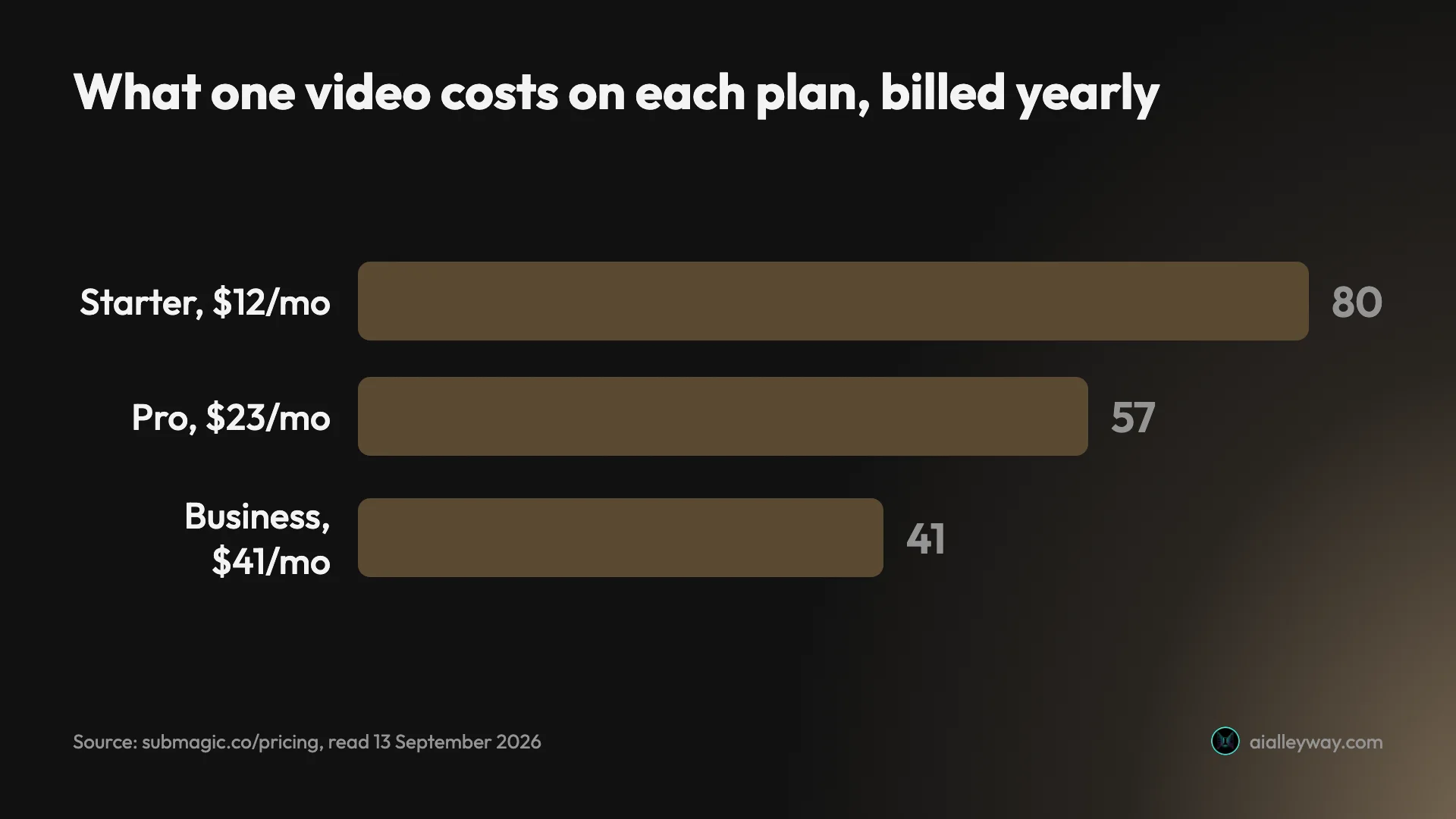
Starter is 80 cents a video, Pro 57 cents, Business 41 cents. Billed monthly those become $1.27, 98 cents and 69 cents. So the per-video price nearly halves between the cheapest plan and the dearest, which makes Submagic unusual — plenty of tools in this category price perfectly linearly, where buying more changes nothing about your rate.
The one exception to three credits per video
Magic Clips, the feature that turns a long video into short ones, costs a flat eight credits per job no matter how long the source is. I put a 35-minute video and a 46-minute video through it and both quoted exactly eight.
That makes it the best-value thing on the price list if your sources are long. Eight credits is $2.13 a job on Starter’s annual rate, $1.53 on Pro and $1.09 on Business, whether you feed it twenty minutes or three hours.
What each plan actually includes
The feature list matters more than the credit count here, because two of the three tiers exist to open up capabilities rather than volume.
| What each tier adds | |
|---|---|
| Starter buys | captions, trimming, 1080p, no watermark |
| Pro adds | the AI editing — auto-zoom, silence and bad-take removal, clean audio, Brand Kit |
| Business adds | 4K/60fps, brand assets, custom dictionary, priority rendering, multi-account publishing |
Starter, $12 a year or $19 a month
Forty-five credits, fifteen videos, and a two-minute ceiling on any video you edit.
What you get: no watermark, AI auto-captions, free b-rolls and audio, text-based trimming, and export at 1080p and 30fps. Ten minutes a month of API access.
The headline here is the watermark. Most tools in this category make watermark removal the thing the first paid tier sells you; Submagic includes it at the bottom. So $12 a month buys genuinely publishable files, provided everything you touch is under two minutes.
Pro, $23 a year or $39 a month
One hundred and twenty credits, forty videos, and a five-minute ceiling.
Everything in Starter, plus Storyblocks b-rolls and audio, AI auto-zooms, AI removal of bad takes and silences, AI clean audio, publishing and analytics for social, and a Brand Kit.
This is the tier where the AI editing actually arrives. Starter captions and trims; Pro removes your silences, cleans your audio and zooms for you. If the pitch that drew you to Submagic was “it edits the clip for me”, Pro is the entry price, not $12.
Business, $41 a year or $69 a month
Three hundred credits, a hundred videos, and a thirty-minute ceiling.
Everything in Pro, plus export at 4K and 60fps, ten custom templates, logos and brand assets, a custom words dictionary, priority support and rendering, 100 minutes a month of API, and publishing from multiple social accounts.
Two things push people here rather than pull them. The 30-minute editor cap, if you work with anything longer than a short. And 4K export, which is the only place it exists.
The Custom plan
Quote-only, with no figure published. The page lists what is negotiable: videos per month, minutes per video, number of members, Magic Clips limits, custom templates, API limits, dedicated customer success, advanced security and SSO. That last pair is the tell — this is the enterprise procurement tier rather than a volume discount.
Is the 41% annual discount real?
Unusually, yes. This kind of headline rarely survives arithmetic, and this one does.
The page advertises “save up to 41%”, and the up to is load-bearing without being misleading:
| Plan | Monthly | Yearly | Actual discount | Badge on the page |
|---|---|---|---|---|
| Starter | $19 | $12 | 36.8% | save $84 |
| Pro | $39 | $23 | 41.0% | save $192 |
| Business | $69 | $41 | 40.6% | save $336 |
Pro lands on exactly the advertised figure. Business is a rounding error below it. Starter, the cheapest plan, gets the smallest discount at under 37%.
Every savings badge reconciles precisely to twelve times the monthly difference: $19 − $12 = $7, times twelve, is $84. The same holds at $192 and $336. Nothing on this page is inflated, which is worth noting because the comparable claim on a rival’s page — OpusClip’s “save up to 60%” — turned out to be a flat 40% at every pack count when I stepped through it.
The practical read: annual billing is worth taking at every tier, and it is worth most at Pro.
The add-on that does not exist
Here is the error to know about before you budget.
Google’s AI Overview currently states that Magic Clips is an add-on costing $19 per member per month, or $12 billed annually. At least one tool directory carries the same figure, which is presumably where it came from.
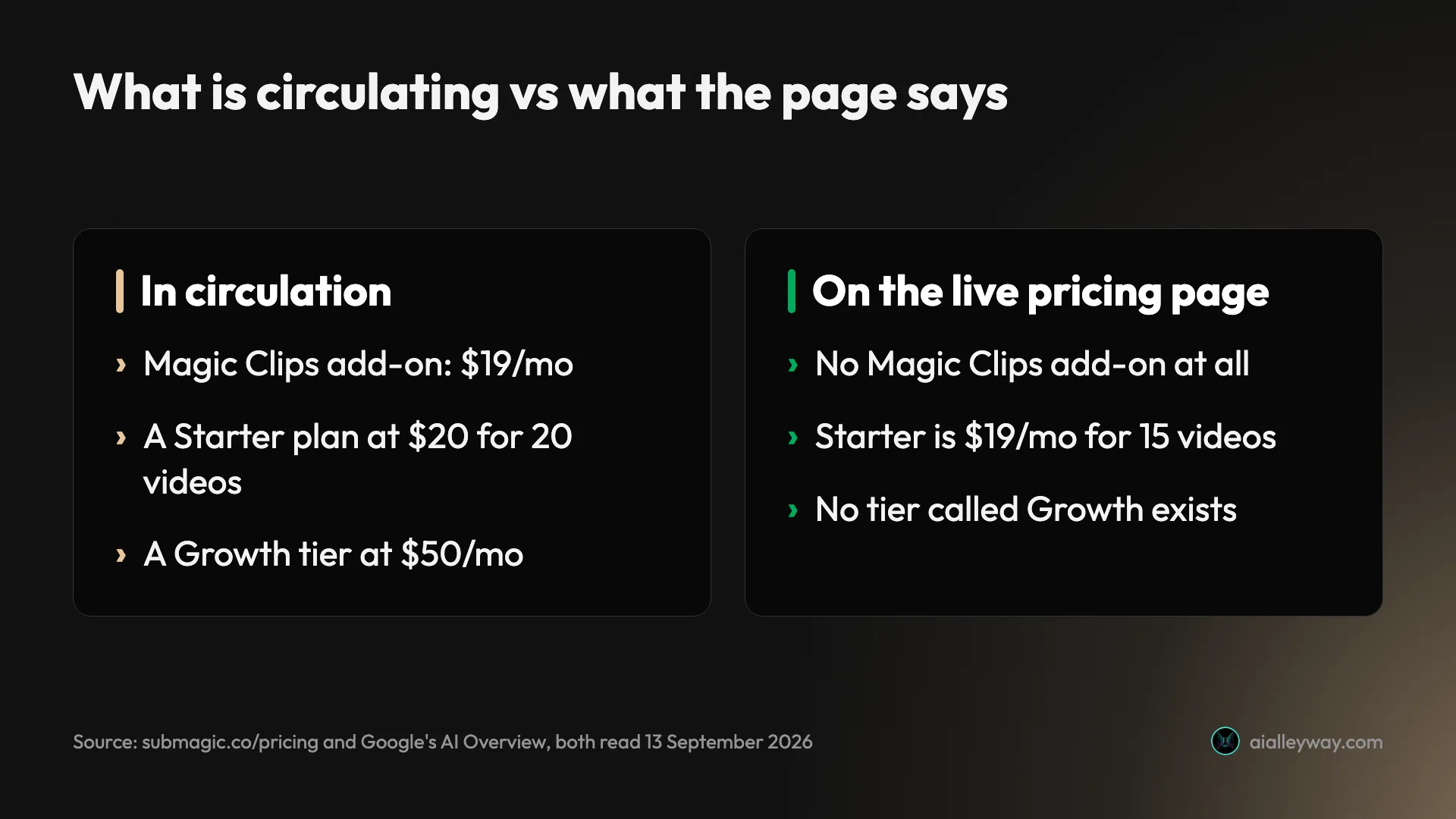
There is no Magic Clips add-on. It does not appear on the pricing page, which lists Starter, Pro, Business and Custom and nothing else. It did not appear as an upsell when I used the feature on a trial account. Magic Clips draws from the same credit balance as everything else.
If you budgeted $23 for Pro plus $19 for Magic Clips, you have budgeted 83% more than the plan costs.
A second circulating error worth checking against: one widely-cited write-up describes a $20 Starter plan with 20 videos and a Growth plan at $50 a month. Neither exists. Submagic’s Starter is $19 for 15 videos and there is no tier called Growth.
What the plan caps actually limit
The three duration caps — 2 minutes on Starter, 5 on Pro, 30 on Business — are the most misread thing on the page, and I misread them myself before checking.
They govern the editor and the captions workflow. They do not govern Magic Clips, whose own upload dialog states up to 180 minutes and 10GB. I read that dialog on the trial and a 35-minute file went through; I did not confirm the figure on a paid plan.
So the practical position is this:
| What you want to do | Starter, $12 | Pro, $23 | Business, $41 |
|---|---|---|---|
| Clip a 60-minute podcast | Yes | Yes | Yes |
| Caption a 12-minute talking head | No | No | Yes |
| Caption a 90-second clip | Yes | Yes | Yes |
A 60-minute podcast can be clipped on the $12 plan. A 12-minute video cannot be captioned below the $41 one, which is a strange place for the wall to sit. Nothing on the pricing page explains the distinction, and it is the single most likely reason to buy the wrong tier.
What it really costs to use
Three worked cases, all on annual billing.
A weekly podcast, one 60-minute episode. Four Magic Clips jobs a month at eight credits each is 32 credits. Starter’s 45 covers it with room for four short videos on top. $12 a month, and the clip count does not matter because Magic Clips is billed per job.
A daily short, 30 a month. Thirty videos at three credits is 90 credits, which clears Starter’s 45 and needs Pro’s 120. $23 a month, about 57 cents a video.
An agency running five clients’ back catalogues. Twenty Magic Clips jobs at eight credits is 160, plus sixty finished shorts at three credits is 180. That is 340 credits against Business’s 300, so either trim or talk to sales. $41 a month per member before the overage.
The pattern is that long-form work is cheap here and volume short-form work is not. Flip your usage from clipping podcasts to finishing individual clips and your costs rise sharply, because the flat eight-credit job becomes a three-credit-per-video meter.
What to watch before you buy
| Before you buy | |
|---|---|
| A job that fails | still spends its credits, never refunded |
| The trial | 15 credits, cannot export a file |
| Smallest API pack | 250 min at $57 — 500 costs only $18 more |
| Every price | per member, not per account |
A failed job still costs you
This is the finding I would want to know first, and it comes from using the product rather than reading the page. A Magic Clips run of mine returned zero clips, displayed no error message anywhere, and still took 8 of the trial’s 15 credits. They were never refunded.
Because a retry quotes eight and seven remained, that single failure ended the trial’s ability to try again. Budget for the attempts, not just the successes. The full review has the detail.
The trial cannot export anything
Fifteen credits will show you the interface, the caption styles and the finished preview. The export button opens a paywall. So you can evaluate whether you like using Submagic, and not whether its output is good enough to publish, which is the question that actually decides a subscription.
The 250-minute API pack is poor value
API minutes are sold as monthly packs on top of a plan: 250 at $57, 500 at $75, 1,000 at $150, 2,000 at $300, 5,000 at $500, 10,000 at $1,000.
That is 23 cents a minute for the smallest pack against 15 cents for the next three and 10 cents for the two largest. Doubling from 250 to 500 minutes costs $18 more, so there is almost no usage level at which the 250-minute pack is the right buy. Each plan also bundles a token allowance: 10 minutes a month on Starter and Pro, 100 on Business.
Prices are per member, not per account
Every figure on the page is per member per month. A three-person team on Pro is $69 a month yearly, not $23. The Business plan’s team features — brand assets, multiple social accounts, a custom dictionary — are what you are paying the per-seat price for.
How Submagic’s price compares
Price comparisons in this category are usually apples to oranges, because the tools meter differently. Submagic charges per job and per video; its closest rival charges per minute of source. That makes one of them much cheaper depending entirely on the length of what you feed it.
Here is the same work costed both ways, using annual rates:
| The job | Submagic | OpusClip |
|---|---|---|
| Clip one 46-minute podcast | 8 credits, $1.53 on Pro | 46 credits, $2.67 on Pro yearly |
| Clip one 5-minute talk | 8 credits, $1.53 on Pro | 5 credits, $0.29 on Pro yearly |
| Finish 40 short videos | 120 credits, $23 on Pro | not what it is for |
On long footage Submagic is the cheaper tool and it is not close. On short footage it is roughly five times dearer for the same job, because the flat fee does not shrink.
The second axis is what the money opens up rather than what it processes. OpusClip’s cheapest plan is $15 a month and sold monthly only, with no annual option at all, which makes it the most expensive minute on OpusClip’s own price list at 10 cents against Pro yearly’s 5.8. Submagic’s $12 Starter is the cheaper entry point and includes watermark-free export, which OpusClip also gates at its first paid tier.
Where OpusClip wins outright is the editor. It exports XML to Premiere Pro and DaVinci Resolve; Submagic has no equivalent, so a clip leaves Submagic finished or not at all. If your clips go through an editor afterwards, that single feature may decide it regardless of the per-job arithmetic.
What the trial actually buys
Worth its own section, because “no credit card required” reads as generous and the reality is narrower.
The trial carries 15 credits. Spent at three credits a video that is five videos; spent on Magic Clips at eight credits a job it is one long-video run with seven credits left over. Mine went on one failed clipping job and one captions job, which is 11 credits for a single usable preview.
And that is the word that matters: preview. The trial cannot export. You can upload a video, watch it process, pick from roughly three dozen caption styles, open the export panel, choose a resolution up to 4K, and then hit a paywall. Dismissing that paywall produces a second offer, a referral scheme promising free videos if people you invite subscribe.
It is also the only tool in this category without a free plan of any kind, which free AI clip generator sets against the three that renew one.
So the honest framing is that Submagic’s trial evaluates the interface rather than the product. Whether the captions are accurate enough, whether the clip boundaries land, whether the finished file looks good on a phone — none of those questions can be answered without paying for a month. Budget $19 for a monthly Starter as the real cost of finding out, or $12 if you are willing to commit to a year on a tool you have not seen the output of.
Which plan should you pick?
- You clip long videos and little else → Starter, $12. Magic Clips is flat-rated, so the cheapest plan does the expensive job. Its 2-minute editor cap will not bite if you are not editing.
- You publish short-form daily → Pro, $23. Thirty videos a month needs more than Starter’s 45 credits, and Pro’s per-video rate is 28% lower.
- You caption videos longer than five minutes → Business, $41. Nothing below it will accept the file, and this is the one case where the jump is forced rather than chosen.
- You are a team → Business, for the brand kit and multiple publishing profiles, and remember it is priced per seat.
- You want to test before paying → you cannot, really. The trial will not export. Budget for one month of Starter as the true evaluation cost.
If the credits do not add up
If the arithmetic above has convinced you the meter is wrong for your work, the comparison worth making is against the other billing models rather than against other feature lists. There are three of them in this category, and which one suits you is decided by the length of your source video rather than by any feature list.
The short version: OpusClip bills per minute of source, which is dearer on long podcasts and cheaper on short clips, and our OpusClip pricing guide has that maths. Vizard uses the same per-minute meter at roughly half OpusClip’s rate and has a free tier that renews monthly. CapCut meters clipping at 60 free source minutes a month and does find the moments, though it returns a handful of three-minute chapters rather than a pile of short candidates.
The final word
Submagic’s pricing is more honest than most in this category. The annual discount does what the headline claims at the top tier, the savings badges reconcile to the penny, and watermark-free export is included on the cheapest plan rather than dangled above it.
Two things stop it being straightforward. The duration caps govern a different feature than most buyers assume, so it is genuinely easy to buy a plan that will not do the job you bought it for. And a job that fails still spends its credits, which is not disclosed anywhere on the page.
The pattern across the whole price list is worth holding onto. Submagic is cheap where the work is long and expensive where the work is small, because one feature is flat-rated and everything else is metered per video. Most people arrive at this page trying to pick a tier, when the question that actually decides the bill is which of its two jobs they are buying.
One boundary worth stating: this is a pricing guide and it makes no claim about output quality. I never exported a file, because the trial does not allow it and I did not buy a plan. For how Submagic’s results compare with the three tools that got the same source, see the best AI clipping tool. For what the tool actually produces, the review puts a 35-minute video through it and counts what came back.
Frequently asked questions
How much does Submagic cost?
Three plans, all billed per member. Starter is $19 a month, or $12 if you pay yearly, for 45 credits. Pro is $39, or $23 yearly, for 120 credits. Business is $69, or $41 yearly, for 300 credits. A Custom plan exists on request with no published figure.
Credits convert to videos at a flat three credits each at every tier, which is why the pricing page describes those allowances as 15, 40 and 100 videos a month. There is no free plan. What you get instead is a trial carrying 15 credits and no card requirement, and it cannot export a file, so it will show you what the tool produces without letting you keep any of it. Read the prices yourself before buying: this page was read live on 13 September 2026 and the figures in circulation elsewhere disagree with it.
Is the Submagic annual discount really 41%?
Yes at the top of the range, which is worth saying because this kind of headline usually does not survive checking. The pricing page advertises save up to 41% and the Pro plan lands on exactly 41.0%, dropping from $39 to $23 a month.
The other tiers get less. Business falls from $69 to $41, which is 40.6%. Starter falls from $19 to $12, which is 36.8%, so the cheapest plan gets the smallest discount and the up to is doing real work in that sentence. It is not misleading, though, and the savings badges on the page reconcile exactly: $84, $192 and $336 a year are precisely twelve times the monthly difference in each case. Annual billing is the better deal at every tier; it is simply best at Pro. Worth checking, because the comparable claim next door does not hold up: OpusClip advertises save up to 60% and the real figure is a flat 40% at every pack count I could test.
How much does a two-minute video cost on Submagic?
Three credits, the same as a video of any other length within your plan's cap, because Submagic meters per video rather than per minute. What that costs in money depends only on your tier.
On Starter billed yearly, 45 credits cost $12, so three credits is about 80 cents. On Pro it is roughly 57 cents, and on Business about 41 cents. Billed monthly those become $1.27, 98 cents and 69 cents. Note that the per-video price falls as you move up, which is unusual in this category and worth knowing if you are choosing between tiers on volume. Two minutes is also the Starter plan's hard ceiling: a video longer than that cannot be edited or captioned on the cheapest plan at all. One feature ignores the three-credit rate entirely. Magic Clips, which cuts a long video into short ones, costs a flat eight credits per job whatever the source length, and it accepts up to 180 minutes on any plan including the trial.
Does Submagic charge extra for Magic Clips?
No, and this is the most common error about Submagic's pricing. Google's own AI Overview currently describes a Magic Clips add-on at $19 per member per month, or $12 billed annually, and at least one directory repeats the figure.
There is no such add-on on the pricing page, and there was no upsell when I used the feature. Magic Clips is metered from the same credit balance as everything else, at a flat eight credits per job regardless of how long the source video is. I verified that on a 35-minute video and a 46-minute one; both quoted eight. At Starter's annual rate that is about $2.13 a job, at Pro $1.53, at Business $1.09. If you are budgeting from the figure in circulation you are budgeting for a product that does not exist.
Does Submagic have a free plan?
No. The pricing page lists Starter, Pro, Business and a Custom plan, with no free column, and the page header states no credit card required, which refers to the trial rather than to a free tier.
The trial grants 15 credits. That stretches to five videos at three credits each, or one long-video clipping job at eight credits plus two videos. The significant limitation is not the size of the allowance but what you can do with the output: the trial cannot export. You can upload, process, choose from roughly three dozen caption styles and watch the result in the editor, and the export button opens a paywall. Dismissing that paywall produces a second offer, a referral scheme rather than a discount. So the trial answers whether you like the interface and not whether the finished file is good enough to publish, which is the question that decides a subscription. Budget one month of Starter as the real cost of finding out.
What do Submagic's API credits cost?
They are bought as monthly packs on top of a plan rather than instead of one, and the per-minute rate improves in two steps rather than smoothly. The packs run 250 minutes at $57, 500 at $75, 1,000 at $150, 2,000 at $300, 5,000 at $500 and 10,000 at $1,000.
That works out at 23 cents a minute for the smallest pack, then 15 cents for the 500, 1,000 and 2,000 packs alike, then 10 cents for the two largest. The 250-minute pack is the one to avoid: doubling it to 500 minutes costs only $18 more, so the small pack is poor value at almost any usage level. Each plan also bundles a token allowance, 10 minutes a month on Starter and Pro and 100 on Business, which is enough to test an integration rather than run one.
Keep reading
The best AI video clipping tool, measured on one file
Four AI video clipping tools, one identical 35-minute file. OpusClip found 32 clips, Submagic 31, Vizard 30 but delivered 10, CapCut 8. What that means.
Free AI clip generator: only one export came back clean
Four AI clip generators, one 35-minute file, two of them on genuine free plans. Only CapCut returned a file with no watermark. Here is what the rest hand back.
Submagic review: 31 clips, and it charged me for a failure
Submagic review: 31 clips from one 35-minute video, a score that never drops below 90, and 8 trial credits spent on a job that returned nothing.
OpusClip review: 32 clips from one video, 5 worth posting
OpusClip review from a measured run: one 35-minute video in, 32 clips out, and a virality score that never went below 80 on a scale of 100.