
OpusClip pricing: the annual discount is 40%, not 60%
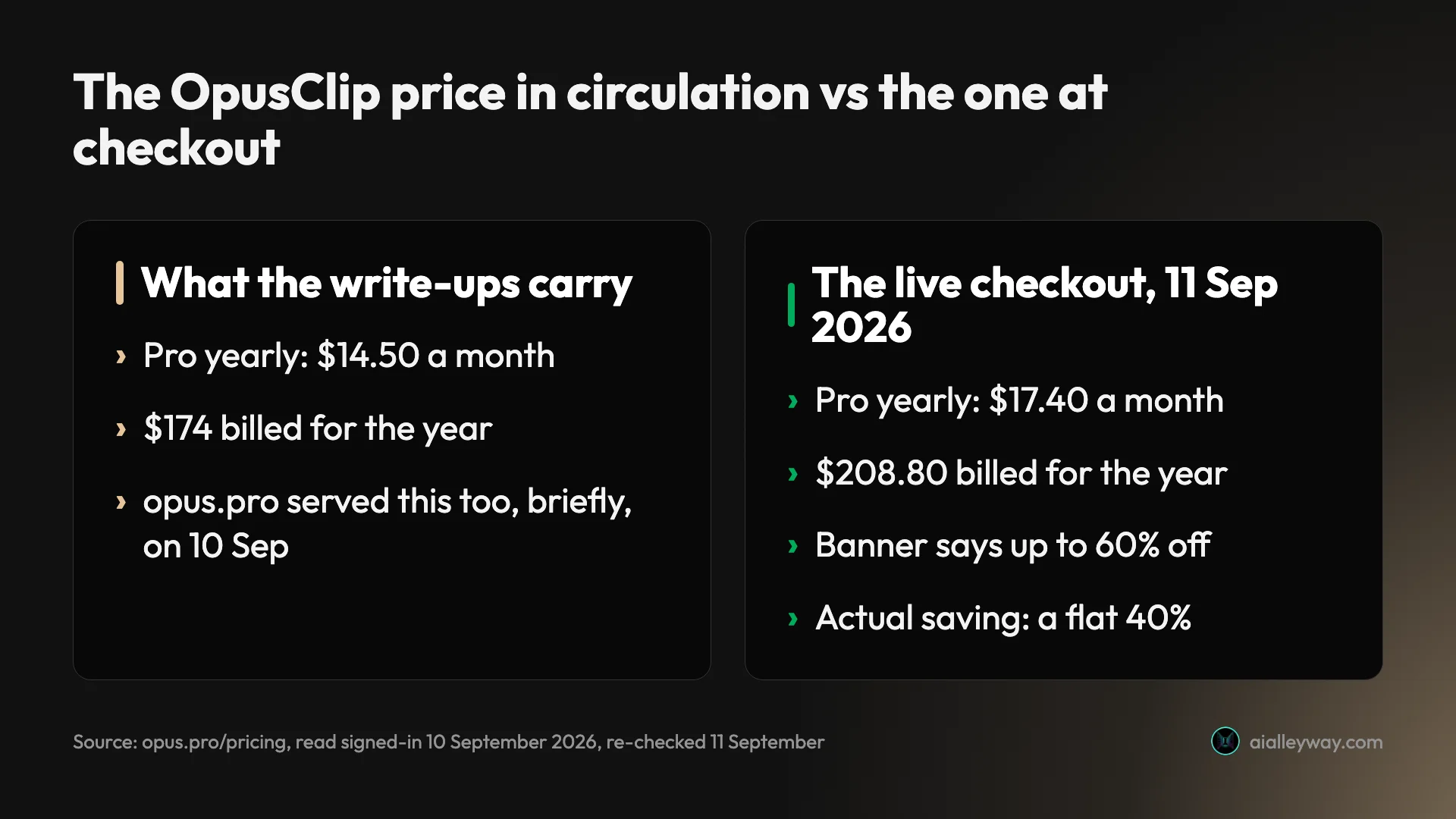
OpusClip pricing read live from a signed-in account: Pro is $208.80 a year, not the $174 everyone quotes, and the annual discount is 40%, not 60%.
Contents
How much does OpusClip cost?
OpusClip, written “Opus Clip” about as often, is an AI tool that takes a long video — a podcast, an interview, a webinar — and cuts it into vertical short clips for TikTok, Reels and Shorts. It bills for that by the minute of video you put in.
Starter is $15 a month for 150 credits and is sold monthly only. Pro is $29 a month for 300 credits, or $17.40 a month billed yearly — $208.80 for the year, with all 3,600 credits granted upfront. Business is quote-only.
One credit buys one minute of the video you feed in. So the number that actually decides your bill is not the sticker price, it is what a minute of source footage costs you — the same trap that makes Pictory’s per-video credits hard to forecast.
| Plan | Price | Credits | Cost per source minute |
|---|---|---|---|
| Starter | $15 a month, monthly only | 150 a month | $0.100 |
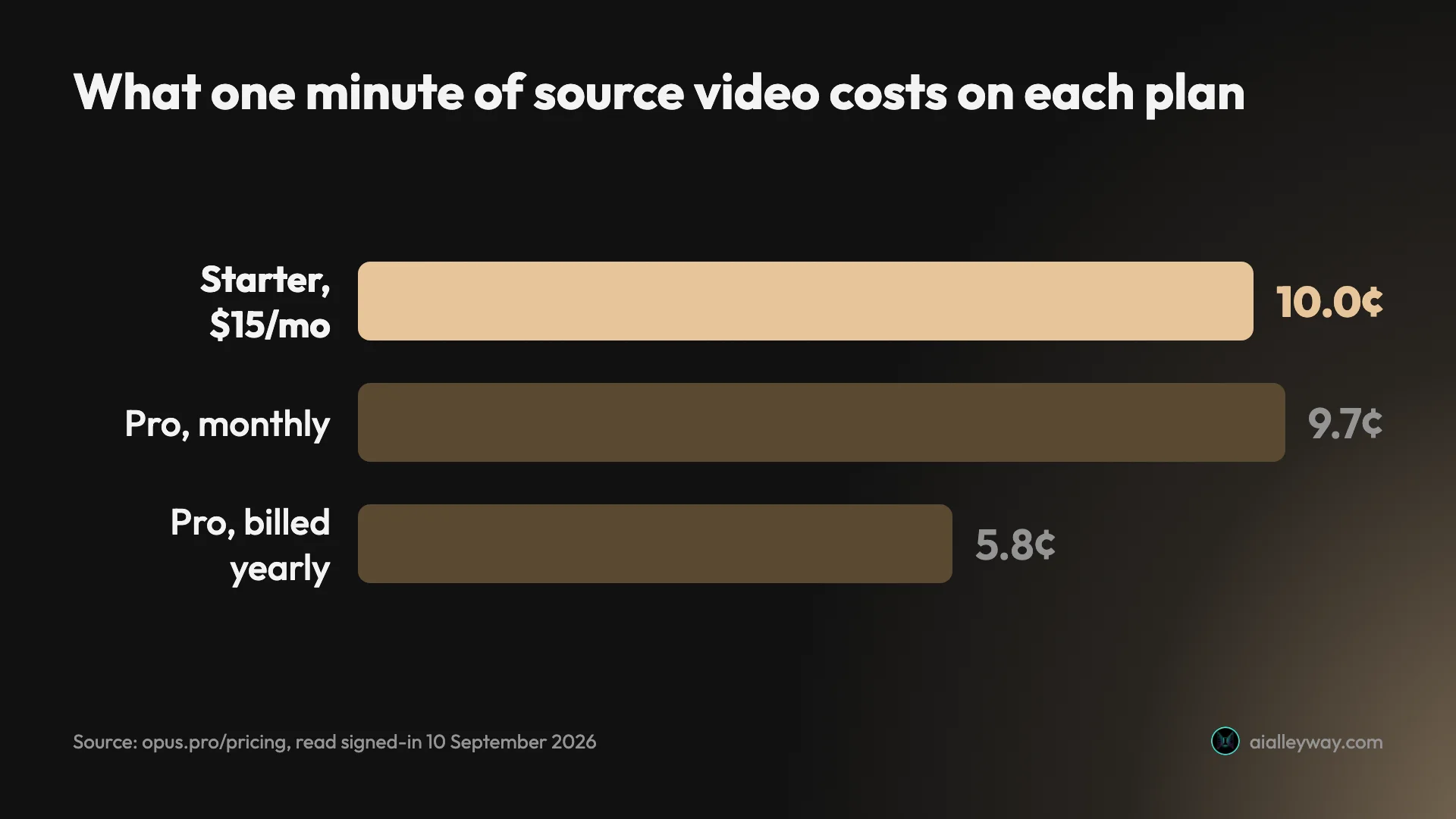
| Pro, monthly | $29 a month per pack | 300 a month | $0.097 |
| Pro, yearly | $17.40 a month per pack | 3,600 a year | $0.058 |
| Business | By quote | Custom | Not published |
Read live from a signed-in account on opus.pro/pricing, 10 September 2026.
That table contains the whole argument. Starter, the entry plan, is the most expensive minute you can buy — a dollar per ten minutes against Pro yearly’s 58 cents, or 72% more per minute at $0.100 against $0.058. Paying less per month costs you more per video.
What is an OpusClip credit?

Every pricing question about this product collapses into one sentence from its own documentation: processing costs 1 credit per minute of the original video imported.
Not per clip. Not per minute of finished output. Per minute of what you upload. A 30-minute podcast costs 30 credits whether the run returns twelve clips you would post or none you would.
That is the structural fact worth sitting with, because it moves all the risk onto you. The tool bills for the attempt. If the clips come back unusable and you upload a re-cut, you pay full freight again on the same footage.
Rounding runs both ways, and OpusClip is unusually specific about it. Anything under a minute rounds up to a full credit. Anything with a partial minute rounds down to the whole minute — their own worked example is a 4.5-minute video billing as 4.
I watched that hold. Pasting in a link to a video of 38 minutes 49 seconds, the setup screen quoted 38 credits, not 39, before I committed to anything. Credit where it is due: it prices the job in front of you rather than after.
There is a second meter most write-ups skip. Publishing a clip to X costs one additional credit per post, refunded automatically if the post fails or you delete a scheduled one. Schedule a week of daily clips and that is seven more minutes of source you have paid for and not used.
The documentation also publishes what each plan grants, and it is the cleanest statement of the ladder anywhere on the site:
| Plan | Credits granted |
|---|---|
| Max | 1,500 a month per pack, sold only through Agent Opus |
| Pro | 300 a month per pack |
| Starter | 150 a month |
| Enterprise | Custom |
It also sets out how long credits survive, and the two billing cycles behave very differently. Monthly credits expire after 60 days, which means they roll over exactly one month and then vanish. Yearly credits are granted in full on day one and stay valid for 12 months.
That second point is under-sold. A yearly Pro pack puts 3,600 credits in the account immediately, so a heavy editing month in January does not leave you rationing in February. The same money on monthly billing would have expired most of it before you got there.
Does OpusClip get cheaper if you buy more credits?
Pro is not one price. It is a pack multiplier, and stepping it is where the plan’s real shape shows up.
| Packs | Monthly | Credits a month | Yearly | Billed annually | Credits a year |
|---|---|---|---|---|---|
| 1 | $29 | 300 | $17.40 a month | $208.80 | 3,600 |
| 5 | $145 | 1,500 | $87 a month | $1,044 | 18,000 |
| 15 | Not offered | n/a | $261 a month | $3,132 | 54,000 |
Two things fall out of that, and neither is on the marketing copy.
Buying more never earns a discount. Fifteen packs on yearly is $261 a month. One pack is $17.40. That is exactly fifteen times the price for exactly fifteen times the credits, and the same holds on monthly, where $145 for five packs is exactly five times $29. The per-credit rate is frozen across the entire ladder: $0.058 yearly, $0.097 monthly, from the smallest purchase to the largest.
That is genuinely unusual. Most metered creative tools taper — the more you buy, the less each unit costs. OpusClip does not taper at all, which means there is no volume argument for committing to a bigger pack than you need this month.
Monthly stops at five packs; yearly runs to fifteen. If you want more than 1,500 credits in a month, the monthly cycle cannot sell them to you. You have to commit to a year. Above 15 packs the page switches to “contact us for more credits.”
Is the 60% annual discount real?
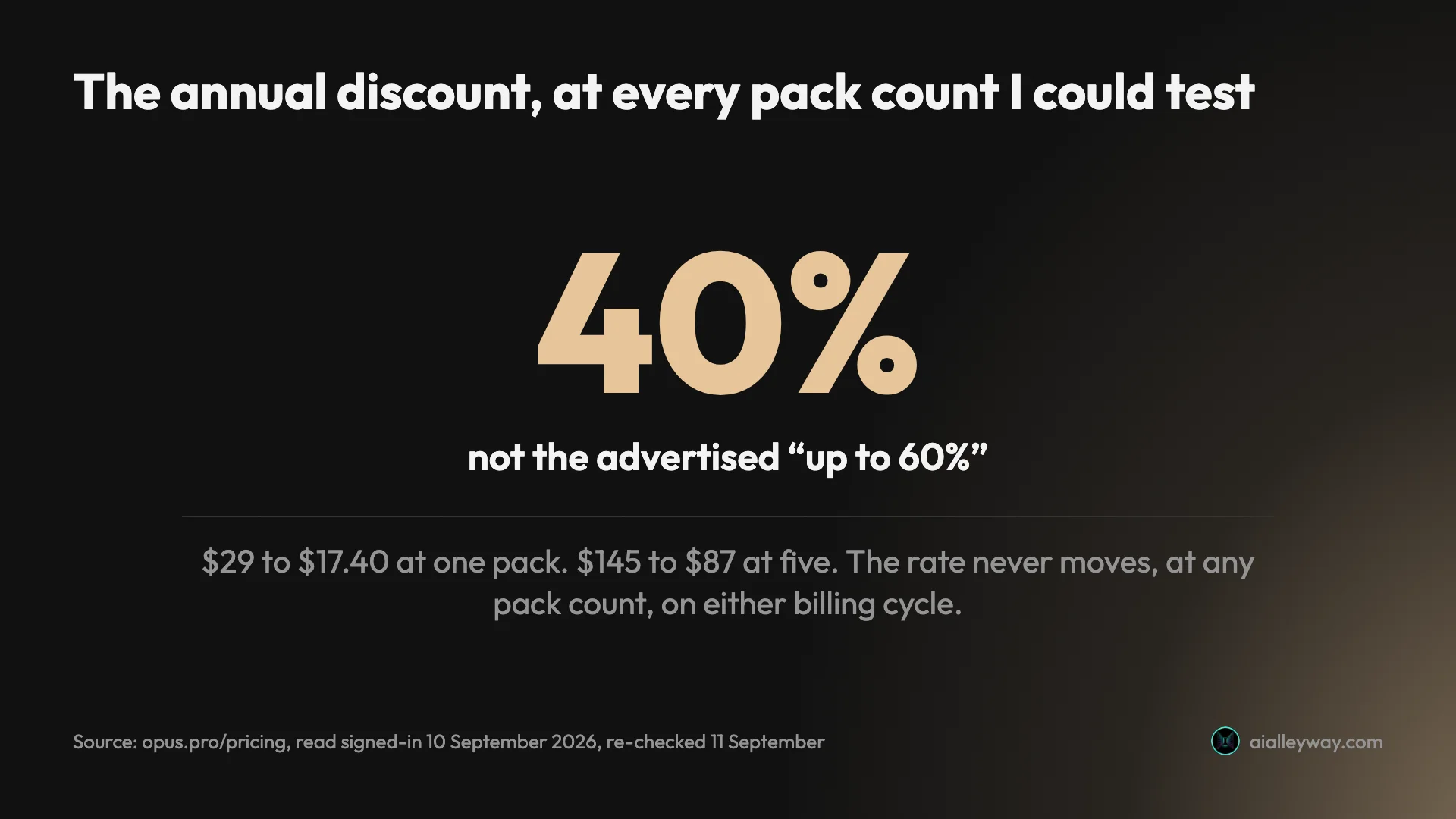
The pricing page header says “Save up to 60% with annual billing.” I could not reproduce 60% anywhere.
| Packs | Monthly | Yearly equivalent | Actual saving |
|---|---|---|---|
| 1 | $29 | $17.40 | 40% |
| 5 | $145 | $87 | 40% |
| 15 | $435, notional | $261 | 40% |
Every pair is exactly 40% off, and because the ladder is linear the rate cannot move — 17.40 against 29, 87 against 145, and 261 against 435 all reduce to the same fraction. One caveat on that last row: monthly billing caps at five packs, so $435 is 15 times $29 rather than a price you can actually buy. The arithmetic holds; the checkout does not offer it.
The discount is real and worth taking. It is simply not the discount the headline promises, and the gap is the sort that quietly breaks a budget: plan a $3,132 annual commitment on a 60% expectation and you are short by a wide margin.
There is one honest caveat. “Up to” is doing work in that sentence, and it is possible some pairing I did not find reaches 60% — a promotional rate, a currency, a plan not shown to my account. What I can say is that on 10 September 2026, signed in, stepping the pack selector through 1, 2, 5 and 15 on both cycles, the number was 40% every single time, and that the 1-pack figures still read the same on 11 September.
One caveat I owe you. On the afternoon of 10 September this same page briefly showed $14.50 a month, $174 a year and a 50%-off banner at every pack count, before returning to the figures above. Three of my four readings give $208.80 and 40%. The fourth is why this guide keeps telling you to look yourself.
Is there an OpusClip free plan?
Yes. Free forever, $0, 60 credits a month — sixty minutes of source video, renewed monthly. The widely-quoted figure turns out to be right.
It is worth reading what those sixty minutes do and do not buy, because the free plan withholds the one thing OpusClip is sold on.
| On the free plan | |
|---|---|
| Credits | 60 a month |
| Render quality | Up to 1080p |
| Auto reframe | Yes |
| AI captions, emoji and keyword highlighting | Yes |
| Brand templates | 1 |
| Aspect ratios | 9:16 only |
| Virality score | No |
| Editing | No |
| Watermark | Burned in |
| Exports | 3-day limit, then the clips stop being exportable |
The free plan does not include the virality score. That is the headline feature, the thing the marketing leads with and the thing every review argues about. Free users get the clipping and the captions and no ranking at all — which, given the score never dropped below 80 across 32 clips in our OpusClip review, may be the least costly omission on the list.
The 3-day export window is the sharper constraint. The compare-all-plans table puts free media storage at three days, so a free month is 60 minutes of source that you must turn into finished posts within 72 hours of processing or lose the output.
The sources still disagree, so check your own account
The 60 is confirmed, but the picture around it is not tidy:
| Source | What it says the free tier is |
|---|---|
| opus.pro/pricing, read 11 Sep 2026 | Free forever, 60 credits a month |
| Independent write-ups and Google’s AI Overview | “Free forever”, 150 processing minutes a month |
| What a new signup actually gets | A 90-credit Pro trial, 6 days left when I looked |
| Agent Opus, the sibling product | Also $0, “always free”, 60 credits a month |
The write-ups and the pricing page still give different allowances for the same free tier — 150 processing minutes against 60 credits — and nothing reconciles them. The processing-minutes framing appears nowhere on OpusClip’s own pricing page. Agent Opus listing the identical 60 is presumably why the two products get confused in write-ups.
My own signup landed on the third of those, not the free plan. The dashboard read Free Trial (Pro Plan), 90 credits, expires in 6 days, which is the trial rather than the free-forever plan. So a new account does not start on the free plan; it starts on a trial, and what happens when that lapses is the part you will have to watch in your own billing screen.
One note on how this page behaves. On 10 September the pricing page showed no free plan to me at all; on 11 September it showed the Free column above. Whether it was added, restored, or served differently, the practical lesson is the same as the one the discount section reaches: read opus.pro/pricing on the day you buy, not an article about it, this one included.
What the trial will not stretch to is worth knowing before you plan around it. Ninety credits is ninety minutes of source. Two 45-minute interviews and it is gone, with nothing left to re-run either of them if the clips come back wrong. For a product whose main risk is paying twice for the same footage, that is a thin margin to evaluate on.
What does each OpusClip plan include?
Price is half the decision. Here is what the money buys, read off the plan cards on the same visit.
| What separates the plans | Starter | Pro | Business |
|---|---|---|---|
| Watermark removal | Yes | Yes | Yes |
| Brand templates | 1 | 2 | Custom |
| Team seats | None | 2 | Custom |
| AI B-Roll | No | Yes | Yes |
| Premiere Pro / DaVinci export | No | Yes | Yes |
| Aspect ratios beyond 9:16 | No | Yes | Yes |
| Social scheduler | No | Yes | Yes |
| API | No | Limited | Full, plus integrations |
Starter, $15. 150 credits a month. AI clipping with Virality Score, AI animated captions in 20+ languages, auto-posting to YouTube Shorts, TikTok and IG Reels or download, the editor, 1 brand template, filler and silence removal, and watermark removal.
That last one matters more than it reads. Watermark removal is the line between clips you can publish and clips you can only evaluate, and it is the cheapest place to buy it.
Pro, $29 or $17.40 yearly. Everything in Starter, plus 300 credits a pack, a team workspace with 2 seats, 2 brand templates, 6 social account connections, and the feature set that separates the plans: AI B-Roll (image, video and stock), input from 10+ sources, export to Adobe Premiere Pro and DaVinci Resolve, multiple aspect ratios (9:16, 1:1, 16:9), a social media scheduler, custom fonts, speech enhancement, limited API access and video dubbing.
If you cut in a real editor, the Premiere and Resolve export is the whole argument. Starter gives you finished verticals; Pro gives you something you can keep working on.
Business, by quote. Everything in Pro, plus priority processing, customised credits, team seats and social connections, tailored brand assets, dedicated storage, full API and custom integrations, an MSA, priority support with a dedicated Slack channel, and enterprise security.
The practical read: Starter is a publishing plan, Pro is a production plan, and Business is a procurement plan. Most people asking what OpusClip costs want Pro and are looking at Starter because it is cheaper on the sticker.
The other door: buying the same credits through Agent Opus
OpusClip’s own documentation contains a line worth chasing. Its plan table lists a Max tier at 1,500 credits a month and notes it is “available only through Agent Opus, but credits can be used on OpusClip.”
So there are two shopfronts selling credits into the same account. They do not charge the same.
| What you get | Through OpusClip | Through Agent Opus | Difference |
|---|---|---|---|
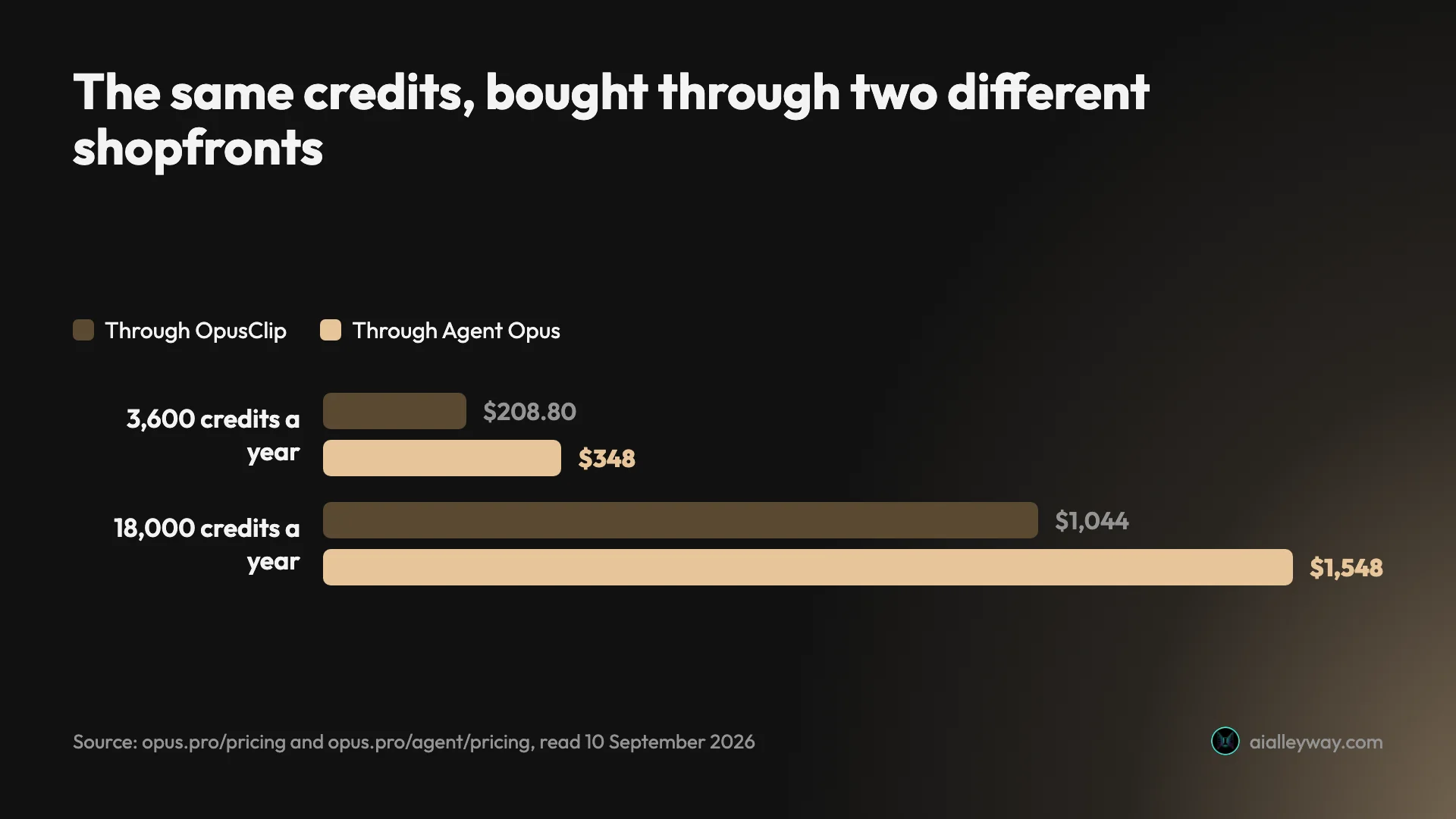
| 3,600 credits a year | $208.80 (Pro, 1 pack, yearly) | $348 (Pro, yearly) | $139.20 more |
| 18,000 credits a year | $1,044 (Pro, 5 packs, yearly) | $1,548 (Max, yearly) | $504 more |
| Free tier | 60 credits a month, “free forever” | 60 credits a month, “always free” | identical |
| Annual discount | 40% | None | — |
Both read live on 10 September 2026, free tiers re-checked 11 September. The same 3,600 credits cost 67% more bought through Agent Opus at $348 against $208.80, and the same 18,000 credits cost 48% more at $1,548 against $1,044.
The reason is that Agent Opus has no annual discount at all. Pro is $29 a month on both cycles; yearly simply bills $348 upfront. Max is $129 a month on both, billed as $1,548. Nothing gets cheaper for committing, where the same commitment on OpusClip takes 40% off.
Agent Opus Max does buy things Pro packs do not — custom avatar slots, voice clone slots, brand brief slots, first place in the processing queue, and a stated 12% saving on credit top-ups. If you need those, the premium is the price of the features rather than of the credits.
But if credits are what you are buying, the documentation’s framing is misleading. Max is not the only route to 1,500 credits a month. Five Pro packs get you there for $504 a year less.
What does a month of clipping actually cost?
Sticker prices are abstract. Source minutes are not. Here is what the plans buy in the only unit that bills.
All rows below use a four-week month, so a daily show counts 28 episodes rather than 30.
| If you publish | Source minutes a month | Cheapest plan that covers it | What you pay |
|---|---|---|---|
| One 45-minute podcast a week | 180 | Pro, 1 pack | $17.40 a month yearly, $29 monthly |
| Two 60-minute interviews a week | 480 | Pro, 2 packs | $34.80 a month yearly, $58 monthly |
| A daily 20-minute show | 560 | Pro, 2 packs | $34.80 a month yearly, $58 monthly |
| One 30-minute video a week | 120 | Starter | $15 a month |
| A 10-minute weekly vlog | 40 | Free forever (60 credits) | $0 |
The weekly-podcast row is the one to look at twice. At 180 source minutes a month, a single Pro pack’s 300 credits covers it with room to spare — and on yearly billing that is $17.40 a month for minutes that cost 5.8 cents each against Starter’s 10, with 3,600 credits banked upfront instead of 150 doled out monthly.
Note the bottom row. At 40 source minutes a month the free plan covers you outright, so long as you can live without the virality score, without editing, with a watermark, and with a three-day window to get the clips out. That squeezes Starter into a narrow band: roughly 60 to 150 source minutes a month, and only if you will not commit to a year. Cross either line and Pro yearly is both cheaper per minute and less restrictive.
And the demo project OpusClip puts on its own dashboard makes the point better than any table. It is a Lex Fridman episode whose final chapter marker sits at 1:50:00, so at least 110 minutes of source. At 1 credit a minute that single video would cost at least 110 credits — more than the entire 90-credit trial the product gives you to evaluate it with.
Five things the pricing page does not tell you
Starter cannot be billed yearly. The page states it plainly once you look: “Starter plan only available in monthly.” That is why it is the most expensive per minute on the whole price list — it is structurally locked out of the 40% discount that every other paid tier can take.
Team allowances stop growing after two packs. One pack gives 2 seats, 2 brand templates and 6 social connections. Two packs doubles all three to 4, 4 and 12. Five packs gives 4, 4 and 12. Fifteen packs gives 4, 4 and 12. Everything above the second pack is credits and nothing else, so a fifteen-pack customer paying $3,132 a year still has four seats.
Monthly credits expire in 60 days. They roll over exactly one month and then die. Yearly credits land upfront and stay valid for 12, which is a materially different product: a heavy month early in the year does not strand you.
Posting to X is metered. One credit per clip published, on top of what the source cost. It is refunded if a post fails or a scheduled one is deleted, but a daily posting habit is a running line item nobody budgets for.
Uploading is the billable event, not succeeding. Nothing in the pricing reflects output. Whether a 40-minute upload returns clips you would post or clips you would not, the 40 credits are spent. That is where the real cost sits, and it is a design decision rather than a rate.
Which OpusClip plan should you pick?
Between ~60 and ~150 source minutes a month and unwilling to commit to a year → Starter, $15. Under 60 minutes the free plan covers you for nothing, if you can live with its limits. It is the worst rate per minute on the page, and at that volume the difference is small enough not to matter.
Anything regular, and you will still be doing this in six months → Pro, billed yearly, $17.40 a month. It costs $2.40 a month more than Starter and buys minutes 42% cheaper, at $0.058 against $0.100. This is the plan the pricing page is quietly built around.
Bursty volume you cannot forecast → Pro, monthly, $29. You pay $0.097 a minute instead of $0.058 for the right to stop, and you can step packs up and down as the workload moves.
More than 1,500 credits in any single month → yearly is your only option. Monthly billing caps at five packs. This is a hard product limit, not a pricing preference.
Skip it entirely if you cannot say how many source minutes you publish a month. Every plan on this page is priced in a unit you have to forecast, and a tool that bills for attempts is the wrong place to find out that your estimate was low.
If the credits add up
Three places to look if the per-minute rate is the problem rather than the product. Submagic and CapCut have since been run on the same file as OpusClip; Captions has not, so treat that one as the shape of the alternative rather than a ranked verdict. Opus Clip alternatives prices each of them against OpusClip and names what the cheaper rate takes away.
| Charges by | Bites when | |
|---|---|---|
| OpusClip | minute of source imported | your sources are long |
| Submagic | flat fee per clipping job | your clips are short |
| CapCut | source minute, 60/mo free | you export more than 512MB |
| Captions | credits | you are on the free tier at all |
Submagic meters per job rather than per source minute, at a flat 8 credits however long the video is. On a two-hour recording that is the cheaper structure by a wide margin. It is not a free re-run though: the credits come off a monthly allowance and a failed job spends them anyway, which our Submagic review measured.
Captions is built around talking-head clips rather than long-video repurposing, so it is the pick if what you actually need is captions, eye contact and polish on footage you have already cut.
CapCut does meter clipping, contrary to an earlier version of this line: 60 minutes of source a month on the free plan, on the same per-source-minute unit OpusClip uses. What it does not do is charge money for it, and its free export is 1080p without a watermark. The limit that bites instead is 512MB of cloud storage, which every export lands in before you can download it.
If the whole job is turning written material into video rather than cutting existing footage, that is a different category with different economics — the best script-to-video tools covers it, and Descript prices per media hour rather than per source minute — on two meters at once, which is harder to forecast, not easier.
What the price does not tell you
One boundary before the verdict, because it changes how much weight to put on everything above.
This is a pricing guide, not a quality verdict. Every figure above came from a signed-in account and OpusClip’s own documentation, so I can tell you exactly what a minute costs and nothing about whether the clips are worth a minute.
If the free plan is the part you are weighing, free AI clip generator covers the watermark and the three-day export window in context.
For that second question there is a measured answer next door. The OpusClip review put one 35-minute video through the tool and counted what came back, which turns the rates on this page into the number that actually matters:
| Measured on one 35-minute run | |
|---|---|
| Credits charged | 35 |
| Clips returned | 32 |
| Cost per clip produced, Pro yearly | about 6 cents |
| Clips judged worth posting | 5 |
| Cost per clip actually used | about 41 cents |
Nothing on this pricing page prices that gap. You are billed for the upload, and the 27 discards cost you nothing in credits and everything in attention.
The aggregate signal is decent rather than glowing: Trustpilot showed 4.0 out of 5 across 486 reviews when I checked on 10 September 2026 — with the caveat that Trustpilot blocks automated access, so that is Google’s rendering of the page rather than the reviews themselves. I have not read them, so I will not characterise what they say.
The final word
OpusClip’s pricing is more legible than most of this category once you convert it into the only unit that bills. One credit, one minute of source, quoted before you spend it — that is a cleaner deal than several competitors offer.
The problems are at the edges. The advertised 60% annual discount is 40% at every pack count I could test. The annual price in wide circulation, $174, is $34.80 below the $208.80 the checkout actually charges, a gap of 20%. The entry plan is the most expensive per minute because it is locked out of annual billing. And the free tier is described three different ways across four sources, two of them OpusClip’s own.
None of that makes it a bad buy. It makes it a product to price from your own dashboard rather than from anyone’s summary. Work out your source minutes a month, put them against $0.058 or $0.097, and the decision makes itself. If the question underneath is which clipper to buy at all, the best AI clipping tool measures four of them on one file.
Frequently asked questions
How much does OpusClip cost?
Starter is $15 a month for 150 credits and is only sold monthly. Pro is $29 a month for 300 credits, or $17.40 a month billed yearly, which the checkout shows as $208.80 for the year and 3,600 credits granted upfront. Business is quote-only.
Those Pro figures matter because the number in wide circulation is wrong. Most write-ups, and Google's own AI Overview, put Pro's annual price at $14.50 a month or $174 a year. Read live it is $17.40 a month and $208.80 a year, on three of my four readings across 10 and 11 September 2026. That is $34.80 more a year than the quoted figure, so budget from the checkout. Business is quote-only and publishes no figure at all, and Starter cannot be billed yearly, which is why it ends up the most expensive plan per minute of video despite the lowest monthly price.
Is OpusClip free?
Yes. The pricing page lists a Free forever plan at $0 with 60 credits a month, which is sixty minutes of source video renewed monthly. It renders up to 1080p, auto-reframes and captions, and allows one brand template and 9:16 only.
What it withholds matters more than what it includes. There is no virality score on the free plan, no editing, a burned-in watermark, and a three-day export window after which the clips can no longer be exported. So a free month is sixty minutes of source that has to become finished posts within 72 hours of processing. Two caveats. Independent write-ups describe the free tier as 150 processing minutes a month rather than 60 credits, a framing that appears nowhere on OpusClip's own pricing page. And a new signup does not start here at all: mine landed on Free Trial (Pro Plan), 90 credits, 6 days left.
What is an OpusClip credit?
One credit is one minute of the original video you import, not one minute of finished clip and not one clip. A 30-minute upload costs 30 credits whether it hands back twelve usable clips or none.
Rounding runs in both directions and the documentation is specific about it. Videos under a minute round up to a full credit; videos with partial minutes round down to the whole minute, so their own example is a 4.5-minute video billing as 4. I watched that hold live: a 38 minute 49 second video was quoted at exactly 38 credits before I submitted it. Posting a clip to X costs one extra credit, refunded automatically if the post fails or you delete a scheduled one. Credits also expire: 60 days on monthly billing, 12 months on yearly, where the whole year's allowance lands upfront.
Is OpusClip's annual discount really 60%?
Not at any pack count I could check. The pricing page header advertises save up to 60% with annual billing, and the actual saving is a flat 40% everywhere I looked.
One Pro pack is $29 monthly against $17.40 yearly. Five packs is $145 monthly against $87 yearly. Fifteen packs is $261 a month on yearly, against a notional $435 monthly rate, since monthly billing caps at five packs and that pair is arithmetic rather than a price you can buy. Every one of those pairs is exactly 40% off, and the rate never moves. I could not reproduce 60% on either billing cycle at any pack count on 10 September 2026. The discount is real and worth taking. It is simply not the discount the headline implies, and budgeting on 60% leaves you short. For contrast, the sibling product Agent Opus offers no annual discount whatsoever, charging $29 and $129 a month on both cycles, so 40% is genuinely the better of the two doors.
Does OpusClip get cheaper if you buy more credits?
No. The pack ladder is perfectly linear on both billing cycles, which makes OpusClip unusual in this category and is worth knowing before you plan a scale-up.
On monthly, one Pro pack is $29 for 300 credits and five packs is $145 for 1,500 credits, which is exactly five times the price for exactly five times the credits. On yearly, one pack is $17.40 a month and fifteen packs is $261 a month, again exactly fifteen times. Buying volume changes nothing about your rate. What it does change, up to a point, is your team allowances, and those stop moving after the second pack. One pack gives 2 seats, 2 brand templates and 6 social connections. Two packs doubles all three. Five packs and fifteen packs both give exactly what two packs gives, so everything above the second pack is credits and nothing else.
Do OpusClip credits expire?
Yes, and the window depends on which cycle you are on. On a monthly plan credits expire after 60 days, so an unused month rolls over into the next one and no further.
On a yearly plan the full year's credits are granted upfront and stay valid for 12 months. That changes what the annual plan is actually buying: it is not only the 40% discount, it is a much longer runway to spend against. A yearly Pro pack lands 3,600 credits in the account on day one, so a heavy editing month early on does not strand you, where the same spend on monthly billing would have expired most of it. Monthly billing also caps at five packs, or 1,500 credits a month, so anyone who needs more than that has to commit to a year regardless.
Keep reading
Opus Clip alternatives: what each one takes away
Every cheaper OpusClip alternative costs you something. I ran four tools on one 35-minute file — Vizard did it for $0.85 against $2.03 — and priced two more.
Free AI clip generator: only one export came back clean
Four AI clip generators, one 35-minute file, two of them on genuine free plans. Only CapCut returned a file with no watermark. Here is what the rest hand back.
The best AI video clipping tool, measured on one file
Four AI video clipping tools, one identical 35-minute file. OpusClip found 32 clips, Submagic 31, Vizard 30 but delivered 10, CapCut 8. What that means.
Descript pricing: two currencies, and one tier that costs more
Descript pricing runs $0 to $65 a month across five plans. Read live today — including the tier that costs more per media hour than the one below it.