
Descript pricing: two currencies, and one tier that costs more
Descript pricing runs $0 to $65 a month across five plans. Read live today — including the tier that costs more per media hour than the one below it.
Contents
How much does Descript cost?
Between nothing and $65 a month, across five plans — and the number that decides your bill is not the one on the card.

Descript meters two separate things. Every plan gives you an allowance of media minutes, which cover the footage you bring into the editor, and a separate allowance of AI credits, which cover the generative features on top. They are listed as two different rows on Descript’s own comparison table, they are allocated per editor, and running out of one does not release any of the other.
Here is the full ladder, read from descript.com/pricing on 18 August 2026:
| Plan | Billed annually | Billed monthly | Media minutes | AI credits |
|---|---|---|---|---|
| Free | $0 | $0 | 60 min (1 hr) / month | 100 one-time |
| Hobbyist | $16/person/mo | $24 | 600 min (10 hrs) / month | 400 / month |
| Creator | $24/person/mo | $35 | 1,800 min (30 hrs) / month | 800 / month |
| Business | $50/person/mo | $65 | 2,400 min (40 hrs) / month | 1,500 / month |
| Enterprise | Custom | Custom | Sized to team | Sized to team |
Three details in that table are easy to skim and expensive to miss.
Free gives 100 AI credits one-time, not monthly. The 60 media minutes renew every month. The credits do not. Once you have spent them, the AI features are gone for good on that plan.
Creator and Business are priced “per person” with seats billed separately. Creator scales to a team of three and Business to five, but each additional editor is billed on top. A three-person Creator team is not $24 a month, it is $24 each.
Both meters scale with seats but pool across the team. Descript’s help documentation is explicit: each Editor seat adds to a shared pool of media minutes and AI credits, and any Editor can draw on it. Viewers and project-level Editors cannot use anything that costs either currency. So a second seat raises the team’s total rather than handing that person a private ration — which is more flexible than the per-person framing on the pricing card suggests.
What changed, and why the guides disagree
If you have read two articles about Descript pricing and got two different answers, the explanation is almost always the date.
Descript moved to the media-minutes-and-AI-credits model in September 2025. Before that, plans were described in transcription hours with the AI features bundled differently. Two of the most widely cited guides on the subject were published that same month — they document the change as it happened, and neither has been meaningfully revised since. One of them still carries “September 2025” in its own URL.
That is a year of drift in a category where the meter is the product. Numbers quoted confidently in those pieces are not wrong so much as historical, and nothing on the page tells a reader which.
The prices in this guide came off Descript’s own pricing page in a rendered browser today. One useful quirk: Descript shows both billing terms at once rather than hiding one behind a toggle, so there is no risk of a reader — or a scraper — capturing only the annual figure and presenting it as the monthly one. That is more transparent than most of this category manages, and it is worth saying so.
The two meters, and how each one fails
Media minutes are consumed by the material you work on. Bring in an hour of footage and you have spent an hour of your allowance, whether you keep thirty seconds of it or all of it. This is the meter that punishes long source material: interviews, multi-camera shoots, unedited webinar recordings.
AI credits are consumed by the generative layer — Studio Sound, Underlord and the rest. This is the meter that punishes heavy polishing of short material.
| Runs out of | Because | |
|---|---|---|
| Documentary / interview editor | Media minutes | Hours of raw footage per finished piece |
| Short-form creator | AI credits | Every clip gets the full AI treatment |
| Remote-panel podcaster | Usually neither | Rooms bills per session, not per participant |
The practical consequence is that the same plan fails in two completely different ways depending on who is holding it. A documentary editor with four hours of raw interview per episode exhausts the minutes while sitting on a pile of unused credits. A short-form creator making five-minute clips and running every one through the AI tools exhausts the credits with twenty-five media hours still in the tank.
Neither of those people is using Descript wrong, and neither can fix the problem by upgrading the axis they are not short of. Both meters can be topped up, which is Descript’s answer, and which is also the moment a fixed subscription becomes a variable bill.
Before you pick a tier, work out which of the two you will hit first. It is the single most useful thing you can know about this pricing, and no plan card tells you.
What actually spends a minute, and what spends a credit
Descript’s pricing page names the two currencies. Its help documentation is where they are defined, and several of the definitions change how you should plan.
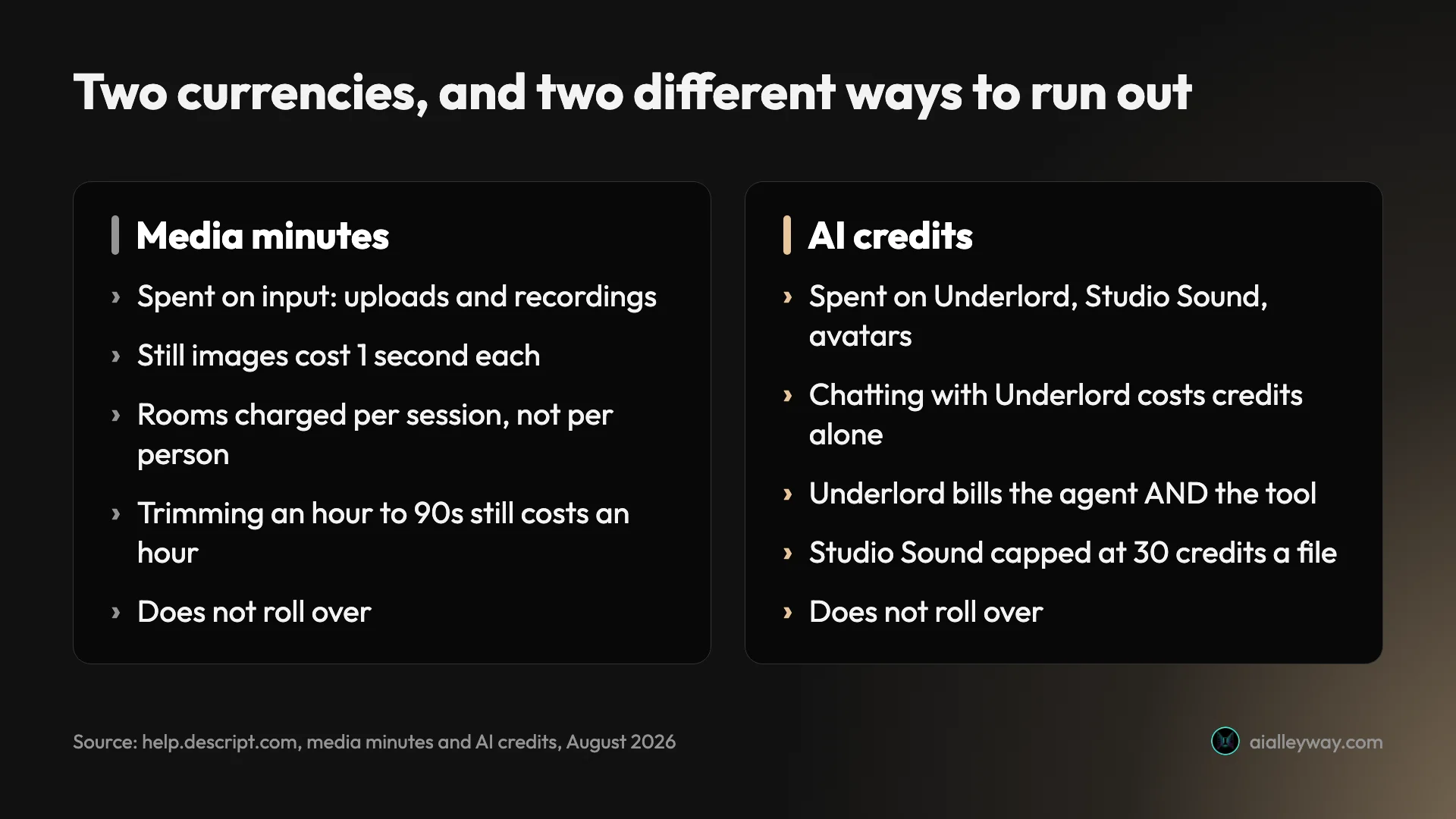
Media minutes are spent on input, not output. They are consumed when you upload audio or video, when you record directly in Descript, and (the odd one) when you add still images, at one second per image. Nothing about how long you spend editing costs you minutes. An hour of footage you trim to ninety seconds still cost an hour.
Rooms recordings are charged per session, not per participant. Descript’s own example: a one-hour session with five participants uses 60 media minutes, not 300. For anyone recording remote interviews or panels, that single rule decides whether the Hobbyist plan is viable at all.
AI credits are spent on the generative layer, and the list is longer than most people assume: Underlord, Studio Sound, filler-word removal, Green Screen, Eye Contact, AI speech, avatars and generated video.
Talking to Underlord costs credits even when it does nothing. Descript states that every message draws from your balance, because the assistant is itself an AI call. There is no free place to think here either.
And when Underlord does act, you pay twice: once for what Descript calls the “agent brain” working out what to do, and again for the tool that does the work.
Two different cost models
Applying an AI feature yourself is deterministic: the cost scales with the size of the job, and running the same input twice charges the same both times. Length of media drives it, and so does model choice. Descript marks pricier models with a stack-of-coins icon, more coins meaning more credits.
Handing the job to Underlord is non-deterministic. Descript says plainly there is no fixed price per action, because the same request can cost different amounts depending on length, model and what the AI decides to do. The Usage tab shows what each run cost, after the fact.
| How you invoke it | What it costs | Repeatable? |
|---|---|---|
| Apply a feature yourself | Scales with media length and model chosen | Yes. Same input, same charge |
| Ask Underlord to do it | Agent reasoning plus the tool it runs | No. No fixed price per action |
| Just chat with Underlord | A few credits per message | n/a |
Two features have a ceiling worth knowing: Studio Sound and Remove Filler Words are capped at 30 credits per application, however long the file. On a 400-credit Hobbyist plan that is a little over thirteen full-price Studio Sound passes a month, and it is the one place a long file is not punished.
Neither meter rolls over
This is the rule that should shape which tier you buy. Descript states it twice, once for each currency: unused media minutes do not roll over month to month, and unused AI credits do not either.
So an allowance is a monthly ceiling, not a balance. Buying a bigger plan to cover an occasional heavy month means paying for the ceiling in all eleven other months and throwing away the difference. The cheaper shape for spiky work is a smaller plan plus top-ups, which are one-time purchases from the Usage tab, shared across the whole Drive, and do not change your subscription.
If your workload is genuinely lumpy — a burst of production, then a quiet fortnight — that combination is worth more than a tier upgrade, and it is the opposite of what the plan ladder nudges you toward.
What a media hour actually costs
This is where the ladder stops behaving the way ladders are supposed to.
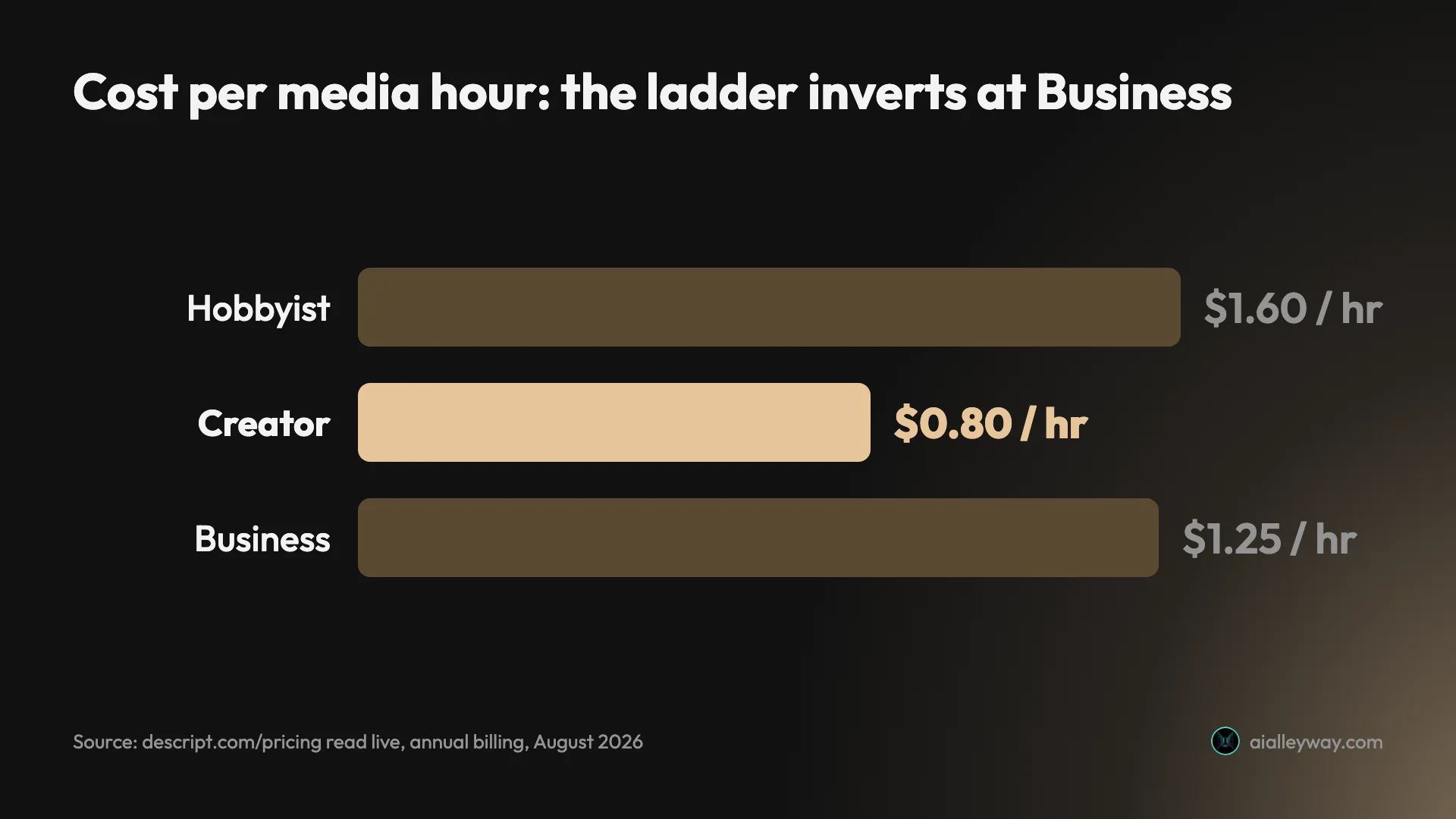
Divide each plan’s price by the media hours it includes and the per-unit cost does not fall as you climb. It falls, then rises:
| Plan | Annual | Per media hour | Monthly | Per media hour |
|---|---|---|---|---|
| Hobbyist | $16 / 10 hrs | $1.60 | $24 / 10 hrs | $2.40 |
| Creator | $24 / 30 hrs | $0.80 | $35 / 30 hrs | $1.17 |
| Business | $50 / 40 hrs | $1.25 | $65 / 40 hrs | $1.63 |
Creator is the cheapest hour on the page. Business, the tier above it, costs 56% more per media hour billed annually and 39% more billed monthly.
That is not a mistake in Descript’s pricing and it is not a criticism of it. Business is not selling capacity. It is selling seats, collaboration and team controls, and the extra ten media hours are incidental rather than the point. But it does mean one specific upgrade path is a trap: if you are on Creator, running short on minutes, and looking at Business because it lists more hours, you are about to pay a higher rate per hour to get 33% more of them.
The cheaper answer in that situation is to top up Creator, or to add a second Creator seat — which brings a whole additional 30 hours and 800 credits with it, at the cheapest per-unit rate Descript offers.
AI credits behave more conventionally. Billed annually, a credit costs 4 cents on Hobbyist, 3 cents on Creator and about 3.3 cents on Business, so Creator is marginally the best there too. On both meters, on both billing terms, Creator is the value tier.
What you don’t lose by buying the cheap plan
The usual shape of software pricing is that cheaper tiers are crippled ones. Descript’s comparison table says otherwise, and it is worth knowing before you talk yourself into a tier you do not need.
Transcription is identical on every plan, including Free. All four tiers list multi-language transcription in 25 languages. There is no “better transcription” tier to buy.
Projects and dynamic captions are unlimited on every plan, including Free. Not capped, not watermarked into uselessness — unlimited on all four. The export itself is another matter: Descript’s pricing page puts watermark-free 1080p export at Hobbyist, so anything you finish on Free carries a mark.
So the core proposition, editing media by editing its transcript, is the same product at $0 as at $65. What the ladder sells is capacity on the two meters, plus team administration at the top. That is unusually honest for this category, and it means the right question is never “which tier has the feature I need” but “which tier has the throughput I need”.
The one real capability cliff is at the bottom. On Free, the entire AI column — Underlord, Studio Sound, Green Screen, Eye Contact, filler-word removal, gap shortening, Edit for Clarity, Remove Retakes, chapters, Automatic Multicam, image and video generation, Quick Design and the rest — is marked Limited rather than included. Paired with the 100 one-time credits, that is the free plan’s actual boundary: a full editor, and a taste of the AI.
The annual discount shrinks as you climb
There is a second inversion, smaller but the same shape.
Annual billing saves you 33% on Hobbyist, 31% on Creator and 23% on Business. The discount for committing a year gets worse the more you spend — which is the opposite of how volume pricing usually works, and the opposite of what most people assume when they are deciding whether to commit.
| Plan | Monthly | Annual | You save |
|---|---|---|---|
| Hobbyist | $24 | $16 | 33% |
| Creator | $35 | $24 | 31% |
| Business | $65 | $50 | 23% |
The practical read: the annual commitment is most worth making on the cheapest plans, which are also the ones where a year is the least risky bet. On Business you are locking in five seats’ worth of spend for the smallest proportional reward on the page. If you are running a team and unsure about headcount, the monthly premium on Business is the cheapest flexibility you will buy all year.
Three workloads, costed
Abstract per-unit numbers are only useful once you attach them to actual work. Three cases, using the annual prices:
A weekly podcast, one host, 45 minutes an episode. That is roughly 3 media hours a month of raw audio, comfortably inside Hobbyist’s 10. If you run Studio Sound and a few AI passes on each episode you will be drawing on the 400 monthly credits, but four episodes is not heavy usage. Hobbyist at $16 works, and Free does not — one hour a month does not cover a single long episode plus a re-import.
A YouTube channel, two videos a week, multi-take. Say 45 minutes of raw footage per finished video, so about 6 hours a month, plus heavy AI use on captions and cleanup. The minutes fit Hobbyist; the credits probably do not. This is the case where Creator at $24 is the obvious answer, because you are buying credits and getting 30 media hours as a side effect — and it is only $8 more than Hobbyist for double the credits and triple the minutes.
A three-person content team. Here the arithmetic changes shape, because seats pool. Three Creator seats is $72 a month for a shared 90 media hours and 2,400 credits that any of the three can draw on. Three Business seats is $150 for a shared 120 hours and 4,500 credits. Unless you specifically need Business’s collaboration controls, three Creator seats is the cheaper team — and the pooling matters more than the totals, because the editor with the four-hour interview can quietly use the capacity the editor making short clips did not touch.
| Workload | Monthly footage | Binding meter | Plan | Annual cost |
|---|---|---|---|---|
| Weekly 45-min podcast | ~3 hrs | Credits, loosely | Hobbyist | $16 |
| 2 videos/week, multi-take | ~6 hrs | Credits | Creator | $24 |
| Three-person team | ~20 hrs shared | Both | 3 × Creator | $72 |
That third case is the one worth sitting with. The instinct when a team grows is to move up a tier. On this pricing, the instinct to add seats on the tier below is usually cheaper per unit of work.
Where the bills go wrong
Four failure modes, all of them visible in the pricing table if you know to look.
The free tier’s credits never come back. 100 one-time credits is the most misread number on the page, because every other allowance on that row renews monthly. Plan for the free tier as a permanently free editor with a one-off trial of the AI, not as a free plan you can keep using the AI features on.
Seats are billed separately, and the plan names hide it. “Scale to a team of 3” reads like three seats are included. It means the plan supports up to three, each billed. A team of three on Creator is $72 a month annually, not $24.
Upgrading for capacity costs more per unit. The Creator-to-Business step is the specific trap, as above. Check whether a top-up or a second seat is cheaper before you move up.
You can be short of one meter and rich in the other. And no upgrade fixes the wrong axis. If you are running out of credits, more media hours do nothing for you, and the tier structure bundles them together whether that suits your work or not.
Which plan should you buy?
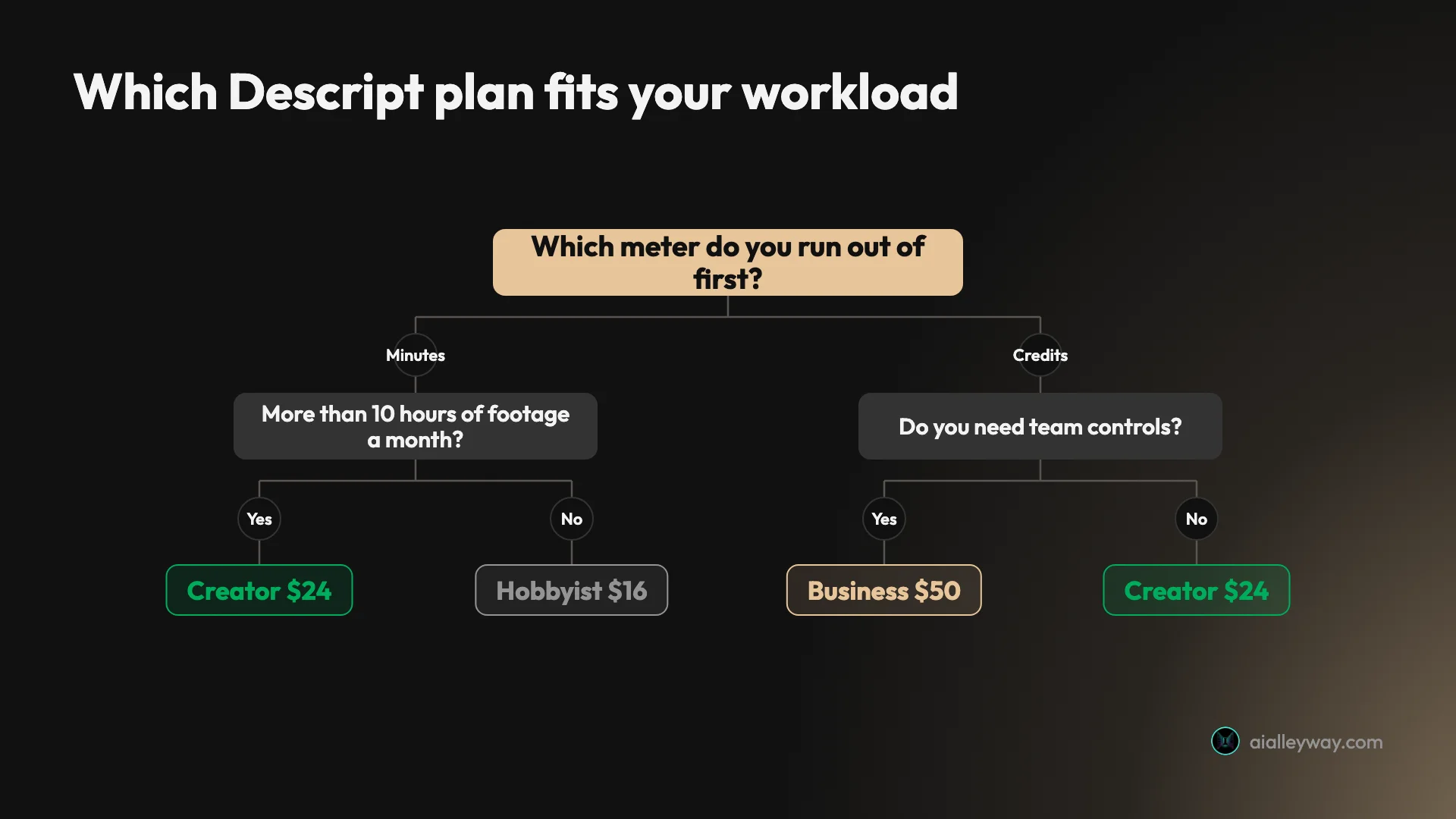
Free, to find out whether text-based editing suits you at all. One media hour a month and 100 one-time credits is enough to edit something real and decide whether the core idea — deleting a word to delete the footage — is how you want to work. It is not enough to keep using.
Hobbyist at $16 annually, for a single creator with modest, short material. A weekly podcast or a light video schedule fits comfortably. Its weakness is the credit allowance rather than the minutes.
Creator at $24 annually, for almost everyone else. It is the cheapest media hour and the cheapest AI credit on the page, and the step up from Hobbyist is only $8 for triple the minutes and double the credits. If you are choosing without doing the arithmetic, this is the one the arithmetic picks.
Business at $50, only if you need the team controls. Buy it for collaboration and administration, not capacity — you pay more per hour than Creator for the privilege. If capacity is the reason you are looking, add a Creator seat instead.
Enterprise, when procurement rather than editing is the constraint.
If you want the qualitative side of this — what the editor is actually like to use, where the transcript-editing model shines and where it frustrates — our Descript review covers eight weeks of real projects and rates it 4.0 out of 5. The short version is that the editing genuinely is remarkable and the metering is the part you have to plan around, which is why this guide exists separately.
Final word
Descript’s pricing is not expensive. Compared with the alternatives it is competitive at every tier, and the free plan is a real product rather than a countdown. If the job is turning long recordings into short clips rather than editing them, the best AI clipping tool measures four tools built for exactly that.
What it is, is two-dimensional — and almost every guide to it, including Descript’s own plan cards, presents it as one dimension with a price attached. You are buying media minutes and AI credits on separate meters, both per editor, and the plan that fits you is decided by which of those two you exhaust first. Nothing on the pricing page tells you that, and you cannot learn it from the sticker price.
Do the arithmetic once, on your own workload. Take your monthly raw footage in hours, take an honest guess at how much of it gets the AI treatment, and check both against the table above rather than against the plan names. Do that and one tier will be obviously correct — and for most people it is Creator, which is the cheapest unit of work Descript sells on either meter.
Frequently asked questions
How much does Descript cost?
There are five plans. Free is $0, Hobbyist is $24 a month or $16 billed annually, Creator is $35 or $24, Business is $65 or $50, and Enterprise is custom. Every paid price is per person per month.
But the sticker price only tells you half of it, because each plan meters two separate things. You get an allowance of media minutes — 60 a month on Free, rising to 2,400 on Business — and a separate allowance of AI credits. Run out of either one and the relevant part of the product stops, regardless of how much of the other you have left.
Is Descript free?
There is a genuine free plan, and it is more limited than it first appears. You get 60 media minutes a month — one hour — which does renew, unlimited projects, unlimited dynamic captions and transcription in 25 languages.
The catch is the AI credits. Free gives you **100 one-time credits**, not 100 a month. Once they are gone they are gone, permanently, and the AI features that make Descript worth using go with them. The free tier is a trial of the AI wrapped in a permanent free tier for the editor.
Which Descript plan is the best value?
Creator, and by a clear margin once you do the arithmetic per unit rather than per month.
Billed annually, Creator costs $24 a month for 30 media hours, which is **80 cents an hour**. Hobbyist is $16 for 10 hours, or $1.60 an hour — twice as much. And Business is $50 for 40 hours, which is $1.25 an hour, so it is *more expensive per hour than Creator*. Business buys you seats and team controls, not capacity. If you are upgrading to it for the extra ten hours, you are paying more per hour for the privilege.
What are Descript media minutes and AI credits?
They are two separate meters, and Descript's own pricing table lists them as separate rows. Media minutes cover the footage you bring into the editor — the transcription and the timeline. AI credits cover the generative features layered on top, things like Studio Sound and Underlord.
Both are allocated *per editor*, and both can be topped up if you exhaust them. The practical consequence is that your plan can fail in two different ways: a documentary editor with long footage runs out of minutes while sitting on unused credits, and a short-form creator polishing five-minute clips runs out of credits with hours to spare.
Why do Descript pricing guides disagree with each other?
Mostly because they are old and do not say so. Two of the most widely cited Descript pricing guides were published in September 2025, when Descript moved to the media-minutes-and-credits model, and they describe that moment rather than today.
The prices in this guide were read directly from descript.com/pricing in a rendered browser on 18 August 2026, with both billing terms visible on the page at once. Check the date on any pricing article you read, including this one — in a category where the meter changes more often than the sticker price, the date is doing more work than the numbers.
Keep reading
Descript review: the editing is magic, the pricing isn't
I ran my own projects through Descript. The transcript editing is genuinely magic — the new AI-credit pricing isn't. Here's who should actually pay.

Free AI clip generator: only one export came back clean
Four AI clip generators, one 35-minute file, two of them on genuine free plans. Only CapCut returned a file with no watermark. Here is what the rest hand back.
Opus Clip alternatives: what each one takes away
Every cheaper OpusClip alternative costs you something. I ran four tools on one 35-minute file — Vizard did it for $0.85 against $2.03 — and priced two more.
Submagic alternatives: the cheapest depends on your meter
Seven Submagic alternatives ranked by the meter they charge on. Four tools measured on one 35-minute video, and the cheapest changes with source length.