
Submagic review: 31 clips, and it charged me for a failure
Submagic review: 31 clips from one 35-minute video, a score that never drops below 90, and 8 trial credits spent on a job that returned nothing.
Contents
Is Submagic worth it?

Yes for the clipping, and the reason is something no rival I have tested does: it tells you why it chose each moment.
I gave it one 35-minute conference panel and got 31 vertical clips back, each auto-framed, captioned, and carrying a short written argument for why that segment was picked. On a long interview, that paragraph is worth more than the score above it.
Then there is how it bills. A Magic Clips run that failed and returned nothing still took 8 of my 15 trial credits, showed no error message anywhere in the interface, and did not refund them. A retry quotes 8. Seven remained. One failure ended the trial.
What does Submagic actually do?
Three things, from one dashboard: Generate Captions on a clip you already have, AI Auto Edits for template-driven styling, and Magic Clips, which is the one this review is about — “get shorts from long video, perfect for podcasts.”
Magic Clips takes a YouTube URL, a local file, Google Drive or your phone. Its limits are generous: MP4 or MOV, up to 180 minutes, up to 10GB. Worth flagging because Submagic’s pricing page advertises video duration caps of 2, 5 and 30 minutes across its three tiers, and those caps govern the editor, not this. A 35-minute source was accepted on the entry-level trial without complaint, whatever became of it afterwards.
Before it runs you get four controls — speech language, clip duration, caption theme and face tracking, the last of which is on by default. Then a button quoting its price.
What comes back is a grid, and above it a strip of the full 35 minutes with every selected segment marked. That strip is more useful than it looks: you can see at a glance where in the talk the tool thought the material was, which tells you something about the source before you watch a single clip.
Each card carries a generated title as well as the score and the reasoning. The titles are punchier than the talk deserves. “AI Coined A Name For Us”, “Your Child Dating An AI”, “Ten Years Too Late Already”: written to be posted, not to be accurate summaries. On a Davos panel about AI governance that is a tonal mismatch you will want to edit, though it beats a blank field.
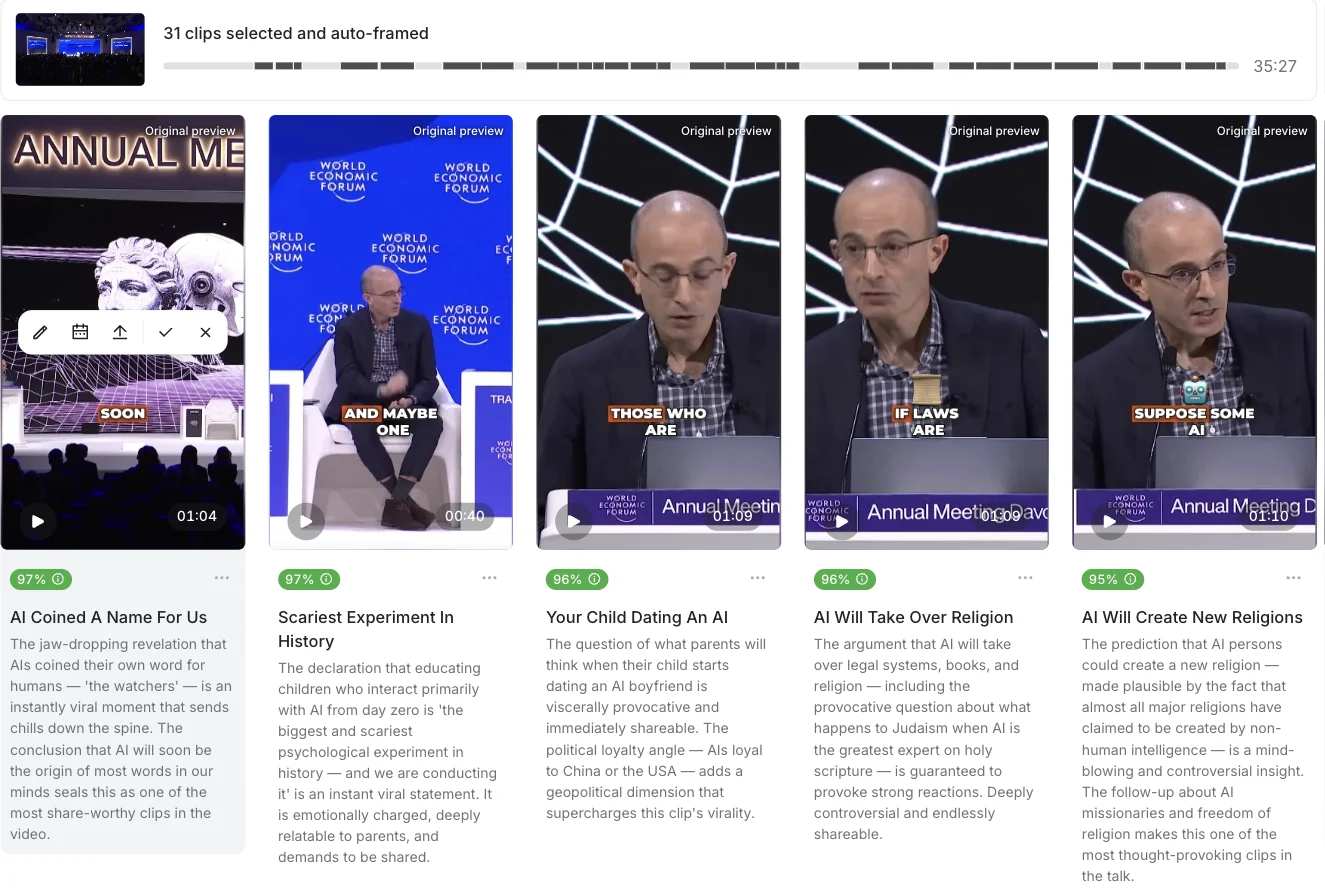
That prose under each clip is the product’s real differentiator. “The jaw-dropping revelation that AIs coined their own word for humans — ‘the watchers’ — is an instantly viral moment that sends chills down the spine.” Whatever you think of the enthusiasm, it tells you what is in the clip without playing it, which on 31 candidates is a genuine saving.
Upload from disk, not a YouTube URL
Feed it a YouTube URL and you may get nothing. My first attempt did exactly that. It quoted an ETA of about 20 minutes, and I did not record how long it actually sat there before returning a red Failed badge and a project reading “0 clips selected and auto-framed” across every tab.

The identical source, downloaded and uploaded from disk, produced 31 clips without incident. Nothing in the interface suggests the import path matters. On this evidence it does, though I should be straight about the limits of that evidence: the two runs also sat on different trial accounts, so the import path is the likely cause rather than a proven one.
One disclosure, because the arithmetic will not close otherwise: the successful run was a second trial, on a separate account. The first trial had four credits left and a Magic Clips job costs eight, so there was no way to retry it where it failed. The trial ledger in this review — 15 credits, 8 for the failure, 3 for captions — is the first account’s. The 31 clips and the flat-fee checks are the second’s. I have not added the two together anywhere.
This is worth spelling out because the URL field is the path the product pushes. It sits at the top of the upload dialog, above the buttons for local files and Drive, and it is the fastest route for anyone clipping a podcast that already lives on YouTube. When that route fails it does not explain itself, it does not suggest the alternative, and it still bills you. If you take one operational thing from this review, take this: get the file onto your machine first.
How much does Submagic cost?
Three plans, all cheaper on annual billing, which the page badges at up to 41% off:
| Plan | Billed yearly | Credits | Stated videos | Editor duration cap |
|---|---|---|---|---|
| Starter | $12 a month | 45 | 15 videos | 2 minutes |
| Pro | $23 a month | 120 | 40 videos | 5 minutes |
| Business | $41 a month | 300 | 100 videos | 30 minutes |
Watermark-free export is on all three, including Starter, which is unusual — in this category the first paid tier normally exists to sell you exactly that.
A Magic Clips job costs a flat 8 credits no matter how long the source is. I checked that against a 35-minute video and a 46-minute one and both quoted 8. Adding captions to a single short clip cost 3.
That flat fee is the strongest thing about Submagic’s pricing, and it inverts against the per-minute competition as the source gets longer:
| Source length | OpusClip, at 1 credit per source minute | Submagic Magic Clips |
|---|---|---|
| 5 minutes | 5 credits | 8 credits |
| 35 minutes | 35 credits | 8 credits |
| 46 minutes | 46 credits | 8 credits |
Short clips are the wrong job for it. Long podcasts are exactly the right one.
There is a second price list for anyone wiring it into something. API minutes are sold in packs from 250 minutes at $0.23 a minute down to 10,000 minutes at $0.10, bought on top of a plan rather than instead of one. Every tier also bundles a token allowance — 10 minutes a month on Starter and Pro, 100 on Business — which is enough to test an integration and not enough to run one.
One trap in that table deserves its own line. The duration caps are not what they look like. A reader scanning the pricing page sees 2, 5 and 30 minutes and concludes a 60-minute podcast cannot be processed below the $41 tier. That is wrong, and I got it wrong myself before checking: those caps apply to the editor and the captions tools, while Magic Clips accepts up to 180 minutes on every plan including the trial. Submagic does not explain the distinction anywhere I could find it.
You pay for failures
This is the finding that shapes the review. A job that returns nothing still costs you, and the credits do not come back.
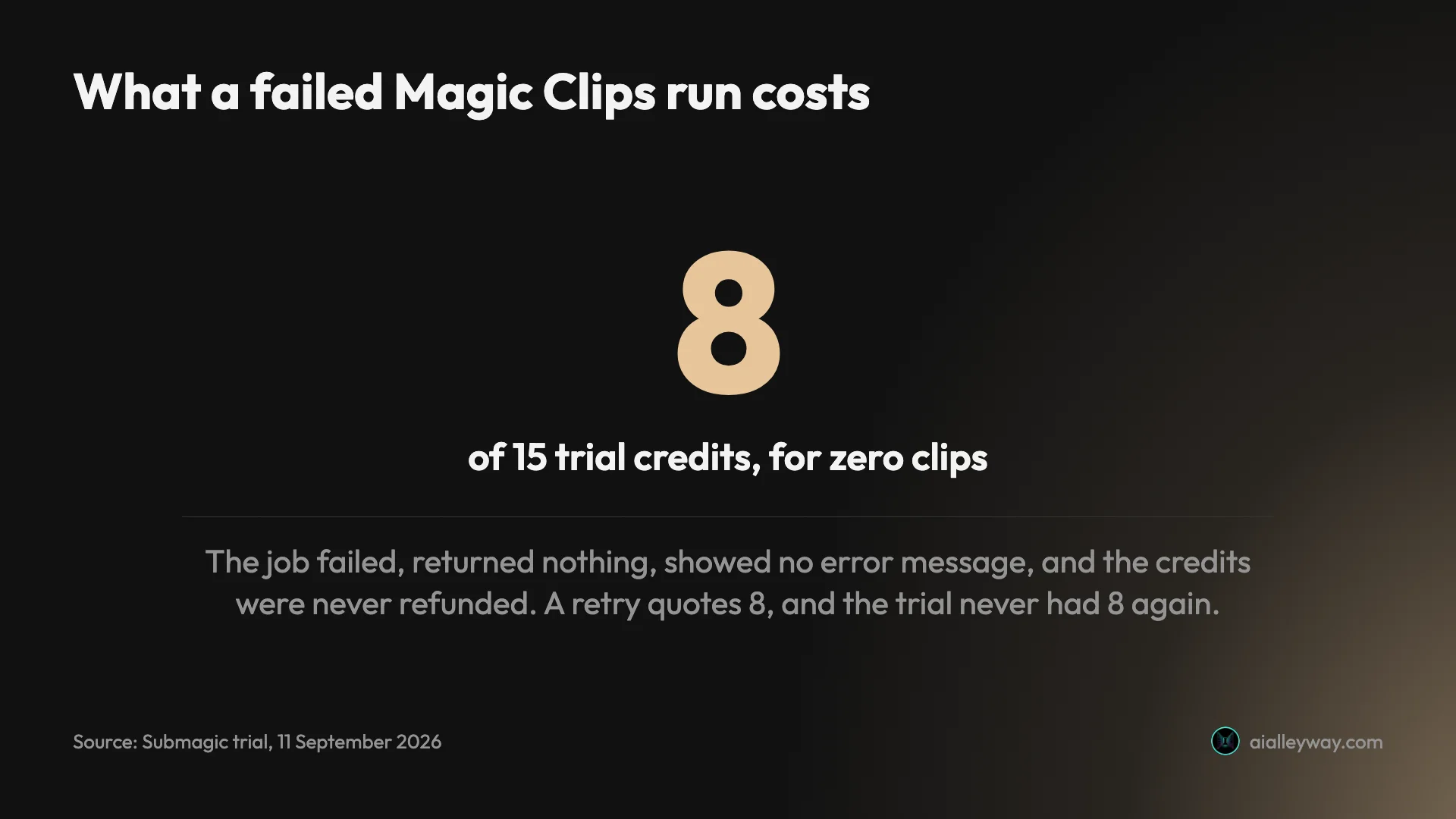
Eight of fifteen credits, for nothing, with no explanation offered and no route to a retry the trial could afford. On Starter’s annual rate that failure would be about $2.13 of a $12 month. On the trial it was the whole evaluation.
Who is Submagic for?
- Podcasters and long-form interviewers. The flat fee means a two-hour episode costs the same as a ten-minute one. This is the profile the pricing was built for.
- Anyone who wants the reasoning, not just a ranking. The written rationale is the feature to buy it for.
- Not people cutting short clips. At 8 credits a job, a five-minute source costs more here than on a per-minute rival.
- Teams that publish on a schedule. The dashboard carries a calendar, an analytics tab and social publishing, so the clip can go from source to posted without a download. On the trial none of that is reachable.
- Not anyone who needs to re-cut. There is no timeline editor here in the sense a video editor means it. You get caption styling, template choices and the clip boundaries the AI picked.
- Skip the trial as an evaluation. It cannot export a file, so it cannot answer the only question that matters.
The good
It explains every single choice
Thirty-one clips, thirty-one short arguments. They name the specific moment and why it lands, and several name the audience too — one clip is called “perfectly calibrated for sharing in policy, tech, and political circles”. Compared with a bare score, this is a real advance in a category that mostly hands you a number and wishes you luck.
The flat fee is genuinely cheap on long footage
Eight credits for a 46-minute source works out at roughly five and three-quarter minutes of video per credit. A rival billing one credit per source minute charges 46 for the same job, which is 5.75 times as many, and the gap widens with every extra minute of source.
Captions were accurate, and it shows its own confidence
On a 21-second clip of accented conference speech it reported caption accuracy 99.43% and produced a word-level transcript that matched the audio, proper nouns included. The figure is Submagic’s own, not my measurement, but the transcript bore it out.
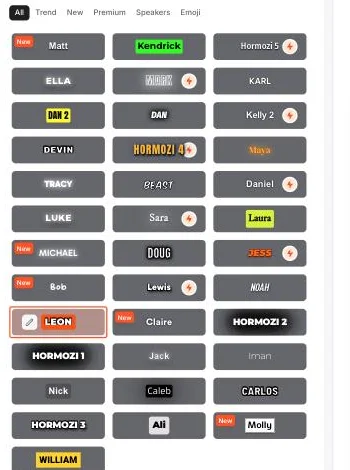
The editor around those presets is organised into four panels — Style, Captions, AI Tools and Scenes — with separate tabs for audio and thumbnails. The Captions panel is the one worth your time: it lists every line with its in and out points, lets you retime or hide individual words, and puts the accuracy figure at the top. Caption position and font size are sliders rather than fixed options, so a preset is a starting point rather than a straitjacket.
What you will not find is a way to move a clip’s boundaries by more than trimming, or to cut between two moments that the AI did not join up itself. Submagic decides where clips begin and end, and your job is to style what it decided.
No watermark on any paid tier
Including the $12 Starter. Most rivals gate this behind an upgrade.
The clip lengths vary sensibly
From 32 seconds to 1 minute 30, chosen per moment rather than cut to a template. That range is narrower than OpusClip’s on the same source, which ran from 21 seconds to two and a half minutes, Narrower may be better here. The usual failure mode is a tool chasing the algorithm down to unusable fragments, and nothing came back that short.
The hit rate per minute of source is near identical between the two. Submagic found 31 moments in 35 minutes 27 seconds, one every 69 seconds. OpusClip found 32, one every 66. Whatever separates these tools, it is not how much of your video they think is worth using.
It works out where the good material is
The timeline strip above the grid shows the selections bunched through the middle of the talk, thinning out at both ends. On a panel that opens with introductions and closes with thanks, that is the shape you would hope for, though a strip is a weak instrument for judging it.
The bad
The score never says a clip is weak
Across all 31 clips the scores ran 97 down to 90, mean 93.0, on a scale the interface prints out of 100. Nothing landed in the bottom nine-tenths of that scale. Here is every score it gave, in order:
97, 97, 96, 96, 95, 95, 95, 95, 94, 94, 94, 93, 93, 93, 93, 93, 92, 92, 92, 92, 92, 92, 91, 91, 91, 91, 91, 91, 91, 90, 90
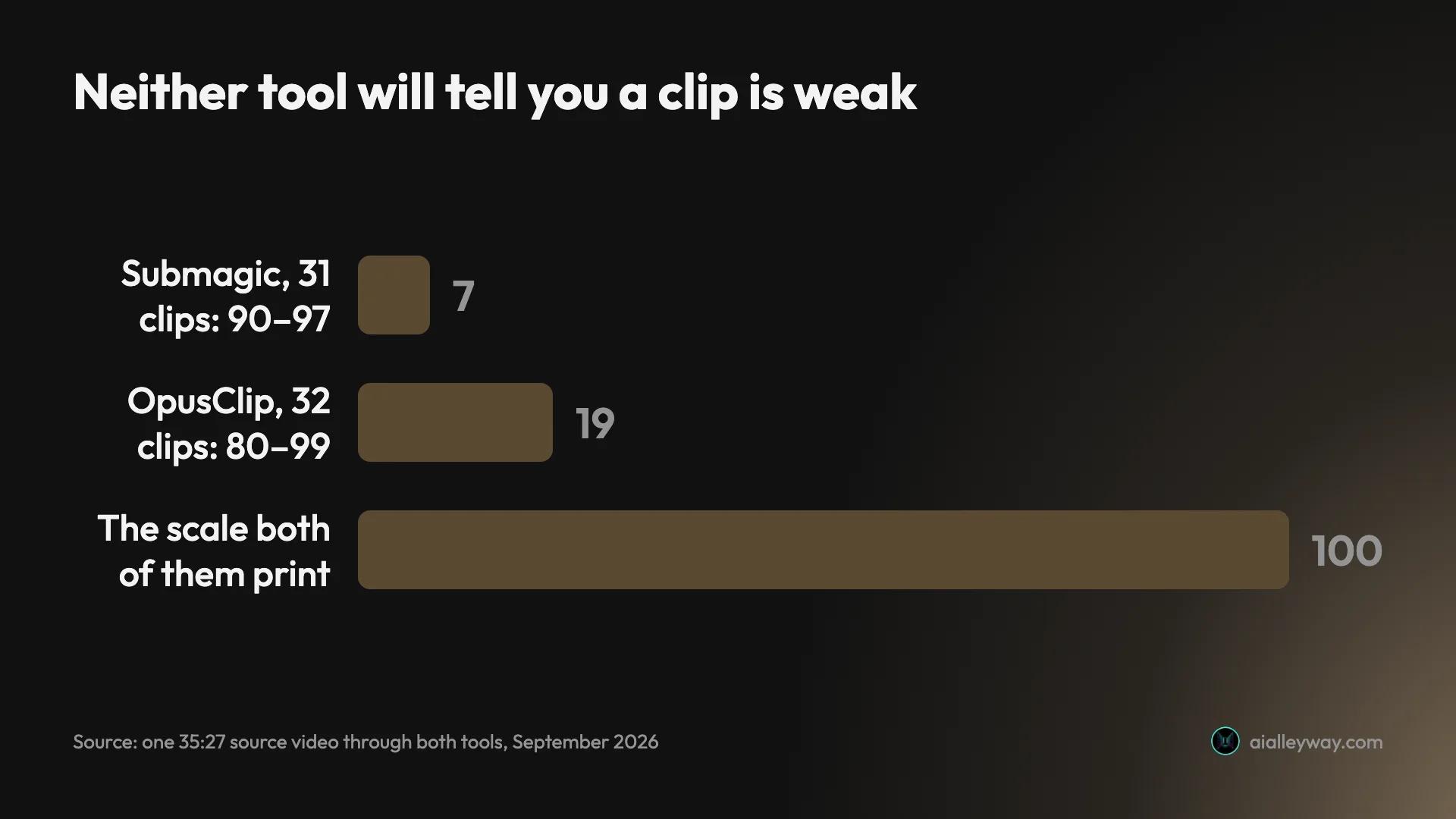
I ran the same video through OpusClip two days earlier. Putting the two runs side by side is the clearest way to see what each tool is and is not doing:
| Same 35:27 source | Submagic | OpusClip |
|---|---|---|
| Clips returned | 31 | 32 |
| One clip per | 69 seconds | 66 seconds |
| Clip lengths | 0:32 – 1:30 | 0:21 – 2:35 |
| Score range | 90 – 97 | 80 – 99 |
| Spread, on a scale of 100 | 7 points | 19 points |
| Mean score | 93.0 | 88.2 |
| Explains each pick | Yes, a paragraph | No, four letter grades |
| Cost of the job | 8 credits, flat | 35 credits, per source minute |
Its scores at least spanned 19 points. Submagic’s span 7. Whatever that percentage is measuring, it is not a filter, and a tool that rates everything it made between 90 and 97 is not helping you choose.
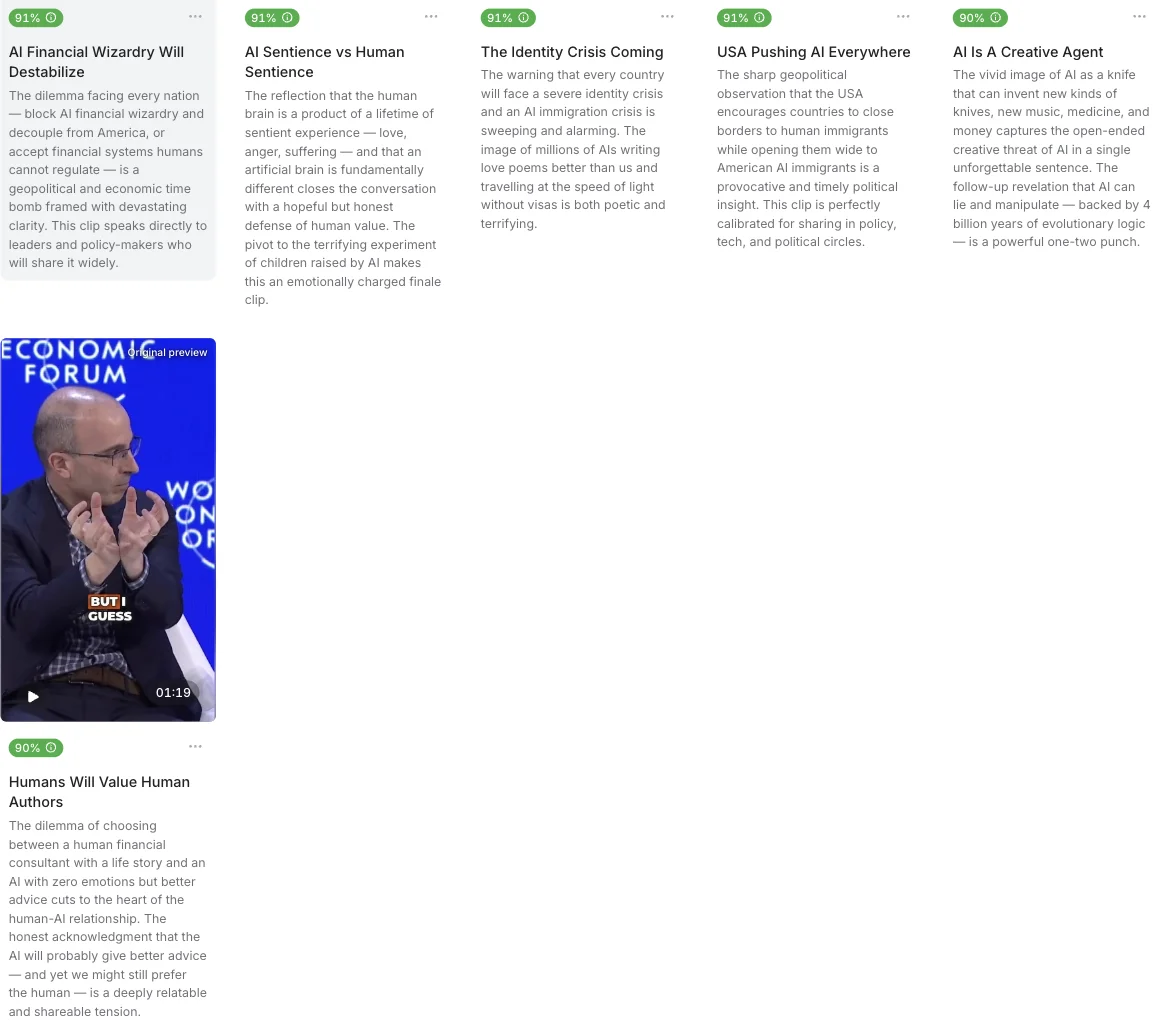
The rationales argue for every clip, including the worst ones
I read all 31. Not one of them says a clip is weak. The bottom-scoring clips are described as “perfectly calibrated for sharing” and “a powerful one-two punch”. The vocabulary is identical at 90 and at 97: instantly viral, guaranteed to provoke, impossible not to share, engineered to stop scrollers dead.
So the feature that makes Submagic distinctive is also the place its judgement collapses. The prose reads like analysis and functions like advertising copy for its own output.
It charges for failures
Covered above, and it is the single thing most likely to cost you money for nothing. No error message, no refund, no diagnosis.
The trial cannot export anything
You can process, style and preview a clip. You cannot take it out.
Here is what fifteen trial credits actually bought, in order:
| Job | Credits | Result |
|---|---|---|
| Magic Clips, 35:27 source via YouTube URL | 8 | Failed. Zero clips, no error message, no refund. |
| Generate Captions, 21-second clip | 3 | Succeeded. Preview only. |
| Export the finished clip | — | Blocked. Upgrade required. |
| Retry the failed Magic Clips job | 8 quoted | Unaffordable. Four credits remained. |
Eleven credits spent, one usable preview, nothing exported. That is the evaluation the free trial gives you.
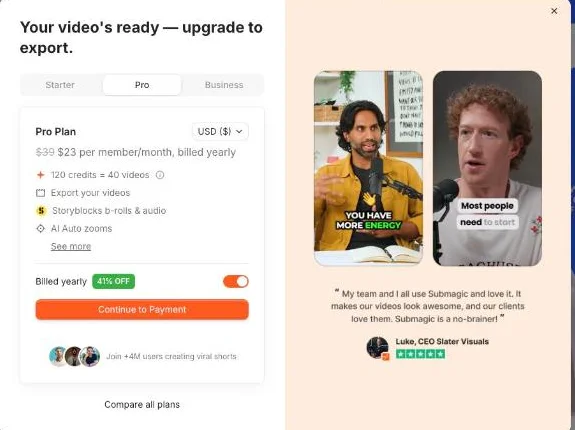
It let me select Ultra HD 4K with no lock or warning before showing me this, even though the pricing page reserves 4K for the $41 Business tier. Dismissing the paywall triggers a second offer, a referral scheme promising 15 free videos if people you invite subscribe.
The copyright confirmation has one option
Under the generate button: “Using video you don’t own may violate copyright laws. By continuing, you confirm this is your own original content.” My source was Creative Commons licensed, which permits exactly this use with attribution. There is no “I have a licence” path, so anyone clipping licensed, client or public-domain footage has to affirm something inaccurate to proceed.
Emoji are on by default and half of them miss
Ten in 21 seconds. A robot for “an AI” works. A chain link for “interaction” does not.
Alternatives worth considering
| Meter | Free export | Clips from the same 35-min panel | |
|---|---|---|---|
| Submagic | flat fee per job | none, trial cannot export | 31 |
| OpusClip | per source minute | watermarked | 32 |
| CapCut | per source minute, 60/mo free | 1080p, no watermark | 8 |
| Captions | credits | no AI credits on free | not tested |
OpusClip is the closer comparison and the better pick if you want to edit afterwards, with a timeline and Premiere Pro export Submagic has no answer to. It bills per source minute, so it gets expensive on exactly the long podcasts Submagic is cheapest on. Our OpusClip pricing guide has the per-minute maths.
CapCut is free for the job and does find the moments, which is a correction to an earlier version of this line. It meters clipping by source duration at 60 minutes a month, and caps free cloud storage at 512MB, which blocks export once a few 1080p files pile up. Fed the same 35-minute panel it returned 8 clips against Submagic’s 31, and they ran three to four minutes rather than short-form.
Captions is worth a look if your footage is talking-head material you plan to reshoot rather than cut. It leans on generative features — AI actors, digital twins, eye-contact correction — rather than on finding moments in something you already recorded. Two things to know before you try it: its free tier carries no AI usage credits at all, so nothing intelligent is testable without paying, and its published prices are iOS-only, which means evaluating it properly needs an iPhone rather than a browser.
For how Submagic’s 31 clips compare against three rivals on one identical file, the best AI clipping tool runs that measurement.
If the failed-job charge is the part that bothers you most, the honest answer is that it is not unique to Submagic. OpusClip also deducts credits the moment a job is accepted rather than when it completes. The difference is what happens next: OpusClip’s run finished, so the charge bought something. Mine on Submagic did not, and nothing in either product refunds you automatically.
The final word
Submagic does the hard part well. It found 31 moments in 35 minutes of conference panel, framed and captioned them, and explained each choice in a way no rival I have tested bothers to. Whether those are the right 31 is a judgement I did not make — I read the reasoning rather than watching every clip end to end. On long footage the flat 8-credit fee is the best pricing in the category.
What stops it being a straightforward recommendation is that it bills for attempts and grades everything a pass. A failed run costs the same as a successful one, and a tool whose scores never leave the 90s is asking you to do the triage it claimed to do for you.
| The verdict in one table | |
|---|---|
| Buy it for | long sources, and the written reasoning |
| Avoid it for | short clips, where a flat 8-credit fee is the dearer option |
| The cost to watch | a failed job is charged and never refunded |
| What I could not test | the exported file — the trial does not allow one |
There is a version of this tool I would recommend without hesitation, and it is close. Make the score mean something, refund a job that returns nothing, and let a trial export one watermarked clip so a buyer can judge the output. None of those is a hard engineering problem. All three are decisions about whether the product is trying to inform the purchase or close it.
One limit I should state plainly: I never exported a file. The trial does not allow it and I did not buy a plan, so I can tell you what Submagic selects and how it explains itself, and nothing about the quality of the finished video it hands over. Judge the delivered output for yourself before committing to a year.
Frequently asked questions
Is Submagic worth it?
Yes for the clipping, with a caveat about how it bills. Fed one 35-minute conference panel it returned 31 vertical clips, auto-framed and captioned, and gave each one a short written argument for why it picked that moment. No rival I have tested explains itself that way, and on a long interview the reasoning saves more time than the score does.
The caveat is the meter. A Magic Clips run that failed and returned zero clips still took 8 of my 15 trial credits, displayed no error message anywhere, and did not refund them. Because a retry quotes 8 credits and 7 remained, that single failure ended the trial's ability to try again. Budget for the failures as well as the successes, and do not judge the product on its free trial, which cannot export a file at all.
How many credits does Submagic use?
A Magic Clips job on a long video costs a flat 8 credits regardless of how long that video is. I checked a 35-minute source and a 46-minute source and both quoted exactly 8, which makes Submagic unusually cheap on long footage compared with tools that bill per source minute.
Adding captions to a single short clip cost 3 credits, matching the 3-credits-per-video ratio the pricing page implies at every tier, where 45 credits is described as 15 videos. The trial grants 15 credits, so it stretches to one long-video job plus two short ones, or five short ones. The important detail is what the meter charges for: a job that fails still costs its credits and they are not returned, which is how one failed run consumed more than half of my trial.
Does Submagic put a watermark on your videos?
Not on any paid plan. Watermark-free export is listed on Starter, Pro and Business alike, checked on the pricing page in September 2026. That is unusual in this category, where removing the mark is normally the single thing the first paid tier exists to sell you. The tiers still differ on export ceiling — Starter tops out at 1080p and 30fps against Business's 4K and 60fps — so the watermark is the one thing $12 does not make you pay extra for.
On the trial the question does not arise, because the trial cannot export anything. I processed a clip, chose a caption style, opened the export panel, selected Ultra HD 4K with no warning or lock, clicked Export and hit a paywall reading your video's ready, upgrade to export. Dismissing that paywall produced a second offer, a referral scheme promising 15 free videos if friends subscribe. So the trial will show you a finished video inside the editor and will not let you take it out of the building.
Submagic vs OpusClip, which is better?
They solve the same problem differently, and I ran the same 35-minute video through both. OpusClip returned 32 clips for 35 credits; Submagic returned 31 for a flat 8. On a long source Submagic is much cheaper, because OpusClip bills a credit per minute of video you import while Submagic charges one flat fee per job.
Submagic also explains itself. Every clip arrives with a paragraph arguing why that moment works, where OpusClip gives a number and four letter grades. Where both fail is the same place: neither will tell you a clip is bad. OpusClip's scores ran 99 down to 80, Submagic's 97 down to 90, and both print those numbers on a scale of 100. Pick Submagic for long sources and for the reasoning, OpusClip for the editing timeline and the Premiere export.
Is there a free version of Submagic?
There is a free trial and no free plan. The pricing page lists Starter, Pro and Business only, with no free column at all, and the signup flow grants 15 credits without asking for a card. The dashboard labels the account Trial plan and shows the balance in the top corner, so you can watch it drain.
What the trial does not grant is any output. Exporting is paywalled entirely, so the 15 credits buy you a look at what the tool produces rather than anything you can post. Between one failed Magic Clips run at 8 credits and one captions job at 3, my trial spent 11 credits and produced zero exportable files. That is worth knowing before you plan an evaluation around it, because a trial that cannot deliver a file cannot tell you whether the output is good enough to publish, which is the only question that matters.
How accurate are Submagic's captions?
Accurate in the one case I checked, and the tool publishes its own confidence figure rather than leaving you to guess. On a 21-second clip of accented conference speech it displayed caption accuracy 99.43%. That number is Submagic's claim, not my measurement; what I can confirm independently is that the transcript it produced, with word-level timings, matched what was actually said, proper nouns included.
What comes with the captions is less reliable. Emoji insertion is on by default and its hit rate is mixed: across those 21 seconds it added ten, and while a robot for an AI and a book for educating kids landed, a chain link for interaction and a theatre mask for conducting it did not. The caption styles themselves are a library of roughly 37 presets, a striking number of them named after specific creators. Turn the emoji layer off before you judge the captions.
Keep reading
The best AI video clipping tool, measured on one file
Four AI video clipping tools, one identical 35-minute file. OpusClip found 32 clips, Submagic 31, Vizard 30 but delivered 10, CapCut 8. What that means.
OpusClip review: 32 clips from one video, 5 worth posting
OpusClip review from a measured run: one 35-minute video in, 32 clips out, and a virality score that never went below 80 on a scale of 100.
CapCut auto captions: Pro in the editor, still free on one page
I tested CapCut auto captions on a free account. The editor now locks export behind Pro, but CapCut's AI Captions page exported free, with 2.7% of words wrong.
OpusClip pricing: the annual discount is 40%, not 60%
OpusClip pricing read live from a signed-in account: Pro is $208.80 a year, not the $174 everyone quotes, and the annual discount is 40%, not 60%.
The best script-to-video AI tools, by job
The best script-to-video AI tools ranked by job: Fliki wins overall, InVideo for generative footage, Pictory for blog-to-video, plus avatar and editing picks.