
Pictory pricing: the plans, the credits, and the catch
Pictory starts at $25/mo annually, but the trial paywalls clean exports and credits meter every video. The real per-plan cost and the catch, hands-on.
Contents
How much does Pictory cost?

Pictory costs $25 a month for Starter, $35 for Professional, and $119 for Teams when you pay annually — or $29, $59, and $199 if you pay month to month. There is a 14-day free trial with 50 AI credits, but no permanent free plan, and the trial will not export a video without the Pictory watermark. Most solo creators are fine on Starter; anyone publishing at volume or who wants voice cloning moves up to Professional.
| Plan | Annual (per mo) | Monthly | Best for |
|---|---|---|---|
| Free trial | 14 days, 50 credits | — | evaluating (watermarked exports only) |
| Starter | $25 | $29 | solo bloggers and creators |
| Professional | $35 | $59 | high-volume and faceless channels |
| Teams | $119 | $199 | agencies and small teams |
| Enterprise | Custom | Custom | large orgs |
Prices verified in Pictory’s in-app plans page (app.pictory.ai/plans), June 2026 — the in-app figures, which differ from the public marketing page on credit counts (more on that below).
That table answers the search, but it hides the number that actually decides whether Pictory is affordable for you: credits. The monthly price gets you in the door; the credit allotment is what runs out. Here is how it meters, what each plan really buys, and the catch the pricing page does not lead with.
How does Pictory’s pricing actually work?
Pictory does not charge per video. It charges a flat monthly fee for access, and then meters your usage in three separate buckets that each refill with your plan: video minutes, AI credits, and premium ElevenLabs voiceover minutes. Every time you generate or re-render a video, you spend from these allotments, and when a bucket runs dry you either wait for the next cycle, buy an add-on pack, or upgrade.
The bucket that matters most is AI credits, because it is the one you hit first. A single short video costs a chunk of credits, regenerating a scene costs more, and re-rendering after an edit costs more again — so the practical limit on how much you can produce is the credit pool, not the price tag. The good news, confirmed in Pictory’s own in-app messaging, is that credits and quotas now roll over month to month, and annual plans drop the entire year’s allotment into your account on day one. If you batch-produce in bursts, you are not losing unused credits at the end of each month.
The headline prices, then, are the easy part. The real cost question is “how many videos does my credit pool actually cover,” and the answer changes with video length and how much you iterate. I will put real numbers on that below.
What does each Pictory plan include?
The jump from Starter to Professional is where most of the value sits, and it is not just more minutes — it is voice cloning, a far bigger stock library, and the higher credit pool that turns Pictory from a trial into a production tool. These are the figures from Pictory’s in-app plans page, which disagreed with the public marketing page on the credit counts (more on that below); trust the in-app numbers.
| Plan | Annual /mo | Video mins/yr | AI credits/yr | ElevenLabs voice | Stock clips | Brand kits |
|---|---|---|---|---|---|---|
| Starter | $25 | 2,400 | 2,400 | 60 min/mo, 29 languages | 5 million | 1 |
| Professional | $35 | 7,200 | 12,000 | 120 min/mo + voice cloning | 18 million | 5 |
| Teams | $119 | 21,600 | 28,800 | 240 min/mo | 18 million+ | multiple |
| Enterprise | Custom | Custom | Custom | Custom | Custom | Custom |
Starter ($25/mo annual) is the real entry point — the first plan that exports a clean, watermark-free video. You get 2,400 video minutes and 2,400 AI credits a year, 60 minutes a month of premium ElevenLabs voiceover across 29 languages, access to a 5-million-clip Getty and Storyblocks stock library, and one brand kit. For a blogger turning posts into social clips, that is a complete pipeline, and the credit pool covers roughly a hundred short videos a year.
Professional ($35/mo annual) is the plan Pictory pushes hardest, and for most serious creators it is the right one. The price is only $10 a month more than Starter, but the allotments jump across the board: the credit pool roughly quintuples to 12,000, video minutes triple to 7,200, monthly ElevenLabs minutes double to 120, and you get the full 18-million-clip stock library.
Two upgrades justify the jump on their own — voice cloning, so your videos can use a consistent custom voice, and five brand kits instead of one, so an agency or multi-channel creator can keep each property on-brand. If you publish more than a couple of videos a week, this is the tier.
Teams ($119/mo annual) is built for agencies and small in-house teams: 28,800 credits, 21,600 video minutes, 240 monthly ElevenLabs minutes, and seat-based collaboration. The per-credit cost drops at this volume, but you are paying for scale and shared workspaces, so it only makes sense once a single Professional plan is genuinely running dry.
Enterprise is custom-quoted for large organizations that need SSO, dedicated support, and bespoke volume — if you have to ask, the standard tiers are not your tier.
Monthly versus annual: the 40% question
Annual billing is the single biggest lever on what you pay, and the discount is steeper than most write-ups claim. Professional is $35 a month on an annual plan but $59 month to month — paying monthly costs about 70% more for the identical plan. Teams is much the same ($119 versus $199, a 67% premium); Starter is gentler, at $25 versus $29 — only 16%, because its base price is already low.
| Plan | Annual (per mo) | Monthly | Monthly premium |
|---|---|---|---|
| Starter | $25 | $29 | +16% |
| Professional | $35 | $59 | +69% |
| Teams | $119 | $199 | +67% |
So on Professional and Teams, committing to a year cuts the effective price by roughly 40%. The trade is the commitment: an annual plan is a year-long contract, and cancelling stops the renewal rather than refunding the unused months. The only sound reason to pay the monthly premium is genuine uncertainty — if you are not sure Pictory will stick in your workflow, the extra cost buys the freedom to leave after thirty days, which is the cheaper option if you end up not using it.
What does a video actually cost in credits?
Here is where the abstract “AI credits” number becomes a real budget. In my testing, Pictory estimated 16 credits for a 41-second 16:9 promo clip and 26 credits for a one-minute-48-second vertical video. Longer and more complex videos cost more, and every regeneration or re-render spends from the same pool.
| What I generated | Length | Credits |
|---|---|---|
| 16:9 promo clip | 41 sec | 16 |
| 9:16 vertical summary | 1 min 48 sec | 26 |
Run those rates against the plans and the picture sharpens. Starter’s 2,400 annual credits cover roughly a hundred short videos a year — about two a week, which is a real publishing cadence for a solo creator but tight for anything more. Professional’s 12,000 credits clear several hundred videos, comfortable for a daily faceless channel. Teams’ 28,800 push into the thousands.
The trap is iteration. Those per-video numbers are for a clean first pass; in practice you regenerate a scene that picked the wrong clip, re-render after tweaking a caption, or rebuild a video that came out 80% right. Each of those costs credits again, so the effective cost per finished, published video is meaningfully higher than the per-render estimate. The honest way to budget Pictory is to take your target number of videos, multiply by the per-video credit cost, then add a generous margin for re-runs — and check that against your plan’s pool, not its price.
What to watch before you pay
The marketing page leads with the monthly prices and the free trial. These are the details it soft-pedals, and they are the ones that change the math.
The free trial paywalls a clean export
This is the one that surprises new users most. The 14-day trial and its 50 credits let you build a full video, but the moment I chose “Generate without watermark,” Pictory redirected me to the plans page instead of rendering, and the trial credits did not cover it. Only the watermarked export was free.
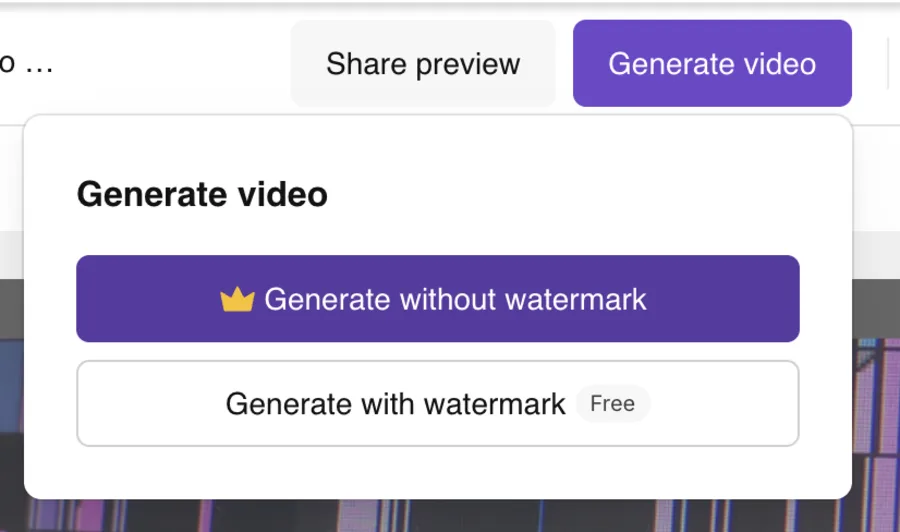
So the trial shows you exactly what Pictory makes but holds the usable output hostage until you pay. That is worth knowing before you invest an afternoon producing something you cannot publish clean — I walk through the full hands-on trial in our Pictory review. The real entry price to a watermark-free video is $25 a month, not $0.
The public page and the app disagreed on credits
When I checked Pictory’s allotments, the public pricing page listed Starter at 1,200 AI credits a year while the in-app plans page said 2,400 — a 2× discrepancy on the exact number you are buying. I trust the in-app figure because it is what your account actually shows, but the lesson is broader: verify the credit allotment inside the app before you commit to a tier, because the marketing page cannot be relied on for the number that decides how many videos you get.
The good voice is metered and gated
Pictory’s default “Tom” voice is serviceable but flat — the kind of narration that signals “AI video” to anyone listening. The voices that actually sound human are the integrated ElevenLabs ones, and those are metered (60 minutes a month on Starter, up to 240 on Teams) and partly gated (voice cloning only arrives on Professional). So the narration quality that makes a faceless video sound professional is a rationed, tier-locked resource, not the default — budget for it as a real pricing lever, not a free feature.
Credits drain faster than the price implies
The $25 and $35 prices feel cheap, and for the access they are. But because every generation and regeneration spends credits, the pool empties faster than the monthly fee suggests once you are iterating on real projects. If you run dry mid-cycle, Pictory sells add-on packs of extra AI credits, Getty stock, and ElevenLabs minutes — and unlike the trial credits, those add-ons do not expire while your plan is active. Useful, but it means a heavy month can cost more than the sticker price.
Which Pictory plan should you pick?
- Solo blogger or creator, a few videos a week → Starter ($25/mo annual). It exports clean, watermark-free video, the 2,400 credits cover about a hundred short clips a year, and the 5-million-clip library is plenty for on-topic B-roll. This is the right plan for most individuals, and the one I would start on.
- Faceless channel or social marketer publishing at volume → Professional ($35/mo annual). For $10 more a month you get five times the credits, voice cloning, the 18-million-clip library, and five brand kits. If you post more than a couple of videos a week or run multiple channels, this is the tier that stops you hitting the credit ceiling.
- Agency or small team → Teams ($119/mo annual). Worth it only once a single Professional plan is genuinely running dry, or when you need shared seats and the better per-credit rate at scale.
- Just testing whether Pictory fits → the trial, then monthly. Use the 14-day trial to confirm the workflow, then pay month-to-month for the first stretch if you are unsure; switch to annual once you know you will keep it, to lock in the annual saving (up to ~40% on Professional and Teams).
- Skip Pictory’s paid plans entirely if you need a genuinely free, watermark-free export, or you want cinematic generated footage rather than stock-and-caption assembly. Those are different tools, below.
If Pictory’s price doesn’t fit
If the credit math or the trial paywall puts you off, two tools in the same lane cost or meter differently.
| Tool | Entry price | The trade |
|---|---|---|
| Fliki | $8/mo (Basic) | cheaper, a free tier that actually exports a video, better voices — but basic visuals |
| InVideo AI | $20/mo (Plus) | wider model access and generative footage, but a credit system that punishes generative use |
- Fliki is the budget pick: it starts at $8 a month, its free tier actually exports a (watermarked) video where Pictory’s trial will not, and its 2,000-plus AI voices outclass Pictory’s default narration. You give up some of Pictory’s article-to-video polish, but if price and voice are your priorities it is the cleaner deal. See our Fliki review.
- InVideo AI is the more powerful all-rounder if you want generative footage rather than stock, with access to models like Veo and Sora — though its premium generations burn credits far faster than Pictory’s stock clips, so it can cost more in practice. See our InVideo AI review.
The bottom line on Pictory pricing
Pictory’s pricing is straightforward on the surface and metered underneath. You pay $25 a month for Starter or $35 for Professional on an annual plan, and for a blogger or faceless creator turning written content into video at volume, that is genuine value — the URL-to-video and script-to-video flows save real hours, and annual billing cuts the Professional and Teams price by roughly 40%.
Just go in clear-eyed about the two things the marketing page underplays: the free trial paywalls a clean export, so the real entry cost is $25, not $0; and the limit you actually hit is the AI-credit pool, not the monthly fee, so budget around credits and the kind of videos you make. Verify the credit allotment in-app before you commit, pick Starter if you are solo and Professional the moment you publish at volume, and the cost is easy to plan around.
Pictory is one of the picks in our best script-to-video AI tools roundup, and our Pictory vs Fliki comparison weighs it against the cheaper voice-first option.
Frequently asked questions
How much does Pictory cost?
Billed annually, Pictory is $25/month for Starter, $35/month for Professional, and $119/month for Teams, with a custom Enterprise tier above that. Paying month-to-month instead, the same plans cost $29, $59, and $199, so an annual commitment shaves roughly 40% off Professional's monthly price. Each plan includes a set yearly allotment of video minutes, AI credits, and premium ElevenLabs voiceover minutes that scale with the tier.
There is a 14-day free trial with 50 AI credits, but no permanent free plan, and the trial will not export a video without the Pictory watermark. For most solo creators the $25 Starter plan is enough; people publishing at volume or who want voice cloning move up to Professional. I verified these figures inside Pictory's own plans page, which is the number to trust over the marketing page, and the credit allotment — not the monthly fee — is the figure worth checking before you commit to a tier.
Is Pictory free?
There is a free 14-day trial that comes with 50 AI credits, not a permanent free plan. The trial lets you build full videos, but in my testing the moment I chose to export without the Pictory watermark, it sent me to the upgrade page instead of rendering, and the 50 trial credits did not cover a clean download. Only the watermarked export was actually free.
So you can try the whole product and see exactly what it makes, but the usable, publishable output is gated behind a paid plan that starts at $25 a month on an annual commitment. Treat the trial as a genuine test drive to confirm the tool fits before you pay, not as a way to produce a free video you can post. The 50 credits are enough to build and preview a couple of short videos and see exactly what Pictory makes, just not to download them without the watermark.
Is Pictory's annual or monthly plan better?
Annual is dramatically cheaper if you are confident you will keep using it. Professional is $35 a month on an annual plan versus $59 month-to-month, so paying monthly costs about 70% more for the same plan, and Teams is much the same ($119 vs $199). Starter's premium is smaller — $25 versus $29, about 16% — because its base price is already low.
Annual billing also drops the full year's allotment of credits and minutes into your account on day one, and Pictory now rolls unused credits over month to month, so a yearly plan suits anyone who produces in bursts. The one reason to pay monthly is genuine uncertainty: if you are not sure Pictory will stick, the month-to-month premium buys you the freedom to walk away after thirty days instead of being locked into a year.
How many videos can you make with Pictory?
It depends on length, because Pictory meters in AI credits, not videos. In my testing a 41-second 16:9 clip cost 16 credits and a one-minute-48-second vertical one cost 26, so Starter's 2,400 annual credits stretch to roughly a hundred short videos a year, Professional's 12,000 to several hundred, and Teams' 28,800 to thousands. That is plenty for a solo creator and tight for a daily-publishing team.
The credit ceiling, not the monthly price, is the real limit to plan around, and because every regeneration and re-render also spends credits, heavy iteration drains the allotment faster than the sticker price suggests. If you run out, Pictory sells add-on credit packs that do not expire while your plan is active. The honest way to budget is your target number of videos times the per-video credit cost, plus a generous margin for the re-runs you will inevitably need.
Does Pictory put a watermark on free videos?
Yes, on the free trial. When I picked 'Generate without watermark' during the 14-day trial, Pictory redirected me to the plans page instead of rendering the video, and the trial's 50 credits did not unlock a clean export. Only the watermarked version was free. A watermark-free download requires a paid plan, starting at $25 a month billed annually. On any paid plan the watermark is gone and you also get higher resolution and the larger stock library.
So the watermark is really a free-versus-paid signal, not a separate add-on: it disappears the moment you are on a Starter plan or above, and it is the single clearest reason the trial is an evaluation tool rather than a free video maker. There is no separate watermark-removal add-on to buy on the trial — the only path to a clean export is a paid plan.
Can you cancel Pictory anytime?
You can cancel a Pictory subscription, but how cleanly depends on which plan you are on. A month-to-month plan can be cancelled before the next billing date and you simply stop paying. An annual plan is a year-long commitment, so cancelling stops the auto-renewal at the end of the term rather than refunding the remaining months, which is the trade-off for the lower annual rate.
This is the standard SaaS model, but it is worth knowing before you choose annual to save up to 40%: you are committing to the year. If you are unsure whether Pictory fits your workflow, the month-to-month plan costs more per month but keeps you free to leave after thirty days, which can be the cheaper choice if you end up not using it. Either way, you keep access through the end of the period you have already paid for.
Keep reading
Pictory vs Fliki: I tested both — here's which to pick
Pictory vs Fliki, both tested: Fliki (4.3) wins on voice, price, and a real free tier; Pictory (4.1) wins at turning blog posts into video. Which fits you?
Pictory vs InVideo: I tested both — here's which wins
Pictory vs InVideo, both tested hands-on: InVideo (4.2) is the faster, more powerful all-rounder; Pictory (4.1) is cleaner for turning blog posts into video.
Pictory AI review: fast blog-to-video, real trade-offs
I ran a script and a blog post through Pictory's free trial: watchable videos in minutes, a 4.1/5 verdict, but the clean export is paywalled. Here's the review.
The 5 best Pictory alternatives, ranked by job
The best Pictory alternatives, ranked: Fliki for voice, InVideo for generative video, Lumen5 for blog-to-video, Synthesia for avatars, Descript for editing.