
Pictory vs Fliki: I tested both — here's which to pick
Pictory vs Fliki, both tested: Fliki (4.3) wins on voice, price, and a real free tier; Pictory (4.1) wins at turning blog posts into video. Which fits you?
Contents
Pictory vs Fliki: the short verdict
I tested both of these script-to-video tools hands-on, and they are less interchangeable than the “vs” framing suggests. Fliki is the voice-first, multilingual, budget pick with a free tier that actually works; Pictory is the tool for turning a blog post or article into a finished video. For most creators Fliki is the better all-round value, which is why it edges Pictory in our ratings — but if your job is repurposing written content, Pictory does that one thing better.
| Category | Verdict |
|---|---|
| Best for voice & languages | Fliki: 2,000+ voices, 80+ languages |
| Best for blog/article-to-video | Pictory: its URL-to-video is cleaner |
| Best value / best free tier | Fliki: $8/mo and a free tier that exports |
| Best overall (our rating) | Fliki 4.3 vs Pictory 4.1 |
Neither is a generative tool — both assemble stock or simple AI visuals around an AI voiceover and captions (if you want footage generated from a prompt, InVideo is the third tool in this lane). The real choice between these two is what you optimize for: Fliki optimizes for the voice, Pictory for the source content.
The full comparison at a glance
| Axis | Pictory | Fliki | Winner |
|---|---|---|---|
| Core use case | blog/article/script → video | voice-first social, multilingual | depends |
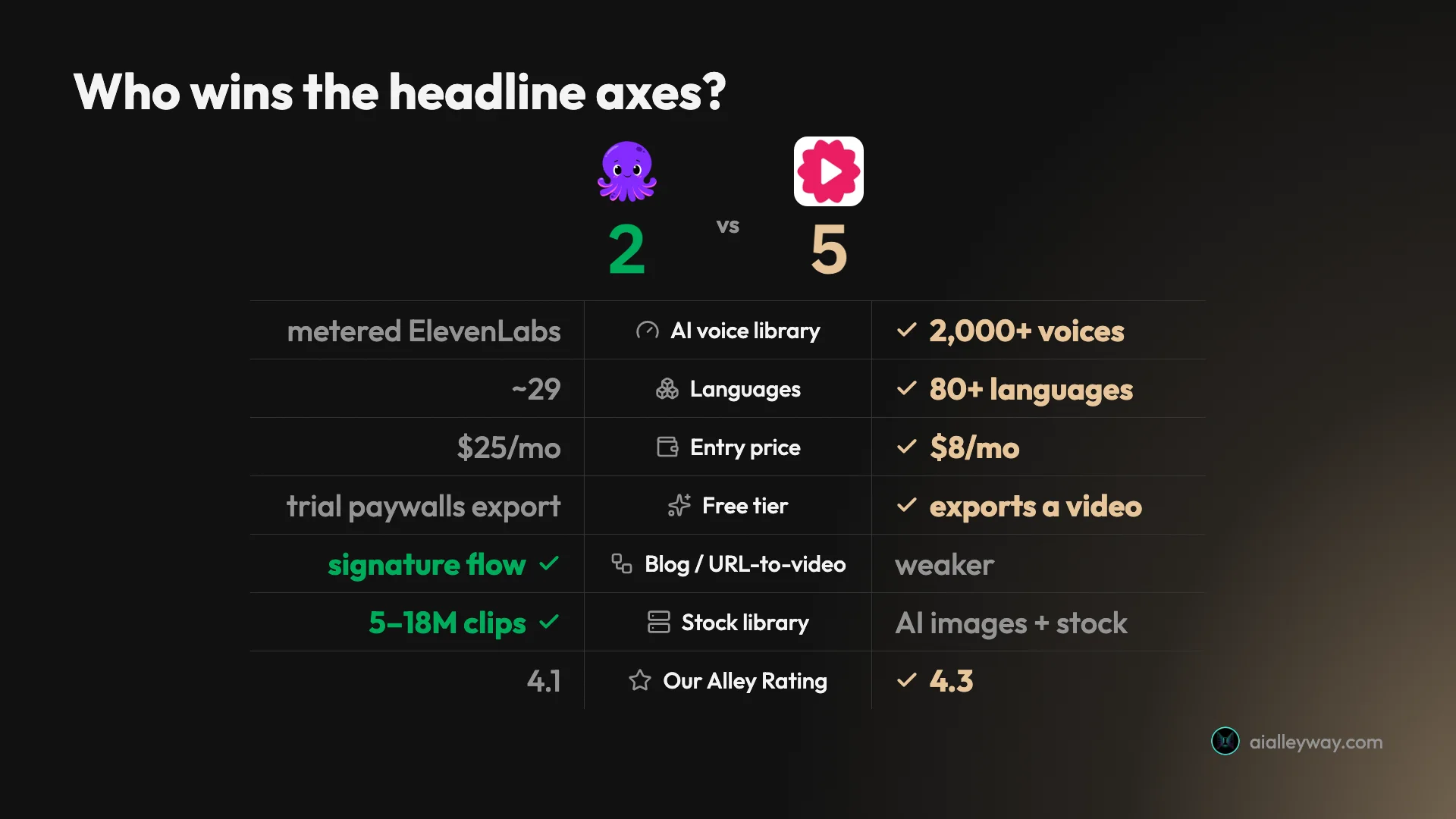
| AI voice library | metered ElevenLabs on paid | 2,000+ voices, ultra-realistic | Fliki |
| Languages | ~29 (via ElevenLabs) | 80+ languages, 100+ dialects | Fliki |
| Blog / URL-to-video | signature, accurate | available, less polished | Pictory |
| Stock / visuals | 5–18M Getty + Storyblocks | AI images + stock, basic | Pictory |
| Generative footage | none | none | tie |
| Entry price | $25/mo (annual) | $8/mo, free tier exports | Fliki |
| Free tier | trial paywalls clean export | exports watermarked video | Fliki |
| Editing control | scene editor | light, no timeline | Pictory |
| Ease of use | very beginner-friendly | very beginner-friendly | tie |
| Support | consistently praised | good | Pictory |
| Alley Rating | 4.1 | 4.3 | Fliki |
Read the table and the split is obvious: Fliki takes the axes most creators weigh first — voice, price, languages, free tier — while Pictory wins the structural ones around repurposing and stock depth.
Pictory: strengths and gaps
Pictory’s clearest edge is URL-to-video repurposing: no other tool in this lane reads an existing article and keeps its real argument as reliably, and its stock library is the deepest of the two.
Where Pictory wins:
- URL-to-video repurposing is its superpower. Paste an article and it reads the page, keeps your real argument, and builds a scene-by-scene video. In my Pictory review it named every tool in one of my roundups and kept the ranking — not just the keywords.
- The stock library is deep. 5 million clips on Starter, 18 million on Professional (Getty + Storyblocks), so scenes rarely come up empty.
- Customer support is a standout — it is the single most-praised thing in Pictory’s user reviews.
- Multiple input types — text, URL, audio, slide decks, documents — all route into one editor.
Where Pictory falls short:
- The default voice is robotic. The good voices are metered ElevenLabs minutes, gated to paid tiers (voice cloning only on Professional).
- The free trial paywalls a clean export — you cannot download without the watermark until you pay.
- It is a stock-and-caption tool in an era moving to generative video; the aesthetic reads as last-generation.
Fliki: strengths and gaps
Fliki’s whole case rests on its voice: the AI voice library is far deeper and more natural than anything Pictory offers, and it is cheaper to get there.
Where Fliki wins:
- The voice library is best-in-class — 2,000+ AI voices across 80+ languages, with ultra-realistic options that do not sound like text-to-speech. This is the whole reason to use it.
- A free tier that actually exports a video (watermarked, 720p, one minute) — you can publish for $0.
- Multilingual is a first-class feature, plus one-click translation on paid tiers, so one script becomes many localized clips.
- It is cheap — $8 a month for Basic versus Pictory’s $25.
Where Fliki falls short:
- The visuals are basic. The AI-generated images and stock are generic; swapping between them only trades one kind of generic for another. (See the Fliki review for the demo.)
- No fine editing — there is no timeline-level control, so coarse fixes only.
- Credits run down with iteration, and the free tier’s caps mean it is evaluation-grade, not publish-grade.
Which is cheaper, Pictory or Fliki?
This is the clearest gap between them, and it runs in Fliki’s favor. Fliki starts at $8 a month for Basic ($28 Standard, $88 Premium, billed monthly), and its free tier exports a real if watermarked video. Pictory starts at $25 a month for Starter billed annually ($29 month-to-month), rising to $35 for Professional and $119 for Teams — and its 14-day trial will not export anything clean without paying.
| Tier | Pictory | Fliki |
|---|---|---|
| Free | trial only, won’t export clean | yes, exports a watermarked clip |
| Entry paid | $25/mo (Starter) | $8/mo (Basic) |
| Mid | $35/mo (Professional) | $28/mo (Standard) |
| Top (individual) | $119/mo (Teams) | $88/mo (Premium) |
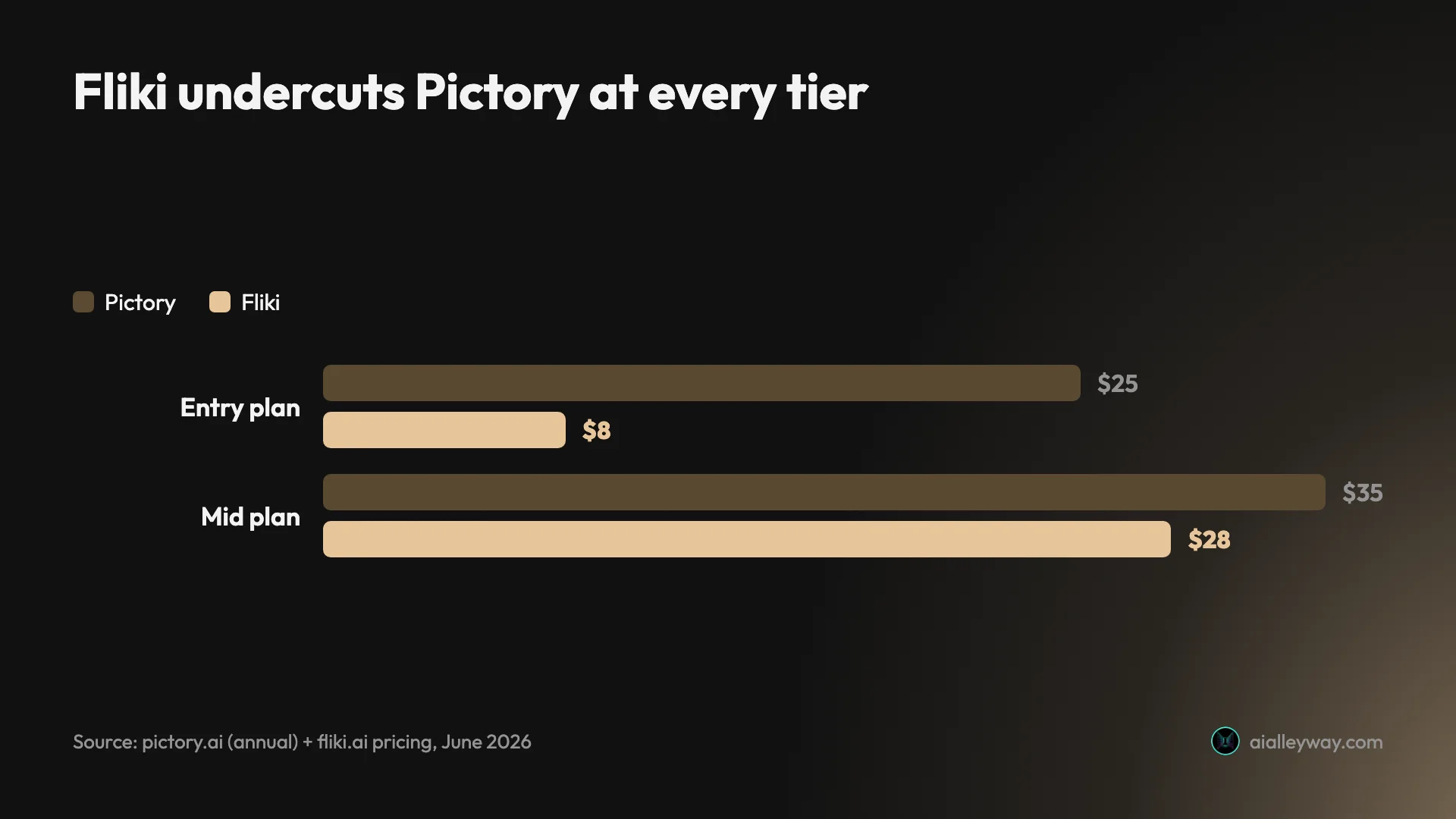
At the entry point Fliki is roughly three times cheaper, and it lets you publish a usable clip for free where Pictory’s trial only previews. Both then meter usage in credits as you scale: Pictory at about 16 to 26 credits per short video, Fliki on a yearly pool from 36 on the free tier up to 7,200 on Premium.
Heavy users should map their real volume against each pool rather than the sticker price, but for getting started and for budget creators, Fliki wins price decisively. Pictory only earns its premium if you need its repurposing depth or stock library.
Put it on a real cadence and the middle narrows. A creator posting two short videos a week, roughly a hundred a year, sits comfortably inside either Fliki’s $28 Standard plan or Pictory’s $25 Starter, so at that volume the monthly cost is close.
The gap reopens at the extremes: Fliki’s free and $8 tiers undercut anything Pictory offers at the low end, and a heavy multilingual publisher uses Fliki’s one-click translation to turn one video into several localized versions without paying again per language. The honest verdict is “Fliki at the entry point and the edges, roughly even in the middle,” which still favors Fliki for the many people who start at the entry point.
Which is better quality, Pictory or Fliki?
Quality splits cleanly by what you are judging: voice or visuals.
| Quality dimension | Pictory | Fliki | Winner |
|---|---|---|---|
| Voice naturalness | metered ElevenLabs; robotic default | 2,000+ ultra-realistic voices | Fliki |
| Languages | ~29 | 80+ | Fliki |
| Visual source depth | 18M licensed stock clips | AI images + stock, basic | Pictory |
| Repurposing fidelity | reads the article, keeps the argument | weaker | Pictory |
On voice, Fliki is in another class. Its 2,000-plus voices across 80-plus languages, with genuinely natural ultra-realistic options, outclass Pictory’s setup, where the default “Tom” voice is flat and the good voices are rationed ElevenLabs minutes locked to paid tiers. If narration carries your videos — and for faceless content it does — Fliki is the better tool, full stop.
On visuals, it is closer and tilts slightly to Pictory, mostly on depth of source material. Both are stock-and-caption assemblers, not generators, so neither produces original footage. But Pictory’s 18-million-clip Getty and Storyblocks library gives it more on-topic options per scene, and its URL-to-video output holds together as a coherent repurposed video. Fliki’s AI-generated images plus stock look more generic. Here are the two tools’ actual outputs from my testing — Fliki’s voice-led script-to-video first, then Pictory’s article-to-video:
The takeaway: pick Fliki when the sound matters most, Pictory when the source content matters most.
How they differ on speed and workflow
Both are built for speed over control, and both deliver a finished draft in minutes from a paste — neither needs a manual, and onboarding is gentle on each. The difference is the shape of the workflow.
Pictory’s workflow is built around inputs: it has dedicated flows for text, URL, audio, slide decks, and documents, all landing in one scene-based storyboard editor where you can swap a clip, retime a caption, or change a voice per scene. That scene editor gives it slightly more hands-on control after the draft exists, and the keyword highlighting it adds to captions is a small touch that saves a pass.
Fliki’s workflow is built around the voice: you paste a script, pick from the huge voice library, and it assembles scenes around the narration, with lighter editing and no real timeline. The trade is that swapping a voice or a language is instant, while restyling the video itself is coarse.
So if your raw material is varied (old webinars, slide decks, articles), Pictory’s input range is the better fit; if your material is scripts and your priority is dialing in the perfect voice fast, Fliki’s flow is tighter. Both get a non-editor to a publishable draft in minutes, with Pictory giving you a bit more to adjust about the video and Fliki far more to adjust about the voice.
Who should pick Pictory
- Bloggers and marketers with a back catalog of articles — the URL-to-video flow is the best reason to choose Pictory, and the job it does better than Fliki.
- Creators who lean on stock B-roll and want the deepest licensed library so no scene comes up empty.
- Teams that value responsive support — Pictory’s support is its most-praised feature.
- Repurposers of mixed source files — webinars, slide decks, and documents all route into one editor.
Who should pick Fliki
- Voice-first faceless creators — the 2,000+ voice library is the whole pitch, and nothing in Pictory matches it.
- Multilingual and non-English channels — 80+ languages plus one-click translation make Fliki the clear pick for publishing beyond English.
- Budget and free-tier users — at $8 a month, with a free tier that exports a video, Fliki is the affordable, try-before-you-pay option.
- High-volume social creators who care more about natural narration at scale than about polished visuals.
The final word
For most people choosing between these two, Fliki is the better pick — it is cheaper, its voices are far better, it covers more languages, and its free tier actually produces a video, which is why it scores 4.3 to Pictory’s 4.1.
The one clear exception is repurposing: if your real job is turning existing blog posts and articles into video, Pictory’s URL-to-video flow does that more cleanly than anything Fliki offers, and its stock library and support back it up. So decide by the job, not the brand — voice-first, multilingual, or budget, go Fliki; article-to-video repurposing, go Pictory. If you only try one, make it the one that matches the work you actually do most.
Both sit in our best script-to-video AI tools roundup, where you can see how they rank against the rest of the field.
Frequently asked questions
Is Fliki better than Pictory?
For most creators, yes, on balance — which is why I scored Fliki 4.3 against Pictory's 4.1. Fliki has a far deeper voice library (2,000+ voices across 80+ languages versus Pictory's metered ElevenLabs minutes), a free tier that actually exports a video, and a lower entry price ($8 a month versus $25).
Where Pictory is genuinely better is the specific job of turning an existing blog post or article into video: its URL-to-video flow reads the page, keeps your argument, and assembles a clean repurposed clip more reliably than Fliki's. So 'better' depends on the job — Fliki wins on voice, value, and languages; Pictory wins on article-to-video repurposing and customer support. For a typical voice-first or budget creator, Fliki is the stronger pick — read both reviews if you want the full hands-on detail behind those two scores.
Is Fliki cheaper than Pictory?
Yes, clearly. Fliki starts at $8 a month for its Basic plan and has a genuinely free tier that exports a watermarked 720p video, so you can publish something for $0. Pictory's cheapest paid plan is $25 a month billed annually, and its 14-day free trial will not export a video without the Pictory watermark — a clean download requires paying. So at the entry level Fliki is roughly three times cheaper and lets you produce a usable clip for free, while Pictory's real entry cost is $25.
Both meter usage in credits as you scale, so heavy users should compare the per-video credit cost on each, but for getting started and for budget creators, Fliki is the cheaper tool by a wide margin. Only at high multilingual volume does the math tighten, and even then Fliki's one-click translation usually keeps it ahead.
What is Pictory best at compared to Fliki?
Repurposing written content into video. Pictory's signature feature is URL-to-video: paste a blog post or article and it scans the page, writes a script that keeps your actual points and verdict, and builds a scene-by-scene video around licensed stock footage. In my testing it pulled the real argument off the page rather than just the keywords, which is genuinely uncommon. Its stock library (5 to 18 million Getty and Storyblocks clips) is also deeper than Fliki's, and its customer support draws consistently strong praise.
So if your workflow is 'I have a back catalog of articles and want them as social videos,' Pictory is the more focused, more reliable tool for that exact job — even though Fliki beats it on voice quality, price, and languages elsewhere. If you do not have a back catalogue of written content to repurpose, though, that core strength matters far less to you.
Can Fliki replace Pictory (or vice versa)?
They overlap enough to replace each other for some jobs, but not all. Both turn a script or a blog URL into a captioned, narrated video with stock or AI visuals, so for general faceless social video either one works. Fliki replaces Pictory well if your priorities are voice quality, multiple languages, and a low price, and you do not need Pictory's deeper stock library or its cleaner article-to-video output. Pictory replaces Fliki well if your core job is repurposing existing written content and you want the strongest URL-to-video flow, and you can live with metered ElevenLabs voices instead of Fliki's huge built-in library.
For most creators I would not run both — pick Fliki for voice-first or budget work, Pictory for article-repurposing, and commit. Running both rarely pays off unless you genuinely need each tool's separate strength at once.
Do Pictory and Fliki have free plans?
Sort of, and this is a real difference between them. Fliki has a permanent free plan that exports a finished video — capped at 720p, one minute, with a Fliki watermark and a small monthly credit pool, but it produces something you could actually post. Pictory has only a 14-day free trial with 50 AI credits, and crucially the trial will not export without the Pictory watermark; a clean download sends you to the upgrade page.
So Fliki lets you make and keep a (watermarked) video for free indefinitely, while Pictory's free option is an evaluation period that paywalls the usable output. If a free tier matters to you, that gap alone points to Fliki, though neither free option removes the watermark without paying. To export clean, you are looking at $8 a month on Fliki or $25 a month on Pictory.
Keep reading
Pictory vs InVideo: I tested both — here's which wins
Pictory vs InVideo, both tested hands-on: InVideo (4.2) is the faster, more powerful all-rounder; Pictory (4.1) is cleaner for turning blog posts into video.
Pictory pricing: the plans, the credits, and the catch
Pictory starts at $25/mo annually, but the trial paywalls clean exports and credits meter every video. The real per-plan cost and the catch, hands-on.
Pictory AI review: fast blog-to-video, real trade-offs
I ran a script and a blog post through Pictory's free trial: watchable videos in minutes, a 4.1/5 verdict, but the clean export is paywalled. Here's the review.
The 5 best Pictory alternatives, ranked by job
The best Pictory alternatives, ranked: Fliki for voice, InVideo for generative video, Lumen5 for blog-to-video, Synthesia for avatars, Descript for editing.