
Fliki AI review: the voices carry it, the visuals don't
I ran a script through Fliki's free tier: a captioned video with a genuinely good AI voice in minutes. The voices are why you'd use it. My 4.3/5 verdict.
Contents
Is Fliki worth it?

Yes, if what you need from a video tool is a great voice. I pasted a short script into Fliki’s free plan, and a couple of minutes later it handed back a captioned, narrated vertical video, no mic and no editing involved. The visuals were forgettable, but the voiceover was clean and natural, and that is the whole point of Fliki. I score it 4.3 out of 5, a Power Tool.
Fliki sits in the same script-to-video lane as Pictory and InVideo, but it competes on a different axis: voice. Its library runs to 2,000+ AI voices across 80+ languages, and the quality of the narration is what reviewers and my own test keep coming back to. The catch is the other half of the screen. The auto-generated images and stock footage are basic and a little generic, the free tier exports at 720p with a watermark, and you spend credits on every generation. For a voice-first, multilingual, or budget creator that trade is easy. For anyone chasing original visuals, it is not.
What does Fliki do?
Fliki turns text into narrated video. You give it a script, a blog URL, or a slide deck, and it writes the video out as a sequence of captioned scenes with an AI voiceover, background music, and matched visuals. The pitch, like the rest of this category, is that you skip the recording booth and the timeline and let the AI assemble a draft.
What sets Fliki apart is where it spends its quality budget: the voice. Where Pictory leans on stock B-roll and InVideo leans on generative footage, Fliki leads with the largest, most natural voice library of the three, then wraps simple visuals around it. The home screen offers Video, Voiceover, and Design modes, plus dedicated workflows for script-to-video, blog-to-video, PPT-to-video, screen recording, and auto-editing.
Here is the actual output. I pasted a six-sentence script about AI voiceovers, kept the smart defaults (9:16, AI-generated images, a voice called “Cooper,” bold captions), and Fliki returned this in minutes.
The voiceover carries it. The AI-generated robot visuals are generic and the captions are plain, but the narration is clear and well-paced, and the scenes are timed to the voice without any work from me. For a faceless social clip, that is most of the way to done.
Each workflow points the same engine at a different starting file. Script-to-video reads a script you paste; blog-to-video ingests an article URL and summarizes it; PPT-to-video rebuilds a slide deck as narrated scenes; and the voiceover-only mode skips visuals entirely to generate audio you can drop anywhere. For a creator with mixed source material, routing all of it into one editor is convenient, and the voice you pick travels across every format.
Inside the editor, each line of the script becomes its own scene with its own voice, image, and caption, and you can edit any of them by hand. The layout is clean and beginner-friendly, with Avatar, Graphics, Media, Shape, Text, and Record tabs along the top.
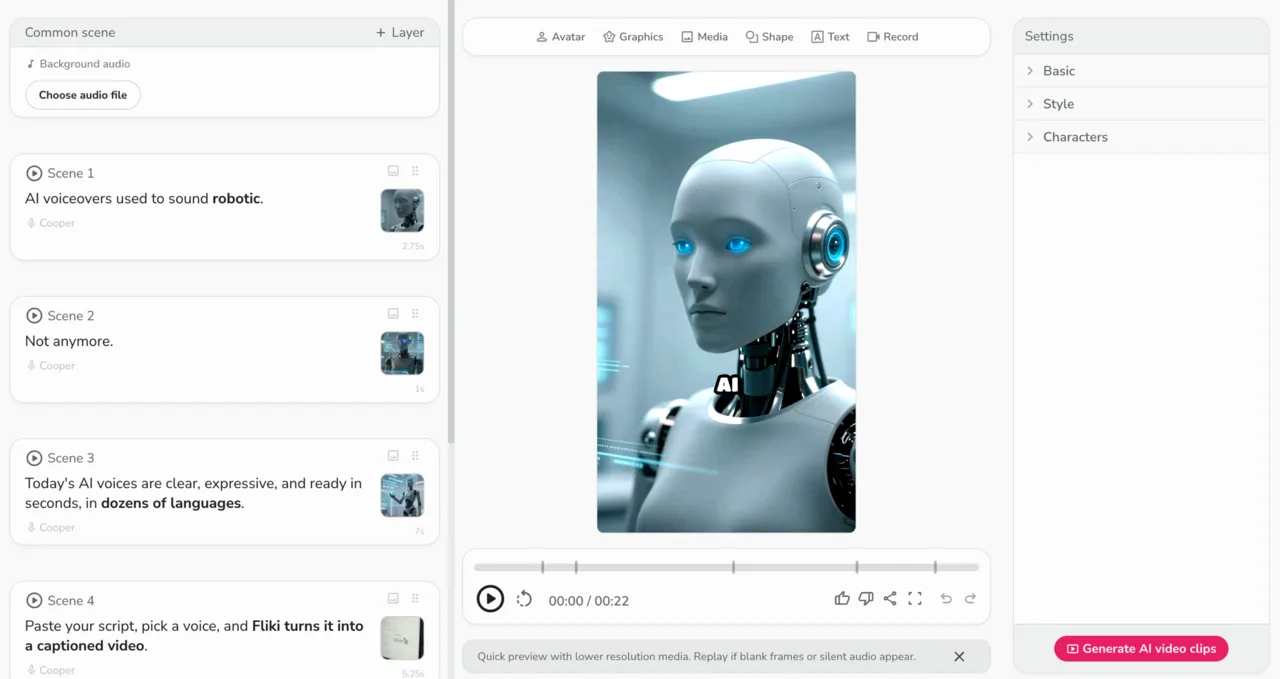
Fliki analyzed my script before it built anything, correctly tagging it as “a product promo for an AI voiceover tool, best suited for short-form vertical video,” and chose sensible defaults off that read. It is the kind of small touch that makes the tool feel easy rather than fiddly.
How much does Fliki cost?
Fliki runs on a credit-based subscription with a genuinely usable free plan. The prices below are what I read live in the in-app upgrade screen.
| Plan | Monthly | Credits/yr | Max export | Voices | Watermark |
|---|---|---|---|---|---|
| Free | $0 | 36 | 1 min, 720p | 300 | Yes |
| Basic | $8 | 720 | 5 min, 1080p | 1,000 (200 ultra) | No |
| Standard | $28 | 2,160 | 15 min, 1080p | 1,000 (500 ultra) | No |
| Premium | $88 | 7,200 | 40 min, 1080p | 2,000+ (1,000+ ultra) | No |
Two things matter here. First, the free plan is real: unlike InVideo, whose free tier cannot generate a single video, Fliki’s free plan let me build and export a watermarked 720p clip without paying. That makes it a true test drive, not a locked demo. Second, annual billing plus the current promo code roughly halves every price, so Standard drops from $28 to about $14 a month on a yearly commitment. The headline monthly numbers are the honest ones to plan around, but the annual discount is steep if you are sure.
The real ceiling is credits, not the monthly fee. Each generation spends from your yearly allotment, so Basic’s 720 credits go faster than the low price suggests once you are iterating. For a steady, light publishing schedule that is fine; for an agency pushing daily multilingual video, Premium’s 7,200 credits and 40-minute exports are the tier that actually fits, and that is where Fliki stops being the cheap option.
What you get as you climb is mostly voice and length. Basic removes the watermark, reaches 1080p, and adds five-minute exports and one-click translation; Standard, the tier Fliki pushes hardest, adds 500 ultra-realistic voices, 15-minute videos, and voice cloning; Premium opens the full 2,000+ voice catalog, 40-minute exports, AI avatars, and brand kits. The annual promo halves every price, but promos end, so the monthly figures are the safer ones to budget against.
Who is Fliki for?
Fliki is built for creators who lead with words and voice rather than visuals, and who value speed, language coverage, and a low price over polished footage. A few profiles fit it especially well.
- Voice-first faceless creators building YouTube Shorts, TikToks, or Reels who care more about a natural narration than original footage. Fliki’s voice library is its whole reason to exist, and this is the creator it serves best.
- Multilingual and non-English creators. With 80+ languages and native-sounding voices, plus translation on paid tiers, Fliki is the strongest pick here for anyone publishing outside English or running channels in several languages at once.
- Bloggers and educators repurposing written posts or slide decks into narrated explainers, using the blog-to-video and PPT-to-video flows without learning an editor.
- Budget and high-volume creators who need a steady stream of captioned clips and value a low entry price and a working free tier over visual polish.
- Not for you if you need original or cinematic visuals, fine timeline-level editing, or a single highly produced hero video. Fliki’s visuals are basic by design, and no amount of credits changes that.
What does Fliki get right?
The voice library is the best in its class
This is the reason to use Fliki. The library advertises 2,000+ voices across 80+ languages, and filtering it to US English alone surfaced dozens of options across Multilingual, Ultra, and Standard categories, each with a one-tap preview and a plain-language descriptor.
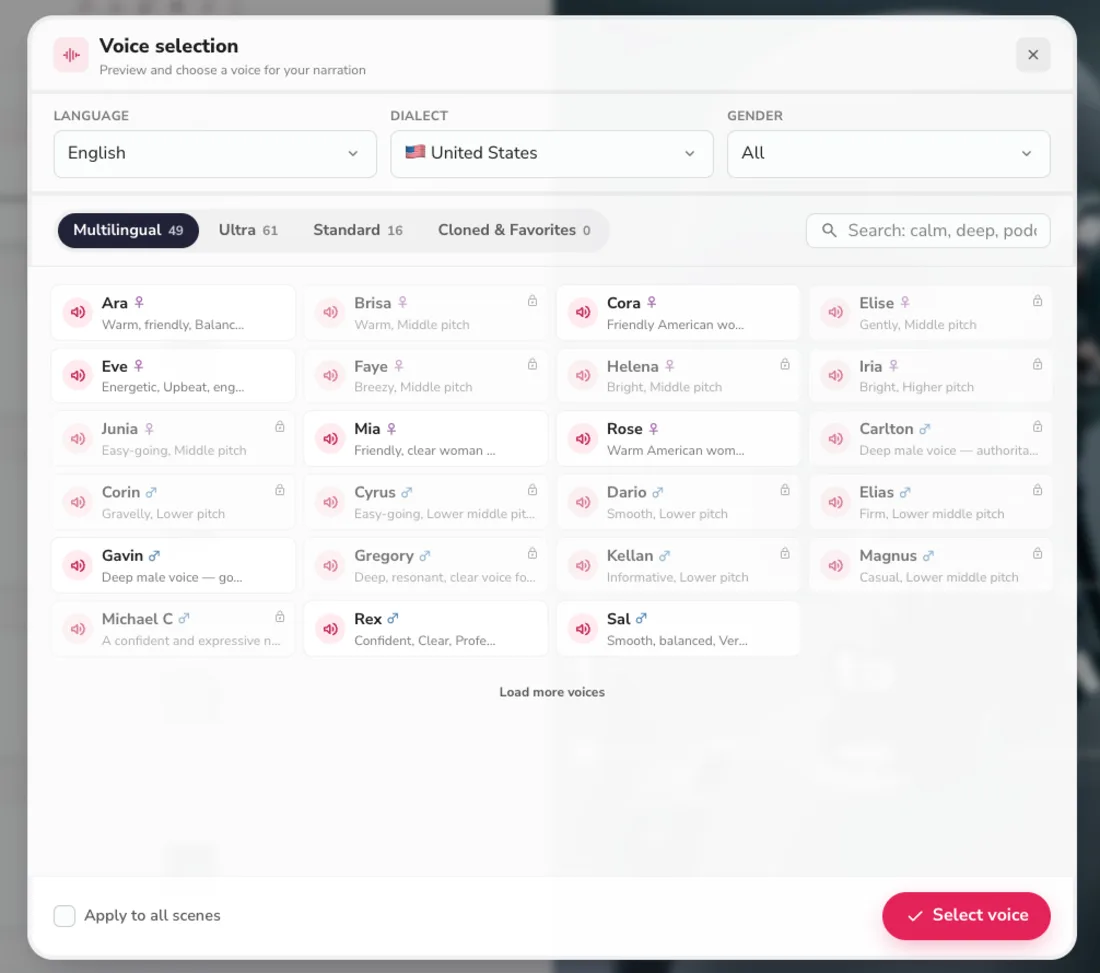
The “Cooper” voice my test picked by default sounded natural and well-paced, not the flat text-to-speech tell you get elsewhere. You preview any voice with one tap before committing, filter by language, dialect, and gender, and the descriptors (“warm,” “gravelly,” “authoritative”) make finding the right tone fast rather than a guessing game. For a tool whose entire output hinges on the narration, having the deepest, most lifelike voice catalog of the three script-to-video tools is a real, defensible edge.
The free plan actually lets you make a video
Fliki’s free tier is a genuine test drive, not a locked preview. I generated a full 22-second video and exported it without paying, watermark and 720p cap aside. That is a meaningfully better first-run than InVideo, whose free plan gives one credit and cannot produce a single clip. If you want to know whether a script-to-video tool fits before you spend, Fliki lets you find out for free.
Multilingual range is built in
Eighty-plus languages with native-sounding voices is not a footnote here, it is a headline feature. Most rivals concentrate on English and treat other languages as an afterthought; Fliki treats multilingual output as a first-class use case, and paid tiers add one-click translation of a finished video. For a creator running a Spanish, Hindi, or Portuguese channel, that breadth is the whole decision. Switching the narration language is a matter of picking a voice in that language from the same dropdown, and on paid tiers Fliki will re-voice a finished video into other languages in a few clicks, which turns one script into a stack of localized clips.
| Plan | Total voices | Ultra-realistic |
|---|---|---|
| Free | 300 | 0 |
| Basic | 1,000 | 200 |
| Standard | 1,000 | 500 |
| Premium | 2,000+ | 1,000+ |
It is genuinely fast and easy
Fliki’s aggregate ratings line up with my experience: it holds 4.7 on G2 across 178 reviews and 4.7 on Software Advice across 345, where the recurring praise is ease of use. Nothing in the flow needed a manual. I pasted a script, accepted the smart defaults Fliki proposed from reading it, and had a finished draft in minutes. Fliki read the script, proposed a format, a voice, and a caption style, and left me to adjust only what I wanted. For a non-editor, that removes the part of video creation that usually stalls people.
It includes AI-generated visuals, not only stock
Fliki’s default scene media is AI-generated images in a chosen style, not just a stock search. My demo produced original cinematic robot imagery rather than a recycled clip everyone else has used. The images are not its strong suit, but generating them in-style is a step up from a pure stock library, and you can switch to stock or upload your own per scene.
One editor for several input types
Script, blog URL, slide deck, and screen recording all route into the same scene-based editor with the same per-scene controls for voice, image, caption, and audio. Trustpilot’s 4.4 across more than 3,000 reviews is the largest review base of any tool in this comparison, and the volume itself is a signal that a lot of people use it and mostly like it.
Where Fliki falls short
The visuals are basic and a little generic
This is the trade you make. The AI-generated images and stock clips are serviceable but forgettable, and my hands-on read landed on the same word every time: limited. My demo’s robot imagery was fine for a social clip but would not pass for original creative, and swapping to stock only trades AI-generic for stock-generic. If the visual is the point of your video, Fliki is the wrong tool, and that is true at every price tier; the higher plans buy you more voices and minutes, not better-looking footage.
The free tier is capped hard
The free plan exports at 720p, stamps a Fliki watermark, and limits you to one-minute videos and roughly five minutes of content a month. It is enough to evaluate the product honestly, which is more than some rivals offer, but it is not enough to publish from.
| Free tier | Limit |
|---|---|
| Resolution | 720p |
| Watermark | Yes |
| Export length | 1 minute |
| Content per month | ~5 minutes (36 credits/year) |
| Voices | 300 (no ultra-realistic) |
A clean, watermark-free, 1080p video, and access to the ultra-realistic voices that are the whole reason to use Fliki, requires a paid plan from $8 a month. The free tier is a real test drive, but it is built to convert you, not to publish from.
Credits run down faster than the price implies
Every generation spends from your yearly credit allotment, and iterating, regenerating a scene, or re-rendering a voice all cost more. Basic’s 720 credits a year sound generous next to the $8 price until you are three drafts deep on a single video. The monthly fee is low; the real budgeting unit is credits, and that is the number that bites high-volume users.
There is no fine editing control
Fliki is built for fast assembly, not precision. There is no timeline-level editing, no real motion design, and limited control over how a scene is composed. You can swap a clip or retime a caption, but if the AI gets a detail wrong, your options are coarse. It is a draft generator with light touch-ups, not an editor.
The captions and on-screen text are plain
In my preview, the bold captions did their job but rendered awkwardly in spots, and the styling options are limited next to a dedicated short-form editor. For a muted-feed social clip the auto-captions are adequate, but creators who care about caption design as part of the brand will find the controls thin.
Strong ratings, but not flawless
Fliki’s scores are good across the board, yet Trustpilot sits at 4.4 rather than the 4.7 it earns on G2 and Software Advice, and the gap reflects a real minority of users who hit the credit limits or wanted more from the visuals. It is a well-liked tool, not a universally loved one, and the rating reflects exactly that.
It is one strong feature wrapped in average ones
Fliki’s voice is excellent and almost everything around it is merely fine. That focus is a strength for the right user and a ceiling for everyone else. If you are not buying it specifically for the narration and the multilingual range, the rest of the product does not pull ahead of the pack.
If Fliki isn’t for you
If the voice-first fit is not quite right, three tools cover the gaps depending on what you need instead.
| Tool | Best for | The trade |
|---|---|---|
| Pictory | repurposing blog posts into video | better at article-to-video, weaker voices |
| InVideo AI | prompt-to-video and generative footage | more powerful visuals, pricier, no free generation |
| ElevenLabs | studio-grade voice on its own | best voice quality, but it is not a video tool |
- Pictory is the better fit if your real job is turning written articles into video; its URL-to-video repurposing is cleaner, though its voices are a step behind Fliki’s. See our Pictory review.
- InVideo AI is the more powerful all-rounder, generating full videos from a prompt and pulling on models like Google’s Veo and OpenAI’s Sora for footage. It costs more and its free plan cannot generate a video, but the visual ceiling is higher. See InVideo.
- ElevenLabs is the move if what you actually want is the best AI voice and you will handle the video elsewhere; it is the studio-grade voice standard, not a video maker. See our ElevenLabs review.
The verdict
| The pick and the rating | |
|---|---|
/picks rank | best in script-to-video |
| Alley Rating | 4.3, Power Tool |
| Why they differ | best voice in the category; the visuals wrapped around it are basic |
Fliki is our script-to-video pick and scores 4.3, below the 4.6 that a Category Leader label usually implies. That gap is the honest answer in a young category: nothing else turns a script into captioned, well-voiced video as cheaply, and the visuals it wraps around that voice are basic. The pick reflects the field; the rating reflects the tool.
Fliki is a Power Tool at 4.3 out of 5, and it earns that on one axis above all: voice. If you are a voice-first or multilingual creator who needs captioned video at volume without a production budget, the 2,000+ voices, the 80+ languages, the working free tier, and the low price make it the easiest recommendation in its category. The narration genuinely sounds good, and that is the hard part most rivals get wrong.
Go in clear about the trade, though. The visuals are basic, the free tier is watermarked and capped, and credits run down faster than the sticker price suggests. Fliki is excellent at the thing it chose to be excellent at and ordinary everywhere else, which is exactly why it is a strong buy for the right creator and a skip for anyone who needs the picture to carry the video.
Fliki tops our best script-to-video AI tools roundup, so it is our default recommendation in this lane. If you are weighing it against the obvious rivals, see Fliki vs InVideo and Pictory vs Fliki, and our Fliki pricing guide breaks down the credits and the annual promo in full.
Frequently asked questions
Is Fliki AI worth it?
For voice-first and multilingual creators who turn scripts into captioned video at volume, yes. In my hands-on test Fliki produced a clean, narrated, captioned 22-second clip in minutes, on the free tier and with no editing, and the 2,000+ AI voices across 80+ languages are its real standout. The default 'Cooper' voice it picked sounded natural rather than robotic, which is the part most rivals get wrong.
It is also cheap, starting at $8/month for Basic. The trade-off is visual: the auto-generated images and stock are basic, so it is less worth it if original or cinematic footage is the point of your video, and it leans on a credit system, so heavy iteration adds up. But for steady, narration-led social or explainer video on a budget, it is one of the easiest recommendations in its category. I score it 4.3 out of 5, a Power Tool.
Is Fliki AI free?
Yes, there is a real free plan, and unlike some rivals it actually lets you make and export a video. In my test I generated a full 22-second clip and downloaded it without paying. The free tier gives roughly 5 minutes of content a month (36 credits a year) and 300 standard voices, and it exports at 720p with a Fliki watermark and a one-minute cap, so it is enough to evaluate the tool honestly but not to publish from.
To remove the watermark, reach 1080p, unlock the ultra-realistic voices that are the main reason to use Fliki, and lift the length cap, you need a paid plan, which starts at $8 a month for Basic. It is a genuine test drive, built to convert you rather than to be a permanent free tier.
How much does Fliki cost?
Billed monthly, the plans are Free $0, Basic $8, Standard $28 (the tier Fliki pushes hardest), and Premium $88; annual billing plus the current promo roughly halves those. What you pay for as you climb is mostly voice and length: credits rise from 720 to 7,200 a year, maximum export length from 5 to 40 minutes, and ultra-realistic voices, voice cloning, and AI avatars unlock on the higher tiers.
The real ceiling, though, is credits, not the monthly fee, because every generation and every regeneration spends from your yearly allotment. For a light, steady schedule the lower tiers are fine; for daily multilingual output, Premium's 7,200 credits are the tier that actually fits, and that is where Fliki stops being the cheap option. The free plan, by contrast, includes only 36 credits a year, enough to test the tool honestly but not to publish from.
How many voices does Fliki have?
Fliki advertises 2,000+ AI voices across 80+ languages and 100+ dialects, scaling by plan: 300 on Free, 1,000 on Basic and Standard (with 200 and 500 ultra-realistic respectively), and the full 2,000+ with 1,000+ ultra-realistic on Premium. In my test, filtering the library to US English alone surfaced dozens of options across Multilingual, Ultra, and Standard categories, each with a one-tap preview and a plain-language descriptor like 'warm,' 'energetic,' or 'deep and authoritative.'
You can filter by language, dialect, and gender, and clone your own voice on the Standard and Premium tiers. The default 'Cooper' voice my test picked sounded natural rather than robotic, and the depth and quality of this catalog is genuinely the best part of the product and the main reason to choose Fliki over rivals. You preview any voice with a single tap before committing it to the video.
Is Fliki better than InVideo AI?
For voice-first, multilingual, budget video, Fliki is the cleaner pick. Its voice library is deeper, its free tier actually lets you build and export a video, and it is cheaper at $8 a month against InVideo's higher entry. InVideo is the more powerful all-rounder for prompt-to-video and can pull on generative models like Google's Veo and OpenAI's Sora for original footage, so its visual ceiling is higher.
But InVideo's free plan gives a single credit and cannot generate even one video, and its generative output burns far more credits per clip. So for pure visual quality InVideo leads; for voice quality, language coverage, a working free tier, and value, Fliki does. In my own testing Fliki's free plan produced a finished, exportable clip while InVideo's single credit could not generate one. Pick Fliki if narration is the priority and InVideo if the picture is.
Can Fliki make videos in other languages?
Yes, and it is a core strength. Fliki supports 80+ languages and 100+ dialects with native-sounding AI voices, and on paid tiers it will translate a finished video into other languages in a few clicks, which turns one script into a stack of localized clips. Because the voice library spans those languages, switching the narration language is a matter of picking a voice in that language from the same dropdown.
Most rivals concentrate on English and treat other languages as an afterthought, so for a creator running a Spanish, Hindi, or Portuguese channel, or several language channels at once, that breadth is one of the main reasons to choose Fliki over tools with smaller voice libraries. The translation feature in particular makes it a practical hub for multilingual faceless content, and Premium's full 2,000+ voice catalog covers the widest language range of any plan.
What are Fliki's main limitations?
The visuals are the weak point. The auto-generated AI images and stock clips look basic and a little generic, and swapping between them only trades one kind of generic for another, so Fliki is the wrong tool when the picture is the point. There is also no fine, timeline-level editing, so if the AI gets a detail wrong your options are coarse.
The free tier is capped at 720p with a watermark and one-minute exports, and every generation spends credits, so high-volume users hit the ceiling faster than the low price suggests. Captions work but the styling options are plain and limited. None of this undercuts the voice, which is genuinely excellent, but it is why Fliki scores a 4.3 rather than higher, and why it is a skip for anyone who needs original or cinematic footage.
Keep reading
Fliki pricing: what $8 a month really gets you
Fliki starts at $8/mo (or $6 with annual billing, 25% off), and its free tier actually exports a video. The real per-plan cost, the credits, and the catch.
Fliki vs InVideo: I tested both — voice or visuals?
Fliki vs InVideo, both tested hands-on: Fliki (4.3) wins on voice, languages, price, and a free tier; InVideo (4.2) wins on generative visuals and speed.
The 5 best InVideo AI alternatives, ranked by job
InVideo alternatives ranked: Fliki from $8 for voice and a free tier, Runway for generative footage, Pictory for blog-to-video, plus avatar and editing picks.
The best script-to-video AI tools, by job
The best script-to-video AI tools ranked by job: Fliki wins overall, InVideo for generative footage, Pictory for blog-to-video, plus avatar and editing picks.