
Pictory AI review: fast blog-to-video, real trade-offs
I ran a script and a blog post through Pictory's free trial: watchable videos in minutes, a 4.1/5 verdict, but the clean export is paywalled. Here's the review.
Contents
Is Pictory worth it?

Yes, if you write for a living and want those words on screen without learning a video editor. I spent a session inside Pictory’s free trial, and the moment that sold me was unglamorous: I pasted the URL of one of my own blog posts, and about two minutes later Pictory handed back a scene-by-scene video that named the right tools, kept my verdict, and added captions and a voiceover I never recorded. I score it 4.1 out of 5, a Power Tool.
Pictory is not the flashiest AI video tool in 2026, and it is not trying to be. It will not generate a cinematic dragon from a sentence the way Sora or Veo will. What it does is take text you already have, a script, an article, a webinar recording, and turn it into a watchable, captioned, narrated clip in minutes. That is a narrower job, but for bloggers, marketers, and faceless-channel creators it is the job that actually pays.
The catch is in the fine print: the free trial paywalls a clean export, the auto-matched stock footage needs babysitting, and the default voice sounds like a robot reading a menu. None of those are dealbreakers for the job it is built for, but they are exactly the things a marketing page will not tell you, which is why this review exists.
What does Pictory do?
Pictory turns words into video. You give it a script, a blog URL, an audio file, a slide deck, or a long recording, and it assembles a finished short-form video around that text, complete with matched stock footage, on-screen captions, background music, and an AI voiceover. The pitch is that you skip the timeline, the B-roll hunting, and the recording booth, and let the AI do the assembly.
My first hour set the tone for the whole tool. I went from a blank screen to a finished, captioned, narrated video without reading a single help doc, and the only real decision was which of the eight inputs to use. That low floor is Pictory’s entire personality, and it cuts both ways: trivial to start, with a ceiling you reach faster than a pro editor would like.
The home screen lays out the full menu of inputs, and it is broader than I expected: text-to-video, URL-to-video, an AI video editor, summarize-video, audio-to-video, images-to-video, PPT-to-video, and a newer doc-to-video.
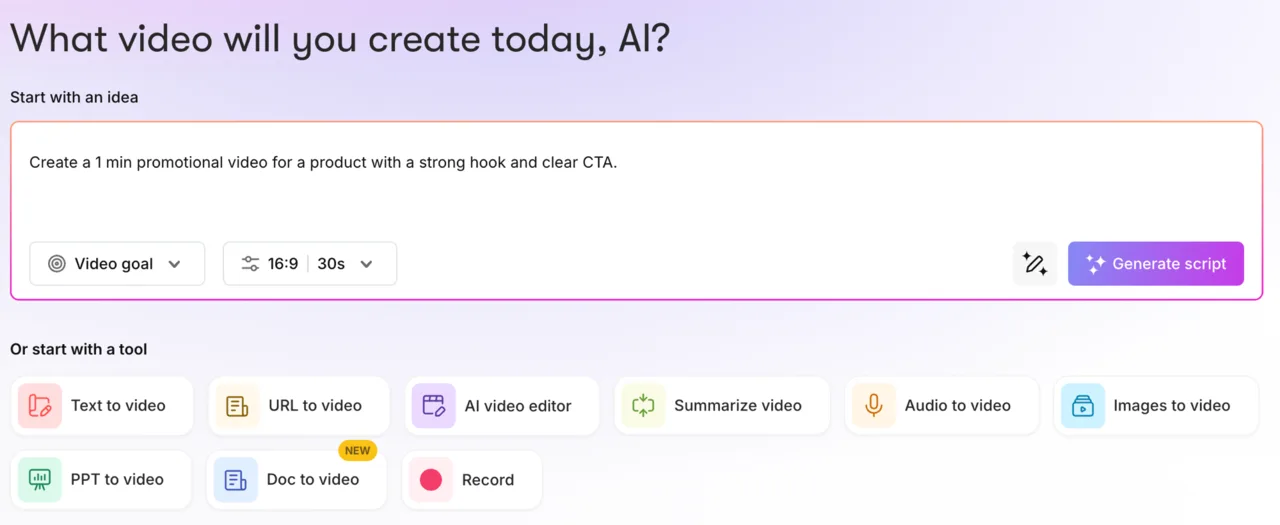
In practice the two that matter most are text-to-video, for when you have a script, and URL-to-video, for when you have an article you want to repurpose.
Here is the actual output. I pasted a short eight-sentence promo script, kept the defaults, 16:9, the stock-footage visual source, and the standard “Tom” AI voice, and Pictory split it into eight scenes, matched each line to a clip, and rendered this in about a minute.
It is not cinema, and the watermark in the corner is the free-trial tell. But look at what it got right with zero manual work: every sentence became a scene, the captions are timed to the voiceover, the stock clips are on-topic, and the whole thing reads as a coherent video rather than a slideshow. For a social clip or a faceless explainer, that is most of the way to done.
The part that makes Pictory worth a review rather than a shrug is the repurposing angle. Google’s own AI Overview, when I searched its category, files Pictory under “best for content marketers wanting to repurpose long-form text like blog posts into short videos,” and that matches what I saw. This is a tool for people who already produce written content and want a second life for it on TikTok, YouTube Shorts, or LinkedIn, without becoming video editors. The economics are simple: you already paid to research and write the article, so turning it into three social videos is almost free reach on work you have already paid for, which is the cheapest content win I know of.
Beyond those two, the rest of the menu exists to handle the awkward source files creators actually accumulate. Audio-to-video turns a podcast episode or a voice memo into a captioned clip. Images-to-video stitches a folder of stills into a moving slideshow. PPT-to-video and the newer doc-to-video ingest a slide deck or a document and rebuild it as a narrated video, which is the real pitch for trainers and course creators sitting on years of old decks. Summarize-video and the AI video editor work the other direction, taking a long recording and cutting it down. They are the same assembly engine pointed at a different starting file, not separate products.
| Input | Turns this | Best for |
|---|---|---|
| Text-to-video | a script you paste | promos, explainers, hooks |
| URL-to-video | a blog post or article | repurposing written content |
| Audio-to-video | a podcast or voice memo | audiograms and clips |
| Images-to-video | a folder of stills | slideshows |
| PPT / Doc-to-video | a slide deck or document | training and courses |
| Summarize / AI editor | a long recording | trimming long video down |
Whichever input you choose, you land in one storyboard editor, and it is deeper than the one-click pitch lets on. A left rail carries Visuals, Avatars, Audio, Layouts, Text, Elements, Styles, and Branding panels, so once the AI hands you a draft you can swap any clip, change the voice on a single scene, drop in your logo, or restyle the captions. Pictory wraps the whole thing in a gamified onboarding it calls “capabilities,” small guided workflows you finish to earn badges. It is harmless, but it tells you who the product is built for: first-timers, not editors.
How much does Pictory cost?
Pictory runs on a tiered subscription, and the prices below are what I read live inside the app on the plans page, not the marketing page, which actually disagreed with the dashboard on credit counts. There is a 14-day free trial with 50 AI credits, but no permanent free plan.
| Plan | Annual (per mo) | Monthly | Video mins/yr | AI credits/yr | ElevenLabs voices |
|---|---|---|---|---|---|
| Starter | $25 | $29 | 2,400 | 2,400 | 60 min/mo, 29 languages |
| Professional | $35 | $59 | 7,200 | 12,000 | 120 min/mo + voice cloning |
| Teams | $119 | $199 | 21,600 | 28,800 | 240 min/mo |
| Enterprise | Custom | Custom | Custom | Custom | Custom |
Two costs hide in that table. First, the monthly-versus-annual gap is steep: Professional is $35/month on an annual contract but $59 month-to-month, so committing to a year shaves about 40% off the price (and paying monthly costs roughly 70% more).
Second, and this is the one that stung in testing, the free trial’s 50 credits do not buy you a clean video. When I picked “Generate without watermark,” Pictory bounced me straight to the upgrade page instead of rendering, and the trial credits did not cover it. Only the watermarked export was free. So the real entry price to a usable, watermark-free video is the $25/month Starter plan, not $0. And $25 is the annual-commitment price; a single month without the year-long lock-in is $29 on Starter or $59 on Professional, so the freedom to walk away costs a premium too.
One genuinely good pricing note: Pictory’s in-app message confirmed that credits and quotas now roll over month-to-month, and annual plans get the full year’s quota on day one. If you batch-produce videos in bursts, unused credits are not lost at the end of the month.
It is worth knowing what a video actually costs in credits before you commit to a tier. In testing, Pictory estimated 16 credits for a 41-second 16:9 clip and 26 for a one-minute-48 vertical one, so Starter’s 2,400 annual credits stretch to roughly a hundred short videos a year, not an open tap. If you run dry, Pictory sells add-on packs of extra AI credits, more Getty stock, and ElevenLabs voice minutes, and unlike the trial credits, those do not expire while your plan is active. For a solo creator the Starter allotment is plenty; for an agency shipping daily, the credit ceiling, not the sticker price, is the number to watch.
Who is Pictory for?
- Bloggers and content marketers sitting on a back catalog of posts. The URL-to-video flow turns an existing article into a social clip in minutes, and it is the single best reason to use Pictory and the workflow it does better than anything else on this list.
- Faceless-channel creators on YouTube Shorts, TikTok, and Reels who need a steady stream of narrated, captioned clips without appearing on camera. The script-to-video flow plus ElevenLabs voices is a complete faceless pipeline, and the stock library means you are never short of B-roll.
- Course creators and trainers with years of slide decks and webinar recordings. PPT-to-video and audio-to-video rebuild that old material into short, narrated lessons without re-recording anything.
- Solo marketers and small teams who value speed and a gentle learning curve over frame-level control. If your bottleneck is volume rather than polish, Pictory removes the bottleneck, and you will be on camera exactly zero times.
- Not for you if you want cinematic, generated footage (that is Sora, Runway, or Veo territory), one highly polished hero video rather than many fast drafts, or a free tool that exports without a watermark. Pictory is a volume-repurposing workhorse, not a film studio.
What Pictory gets right
It turns a blog post into a video, accurately
This is the feature that earns the rating. I used URL-to-video on one of my own published roundups, and Pictory scanned the page, wrote a script that correctly named every tool and kept the article’s actual verdict, then built a 13-scene vertical video, all in about two minutes. It did not hallucinate, and it did not generically paraphrase; it pulled the real points off the page. For a tool to read an article and keep its argument intact, not just its keywords, is genuinely uncommon at this price.
What sold me was the fidelity. It named all four tools from my roundup, kept my actual ranking, matched a calmer tone to the explainer format, and ended on a “read the full guide” call to action drawn from the post’s intent rather than invented. That is the difference between a tool that genuinely reads your content and one that just paraphrases the title.
For anyone sitting on a back catalog of articles, this is a real workflow, not a demo trick: paste a URL, get a draft social video, tweak, publish.
Scene splitting and captions are automatic and sensible
Paste a script and Pictory breaks it into one scene per sentence by default, highlights the keywords it thinks matter, and times captions to the voiceover without any input from you.
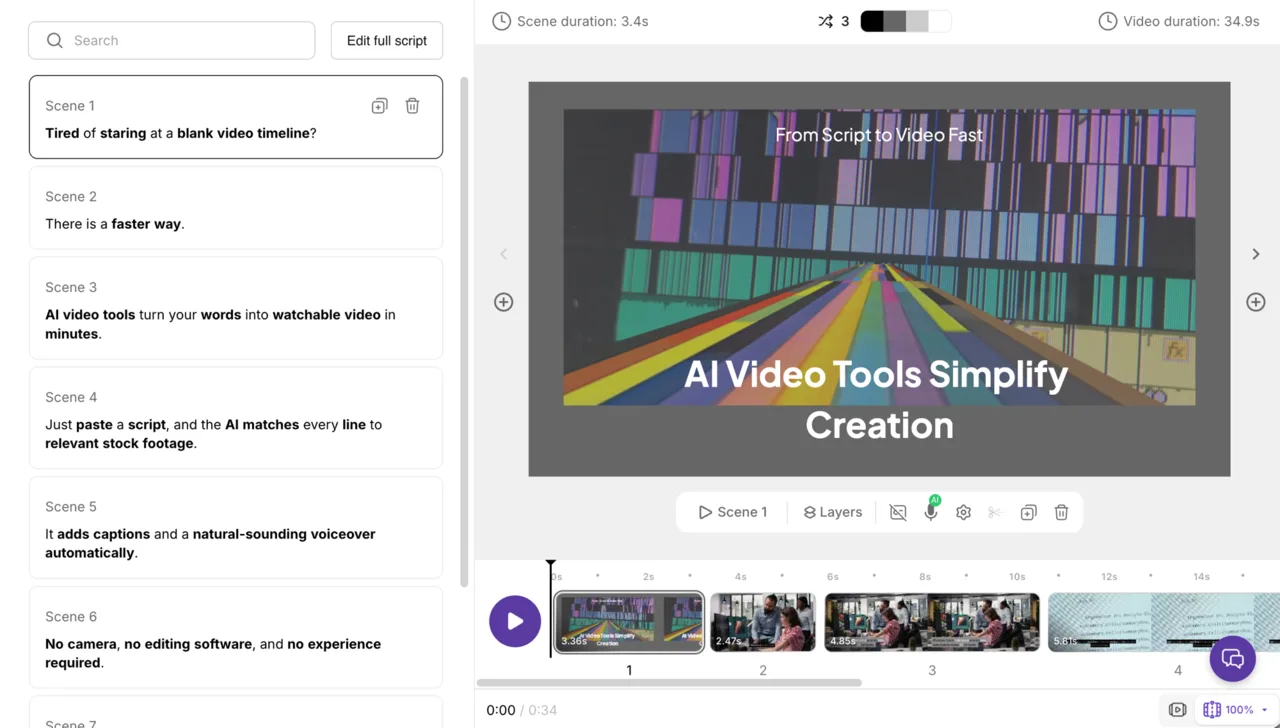
You can switch to one-scene-per-line-break, change the max caption lines, or edit any scene by hand, but the default output was coherent enough that I did not need to. The keyword highlighting is a small but smart touch: Pictory bolds the words it judges most important on screen, which is what a human editor does to keep captions readable at a glance on a muted feed.
The stock library is large and built in
Visuals come from Getty Images and Storyblocks, and the allotment scales with the plan: 5 million clips on Starter, 18 million on Professional, per the live plans page. You are not hunting external stock sites or paying for clips separately; the search and auto-match pull straight from that library inside the editor. For the kind of generic, on-topic B-roll these videos need, the catalog is deep enough that I rarely saw a scene with nothing usable. That matters more than it sounds: the most common failure mode of a script-to-video tool is a scene with no relevant footage, and a deep, licensed catalog is the only real cure.
ElevenLabs voices are available on paid plans
The default “Tom” voice is fine for a draft, but Pictory integrates ElevenLabs for the good voiceovers, with 60 minutes a month on Starter and 120 minutes plus voice cloning on Professional, per the plans page. That matters because voiceover is half of whether a faceless video sounds professional, and ElevenLabs is the studio-grade option. The narration type also lets you swap to an AI avatar or turn narration off entirely. I stuck with the AI voice, but the avatar option is there if you want a synthetic presenter reading the script, which nudges Pictory toward the same territory as Synthesia for talking-head explainers.
It is genuinely easy to use
Pictory’s aggregate ratings line up with my experience: it holds a 4.6 on G2 across 81 reviews, where the recurring praise is ease of use and time saved. Nothing in the create flow needs a manual. You pick an input, paste your text, accept or tweak a few defaults, and you have a draft. From clicking “Text to video” to a finished draft took me under three minutes the first time, most of which was the render, not figuring out the interface. For a non-editor, that low floor is the whole point.
Multiple input types, one editor
Most “AI video” tools do one trick. Pictory takes text, URLs, audio, images, slide decks, and documents, and routes all of them into the same storyboard editor with the same toolbar of visuals, audio, text, and branding controls.
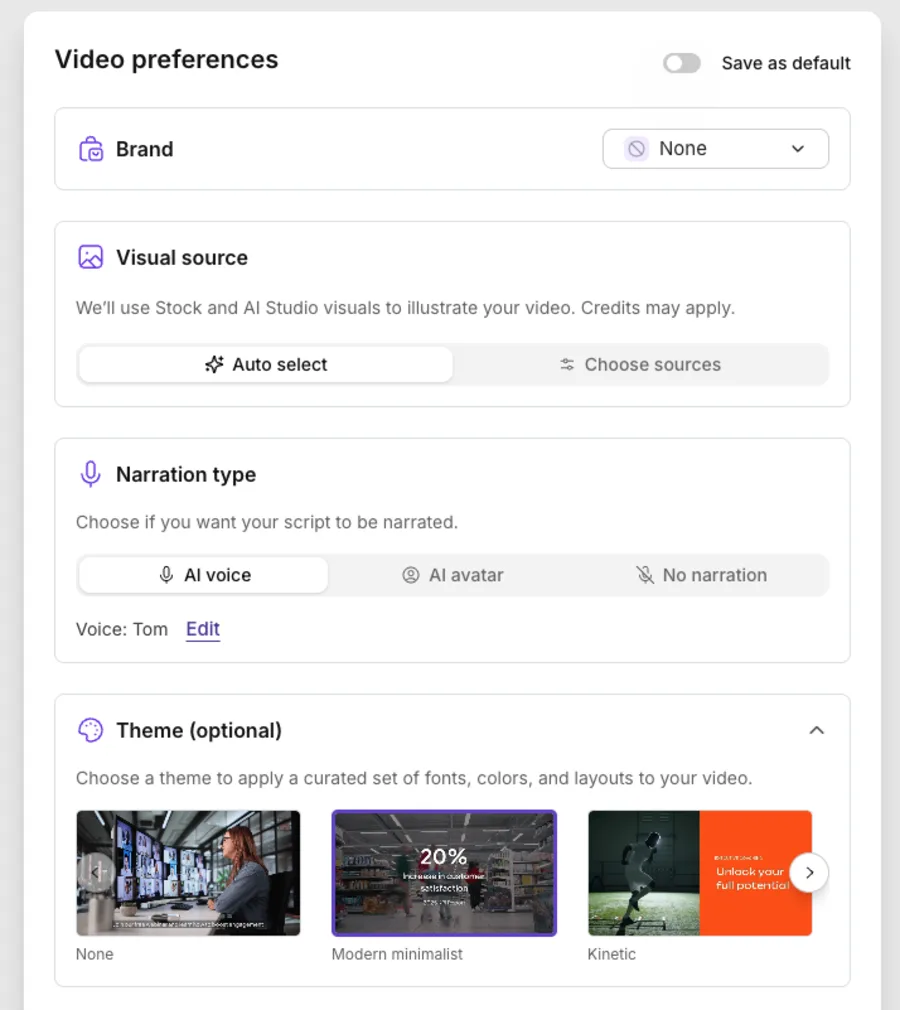
If your source material is messy and varied, that range is convenient.
The AI script tools are a nice touch
Inside the script editor there is a small toolbar to Optimize, Rephrase, Shorten, Lengthen, or Change tone, plus a free-form “Ask AI.” When a script ran long for the format I wanted, Shorten trimmed it in place without my having to leave for ChatGPT and paste back. Minor, but it keeps the work in one window.
The editor has a real ceiling when you need it
The one-click draft is the headline, but the storyboard editor underneath is what makes Pictory worth keeping. Every scene is independently editable: swap the clip from the Visuals panel, retime or rewrite a caption, change the voice for that scene alone, or add elements and transitions. I rarely needed to, but the ceiling is the point. A draft that comes out 80% right is a few clicks from finished, not a dead end you restart from scratch.
Brand kits keep a channel consistent
On paid plans you can save a brand kit of logo, fonts, and colors and apply it across every video, so your clips look like one channel instead of a stack of stock templates. Starter includes one brand kit and Professional includes five, per the plans page. For anyone treating video as a marketing channel rather than a one-off, that consistency is what separates content that builds a brand from content that just fills a feed.
Where Pictory falls short
The free trial paywalls a clean export
This is the one that will frustrate new users most. The 50-credit trial lets you build a full video, but the moment I chose “Generate without watermark,” Pictory redirected me to the plans page instead of rendering, and the trial credits did not cover it. Only the watermarked export was free.
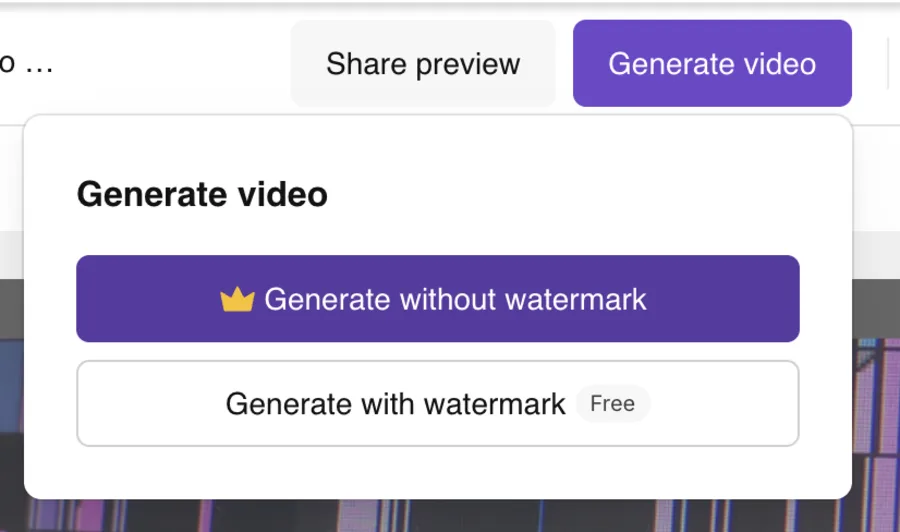
So the trial shows you the product but holds the usable output hostage until you pay, which is worth knowing before you invest an afternoon in it.
The auto-matched B-roll needs babysitting
Pictory’s scene-to-clip matching is good, not psychic. A few of my scenes paired a generic clip with a specific line, the AI reaching for something on-topic but not on-point. The fix is one click to swap from the library, but on a 13-scene video those clicks add up.
On my note-taker video, two scenes about transcription accuracy pulled generic office B-roll that said nothing about the point, and one about discretion showed a crowded meeting room, the opposite of the idea. Each was a ten-second fix, but ten seconds across a dozen scenes is the gap between the two-minute promise and a real ten-minute session. The “zero-editing” pitch is really “light-editing.”
The default voice is robotic next to the upgrade
Out of the box you get the “Tom” voice, and it is serviceable but flat, the kind of narration that signals “AI video” to anyone listening. The good voices are the ElevenLabs ones, which are metered (60 to 240 minutes a year depending on plan) and gated to paid tiers. So the narration that makes a faceless video sound human is a paid, rationed resource, not the default.
It is a last-generation tool in a shifting category
Text-to-video the Pictory way, stitching stock clips to a script, is being squeezed from above by true generative video. Sora, Runway, and Veo now create original footage from a prompt, and the center of gravity in “AI video” is moving toward generation, not assembly. Pictory still does its specific repurposing job well, but you are buying into the older paradigm, and it shows in the output itself: stock clips under captions is a 2022 aesthetic, and it reads as one. A Sora or Veo clip looks like footage someone shot; a Pictory clip looks like a tool assembled it. For a fast social post that is a fair trade, but the gap is widening every quarter.
The credit math is confusing and inconsistent
Pictory’s pricing is quoted in “AI credits,” and a single video quietly costs a chunk of them.
| What I generated | Length | Credits (est.) |
|---|---|---|
| 16:9 promo clip | 41 sec | 16 |
| 9:16 vertical summary | 1 min 48 sec | 26 |
At that rate, Starter’s 2,400 annual credits cover roughly a hundred short videos, which is fine for a solo creator and tight for a team. Worse, the public pricing page and the in-app plans page disagreed on the allotment itself: the marketing page listed Starter at 1,200 credits a year while the dashboard said 2,400. When the vendor’s own two pages cannot agree on what you are buying, budgeting your output is guesswork until you are already inside.
Ratings are good, not great
The G2 score is a strong 4.6, but Trustpilot tells a more mixed story at 4.0 across 577 reviews, a noticeable gap for the same product. It is not a red flag, but it is a step below the category’s best-loved tools, and it suggests the experience is well-liked rather than beloved. The gap between the two scores is itself the signal: the people who seek out G2 to praise the time savings love it, while the broader Trustpilot pool runs more lukewarm.
It is built for many drafts, not one masterpiece
Pictory optimizes for speed and volume, and that is a trade-off, not a free win. There is no fine-grained, frame-level control, no real motion design, and no cinematic editing. If your goal is one standout video rather than a pipeline of fast, good-enough ones, you will hit the ceiling quickly. It cannot handle complex, cinematic, or directorial editing, and it does not pretend to. There is no keyframing, no real color work, and no audio mixing beyond a music-volume slider. You are choosing a fast pipeline, and a fast pipeline has a low ceiling by design.
If Pictory isn’t for you
If the repurposing fit is not quite right, three tools cover the gaps, depending on which way you need to go.
| Tool | Best for | How it works |
|---|---|---|
| Pictory | repurposing existing text | paste a blog or script, get an assembled video |
| InVideo AI | prompt-to-video scope | one prompt, a full generated video |
| Fliki | budget, multilingual narration | text to video with 2,000+ AI voices |
| Descript | editing your own footage | edit video like a text document |
- InVideo AI — the more powerful all-rounder. Where Pictory repurposes existing text, InVideo generates a full video from a single prompt, writing the script, picking the footage, and narrating it in one pass, with a far larger template and editing surface. It is widely regarded as the strongest prompt-to-video tool for social and YouTube. Reach for it when you want flexibility and scope over Pictory’s simplicity. See InVideo.
- Fliki — the budget, voice-first option. Fliki leans on a library of more than two thousand AI voices across eighty-plus languages at a lower entry price, which makes it the pick for high-volume, multilingual faceless channels where narration variety matters more than editing polish. Try Fliki.
- Descript — for editing, not assembling. If your real need is recording and cleaning up your own footage, editing video as easily as deleting words in a document, Descript is the better fit, and it is the tool to reach for when the job is polish rather than repurposing. We cover it in depth in our Descript review.
The verdict
Pictory is a Power Tool at 4.1 out of 5, and it earns that the honest way: it is genuinely excellent at the one job most people buy it for, turning written content into watchable video, with caveats that are real but knowable rather than dealbreakers. If you are a blogger or marketer with a library of written content and a need for steady, captioned, narrated video, the URL-to-video and script-to-video flows will save you real hours, and the stock library and ElevenLabs voices on a paid plan back that up.
If you want cinematic generation, a free clean export, or one polished hero video, this is not your tool, and you should look at the generative options instead. Just go in clear-eyed: the free trial will show you the magic and then paywall the download, so treat it as a test drive, not a free ride.
Pictory is one of the picks in our best script-to-video AI tools roundup. For the head-to-heads, see Pictory vs Fliki and Pictory vs InVideo; our Pictory pricing guide has the full cost breakdown; and if you are considering a switch, our Pictory alternatives guide covers where to go.
Frequently asked questions
Is Pictory AI worth it?
For bloggers, marketers, and faceless-channel creators who repurpose written content into video, yes. In my hands-on test Pictory turned a script and a full blog post into watchable, captioned videos in minutes, and the stock library and ElevenLabs voices on paid plans are strong. It is less worth it if you want cinematic AI generation, one highly polished clip, or a free export without a watermark. I score it 4.1 out of 5, a Power Tool.
Is Pictory AI free?
There is a free 14-day trial with 50 AI credits, not a permanent free plan. The trial lets you build full videos, but in my test exporting without the Pictory watermark was paywalled, it pushed me to a paid plan, and the 50 trial credits did not cover it. Only the watermarked export was free on the trial. Paid plans start at $25/month (Starter, billed annually).
How much does Pictory cost?
Billed annually, Starter is $25/month, Professional is $35/month, and Teams is $119/month, with a custom Enterprise tier. Billed monthly the same plans are $29, $59, and $199, so an annual commitment shaves about 40% off Professional's price. Each plan includes a set allotment of video minutes, AI credits, and ElevenLabs voiceover minutes that scale with price.
Does Pictory remove the watermark for free?
Not on the free trial. When I chose 'Generate without watermark' on the trial, Pictory sent me to the upgrade page instead of rendering, and my 50 trial credits did not unlock it. Only 'Generate with watermark' was free. A clean, watermark-free export requires a paid plan.
Is Pictory better than InVideo AI?
They serve slightly different jobs. Pictory is built for repurposing existing text, like turning a blog post or long script into a summarized video, and it is beginner-friendly. InVideo AI is the more powerful all-rounder for generating a full video from a single prompt. For pure blog-to-video repurposing Pictory is the cleaner fit; for prompt-to-video flexibility InVideo leads.
Can Pictory turn a blog post into a video?
Yes, and it is the feature I was most impressed by. I pasted the URL of one of my own articles and Pictory scanned the page, wrote an accurate script that named the right tools and verdict, and built a scene-by-scene video in about two minutes. You can guide the tone and video type, then edit any scene before exporting.
What are Pictory's main limitations?
The biggest one on the free trial is that a watermark-free export is paywalled, so a clean download needs a paid plan. Beyond that, the auto-matched stock B-roll often needs a manual swap, the default 'Tom' voice sounds robotic unless you spend the metered ElevenLabs minutes on a paid tier, and the credit system is confusing (a short video costs 16-26 credits, and the public and in-app pages disagreed on the allotment).
It is also a text-to-video assembler, not a generative tool, so it cannot do cinematic or frame-level editing. None are dealbreakers for repurposing written content, but together they are why it scores 4.1 rather than higher.
Keep reading
Pictory vs Fliki: I tested both — here's which to pick
Pictory vs Fliki, both tested: Fliki (4.3) wins on voice, price, and a real free tier; Pictory (4.1) wins at turning blog posts into video. Which fits you?
Pictory vs InVideo: I tested both — here's which wins
Pictory vs InVideo, both tested hands-on: InVideo (4.2) is the faster, more powerful all-rounder; Pictory (4.1) is cleaner for turning blog posts into video.
Pictory pricing: the plans, the credits, and the catch
Pictory starts at $25/mo annually, but the trial paywalls clean exports and credits meter every video. The real per-plan cost and the catch, hands-on.
The 5 best Pictory alternatives, ranked by job
The best Pictory alternatives, ranked: Fliki for voice, InVideo for generative video, Lumen5 for blog-to-video, Synthesia for avatars, Descript for editing.