
Vizard review: the cheapest clipper, with one catch
A Vizard AI review from a measured run: it found 30 clips in my 35-minute panel and handed me 10. The other 20 need a card, and the maths still favours it.
Contents
Is Vizard worth it?

Yes, if you are clipping long video and paying attention to what it costs. Vizard found 30 clips in a 35-minute panel and the ones it showed me were the tightest short-form of any tool I have run that file through, at a job cost of 85 cents against OpusClip’s $2.03 on the identical meter. The catch is in that phrase “the ones it showed me”: the free plan hands over ten and sells you the other twenty.
What Vizard actually does
Vizard does one job and does not pretend otherwise. You give it a long recording — a podcast, a webinar, a Zoom call, a conference talk — and it returns short vertical clips with captions burned in, ready for TikTok, Reels and Shorts.
That puts it in a three-way fight with OpusClip and Submagic rather than against general editors. The whole product is organised around the one workflow: upload, wait, review a ranked list, publish or download.
How I tested it
I gave Vizard the same source I previously gave Submagic, OpusClip and CapCut, so four tools have now seen the identical file: “An Honest Conversation on AI and Humanity” from the World Economic Forum’s 2026 annual meeting, 35 minutes 27 seconds of multi-speaker panel published under a Creative Commons Attribution licence. Settings were left at their defaults throughout, which is how I ran the other three.
The account is a free one. Nothing here was paid for, and no plan was upgraded at any point. The best AI clipping tool ranks what all four tools returned from that same panel.
What I did not test: the twenty clips behind the paywall, the second model, the “Find clip moment” prompt box, caption accuracy against a reference transcript, Creator’s 4K export, or the mobile apps. Only one of the ten clips was downloaded and probed. Where this review is quiet, it is because I did not measure it.
What you actually get back
Ten cards, sorted by score, each with a preview, a title Vizard wrote itself, a virality figure, the written reason and the transcript. This was the full delivered set from my run:
| # | Score | Length | From | Title |
|---|---|---|---|---|
| 1 | 10.0 | 0:37 | 24:28 | Is AI stealing our only superpower? |
| 2 | 10.0 | 0:40 | 03:06 | Why AI Is Not Just A Tool |
| 3 | 10.0 | 0:45 | 32:22 | What happens when AI understands finance better than us? |
| 4 | 10.0 | 0:33 | 13:22 | The Next Wave of Immigration Will Be AI |
| 5 | 9.6 | 0:41 | 20:20 | What is your answer to the AI future? |
| 6 | 9.5 | 0:36 | 17:21 | Why AIs are different from rivers and gods |
| 7 | 9.3 | 0:39 | 18:10 | The geopolitical nightmare of AI personhood |
| 8 | 9.2 | 0:42 | 24:04 | Why Language Is The Ultimate Human Superpower |
| 9 | 9.2 | 0:56 | 29:25 | Why AI is like a Mercenary Army |
| 10 | 9.2 | 0:32 | 12:03 | Are We Just ‘The Watchers’ to AI? |
Two things in that table are worth pausing on. The titles are sharp enough to use as posted captions without editing. And the source timecodes overlap — clip 8 starts at 24:04 and clip 1 at 24:28, two competing cuts of the same passage, ranked against each other.
That overlap is the signature of a tool generating candidates rather than dividing a video up, and it is the clearest evidence that Vizard belongs in the same bracket as OpusClip and Submagic.
The settings, and one box nobody else has
After the upload a second screen appears: aspect ratio, clip length, a template picker with a dozen caption styles, and a row of toggles. Add emojis and Highlight keywords are ticked for you; AI B-roll carries a crown and needs a paid plan; Remove silences and Auto-censor are off.
Then there is Find clip moment, a free-text box that takes a plain-English instruction — its own example is “When Sam talks about GPT-5”. No rival in this category offers anything comparable. OpusClip, Submagic and CapCut all decide what matters for you and hand back the result.
I left it empty so this run stayed comparable with the other three, which means I cannot tell you how well it works. It is the single most interesting thing on the screen and it deserves its own test.
What happens after you pick one
Each card carries its own row of controls: Publish, Download, AI Enhance, share, duplicate and a trim tool, plus thumbs-down and star icons for marking favourites or hiding the rest.
The editor behind them is a real one rather than a preview pane, and the free plan gets “full access to video editor” by Vizard’s own description. I did not put it through its paces, so treat that as read from the page rather than tested.
Downloading is one click with no second dialog, which is worth saying after CapCut, where a finished render is only handed over while its dialog is still open.
The pipeline is unusually legible
Vizard shows you stages — Upload, Create project, Process video, Find best parts, Edit clips, Finalize — and tells you what it found as it goes.
That is where the headline number came from. At the “Find best parts” stage it reported, in its own words, “30 clips found, editing for best framing”. The whole run took about 17 minutes from submit.
How much does Vizard cost?
Three plans, read off the pricing page on 15 September 2026, and the free one renews monthly rather than expiring as a trial.
| Plan | Listed | Discounted | Credits/mo | Export | Storage |
|---|---|---|---|---|---|
| Free | $0 | — | 60 | 720p, watermarked | 3 days |
| Creator | $29 | $14.50, $174/yr | 600 | 4K, clean | 100 GB |
| Business | $39 | $19.50, $234/yr | 600+ | 4K | unlimited |
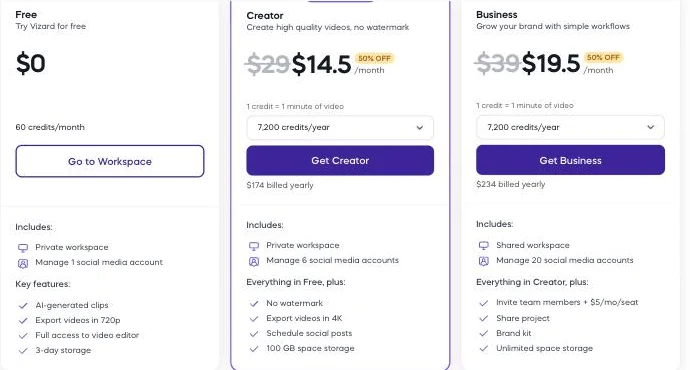
Business adds a shared workspace, 20 social accounts and a brand kit, with extra seats at $5 a month. Upload caps are 60 minutes and 1 GB on free, 600 minutes and 30 GB on either paid plan.
The page says one credit equals one minute of video, and on the default model that was exact: my 35:27 file, which Vizard read as 35:28, cost 35 credits. Which makes the comparison easy to run, and the result is the reason this review exists.
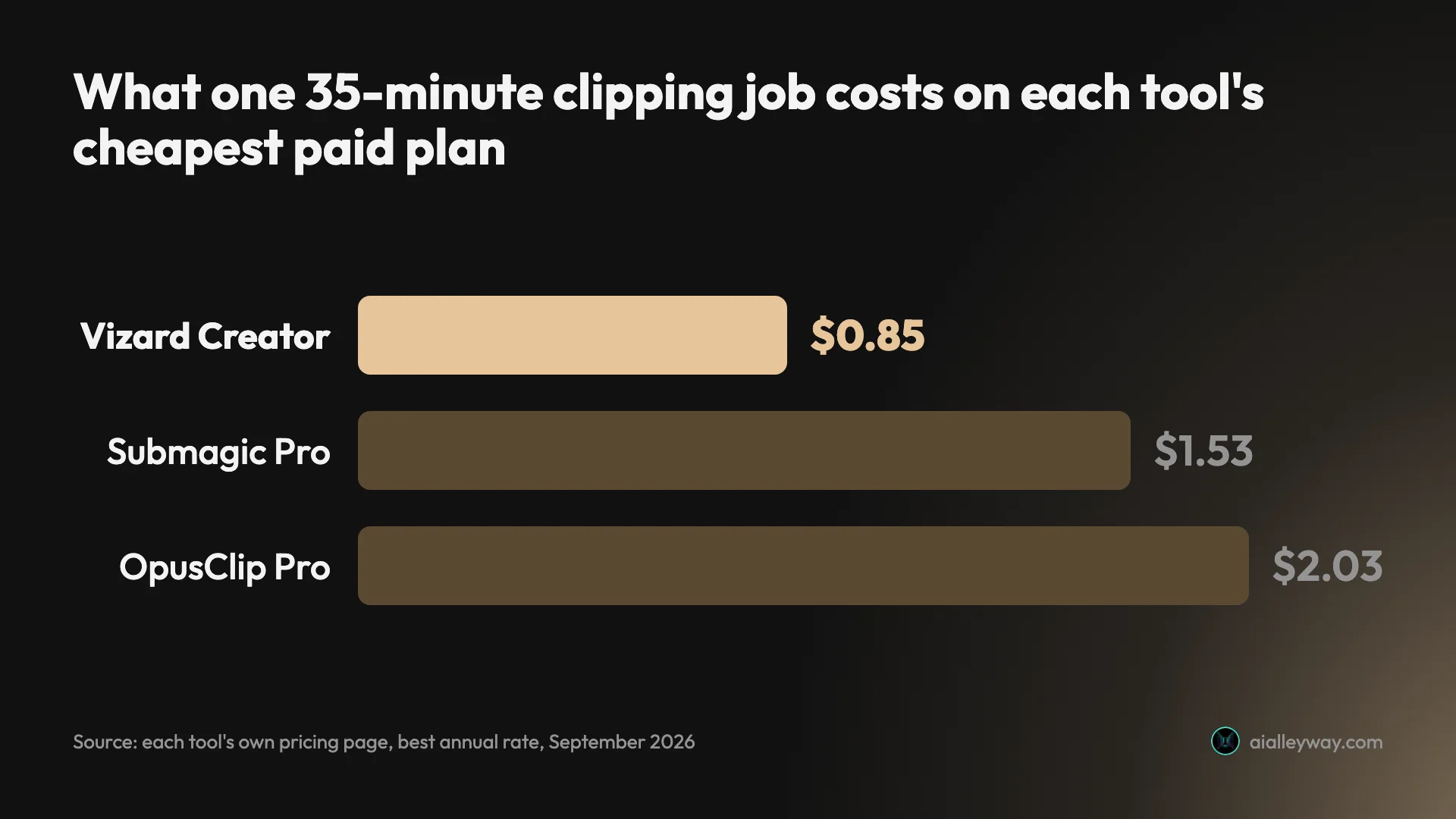
Creator works out at about $0.024 a credit, so this job costs 85 cents. OpusClip Pro billed yearly is $0.058 a credit, so the same job is $2.03, 2.4 times as much on the same unit for work of a comparable standard. Both pages were read on 15 September 2026, and one caveat carries over from the OpusClip pricing guide: OpusClip’s annual rate promo-cycles within a single day, so check it on the day rather than trusting this figure. Submagic’s flat per-job fee lands between them at $1.53.
When Creator starts paying for itself
The free plan covers 60 source minutes a month. Cross that line even once and you are choosing between waiting for the reset and paying $14.50 a month, billed as $174 up front.
Put it in videos rather than credits. One 35-minute talk a month fits free with 25 credits spare. Two of them does not. A weekly 45-minute podcast needs 180 source minutes a month against the free plan’s 60, and that is still only 30% of Creator’s 600, at under nine cents a minute of source.
So the break-even is low and the headroom above it is large, which is the opposite of how this category usually prices. OpusClip’s cheapest plan, Starter, is $15 a month for 150 credits and is sold monthly only; its Pro plan is $29 for 300. Vizard’s Creator is $14.50 for 600, billed yearly. Against Starter that is roughly the same money for four times the footage.
Who is Vizard for?
- Anyone clipping long video on a budget. This is the cheapest credible tool in the category and it is not a close race. If cost per clipping job is your deciding number, stop reading and go.
- Podcasters with a monthly rhythm. Sixty free credits is one long episode a month, renewing, which is enough to keep a clipping habit alive without a card on file.
- Creators who want short clips, not chapters. Everything it returned was between 32 and 56 seconds, which is the shape Reels and Shorts actually want.
- People who like knowing why. Every clip carries a written reason for its selection, which makes triaging ten of them fast.
- Teams publishing on a schedule. Creator connects six social accounts and Business twenty, with a calendar and scheduling built in rather than sold as a tier above.
- Not for anyone who needs every candidate. If your workflow is to review all thirty and pick your own, the free plan is the wrong shape and you are paying to see the rest.
- Not for anyone who needs a clean file for nothing. Free exports are 720p with a watermark, and they vanish after three days.
The good
It is the cheapest credible clipper, by a distance
Eighty-five cents against $2.03 for the same job on the same meter is not a rounding difference, and Vizard gets there by giving you 600 credits a month for the $29 OpusClip charges for 300. Nothing else in the category comes close on unit price while still doing the job properly, CapCut aside, which charges nothing at all but returns long chapters rather than clips. That is the whole argument for the tool in two sentences, and it is the rare case where the cheap option is not also the weak one.
The clips are genuinely short-form
All ten ran between 0:32 and 0:56. Not one crept over a minute. Total output was 6 minutes 41 seconds from a 35-minute source, or 18.9% retained — the mark of a tool searching for moments rather than dividing a video into parts.
Set that against CapCut, which returned eight clips of 1:26 to 3:58 totalling 73.6% of the same source. That is chaptering. This is clipping.
It explains every pick, and shows its working
Each clip carries a “viral reason”, a written paragraph arguing why that moment was chosen, plus timecoded transcript excerpts so you can see the actual words without opening the clip.

And here is what that card actually produces. This is the top-ranked clip of the ten, straight out of the free plan with nothing edited:
Submagic does the explaining too and I rated it the standout feature there. Vizard adds the transcript, which makes skim-triage faster still.
The free tier renews, and matches the category leader’s allowance
Sixty credits every month, at one credit per source minute. That is the same renewing allowance OpusClip’s free plan gives away, so Vizard does not win here on size. Submagic, by contrast, offers a one-off 15-credit trial that cannot export a file at all, as the Submagic pricing guide sets out.
Where the two differ is what they do with the allowance. OpusClip spent mine and handed back everything it found, though that run was on a Pro trial rather than the free-forever plan. Vizard spends yours and hands back a third.
Publishing is part of the product, not a tier above it
The workspace carries Projects, Exported, a Calendar, Analytics and a Brand kit as top-level sections, and the plans are priced in social accounts — one on free, six on Creator, twenty on Business — rather than gating scheduling behind an upgrade.
Submagic puts publishing and analytics on its Pro plan and multi-account publishing on Business. Here the scheduler is in the same screen as the download button, and the free plan still gets one connected account.
It tells you what it is doing
The progress screen names its stages — Upload, Create project, Process video, Find best parts, Edit clips, Finalize — and reports findings as it goes, which is how I know it found thirty. It also offers to email you and says plainly that you can close the tab.
That sounds like a small thing until you have sat through a rival’s undifferentiated spinner wondering whether a 35-minute upload has silently failed.
Its reputation is strong where rivals’ is not
Vizard holds 4.7 on Trustpilot across about 2,520 reviews, 4.7 on G2 across 408, and 4.4 on Google Play across roughly 5,798 ratings, all read on 15 September 2026. CapCut, for contrast, sat at 1.2 on Trustpilot when I checked it a day earlier, over subscription billing.
That matters in a category where the usual complaint is not the editing but the invoice.
The bad
It found thirty clips and gave me ten
This is the finding that keeps the score where it is. The processing screen said “30 clips found”. The results header said “10 clips”. A banner sat at the foot of the list offering the rest.
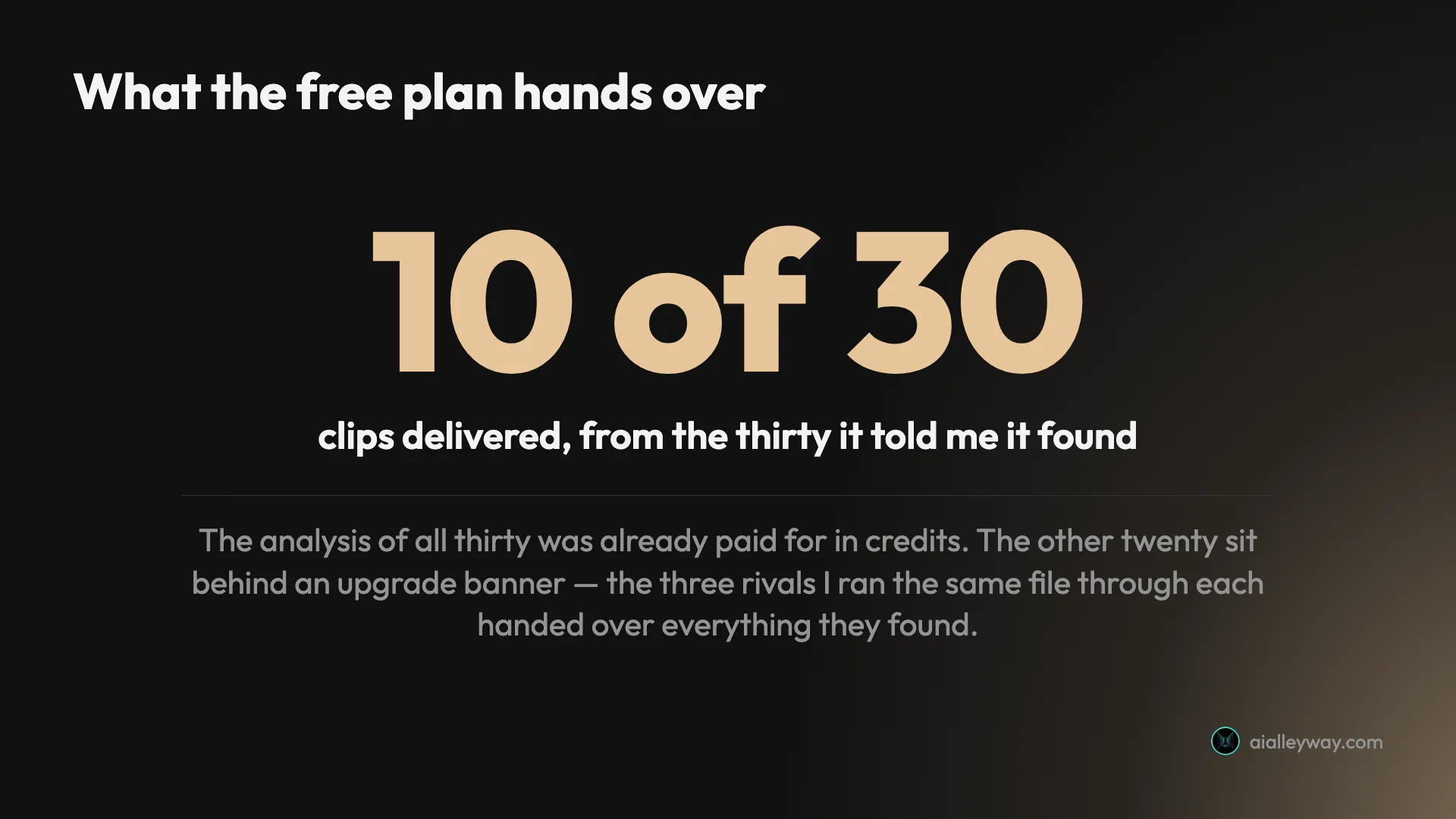
My 35 credits paid for analysing all thirty. The paywall is on delivery, not on compute — and that is the part no rival does. OpusClip, Submagic and CapCut each handed over every clip they found on the plans I tested, and charge for quality instead: a watermark, a resolution cap, an export you cannot take. One caveat on OpusClip: that run was on a Pro trial rather than its free-forever tier, so I am describing what it delivered to me, not a tested claim about its free plan. Vizard charges for quantity, which is a different bargain and a worse-feeling one.

Credits go at upload, not at generation
The balance read 60 before the upload and 25 the moment it finished — before I had clicked “Get AI clips”, and while a whole settings screen still stood between me and any output.
Walk away at that screen and the 35 credits are spent regardless. OpusClip behaves the same way, and it is worth knowing on a 60-credit monthly allowance where one mistake costs you over half the month.
“One credit per minute” is only true on the default model
The upload screen carries a model picker most people will never open, because it already looks filled in.
| Model | What Vizard says | Cost for a 35:28 file |
|---|---|---|
| v1 (default) | “Faster, more clips. Best for most long-form content.” | 35 credits |
| v2 | “AI will think longer and go deeper to find confident clips. Fewer clips, more complete.” | 44 credits |
That is a 25% surcharge on a page that promises one credit per minute, and nothing on the pricing page mentions a second model exists. On the free allowance it is the difference between one run a month and one run with 16 credits stranded.
The scores do not discriminate, and Google says they do not exist
Vizard does score its clips: every one of the ten carried a virality figure and the list sorts by it by default. The problem is the spread. Four of the ten tied at a perfect 10.0, and the rest ran 9.6, 9.5, 9.3 and 9.2 three times over.
Google’s AI Overview manages to get this wrong in the opposite direction, listing among Vizard’s weaknesses that it lacks “deep analytical tools, virality scores, or advanced multi-cam scene detection”. Buyers ruling the tool out on that summary are ruling it out for a reason that is not true, when the real criticism is that its scores are too generous to sort anything.
A scale that awards full marks four times in ten is not sorting anything at the top end, and since the remaining twenty are hidden I cannot see whether the tail does better. OpusClip has the same disease in a milder form, scoring 80 to 99 and never below; the honest read is that nobody in this category will tell you a clip is weak.
The free export is modest, and temporary
The file I downloaded was 720×1280 at 967 kbps with “made with Vizard.ai” burned into the upper right of every frame I sampled. Storage expires after three days.
CapCut’s free plan exports 1080p at 5.5 Mbps with no watermark at all, so if a publishable file at zero cost is the whole requirement, Vizard is not the answer.
Sixty free credits is one video a month, and then you stop
One credit per source minute means the free allowance is a single 35-minute talk, or one hour-long podcast, per month. My run consumed 35 of 60 in one go and left 25 — not enough for a second pass at the same file, and not enough to try the more expensive model at all.
Free uploads are also capped at 60 minutes and 1 GB, against 600 minutes and 30 GB on either paid plan, so a two-hour episode cannot go through the free tier regardless of credits.
Alternatives worth considering
If the withheld clips are the dealbreaker, three tools solve it differently.
| Meter | Free tier | Clips from my 35-min panel | |
|---|---|---|---|
| Vizard | per source minute | 60 credits/mo, renewing | 30 found, 10 given |
| OpusClip | per source minute | 60 credits/mo | 32, all delivered |
| Submagic | flat fee per job | 15-credit trial, no export | 31, all delivered |
| CapCut | per source minute | 60 min/mo | 8, all delivered |
Clip counts are from the plan each tool was tested on. The OpusClip run used a Pro trial rather than its free-forever tier, so read that row as what it delivered to me.
OpusClip is the one to pick if you want every candidate. It found 32 on the same file and handed over all of them, with a timeline and Premiere Pro export Vizard has no answer to. You pay 2.4 times as much per job for that.
Submagic wins on long sources, because it charges a flat fee per clipping job rather than per minute. On a two-hour episode that structure is dramatically cheaper. Its free trial cannot export a file at all.
CapCut is the answer if the requirement is a clean file for nothing: free 1080p with no watermark, which none of the others offer. It returned eight clips of 1:26 to 3:58 rather than short ones, so it is solving a different problem.
If free is the constraint rather than the price, free AI clip generator works through what each free tier here actually releases — including why Vizard’s shows you ten of the thirty it finds.
The final word
Vizard is the best-value tool in this category and the numbers behind that are not close. The same job that costs $2.03 on OpusClip costs 85 cents here, the clips come back tighter, and the free tier renews monthly, matching the most generous allowance in the category.
There is a version of this review that treats the withheld clips as disqualifying. I do not think it is the right read, because ten sub-minute clips with written reasons attached is more usable output than most people will publish in a month, and because the moment you pay the objection disappears entirely.
What stops it scoring higher than OpusClip’s 4.2 is a choice rather than a limitation. The three rivals I ran this file through each gated on quality and handed over everything they made; Vizard gates on quantity and keeps two thirds of the work your credits already bought. Once you are paying, that objection evaporates and the value argument is the only one left standing — which is precisely why it is worth knowing before you judge the free plan on what it shows you.
Frequently asked questions
Is Vizard AI free?
There is a genuinely free plan that renews rather than expiring: 60 credits every month, at one credit per minute of source video, which is the same monthly allowance OpusClip gives away. That is roughly one long podcast or three short talks, and it comes back every month rather than expiring as a trial.
What the free plan does not do is give you everything it makes. Fed a 35-minute video it told me it had found 30 clips and then showed me 10, with a banner offering the other 20 in exchange for an upgrade. Free exports are also 720p with a Vizard watermark burned into the corner, storage lasts three days, and you can connect one social account. The clips you do get are usable; you are simply seeing a third of the work your credits already paid for. Free uploads are capped at 60 minutes and 1 GB, so a two-hour recording will not go through the free tier at any credit balance.
Does Vizard have a virality score?
Yes. Every one of the ten clips Vizard delivered carried a virality score out of 10, the results list is sorted by that score by default, and mine ran from 10.0 down to 9.2. This needs saying plainly because Google's AI Overview currently states the opposite, listing among the tool's weaknesses that it lacks "deep analytical tools, virality scores, or advanced multi-cam scene detection".
That summary is wrong. Each clip also carried a written "viral reason" explaining why that moment was picked, plus timecoded transcript excerpts. Whether the scores mean much is a fair question, since four separate clips tied at a perfect 10.0. But the feature exists, it is prominent, and anyone choosing between tools on that basis is working from bad information. The fair criticism is the opposite one: a scale that awards full marks four times in ten is not sorting anything at the top, and the twenty clips Vizard withheld might well have shown a more useful spread.
How much does Vizard cost?
Three plans. Free is $0 for 60 credits a month. Creator lists at $29 a month and is discounted to $14.50, billed yearly at $174, for 600 credits a month, 4K export, no watermark and six social accounts. Business lists at $39, discounted to $19.50, billed yearly at $234, for a shared workspace, 20 social accounts and a brand kit, with extra seats at $5 a month each.
The pricing page states one credit equals one minute of video, and on the default model that held exactly: a 35-minute 28-second file cost 35 credits. Work it through and Creator comes to about 85 cents for that job, against $2.03 on OpusClip, which charges on the same per-source-minute unit. That is the number that makes Vizard interesting, and it survived checking. One caveat the page omits: a second, slower model sits in a dropdown on the upload screen and costs 44 credits for the same file, so the one-credit-per-minute promise holds only on the default.
Is Vizard better than OpusClip?
On cost it is not close, and on output they are near enough level. I ran the same 35-minute conference panel through both. OpusClip returned 32 clips, Vizard found 30, and Vizard's were tighter — 32 to 56 seconds against OpusClip's longer cuts.
The difference is what you pay and what you get to keep. Both meter per minute of source, but at each tool's cheapest paid annual rate that job is 85 cents on Vizard Creator and $2.03 on OpusClip Pro, so OpusClip costs 2.4 times as much for the same work. OpusClip handed over every clip it found on the plan I tested and gates quality instead, where Vizard hands over ten of thirty. So OpusClip is the safer free tier and Vizard is far better value the moment you pay for either. OpusClip also exports XML to Premiere Pro and DaVinci Resolve, which Vizard has no equivalent for, so an editor who keeps working on clips afterwards has a reason to pay the difference.
What are Vizard's limitations?
Four came out of testing. The free plan withholds two thirds of the clips it found, where the three rivals I ran the same file through handed over everything they found. Credits are debited when the upload finishes rather than when clips are generated, so abandoning a job at the settings screen still costs you.
The pricing page's promise that one credit equals one minute is only true on the default model; a second model sits in a dropdown and costs 44 credits for the same file, a 25% surcharge that nothing announces. And the virality scores do not discriminate at the top, with four clips tied at a perfect 10.0. Free exports are 720p, watermarked and stored for three days, so the free tier is a way to evaluate the tool rather than to run on. Sixty credits is also one long video a month and no more, since a 35-minute file consumes 35 of them in a single pass.
Is Vizard safe and well reviewed?
Its public reputation is strong, which is not something you can say about every tool in this category. Vizard holds 4.7 out of 5 on Trustpilot across roughly 2,520 reviews, 4.7 on G2 across 408, and 4.4 on Google Play across about 5,798 ratings.
For contrast, CapCut sits at 1.2 on Trustpilot across 1,288 ratings, almost entirely over subscription billing. The Apple App Store entry is the one mixed note, carrying both "best clipping app available" and complaints that the mobile app underperforms, so the phone experience may not match the browser one I tested. Nothing in my own run produced a billing surprise, though I never subscribed and paid nothing at any point, so I cannot speak to renewals or cancellation from experience. The one behaviour worth flagging is that credits leave your balance when the upload finishes rather than when clips are generated.
Keep reading
Free AI clip generator: only one export came back clean
Four AI clip generators, one 35-minute file, two of them on genuine free plans. Only CapCut returned a file with no watermark. Here is what the rest hand back.
The best AI video clipping tool, measured on one file
Four AI video clipping tools, one identical 35-minute file. OpusClip found 32 clips, Submagic 31, Vizard 30 but delivered 10, CapCut 8. What that means.
OpusClip review: 32 clips from one video, 5 worth posting
OpusClip review from a measured run: one 35-minute video in, 32 clips out, and a virality score that never went below 80 on a scale of 100.
CapCut review: free 1080p exports, until 512MB stops you
I put a 35-minute panel through CapCut's AI clipping and exported all 8 clips. Watermark-free 1080p on the free plan, but the cloud ceiling bites at clip four.