
Klap AI review: the free trial that will not make a clip
A Klap AI review from two runs on its free trial. It took a 354MB upload, then asked for money at the generate step. What Klap pricing costs and what it claims.
Contents
Is Klap worth it?

Klap AI is the one clipping tool here that charges for what it hands back rather than what you feed in, and it is also the one I could not get to hand back anything. Klap says you can create a video free and asks for money before it makes one, so you are buying its output unseen. Worth it only if per-clip billing fits your sources and you accept buying unseen — the 2.6 rates what a buyer can check before paying, not the clips, because I never saw one.
What does Klap actually do?
It is sold as a tool that takes a long recording and cuts it into vertical shorts with captions burned in, which is the same sentence you could write about OpusClip, Submagic, Vizard or CapCut. The differences live in the meter and the funnel, and those are the parts I could examine.
The create screen is the best thing about the product. Drop a file in, and Klap reads its duration, offers a source-language selector set to Auto, and shows a grid of caption templates you pick before anything runs. Underneath sits a panel called Moments, headed “Tell the AI what to clip”, with a permanently-on Best: Find the strongest moments mode, a free-text box, and preset chips for funny moments, key takeaways and hot takes.
Two of the four tools I measured have a box like it — Vizard’s “Find clip moment” and OpusClip’s include-specific-moments prompt — but neither surfaces it as a set of one-tap presets, and neither prices the run on the same screen.
Then the generate button quotes you a number. For my 35-minute conference panel it read “Generate ~13 shorts”. That is a guess made before any analysis you can watch, and it moves with the file: a two-minute cut produced “Generate ~7 shorts”, which is seven shorts from 120 seconds of footage and tells you how seriously to take the estimate. Still, no rival offers a count up front at all, and on a meter that bills per clip returned, an up-front count is the one number a buyer most needs.
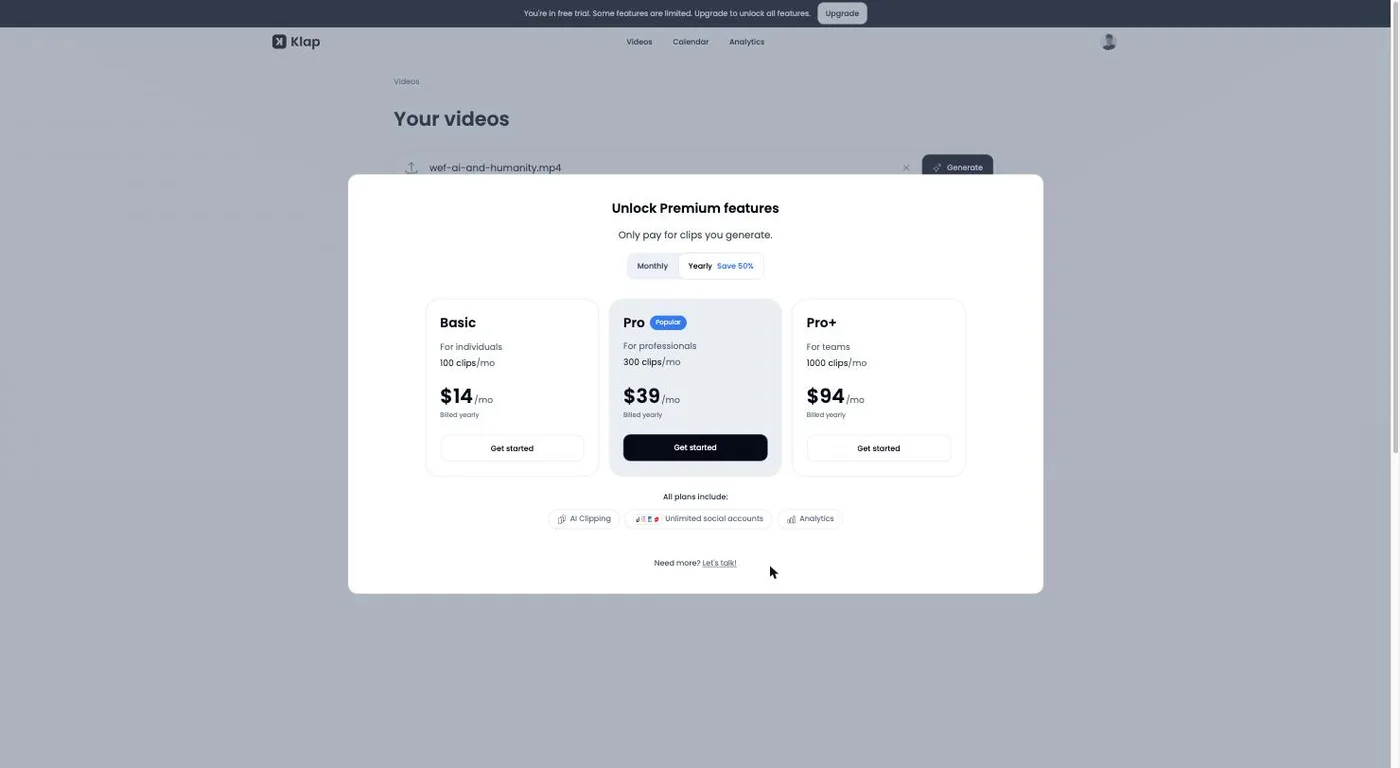
What happens next is the review. I signed in to a trial account and uploaded the same 35:27 recording I fed OpusClip, Submagic, CapCut and Vizard — the World Economic Forum panel “An Honest Conversation on AI and Humanity”, published under a Creative Commons Attribution licence — and watched the progress climb to 100%. The button read “Verifying” for about a minute. Then the screen above appeared: “Unlock Premium features / Only pay for clips you generate.” No clips. In case the wall was about file size or duration, I cut a two-minute, 2.4MB sample and tried again. Same modal, faster. The usage page still reads Clips 0 / 120, and the workspace still says I have not created any videos.
So everything below about quality, scores, captions, reframing and export resolution is Klap’s claim rather than my measurement, and I will say so each time.
What the account does show is the shape of the wider product. The app’s top navigation carried three tabs on the day I tested — Videos, Calendar and Analytics — so scheduling and performance tracking are built in rather than sold a tier up, and the pricing page confirms analytics and unlimited connected social accounts on every plan. I could not open either tab against real clips, for the obvious reason, so what they contain is unknown to me. Klap also claims 52 languages, against the “over 25 languages” OpusClip’s help centre lists, so this is one place where Klap’s claimed advantage looks real even if I could not test a single language.
How much does Klap cost?
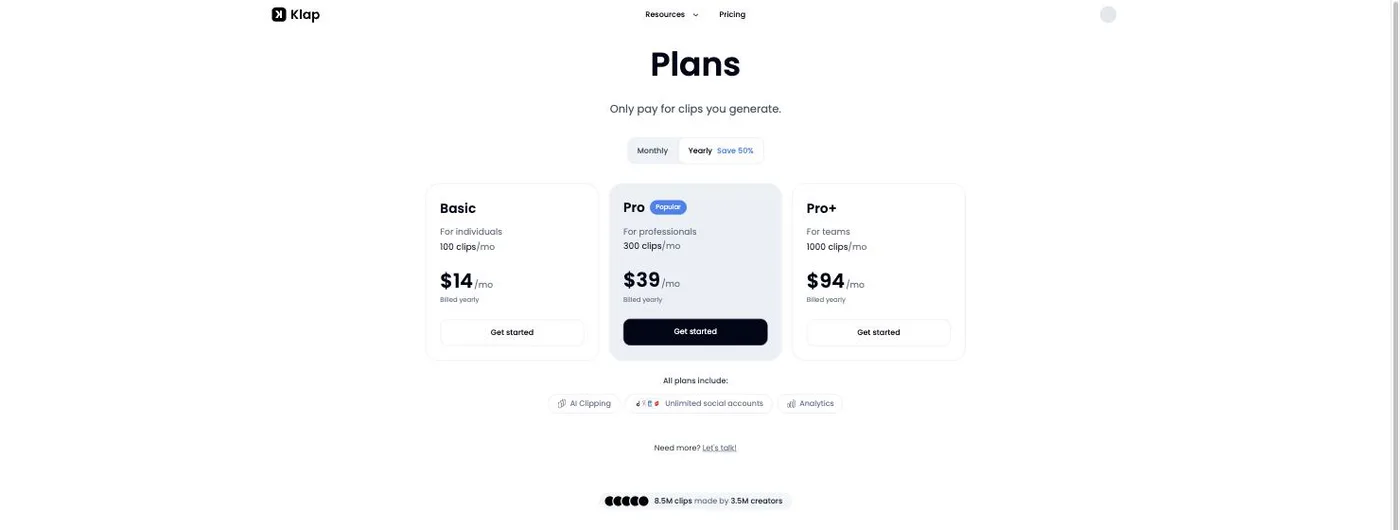
Three plans, no free tier, and the monthly price is roughly double the annual one: I toggled it myself on 18 September and Basic went from $14 to $29, Pro from $39 to $79 and Pro+ from $94 to $189, with the clip counts unchanged.
| Plan | Clips per month | Billed yearly | Billed monthly | Per clip, yearly |
|---|---|---|---|---|
| Basic, for individuals | 100 | $14/mo | $29/mo | 14¢ |
| Pro, for professionals | 300 | $39/mo | $79/mo | 13¢ |
| Pro+, for teams | 1,000 | $94/mo | $189/mo | 9.4¢ |
Every plan includes the AI clipping, unlimited social accounts and analytics, so you are buying volume rather than features. The page header states the pitch in one line: “Only pay for clips you generate.”
That unit is the argument. OpusClip, Vizard and CapCut all bill per minute of source, so a three-hour recording costs you before you know whether one second of it is usable. Submagic charges a flat fee per job. Klap charges for output, which inverts the risk on exactly the sources that waste the most money elsewhere — long, rambling, low-yield footage.
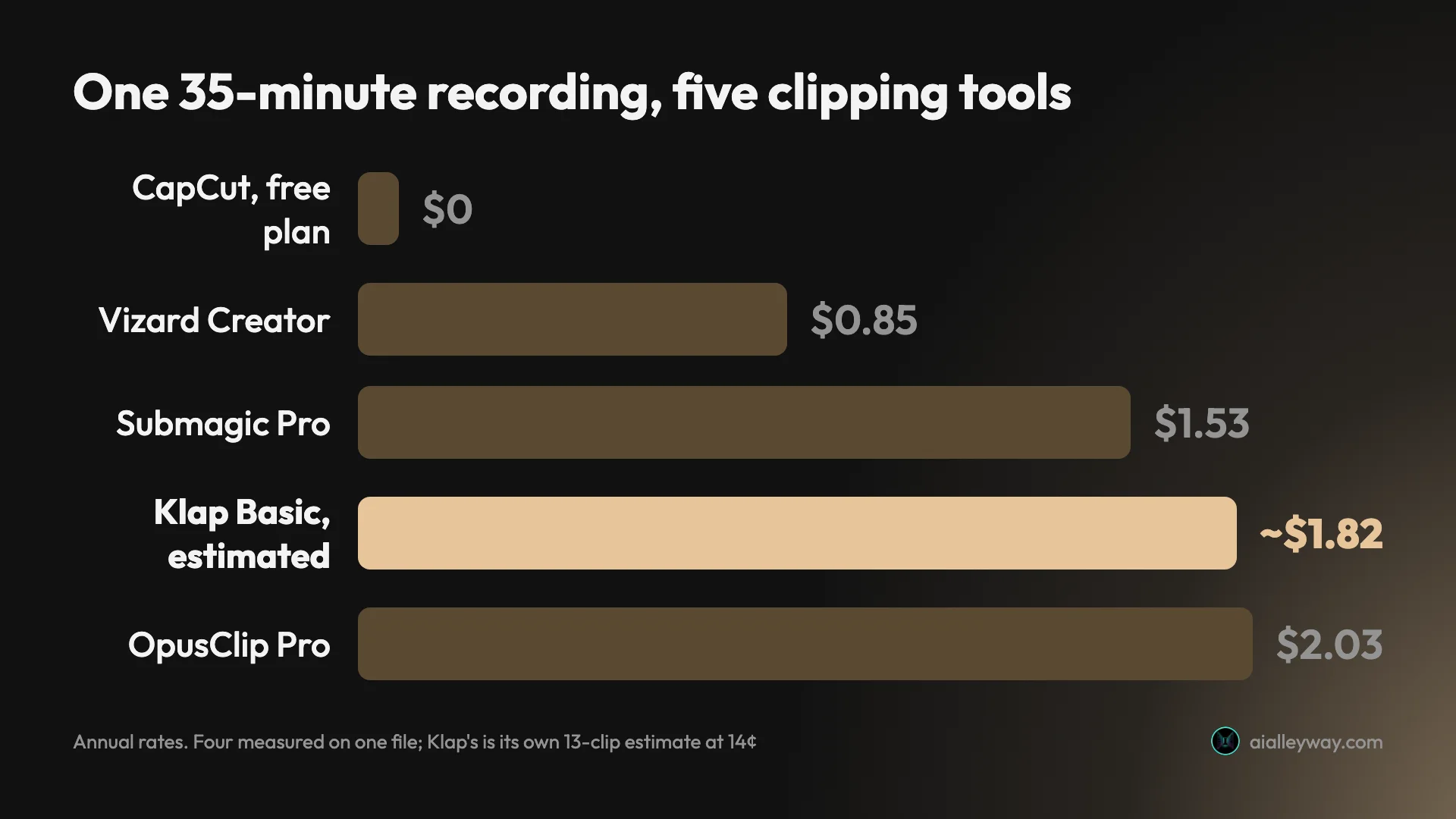
Work it against my own file and Klap lands mid-table rather than underneath. Klap estimated about 13 shorts from the panel; at Basic’s 14 cents that is roughly $1.82, at Pro’s 13 cents about $1.69. The same job measured $2.03 on OpusClip Pro annual, $1.53 on Submagic Pro annual, $0.85 on Vizard Creator annual and nothing at all on CapCut’s free tier. Klap’s shape only wins when a long source yields few clips.
There the gap can be wide. Take a two-hour recording as an example: on a per-minute meter it costs $2.90 at Vizard’s Creator rate and $6.96 at OpusClip’s Pro rate before you have seen anything, while on Klap you pay 14 cents for each clip it generates. The catch is that Klap decides how many that is — it offered around 13 for a 35-minute file — and I never established whether a user can cap the count. Since the estimate is Klap’s and the delivered count is unknown, even that $1.82 is provisional.
One more thing the pricing page does not tell you. Klap’s own homepage FAQ, live the day I tested, says to “upgrade to Klap Pro for just $29/month”. Pro today is $39 billed yearly or $79 monthly, and $29 is what Basic costs month to month. The FAQ is quoting a plan structure the company has moved on from.
Who is Klap for?
- Anyone clipping long recordings that yield few clips. This is the case the product is built for, as long as it does not produce more than you need.
- Developers who want clipping inside their own product. Klap publishes a usage-based API whose docs name no plan gate at all, at $0.44 per video input, $0.32 per generated short and $0.48 per export, billed by operation rather than out of your plan.
- Teams posting at volume. Pro+ at 1,000 clips a month works out at 9.4 cents a clip, the cheapest per-clip rate on this page, and every plan carries unlimited connected social accounts.
- People who want to direct the cut. The Moments box takes a written instruction about what to look for. Vizard and OpusClip both have an equivalent free-text box, so the idea is not unique; what Klap adds is the preset chips beside it and a clip-count estimate on the same screen.
- Not for anyone who needs to see output before paying. There is no way to do that. If evaluating first matters, CapCut exports clean 1080p on a free plan and OpusClip has a free tier with 60 credits a month.
What does Klap get right?
The meter is the best-designed thing in this category
Every other clipper I have run bills for what you put in. Klap bills for what comes out, and for a certain kind of source that is straightforwardly better: the bill tracks how many clips it makes rather than how long you talked. Submagic alternatives sets the three meters in this category side by side. Its pricing page puts it in one line, “Only pay for clips you generate”, and no rival on my measured list offers the same shape.
It quotes a clip count before you commit
The generate button reads “Generate ~13 shorts” for a 35-minute file. On a per-clip meter that estimate is the price quote, and it is the only up-front number of its kind I have seen in this category. It is also unreliable at the short end, where a two-minute clip returned an estimate of seven, so treat it as a ballpark rather than a bill.
You can tell it what to clip in words
The Moments panel is headed “Tell the AI what to clip”. Alongside the always-on “Best: Find the strongest moments” there is a text box and preset chips for funny moments, key takeaways and hot takes. Submagic explains its picks after the fact and Vizard writes a reason per clip, so the category is getting better at telling you why; Klap is the one that asks you first and puts presets behind it.
The API is open and priced in public
Klap’s API needs no application: the docs publish per-operation pricing and name no plan gate at all. That is a real advantage over OpusClip, whose help centre puts API access on “Pro (Beta), Max, and Business plans” — though its API page still advertises a self-serve free tier and no sales call, which is not the closed enterprise gate Klap describes.
The editing features are not an upsell
Klap’s comparison table claims a full editor on every plan against a paid add-on at OpusClip. That is Klap’s own scoring of the matchup and I could not test the editor, but the half I can check holds up: OpusClip only says “No editing” on its free tier, and Klap’s three plan cards name no editing gate at all.
Scheduling and analytics are not a tier up
The nav carried Calendar and Analytics tabs when I signed in, and all three plans list analytics and unlimited connected social accounts. Several rivals treat publishing as the upsell: Vizard’s free tier connects one account and its paid tiers six or twenty. Whatever those tabs contain — and I never got clips into them — Klap is not charging extra for the posting half of the workflow.
Where does Klap fall down?
The trial will not make a clip, on any file I tried
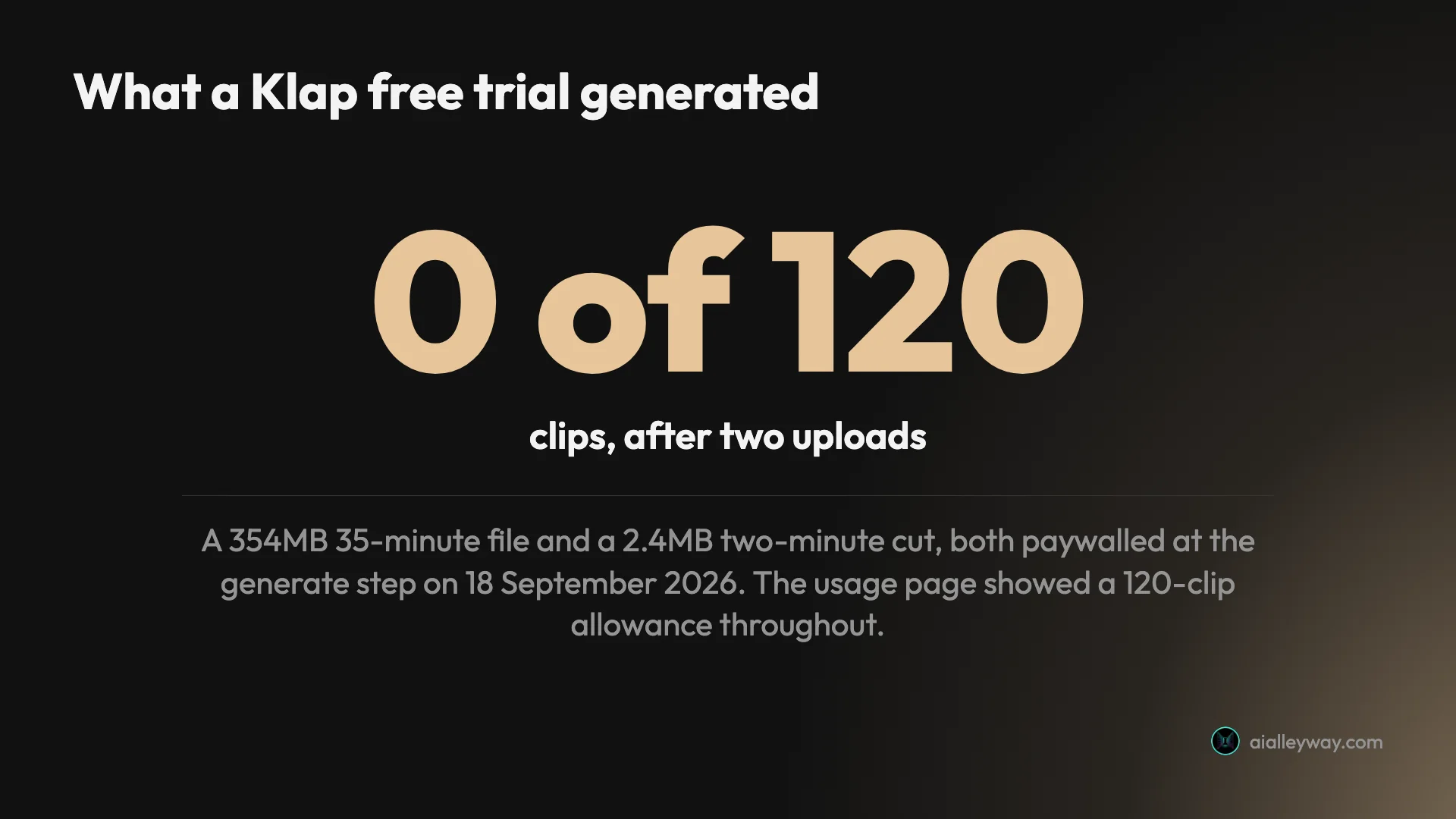
“Try for free. No credit card required.” sits directly under the upload box, and the FAQ promises one free video. Two runs on 18 September say otherwise: a 354MB 35-minute file uploaded in full, then paywalled at generate, and a 2.4MB two-minute file paywalled immediately. Usage stayed at 0 of 120 both times. Whatever the intended trial is, what the account did was take the upload and ask for money.
Three of the four claims I checked do not hold
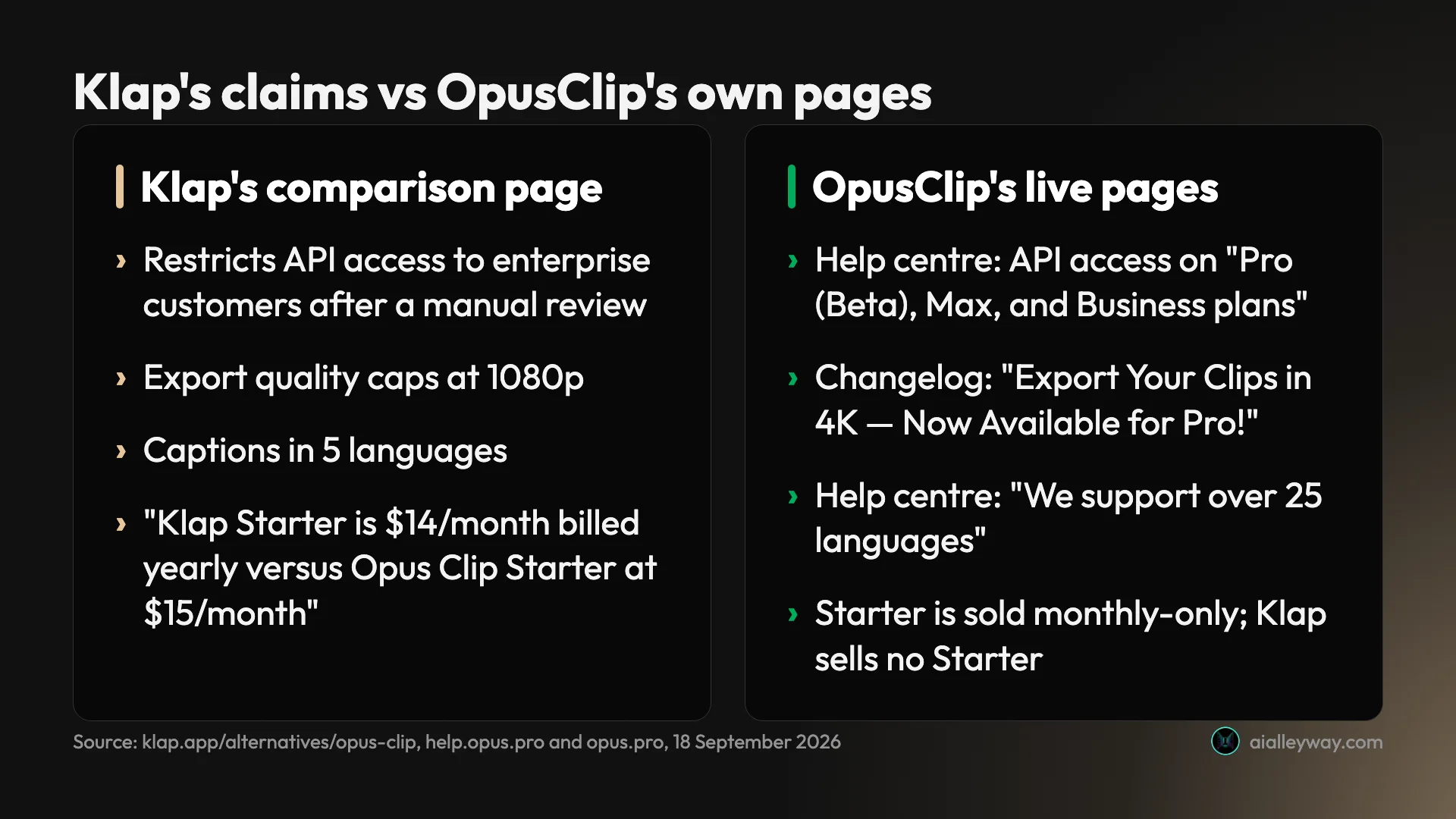
Klap’s comparison page is stamped “Last updated May 13, 2026 · Hands-on comparison by the Klap team”. It says OpusClip restricts API access to enterprise customers after a manual review, so most teams cannot prototype against it. OpusClip’s own help centre says “API access is available on Pro (Beta), Max, and Business plans”, and its API page advertises a “Self-serve free tier” where you “start building without a sales call”. Klap caps OpusClip at 1080p, which is the limit on OpusClip’s free tier — its changelog announces “Export Your Clips in 4K — Now Available for Pro!”. And it credits OpusClip with 5 languages, where OpusClip’s help centre says “We support over 25 languages” and lists 25.
Two of its own pages price plans it does not sell
The comparison page says “Klap Starter is $14/month billed yearly versus Opus Clip Starter at $15/month” and credits Klap Starter with “10 × 45-minute videos / month (~$0.03 / minute)”. There is no Starter plan on Klap’s pricing page — the $14 tier is Basic, and it is sold as 100 clips, not as 450 source minutes. OpusClip’s pricing page also sells Starter as monthly-only, so the annual comparison is annual on one side only.
The homepage FAQ has the same problem from the other end: it tells you to “upgrade to Klap Pro for just $29/month”, when Pro is $39 billed yearly and $79 month to month, and $29 is what the cheapest plan, Basic, costs monthly. Pro costs 34% more than the quoted figure billed yearly, and 172% more month to month. Two vendor pages, two plan names the company has moved on from.
Two rating badges rest on three reviews
The comparison page displays 4.8 out of 5 and 5.0 out of 5 without saying where they come from. The 4.8 is G2, which holds two reviews and still shows a “Re-claim Profile” button, meaning nobody at Klap has claimed it. The 5.0 is Capterra, which holds one — the same review Klap quotes as a testimonial. On Trustpilot, where 45 people have posted, the score is 3.5 and the shape is a barbell: 47% at five stars and 35% at one.
I read the one-star reviews: they are about unexpected charges, missing cancel options and slow support, not about the clips. One from September 2025, titled “Free Trial has no Value”, describes the same complaint a year earlier.
The user-count badge does not match the founders’ own number
“8.5M clips made by 3.5M creators” sits on the pricing page with no date and no source. The founders’ own Google Cloud case study says something different: “Launched in 2023, Klap has since attracted more than two million users worldwide.” The creator count is 75% higher than the user figure the founders gave, and only one of the two names its source.
The API docs publish prices and no limits
Klap’s API docs publish per-operation prices and nothing else: no requests per minute, no concurrency cap, no monthly ceiling, where OpusClip’s limitations page sets out 30 requests a minute per key, 900 credits of API usage a month on Pro Beta and Max, and four concurrent projects. A reviewer on Product Hunt, where Klap scores 3.2 from six reviews, puts it more bluntly: “The API documentation is outdated, incomplete and is a pain in the a** to read and understand, even their typescript example simply doesn’t work.”
Cancelling is where the complaints cluster
Klap’s terms allow a refund request “before the end of your first month of subscription”, plus partial refunds on annual plans for up to three consecutive unused months, “prorated at 1/12 of the annual amount per month”. It sits against a Trustpilot profile where a third of reviewers are at one star, and reading those reviews the recurring themes are charges people say they did not agree to and a missing cancel option, which is worth knowing before you buy a year up front.
If Klap is not for you
Framed for the case where per-clip billing does not fit, or where seeing output first is non-negotiable. All three below were measured on the same file, and the best AI clipping tool ranks what each returned; Opus Clip alternatives is the version of this page written for leavers rather than buyers.
Vizard is the cheapest credible clipper I have measured: it found 30 clips in the same panel, delivered 10 on the free plan, and the job costs 85 cents at its Creator annual rate against Klap’s estimated $1.82. It meters source minutes, so it is the wrong shape for long low-yield footage and the right one for everything else.
OpusClip is the tool Klap spends its marketing attacking, and it has the free tier Klap lacks: 60 credits a month, watermarked, clips expiring after three days. It returned 32 clips from my file at $2.03 a job, and its pricing page lists XML export to Premiere Pro and DaVinci Resolve, which nothing else here offers — I saw the button on my own run but never opened the file it produces.
CapCut is free and its export is clean — 1080p, no watermark, no upgrade. It returned 8 long chapters covering 73.6% of the same recording rather than short highlights, so it is doing a different job, but it is the only one here whose free export you could publish as it stands.
The final word
Klap is a two-person product with the smartest billing model in its category and a marketing surface that does not survive being checked. I wanted to test the clipping, and on two attempts across files about 150 times apart in size, the trial took the upload and asked for money instead. That is the finding: not that the clips are bad, but that Klap has decided you will buy them before you see one. If your sources are long and yield little, the per-clip meter may still make it the cheapest option you have — just go in knowing the comparison page arguing that case quotes a plan it no longer sells, and price the risk accordingly.
One disclosure, since this page links tools that do pay us: Klap pays us nothing, and the link below earns us nothing either. Vizard and OpusClip, linked above, are commissioned, and so is Submagic, which the cost comparisons name.
Frequently asked questions
Is Klap free?
No, and the wording on its own site is more generous than the product. The homepage FAQ says you can "create 1 video for free", and the line under the upload box reads "Try for free. No credit card required." On a signed-in trial account on 18 September 2026 I uploaded a 35-minute file, watched all 354MB go up, and was met with an "Unlock Premium features" paywall at the generate step.
I repeated it with a two-minute, 2.4MB cut of the same recording in case length or size was the trigger. Same paywall, no clips. The usage page still reads 0 of 120 clips and the workspace still says I have not created any videos. So a Klap account lets you sign in, pick a caption template and upload, and stops at the point where it would make something. The pricing page carries no free tier at all: three paid plans, headed "Only pay for clips you generate."
How much does Klap cost?
Three plans, and the monthly price is roughly double the yearly one. Basic is $14 a month billed yearly or $29 month to month, for 100 clips a month. Pro is $39 yearly or $79 monthly for 300 clips. Pro+ is $94 yearly or $189 monthly for 1,000. Every plan includes the AI clipping, unlimited social accounts and analytics.
What makes it unusual is the unit. Klap bills per clip it hands back, where OpusClip, Vizard and CapCut all meter the minutes you feed in and Submagic charges a flat fee per job. At the yearly rates that works out at roughly 14, 13 and 9.4 cents a clip as volume rises, and about double that month to month. Klap's own homepage FAQ still tells you to "upgrade to Klap Pro for just $29/month", which is neither the current Pro price nor the current name of the $29 tier.
Is Klap better than OpusClip?
I cannot tell you, and neither can Klap's comparison page, which is the problem. That page is titled a hands-on comparison by the Klap team and rests on four checkable claims about OpusClip. Three do not survive a look at OpusClip's own live pages. It says OpusClip restricts API access to enterprise customers after a manual review, while OpusClip's help centre says API access is available on its Pro, Max and Business plans and its API page advertises a self-serve free tier with no sales call.
It caps OpusClip's export at 1080p, which is the limit on OpusClip's free tier, not its Pro plan, where OpusClip's own changelog announces 4K. It credits OpusClip with 5 languages against Klap's 52, where OpusClip's help centre says it supports over 25 and lists them. The fourth claim compares a "Klap Starter" plan at $14 that Klap's pricing page does not sell. I measured OpusClip's clipping directly; Klap's never reached a clip.
Does Klap have a free trial?
There is a trial account, and on my testing it is a look-around rather than a try-out. The banner across the app reads "You're in free trial. Some features are limited. Upgrade to unlock all features", and the usage page shows a 120-clip allowance that resets monthly or yearly depending on your plan. None of those 120 was spendable: two upload-and-generate attempts on 18 September, one a 354MB 35-minute file and one a 2.4MB two-minute cut, both stopped at the same paywall.
What the trial does let you do is inspect the product up to that line. You see the caption template grid, the Moments panel where you tell the AI what to clip, the source-language selector and an estimate of how many shorts it thinks your file contains. Mine offered around 13 for the 35-minute panel. That estimate is Klap's own guess, made before any analysis you can see, and I never saw what it would have delivered against it.
What do Klap reviews say?
The review base is much thinner than the badges on Klap's own pages suggest. Its comparison page displays a 4.8 out of 5 and a 5.0 out of 5. The 4.8 is G2, where the profile carries exactly two reviews and still shows a "Re-claim Profile" button, so nobody at Klap has claimed it. The 5.0 is Capterra, where there is a single review — the same one Klap quotes as a testimonial on its own page.
Trustpilot is where the volume is, and it splits hard: 3.5 out of 5 across 45 reviews, with 47% five-star and 35% one-star, read on 18 September 2026. Reading the one-star reviews, they are about billing rather than clip quality: unexpected charges, a missing cancel option, and one from September 2025 titled "Free Trial has no Value". Product Hunt sits at 3.2 from six reviews, where one reviewer calls the API documentation outdated, incomplete and painful to read.
Does Klap have an API?
Yes, and it is the genuine advantage in its pitch. Klap publishes a usage-based API at docs.klap.app whose docs name no plan gate: $0.44 per video input operation, $0.32 per generate-short operation and $0.48 per export.
Three caveats. The docs publish no rate limits at all: I searched them for rate limits, quotas and concurrency and found nothing, where OpusClip publishes 30 requests a minute per key, a 900-credit monthly API ceiling on Pro Beta and Max, and a four-project concurrency cap. And Klap's key management page sits behind the login, so whether a trial account can mint a key is something I could not establish. The API also bills by operation rather than out of your plan's clip allowance, so the $14, $39 and $94 tiers do not tell you what an integration costs: one video in, ten shorts generated and three exported comes to $5.08 on its own.
Keep reading
The best AI video clipping tool, measured on one file
Four AI video clipping tools, one identical 35-minute file. OpusClip found 32 clips, Submagic 31, Vizard 30 but delivered 10, CapCut 8. What that means.
Opus Clip alternatives: what each one takes away
Every cheaper OpusClip alternative costs you something. I ran four tools on one 35-minute file — Vizard did it for $0.85 against $2.03 — and priced two more.
Submagic alternatives: the cheapest depends on your meter
Seven Submagic alternatives ranked by the meter they charge on. Four tools measured on one 35-minute video, and the cheapest changes with source length.
Vizard review: the cheapest clipper, with one catch
A Vizard AI review from a measured run: it found 30 clips in my 35-minute panel and handed me 10. The other 20 need a card, and the maths still favours it.