
Kling AI Review: The Best AI Video, and a Billing Problem
Kling AI makes some of the best AI video anywhere, but one free clip cost 60 of my 66 credits. My hands-on take on quality, credits, and trust issues.
Contents
Is Kling AI worth it?

Kling AI makes some of the best AI video you can generate anywhere, and it is one of the least trusted tools I have reviewed. Both things are true at once. In testing, a single free-tier prompt returned a photorealistic barista scene with clean hand motion, realistic steam, and native audio, the kind of clip that used to take a paid model. Kling 3.0 is genuinely elite.
Then the bill arrives. That one five-second clip cost 60 of my 66 free credits, credits that carry an expiry date, on a tool sitting at 1.3 stars on Trustpilot for charging people after they cancel. The video is a category leader; the way you pay for it is the problem.
If output quality is the only thing you care about, and you will pay for a plan and read the fine print, Kling is worth it. If you want a clean, trustworthy experience, Google Veo is the safer pick, even though Kling often beats it on raw quality and price. This review is here to help you decide which of those you are.
I ran it the same way I would use the tool: a free account, one real prompt, the live pricing page open in another tab, and the finished clip downloaded to check for a watermark. Every number below, from the 60-credit cost to the plan prices, comes from that session rather than from marketing copy.
What is Kling AI, and how do you use it?
Kling is a text-to-video and image-to-video model from the Chinese company Kuaishou. You use it in the browser at klingai.com, which despite the origin is fully in English, takes an email signup, and needs no Chinese phone number or VPN for a US creator. Access is genuinely easy; that is not where the friction lives.
It is also not a niche tool. The venture firm a16z has named Chinese models the current quality leaders in AI video, and Kling is the front-runner of that pack, backed by Kuaishou, one of China’s largest tech companies. So the reputation problems below are not the growing pains of a small startup; they belong to one of the most-used video generators around, which is part of why they are worth taking seriously.
Inside the app you pick a model, write a prompt, choose a resolution and length, and generate. The current lineup, seen in the model dropdown, spans three generations.
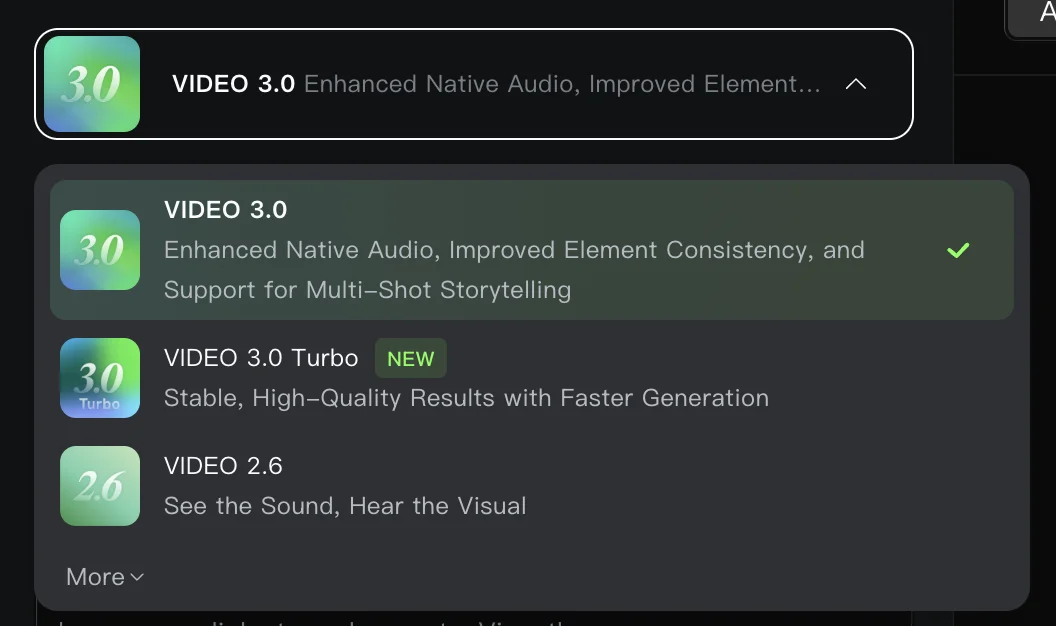
- Video 3.0 is the flagship: enhanced native audio, improved element consistency, and support for multi-shot storytelling.
- Video 3.0 Turbo trades a little polish for faster, stable generation.
- Video 2.6 and older models remain available under “more.”
The headline capabilities are real. Kling 3.0 generates native 4K at high frame rates, uses a physics-aware motion system, produces native audio with lip sync, and can chain multi-shot sequences from a single batch. Clips run 5 to 10 seconds, in 16:9 or vertical. On raw output, this is one of the two or three best models available in 2026.
You are not limited to a bare prompt, either. Kling adds start-and-end-frame control for animating between two images, a Multi-Shot toggle for building a short story across cuts, and separate tools for Image Generation, Motion Control, and an Avatar 2.0 talking-head system. There is also an Omni mode and a Kling Canvas agent for guided workflows. It is a full studio, not a single endpoint, which is part of why it attracts serious creators despite the friction.
The Video 3.0 generation is what moved Kling from “impressive” to “elite.” Over Kling 2.x it adds the native audio, tighter element consistency across a clip, and the multi-shot storytelling that lets you direct a sequence rather than roll one shot at a time. The quality jump is real; the pricing model did not get any simpler alongside it.
The catch, which the rest of this review is about, is that every one of those generations costs credits, and the credit economy is where Kling gets complicated.
How much does Kling AI cost?
Kling is free to try and runs from about $7 to $128 a month on paid plans, but the real cost is measured in credits per clip, not dollars per month. There are two layers: the plan you buy, and the credits each generation spends.
The plans are priced as first-month “special offers” that revert on renewal, so the big number you see is not what you pay ongoing. Here is the live pricing from the membership page.
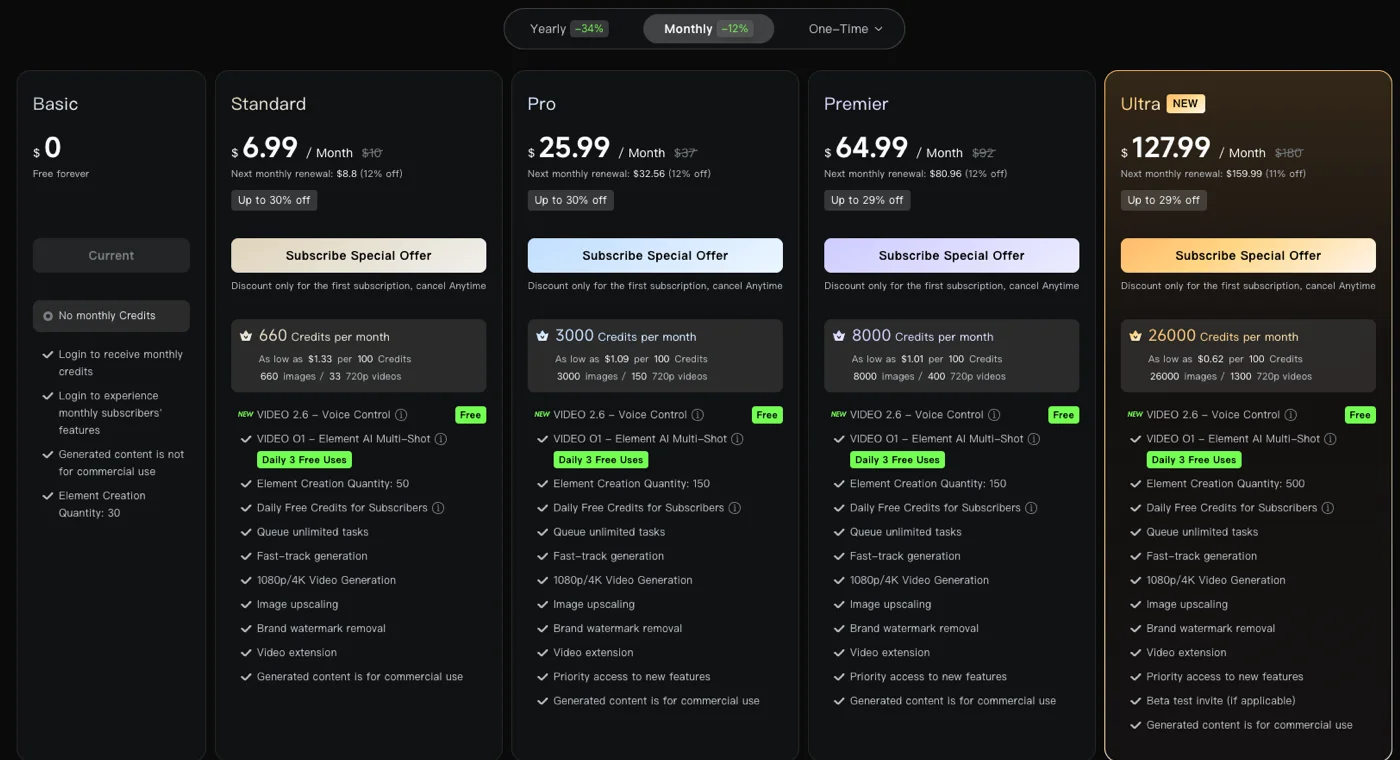
| Plan | First month | Regular | Credits / month |
|---|---|---|---|
| Basic (Free) | $0 | $0 | Daily login credits only |
| Standard | $6.99 | $10 | 660 |
| Pro | $25.99 | $37 | 3,000 |
| Premier | $64.99 | $92 | 8,000 |
| Ultra | $127.99 | $180 | 26,000 |
Read the small print under each price. The headline figure applies only to a first subscription, labelled “discount only for the first subscription,” and the next renewal is billed higher, around 11 to 12 percent off the regular price rather than the special rate. As shown on the page, Standard is $6.99 the first month and $8.80 after; Ultra is $127.99 the first month and $159.99 after. A first-time referral code adds up to 1,500 bonus credits, but only for that first month. In other words, the cheapest number is a hook, and the plan gets more expensive the moment you renew.
The second layer is the credit cost per generation, and this is the number that decides whether a plan is generous. I measured it directly: a top-quality 1080p Video 3.0 clip with native audio cost 60 credits, while simpler 720p clips run closer to 20.
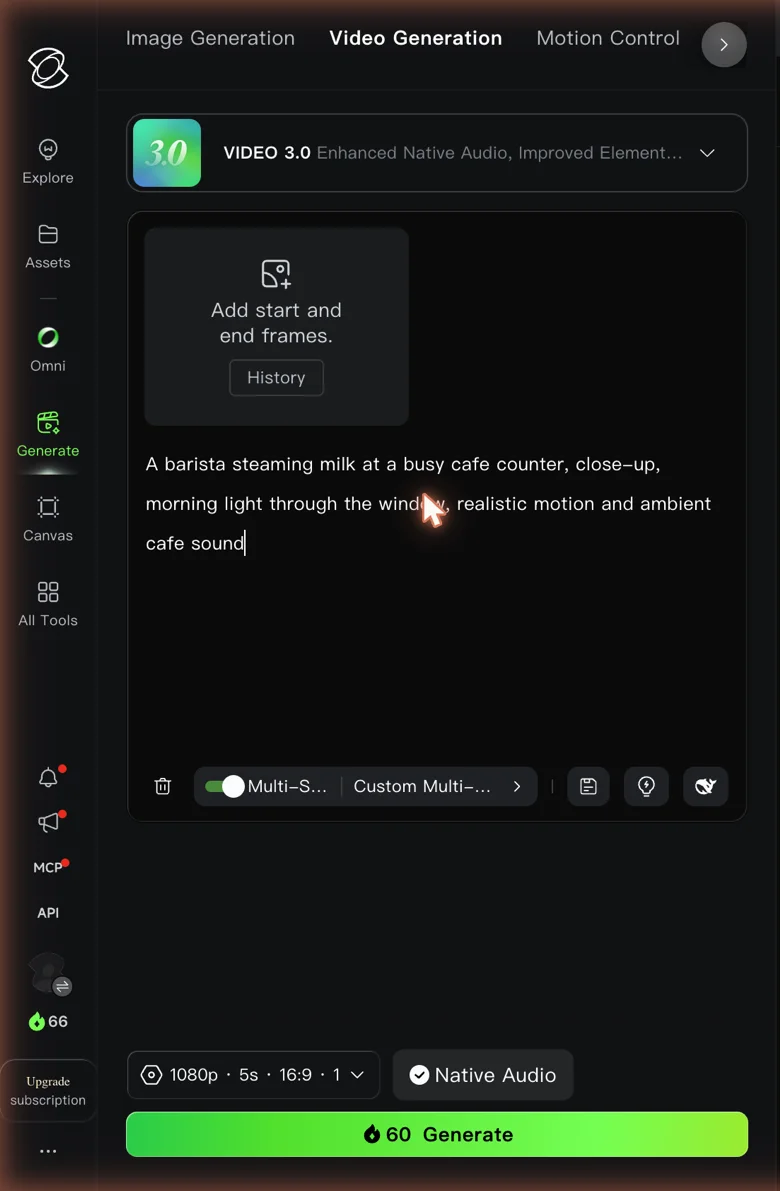
That reframes the whole table. On the free tier I had 66 credits, so one flagship clip left me with 6. Standard’s 660 credits buy about 11 of those clips a month; Pro’s 3,000 buy roughly 50; Ultra’s 26,000 buy a few hundred. The free tier is a demo, not a workflow.
It helps to think in finished clips per plan, at the flagship 60-credit rate.
| Plan | Credits / month | Flagship 1080p clips (~60 credits each) |
|---|---|---|
| Free | 66 | ~1 |
| Standard | 660 | ~11 |
| Pro | 3,000 | ~50 |
| Premier | 8,000 | ~133 |
| Ultra | 26,000 | ~433 |
Think in finished projects to feel the real cost. Because clips cap at 5 to 10 seconds, a one-minute video is roughly eight to twelve generations stitched together. At the flagship 60-credit rate that is around 600 to 700 credits for a single minute, which is most of a Standard month gone on one short piece, before any re-rolls for prompts that miss. On the cheaper 720p setting the same minute is far more affordable, which is why most creators draft at lower quality and reserve the flagship model for final shots.
One more wrinkle sits on top: credits expire. My free credits carried a hard expiry date, which is exactly the sort of thing that turns into a complaint when a paid allowance vanishes unused. More on that below.
Who is Kling AI for?
Kling is for creators who put raw output quality above everything else. If you want the most cinematic motion and detail you can get, will pay for a plan, and are comfortable managing credits and cancellations carefully, this is a top-tier tool.
Three groups get the most from it. AI filmmakers and video artists get the elite motion, native 4K, and multi-shot control that make Kling feel closest to a real camera. Social and short-form creators who want a standout hero clip can lean on the quality, as long as they pay to drop the watermark. And power users chasing cost per clip get more raw quality per credit than most Western models once they are on a paid tier.
It is a poor fit for anyone who wants a low-friction, trust-first experience. If a watermark on free output is a dealbreaker, if you need commercial rights without paying, or if you have been burned by subscription billing before, the trust issues below will outweigh the quality. It is also a weaker fit for high-volume work at the cheapest tiers, where the credit math bites fast, and for teams that need a vendor they can trust on billing without watching the statement.
What does Kling AI get right?
Elite raw quality and motion
The reason people put up with everything else is the output. My barista prompt on the free Video 3.0 model came back photorealistic: the hand on the steam wand held together, the steam and chrome looked real, and the motion was smooth rather than the usual AI wobble. Here is what that single free generation involved.
| Test detail (Kling Video 3.0, free tier) | Result |
|---|---|
| Credits spent | 60 (of 66 free) |
| Output | 5 seconds, 1080p, native audio |
| Hand and steam-wand motion | Clean, realistic |
| Watermark | Visible “KlingAI 3.0” on free output |
This is the actual clip.
In my test, motion and physics were Kling’s clear strongest area. Kuaishou’s physics-aware motion system handled weight and movement convincingly, and detail held up better than I expected. The small things that usually break, the fingers gripping the wand, the way the steam moved, the reflections on the metal pitcher, all held together across the full five seconds rather than falling apart mid-shot.
If the whole job is a great-looking shot, Kling delivers it, and it does so on the free tier. That is the uncomfortable part of this review: the thing Kling is criticised for most, its billing, sits right next to output that is genuinely better than tools with spotless reputations.
Native 4K and a low cost per clip
Kling 3.0 generates true native 4K at high frame rates, not upscaled, which is rare. Most rivals reach 4K by enlarging a lower-resolution frame; Kling renders at that resolution, so the sharpness and lighting consistency hold up rather than softening under scrutiny. Paired with the fact that its credit cost per clip undercuts most Western models, it is the value champion on paper: the best raw quality for the lowest per-generation price, once you are on a paid plan. At a glance, here is what the flagship model brings to the table.
| Kling 3.0 strength | Detail |
|---|---|
| Resolution | Native 4K at high frame rate (paid tiers) |
| Motion | Physics-aware, rated near the top of the field |
| Audio | Native track plus lip sync, single pass |
| Sequencing | Multi-shot storytelling from one batch |
| Cost per clip | Lower credits than most Western models |
That combination is why I would call Kling the best raw model of the bunch, even though its billing keeps it from being my overall pick. It wins the output-quality argument and then loses the trust argument, which is exactly the tension this review keeps returning to.
Worth noting: the highest-resolution 4K output and image upscaling are listed as paid-tier features on the pricing page, so the free tier gives you the quality of the model but not its top resolution. To see Kling truly at its best, you are on a plan, which brings the credit and billing considerations back into play.
Easy access and native audio
Getting started is frictionless for a US creator: an English UI, email signup, and no regional workarounds, despite Kling being a Chinese product. That matters, because plenty of top models are gated behind aggregators or region locks. With Kling you sign up and generate in a couple of minutes.
Video 3.0 also generates a native audio track in the same pass as the picture, with lip sync available, so a prompt that mentions sound returns with it attached rather than needing a separate step. My test clip came back with an audio track baked in. For dialogue-driven or ambient work, that single-pass audio removes a whole layer of post-production.
The multi-shot storytelling feature, which builds a short sequence from per-shot prompts in one batch, is a genuine step beyond single-clip generation for anyone assembling a narrative rather than a one-off shot.
Where does Kling AI fall short?
The billing reputation is real, and it is bad
This is the headline problem. Kling holds a 1.3-star rating on Trustpilot across more than 300 reviews, and those reviews are strikingly consistent: charges after cancellation, no refunds, and access denied while credits remained on the account. A widely shared Reddit thread calls the credit system exceptionally predatory. The video quality is not what people are angry about; the billing is.
What makes it worse is that the complaints cluster around the exact mechanics I have already described: the first-month special that renews at a higher price, credits that expire before you use them, and a cancellation flow people struggle to find. When those combine, a user signs up for a cheap month, forgets the renewal jumps, and finds a charge they did not expect with no refund on offer. That is the pattern the low rating is built on.
For a tool you subscribe to, that is a genuine liability, and it is the main reason Kling is a runner-up rather than a top pick. If you do subscribe, protect yourself: cancel through the account settings well before the renewal date, screenshot your cancellation confirmation, and treat the free tier as a test before you ever attach a card. None of that should be necessary for a $7 subscription, and the fact that it is tells you where Kling’s real weakness lies.
There is one way around the subscription entirely: Kling 3.0 is resold by aggregators, so you can run the model on someone else’s balance without ever holding a Kling plan. That trades this billing record for a different one, and our Higgsfield review works out what the middle layer charges.
Credits expire, and free credits burn fast
Kling’s credit model has two sharp edges. First, credits carry an expiry date, so a paid allowance you do not use can simply disappear. That is visible right on the account.

Second, the burn rate is steep. One 60-credit flagship clip emptied most of my 66-credit free balance in a single generation, which matches the common complaint that free credits vanish after one or two tries. The two edges compound: a slow drip of daily login credits, a high cost per clip, and an expiry clock mean the free tier never really accumulates into anything usable. You are always either just topped up or nearly empty.
For paying users the expiry is the sharper issue. If you buy a plan for a busy month and then have a quiet one, the unused credits do not roll over indefinitely, so you can pay for capacity you never get to use. Budget your generations against the expiry, not just the monthly total.
Watermarks, non-commercial free output, and slow queues
Free output carries a visible KlingAI watermark, which showed on my downloaded clip, and the free licence does not permit commercial use. Removing the watermark and enabling commercial rights both require a paid plan. Free generations also sit in a slower queue: when I generated, the app estimated a two-minute wait and openly offered faster generation to subscribers, and user reviews mention “currently busy” errors at peak times.
None of these are unusual for a freemium tool, but stacked together they make the free tier more of a locked demo than a usable free plan. It is worth contrasting with Google Veo, whose 50 daily credits cover about five Lite clips, where Kling’s free plan relies on a slow drip of daily login credits and one flagship clip costs 60 credits.
Our July Veo export had no visible mark, but an October export (tested from a region where Google applies a visible watermark automatically) carried a small “Veo” label, so a mark alone does not separate the two. So the free experience is a fair way to judge the quality, but not a way to actually ship work: the watermark, the licence, and the queue all push you toward a paid plan, which loops right back to the billing concerns above.
Alternatives worth considering
If Kling’s trust issues or credit math do not sit right, three models are worth a look. Here is how they compare.
| Tool | Where it beats Kling | Where Kling beats it | Best for |
|---|---|---|---|
| Google Veo | Trust, five free clips a day, ecosystem | Native 4K, cost per clip | A safer, more complete experience |
| Runway | Editing suite, predictable pricing | Raw output quality | Edit-heavy client work |
| Seedance | Benchmark scores, price | Ease of access, reputation | Frontier quality for less |
Google Veo is the pick if you want Kling’s cinematic quality with none of the trust baggage. Its 50 daily free credits cover about five Lite clips, its billing carries no reputation problem, and it sits inside Google. Kling often beats it on raw 4K and price, but Veo is the safer product. See our full Google Veo review or the Kling vs Veo head-to-head.
Runway is the choice when editing control matters more than raw fidelity. Its Aleph editing model suits client-facing work, and its subscription pricing is predictable rather than credit-metered. See our full Runway review or Runway vs Kling side by side.
Seedance ranks among the top on public video benchmarks and undercuts Kling on price, but it is reached through ByteDance’s Dreamina or CapCut apps rather than a first-party site, and it carries its own legal uncertainty. See our full Seedance review.
The final word
Kling AI earns its 4.2 rating on the strength of what it makes. Kling 3.0 is one of the best AI video models available, and the free clip I generated would have passed for a paid result a year ago. On raw quality and cost per clip, it beats most of the field, including Google Veo.
The honest caveat is that the tool around the model does not match it. A 1.3-star billing reputation, expiring credits, watermarked free output, and a locked free tier are real costs that do not show up on the pricing page. Go in for the output, pay for a plan, cancel carefully, and Kling is a superb generator. Go in expecting a trustworthy, low-friction subscription, and the reviews will have warned you.
So here is the simple way to decide. If you are a filmmaker or creator who will judge a tool purely on the shot it produces, and you are disciplined about subscriptions, Kling gives you the best raw video for the money. If you want a model that is nearly as good with none of the anxiety, use Google Veo. Try Kling free, then decide whether the trade-off is one you can manage.
See the best Kling AI alternatives or Seedance vs Kling for where to go instead, our Kling AI pricing guide for the plan math, and the best AI video generator hub for the full field.
Frequently asked questions
Is Kling AI really free?
There is a free tier, but it is best treated as a trial. A free account gets a small pool of credits (mine held 66), and in testing a single 1080p Video 3.0 clip with native audio cost 60 of them, so free access is one good clip and you are nearly out. Free credits also carry an expiry date, and daily login credits refill slowly.
Free output comes with two more catches: a visible KlingAI watermark, and a licence that does not allow commercial use. So Kling is genuinely free to try, but not free to rely on. For regular or commercial work you move to a paid plan, where the watermark is removed and credits are more generous.
How much does Kling AI cost?
Kling meters everything in credits, so the plan price is only half the story. Its four paid tiers start at $6.99 a month (about $8.80 on renewal) for 660 credits and climb to $127.99 for 26,000, but the figure that decides value is credits per clip: a flagship 1080p Video 3.0 clip with audio cost 60 in my test, so an entry plan buys only about 11 a month.
The verdict: cheap per clip once you are paying, priced as a first-month promo that rises on renewal, and only sensible if you read the credit table rather than the monthly total. Our full Kling AI pricing guide works that out tier by tier.
Why does Kling AI have bad reviews?
The complaints are almost entirely about billing and trust, not video quality. Kling holds a 1.3-star Trustpilot rating across hundreds of reviews, and the recurring themes are charges after cancellation, credits that expire before you can use them, no refunds, and slow or absent customer support. A popular Reddit thread calls the credit system exceptionally predatory.
The video itself is widely praised: its Product Hunt listing sits at 4.9 stars, though from a far smaller pool of reviews than the Trustpilot complaints. So the split is stark: people love what Kling makes and distrust how it charges them. That gap is the single biggest reason to go in with your eyes open and cancel carefully.
Is Kling AI better than Google Veo?
On raw quality and price, Kling often wins. Kling 3.0 offers native 4K at high frame rates and a lower cost per clip, and its motion and detail rate at or near the top of the field.
On trust and experience, Google Veo wins clearly. Veo's 50 daily credits cover about five Lite clips, where Kling's daily login credits refill slowly, its billing has none of Kling's reputation problems, and it sits inside Google's ecosystem. The honest summary: Kling is the better raw model, Veo is the safer product, and our full Google Veo review covers that side in detail. Which one fits depends on whether you optimize for the output or for peace of mind.
Keep reading
How to Use Kling AI Without Getting Burned
How to use Kling AI: sign up, generate an elite clip, and manage the credit system that eats a free account. Tested hands-on, billing traps included.
Kling vs Sora: One Shut Down, the Other Didn't
OpenAI shut Sora down, so Kling vs Sora has one answer: Kling — the raw-quality heir, if you can handle its billing. The honest comparison and what to use now.
Kling vs Veo: I Tested Both AI Video Models
Kling and Google Veo are the two best AI video models. I tested both: Veo wins overall (4.6), but Kling does native 4K and is far cheaper per top clip.
Kling AI Pricing: What a Clip Really Costs
Kling AI runs from $0 to $128 a month, but the real cost is credits per clip — a 1080p video is 60 credits. Here's the full pricing math, hands-on.