
Kling AI Pricing: What a Clip Really Costs
Kling AI runs from $0 to $128 a month, but the real cost is credits per clip — a 1080p video is 60 credits. Here's the full pricing math, hands-on.
Contents
How much does Kling AI cost?
Kling AI costs anywhere from nothing to about $128 a month, but the dollar figure is the least useful number on its pricing page. Kling meters everything in credits, and the cost that actually decides your bill is credits per clip: in hands-on testing, a single high-quality 1080p video cost 60 credits. So the real question is not “how much is the plan,” it is “how many clips do those credits buy,” and that answer is what this guide works out.
Here is the quick version. Kling has a free Basic plan and four paid tiers, priced as first-month specials that revert to a higher rate on renewal.
| Plan | First month | Renews at | Credits / month |
|---|---|---|---|
| Basic (Free) | $0 | $0 | Daily login credits only |
| Standard | $6.99 | ~$8.80 (reg. $10) | 660 |
| Pro | $25.99 | ~$33 (reg. $37) | 3,000 |
| Premier | $64.99 | ~$81 (reg. $92) | 8,000 |
| Ultra | $127.99 | $159.99 (reg. $180) | 26,000 |
Every figure below the free plan is a first-subscription promo, and the plan gets more expensive the moment it renews. The rest of this guide breaks down what those credits actually buy, why the free tier is a trial rather than a workflow, and which plan fits which kind of creator. Prices were checked directly on Kling’s membership page; credit costs were measured by generating real clips.
How Kling’s credit system works
Kling does not sell you videos, it sells you credits, and every generation spends them. That single design choice is why the monthly price is misleading: two people on the same $25.99 Pro plan can get wildly different value depending on what they generate. A creator making short 720p drafts stretches 3,000 credits a long way; one rendering flagship 1080p clips with audio burns through the same allowance in a few dozen generations.
Credits arrive in two ways. Paid plans grant a fixed monthly pool that refreshes each billing cycle, and the free Basic plan drips a small number of daily login credits. Both share an important catch: credits carry an expiry date, so an allowance you do not use does not bank indefinitely. That matters most for paying users who buy a plan for a busy month and then have a quiet one, because the unused credits can simply lapse.

It helps to know what actually moves the credit number, because that is where your control lies. Four things drive it, and because they compound, the gap between a cheap draft and an expensive final clip is wide — often three to one or more — which is exactly why drafting discipline matters so much to your bill.
| What drives the cost | Effect on credits |
|---|---|
| Model | The flagship Video 3.0 costs more than the older or turbo options |
| Resolution | 1080p runs roughly triple the cost of 720p |
| Length & quantity | Longer clips and batches multiply the spend |
| Native audio | Adds a little on top |
The upside of the credit model is transparency at the moment of generation. Before you render, Kling shows what a clip will cost given your chosen model, resolution, and length, and the number updates live as you change settings. You always know the price before you pay it. The downside is that the plan you buy and the value you get are only loosely related, which is exactly why reading the credit table beats reading the price tag.
The Kling AI plans in detail
Kling’s five tiers climb steeply in both price and credits. Here is how they line up at a glance, then what each one includes and who it suits.
| Plan | Watermark | Commercial use | Credits / month | Best for |
|---|---|---|---|---|
| Basic (Free) | Yes | No | Daily logins (~66) | Testing the quality |
| Standard | Removed | Yes | 660 | Occasional finished video |
| Pro | Removed | Yes | 3,000 | Regular creators |
| Premier | Removed | Yes | 8,000 | Heavy users, small teams |
| Ultra | Removed | Yes | 26,000 | Professionals and studios |
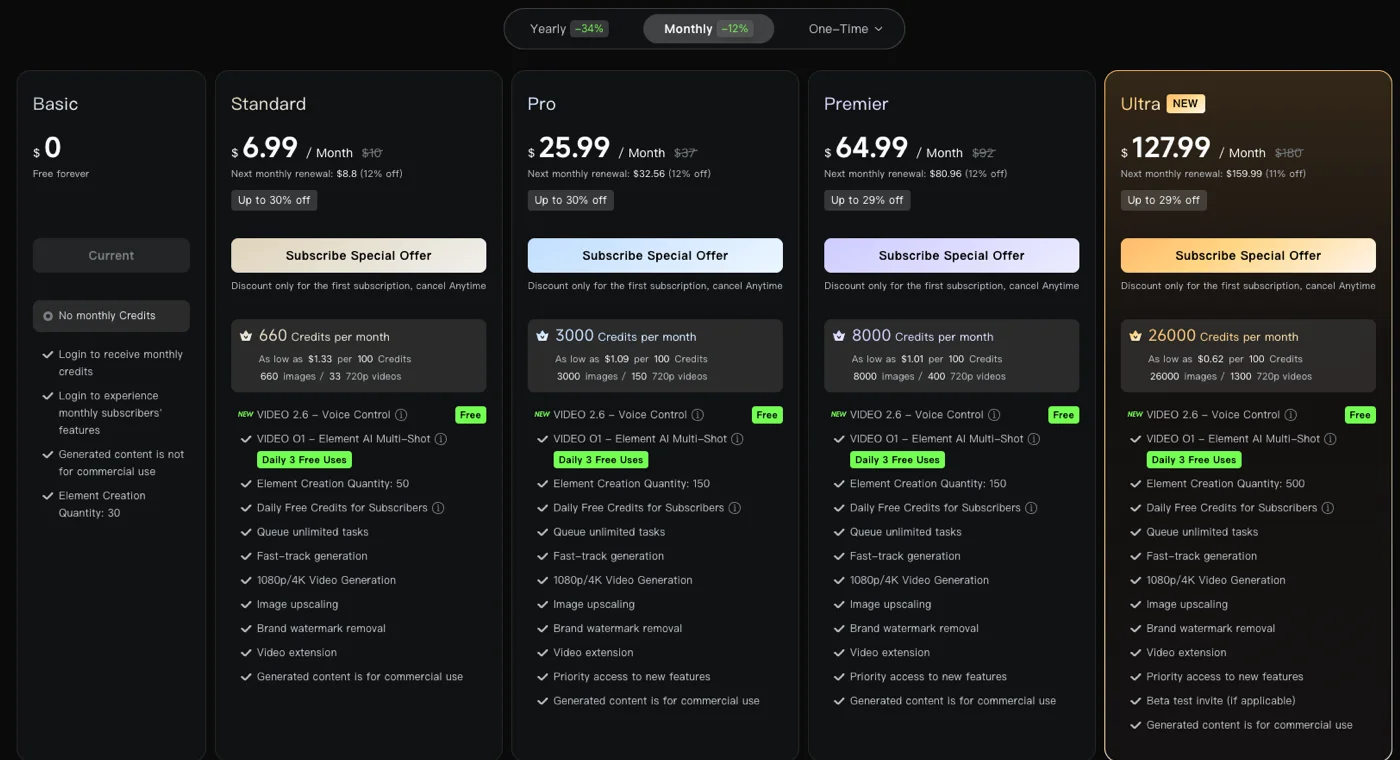
Basic (Free) — $0. A trial, not a plan. You get a small pool of credits topped up by daily logins, output carries a KlingAI watermark, and the licence forbids commercial use. Enough to judge the quality, not to ship work.
Standard — $6.99 first month (about $8.80 after), 660 credits. The entry paid tier. It removes the watermark and grants commercial rights, and 660 credits buy roughly 11 flagship clips a month. Right for an individual making the occasional finished video.
Pro — $25.99 first month (regular $37), 3,000 credits. The step up for regular creators. Three thousand credits are about 50 flagship clips, enough to produce video as a routine part of your work rather than a one-off.
Premier — $64.99 first month (regular $92), 8,000 credits. For heavy users and small teams. Eight thousand credits cover well over a hundred flagship clips a month, plus room for the constant re-rolling that real production involves.
Ultra — $127.99 first month (regular $180), 26,000 credits. The top consumer tier, aimed at professionals and studios generating video at volume. Twenty-six thousand credits buy several hundred flagship clips, and it is the plan you reach for when Kling is central to your output.
The jump from Standard to Pro is the one most people feel: it is where credits stop being a constraint on casual use. Above Pro, you are buying volume for professional workloads.
What a Kling clip actually costs
This is the section that matters most, because it converts credits back into dollars. In testing, a five-second clip on the flagship Video 3.0 model at 1080p with native audio cost 60 credits, while a simpler 720p clip ran closer to 20. Lower resolutions and shorter clips cost less; the flagship, audio-enabled 1080p output is the expensive end.
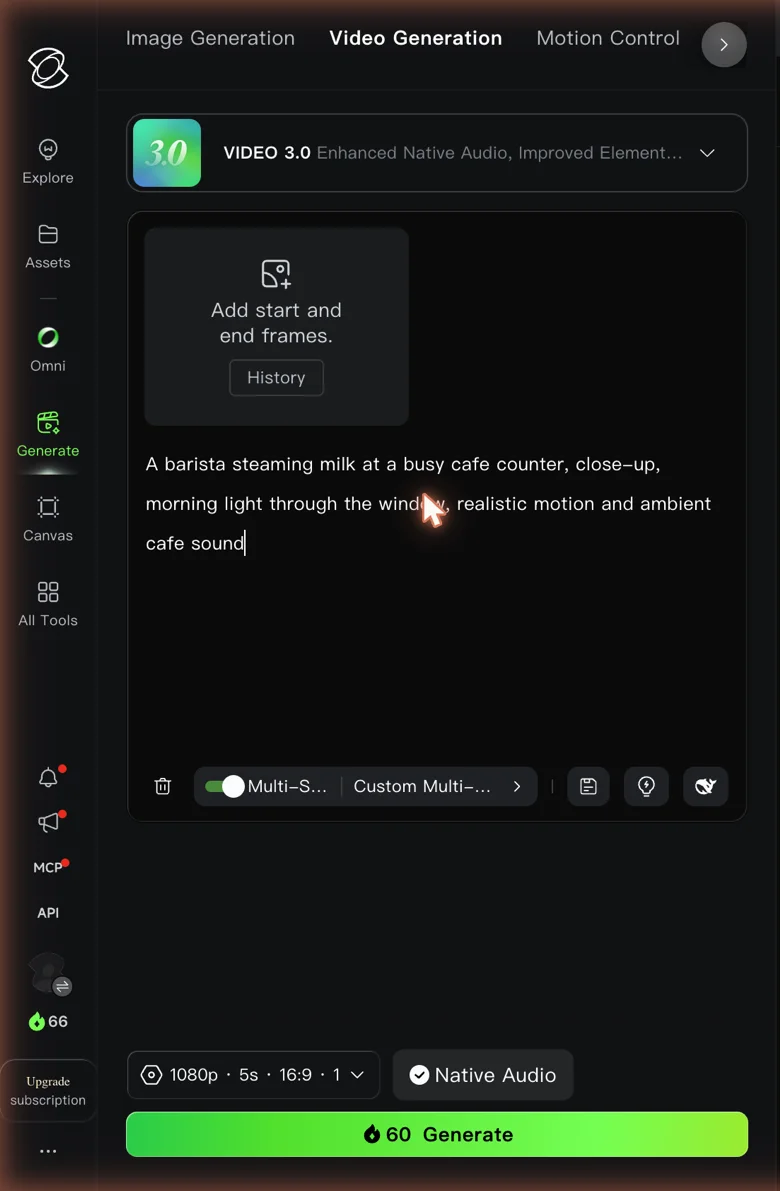
Translate that into clips per plan and the tiers look very different from their price tags.
| Plan | Credits / month | Flagship 1080p clips (~60 credits) | 720p clips (~20 credits) |
|---|---|---|---|
| Basic (Free) | ~66 | ~1 | ~3 |
| Standard | 660 | ~11 | ~33 |
| Pro | 3,000 | ~50 | ~150 |
| Premier | 8,000 | ~133 | ~400 |
| Ultra | 26,000 | ~433 | ~1,300 |
Now put it in dollars per clip. On the Standard plan’s renewal price of about $8.80 for 660 credits, a 60-credit flagship clip works out to roughly $0.80 each; on Pro at around $33 for 3,000 credits, it is about $0.66 a clip. That is genuinely cheap for the quality, and it undercuts most Western tools, which is Kling’s core value argument once you are paying.
The trap is thinking in single clips. Because Kling caps generations at five to ten seconds, a finished piece is stitched from many of them, so the credits add up far faster than the per-clip figure suggests — which is why most creators draft at the cheaper 720p and reserve the flagship 60-credit model for final shots. The next section runs that math on real projects.
What real Kling projects cost
Single-clip pricing is easy to reason about; real projects are where the credits quietly add up, so it helps to run the math on a few common jobs before you pick a plan. Here are three, with rough credit costs at the rates measured above.
A one-minute explainer video is the credit-hungry case. Because clips cap at five to ten seconds, a finished minute is eight to twelve stitched generations, so at the flagship 60-credit rate that is roughly 600 to 720 credits for a single minute — most of a Standard month gone on one short piece, before any re-rolls. Drafting at 720p and reserving the flagship model for the few hero shots cuts the same minute to nearer 200 to 300 credits, which is the difference between Standard being unusable and comfortable for this kind of work.
A week of short social clips is far kinder. Ten vertical five-second clips at flagship 1080p run about 600 credits, so Standard covers roughly one such burst a month while Pro covers a month of near-daily posting. And a batch of product or B-roll shots is cheapest of all: twenty quick 720p clips at around 20 credits each is about 400 credits, comfortably inside a Standard plan. Here is the same math in one view.
| Real project | Rough credits | Fits comfortably on |
|---|---|---|
| One minute of flagship 1080p video | ~600–720 | Pro or higher (most of a Standard month) |
| A week of ten 1080p social clips | ~600 | Standard (once a month) or Pro (weekly) |
| Twenty quick 720p product shots | ~400 | Standard |
| One minute, drafted at 720p + hero shots at 1080p | ~200–300 | Standard |
The lesson repeats: the resolution you draft at, not the plan you buy, is the biggest lever on your Kling bill.
The free tier: a trial, not a plan
Kling’s Basic plan is free, and it is a legitimate way to judge the quality, but it is not a way to actually produce anything. The free allowance is small — a fresh account held 66 credits in testing — and topped up only by slow daily logins, so a single 60-credit flagship clip leaves you with 6. You are always either just topped up or nearly empty.
Three limits define the free experience. Output carries a visible KlingAI watermark. The licence does not permit commercial use, so anything you make is for personal testing only. And free credits expire, so you cannot save them up over weeks to fund a bigger project. None of this is unusual for a freemium tool, but stacked together it makes the free tier a locked demo rather than a usable free plan.
Treat the free plan the way it is designed to be treated: generate a clip or two to see whether Kling’s output suits your work, then move to Standard the moment you want to keep or sell what you make. If you sign up through a referral, Kling adds up to 1,500 bonus credits, but only in that first month, which is another nudge to try it properly and then decide.
Annual billing, top-ups, and API access
Three pricing details sit outside the standard monthly plans, and they are worth knowing even though the monthly tiers are what most people buy.
Annual billing. Kling’s membership page offers the option to pay yearly rather than monthly, which lowers the effective monthly rate in exchange for the up-front commitment. Because Kling’s promotional pricing changes often, confirm the current annual figure on the page before you commit — and weigh it against the credit-expiry rule, since a yearly plan still meters credits monthly.
Top-up credit packs. When a plan’s monthly credits run out before the cycle resets, you do not have to upgrade the whole subscription; Kling sells add-on credit packs you can buy on top of your plan. These are the release valve for a busy month, and they are usually the cheaper fix than jumping a full tier if you only occasionally exceed your allowance.
API access. Beyond the consumer app, Kling’s models are available programmatically through third-party API platforms, billed pay-as-you-go and separately from the consumer plans. That route suits developers wiring Kling into a pipeline rather than generating in the browser, and its per-clip economics differ from the membership tiers, so price it on its own terms if that is your use case.
How Kling’s pricing compares
Kling’s headline pitch is elite quality at a low cost per clip, and against its main rivals that holds up on price while the trade-offs shift.
- Google Veo also meters in credits (a top clip runs 100 Flow credits), and its plans start higher, but it adds reliable native audio and a cleaner billing reputation. You pay a little more for a safer, more complete product. See our full Google Veo review.
- Seedance undercuts Kling outright — a clean 1080p clip runs about $0.62 through a developer platform — but its official app gates the free tier and access is fragmented. It is the cheaper option if you can handle the friction. See our full Seedance review.
- Runway charges a flat subscription ($12 to $76 a month) rather than pure credits, which some prefer, but its raw quality trails Kling and its free tier is more locked. See our full Runway review.
The pattern is consistent: Kling wins on quality-per-credit and loses on trust and billing polish. For a wider view of where it sits, our roundup of the best Sora alternatives ranks all four.
The short version on value is this. If you will actually use the credits and stay on top of the renewal date, Kling is one of the cheapest ways to generate genuinely high-end AI video, at well under a dollar a flagship clip on the Pro plan. Seedance is cheaper still but harder to reach, Google Veo costs a little more but is calmer to own, and Runway trades some raw quality for a flat, predictable subscription. Kling’s pricing only becomes a problem if you let credits expire unused or get caught by the renewal jump, and both are avoidable with the habits in the section above.
How to avoid overpaying on Kling
A handful of habits keep the credit meter from running away with your budget.
Budget for the renewal price, not the promo. The first-month figure is a discount for a first subscription only; the plan renews higher. Decide whether Kling is worth the renewal number — Standard at about $8.80, Ultra at $159.99 — because that is what you actually pay from month two onward.
Draft cheap, finalise expensive. A 720p clip costs roughly a third of a flagship 1080p one. Rough out your prompts and timing at the lower setting, and only spend the 60-credit flagship model on the shots you are keeping. This one habit does more to control your bill than any plan choice.
Mind the expiry. Credits lapse rather than banking forever, so do not buy a bigger plan than a given month needs. If you occasionally exceed your allowance, a one-off top-up credit pack is cheaper than jumping a full tier for a single busy month.
Cancel before the second bill if it is a one-off. If you only need Kling for a single project, the first-month promo is the whole deal — do the project, then cancel before renewal. And because Kling’s billing reputation is poor, cancel through the account settings and screenshot the confirmation.
Use a referral for the first month. Signing up through a referral adds up to 1,500 bonus credits, but only in that first month, so it pays to have it in place before you start.
Here is the same advice as a quick cheat sheet.
| Tactic | Why it saves |
|---|---|
| Draft at 720p, finalise at 1080p | A draft clip costs about a third of a flagship one |
| Budget for the renewal price | The first-month figure is a promo, not your real rate |
| Top-up pack over a tier jump | Cheaper for an occasional monthly overflow |
| Cancel a one-off before renewal | You pay only the discounted first month |
| Referral code in the first month | Adds up to 1,500 bonus credits, once |
Which Kling plan should you buy?
Match the plan to your output, not your enthusiasm.
- Just testing? Stay on Basic (Free) for a clip or two, then decide. Do not try to produce real work on it.
- Occasional finished videos? Standard at $6.99 first month is enough — about 11 flagship clips a month, with the watermark gone and commercial rights on.
- Regular creator? Pro is the sweet spot. Three thousand credits stop the credit meter from dictating your work, and the per-clip cost drops to around $0.66.
- Heavy user or small team? Premier or Ultra, depending on volume — hundreds of flagship clips a month, priced for professional workloads.
Whatever you pick, buy it for the renewal price, not the first-month promo, and if a single project is all you need, cancel before the second month bills.
The bottom line on Kling AI pricing
Kling’s pricing looks simple and is not. The plans span $0 to about $128 a month, but the number that decides your real cost is credits per clip — 60 for a flagship 1080p video, roughly 20 for a 720p one — and the headline monthly prices are first-month promos that rise on renewal. Read the credit table, think in finished projects rather than single clips, and the value is genuinely strong: on a paid plan, Kling delivers top-tier quality for well under a dollar a clip.
The cautions are the credit expiry, the renewal jump, and Kling’s billing reputation, all of which reward going in with your eyes open. If the credit math fits your workflow, start on Standard or Pro, watch the renewal date, and you get some of the best AI video available at a price most Western tools cannot match. For the hands-on quality verdict and the trust caveats, read our full Kling AI review, or the best Kling AI alternatives if you are looking to switch.
Frequently asked questions
How much does Kling AI cost?
Kling runs on four paid tiers plus a free plan, priced as first-month special offers that rise on renewal. As measured on the membership page, Standard is $6.99 the first month (regular $10) for 660 credits, Pro is $25.99 (regular $37) for 3,000 credits, Premier is $64.99 (regular $92) for 8,000 credits, and Ultra is $127.99 (regular $180) for 26,000 credits. The Basic plan is free.
The monthly figure is only half the story, because Kling meters generation in credits. A top-quality 1080p clip cost 60 credits in testing, so the plan that fits you depends on how many clips you make, not the headline dollar amount.
How many credits does a Kling video cost?
It depends on resolution and model. In hands-on testing, a five-second 1080p clip on the flagship Video 3.0 model with native audio cost 60 credits, while simpler 720p clips ran closer to 20. Still images and lower settings cost less.
That makes the credit-to-clip math the number that matters. Standard's 660 monthly credits buy roughly 11 flagship clips, Pro's 3,000 buy about 50, and Ultra's 26,000 buy a few hundred. Because a finished one-minute video is stitched from eight to twelve separate generations, real projects burn credits faster than the per-clip figure suggests.
Is Kling AI free?
There is a free Basic plan, but it is best treated as a trial. A free account gets a small pool of credits topped up by daily logins — mine held 66 — and a single flagship 1080p clip cost 60 of them, so free access is one good clip and you are nearly empty. Free credits also carry an expiry date.
Free output comes with two more catches: a visible KlingAI watermark, and a licence that does not permit commercial use. So Kling is genuinely free to try, but not free to rely on. Removing the watermark and unlocking commercial rights both require a paid plan.
Why does Kling's price go up after the first month?
The headline prices are labelled as a discount for a first subscription only. On the membership page the small print shows each plan renewing higher: Standard is $6.99 the first month and about $8.80 after, and Ultra is $127.99 the first month and $159.99 after, roughly 11 to 12 percent off the regular price rather than the special rate.
So the cheapest number you see is a hook. Budget for the renewal figure, not the first-month promo, and if you only need Kling for a single project, cancel before the second month bills.
Is Kling AI worth the price?
On raw quality, yes — Kling makes some of the best AI video available, and its cost per clip undercuts most Western tools once you are on a paid plan. The value is real if you will use the credits and manage the subscription carefully.
The caveats are the billing reputation and the credit mechanics: credits expire, the first-month price rises on renewal, and Kling holds a low Trustpilot rating built on charge-after-cancellation complaints. Buy it for the output, read the credit table, and cancel carefully. Our full Kling AI review covers the trust side in detail.
Keep reading
How to Use Kling AI Without Getting Burned
How to use Kling AI: sign up, generate an elite clip, and manage the credit system that eats a free account. Tested hands-on, billing traps included.
Kling AI Review: The Best AI Video, and a Billing Problem
Kling AI makes some of the best AI video anywhere, but one free clip cost 60 of my 66 credits. My hands-on take on quality, credits, and trust issues.
Kling vs Sora: One Shut Down, the Other Didn't
OpenAI shut Sora down, so Kling vs Sora has one answer: Kling — the raw-quality heir, if you can handle its billing. The honest comparison and what to use now.
Kling vs Veo: I Tested Both AI Video Models
Kling and Google Veo are the two best AI video models. I tested both: Veo wins overall (4.6), but Kling does native 4K and is far cheaper per top clip.