
Hailuo AI review: the most generous free trial in AI video
Hailuo AI review: MiniMax's video model gives ~80 free videos to start and genuinely good motion for $7.99/mo — but it's silent, watermarked, and one-time.
Contents
Is Hailuo AI worth it?

Hailuo AI is worth it, and it earns a 4.1 (Power Tool), because no other tool lets you try this much genuinely good AI video for so little. Hailuo, MiniMax’s video model, hands a new account a large pool of free trial credits — enough for roughly eighty clips — and the paid plans start at just $7.99 a month. In hands-on testing the output held up: a barista scene came back photorealistic, with the milk actually frothing.
The catches are real and worth naming up front. Free output is watermarked and the trial does not refill, the clips are silent with no native audio, and the default resolution is 768p with HD reserved for paid tiers. So Hailuo is the pick for a creator who wants a lot of capable, realistic short video cheaply and does not need sound baked in; it is the wrong pick if you need native audio or a free tier that refills, which you can get from Google Veo.
What Hailuo AI does
Hailuo is the video generator from MiniMax, one of the better-funded of China’s AI labs, whose models built a following on strong, realistic motion for the price and rode that reputation to a large, largely word-of-mouth user base. You reach it at hailuoai.video, which has grown into a broader “MiniMax Hub”: the core job is still turning a text prompt or a starting image into a short clip, but the same workspace now also runs image models and hosts a lineup of third-party engines.
In testing, the flow is refreshingly direct. You type a prompt, pick the model (the current flagship is Hailuo 2.3), set the resolution and length, and generate. I ran our standard test, the prompt “a barista steaming milk for a latte, close-up, cinematic,” on Hailuo 2.3 at 768p. About a minute later it returned a photorealistic six-second clip: a steel pitcher under an espresso machine, the milk visibly frothing and the foam level rising across the shot. The motion was coherent and the physics believable, which is exactly the reputation Hailuo has earned.
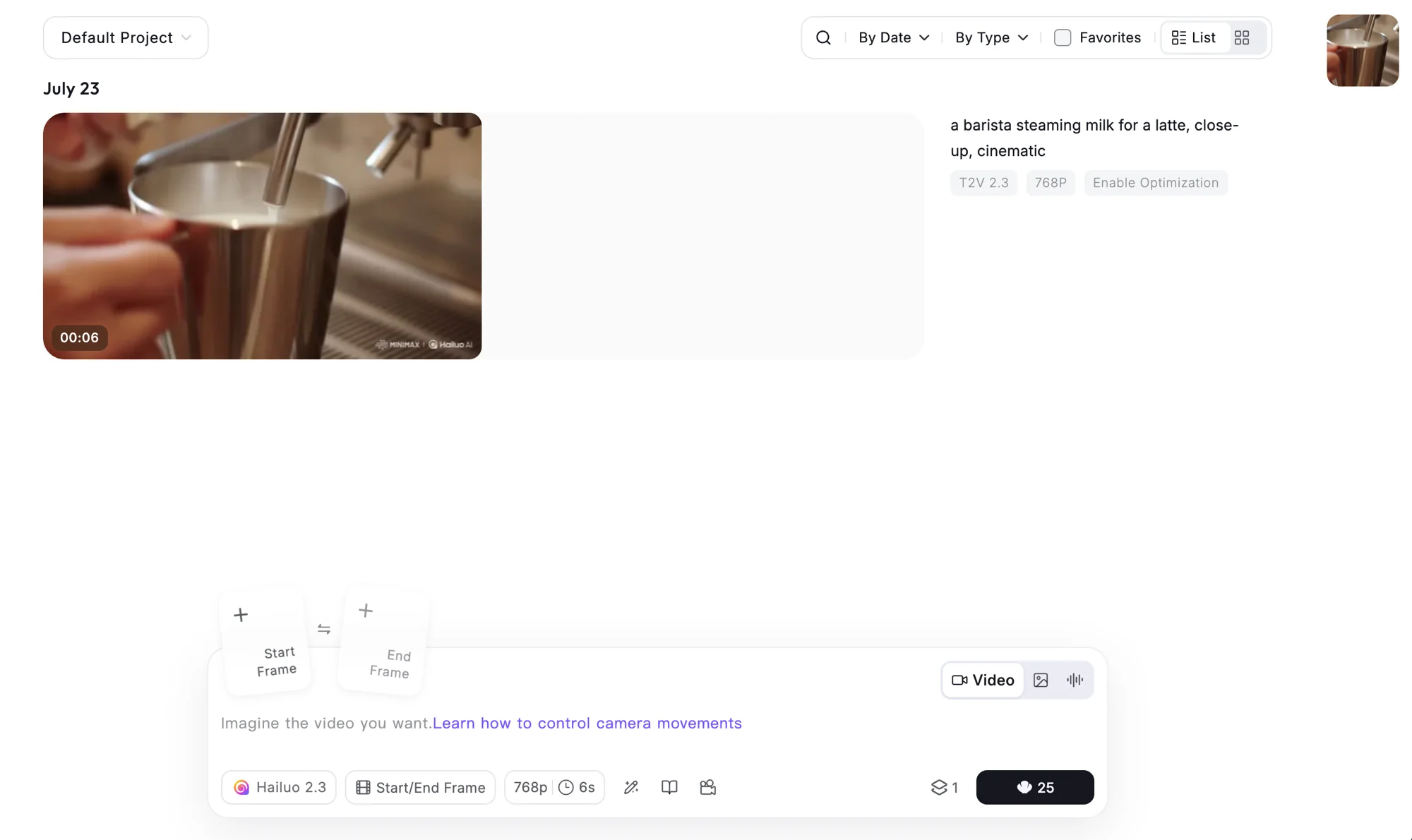
It also offers the shot control most of its peers do: Start and End frame inputs (give it a first and last image and it fills the motion between), plus the standard text-to-video and image-to-video modes. What it does not offer is sound — the downloaded clip had no audio track at all, so Hailuo generates picture only.
It is more capable than a stripped-back reputation would suggest. A camera-movement panel lets you direct pans, zooms, and tilts rather than hope the model guesses, a subject-reference option keeps a character or product consistent across generations, and the model lineup spans the current Hailuo 2.3 flagship down to older 2.0 and 1.0 engines. There is even a “Hailuo Agent” mode that takes a looser brief and plans the shot for you, closer to the agent-driven flow the rest of the category is moving toward.
The bigger shift is the platform around the model. The hub now bundles Seedance 2.0, Veo 3.1, Sora 2, Nano Banana, Seedream, and GPT Image alongside Hailuo’s own engine, so on paper a subscription is a gateway to several models, not one. That list is worth a little skepticism, though: it advertises “Sora 2” access even though OpenAI has discontinued Sora, so confirm a bundled model is really what it claims before you rely on it. In practice the interface also leans hard on that breadth, with prominent sale banners and cross-promotion for Seedance in particular — useful if you want the range, noisy if you just want to make a Hailuo clip.
Video is only part of it now, too. The same workspace runs a Create Image mode and an audio section, so MiniMax is clearly positioning hailuoai.video as a full creative suite rather than a single video generator. For this review I stayed on the video side — text-to-video on Hailuo 2.3, the tool most people mean when they search “Hailuo AI” — but it is worth knowing the breadth is there if your work spans formats.
How much does Hailuo AI cost?
Hailuo runs on a credit system with a genuinely free trial and four paid tiers. The number that matters is credits per clip: a standard Hailuo 2.3 video costs about 25 credits, so read each plan’s monthly credit total as roughly that many divided by 25.
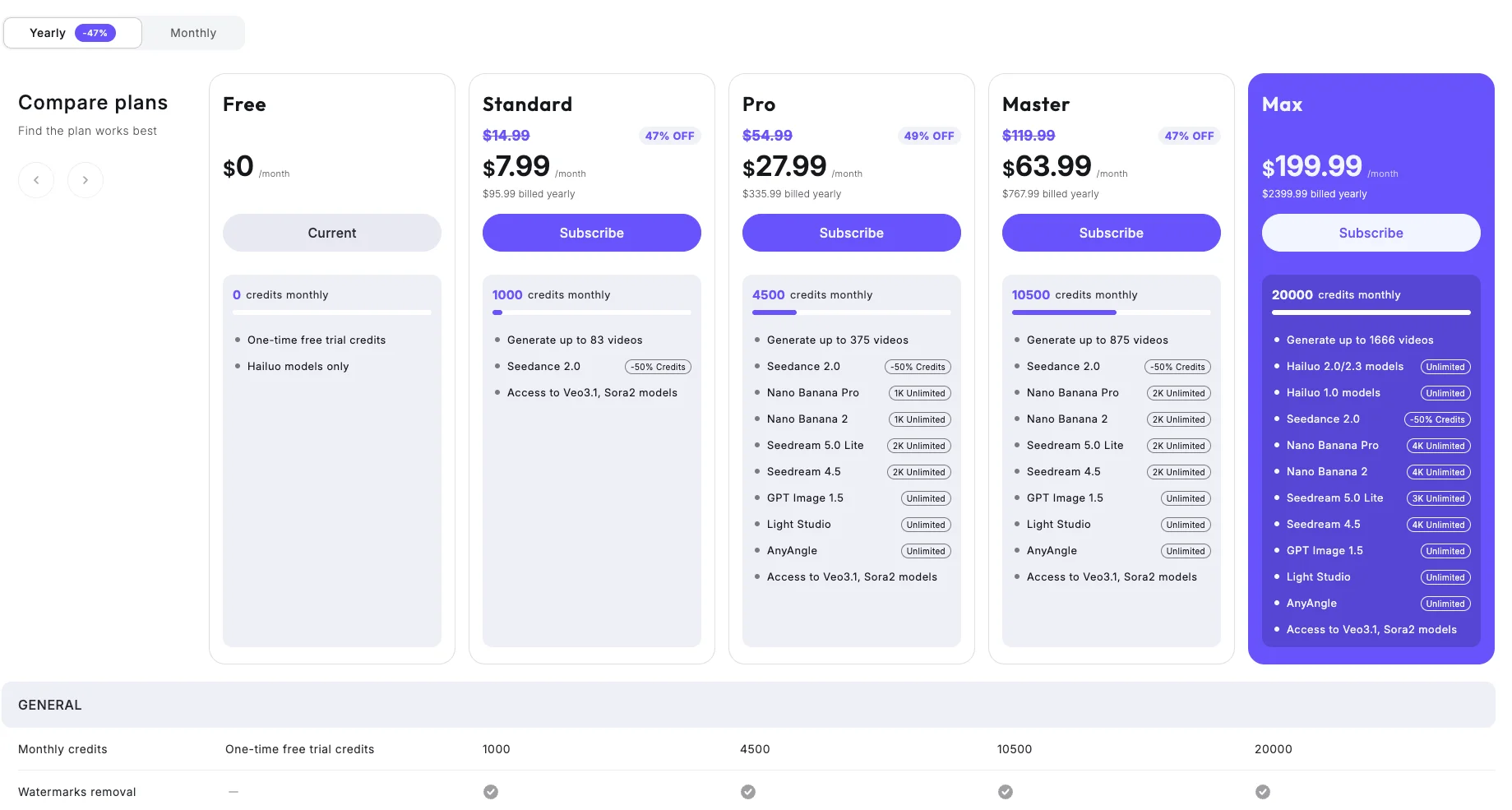
| Plan | Price (monthly) | Credits | ~Videos | Watermark |
|---|---|---|---|---|
| Free | $0 | One-time trial (2,000 for new users) | ~80 | Yes |
| Standard | $7.99 (annual; reg $14.99) | 1,000/mo | ~83 | Removed |
| Pro | $27.99 | 4,500/mo | ~375 | Removed |
| Master | $63.99 | 10,500/mo | ~875 | Removed |
| Max | $199.99 | 20,000/mo | ~1,666 | Removed |
The video counts on the paid rows are Hailuo’s own “up to X videos” figures, which assume cheaper, lower-setting clips; at the ~25 credits a full 768p Hailuo 2.3 clip actually cost in testing, roughly halve them (Standard is closer to 40 real clips than 83).
Two things stand out. The free tier is a one-time trial, not a refilling free plan — those 2,000 credits are a fixed grant, generous enough for around eighty watermarked clips, but once they are gone you are on a paid plan. And the watermark only comes off when you pay: every paid tier removes it, the free tier does not.
The entry price is the real headline. Standard at $7.99 a month (on annual billing; $14.99 regular) for 1,000 monthly credits and no watermark is among the cheapest ways into capable AI video anywhere. The higher tiers mostly buy more credits plus “unlimited” access to the bundled image and video models, so they suit people who want the whole MiniMax Hub, not just Hailuo. Discounts run near-constantly, so budget against the regular price, not the sale.
There is a wrinkle worth knowing before you count on the advertised video totals. Hailuo markets Standard as “up to 83 videos,” but that assumes cheaper, lower-setting generations — a full 768p Hailuo 2.3 clip cost 25 credits in our testing, which puts Standard closer to 40 of those a month. Read the advertised counts as a best case, and budget by the ~25-credit real cost of the clips you actually want to make.
Who is Hailuo AI for?
- Creators on a budget who want a lot of capable video output without a big commitment. The generous free trial plus a $7.99 entry make it the lowest-risk, lowest-cost way into the category.
- Anyone who values realistic motion over resolution or audio. Hailuo’s physics and human movement are its strength, and for realistic short clips it competes with far pricier models.
- Social and short-form makers whose clips will be scored with music or captioned anyway, so silent output is not a dealbreaker.
- People who want a multi-model workspace cheaply — a Hailuo plan also opens Seedance and Veo access through the same hub.
- Prototypers and ideators who need many quick variations of a shot before committing. At around 25 credits a clip on a large free trial, Hailuo is well suited to running a dozen takes to find a direction, then finishing on a pricier model if the job needs audio or higher resolution.
- Not for: anyone who needs native audio, a free tier that refills, or full-HD length in one pass. Google Veo gives you audio and about five free Lite clips a day; if sound or a refilling free tier is the requirement, Hailuo will frustrate you.
The good
The free trial is genuinely generous
Most “free” AI video is a single watermarked clip or a tiny credit pool. Hailuo hands a new account 2,000 trial credits — around eighty clips at ~25 credits each — which is enough to actually learn the tool, test a range of prompts, and decide whether it fits before paying anything. That much free runway is rare in the category.
The output quality is genuinely good
This is not breadth over substance. Our barista test came back photorealistic, with coherent physics — the milk frothed and the foam rose believably, the pitcher and hand held clean detail, and there were none of the melting hands or warping edges that betray weaker models. Checking the downloaded file frame by frame, the motion was real rather than a barely-moving loop: the foam level genuinely climbed across the six seconds, which is the failure mode that sinks weaker models’ “video” output. Independent reviews consistently single out Hailuo’s realistic human and physical motion, and the hands-on result matched that.
It is extraordinarily cheap for what it does
Paid access starts at $7.99 a month for 1,000 credits with the watermark removed. Against Google Veo’s comparable $19.99 tier (its cheaper $4.99 Plus plan buys far fewer clips) or the premium metered pricing of most rivals, that is a fraction of the cost for output that holds its own on realism. For anyone weighing capability against budget, Hailuo’s price-to-quality ratio is the standout number in this review.
The one asterisk is that $7.99 is the annual rate; paid monthly, Standard is $14.99, still cheap but closer to the field. Either way, a year of Hailuo Standard costs roughly what two months of a $19.99 rival would, and you get watermark-free video for all twelve of those months. For sustained output on a budget, nothing else in this review comes close.
| Hailuo AI at a glance | |
|---|---|
| Our rating | 4.1 / 5 (Power Tool) |
| Best for | Cheap, realistic short video and a big free trial |
| Free tier | One-time ~2,000-credit trial (~80 clips), watermarked |
| Cost | Standard $7.99/mo (1,000 credits); ~25 credits a clip |
| Standout | Realistic motion at the lowest price in AI video |
| The catch | Silent output, 768p default, watermark on free |
Realistic motion is a real specialty
Where many models produce a pretty but stiff frame, Hailuo moves convincingly. The milk-frothing test is a small example of a broader pattern: it handles fluid, human, and physical motion with a coherence that reads as filmed rather than interpolated. For shots where the movement is the point — a product in use, a person in action — that is worth more than a couple of points of resolution.
One subscription, several models
Because hailuoai.video is now the MiniMax Hub, a Standard plan and up opens not just Hailuo but Seedance and Veo 3.1, plus image models like Seedream and Nano Banana. If you want to switch between engines without juggling separate accounts, that bundled access is genuine added value on top of the low price.
Keyframe control is included
The Start and End frame inputs let you set a first and last image and have Hailuo interpolate the motion between them — useful for product spins, reveals, and controlled camera moves. It is a level of directability that some pricier tools charge for or omit, and it comes standard here.
The bad
The clips are silent
Hailuo generates picture only — the downloaded file had no audio track at all. Against Google Veo and Kling, which produce synced dialogue, effects, and ambient sound in the same pass, that is a real gap. Any clip meant to stand alone with sound needs a separate audio step, which adds work the audio-native models save you.
On the specs a buyer actually weighs, that gap is part of a pattern, and Hailuo trades resolution and sound for price:
| Spec that matters | Hailuo | Google Veo | Kling |
|---|---|---|---|
| Native audio | No, silent | Yes | Yes |
| Default resolution | 768p (HD paid) | 1080p tiers | Native 4K |
| Free tier | One-time trial, watermarked | Watermark-free clip with audio | One watermarked clip with audio |
| Comparable plan | $7.99/mo | $19.99/mo | ~$6.99/mo |
Free output is watermarked, and removal is paid-only
Every clip on the free trial carries a visible “MINIMAX | Hailuo AI” watermark, and the only way to remove it is to subscribe — the watermark-removal row on the pricing page is a flat “no” for Free and a check for every paid tier. So the generous free trial is for judging quality, not publishing finished work.
The free trial does not refill
Those 2,000 credits are a one-time grant, not a monthly allowance. It is a lot of free video, but once it is spent the free ride is over — unlike rivals whose free tiers, however small, top up each month. Plan the trial as a fixed evaluation budget rather than a standing source.
768p by default, with HD gated to paid
The standard output is 768p, and full-HD resolution is reserved for higher tiers. Clips also run about six seconds. So while the per-frame quality is strong, you are working at a lower resolution and shorter length than a tool like Google Veo delivers, unless you pay up for the HD tiers.
The interface pushes upsells hard
The hub is busy with sale banners and cross-promotion — a persistent “Seedance 2.0 50% off” push, premium upgrade prompts, and discount countdowns crowd the workspace. It is not a dealbreaker, but the constant selling makes the tool feel more like a storefront than a studio, and it can obscure the setting you actually want.
The bundled-model pricing is confusing
The upside of the MiniMax Hub — many models in one plan — comes with opaque economics. Different models cost different credits, some carry “unlimited” tags with hidden caps, and Seedance is discounted while others are not, so working out what a given project will actually spend takes trial and error. For a credit-metered tool, that lack of a clear per-model cost is a genuine friction.
Alternatives worth considering
If Hailuo’s silent, watermarked, 768p output isn’t the fit, three tools cover the ways you might go instead.
- Google Veo is the pick if you want the best all-round quality with native audio and a free tier that refills daily. It is the most cinematic model we have tested (4.6), at $19.99/mo — more than Hailuo, but you get sound and a free tier that comes back every day.
- Kling is the step up on raw specs: native 4K, synced audio, and lip-sync (4.2). The trade-off is trust — it carries a 1.3-star Trustpilot billing reputation — so Hailuo’s generous, low-risk trial is the safer way to start. See Hailuo vs Kling head to head.
- Seedance is the cheapest route to top-tier clips at around $0.62 each, pay-as-you-go with a clean commercial licence (4.2). Fittingly, Hailuo’s own hub now bundles Seedance, so you may reach it through Hailuo anyway.
The verdict on Hailuo AI
Hailuo AI is the best-value entry point in AI video, and its 4.1 reflects a genuinely good model held back by a few honest gaps. The free trial is generous enough to learn the tool properly, the output is realistic where it counts, and $7.99 a month for watermark-free video undercuts almost everything else in the category. For a budget-minded creator making realistic short clips, it is an easy recommendation.
Just go in clear about the trade-offs: no native audio, a watermark on free output, a one-time trial rather than a refilling free tier, and a 768p default. If none of those is a dealbreaker, start with the free trial — there is enough of it to know within an afternoon whether Hailuo is your tool.
The way to think about Hailuo is as the value pick, not the outright best. Google Veo and Kling make a more complete clip and cost more for it. Hailuo makes a genuinely good clip for a fraction of the price and lets you try it at length for free, which for a great many creators is the trade worth making. If native sound or a refilling free tier is non-negotiable, Google Veo is the better fit; if budget and realistic motion are what you optimise for, Hailuo is hard to beat.
For the wider field, see the best free AI video generator and our best AI video generator hub.
Frequently asked questions
Is Hailuo AI free?
Yes, there is a genuinely free tier, and it is one of the more generous ones in AI video — but it is a one-time trial, not a refilling monthly free plan. A new account gets a pool of free trial credits (2,000 at the time of writing), and since a standard Hailuo 2.3 clip costs about 25 credits, that works out to roughly 80 videos before you have to pay. That is a lot of runway to evaluate the tool.
The catches are that free output carries a visible 'MINIMAX | Hailuo AI' watermark, the free plan is limited to Hailuo's own models, and once the trial credits are gone they do not refill. So treat it as a very generous test drive rather than a standing free video source. To remove the watermark and get monthly credits you move to a paid plan, which starts at $7.99 a month.
How much does Hailuo AI cost?
Free to start, then $7.99 a month for the entry Standard plan on annual billing (regular price $14.99, currently discounted). Standard gives you 1,000 credits a month — about 83 videos — removes the watermark, and adds access to third-party models like Veo 3.1. Above that, Pro is $27.99/mo (4,500 credits, ~375 videos), Master is $63.99 (10,500 credits), and Max is $199.99 (20,000 credits).
The number that actually matters is credits per clip, not the monthly figure. A standard Hailuo 2.3 video costs about 25 credits, so a plan's value is really its monthly credit allotment divided by ~25. The higher tiers mostly buy more credits plus 'unlimited' access to the extra image and video models bundled in the MiniMax Hub.
Does Hailuo AI have audio?
No — Hailuo's video output is silent. In hands-on testing, the downloaded clip had no audio track at all, which is a real gap against rivals like Google Veo and Kling that generate synced dialogue, effects, and ambient sound in the same pass as the picture.
If your work needs sound, you either add it in a separate editing step or reach for a model that includes native audio. For social clips that will be scored with music or captioned anyway, the silence matters less; for anything meant to stand alone with dialogue or ambient sound, it is a meaningful limitation to plan around.
Is Hailuo AI good quality?
Yes, the output is genuinely good, and realistic motion is its particular strength. In hands-on testing a single barista prompt produced a photorealistic close-up with coherent physics — the milk actually frothed and the foam level rose believably across the clip — with clean detail on the pitcher and hand and none of the melting or warping that gives weaker models away.
The honest limits are resolution and length: the default is 768p (full HD is gated to paid tiers) and clips run about six seconds. So the per-frame quality is competitive with the better models, but you are working at a lower resolution and shorter length than a tool like Google Veo unless you pay up. For quick, realistic short clips, though, Hailuo punches well above its price.
Hailuo AI or Kling — which is better?
Both are strong, cheap Chinese video models, and the split comes down to audio and trust. Kling generates native 4K with synced audio and lip-sync, which Hailuo does not — Hailuo's clips are 768p by default and silent — so on raw specs Kling is ahead. But Kling carries a 1.3-star Trustpilot billing reputation, while Hailuo's much larger free trial lets you judge the tool at length before paying a cent.
So if you need audio, resolution, and lip-sync, Kling wins on capability. If you want to try a genuinely good model risk-free and cheaply, Hailuo's generous trial and $7.99 entry make it the easier, lower-commitment start. Our full Kling AI review covers the trust caveats in depth.
Can I use Hailuo AI videos commercially?
On a paid plan, yes; on the free trial, effectively no. Every paid tier removes the watermark and grants commercial-use rights, so a Standard subscription at $7.99 a month is enough to produce clips you can use in client or commercial work. The free trial is the opposite: its output carries a visible MiniMax and Hailuo AI watermark and is meant for evaluation, not publishing.
As with any fast-moving lab, confirm the current terms for the specific plan and model before a clip goes in front of a client, since licensing details can shift by tier and by which bundled model you generate with. But for the core case, a paid Hailuo subscription producing Hailuo clips, commercial use is included and the watermark is gone.
Keep reading
Hailuo vs Kling: Cheap, Capable, and Very Different
Hailuo vs Kling, tested hands-on. Kling wins on 4K and native audio; Hailuo wins on a huge risk-free trial and clean billing. Which cheap AI model to pick.

The Best Free AI Video Generator (No Trial Traps)
Most free AI video generators are watermarked or trials in disguise. Google Veo's free tier gives a real clip with sound, refilled daily, for $0.

Kling AI Alternatives: 6 Best Video Tools Ranked
Kling makes great video but has a 1.3-star billing record. The 6 best Kling AI alternatives — cleaner billing, better free tiers, top picks tested hands-on.
The Best Luma AI Alternatives, Tested Hands-On
Luma AI is a multi-model aggregator you pay a margin for. The 6 best Luma alternatives — go direct to one model, or switch aggregators — each tested hands-on.