
Seedance Review: The Best Video Model You Can't Easily Use
Seedance makes some of the best AI video anywhere for about $0.62 a clip, but its own app gates it behind a paywall. My hands-on take on quality and price.
Contents
Is Seedance worth it?

Seedance makes some of the best AI video you can generate, at the lowest price in the category, and it is the single hardest tool to actually get running. In testing, one plain text prompt on fal.ai returned a photorealistic barista scene, clean motion and all, for about 62 cents. On raw quality and cost per clip, Seedance competes with anything.
Then you try to use ByteDance’s own app for it, and the door is locked. Dreamina, the consumer product that hosts Seedance, would not generate a single free clip for me: every attempt hit an upgrade wall, credits sitting unused in the account. The model is superb; the way you reach it is the problem.
So Seedance earns its 4.2 if output quality and cost per clip matter more than a friendly interface, and you are comfortable running it through a developer platform rather than a polished app. If you want that same quality in a clean consumer product with none of the access friction, Google Veo is the easier choice. This review is here to help you tell which of those you are.
I ran it the way you would if you wanted the quality without the paywall: a real prompt through fal.ai’s pay-as-you-go pricing, the clip downloaded to check for a watermark and audio, and Dreamina opened alongside to see the official route. Every number below comes from that session, not marketing copy.
What is Seedance, and how do you use it?
Seedance is a text-to-video and image-to-video model from ByteDance, the company behind TikTok and CapCut. It is not, in itself, an app. It is a model that shows up across several surfaces, and understanding those surfaces is most of the battle, because it is also why Seedance feels harder to use than its quality deserves.
There are two realistic ways to run it:
- ByteDance’s Dreamina app (dreamina.capcut.com), the official consumer product, which hosts the full Seedance 2.0 family in a polished interface, alongside image and avatar tools.
- Developer API platforms like fal.ai and Replicate, which expose Seedance as a pay-as-you-go endpoint you can run from a simple web playground, no code required.
The version story is its own maze. Seedance 1.0 is the original model that topped independent video benchmarks; 1.5 Pro added synced natural sound; and Seedance 2.0 is the newest generation, itself split into the full 2.0 for the most versatile, director-level control, plus cheaper 2.0 Mini and 2.0 Fast variants. Here is the current lineup as it appears inside Dreamina.
| Seedance model | Positioning |
|---|---|
| Seedance 2.0 | Most versatile, director-level control (newest flagship) |
| Seedance 2.0 Mini | Most cost-effective, quicker results |
| Seedance 2.0 Fast | Fast generation, lower cost |
| Seedance 1.5 Pro | Adds synced, natural sound |
| Seedance 1.0 | Original benchmark leader, ultra-clear visuals |
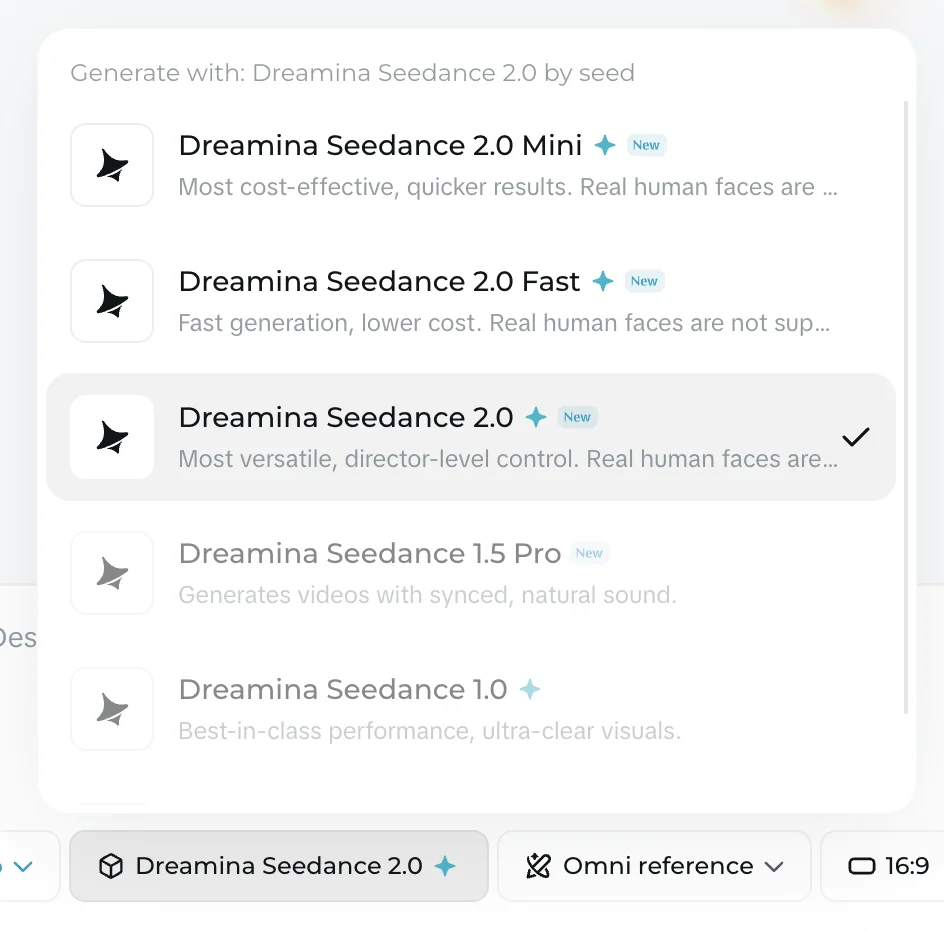
For my hands-on test I used Seedance 1.0 Pro through fal.ai, because it is the version most API platforms expose and because, as the next section covers, ByteDance’s own app would not let me generate anything free. I gave it a single line, the same barista prompt I have used across this whole video cluster, and let it run at 1080p for five seconds.
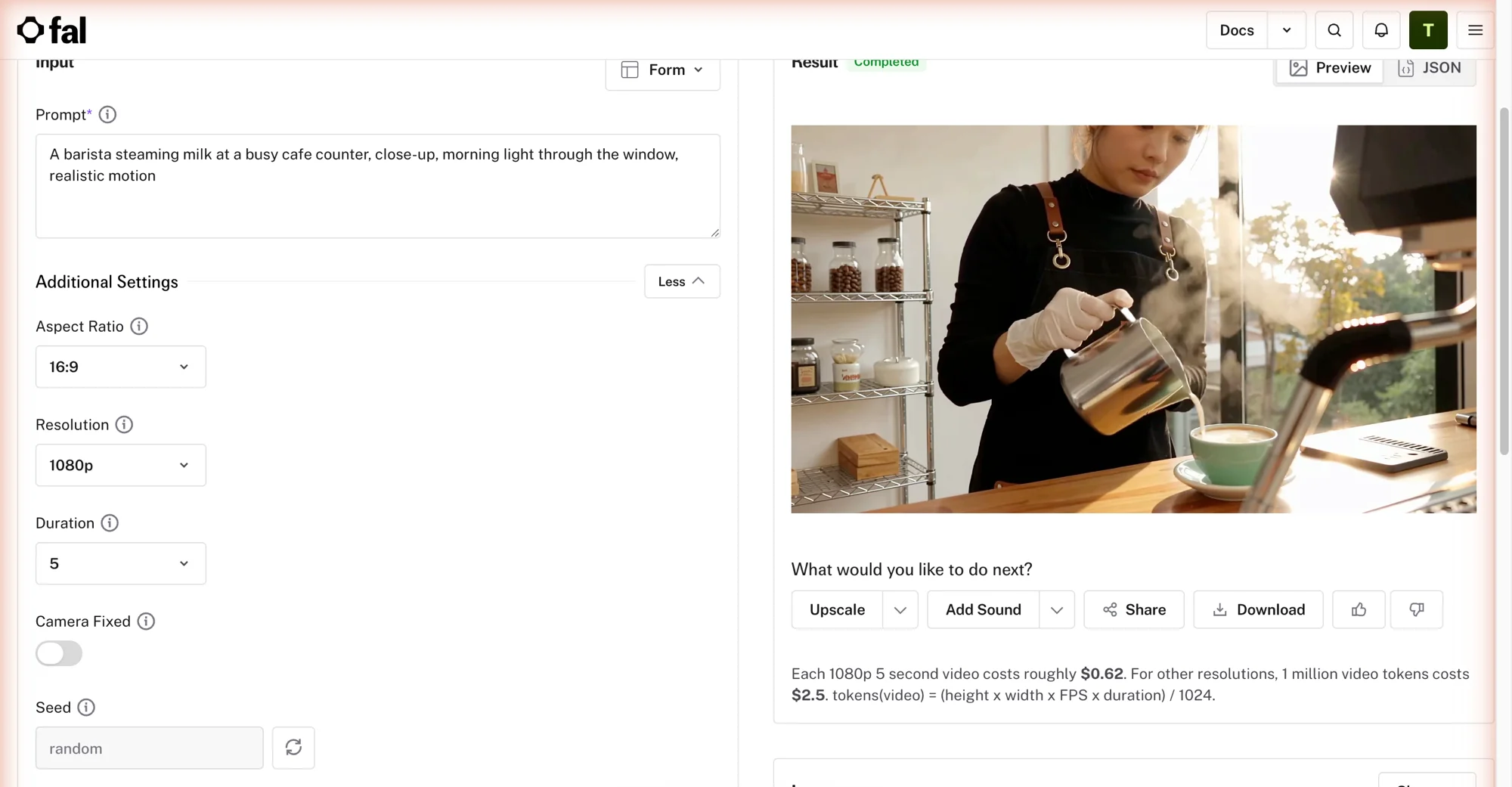
This is the actual result.
The output speaks for itself: realistic hands, believable steam, natural light, smooth motion across the full five seconds. This is the quality that put Seedance at the top of the benchmarks, and it came from a one-line prompt for pocket change. The model is the easy part; getting to it is where Seedance asks more of you than its rivals do.
How much does Seedance cost?
Seedance is cheap, but the price you pay depends entirely on which door you use, and the two doors are wildly different. There is the API route, which is inexpensive and clean, and the consumer-app route, which is credit-metered and, on the free tier, closed.
The API route is the honest headline. Through fal.ai, a 1080p five-second clip costs roughly $0.62, billed per generation with no subscription, and it comes with a commercial licence and no watermark. That is among the cheapest quality video generation anywhere, and it is exactly what I paid in testing.
| Access route | What a clip costs | Notes |
|---|---|---|
| fal.ai (API playground) | ~$0.62 per 1080p 5s | Pay-as-you-go, no subscription, clean commercial licence, no watermark |
| Dreamina (free plan) | Cannot generate video | Shows daily bonus credits, but gates all video behind an upgrade |
| Dreamina (Seedance 2.0) | 172 credits per clip | On a paid, credit-based plan |
| Dreamina (Seedance 2.0 Mini) | 124 credits per clip | Cheaper variant, same paid plans |
ByteDance’s Dreamina app is the more complicated route. It runs on credits: a full Seedance 2.0 clip cost 172 credits in my session, and the cheaper 2.0 Mini cost 124. Those credits come from monthly plans that run roughly $9 to $40 a month depending on the tier and your region, granting on the order of 3,875 to 21,215 credits a month and adding watermark removal, higher resolution, and 60fps output. The free plan drips a small number of daily bonus credits, but as the next section explains, they do not actually buy you a video.
The practical conclusion is unusual for this category: the developer API is not just cheaper than the official app, it is also the only way to run Seedance for free-in-practice, low-commitment cash rather than a subscription. If you want one great clip, fal.ai charges you 62 cents; Dreamina wants a monthly plan. For occasional or quality-first use, the API wins on cost outright.
Who is Seedance for?
Seedance is for people who care about the output and the invoice, and are willing to reach past a friendly interface to get both. If you want top-tier video at the lowest cost per clip and you are comfortable running a model through an API playground, this is one of the best values in AI video.
Three groups get the most from it. Quality-first creators and studios get benchmark-leading realism at a price that makes iteration cheap, which matters when a finished piece is a dozen re-rolled clips. Developers and technical teams get a clean pay-as-you-go endpoint on fal.ai or Replicate that drops straight into a pipeline, with a commercial licence and no watermark to strip. And cost-conscious high-volume users get more quality per dollar than almost anything else, as long as they are running it through the API rather than the app.
It is a poor fit for the opposite user. If you want to open a polished app, click generate, and get a free clip with sound, Seedance will frustrate you: the official app gates video, the versions confuse, and even the simple API route is a developer tool, not a designed product. Anyone who values a finished experience should look at Google Veo instead. One more caution: like other Chinese frontier models, Seedance has reportedly drawn legal scrutiny in the US over training data, so brand-sensitive teams may prefer a Western model.
What does Seedance get right?
Benchmark-leading quality
The reason to put up with the access friction is the video. Independent testing has repeatedly ranked Seedance at or near the top of the field for quality, motion, and prompt adherence, and my own test backed that up: the barista’s hands held together, the steam and pour looked real, and the motion stayed smooth rather than melting the way weaker models do. Here is what that single generation involved.
| Test detail (Seedance 1.0 Pro, via fal.ai) | Result |
|---|---|
| Cost | ~$0.62 |
| Output | 5 seconds, 1080p (1920×1088), 16:9 |
| Motion and detail | Realistic hands, steam, and pour; smooth throughout |
| Watermark | None — clean, commercially-licensed export |
| Audio | None — Seedance 1.0 Pro is silent |
This is genuinely competitive with the best models in this category, including the ones that cost far more or lock their flagship behind a subscription. On the picture alone, Seedance belongs in the same conversation as Google Veo and Kling, which is exactly why its access problems are so frustrating: the hard part, the model, is already excellent.
The lowest real cost per clip, with a commercial licence
At roughly 62 cents for a clean 1080p clip, Seedance on fal.ai is one of the cheapest ways to generate quality video anywhere, and unlike a free tier, what you make is yours: the export carries a commercial licence and no watermark. That combination, top-tier quality plus rock-bottom per-clip cost plus commercial rights, is rare. Most tools make you choose two of the three, and Seedance is one of the few that delivers all three, provided you use the API route.
For anyone iterating toward a finished piece, that price changes the math. Re-rolling ten variations to get the shot you want costs a few dollars, not a chunk of a monthly plan, which makes Seedance a genuinely practical workhorse rather than a novelty. The value story is the strongest in the category, and it is why Seedance keeps showing up as the alternative worth knowing in every other review we write.
A flexible model family
Seedance is not one setting but a small family, and that range is a real strength once you know it exists. The full 2.0 gives you the most control and quality; 2.0 Mini and Fast trade a little polish for lower cost and quicker turnaround; 1.5 Pro adds synced sound; and 1.0 remains a benchmark-grade workhorse. So you can match the model to the job, drafting cheaply on a Mini or Fast variant and reserving the flagship for final shots, the same disciplined workflow serious creators use on credit-metered rivals. The flexibility is there; it is just buried under version numbers that take a minute to decode.
Where does Seedance fall short?
No usable free tier, and a gated official app
This is the headline problem, and I ran straight into it. ByteDance’s own consumer app, Dreamina, is the surface most people will find first, and its free plan will not generate a Seedance video at all. In testing, every click of Generate opened an “Unleash the power of Dreamina” upgrade wall, and it did so regardless of which model I chose, the full 2.0 at 172 credits or the cheaper Mini at 124, even though the account held 300 credits the whole time. The credits were real; the video was not on offer.
That is the most locked free experience in this entire category, as a side-by-side makes plain.
| Tool | Free-tier video generation |
|---|---|
| Google Veo | Free clip, native audio |
| Kling | Free flagship clip, watermarked, with audio |
| Runway | Free image-to-video (no flagship text-to-video) |
| Seedance (Dreamina) | None — video generation is fully gated |
Google Veo let me generate a full clip free with audio; Kling gave me a free watermarked clip with sound; even Runway allowed free image-to-video. Seedance’s official app gave me nothing without a paid plan. The only reason I have a first-party Seedance clip to show you at all is that I bypassed Dreamina entirely and ran the model through fal.ai for 62 cents. For a tool this good, the front door being locked is a genuine failing, and it is the main reason Seedance is a review rather than a pick.
Fragmented, confusing access
Even once you accept paying, Seedance asks you to figure out where and how. The model lives across ByteDance’s Dreamina app, fal.ai, Replicate, and others, each with different pricing, different available versions, and different interfaces. Layer on the version sprawl, 1.0, 1.5 Pro, 2.0, 2.0 Mini, 2.0 Fast, and a newcomer faces a real question just to make one video: which platform, which version, which price. None of the rival flagships demand that. You open Veo, or Kling, or Runway, and generate; with Seedance you first have to choose your own adventure, and the official app is the one route that then refuses to play.
This is what a model-without-a-product feels like. The technology is first-rate, but ByteDance has not wrapped it in a single, obvious, friendly place to use it, and the burden of that lands on the user. It is the clearest thing separating Seedance from the tools we picked: not quality, but polish and coherence.
No audio, and a per-region pricing muddle
Two smaller but real gaps round it out. The Seedance 1.0 Pro model I tested produces no audio at all, so where Google Veo returns a clip with a native soundtrack, Seedance hands you a silent video you will need to score yourself. Newer variants like 1.5 Pro add synced sound, but that is another version to hunt down rather than a default.
Pricing is muddled too. Dreamina’s plans are shown in local currency and vary by region, which makes a clean dollar figure hard to pin down and comparison shopping harder than it should be. The API route sidesteps this with a simple per-clip dollar price, which is another quiet argument for skipping the official app. None of these is fatal on its own, but stacked on top of the gated free tier and the fragmented access, they complete the picture: a superb model wrapped in an experience that keeps getting in your way.
Alternatives worth considering
If Seedance’s access friction outweighs its quality and price for you, three models are worth a look. Here is how they compare.
| Tool | Where it beats Seedance | Where Seedance beats it | Best for |
|---|---|---|---|
| Google Veo | Clean app, free clip, native audio | Cost per clip | The same quality with none of the friction |
| Kling | Free watermarked clip with sound, easy access | Cost per clip, benchmark quality | A usable free tier and elite output |
| Runway | Editing suite, multi-model platform | Raw quality, price | Edit-heavy and client work |
Google Veo is the pick if you want Seedance-level quality without the access headache. Its free tier generates a full clip with audio, which Seedance’s official app does not offer at all. Seedance often beats it on pure cost per clip, but Veo is the finished product. See our full Google Veo review or Seedance vs Veo 3.
Kling is the choice if you want elite output and an actually usable free tier. It gives you a free, watermarked flagship clip with sound and a clean sign-up, where Seedance gives you a paywall. Its billing reputation is worse, so read the fine print. See our full Kling AI review and the Seedance vs Kling comparison.
Runway is the option when editing control matters more than raw fidelity. Its Aleph editing model and multi-model marketplace suit client work, and, fittingly, that marketplace even lets you run Seedance from inside Runway. See our full Runway review or Runway vs Seedance.
The final word
Seedance earns its 4.2 on the strength of what it makes and what it costs. On raw quality it stands with the best models in AI video, and at roughly 62 cents for a clean, commercially-licensed 1080p clip through fal.ai, nothing in this category offers more picture per dollar. As a model, it is genuinely excellent, and my test clip would pass for a far pricier tool.
The honest caveat is everything around the model. ByteDance’s own app gates video behind a paywall so completely that the free tier cannot make a single clip, the model is scattered across confusing versions and platforms, and the one I tested has no sound. That gap between a superb engine and a welcoming product is why Seedance is a review here, not a pick.
So here is the simple way to decide. If you care most about output quality and cost per clip, and you are comfortable running a model through a platform like fal.ai rather than a polished app, Seedance is the best value in AI video. If you want that quality in a clean product that just works, with a real free tier and native audio, use Google Veo. Try Seedance through fal.ai to see the quality for a few cents, and skip its official free tier, because it will not make you a video.
For more, see our Seedance pricing guide, the best Seedance alternatives, and our best AI video generator hub.
Frequently asked questions
Is Seedance free?
Not in any practical sense. ByteDance's own Dreamina app shows a free credit balance but hard-gates video: in testing, every attempt to generate on the free plan hit an upgrade wall, with credits sitting unused and regardless of the model. So the one surface that looks free will not actually make you a video.
The realistic route is pay-as-you-go through a developer platform like fal.ai — inexpensive rather than free. Our full Seedance pricing guide covers exactly what that costs; the short version is that Seedance is cheap to run, but not free.
How much does Seedance cost?
It depends on how you reach the model. Through a developer platform like fal.ai it is about $0.62 a clip, pay-as-you-go, commercially licensed and watermark-free — among the cheapest quality generation anywhere. Through ByteDance's Dreamina app it is credit-metered on plans of roughly $9 to $40 a month, while the free app tier will not generate video at all.
So the honest one-liner is: cheap and clean via the API, gated and confusing via the official app. Our full Seedance pricing guide has the per-resolution cost ladder and the route-by-route math.
Is Seedance better than Google Veo or Kling?
On raw quality it is right in the mix. Independent video benchmarks have repeatedly placed Seedance at or near the top of the field, alongside Google Veo and Kling, and my test clip was genuinely photorealistic. On price per clip it often beats both.
Where it loses is everything around the model. Google Veo generates a full clip free and adds native audio; Kling gives you a free watermarked clip with sound; Seedance gives you neither a usable free tier nor, on the 1.0 Pro model, any audio. So Seedance matches the leaders on the video itself and trails badly on how you actually get to it. If quality and cost are everything, it competes; if you want a finished, friendly product, Veo is the easier pick. See our full Google Veo review for that side.
What is the difference between Seedance 1.0, 1.5 Pro, and 2.0?
They are successive generations of the same ByteDance model, and the naming is genuinely confusing. Seedance 1.0 is the original high-quality model that topped video benchmarks; 1.5 Pro adds synced natural sound; and Seedance 2.0 is the newest and most capable, with a lineup of its own: the full 2.0 for the most versatile, director-level control, plus cheaper 2.0 Mini and 2.0 Fast variants that trade some quality for lower cost and quicker results.
Which one you can run depends on the surface. API platforms like fal.ai commonly expose Seedance 1.0 Pro, while ByteDance's Dreamina app offers the full 2.0 family. For most people the practical version is whichever your chosen platform supports, and the quality gap between them is smaller than the version numbers suggest.
Keep reading
Seedance vs Veo 3: Cheapest Quality vs the Best Model
Seedance makes benchmark-quality clips for ~$0.62; Veo 3 is the best model at ~$2 a clip. I tested both — which wins depends on price, access, and audio.
How to Use Seedance AI Without the Paywall
How to use Seedance AI: the cheap route to top-tier video is a developer platform, not the gated app. Which version, what it costs, tested hands-on.
Seedance vs Kling: I Tested Both AI Video Models
Seedance and Kling both make elite AI video and both score 4.2. I ran one prompt through each: Seedance wins on price and licensing, Kling on audio and ease.
Seedance Pricing: What It Really Costs by Route
Seedance has no single price — it depends where you run it: ~$0.62 a 1080p clip on fal.ai, credits on Dreamina. Full route-by-route breakdown, tested hands-on.