
Seedance Pricing: What It Really Costs by Route
Seedance has no single price — it depends where you run it: ~$0.62 a 1080p clip on fal.ai, credits on Dreamina. Full route-by-route breakdown, tested hands-on.
Contents
How much does Seedance cost?
Seedance is one of the cheapest ways to generate high-end AI video: on a developer platform like fal.ai, a 1080p five-second clip costs about $0.62, pay-as-you-go. But it is also one of the most confusing tools to price, because it has no single pricing page. It is a ByteDance model rather than a finished product, so what you pay depends entirely on where you run it, and the two main routes give very different answers. Through ByteDance’s own Dreamina app, the same video is credit-metered on monthly plans that run roughly $9 to $40, with a free tier that will not actually generate video.
Here is the quick version, before the detail.
| Route | What it costs | Free option | Best for |
|---|---|---|---|
| fal.ai / API | ~$0.62 per 1080p 5s clip (pay-per-use) | No (paid per clip) | Cheapest, cleanest, no commitment |
| Dreamina (free) | Gated: cannot generate video | Yes, but unusable | Nothing; it is a locked demo |
| Dreamina (paid) | ~$9 to $40/mo credit plans | No | Running Seedance 2.0 in an app |
The short answer: for pure cost per clip, the API route wins outright, and the “free” app route makes no video at all. Every number in this guide was checked directly in July 2026 — the fal.ai rate on the platform, the Dreamina credit costs by generating real clips, and the resolution math derived from fal’s own published token formula.
Why does Seedance have no simple price?
Most tools have a pricing page with three or four plans. Seedance does not, and understanding why is the key to pricing it. ByteDance ships Seedance as a model, then lets it appear across many surfaces: its own Dreamina consumer app, developer API platforms like fal.ai and Replicate, and various resellers. Each of those sets its own price, in its own units — dollars per clip on one, credits per generation on another, local-currency subscriptions on a third.
Layered on top is a genuinely confusing version story. Seedance 1.0 and 1.0 Pro are the original models most API platforms expose; 1.5 Pro added synced sound; Seedance 2.0 is the newer flagship, itself split into full 2.0, 2.0 Mini, and 2.0 Fast; and Seedance 2.5, released in July 2026, adds native 30-second clips. Different surfaces run different versions at different prices, so “how much is Seedance” genuinely has no single answer until you pin down which Seedance, run where.
This guide breaks the cost down by route, so you can pick the cheapest path for your work rather than accepting whichever price the first surface you find happens to charge. The headline finding, which the rest of the guide backs up: the API route is both the cheapest and the cleanest, and it is not the route most people stumble onto first.
The API route (fal.ai): the cheapest, cleanest way
Running Seedance through a developer platform is the cheapest way to use it, and despite the “developer” label it needs no code — fal.ai has a web playground where you type a prompt and click generate. It is where I ran my own test for the full Seedance review, and a clean, commercially-licensed, watermark-free 1080p clip cost about $0.62, billed per generation with no subscription.
The clever part is how fal prices other resolutions. Rather than a fixed rate per clip, it uses a token formula: $2.50 per million video tokens, where tokens equal height × width × frame rate × duration, divided by 1024. That stated $0.62 for a 1080p five-second clip back-solves to about 24 frames per second, which lets you work out the cost of any resolution and length yourself.
| Resolution | 5-second clip | 10-second clip | Cost per second |
|---|---|---|---|
| 480p | ~$0.12 | ~$0.24 | ~$0.024 |
| 720p | ~$0.27 | ~$0.54 | ~$0.054 |
| 1080p | ~$0.62 | ~$1.24 | ~$0.124 |
Those figures are computed from fal’s own formula, not a separate price list, so treat them as close estimates rather than published rates — but they span a clean two-to-twelve-cents-a-second range across resolutions, which is the band Seedance tends to fall in wherever it is hosted. The practical takeaway is that drafting at 480p costs a fifth of finishing at 1080p, so the same discipline that controls costs on credit tools works here too: rough at low resolution, finalise at high.
If you want to estimate a specific clip, the formula makes it straightforward. Take the resolution’s pixel count — 1,280 by 720 for 720p — multiply by the frame rate (about 24) and the duration in seconds, divide by 1,024 for the token count, then multiply by $2.50 per million tokens. A 720p eight-second clip works out to roughly 43 cents on that basis; a 480p ten-second clip to about 24 cents.
Because the pricing is purely usage-based, there is also no minimum spend and no monthly floor: a month in which you generate nothing costs nothing, which no subscription route can match, and a month where you generate heavily is billed exactly in proportion. That is the quiet advantage of the API route — the cost tracks your actual output rather than a plan you guessed at when you signed up.
What makes this route genuinely cheap is what comes with it: a commercial licence, no watermark, and no monthly commitment. You pay for exactly the clips you generate and nothing else. For anyone who does not need to generate constantly, that pay-as-you-go model beats any subscription, and it sidesteps the gated free tier of the official app entirely.
Other API platforms
fal.ai is not the only pay-as-you-go route. Seedance’s models are also hosted on Replicate and various other API resellers, all billing per generation rather than by subscription. Pricing across these platforms is broadly similar and usually quoted per second, generally landing in the low single-digit cents per second — the same ballpark as fal’s own resolution-based rates above, with each provider setting its own small margin on top.
The differences between platforms are mostly about which versions they expose, how their playground works, and whether they add a margin. fal.ai commonly runs Seedance 1.0 Pro and 2.0; other providers vary. For most people the choice comes down to which platform you already have an account and credit on, since the underlying per-clip economics are close. The important point is the category-level one: any API route is dramatically cheaper and less restrictive than the consumer app (and if you are weighing the model itself, the Seedance alternatives sit in the same price band), and none of them gate a paid clip behind an upgrade wall the way Dreamina’s free tier does.
If you are wiring Seedance into a pipeline rather than generating in a browser, the API route is also the only one that makes sense, and its pay-per-use billing scales cleanly with usage rather than forcing you onto a monthly tier sized for your busiest week.
The Dreamina route: ByteDance’s own app
Dreamina is the surface most people find first, because it is ByteDance’s official consumer product and it runs the newest Seedance 2.0 family. It is also the more expensive and more restrictive way to use Seedance, so it is worth understanding before you commit to it.
Dreamina meters generation in credits. In testing, a full Seedance 2.0 clip cost 172 credits and the cheaper 2.0 Mini cost 124, with the price shown before you generate.
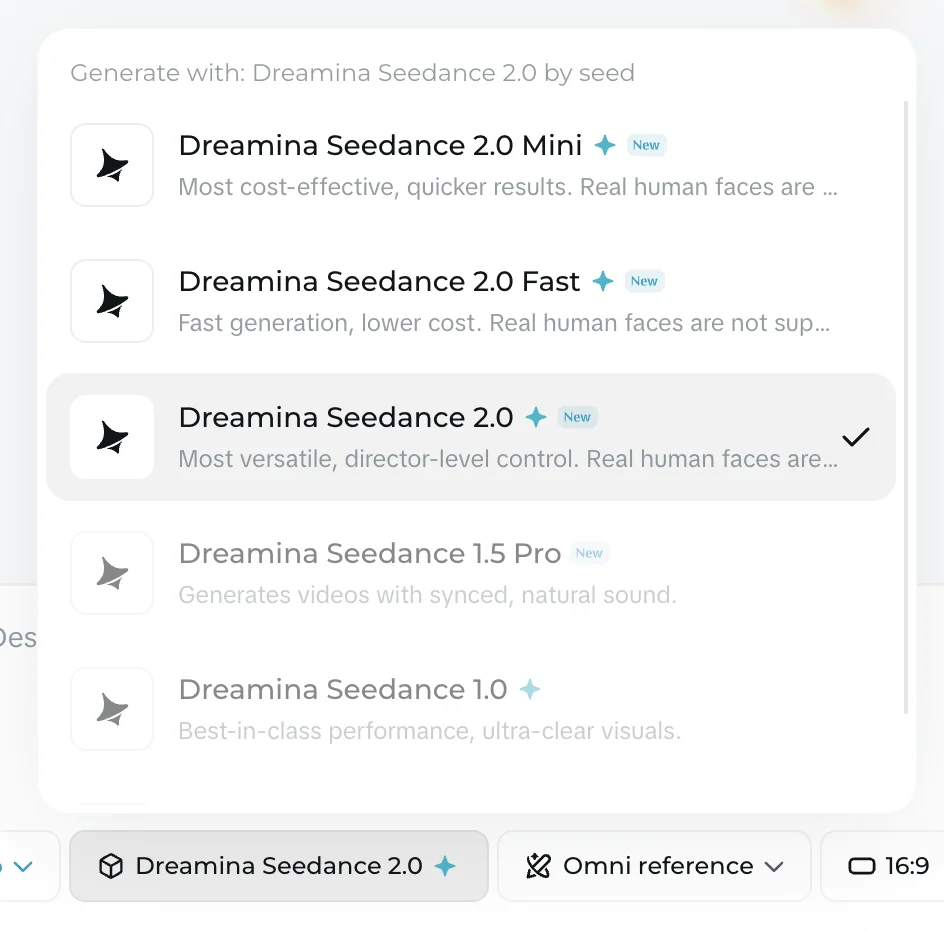
Those two are the models I measured directly; Dreamina’s lineup also includes an even cheaper 2.0 Fast, plus the older 1.5 Pro and 1.0 models, each at its own credit rate. So the per-clip cost inside Dreamina depends on which Seedance you pick as much as which plan you are on — a batch of 2.0 Mini drafts stretches an allowance much further than the same number of full 2.0 finals.
The credits themselves arrive two ways: the free plan drips a small daily-login bonus (which, as noted, cannot be spent on video), while paid plans grant the full monthly pool up front. Those monthly credits do not bank usefully from one cycle to the next, so a plan sized for a busy month leaves value on the table in a quiet one.
Those credits come from monthly plans, shown in local currency that varies by region. Converted to dollars, the tiers run roughly as follows, at first-month promo prices that rise on renewal.
| Dreamina plan | Approx. price/mo | Credits/mo | Seedance 2.0 clips (~172 cr) |
|---|---|---|---|
| Free | $0 | Daily bonus only | None — video is gated |
| Basic | ~$9 | 3,875 | ~22 |
| Standard | ~$21 | 9,545 | ~55 |
| Advanced | ~$40 | 21,215 | ~123 |
Do the per-clip math and something surprising falls out: at roughly $9 for 3,875 credits, a 172-credit Seedance 2.0 clip costs about 40 cents on Basic, dropping toward 32 cents on the bigger plans. That is actually cheaper per clip than fal’s 1.0 Pro at 62 cents — but there are three catches.
You are buying a monthly plan rather than paying per clip, so unused credits are wasted; the prices are first-month promos that renew higher; and the plan is priced in local currency that shifts by region, so your exact dollar figure will vary. The paid tiers also enable watermark removal, higher resolution, 60fps, and lip-sync audio, which the free tier lacks. It is a real cost advantage on paper, but only for someone who reliably fills the plan and happens to be in a region where the pricing lands well.
The free tier deserves its own warning, because it is the trap. Dreamina shows a free credit balance topped up by daily logins, which makes it look usable — but it hard-gates video generation. Every attempt to make a Seedance clip on the free plan, in my testing, opened an upgrade wall, regardless of the credits displayed and regardless of which model I chose. So the one route that looks free is the one route that makes no video at all. Judge Seedance’s quality on fal.ai’s 62-cent clip, not on Dreamina’s free plan, which will not produce one.
The versions, and what each one costs
Because different surfaces run different versions, the version you can use is tied to where you run it and what you pay. Here is the map.
| Version | Where it runs | Notes on cost |
|---|---|---|
| Seedance 1.0 / 1.0 Pro | fal.ai, Replicate, most API platforms | The cheapest widely-available route (~$0.62/1080p 5s on fal) |
| Seedance 1.5 Pro | Some API platforms, Dreamina | Adds synced sound |
| Seedance 2.0 (+ Mini, Fast) | Dreamina, some API platforms | 172 credits/clip on Dreamina (~$0.32–0.40); Mini cheaper |
| Seedance 2.5 | Newest (July 2026), rolling out | Native 30s clips + audio; pricing not yet public |
Two practical points come out of this. First, if you want the cheapest quality video, Seedance 1.0 Pro on an API platform is the route, and it is only a generation behind the flagship — the quality gap is smaller than the version numbers suggest. Second, Seedance 2.5 is the newest and most capable, with native 30-second generation, but ByteDance had not published its pricing at the time of writing, so any specific 2.5 cost you see on another site is an estimate rather than a confirmed rate. Wait for official pricing before budgeting around 2.5.
For pricing purposes, the honest advice is to default to the cheapest capable version and only pay up when a job needs more. Seedance 1.0 Pro through an API platform covers most needs at the lowest cost; step up to the pricier Seedance 2.0 on Dreamina when you specifically want its director-level control or newer motion; and keep 2.5 on your radar for the native long clips it promises, once its rate is known. Paying for the newest version by default — before you have confirmed what it costs or whether you actually need it — is the easiest way to overspend on Seedance.
What does a real Seedance project cost?
Single-clip pricing is easy; real projects are where the routes diverge, so it helps to run the same job through each.
A one-minute video built from short clips is a dozen or so generations once you count re-rolls. On fal.ai at 1080p that is roughly $6 to $8 of pay-as-you-go generation for a finished minute, with no commitment — you pay only for what you make. Draft that same minute at 480p and finalise the hero shots at 1080p, and it drops closer to $2 to $3.
Through Dreamina, the same minute at Seedance 2.0 is roughly a dozen clips at 172 credits, or around 2,000 credits — more than half of a Basic month’s allowance on a single minute, or a comfortable fraction of Standard. Whether that is cheaper than fal depends entirely on how much video you make: a heavy user who fills a Standard or Advanced plan every month gets a lower per-clip cost through Dreamina, while an occasional creator wastes a monthly plan and is far better off paying fal’s per-clip rate.
| Job | fal.ai (pay-per-use) | Dreamina (credit plan) |
|---|---|---|
| One 1080p clip | ~$0.62 | ~$0.32–0.40 (2.0), plan required |
| A one-minute 1080p video | ~$6–8, no commitment | ~2,000 credits (½ a Basic month) |
| Occasional / low volume | Cheaper — pay only per clip | Wasteful — you buy a whole plan |
| High volume, every month | Adds up per clip | Cheaper per clip if you fill the plan |
The rule of thumb: pay-per-use for occasional or unpredictable work, a Dreamina plan only if you will reliably fill its monthly credits with Seedance 2.0.
How does Seedance pricing compare?
Against the other leading AI video tools, Seedance’s cost advantage is real but comes with the access friction this guide keeps flagging.
- Google Veo meters credits inside Google Flow, where a top-quality clip runs 100 credits and the Pro plan is $19.99/mo for 1,000 credits — about $2.00 a Quality clip, several times Seedance’s cost, though with reliable audio and a genuinely usable free tier Seedance lacks. See our full Google Veo review.
- Kling runs about 60 credits per 1080p clip on plans from roughly $7 to $128 a month, which works out to a similar per-clip cost, but on first-month promo prices that rise on renewal and with a poor billing reputation. See our Kling pricing guide.
- Runway is a flat subscription ($12 to $76 a month) rather than pure per-clip billing, with a 25-credit Gen-4 Turbo clip costing about 20 to 48 cents depending on plan — more predictable, but its free tier is the most locked and its raw quality trails. See our Runway pricing guide.
The pattern: Seedance matches or beats all of them on raw cost per clip, especially through the API route, and loses on convenience and a usable free tier. For where it sits on quality and access, our roundup of the best Sora alternatives ranks all four.
The short version on value is this. Seedance is the cheapest way to generate this tier of AI video, full stop — through the API route a clip costs a fraction of what a polished consumer tool charges, with a commercial licence attached. What you trade for that price is convenience: there is no reliable free tier to test on, a version-and-platform maze to navigate first, and, on the 1.0 Pro model most API platforms expose, no audio.
If cost per clip is the number that decides your tool, and you are comfortable running a model through an API rather than an app, nothing here beats it. If you want a finished product with a real free trial and audio built in, you are paying a little more elsewhere for good reason — and our Google Veo and Kling guides cover those trade-offs.
How to keep your Seedance costs down
Because Seedance is priced by route and by resolution, a few deliberate choices cut your bill sharply.
Use the API route, not the app. This is the single biggest lever. fal.ai and similar platforms charge per clip with no subscription, no watermark, and a commercial licence; Dreamina charges a monthly plan and gates its free tier. Unless you are a high-volume Seedance 2.0 user, pay-as-you-go is both cheaper and less wasteful, because you never pay for credits you do not spend.
Draft at 480p, finalise at 1080p. The resolution lever is enormous: a 480p clip costs about a fifth of a 1080p one on fal’s formula. Rough out your prompt, timing, and composition at the low resolution for a few cents each, and only spend the full 1080p rate on the shots you are keeping. On a project of any size this saves more than any platform choice.
Match the model to the job. Seedance 1.0 Pro on an API platform is the cheapest quality option and only a generation behind the flagship. Reserve the pricier Seedance 2.0 on Dreamina for work that genuinely needs its extra capability, and use the cheaper 2.0 Mini for drafts within the app.
Do not pre-buy a Dreamina plan you will not fill. Credits do not carry over usefully, and the plan is a monthly commitment. If your usage is occasional or spiky, the per-clip API route wins every time; only commit to a plan if you will reliably use its monthly credits.
Wait for official 2.5 pricing. Seedance 2.5 is the newest model, but ByteDance had not published its rates when this was written. Do not budget a project around a 2.5 figure quoted on another site — it is an estimate until ByteDance confirms it.
| Tactic | Why it saves |
|---|---|
| API route over the Dreamina app | Pay per clip, no wasted subscription, no watermark |
| Draft at 480p, finalise at 1080p | 480p costs roughly a fifth of 1080p |
| Use 1.0 Pro (or 2.0 Mini) for drafts | The cheaper models are only a step behind |
| Only buy a Dreamina plan you will fill | Monthly credits are wasted if unused |
| Don’t budget around unconfirmed 2.5 rates | Official 2.5 pricing isn’t public yet |
Which route should you use?
Match the route to how much video you make and how you work.
- Occasional or one-off use? Use fal.ai or another API platform, pay per clip, and skip the subscription. About 62 cents a 1080p clip, no commitment, no gated free tier.
- Want the cheapest possible clips? Draft at 480p (~$0.12) on an API platform and finalise your keepers at 1080p. The resolution lever is the biggest saving available.
- Running Seedance 2.0 in a polished app, at volume? A Dreamina plan sized to your monthly output gives a slightly lower per-clip cost on 2.0 — but only if you reliably fill it, and only if the regional pricing works out for you.
- Building into a pipeline? The API route is the only sensible one; its pay-per-use billing scales with usage.
- Just want to judge the quality first? Generate one clip on fal.ai for about 62 cents. Do not use Dreamina’s free tier, which will not make a video.
The bottom line on Seedance pricing
Seedance is genuinely one of the cheapest ways to make high-end AI video, but only if you price it by route rather than by the first surface you find. Through an API platform like fal.ai it is about 62 cents for a 1080p clip, or as little as 12 cents at 480p, pay-as-you-go with a commercial licence and no watermark. Through ByteDance’s Dreamina app it is a credit-metered monthly plan of roughly $9 to $40, cheaper per clip if you fill it but wasteful if you do not — and its free tier makes no video at all.
So the honest guidance is simple: for most people, run Seedance on fal.ai and pay per clip; reach for a Dreamina plan only if you are a high-volume Seedance 2.0 user in a supported region. Whichever route you pick, budget by the cost per clip and the resolution you actually need, and Seedance delivers top-tier quality for less than almost anything else on the market. For the hands-on quality verdict behind these numbers, read our full Seedance review.
Frequently asked questions
How much does Seedance cost?
There is no single price, because Seedance is a model rather than a product, and what you pay depends entirely on where you run it. The cheapest and cleanest route is a developer platform like fal.ai, where a 1080p five-second clip costs about $0.62, billed per generation with no subscription and a commercial licence.
ByteDance's own consumer app, Dreamina, is the other main route, and it is credit-metered: a full Seedance 2.0 clip cost 172 credits in testing, on paid plans that run roughly $9 to $40 a month depending on tier and region. Its free plan will not generate video at all. So Seedance is genuinely cheap, but only if you use the API route; the official app is pricier and gated.
Is Seedance free?
Not in any usable way. ByteDance's Dreamina app shows a free credit balance topped up by daily logins, but it hard-gates video generation — every attempt to make a Seedance clip on the free plan opens an upgrade wall, regardless of the credits shown. So the one surface that looks free will not actually make you a video.
The realistic cheap route is a developer platform like fal.ai, which is pay-as-you-go rather than free: about $0.62 for a 1080p clip, with no subscription. Cheaper resolutions cost less — roughly $0.12 at 480p and $0.27 at 720p for a five-second clip, worked out from fal's own token formula. Inexpensive, but not free.
How much does a Seedance clip cost on fal.ai?
fal.ai states that a 1080p five-second clip costs about $0.62, and prices everything else by a token formula: $2.50 per million video tokens, where tokens equal height times width times frame rate times duration, divided by 1024. Their 1080p rate implies roughly 24 frames per second, which lets you work out any resolution.
On that basis a five-second clip runs about $0.12 at 480p, $0.27 at 720p, and $0.62 at 1080p; a ten-second clip is double each. That works out to roughly 12 cents a second at 1080p, or about 2 to 5 cents a second at lower resolutions — among the cheapest quality video generation available anywhere, with a commercial licence and no watermark.
How much does Seedance cost on Dreamina?
Dreamina meters Seedance in credits, and the plans are shown in local currency that varies by region. In testing, a full Seedance 2.0 clip cost 172 credits and the cheaper 2.0 Mini cost 124. The paid tiers grant roughly 3,875 credits a month on Basic, 9,545 on Standard, and 21,215 on Advanced, which works out to around $9, $21, and $40 a month respectively, at first-month promo prices that rise on renewal.
That makes Dreamina's cost per Seedance 2.0 clip roughly 32 to 40 cents once you factor the plan price against the credits — cheaper per clip than fal's 1.0 Pro, but you are buying a monthly plan rather than paying per clip, and the free tier is gated.
What is the difference between Seedance 1.0, 2.0, and 2.5?
They are successive generations of ByteDance's model. Seedance 1.0 (and 1.0 Pro) is the original benchmark leader that most API platforms expose; 1.5 Pro adds synced sound; Seedance 2.0 is the newer flagship with a lineup of its own — full 2.0, plus cheaper 2.0 Mini and 2.0 Fast variants — and lives mainly in ByteDance's Dreamina app; and Seedance 2.5, released in July 2026, adds native 30-second clips and synchronized audio.
Which one you can run, and what it costs, depends on the surface: fal.ai commonly exposes 1.0 Pro and 2.0, while Dreamina runs the 2.0 family. Seedance 2.5's pricing had not been publicly disclosed at the time of writing, so treat any 2.5 figure you see elsewhere as an estimate.
Keep reading
Seedance Review: The Best Video Model You Can't Easily Use
Seedance makes some of the best AI video anywhere for about $0.62 a clip, but its own app gates it behind a paywall. My hands-on take on quality and price.
Seedance vs Veo 3: Cheapest Quality vs the Best Model
Seedance makes benchmark-quality clips for ~$0.62; Veo 3 is the best model at ~$2 a clip. I tested both — which wins depends on price, access, and audio.
How to Use Seedance AI Without the Paywall
How to use Seedance AI: the cheap route to top-tier video is a developer platform, not the gated app. Which version, what it costs, tested hands-on.
Seedance vs Kling: I Tested Both AI Video Models
Seedance and Kling both make elite AI video and both score 4.2. I ran one prompt through each: Seedance wins on price and licensing, Kling on audio and ease.