
CapCut pricing: there is no single price, and CapCut says so
CapCut publishes $19.99 a month on one page and says it has no fixed global price on another. Here is what the upgrade screen showed, and how to find yours.
Contents
What does CapCut actually cost?

CapCut’s free tier is $0 and genuinely usable. CapCut’s own US page quotes $19.99 a month for Pro. On the one logged-in, non-US account I could read, Pro renewed at about $8.57 a month, a local-currency price converted at September 2026 rates. All three of those are true at once, which is the whole problem.
There is no single answer here, and that is not evasion on my part — it is CapCut’s own position. Its help centre states that pricing “can vary depending on your region, device, and available promotions”, and that there is no fixed global price. Almost every article written about this ignores that and publishes one number anyway, usually the $19.99. So the practical answer is that the paid tiers cost whatever your own upgrade screen says, and the one reliable way to learn your price is to log in and look.
| Plan | What CapCut’s US page says | What my account actually showed |
|---|---|---|
| Free | $0 | free, and the current plan |
| Pro, monthly | $19.99 | about $8.57 on renewal |
| Pro, yearly | $179.99 | about $54.05 on renewal |
| Ultra, monthly | not published | about $65.59 |
| Teams | from ~$24.99, basis unstated | about $5.11 per seat |
My account is a non-US one, so its upgrade screen shows local-currency prices; every figure I give for it in this guide is that local price expressed in dollars. Conversions are mine, at the exchangerate-api.com rate on 16 September 2026. One account in one region on one day — proof the variance is real, not a price list for your country.
How CapCut’s pricing works
Three things decide what you see, and CapCut names all three: your region, your device, and whatever promotion is running when you look. That is why there is no /pricing page to link to. The URL 404s, there is no pricing link in the site navigation, and the upgrade modal behind the login is the pricing page.
The second thing to understand is that a CapCut plan card does not show you a price. It shows you three prices: a struck-through list figure, a large promotional figure for your first term, and a small grey line underneath giving the rate you will pay on renewal. The large number is an introductory offer. The small grey line is the subscription — and on all six cards I read, it matched the struck-through figure exactly, so the discount is against your first term rather than against a marked-up list price.
Third, there are two meters underneath the subscription, and they are separate. AI credits pay for the generative features — 650 a month on Pro, 21,215 on Ultra. Storage is the one that stops free users: 512MB on Free against 1TB on every paid tier. The clipping tool meters separately again, at 60 source minutes a month on Free. None of that is visible on a plan card.
What CapCut publishes, and what it charges
Here is the contradiction in full, because it is the reason this question is so badly answered.
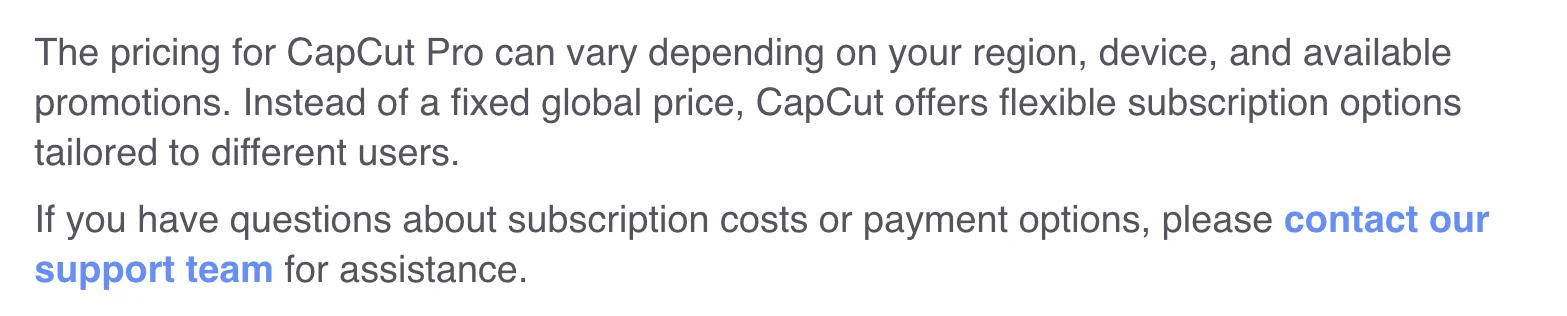
CapCut’s help centre, dated April 2026, says this:
The pricing for CapCut Pro can vary depending on your region, device, and available promotions. Instead of a fixed global price, CapCut offers flexible subscription options tailored to different users.
CapCut’s own comparison page, on the same domain, says this:
Monthly plan: $19.99 per month for individual users. Yearly plan: $179.99 per year… Team plan: Starts at around $24.99 per month.
Both were live when I checked on 16 September 2026. The second matches the figures Google’s AI Overview and most write-ups publish, which is how a number CapCut itself declines to call fixed ends up presented as the price of the product.
Now the upgrade screen itself, reached exactly as CapCut’s help page instructs — log in, click Upgrade in the top right.
Everything is in my account’s local currency rather than dollars, on a US-English browser session, because the account is localised to a region outside the US. And every paid card carries its three numbers. Pro reads free for 7 days in large type, with a discounted first month and then the renewal rate, about $8.57, in small grey text underneath.
| Monthly | Shown in large type | Renews at | Credits |
|---|---|---|---|
| Free | free | — | basic tools only |
| Pro | free for 7 days | about $8.57 | 650/mo |
| Ultra | a discounted first month | about $65.59 | 21,215/mo |
| Teams | a discounted first month, per seat | about $5.11/seat | 650 per seat |
Switch to the yearly tab and the whole ladder changes. Pro again leads with a free 7 days, then a discounted first year, then renews at about $54.05 a year. Ultra and Teams each show a discounted first-year figure above a higher renewal rate.
One more detail worth knowing before you choose a tab: the modal offers four billing modes, not two. Monthly and Yearly sit alongside options labelled “One month” and “One year”. CapCut’s help page describes the product as offering “monthly and yearly subscription plans”, so its own documentation is a tab short. I could not get those two tabs to load their contents, so I will not tell you what they cost or how they bill — only that they exist and are worth opening before you buy.
Where the money goes on each tier
Price is only half the question. Here is what the money buys, drawn from the plan cards and from what I could verify by using the product.
| What you get | Free | Pro | Ultra | Teams |
|---|---|---|---|---|
| AI credits a month | none | 650 | 21,215 | 650 per seat |
| Cloud storage | 512MB | 1TB | 1TB | 1TB |
| Premium templates | no | yes | yes | yes |
| Brand kit (on the plan card) | not listed | not listed | not listed | yes |
| Clipping allowance | 60 source min/month | +240 min/month | not measured | not measured |
Brand kit needs a footnote: it appears only on the Teams card, yet a Brand kit panel sits in the free editor’s tool rail, so the card is describing billing rather than access. I did not test what the free panel does. My free account also held a one-off 80 AI credits despite the card listing no allowance, and I did not test whether those renew.
Two things stand out. The free clipping tool caps uploads at three hours or 10GB per file, which is the ceiling I could read; I did not check whether the paid tiers lift it, so do not assume they do. And the credit jump from Pro to Ultra is 32× while the price rises 7.65×, which makes Ultra either excellent value or completely irrelevant depending on whether you touch the generative tools at all. The step-by-step walkthrough shows where that upload ceiling bites in practice, and the best AI clipping tool sets what CapCut returns against three rivals on the same file.
What Free gives you is more than the tier name suggests. Multi-track editing, auto-captions (free on CapCut’s AI Captions page; in the editor they needed Pro to export when I rechecked on 31 October, see CapCut auto captions), the resolution ladder up to 4K with no upgrade badge on any rung — though I only confirmed that 1080p renders — and direct publishing to TikTok, YouTube Shorts, Facebook Pages and Instagram Reels, with a scheduler, badged free. When I exported eight clips from a 35-minute source for the CapCut review, every one came out at 1080×1920, 30fps, no watermark.
The resolution ladder is worth a closer look, because it is the place you would expect a free tier to be crippled and it is not. The export dialog offers 360p, 480p, 720p, 1080p, 2K and 4K, and none of those rungs carries a Pro badge on a free account. I verified 1080p by pulling all eight exports to disk and probing them; whether 2K and 4K genuinely render on the free tier I did not test, so treat those two as unconfirmed.
What Free does not include is the premium template library, the AI credits that drive the generative tools, and the storage to keep much of anything. That last one is the real dividing line, and it is why the sensible comparison is not Free versus Pro on features but Free-plus-discipline versus Pro-plus-headroom.
The annual tab is worth more than it says
The yearly tab advertises “up to 30% off”. On my account it was worth considerably more than that, and the arithmetic is easy to check.
Pro paid monthly comes to about $103 a year at the renewal rate. Pro yearly renews at about $54. Paying annually is therefore about 47% cheaper over a year, not 30%.
| Tier | 12 × monthly | Yearly | You save |
|---|---|---|---|
| Pro | about $103 | about $54 | about 47% |
The other tiers do not all match. Teams showed an annual saving close to Pro’s, and Ultra a smaller one. So the badge understates the Pro and Teams cases badly and overstates nothing.
If you already know you will use CapCut for a year, the annual tab is the single biggest saving available on this screen — bigger than any promotion on it.
When the free tier stops being enough
Before you weigh any annual saving, run your own numbers against the free tier, because the free tier is not a demo. Say you publish two short clips a week. That is roughly eight exports a month, and four 1080p exports of two-to-four-minute clips filled my 512MB quota — but deleting an export releases the space immediately, so eight a month is comfortable if you download and clear as you go. On that pattern Pro buys you convenience, not capability.
Now say you publish daily, or you keep finished work in the cloud rather than pulling it down. Thirty exports a month against a 512MB ceiling means clearing the space every few days, and the 1TB on Pro stops being a nice-to-have. At about $54 a year on the annual tab, that works out near $4.50 a month for the storage headroom, which is the clearest value case on the whole ladder.
The credit meter is a separate calculation again, and for most people it is zero. Clipping a long video into shorts does not spend AI credits; it spends the clipping allowance, which is 60 source minutes a month on Free. Credits go on the generative features. If you never open those, Pro’s 650 a month and Ultra’s 21,215 are both equally irrelevant to you and storage is the only reason to pay.
Where is the Standard plan?
Google’s AI Overview, and several of the articles carrying the same figures, describe a Standard tier at around $9.99 a month sitting below Pro. It is also a related search in its own right, so plenty of people are looking for it.
There was no Standard tier on my upgrade screen at all. The ladder ran Free, Pro, Ultra, Teams. Whether Standard is region-specific, device-specific, or simply gone from this account’s view, I cannot say — and I would rather say that than invent a reason. But if you have been searching for CapCut’s Standard price and cannot find the plan, that is not you missing it.
Does the device you buy on change what you pay?
CapCut says it can. “Device” is the second of the three factors it names, sitting between region and promotions, and the help page reinforces it by documenting three separate routes to the same information rather than one.
On the web you log in and click Upgrade in the top right. On the desktop app you log in and use the subscription button under your User ID. On mobile you open the app, go to the Me tab and tap Join CapCut Pro next to your nickname. Three products, three routes to the price, and one company telling you it may differ between them.
I measured the web only, so I cannot tell you what the mobile app charges on the same account — and I am not going to guess, because guessing is what the rest of the internet is doing with this question. What I can say is that the structure invites a difference, and that mobile subscriptions generally bill through the App Store or Google Play rather than the vendor directly, which carries its own renewal and refund rules.
The practical takeaway is narrow but useful: check the price on the device you intend to buy on, not the one you happen to have open. If you edit on a laptop and subscribed on a phone, those may not have been the same transaction, and cancelling one may not be the same operation as cancelling the other.
What to watch before you subscribe
On the one non-US account I could read, here is the distance between what each card advertises and what it renews at. Your own figures will differ; the gap between the two columns is the part that travels.
| What the card shouts | What you actually pay |
|---|---|
| Pro, monthly: free for 7 days | about $8.57 a month |
| Pro, yearly: free for 7 days | about $54.05 a year |
| Ultra, monthly: a discounted first month | about $65.59 a month |
| Teams, monthly: a discounted first-month seat price | about $5.11 a seat |
The big number on the card is not your price
Every paid tier shows a promotional figure in large type and the renewal rate in small grey text beneath the button. Pro’s monthly card shows a free week; it renews at about $8.57. Ultra shows a discounted first month; it renews at about $65.59. Teams shows a discounted seat price; it renews at about $5.11 a seat, several times as much. Read the grey line, every time.
Any article quoting one worldwide price is describing one market
This includes CapCut’s own comparison page. $19.99 a month is a real number for somebody, but it was not the number on my screen, and CapCut’s help centre explicitly declines to call it the global price. If you are searching for CapCut’s price in the UK, Canada or anywhere else, no third-party article can answer that — only your own upgrade screen can.
The free wall is storage, not a watermark
This one surprised me when I tested CapCut properly. The free tier exports 1080p with no watermark at all, which I confirmed by downloading eight clips and probing them. What stops you is 512MB of cloud storage that every export lands in first. Four 1080p exports of two-to-four-minute clips filled it on my account, after which exports began failing and one was refused outright. Deleting an export frees the space immediately, so the free tier is workable if you download and clear as you go.
Credits and storage are separate meters, and neither is on the plan card
Pro’s 650 monthly AI credits pay for the generative features; the 1TB is storage; the clipping tool’s 60 free source minutes a month is a third meter again. A plan card shows you the price and the credit count, not how those interact. Our full CapCut review works through what each meter actually buys.
What the pricing page will not tell you
Four things decide whether a subscription turns out to be what you expected, and none of them is printed on a plan card. The first is what existing customers are angry about, because on this product it is unusually specific.
| Signal | Reading |
|---|---|
| Trustpilot, via Google’s rendering, 14 Sep 2026 | 1.2 out of 5 across 1,288 ratings |
| Google’s AI Overview, 14 Sep 2026 | praised for its interface, criticised for “technical glitches and aggressive subscription billing” |
| What the complaints concern | unexpected charges and difficult refunds — not the editor |
The complaints are about billing, not editing
Read the Trustpilot reviews and they cluster on unexpected charges and difficult refunds rather than on the editor, which is capable. That is a different failure from a bad product, and it changes the practical advice rather than the verdict: staying on the free tier sidesteps the thing people are angry about almost entirely. Nothing in my own testing produced a billing event, because nothing I did cost money. But if you do subscribe, subscribe somewhere you can cancel without an argument.
There is no lifetime licence
It is one of the most common questions asked about CapCut’s price, and the answer is simply no. Every tier I could load is a recurring subscription, monthly or yearly, with a renewal rate printed in the small grey line. Anywhere offering permanent CapCut Pro access for a one-off fee is not selling you something CapCut offers.
Export resolution silently resets, which wastes the quota you are paying for
A practical one. The export dialog defaults to 720p, and although a resolution you pick persists between clips within a session, any page reload drops it silently back to 720p. I confirmed that across three separate exports. On a metered storage quota this cuts both ways — smaller files, but a re-export at the right resolution costs the space twice.
The prices move with promotions, so today’s screen is not next month’s
“Available promotions” is CapCut’s own third variable. The monthly tab was badged “up to 80% off” when I looked and the yearly tab “up to 30% off”. Those badges are not permanent fixtures, which means a price you screenshot today — including every number in this guide — is a reading, not a constant.
Which plan should you actually pick?
- Editing a few clips a month and deleting them as you go → stay on Free. The export is already clean 1080p with no watermark, and the 512MB recycles.
- Hitting the storage wall → Pro, on the yearly tab. Storage is the honest reason to upgrade, and annual was 47% cheaper than monthly on my account.
- Using the generative AI tools heavily → compare credits, not price. Ultra’s 21,215 monthly credits against Pro’s 650 is a 32× jump; the price is not.
- Buying for a team → check the per-seat renewal rate, not the promotional one. The gap between them was the widest of any tier I saw, and it multiplies by however many seats you buy.
- Skip CapCut entirely if what you actually want is long video turned into short clips. It does that job differently — on Auto, on an identical 35-minute source, it returned 8 chapters covering 73.6% of the runtime rather than short highlights.
If clipping is the job, not editing
Vizard is the better tool for turning long recordings into short clips, and it is cheap on a per-job basis — 85 cents for a 35-minute source at its Creator annual rate, itself a promotional price. Its catch is that the free plan shows you ten of the clips it finds and sells you the other twenty. The Vizard review has the measured detail.
OpusClip finds the most material of any tool I have run — 32 clips from that same source — and costs more for it, at $2.03 a job against Vizard’s $0.85 on an identical per-source-minute meter. Worth it if the virality scoring earns its keep for you. The OpusClip review covers where it does.
One clipping job, priced across four tools
CapCut is a video editor that grew a clipping feature, so a straight price comparison against the tools built for clipping is unfair to all of them. But the numbers are worth seeing, because the free tier changes the maths in CapCut’s favour more than any subscription does.
I have run the same 35-minute conference panel through four tools. On each tool’s cheapest paid annual rate — Vizard’s is Creator, since it sells no Pro tier, and several are promotional rates that move, so check before you buy — one pass over that file costs:
| Tool | Cost for one 35-minute job | What came back |
|---|---|---|
| CapCut | $0 | 8 chapters on Auto, 73.6% of the runtime |
| Vizard | $0.85 | 30 found, 10 delivered free |
| Submagic | $1.53 | 31, none exportable on trial |
| OpusClip | $2.03 | 32, on a Pro-trial account |
CapCut’s zero is real — that is the free tier, exporting clean 1080p with no watermark — but it buys a different product. Its eight results ran 1:26 to 3:58 and covered nearly three-quarters of the source in sequential, non-overlapping ranges. That is chaptering, and it is what the default Auto setting does rather than what the tool can only do. Submagic and OpusClip hand back thirty-odd short overlapping candidates ranked against each other, and Vizard finds thirty and delivers ten. That is highlight-picking.
So if you want a long recording cut into publishable shorts, the free CapCut tier is not the cheap option — it is a different one, and free AI clip generator covers what the zero actually buys you here, and the alternatives roundup works through which meter suits which kind of source. If you want a capable editor whose free tier exports clean files, CapCut at $0 is very hard to argue with.
The final word
CapCut’s pricing is not complicated so much as unpublished. The company prices by market and says so plainly in its help centre, then quotes fixed dollar figures on its marketing pages, and the gap between those two positions is where every confused article about CapCut’s cost comes from. On my account the real Pro rate was about $8.57 a month, a local-currency price at September 2026 rates — less than half the published US price, and reachable only by logging in and clicking Upgrade.
So do that. It takes about fifteen seconds, it is the procedure CapCut itself recommends, and it is the only number that describes what you will be charged. When you are there, open the yearly tab before you decide, and read the small grey line under the button rather than the large one above it. If the number you see sends you looking elsewhere, CapCut alternatives compares ten replacements by the job you used CapCut for.
CapCut has no affiliate programme with us and the link above earns us nothing — it goes to CapCut’s homepage so you can log in and read your own upgrade screen.
Frequently asked questions
How much does CapCut Pro cost?
It depends on where you are, and CapCut will not give you one number. Its own help page says the price "can vary depending on your region, device, and available promotions" and that there is no fixed global price. Its marketing pages say $19.99 a month or $179.99 a year.
Both of those are live on CapCut's own site at the same time, and the second is the one nearly every write-up repeats. When I opened the actual upgrade screen on a logged-in account, CapCut Pro renewed at about $8.57 a month in my account's local currency at mid-September 2026 rates, or less than half the published US figure. That is one account in one region on one day, so treat it as proof the variance is real rather than as your price. The only number that applies to you is the one on your own upgrade screen.
Is CapCut still free in 2026?
Yes, and the free tier is more usable than most free tiers in this category. It covers multi-track editing, the basic toolset, and — the part that matters most — exports at 1080p with no watermark, which I verified by downloading eight clips and probing them.
The wall is not a watermark and not a resolution cap. It is 512MB of cloud storage. Every export renders into that space before you can download it, and on my account four 1080p exports of two-to-four-minute clips filled it, after which exports started failing and one was refused outright with an upgrade prompt. Deleting an export reclaims the quota immediately. Every paid tier lists 1TB instead. The free clipping tool also meters separately, at 60 minutes of source video a month, and caps any single upload at three hours or 10GB.
Why is CapCut cheaper in some countries?
Because CapCut prices per market rather than globally, which it states openly: "Instead of a fixed global price, CapCut offers flexible subscription options tailored to different users." Region is one of three factors it names, alongside device and current promotions.
The gap is not small. CapCut's own US-facing page quotes $19.99 a month for Pro. The upgrade screen on my non-US account renewed at a local-currency price that converted to roughly $8.57 at September 2026 rates — and annually the gap widens, with $179.99 against about $54. I have only measured one region, so I cannot tell you what Pro costs in the UK or Canada. What I can tell you is that any article quoting a single worldwide CapCut price is describing one market and presenting it as the rule. Device and current promotions are the other two factors CapCut names, so even within one country the figure can move.
Does CapCut have a free trial?
Yes, on the Pro tier, and it is easy to misread what follows it. On the monthly tab the Pro card shows a free 7 days in large type, with the real terms underneath in small grey text: a discounted first month, then renewal at the full rate, about $8.57 on my non-US account.
That is three prices on one card — a free week, a discounted first month, then the rate you actually pay. The yearly tab does the same with different numbers: free for 7 days, a discounted first year, then about $54 on renewal. The large promotional figure is not what leaves your account at the first full-rate renewal, but the struck-through price is: on all six cards I read, the crossed-out number was exactly the renewal rate. The discount is against your first term only, not against an inflated list price. Read the small grey line under the button either way, because it is the one that describes the steady state.
Is CapCut Pro worth the price?
It depends entirely on whether the free tier's storage ceiling is actually blocking you, because that is the wall most people hit first. If you export a handful of clips a month and delete them as you go, the free tier's 512MB recycles fine and the exports are already clean 1080p with no watermark.
Pro buys 1TB of storage, 650 AI credits a month and the premium template library. The storage jump is the honest reason to upgrade; the credits matter only if you use the generative tools. If what you want is to turn long videos into short ones, weigh it against the tools built for that job — on an identical 35-minute source, CapCut on Auto returned 8 long chapters covering 73.6% of the runtime, where OpusClip returned 32 short overlapping candidates and Vizard found 30 and delivered 10.
Where can I check CapCut's real price?
On your own upgrade screen, which is the only place it is accurate, and CapCut publishes the steps. On the web, open CapCut Online, log in, then click Upgrade in the top right and read the Pro card. On desktop, log in and use the subscription button under your User ID. On mobile, open the app, go to the Me tab and tap Join CapCut Pro next to your nickname.
CapCut's wording is that you will then "see the current pricing in your region". Two things to do once you are there. Switch between the Monthly and Yearly tabs, because the annual saving on my account was 47% rather than the 30% the tab advertises. And read the small grey line under each button, which is where the renewal rate lives once the promotional period ends.
Keep reading
CapCut review: free 1080p exports, until 512MB stops you
I put a 35-minute panel through CapCut's AI clipping and exported all 8 clips. Watermark-free 1080p on the free plan, but the cloud ceiling bites at clip four.
CapCut auto captions: Pro in the editor, still free on one page
I tested CapCut auto captions on a free account. The editor now locks export behind Pro, but CapCut's AI Captions page exported free, with 2.7% of words wrong.
Submagic alternatives: the cheapest depends on your meter
Seven Submagic alternatives ranked by the meter they charge on. Four tools measured on one 35-minute video, and the cheapest changes with source length.
Vizard review: the cheapest clipper, with one catch
A Vizard AI review from a measured run: it found 30 clips in my 35-minute panel and handed me 10. The other 20 need a card, and the maths still favours it.
Captions AI review: the pricing page hides half the plans
A Captions AI review from the published record: the pricing page shows three plans, the help doc lists six. Credits are 5 cents flat, and one clip costs $7.