
QuillBot humanizer: free, 100 words at a time, and it broke my logic
I ran a Claude essay through QuillBot's free AI humanizer and its own detector. The 100-word cap, the daily limit, what it changed, and an 11% that hid a 45%.
Contents
The short answer: free, tiny, and it rewrites more than your wording
The QuillBot humanizer is free for 100 words at a time, with a daily cap that stopped me after three usable rewrites. It does make AI text score lower on QuillBot’s own detector. It also changed what my text said, and part of its lower score came from typos it added.
I gave it the same Claude essay I used for my Grammarly humanizer test. QuillBot’s detector had scored that essay 100% AI. After humanizing, it scored 11%. Then I deleted five stray spaces the humanizer had left behind, changing no words, and the score went back up to 45%.

| Question | What I found (free account, 29 October 2026) |
|---|---|
| Free word limit | 100 words a run |
| Daily limit | 3 usable runs, then “Daily limit reached” |
| QuillBot detector, original essay | 100% AI |
| QuillBot detector, after humanizing | 11% AI |
| Same text, stray spaces removed | 45% AI |
| Meaning kept? | No: one sentence lost its subject, two claims got stronger |
| Premium | $19.95 a month or $99.95 a year (US default price) |
Inside the tool: tabs, colours and AI signals
It is a two-pane rewriter. You paste text on the left, pick a tab, click Humanize, and the rewrite appears on the right with its changes colour-coded.
The tabs on my account were Standard, Academic, Professional and Casual. I used Standard for every run, so I can’t tell you how the other three differ. Under the output, a bar shows the word count, a ”% Human” figure, a count of “AI signals” and a tone label. On my runs the ”% Human” field stayed at ”—”, and the tone label read “Formal”.
The colours follow a key in QuillBot’s help article on the humanizer’s colours. Red marks “Words that were swapped with synonyms to preserve meaning”. A yellow underline marks a sentence whose structure was rearranged, and blue marks the longest run of words left unchanged. That red label matters later, because one of the red words in my test did not preserve the meaning.
QuillBot is clear about the tool’s purpose. Its help article on flagged humanized text says the humanizer “Does not try to trick AI detectors or promise undetectability.” It describes the job as making “tone, vocabulary, flow more natural & human-like.” The language article lists English (US, UK, Australian and Canadian), German, French, Spanish and Brazilian Portuguese.
My test: the same Claude essay I gave Grammarly
I wanted a like-for-like comparison, so I reused my inputs. In October I asked Claude for three short texts for an AI detector test: a 216-word essay on the printing press, a 219-word explainer on sourdough starters, and a 207-word story about missing a train. I ran all three through Grammarly’s humanizer two days earlier.
On 29 October 2026 I opened QuillBot’s humanizer in Chrome, signed in to a free account, with the language set to English (US). I typed each text in, clicked Humanize, waited about ten seconds and copied the output. Then I scored the rewrite with QuillBot’s free AI detector, which uses Model v7.1.0; its panel showed “You’ve got 7 AI scans left today” before my first scan.
The plan was nine rewrites: three texts, three chunks each. I got three. The essay is the only text QuillBot rewrote in full, so every finding below comes from that one 216-word essay, and you should read it as one test, not a study.
The free plan stops at 100 words
The first run told me the rules. I pasted the whole 216-word essay and clicked Humanize. The output pane showed one clear sentence, then blurred the rest into placeholder text behind a card: “216/100 words. Limit exceeded.”
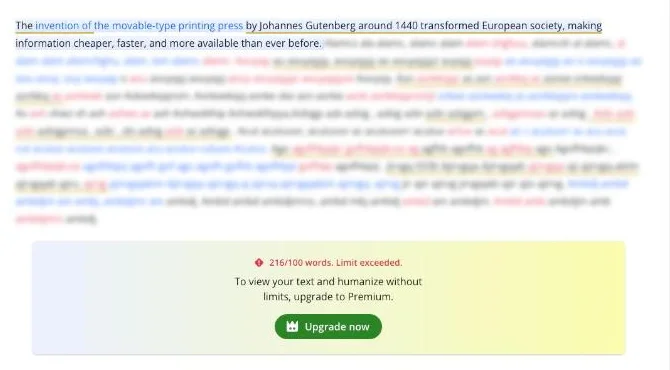
That matches QuillBot’s premium page, which lists the free humanizer as “Up to 100 words, limited usage”. You may see 125 words quoted elsewhere. That was the free paraphrasing cap on QuillBot’s premium page in August 2026; by October the page listed 100 words for both the paraphraser and the humanizer, and 100 is where my run stopped. A hundred words is one solid paragraph. A 1,000-word assignment would take ten or more runs, which brings in the second limit.
So I split the essay at sentence boundaries into chunks of 90, 97 and 29 words and ran them one at a time. All three came back in full. Then I typed the first 88-word chunk of the sourdough explainer, clicked Humanize, and got a pop-up instead of a rewrite.

The pop-up said “Daily limit reached” and offered an upgrade. I closed it with the X and stopped there, so the explainer and the story were never humanized. All of this happened in the 11 minutes after my first run.
How many runs the free plan gives you is fuzzy. I clicked Humanize five times: the first two were over 100 words and came back blurred, and the next three worked. If the blurred runs counted, the cap was five a day. If they didn’t, it was three. QuillBot’s language article only says “Limited daily usage is available for the humanizer.” If three is the cap, that is at most 300 words a day, and less if a run is short, as my 29-word last chunk was.
For comparison, Grammarly’s free humanizer page took the whole essay in one run, with a limit of 1,500 words, and also stopped me after three rewrites.
What it changed in the essay
The rewrites read smoothly. That is the problem, because three changes in 216 words altered what the essay claimed, and none of them looks like an error at a glance.
The copies lost their cause
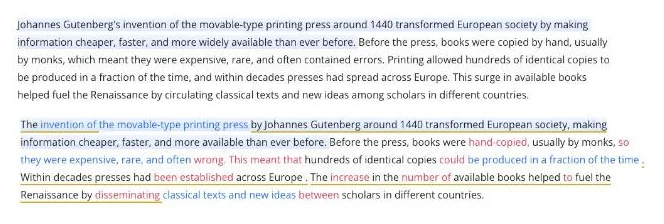
The original said books were copied by hand, so they were “expensive, rare, and often contained errors.” The next sentence said: “Printing allowed hundreds of identical copies to be produced in a fraction of the time.”
QuillBot rewrote that pair as “so they were expensive, rare, and often wrong. This meant that hundreds of identical copies could be produced in a fraction of the time.” Read it again. “This” now points back to hand-copied books being expensive and wrong, and printing has dropped out of the sentence. The essay now says hand-copying is why hundreds of identical copies could be made, which is the opposite of the point.
“Often wrong” is also flatter than “often contained errors”. A book can contain errors without being wrong as a whole. Both “wrong” and “This meant that” were shown in red, the colour QuillBot’s key describes as “swapped with synonyms to preserve meaning”.
The Reformation and the movements got bigger
In the second chunk, Martin Luther’s writings no longer “reached ordinary people in huge numbers, challenging the Catholic Church’s control over religious interpretation.” They “were widely distributed to ordinary people, breaking the Catholic Church’s monopoly on religious interpretation.”
Challenging control and breaking a monopoly are different historical claims, and the second is much stronger than anything the source said. The same chunk turned “laying groundwork for later movements demanding rights and representation” into “leading to later movements for rights and representation”. Groundwork is a contribution, while leading to is a cause.
The last chunk added an idea of its own: the press mattered “because it democratized knowledge”. That is a fair summary of the essay, but it is QuillBot’s sentence, not the source’s.
It typed spaces before punctuation
The output had a space before three full stops and two apostrophes: “in a fraction of the time .”, “across Europe .”, “Martin Luther ‘s”, “the Catholic Church ‘s” and “religious interpretation .”. A careful reader would catch them.
They are easy to fix. The next section shows why fixing them changed the detector score so much.
11% AI, until I deleted five spaces
I pasted the humanized essay, exactly as QuillBot produced it, into QuillBot’s AI detector. It scored 11% AI: 11% AI-generated, 0% AI-refined and 89% human-written.
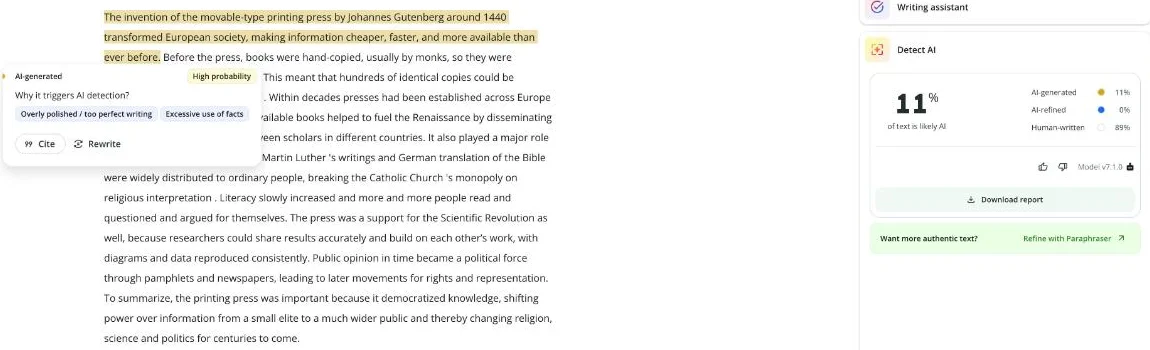
Only the first sentence was highlighted. Its popover said “High probability” and gave two reasons: “Overly polished / too perfect writing” and “Excessive use of facts”. That is also the sentence the humanizer changed least, mostly by moving Gutenberg’s name to later in the sentence.
Then I made one change. I removed the five stray spaces before full stops and apostrophes, which is the first thing anyone would fix before handing the essay in. I did not touch a word. The detector, run again in the same document, scored it 45% AI.
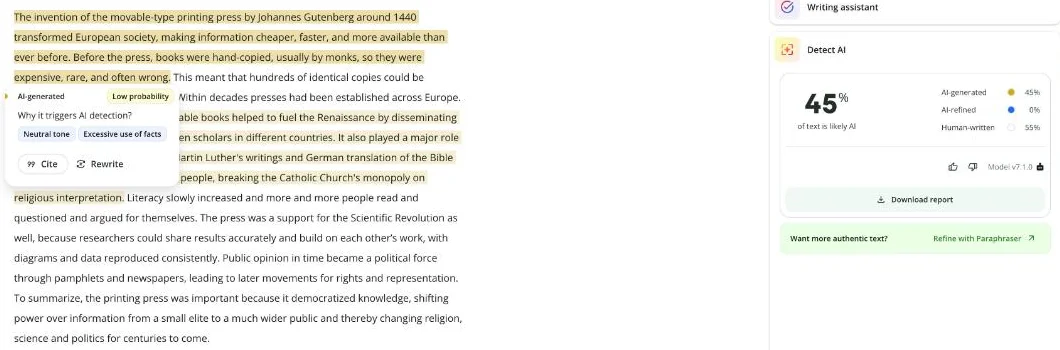
This time the highlights covered most of the first half of the essay, from the opening sentence to “religious interpretation”, in two blocks. The popover rated them “Low probability”, with “Neutral tone” and “Excessive use of facts”.
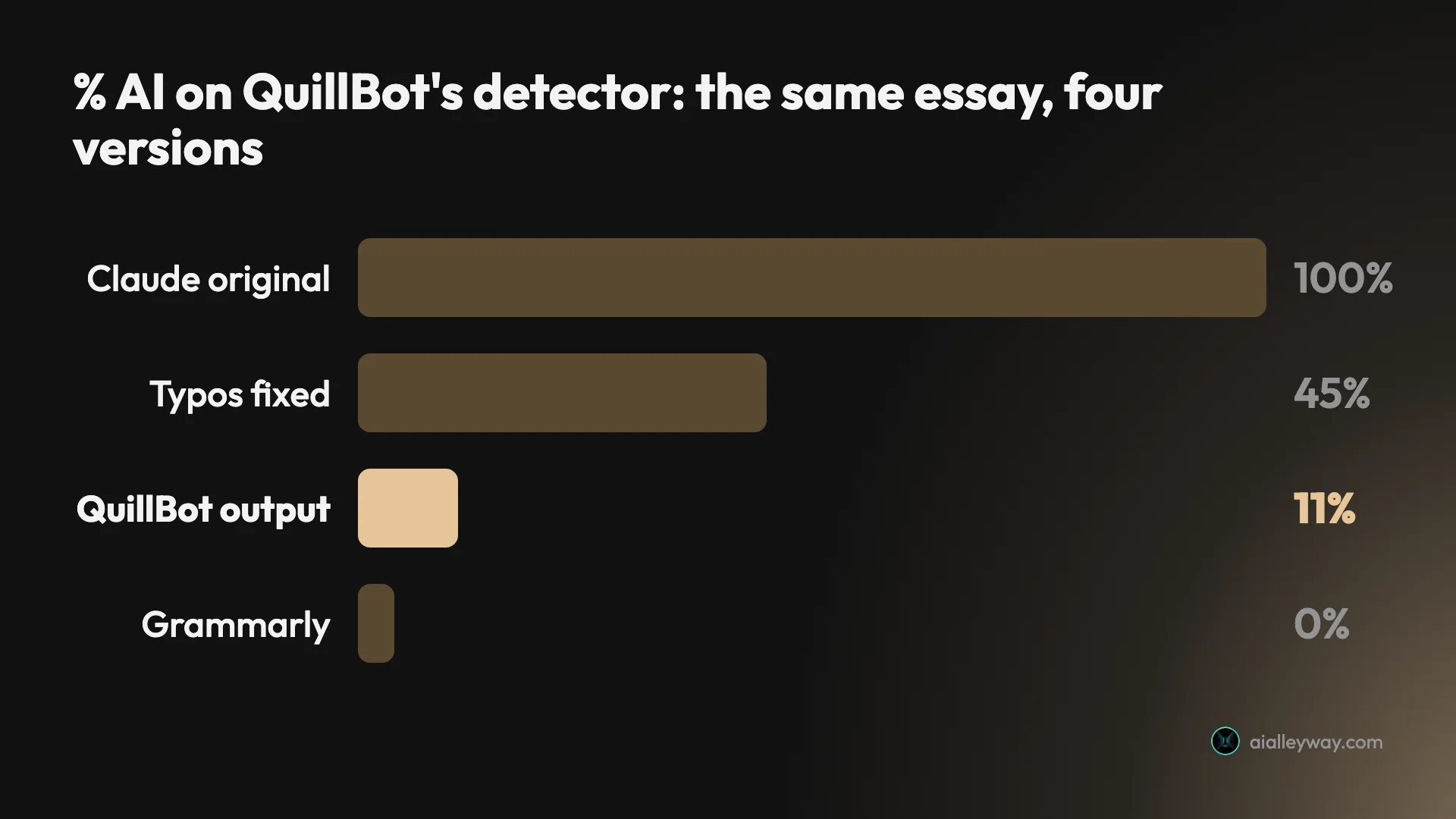
So, on QuillBot’s own detector, the humanizer took this essay from 100% to 45%, and its own typos took it the rest of the way to 11%. That is one essay and two scans, so it proves nothing general. It is still worth knowing before you trust the first score you see.
The baseline comes from my earlier QuillBot AI detector test, where the original essay scored 100%. I did not run these versions through Turnitin, GPTZero or Grammarly’s detector.
Same essay, two free humanizers
Both free tools started from the same 216 words, so they can be compared directly, with the caveat that each ran once.
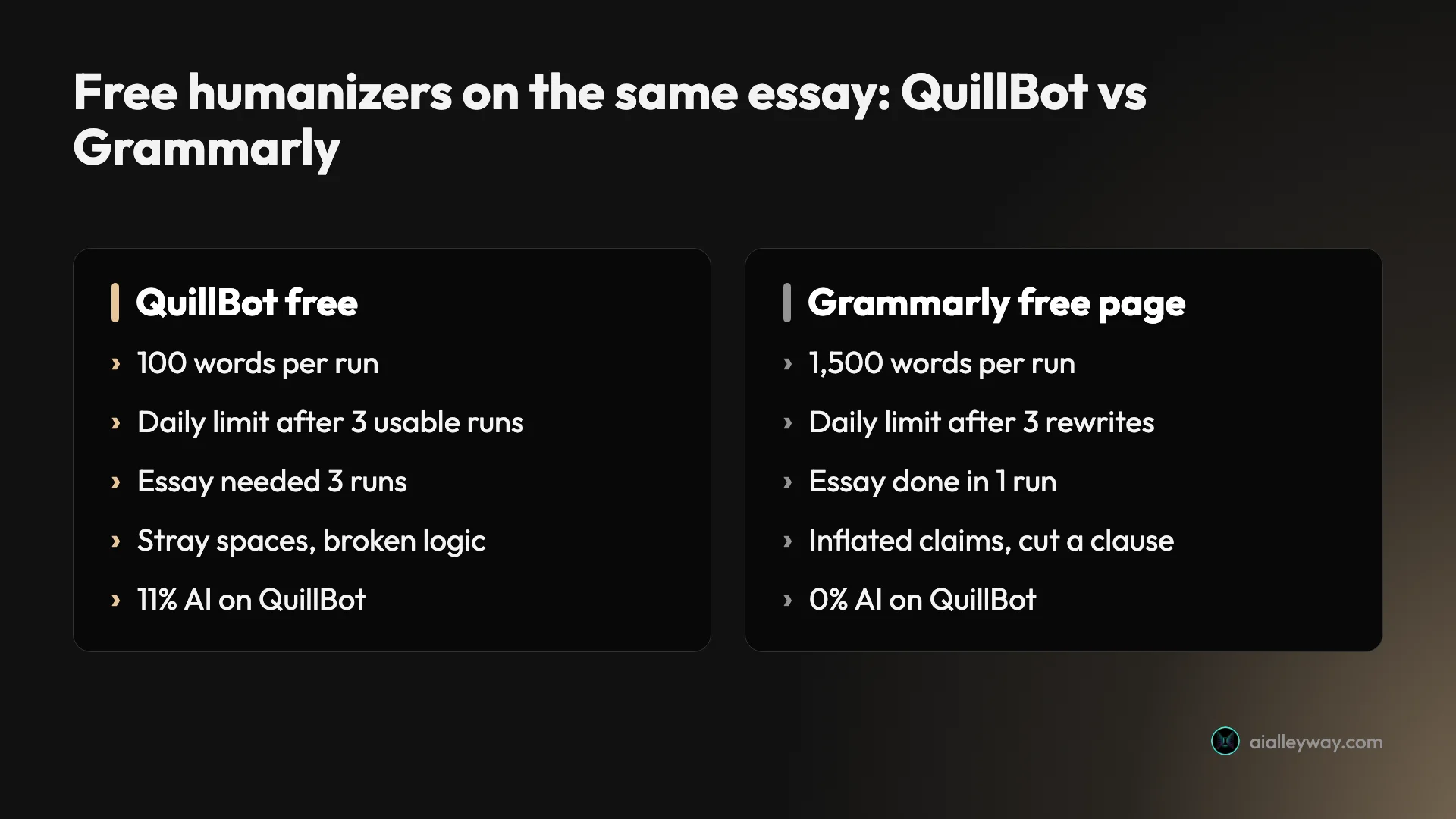
| QuillBot humanizer (free) | Grammarly humanizer page (free) | |
|---|---|---|
| Words per run | 100 | 1,500 |
| Runs before the daily limit | 3 usable | 3 |
| Runs needed for the 216-word essay | 3 | 1 |
| Output length | 224 words | 237 words |
| QuillBot detector score | 11% (45% with spaces fixed) | 0% |
| Meaning problems | Lost the subject of one sentence, two stronger claims | Stronger claims, dropped a clause |
| Typography problems | Spaces before 3 full stops and 2 apostrophes | A wrong apostrophe (“each others’ work”) |
| Modes | Standard, Academic, Professional, Casual | None on the free page |
Neither kept the essay’s meaning intact. Grammarly’s page tool went further, cutting the whole clause about rights and representation, and it got a lower score. In my Grammarly test, the rewrite that kept the meaning best was also the one both detectors still caught at 100%. Across both tests, the rewrites that scored lowest were ones that had changed the meaning.
The practical difference is the allowance. Grammarly’s free page will rewrite a full essay in one go. QuillBot’s will rewrite one paragraph at a time, and only a few of them a day.
Humanizer or paraphraser: which rewrote it better?
The paraphraser did, in my one comparison, though the two are close relatives. After the humanizer hit its daily limit, I opened QuillBot’s paraphraser in the same account and ran the first 90-word chunk through its Standard mode. It worked, so the two tools have separate allowances.
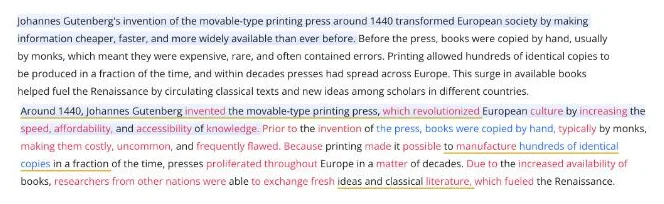
The paraphraser kept printing as the subject: “Because printing made it possible to manufacture hundreds of identical copies in a fraction of the time, presses proliferated throughout Europe in a matter of decades.” It did not make the humanizer’s “This meant that” mistake. It added a causal link of its own, though, and turned “European society” into “European culture” and “scholars in different countries” into “researchers from other nations”.
The paraphraser also has a Humanize tab among its ten modes (Standard, Fluency, Humanize, Formal, Academic, Simple, Creative, Expand, Shorten and Custom). The premium page says the free plan gets two built-in paraphraser modes, Standard and Fluency, so that Humanize tab is most likely a Premium mode. I did not click it.
If your goal is clearer wording rather than a lower detector score, the paraphraser in Standard mode is the better free tool. It gives you the same 100-word cap, its output was cleaner in my one comparison, and it was still working after the humanizer had stopped for the day.
What QuillBot Premium costs, and what it adds to the humanizer
Premium is the only individual paid plan. For the humanizer, it changes three things: the 100-word cap, the daily limit and the history.
| Plan | Price (USD, US default) | Humanizer |
|---|---|---|
| Free | $0 | Up to 100 words, limited usage; no history |
| Premium, monthly | $19.95 a month | Full access, full history and insights |
| Premium, 6 months | $79.95 | Same |
| Premium, annual | $99.95 a year ($8.33 a month) | Same |
| Team Plan | On request | Same, plus team usage metrics, user management and centralized billing |
Those are the default prices in the code of QuillBot’s premium page as served to a US visitor on 10 August 2026, archived by the Wayback Machine; QuillBot blocks automated reads of the page. They are the same figures our QuillBot review uses. QuillBot tests prices and varies them by region: on 29 October the live page showed my browser, outside the US, $4.17 a month billed annually.
The humanizer rows come from the live comparison table. Free gets “No history & limited insights”; Premium gets “Full history & insights”. Premium also adds the full AI detector, plagiarism checks of 25,000 words a month and nine paraphraser modes. Freeze Words, which stops chosen words or phrases from being rewritten, is “a Premium feature”, according to QuillBot’s help center.
Twelve months at $19.95 comes to $239.40, against $99.95 billed annually. If you only need the humanizer for one deadline, a single month is the cheaper route. Set a reminder to cancel, because the refund article says refunds are issued only if required by law.
How to use the QuillBot humanizer a paragraph at a time
The free plan forces you to work a paragraph at a time, which turns out to be the right way to check a rewrite anyway. This is the routine I would use after my test.
- Split your text at paragraph or sentence breaks into pieces under 100 words. QuillBot counts the words in the bottom bar before you click, so check the counter first. An over-limit run gives you one sentence and may still use up one of your daily runs.
- Humanize one piece and read it against the original, sentence by sentence. Look hardest at linking words: “This meant that”, “because”, “leading to”. In my test, that is where the meaning moved.
- Check every name, number and verb of cause. “Challenging” became “breaking”, and “laying groundwork for” became “leading to”. Swap back anything that makes a stronger claim than your source.
- Fix the typography. Search the output for a space before a full stop or an apostrophe. In my test there were five.
- If you check the result with a detector, check the final, cleaned text. My score on the uncleaned output was a quarter of the score on the text I would actually hand in.
Repairing the sentence that broke
Here is the sentence that broke, with a fix that keeps QuillBot’s lighter phrasing and the original’s logic.
| Version | Sentence |
|---|---|
| Original (Claude) | Printing allowed hundreds of identical copies to be produced in a fraction of the time, and within decades presses had spread across Europe. |
| QuillBot humanizer | This meant that hundreds of identical copies could be produced in a fraction of the time . Within decades presses had been established across Europe . |
| Fixed by hand | Printing meant hundreds of identical copies could be made in a fraction of the time, and within decades presses had spread across Europe. |
The fix takes ten seconds once you’ve spotted the problem. Spotting it is the hard part, because the rewrite reads well. That is the real cost of a humanizer: you save time on the wording and spend it on the checking.
Traps in the free humanizer
None of these is hidden, but they are easy to miss when you are in a hurry.
| Watch for | What I saw or read | What to do |
|---|---|---|
| Meaning changes | 3 in 216 words | Read every sentence against the source |
| Added typos | 5 stray spaces | Fix before scoring or submitting |
| A falsely low score | 11% became 45% after the fixes | Score the cleaned text |
| The daily limit | Stopped after 3 usable runs | Chunk under 100 words first time |
| QuillBot’s own disclaimer | No promise of undetectability | Don’t rely on it to pass a check |
| Turnitin | Targets paraphrased AI text | Follow your school’s AI rules |
Red highlights are not a meaning check
The red highlight is QuillBot’s label for a synonym swap meant to “preserve meaning”. In my test, “This meant that” and “wrong” were shown in red, and together they turned the essay’s main cause round. Treat the colours as a map of what moved, not a guarantee that nothing important did.
It adds errors a writer would fix
Spaces before full stops and apostrophes appeared in two of the three chunks. They are trivial to remove, but you have to look for them, and leaving them in makes the text look careless.
Its typos lowered the score
The cleaned text scored four times higher than the uncleaned output on the same detector. One essay can’t tell you why. It does tell you that a score taken on the raw output can understate how AI-like the text you hand in will look.
The daily limit comes quickly
Three usable runs is at most 300 words a day on my reading of the cap, and my two over-limit attempts may have counted against me. If you need a full essay done today, the free plan will not get you there.
QuillBot says it is not a detector-beating tool
Its help center says the humanizer “Does not try to trick AI detectors or promise undetectability,” and its key takeaway is that humanized “content can still be flagged.” The same article says detectors use “statistical and stylistic patterns that are not 100% transparent”.
Turnitin is built for this case
Turnitin’s AI writing detection FAQ, updated 22 October 2026, says its detector includes “detection of likely AI-generated content that may have been modified using a word spinner/AI paraphrasing or bypassing tool to evade detection.” That describes writing with an AI and then humanizing it. I did not test Turnitin, so I can’t tell you what it would score these versions.
Who the free humanizer suits
- Writers smoothing a stiff paragraph of their own. Free works well for this: one paragraph, one run, read it back and keep what helps.
- Non-native English writers polishing short passages. The 100-word cap suits sentence-level help, and the Standard mode kept my US spelling.
- Anyone already paying for Premium. The humanizer comes with it, without the word cap or the daily limit, so it is a free extra to try on rough drafts.
- Students under an AI-use policy. Check the rules first. If your course restricts AI writing, humanizing AI text does not change what it is, and Turnitin says it looks for exactly this.
- Skip it if you need long text rewritten today. At 100 words a run and three runs a day, the free plan can’t humanize a full essay, and Grammarly’s free page takes 1,500 words at a time.
Where to go instead
- Grammarly’s humanizer. Free for 1,500 words a run, three runs a day on my account. It also changed my essay’s meaning, but it handles a whole essay at once.
- QuillBot’s paraphraser, covered in our QuillBot review. The same 100-word cap, a separate allowance, and in my one comparison a cleaner rewrite of the same paragraph. Better if you want clearer wording rather than a lower score.
- Grammarly alternatives. Six other writing tools tested on the same practice text, if you want editing help rather than rewriting.
For the editors themselves, our Grammarly vs QuillBot comparison runs both free plans on the same practice text, and our best AI writing tools guide ranks the wider field.
Final word
QuillBot’s humanizer is a fast, free paragraph rewriter with a small daily allowance. On my test essay, it did lower QuillBot’s AI score. It got there partly by changing what the essay said and partly by adding typos. The score I would have handed in was 45%, not 11%.
Use it on your own writing, a paragraph at a time, and read every sentence back. If you need an essay humanized today, the free plan is too small, and if you need it to pass an AI check, QuillBot itself tells you not to count on that.
Frequently asked questions
Is QuillBot's AI humanizer free?
Yes, with two tight limits. QuillBot's premium page lists the free humanizer as up to 100 words with limited usage. When I pasted a 216-word essay, the output showed one clear sentence and blurred the rest behind a card reading 216/100 words, Limit exceeded.
The second limit is daily. On my free account in October 2026, I got three usable rewrites of 90, 97 and 29 words before a Daily limit reached pop-up. Two earlier over-limit attempts may also have counted. Premium removes both limits and costs $19.95 a month or $99.95 a year at QuillBot's US default prices.
Does QuillBot's humanizer bypass AI detectors?
Partly, in my test, and less than it first looks. A Claude essay that QuillBot's own detector had scored 100% AI came back at 11% after humanizing. But the humanizer had left stray spaces before three full stops and two apostrophes. When I removed only those spaces, changing no words, the same detector scored it 45%.
QuillBot's help center says the humanizer does not try to trick AI detectors or promise undetectability. Turnitin's FAQ says its detector looks for AI text modified with paraphrasing or bypassing tools. I did not test Turnitin.
Does the QuillBot humanizer change the meaning of your text?
It did in my test. In one paragraph it turned the sentence about printing making hundreds of identical copies into a sentence that begins This meant that, so the copies now follow from hand-copied books being expensive and wrong. The printing press dropped out of its own sentence.
It also turned challenging the Catholic Church's control into breaking its monopoly, and laying groundwork for later movements into leading to them. Each change sounds natural and reads as a stronger claim than the original made. Check every output against your source.
What is the difference between QuillBot's humanizer and its paraphraser?
They are separate tools with separate allowances. The humanizer has four tabs, Standard, Academic, Professional and Casual, and on my free account it hit its daily limit after three usable runs. The paraphraser has ten mode tabs, of which the free plan gets Standard and Fluency, and it kept working after the humanizer had stopped.
On the same 90-word paragraph, the paraphraser kept printing as the subject of the copies sentence, which the humanizer had lost. It made changes of its own, such as presses that proliferated because printing made copies cheaper.
How much does QuillBot Premium cost for the humanizer?
The default prices in the code of QuillBot's premium page, served to a US visitor in August 2026, were $19.95 a month, $79.95 for six months or $99.95 a year, which works out to $8.33 a month. Premium lists full access to humanizing and to the AI detector.
QuillBot tests prices and varies them by region, so your checkout may show a different figure. From my browser outside the US the same page showed $4.17 a month billed annually. Read the total at checkout before you pay.
Keep reading
Grammarly humanizer: I tested it, and it rewrote my facts
I ran three Claude texts through Grammarly's free humanizer and Humanizer agent, then two AI detectors. What it changed, what it scored, the limits.
QuillBot AI detector: 6 of 7 right, and the miss that matters
QuillBot AI detector tested on seven texts: it cleared every human one and caught formal AI, then scored a casual Claude story 100% human.
QuillBot review: a quick paraphraser that edits your meaning too
A QuillBot review from the free plan: 18 of 23 planted errors caught, a paraphraser that swapped facts, and whether Premium at $99.95 a year is worth it.
Grammarly vs QuillBot: one caught 23 of 23 errors, one costs less
Grammarly vs QuillBot, tested with the same paragraphs on both free plans: who caught more errors, who rewrote without changing facts, and who costs less.
Best AI writing tools: one to draft, one to check
The best AI writing tools, tested on one email brief and 23 planted errors. Claude drafted best, Grammarly checked best, and Gemini changed a promise.