
Best AI avatar generator: our picks for every use case
We tested the top AI avatar generators. Synthesia (4.6) wins for enterprise, HeyGen for creators, Tavus for live conversation. The best one for your use case.
Contents
There is no single best AI avatar generator; the right one depends on the job, so we picked one for each. This roundup covers AI avatar video tools, the kind that turn a script into a talking presenter or a real-time agent you can speak to. If you want a stylized profile picture for social instead, that is a different category (Canva and Fotor live there); this is about video.
We tested the top three of these tools hands-on and reviewed each in full, then synthesized the rest from vendor pricing and community reports, which is why some carry our Alley Rating and others are marked “not tested.”
The best AI avatar generators at a glance
Here are the six that earned a spot, each the best at one specific thing.
- Synthesia — best overall and for enterprise training. The category standard, built for corporate video at scale, and our top pick.
- HeyGen — best for creators and realism. The most lifelike avatars and the fastest renders, ideal for social and marketing.
- Tavus — best for real-time conversation. A different category: avatars you talk to, not scripts you play back.
- Colossyan — best for interactive training. Builds quizzes and branching scenarios into the video for L&D teams.
- D-ID — best for talking photos. Animates a still portrait into a presenter, with a developer API.
- Vidnoz — best free option. The most generous free tier if budget is the deciding factor.
How we chose
A “best AI avatar generator” list is only useful if it has an argument, so ours is built on one criterion above all: match the tool to the job. An enterprise standardizing compliance video needs governance and languages; a creator cutting TikToks needs realism and speed; a product team needs an API. No tool tops all three, so ranking them on a single scale would be dishonest.
We tested the three market leaders ourselves, generating a real avatar from the same short script on each tool’s free plan, timing the renders, hitting the paywalls, and scoring them against our Alley Rating rubric. Those hands-on reviews (linked in each section) are the backbone of this guide. For the remaining tools, which serve narrower niches, we synthesized from vendor documentation, aggregate ratings on G2 and Trustpilot, and community testing threads, and we say so rather than pretend we ran every one.
The axes that decided the ranking were avatar realism, render speed, language coverage, governance and security, editor workflow, and honest pricing. Those are the things that actually change which tool is right for you, and they are what the comparison table below scores.
We also drew a hard line around scope: only tools that generate avatar video qualified, so the profile-picture and cartoon-avatar apps that clutter the same results did not, and neither did general video generators that bolt on an avatar as an afterthought.
Quick comparison
Ratings and starting prices are current as of July 2026.
| Tool | Best for | Our rating | Starts at | The catch |
|---|---|---|---|---|
| Synthesia | Enterprise training | 4.6 | $18/mo | Slow renders, priced per minute |
| HeyGen | Creators & realism | 4.3 | $29/mo | Opaque credits, funnel-like free plan |
| Tavus | Real-time conversation | 4.0 | Free / $59 Builder | Beta, developer-first, niche |
| Colossyan | Interactive L&D | Not tested | $27/mo | Smaller avatar library than the leaders |
| D-ID | Talking photos | Not tested | Free trial | Narrower than the full-video leaders |
| Vidnoz | Free avatar video | Not tested | Free | Watermark and 3-min cap on the free tier |
1. Synthesia — best for enterprise training

Synthesia is the tool most companies mean when they say “AI avatar video,” and it is our top pick overall because it does the highest-stakes job, corporate video at scale, better than anyone. In our hands-on test it turned a script into a clean, composed presenter without any fuss, and the whole product is shaped around training, onboarding, and compliance rather than social clips.
What sets it apart is governance. It supports SSO and SCORM export into a learning management system, moderates every clip before release, and offers brand-template controls, which are the boxes an IT or procurement team checks before a tool is approved. It also leads on languages, with 160+ supported and one-click translation into 80+ on Enterprise, so one video localizes across markets without a reshoot. It holds a 4.6 on G2 across more than 2,700 reviews, the largest review base in the category, and is used across most of the Fortune 100 by its own count.
Here is the clip Synthesia generated for us on the free plan, so you can see its avatar in motion.
The editor is built for how training teams already work: it is slide-based rather than a video timeline, and it imports a PowerPoint deck directly, so each slide becomes a beat of the lesson. That structure is a poor fit for a punchy social clip but ideal for a multi-scene onboarding module.
The trade-offs are real. Rendering is slow, four to five minutes for a nine-second clip in our test, because of that moderation step, and pricing is metered by video minutes (Starter at $18 a month billed yearly buys only ten minutes a month, which runs out fast). The free plan watermarks your video and blocks downloads, so treat it as a preview rather than a way to ship for free. But for a company standardizing video across teams and regions, none of that outweighs the governance, languages, and reliability. It scores 4.6, a Category Leader, and it is the safe default for anyone whose real question is “which tool will IT actually approve.”
For the full breakdown, see our hands-on Synthesia review, or the Synthesia pricing guide for the minute math.
2. HeyGen — best for creators and realism

If your priority is the most lifelike avatar and the fastest turnaround, HeyGen is the pick. In our test it turned one line of script into a presenter whose lip-sync, blinking, and hand gestures were convincing enough to pass at a glance, and it came back in about a minute, with no moderation queue in the way.
Its Avatar IV and V engines are the most expressive in the category, adding subtle breathing and timing-aware gestures, and it holds a 4.8 on G2, the highest avatar-quality score of any tool here. Beyond the talking head, it has a real creator toolkit: photo-to-video that turns a single headshot into a presenter, video translation and dubbing, and a timeline-style editor. That range is why it is the tool creators and marketers reach for.
The everyday work happens in HeyGen’s AI Studio, a familiar timeline-style workspace where you type a script on the left, watch a live avatar preview in the center, and set the avatar, voice, and motion engine on the right. That last setting is the one that matters, because it decides both how realistic the result looks and how fast it drains your credits.
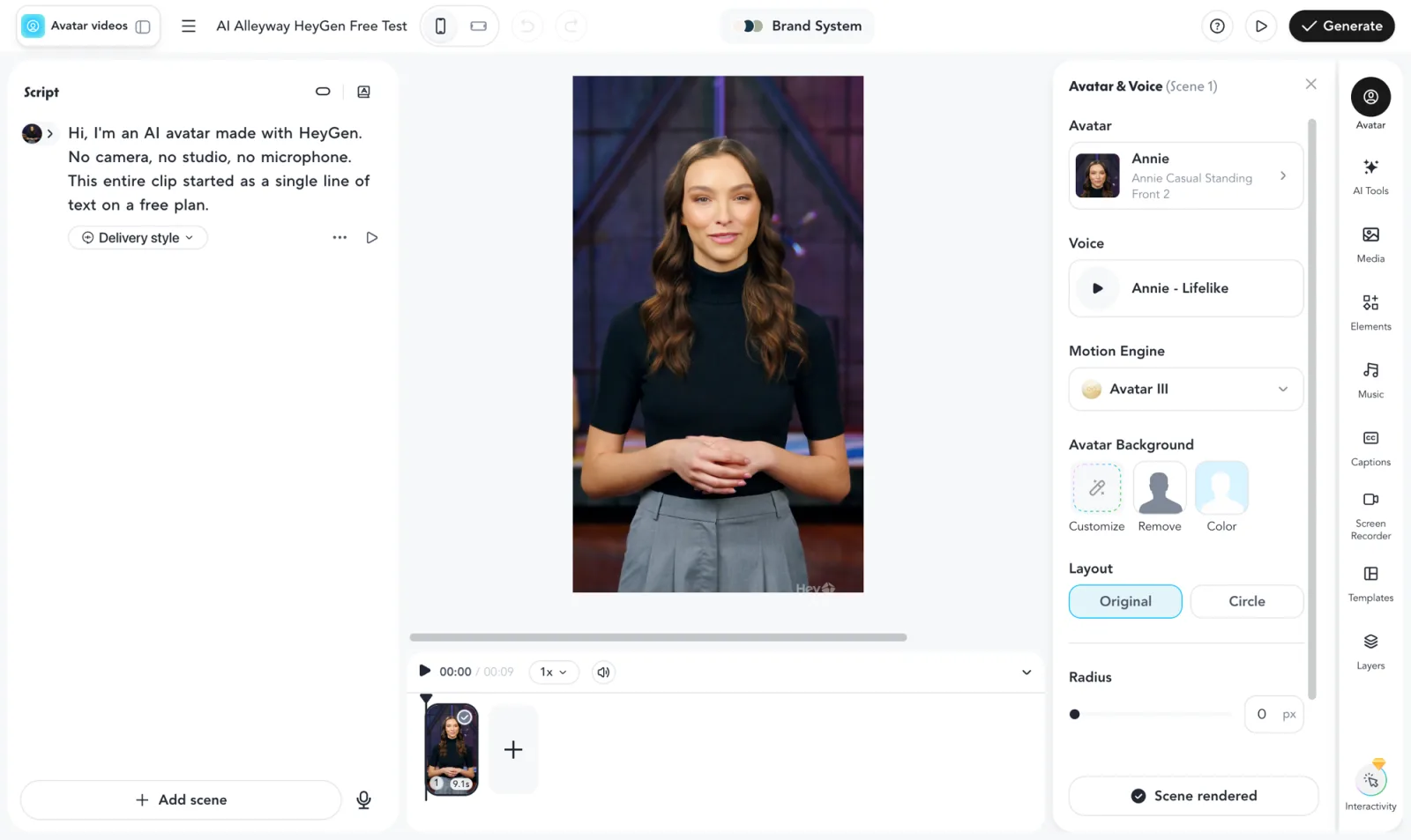
Here is the actual clip we generated on HeyGen’s free plan, so you can judge the avatar for yourself.
The catch is the packaging. The free plan is a funnel, not a tool: it hands you one watermarked video and then will not let you download it. Credits are opaque too, since the premium engines burn 20 credits a minute, so Creator’s 600 credits are only about 30 minutes of top-tier video, and the built-in voices are the weak link. But as a paid tool for anyone who needs realistic avatars at volume, HeyGen is excellent. It scores 4.3, a Power Tool.
Read the full HeyGen review, see how it stacks up in our HeyGen vs Synthesia comparison, or decode the credits in our HeyGen pricing guide.
3. Tavus — best for real-time conversation

Tavus is the odd one out, and that is the point. It does not make scripted videos you play back; it builds conversational agents, real-time AI humans you talk to over what feels like a video call. If your project is a support agent, an AI tutor, or a sales rep that answers questions live, none of the other tools here is a real substitute.
In our test we held an actual conversation with “Charlie,” Tavus’s built-in AI assistant, and the real-time render was convincing, the closest thing to talking to a person that we have tried. It is developer-first, with whitelabeled APIs on every plan including the free one, and organized around the pieces a builder needs: replicas, a knowledge base, tools, and guardrails.

Around that core sit the pieces that make it a real platform rather than a demo: a knowledge base you attach so the agent knows your material, tools it can call, guardrails to keep it on-topic, and stock or custom “replicas” for the face. You build an agent by describing it to a no-code assistant or by wiring the API, which tells you who it is for: product and engineering teams, not solo creators.
The caveats are equally real. Tavus is still in beta, and our first call dropped before connecting on a retry. It is narrow, the wrong tool for a simple talking-head video, and priced by conversational minutes with pay-as-you-go overage, so costs are harder to predict than a flat plan. But for the frontier use case it owns, real-time conversational video, it is the leader with no close substitute. It scores 4.0, a Power Tool.
See the full Tavus review for the hands-on details.
4. Colossyan — best for interactive training

Colossyan is the tool to look at when Synthesia is close but you need learners to do more than watch. It is built for corporate L&D, with the same slide-based editor and PowerPoint import, but its standout is interactivity: it bakes quizzes and branching scenarios into the video, so a learner can answer a question and the module responds. For onboarding, compliance, and sales enablement where retention matters, that is a genuine edge.
It covers the enterprise basics well, with 100+ voices, auto-translation into 80+ languages, and instant avatars trained from a 20-second phone recording. The avatar library scales by plan, from 20+ on the free tier to 200+ on Enterprise. Pricing is a free plan with three minutes, Starter at $27 a month (or $19 billed yearly) for 15 minutes a month, and Business at $88 a month for unlimited minutes, which is the tier most teams doing real volume will need.
The interactivity is the real differentiator. Letting a learner answer mid-video and branch on their choice turns a passive compliance clip into something closer to a scenario simulation, a real retention upgrade for onboarding and enablement.
The limitation is that it is a specialist. Its avatar library and raw realism trail the leaders, and outside interactive training there is little reason to choose it over Synthesia. But if your training genuinely needs the learner to click and decide, it is the best pick here.
5. D-ID — best for talking photos
D-ID solves a narrower problem than the video leaders, and solves it well: it animates a single still photo into a talking presenter. Feed it a headshot and a script or voiceover, and it produces a talking-head clip from that one image, which is perfect for personalized outreach where each recipient sees a familiar face. Founded in 2017, it was among the first to commercialize AI talking-avatar video.
Its second strength is developer reach. D-ID leans API-first, so teams can generate talking-photo videos programmatically at scale, and it has expanded into real-time “Agents” for conversational use. Rendering is fast and the tool is positioned as one of the more affordable ways to produce talking heads. Pricing runs on separate Studio and API tracks, starting with a free trial, though trial and entry videos carry a full-screen D-ID watermark.
That photo-first approach fits use cases the studio tools handle awkwardly: a personalized greeting built from a real customer’s photo, or developers spinning up talking heads for thousands of users through the API.
The trade-off is scope. D-ID does not try to be the full studio that Synthesia or HeyGen is, and its avatars are more “animated photo” than performing presenter, which shows most on longer scripts. But if your job is turning portraits into talking videos, or building talking avatars into a product through an API, it is the specialist that fits.
6. Vidnoz — best free option

Vidnoz earns its place on one axis: it is the most genuinely free avatar tool here. Where HeyGen and Synthesia gate downloads behind a paid plan, Vidnoz gives you daily free credits, access to more than 1,800 avatars, and videos up to three minutes on the free tier, so you can actually make and use something without paying. Free exports carry a watermark and cap at 720p, but that is a fair trade for a working free tool.
Beyond the free plan, it is a broad, budget-minded video generator, advertising 1,900+ avatars, 2,660+ voices, and translation across 135 languages, aimed at creators and small teams producing a lot of video cheaply. Paid plans add credits, remove the watermark, and raise the export resolution.
What makes the free tier genuinely useful, not a locked demo, is that you can download the result, unlike the bigger names’ free plans that let you watch a video but not keep it. For anyone testing whether avatar video fits their workflow at all, that is the whole difference.
The honest caveat is that Vidnoz trades polish for price. Its avatar realism does not match HeyGen’s, the interface is busier than the premium tools, and the daily-credit model nudges you toward a paid plan as soon as you produce at any volume. But if cost is the constraint and you can live with a watermark, it is the best place to start without a credit card.
How to pick the right one
The decision comes down to one question: what are you actually making? Use this as a shortcut.
- Standardizing training or corporate video across a company? Pick Synthesia for its governance and languages, or Colossyan if the training needs to be interactive.
- Making social clips, ads, or creator content? Pick HeyGen for the most lifelike avatar and the fastest render.
- Building a product where users talk to an AI in real time? Pick Tavus, the only tool here built for live conversation.
- Turning existing photos into talking videos, or generating them via an API? Pick D-ID.
- On a tight or zero budget? Pick Vidnoz for its genuinely usable free tier.
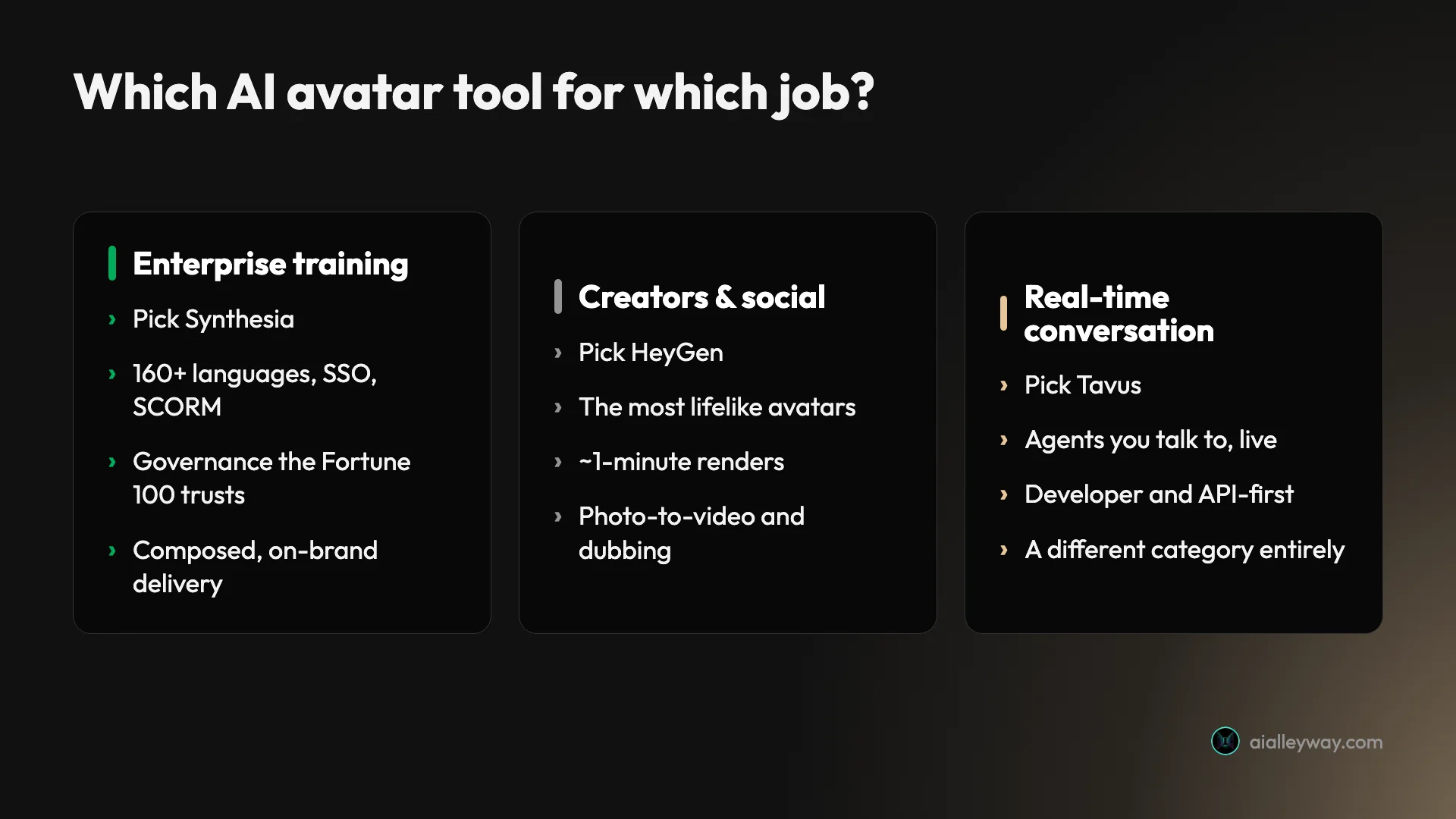
The one mistake to avoid is picking on realism alone. HeyGen’s avatars are the most lifelike, but if you are shipping localized compliance training, Synthesia’s governance matters more than a slightly more expressive face, and if you need a live conversation, no amount of realism helps a tool that only plays back scripts.
The final word
There is no best AI avatar generator, only the best one for your job, and for most buyers that is Synthesia for enterprise video or HeyGen for creator content. Both back up a free plan good enough to judge quality before you pay, even if neither lets you download the result, so the safest move is to test your top two on the same script and let the output decide.
If you are choosing between the two front-runners, our hands-on Synthesia review and HeyGen review go deeper, and the HeyGen vs Synthesia comparison settles it axis by axis.
Frequently asked questions
What is the best AI avatar generator?
There is no single best one; it depends on what you are making. For enterprise training video at scale, Synthesia is the standard, and it is our top pick overall. For the most lifelike avatars and the fastest renders, HeyGen wins, which makes it the better choice for creators and social content.
If you want a real-time avatar that holds a conversation rather than reads a script, Tavus leads that newer category. And if budget is the deciding factor, Vidnoz has the most generous free tier. Match the tool to the job rather than chasing one universal winner.
What is the best free AI avatar generator?
Vidnoz has the most usable free tier of the tools here, with daily free credits, access to more than 1,800 avatars, and videos up to three minutes, though free exports carry a watermark and cap at 720p. It is the closest thing to a genuinely free avatar video tool.
The bigger names have free plans too, but they are previews, not working free tools: HeyGen and Synthesia both watermark your video and, in our testing, would not let you download it at all. Use their free plans to judge quality, then expect to pay to keep anything.
Which AI avatar generator is the most realistic?
HeyGen, by most measures including our own hands-on test. Its Avatar IV and V engines produce the most expressive, lifelike delivery, with natural gestures and micro-movements, and it holds a 4.8 rating on G2, the highest avatar-quality score in the category.
Synthesia is a close second with a cleaner, more composed style that suits corporate video, and Tavus produces strikingly realistic real-time faces for live conversation. But for a scripted talking head that looks human at a glance, HeyGen is the one to beat.
Which AI avatar tool is best for corporate training?
Synthesia is the default choice, built for training and used across most of the Fortune 100 by its own count, with SCORM export, SSO, content moderation, and 160+ languages. Colossyan is the strongest alternative, and it edges ahead specifically for interactive training, since it builds quizzes and branching scenarios into the video.
Both use a slide-based editor that mirrors PowerPoint, so a training team can import an existing deck rather than rebuild it. If you need standard training video at scale, pick Synthesia; if you need learners to click and make choices, look at Colossyan.
Can I create an AI avatar of myself?
Yes. Most of these tools offer a custom avatar (sometimes called a digital twin or instant avatar) trained from a short recording, often just 20 to 30 seconds of phone footage. HeyGen, Synthesia, and Colossyan all support custom avatars, though usually on a paid plan.
Quality and consent controls vary: HeyGen's are the most lifelike, while Synthesia and Colossyan add enterprise safeguards like verified consent. Expect to pay for the feature, and check each tool's likeness-consent policy before cloning yourself or anyone else.
Vidnoz leans on a large stock library rather than custom cloning, so if a digital twin of yourself is the goal, HeyGen or Synthesia are the surer bets.
Is HeyGen or Synthesia better?
They win different buyers. HeyGen makes the more lifelike avatars and renders in about a minute, which suits creators, marketers, and social content. Synthesia is the enterprise standard, with heavier governance, 160+ languages, and a slide-based editor built for training.
We compared them head-to-head in detail, and the short version is that HeyGen wins on avatar realism and speed while Synthesia wins on languages, governance, and predictable pricing. See our full HeyGen vs Synthesia comparison for the axis-by-axis breakdown.
Keep reading
HeyGen alternatives: the best one depends on why you left
Leaving HeyGen? The best HeyGen alternative isn't one tool: Synthesia (4.6 on G2) for training, Creatify for ads, Tavus for real-time, plus 3 more by job.
Synthesia pricing: what the minutes really cost
Synthesia starts at $18/mo, but it meters by video minutes, and they're tight: Starter is about 10 minutes a month at roughly $2 a minute. Here's the math.
Synthesia review: the enterprise standard, at a price
I made a real avatar video on Synthesia's free plan. The output is enterprise-clean, but you can't download it and the minutes run out fast. Who should pay.
Synthesia alternatives: cheaper, or more lifelike?
Leaving Synthesia over the price or the stiff avatars? HeyGen (4.8 on G2) is more lifelike and cheaper, plus 5 more picks sorted by why you're switching.