
HeyGen vs Synthesia: which AI avatar tool wins for you?
I tested both hands-on. HeyGen makes more lifelike avatars and renders in ~1 min; Synthesia wins on languages, governance, and price. Here's how to pick.
Contents
The verdict at a glance
HeyGen and Synthesia are the two leaders in AI avatar video, and the honest answer to “which is better” is that they win different buyers. I tested both hands-on, generating a real avatar clip on each tool’s free plan, and the split was clear: HeyGen makes the more lifelike avatar and renders it in about a minute, while Synthesia is the enterprise standard, built for training video at scale with the governance and languages a company needs.
Neither is a knockout. In our reviews HeyGen scored 4.3 and Synthesia 4.6, close enough that the right pick is about your use case, not a leaderboard. Here is the one-line version.
| If you are… | Pick |
|---|---|
| A creator, marketer, or social team | HeyGen — more lifelike, faster, friendlier |
| An enterprise standardizing training video | Synthesia — governance, 160+ languages, LMS delivery |
| Deciding on overall value | Synthesia (cheaper entry, broader, higher-rated), unless avatar realism is your single top priority |
The rest of this comparison is how they differ on the axes that actually move that decision: price, avatar quality, and speed and workflow.
HeyGen vs Synthesia: the quick comparison
Scan this first. Every row is drawn from our hands-on tests of both tools, with vendor-stated figures marked.
| Axis | HeyGen | Synthesia |
|---|---|---|
| Avatar realism | Most lifelike (Avatar IV/V); 4.8 on G2 for avatar quality | Clean, composed, newsreader style |
| Render speed | ~1 minute | 4-5 minutes (content moderation step) |
| Editor | AI Studio, timeline-style | Slide-based, PowerPoint import |
| Stock avatars | 500+ (vendor-stated) | 125+ (Starter), 180+ (Creator) |
| Languages | 175+ (vendor-stated) | 160+, one-click translation on Enterprise |
| Free plan | 1 video, 720p, tiled watermark, no download | ~10 min total, corner watermark, no download |
| Entry price | $29/mo Creator | $18/mo Starter (billed yearly) |
| How it meters | Credits (premium avatars 20/min) | Video minutes (~$2/min on Creator) |
| Photo-to-video | Yes | No |
| Governance | SOC 2, GDPR | + SSO, SCORM, content moderation, brand controls |
| Best for | Creators, social, marketing, outreach | Enterprise training, onboarding, L&D |
| Our Alley Rating | 4.3 (Power Tool) | 4.6 (Category Leader) |
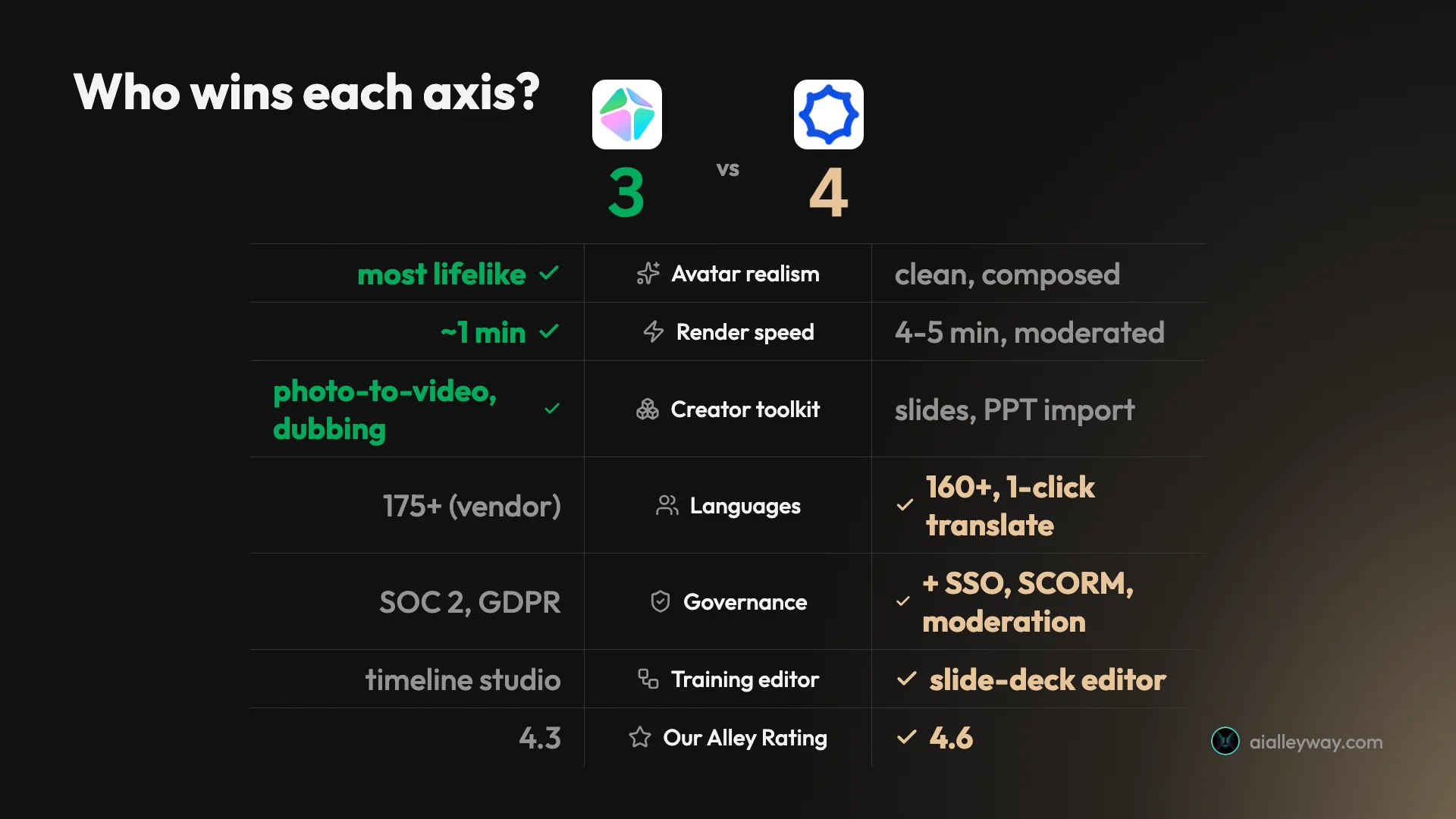
The scorecard below tallies who takes each axis. HeyGen owns realism, speed, and the creator toolkit; Synthesia takes languages, governance, the training editor, and the overall rating.
HeyGen: strengths and gaps

HeyGen is the creator-friendly leader, and its whole pitch is realism. It turns a line of script into a talking presenter, and in my test the avatar’s lip-sync, blinking, and hand gestures were convincing enough to pass at a glance. Our full HeyGen review covers that hands-on test in depth.
Where it wins:
- The most lifelike avatars in the category. Its Avatar IV and V engines produce expressive, natural delivery, and it holds a 4.8 on G2 across more than 1,500 reviews as of mid-2026, the highest avatar-quality score of any tool here.
- Fast renders. My nine-second clip came back in about a minute, with no moderation queue in the way. That speed compounds when you are testing a dozen variations of an ad, which is exactly what social work demands.
- A real creator toolkit. Photo-to-video, video translation and dubbing, and an “AI Studio” timeline editor give creators room to do more than a talking head. The photo-to-video feature in particular turns a single headshot into a talking presenter, a trick Synthesia does not match.
- A generous cheap engine. The older Avatar III costs just 3 credits a minute, so if you do not need the premium engine, a Creator plan stretches a long way. Mixing engines, premium for hero shots and Avatar III for the rest, is how experienced users keep the credit bill down.
Where it falls short:
- A funnel-like free plan. It hands you one watermarked video and then will not let you download it, so the free tier is a preview, not a tool. It also defaults to the gated premium engine, so on a free account hitting Generate pushes an upgrade before it will even render.
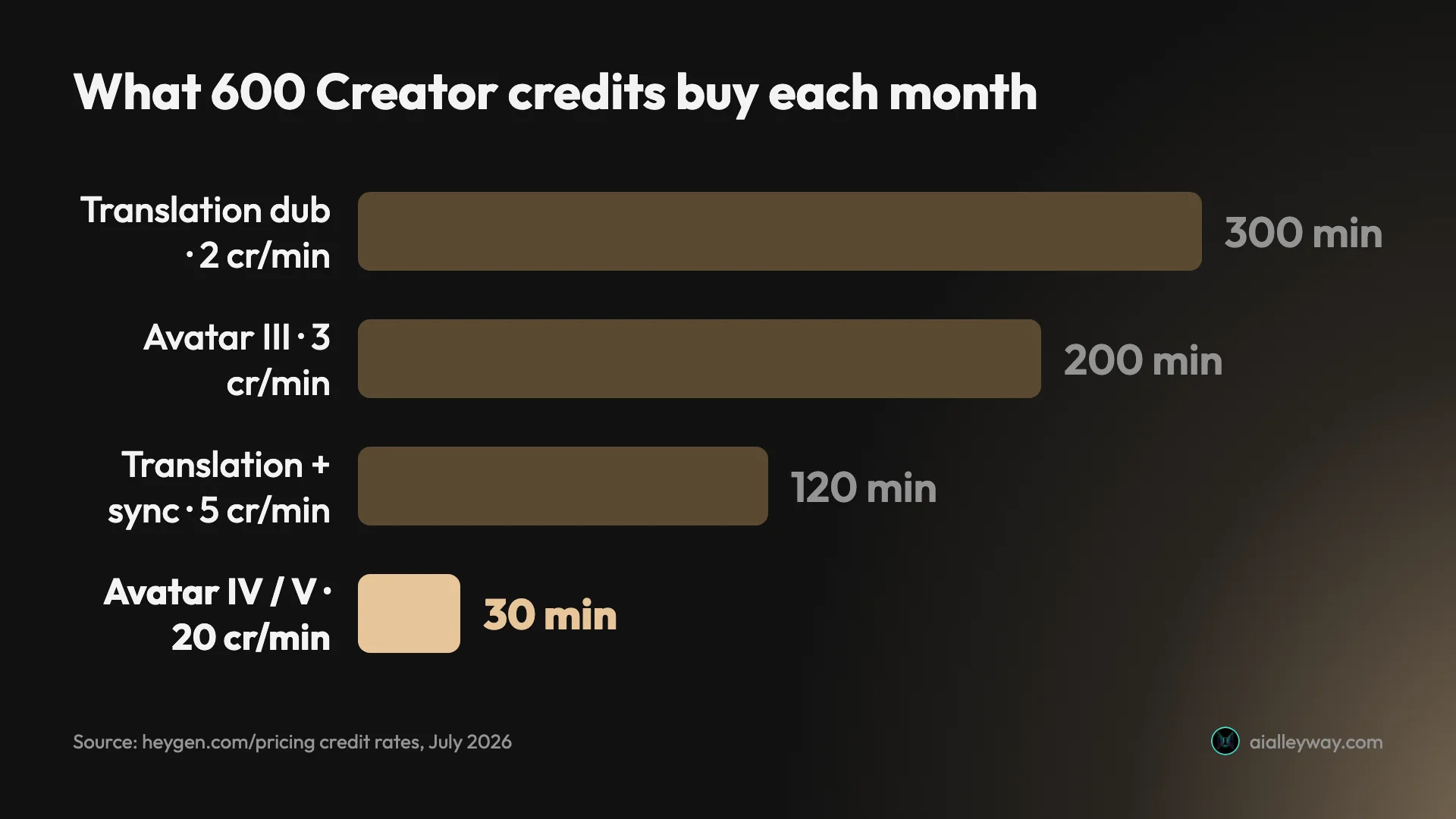
- Opaque credits. The premium Avatar IV and V engines burn 20 credits a minute, so Creator’s 600 credits are really about 30 minutes of top-tier video.
- Weaker built-in voices. The visuals outclass the audio, which is why many creators pair HeyGen with a dedicated voice tool.
Synthesia: strengths and gaps

Synthesia is the enterprise standard, the tool used to turn scripts, slide decks, and training material into video at scale. In my test it generated a clean, natural presenter without the engine gymnastics HeyGen’s free plan demanded, and the whole product is shaped around companies rather than creators. Our full Synthesia review goes deeper on that hands-on test.
Where it wins:
- Governance built in. SSO and SAML, SCORM export into a learning management system, content moderation on every clip, and brand-template controls are the pieces that get a tool through enterprise procurement. The moderation screens both the script and the finished video, the kind of guardrail a legal or brand team insists on before AI goes anywhere near the company name.
- Language coverage. It supports 160+ languages, and Enterprise adds one-click translation into 80+, so one video localizes across markets without a reshoot. Update the master script once and every language version regenerates from it.
- A training-shaped editor. The slide-based interface mirrors how teams already build in PowerPoint, and it imports decks directly. A training team can bring an existing deck in rather than rebuilding the lesson in an unfamiliar video timeline.
- The deepest trust signals. A 4.6 on G2 across more than 2,700 reviews as of mid-2026, the largest review base in the category, and use across most of the Fortune 100 by its own count. That track record is itself a selling point when you have to justify the tool to a skeptical stakeholder.
Where it falls short:
- Slow renders. Every clip is moderated before release, so a nine-second video took four to five minutes in my test, versus about a minute on HeyGen. Rapid iteration is off the table; you write carefully, generate once, and wait.
- Tight minutes. Starter’s ten minutes a month runs out fast, and the effective cost on Creator is roughly two dollars per finished minute.
- The same free-plan wall. Like HeyGen, the free tier watermarks your video and blocks downloads entirely.
Which is cheaper, HeyGen or Synthesia?
Price is where the two tools look similar and behave very differently, because they meter in different currencies. Synthesia charges by finished video minutes; HeyGen charges by credits. Get that distinction wrong and either bill can surprise you, because the sticker price tells you almost nothing about what a month of real use actually costs. The figures below are verified as of July 2026.
| Plan tier | HeyGen | Synthesia |
|---|---|---|
| Free | 1 video, 720p, tiled watermark, no download | ~10 min total, corner watermark, no download |
| Entry | Creator $29/mo, 600 credits, 1080p, no watermark, voice cloning | Starter $18/mo yearly ($29 monthly), 120 min/year, downloads, 125+ avatars |
| Mid | Pro ~$49/mo, 4K export | Creator $64/mo yearly ($89 monthly), 360 min/year, 180+ avatars |
| Top | Business $149/mo plus $20/seat | Enterprise custom, unlimited minutes, SSO, SCORM |
On paper Synthesia is cheaper to start, at $18 a month billed yearly against HeyGen’s $29. Both also discount annual billing heavily, so paying monthly (Synthesia’s Starter jumps to $29, Creator to $89) is the most expensive way to use either. But the sticker price is not the real number on either side.
Synthesia’s constraint is minutes. Starter’s $18 buys 120 minutes of finished video a year, which is ten minutes a month, and Creator’s $64 buys 360 minutes a year, about six hours. Run the Creator math and you are paying roughly two dollars per minute of video. Picture a training team producing an hour of onboarding content: that hour eats two months of Creator’s allowance in one project, and there is no way to buy your way past the cap short of Enterprise. The model is predictable and easy to budget, but it rewards short, occasional videos and punishes volume; our Synthesia pricing guide covers the minute model in full.
HeyGen’s constraint is credits, and it is easier to misjudge. The 600 credits on the $29 Creator plan sound generous until you learn the premium Avatar IV and V engines cost 20 credits a minute, so the best avatars give you only about 30 minutes a month. The older Avatar III engine costs just 3 credits a minute, which stretches to roughly 200 minutes on the same plan, but the realism drops a step. Video translation adds its own draw, at 2 to 5 credits a minute. So a creator who lives on the premium engine will burn through Creator faster than Synthesia’s Starter, while one who uses Avatar III gets far more runway than either.
Team pricing tilts the same way. HeyGen’s Business plan is $149 a month plus $20 per seat, so a five-person team lands near $250 before anyone renders a frame, whereas Synthesia folds its team features into Enterprise, which is quote-only and negotiated. That makes HeyGen’s costs transparent but front-loaded for small teams, and Synthesia’s opaque but potentially better at real scale.
The honest read: for predictable, low-volume use, Synthesia’s per-minute model is simpler to budget. For creators willing to manage credits and use the cheaper engine, HeyGen offers more room for the money. Both, notably, gate downloads behind their paid plans, so neither free tier is a way to produce a single usable video for free. Our HeyGen pricing guide breaks the credit math down in full.
Which has more realistic avatars, HeyGen or Synthesia?
Avatar quality is the axis most people are really asking about, and here HeyGen has the edge. Its newer engines render more expressive, lifelike delivery, with gestures and micro-movements that read as human, and its 4.8 G2 score for avatar quality is the highest in the category. In my hands-on test, the HeyGen avatar’s lip-sync and small hand movements tracked the audio closely enough to pass at a glance.
The engines are the reason. HeyGen’s fourth- and fifth-generation avatar models add subtle breathing, weight shifts, and timing-aware hand gestures that older talking-head systems simply do not attempt, and that is what keeps HeyGen winning avatar-realism head-to-heads. The catch loops back to pricing: this is precisely the premium engine that costs 20 credits a minute, so the realism you are judging on the free plan is the expensive one to actually use.
Here is the actual clip I generated on HeyGen’s free plan, so you can judge the avatar yourself.
Synthesia’s avatars are a different aesthetic rather than simply a worse one. In my test the mouth tracked the audio cleanly, the blinks landed at natural intervals, and the head moved in small, believable beats, with none of the warping that makes cheaper tools look like novelties. The look is more newsreader than influencer: composed, consistent, and calm.
Here is the clip Synthesia generated for me on the free plan, so you can compare its avatar in motion against HeyGen’s above rather than judge a still.
That difference maps directly onto use case. For social clips, ads, and creator content, where personality and expressiveness sell, HeyGen’s more animated avatars win. For training, onboarding, and compliance video, where the presenter should be professional and never distracting, Synthesia’s composed delivery is arguably the better fit even though it is technically less flashy. One tool optimizes for “wow”; the other for “trustworthy.”
A shared caveat from both tests: the built-in AI voices are the weaker link on each platform. The visual quality outpaces the audio on both, which is why serious creators on either tool often import narration from a dedicated voice generator rather than lean on the stock voices.
The two tools’ review profiles tell the same story from a different angle. HeyGen’s 4.8 on G2 is the higher score and skews toward avatar quality, while Synthesia’s 4.6 sits on a much larger base of more than 2,700 reviews and skews toward reliability, support, and rollout success. HeyGen wins the beauty contest; Synthesia wins the dependability vote, which is exactly what you would expect from a creator tool set against an enterprise one.
Which is faster, HeyGen or Synthesia?
Speed is the starkest single difference between them, and it comes straight from their different philosophies. HeyGen renders fast: my nine-second clip was ready in about a minute. Synthesia renders slowly, because it moderates content: it reviews the script before generating and then screens the finished video before releasing it, and in my test that pushed the same nine-second clip to four to five minutes.
That slowness is not sloppiness; it is the point. The moderation step is exactly why enterprises trust Synthesia to put an AI avatar in front of their brand, since it guards against misuse. But if you are iterating quickly on creative, the wait is real friction, and HeyGen’s speed is a genuine advantage for anyone producing at pace.
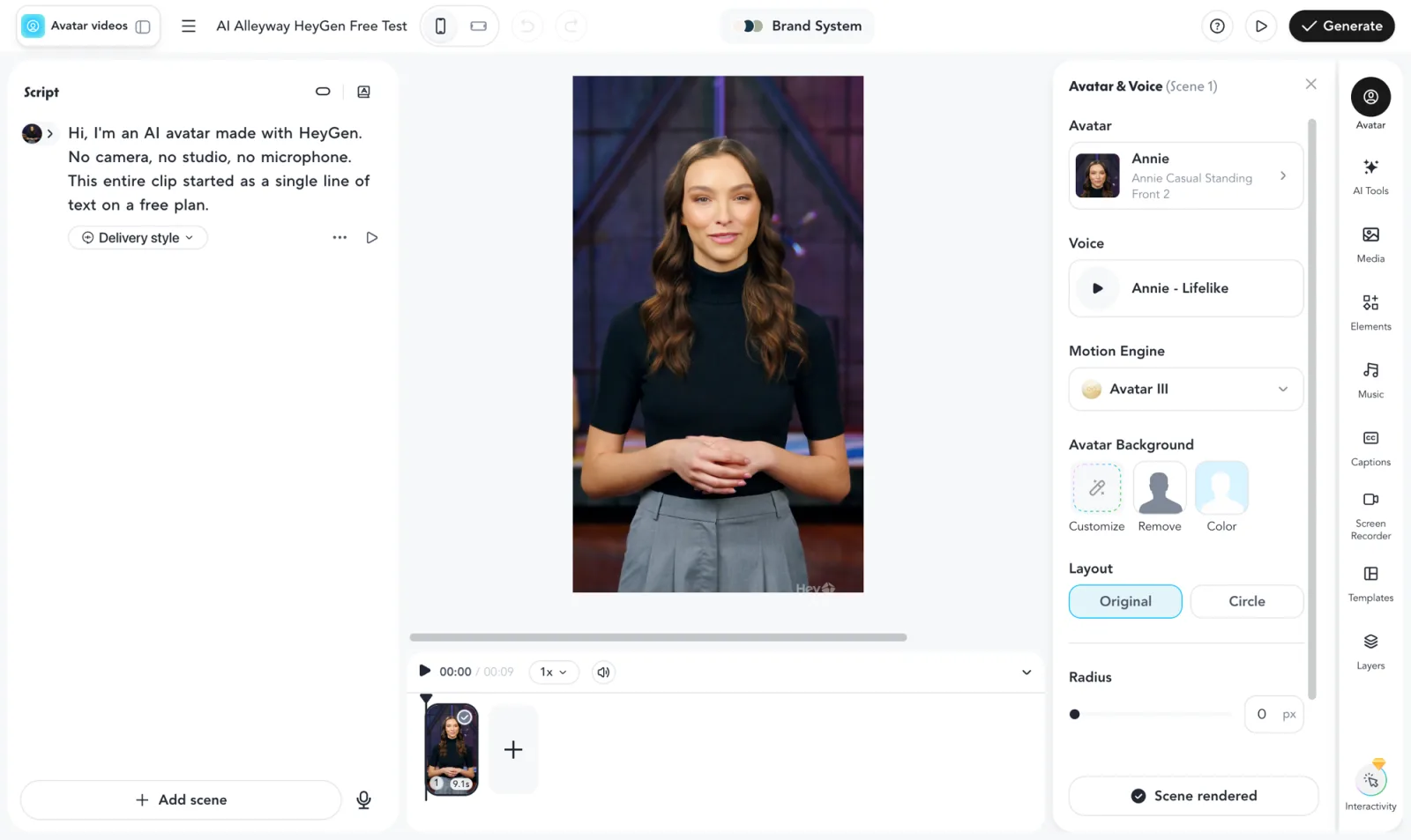
The editors reflect the same divide. HeyGen’s AI Studio is a timeline-style workspace: a script box on the left, a live avatar preview in the center, and a panel for the avatar, voice, and Motion Engine on the right. It suits dynamic, custom, one-off videos.
Synthesia’s editor is slide-based, closer to PowerPoint than to a video timeline, and it imports decks directly. That structure is perfect for building a multi-scene training module, where each slide is a beat of a lesson, and it is instantly familiar to anyone who has made a corporate deck.
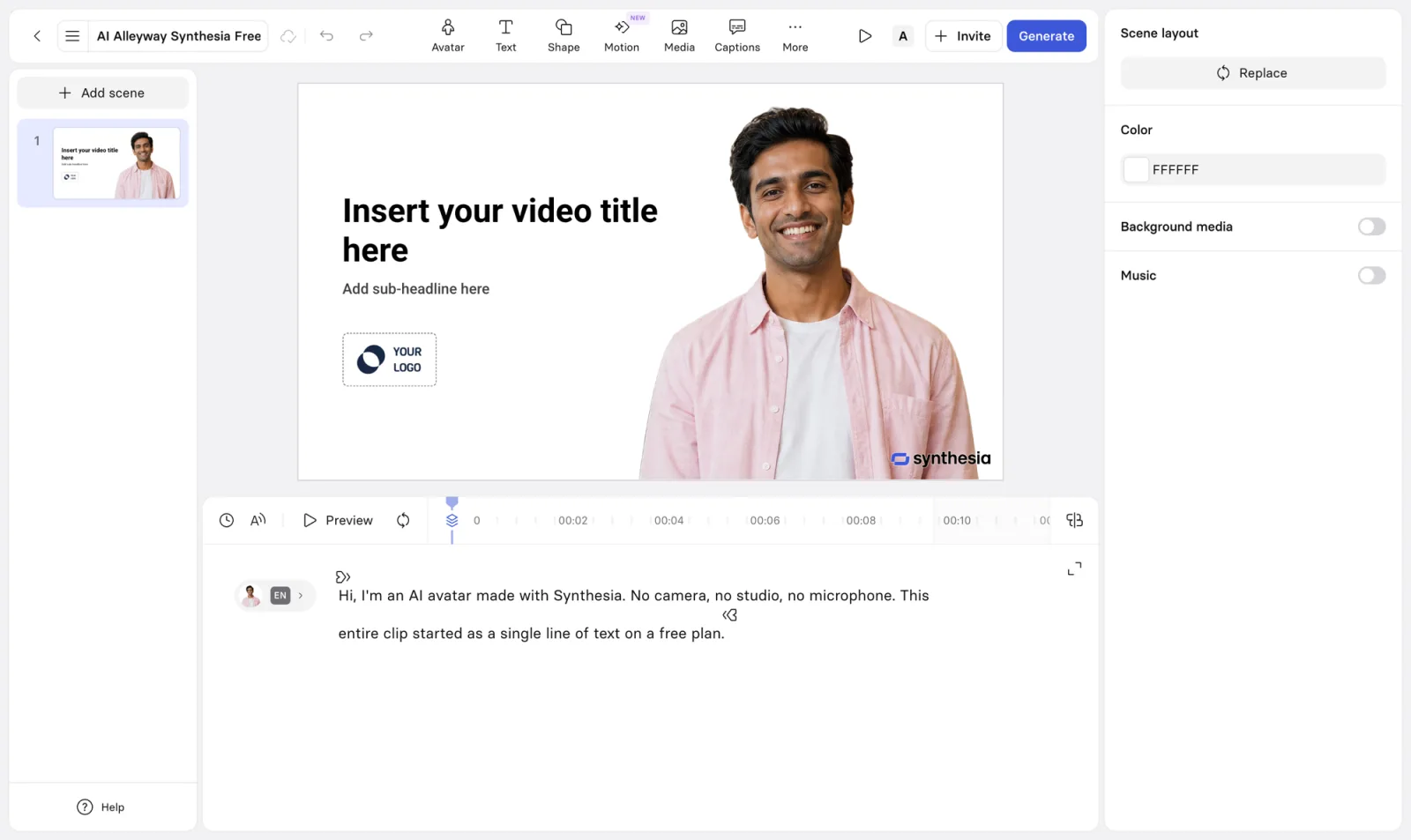
Two workflow details round out the picture. Synthesia leans into collaboration, with live co-editing, shared brand templates, and comment-based review that suit a team maintaining a library of training videos, while HeyGen exposes a developer API and batch tools that suit programmatic, high-volume generation. Localization differs too: Synthesia translates a finished video into 80+ languages in one click on Enterprise, whereas HeyGen’s translation is a per-video, credit-metered step. If your job is shipping one video across many regions, Synthesia’s one-click model is smoother; if you translate occasionally, HeyGen’s pay-as-you-go approach is fine.
So the workflow choice tracks the same fork as everything else. HeyGen is faster and built for flexible, expressive one-offs; Synthesia is slower and built for structured, repeatable, governed video. Neither editor is objectively better, but they are optimized for different jobs, and picking the wrong one means fighting the tool the whole way.
Who should pick HeyGen
- Creators and social teams. If you make short-form video, ads, or social clips where the avatar needs personality and you need to iterate fast, HeyGen’s realism and one-minute renders are the right fit. The fast turnaround matters most here, because social content lives or dies on how many variations you can test.
- Marketers doing outreach and personalized video. Photo-to-video and translation make HeyGen strong for one-to-many messages that need to feel human and on-brand. A personalized video that looks individually recorded lands harder than a templated email, and HeyGen’s expressiveness sells that illusion.
- Multilingual creators on a budget. With translation and dubbing plus the cheaper Avatar III engine, HeyGen can localize content without the enterprise price tag, as long as you manage credits. Run the premium engine only for hero videos and Avatar III for the rest, and a Creator plan goes surprisingly far.
- Anyone for whom avatar realism is the single most important thing. If nothing matters more than the most lifelike talking head, HeyGen is the pick, full stop. It consistently wins avatar-quality comparisons, and no amount of governance elsewhere changes that.
Who should pick Synthesia
- Enterprises standardizing training video. If you are rolling out onboarding, compliance, or L&D video across a company, Synthesia’s SCORM export, SSO, and brand controls are what the rollout actually needs. These are the boxes a procurement or IT team checks before a tool is approved, and HeyGen does not tick most of them.
- Global teams that localize. With 160+ languages and one-click translation into 80+, Synthesia is the default for shipping the same training video across regions without reshoots. Update the master script once and every localized version regenerates, which is a genuine workflow saver at scale.
- Teams that build in slides. If your content is structured, multi-scene, and deck-shaped, Synthesia’s PowerPoint-style editor and import will feel like home. You can bring an existing training deck straight in rather than rebuilding it in a video timeline.
- Buyers who value trust and governance over speed. The content moderation, the largest review base in the category, and the Fortune 100 track record make Synthesia the safer institutional choice, slow renders and all. When your brand is on the avatar’s face, the moderation step you cursed while waiting is the feature you were actually paying for.
The final word
If I had to give one answer for the typical buyer, it is this: most individual creators and marketers should choose HeyGen, and most companies standardizing video should choose Synthesia. The scorecard tilts to Synthesia on breadth, price, and our overall rating, but HeyGen wins the two axes creators care about most, realism and speed, and for that audience those wins are decisive.
The good news is that the decision is low-risk to test, because both offer a free plan good enough to judge avatar quality and workflow, even if neither lets you download the result. Run the same script through both, compare the avatar and the editor, and let your use case break the tie. For a deeper look at each, see our full HeyGen review and Synthesia review. And if what you actually want is a real-time conversation rather than a scripted video, our Tavus review covers the third path, conversational AI video.
Frequently asked questions
Is HeyGen or Synthesia better?
It depends on your use case, because they lead the same category from opposite ends. HeyGen makes the more lifelike, expressive avatars and renders in about a minute, which suits creators, marketers, and social content. Synthesia is the enterprise standard, built for training and corporate video, with heavier governance, 160+ languages, and a slide-based editor.
In our hands-on testing HeyGen scored 4.3 and Synthesia 4.6, but the gap is about breadth and polish, not a knockout. If avatar realism and speed are your top priorities, pick HeyGen. If you are standardizing video across a company and need languages and controls, pick Synthesia.
Which is cheaper, HeyGen or Synthesia?
Synthesia has the cheaper entry plan at $18 a month billed yearly, versus HeyGen's $29 a month for Creator. But the real cost depends on how they meter. Synthesia charges by finished video minutes (about ten a month on Starter), so heavy use runs out fast at roughly two dollars per minute.
HeyGen charges by credits, and its premium Avatar IV and V engines burn 20 credits a minute, so Creator's 600 credits equal only about 30 minutes of top-tier avatar video. Neither is simply cheaper; Synthesia is more predictable per minute, while HeyGen gives more room if you use its cheaper avatar engine.
Which has more realistic avatars, HeyGen or Synthesia?
HeyGen, by most measures including our own test. Its newer Avatar IV and V engines produce more expressive, lifelike delivery, with natural gestures and micro-movements, and it holds a 4.8 rating on G2 across more than 1,500 reviews, the highest avatar-quality score in the category.
Synthesia's avatars are clean, composed, and reliable, more newsreader than influencer, which is exactly the register corporate training wants. So HeyGen wins raw realism, but Synthesia's calmer, consistent avatars are arguably the better fit for formal internal video where polish matters more than personality.
Which is better for corporate training, HeyGen or Synthesia?
Synthesia, clearly. It was built for training and corporate video, and the enterprise pieces training teams need live there: SCORM export straight into a learning management system, single sign-on, content moderation on every clip, brand-template controls, and one-click translation into 80+ languages.
Its slide-based editor also mirrors how training teams already build in PowerPoint, and it is the default choice across most of the Fortune 100 by its own count. HeyGen can make training videos, but it is aimed at creators, so it lacks the governance and LMS delivery a company rollout usually requires.
Do HeyGen and Synthesia both have a free plan?
Yes, but both free plans are previews rather than working free tools, and both share the same dealbreaker: you cannot download the video. HeyGen's free plan gives you one avatar video, caps it at 720p, and tiles a watermark across the whole frame. Synthesia's gives you about ten minutes of video total with a single corner logo.
In both cases the free tier is genuinely useful for one thing, judging whether the avatar quality and workflow fit your work before paying. To keep, share, or publish anything, you are on a paid plan: $29 a month for HeyGen Creator or $18 a month for Synthesia Starter.
Can I switch from HeyGen to Synthesia or back?
There is no automatic migration. Scripts are just text and move easily, but avatars, voices, brand templates, and any custom avatar you trained are locked to the platform you built them on, so switching means rebuilding those assets.
Because of that lock-in, it is worth testing both free plans on the same script before you commit, so you can compare the avatar quality, the editor, and the workflow side by side. Pick the one that fits your main use case, since moving later is more friction than it looks.
Keep reading
HeyGen pricing: what the credits really cost
HeyGen starts at $29/mo, but credits decide your real cost: 600 credits is 30 min of premium avatar or 200 on the cheaper engine. Here's the full breakdown.
HeyGen review: stunning avatars, a stingy free plan
I made a real avatar video on HeyGen's free plan. The avatar was uncannily good — then it wouldn't let me download it. Here's who should pay, and who shouldn't.
HeyGen alternatives: the best one depends on why you left
Leaving HeyGen? The best HeyGen alternative isn't one tool: Synthesia (4.6 on G2) for training, Creatify for ads, Tavus for real-time, plus 3 more by job.
Synthesia alternatives: cheaper, or more lifelike?
Leaving Synthesia over the price or the stiff avatars? HeyGen (4.8 on G2) is more lifelike and cheaper, plus 5 more picks sorted by why you're switching.