
Synthesia review: the enterprise standard, at a price
I made a real avatar video on Synthesia's free plan. The output is enterprise-clean, but you can't download it and the minutes run out fast. Who should pay.
Contents
Is Synthesia worth it?

Synthesia is the enterprise standard for AI avatar video, and if you make training, onboarding, or corporate video at any scale, it is the tool to beat. This Synthesia review is grounded in a hands-on test: I typed one line of script, picked a stock avatar, and got back a clean, natural-looking presenter delivering my words. On the strength of that output, a category-leading 4.6 rating on G2, and its place as the default choice for most of the Fortune 100, I score it 4.6 out of 5, a Category Leader.
The polish comes with real friction, and most of it lives on the free plan. Synthesia’s free tier is a preview, not a tool: it caps you at about ten minutes of video, stamps a logo on the result, and, most tellingly, will not let you download the video at all. Rendering is slow because every clip is moderated before release, and the paid plans are expensive once you count the minutes rather than the dollars.
So the verdict splits by who you are. For an enterprise team standardizing video across departments and languages, Synthesia is genuinely the leader, and worth the price. For a solo creator who wants a quick, downloadable clip, it is slower, pricier, and more locked-down than the alternatives. Pay for it if training and scale are the job; treat the free plan as a way to judge the quality, nothing more.
What does Synthesia do?
Synthesia turns text into video of a person talking. You write a script, choose an AI avatar and a voice, and it generates a clip of that avatar delivering your words, no camera or studio needed. Where HeyGen leans toward creators, Synthesia is built for the enterprise: its whole design points at training, onboarding, compliance, and corporate communication.
That focus is obvious the moment you land. The homepage offers four ways in, and they read like an L&D team’s wish list: create a video from a template or blank, start with an AI assistant that drafts from a prompt, translate an existing video into another language, or import a PowerPoint deck and turn each slide into a scene. The template gallery is wall-to-wall corporate, all compliance quizzes and onboarding walkthroughs.
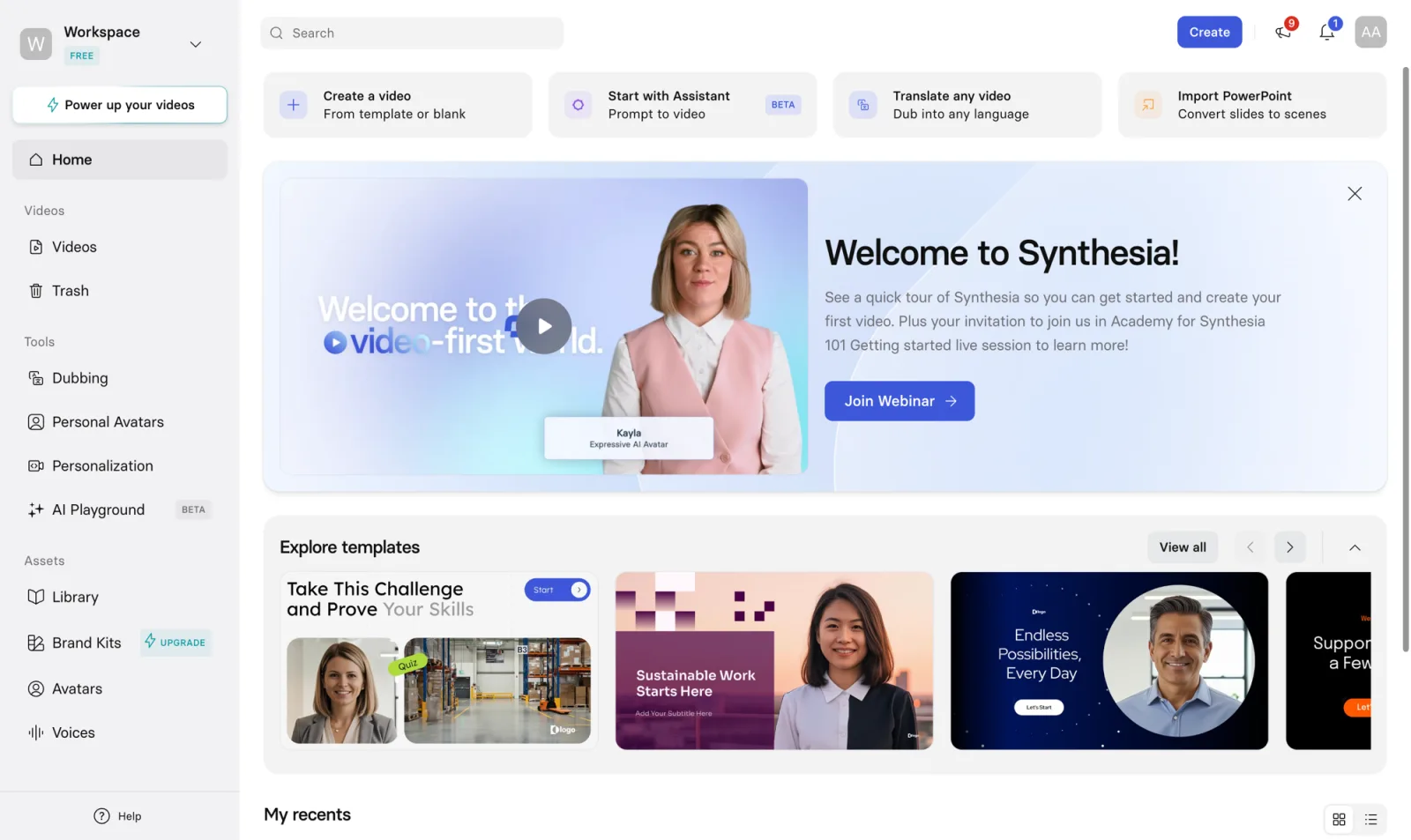
The editor is a slide-style workspace. Each scene has an avatar, a script box where you type what they say, and layout elements like a title, subheadline, and logo. You build a video scene by scene, the way you would a deck, which is exactly why the PowerPoint import feels native rather than bolted on. I picked a stock avatar, typed a short intro, and the scene assembled itself.
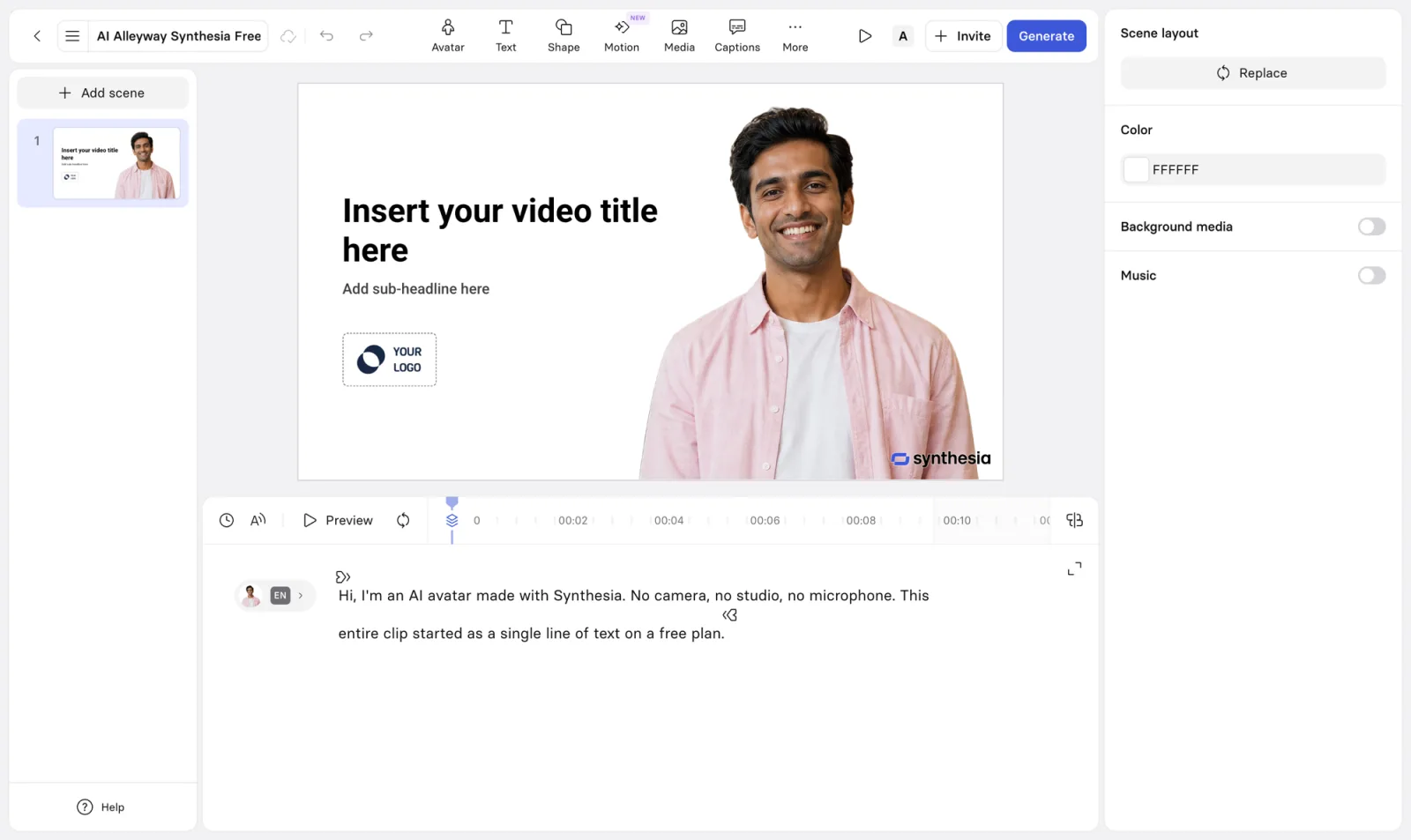
To judge the output rather than the marketing, I ran the real thing end to end on a free account, using the same nine-second script I gave HeyGen so the two would be comparable. I hit Generate, and Synthesia did something HeyGen does not: it reviewed my script for policy issues, then, after rendering, moderated the finished video before releasing it. That safety pass is a deliberate enterprise feature, and it is also why the wait was longer.
When the clip landed, the avatar was clean and natural, delivered against Synthesia’s default plain-white background rather than a styled set. The lip-sync tracked the audio and the delivery was steady, if a touch more corporate-newsreader than the expressive, social-ready look HeyGen produces. For a training video, that composed tone is the point.
Here is the actual clip Synthesia generated for me on the free plan, watermark and all, so you can judge the avatar for yourself.
Language is where Synthesia pulls ahead. It supports more than 160 languages and voices, and the Enterprise plan adds one-click translation into 80-plus languages, so one recording becomes a dozen localized versions without a reshoot. For a company shipping the same onboarding video across regions, that single capability can justify the subscription.
How much does Synthesia cost?
Synthesia pricing looks simple until you count minutes instead of dollars. The tiers below are the in-app rates, verified in July 2026. Paying annually is cheaper than month-to-month.
| Plan | Price (monthly) | What you get |
|---|---|---|
| Free | $0 | ~10 minutes of video total, watermark, no download; stock avatars only |
| Starter | $18 (yearly) / $29 | 120 minutes/year, downloads, logo removed, 125+ avatars, 3 personal avatars, 160+ languages |
| Creator | $64 (yearly) / $89 | 360 minutes/year, 180+ avatars, interactive videos, multiple avatars per scene |
| Enterprise | Custom | Unlimited minutes, 1-click translation into 80+ languages, SSO/SAML, live collaboration, dedicated support |
The line that governs your bill is video minutes, and the allowances are tighter than the prices suggest. Starter’s $18 a month buys 120 minutes of finished video a year, which is ten minutes a month. Creator’s $64 buys 360 minutes a year, about six hours. Run the Creator math and the effective cost is roughly two dollars per minute of video, which is fine for occasional use and steep for a team producing daily. Our Synthesia pricing guide works through the minute math plan by plan.
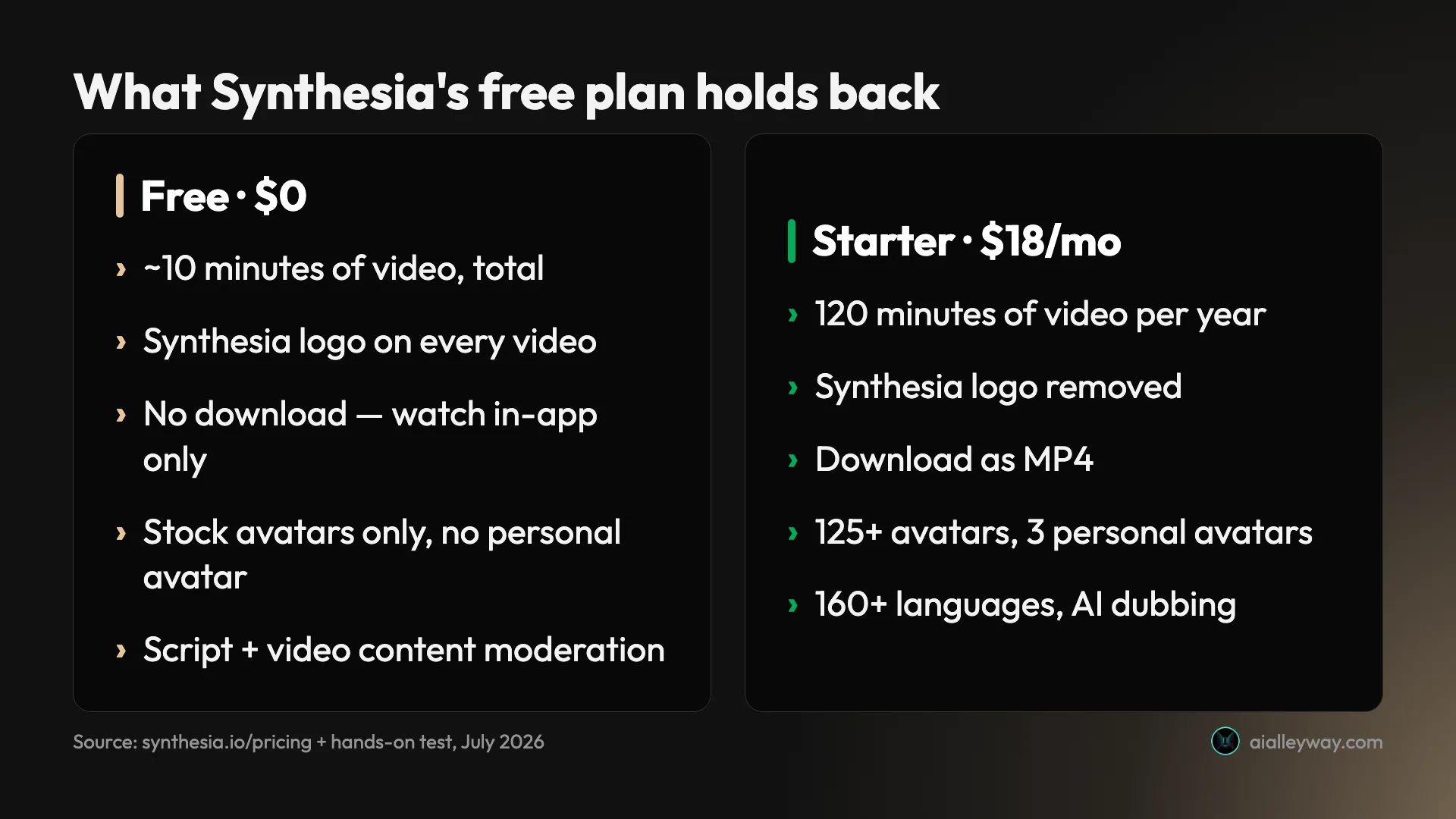
The free plan deserves its own warning, because it is more of a demo than the pricing page implies. In the app it caps you at roughly ten minutes of video creation total, keeps the Synthesia logo on every clip, limits you to stock avatars, and blocks downloads entirely. It is enough to test the avatar quality and the workflow, and not much more.
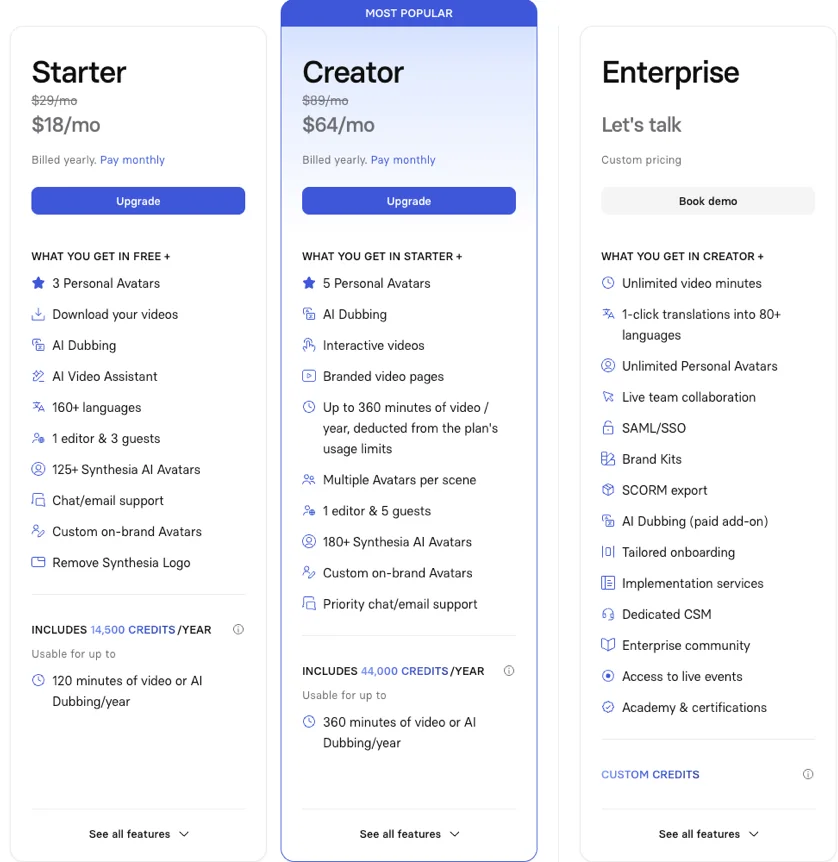
The honest read is that Starter at $18 is the true entry point, not the free plan, and Enterprise is where Synthesia is really sold. Unlimited minutes, SSO, one-click translation, and dedicated onboarding are the features that matter to the training teams it targets, and none of them carry a public price. If you are an individual, the minute caps will feel tight; if you are a company, the custom tier is the one your procurement team will end up on.
Who is Synthesia for?
- Enterprise learning and development teams. This is the core audience. If you produce onboarding, compliance, or training video at scale, Synthesia’s templates, SCORM export, and governance are built for exactly that, and no consumer-focused rival matches it.
- Companies localizing video across languages. With 160+ languages and one-click translation, Synthesia turns a single training video into a library of localized versions. For a global workforce, this is the standout capability.
- Corporate communications and internal video. Update-style videos, policy explainers, and exec messages suit Synthesia’s composed, professional avatars and its slide-based editor better than a flashier creator tool.
- PowerPoint-heavy teams. The deck import turns existing slides into narrated video scenes, which is a genuine shortcut for teams that already live in PowerPoint and want video without starting from scratch.
- Regulated industries that need governance. Content moderation, SSO, and audit-friendly controls make Synthesia an easier sell to security and compliance teams than tools built for individual creators.
- Not for: solo creators, social-video makers, or anyone who wants a fast, cheap, downloadable clip. The free plan cannot download, the render is slow, and the per-minute cost is high. If your work is short-form and expressive rather than corporate and scaled, a creator-first tool will serve you better and cost less.
The good
Synthesia earns its 4.6 as the category’s enterprise leader. Here are the six things that should sway you, strongest first.
It is the most trusted tool in the category
Reputation is not a feature, but Synthesia’s is hard to ignore. As of July 2026 it holds a 4.6 on G2 across more than 2,700 reviews, one of the largest review bases in the category, and, by Synthesia’s own count, it is used across most of the Fortune 100. That combination of independent sentiment and blue-chip adoption is a strong signal that the product holds up in real corporate use, not just a demo.
| Source | Rating | Reviews |
|---|---|---|
| G2 | 4.6 / 5 | 2,700+ |
| Trustpilot | 3.9 / 5 | 1,800+ |
The gap between the two scores is worth reading: G2, where business software buyers review, rates it far higher than Trustpilot, where billing and cancellation complaints tend to pool. The workflow is well-regarded; the money side draws more of the friction.
One honest wrinkle: HeyGen actually edges Synthesia on G2, at 4.8 to 4.6, and its avatars are more lifelike for social content. So why does Synthesia score higher here, at 4.6 to HeyGen’s 4.3? Because the Alley Rating weighs the whole product against its category-leadership claim, not a single review-score delta. Synthesia’s edge is breadth and fit: the language coverage, the governance, the LMS and deck integrations, and the Fortune-scale reliability that make it the corporate default. HeyGen wins on lifelike delivery; Synthesia wins on being the more complete enterprise tool.
Language coverage is best in class
Synthesia supports 160+ languages and dialects, and the Enterprise plan adds one-click translation into 80-plus of them. For an enterprise training team, this is the feature that closes the deal: the same compliance or onboarding video can ship across every region a company operates in, re-voiced and re-synced, without filming anything again. Few creator-focused rivals match this breadth.
The moderation is a feature, not a bug
Synthesia reviews your script and moderates the finished video before releasing it. For an individual that reads as friction, but for the enterprises Synthesia sells to, it is a selling point: it is a guardrail against misuse of AI avatars and a reason security teams sign off. The trust that moderation buys is a large part of why Synthesia, not a faster tool, is the corporate default.
PowerPoint import and SCORM export fit real workflows
Two features quietly do a lot of work for training teams. The PowerPoint import turns an existing deck into narrated video scenes, so a team can convert material it already has rather than starting from a blank timeline. SCORM export, on the Enterprise plan, drops the finished video straight into a learning management system. These are not flashy, but they are exactly the integrations that make Synthesia stick inside a company.
The free plan generates without a fight
For all its limits, Synthesia’s free tier does one thing more gracefully than HeyGen: it just generates. Where HeyGen defaults to a premium engine that stalls on an upsell until you manually downgrade, Synthesia let me hit Generate and get a video, watermark and all, with no engine gymnastics. The on-ramp to seeing real output is smoother, even if the output itself is locked behind the download wall.

The avatars are polished and professional
Synthesia’s avatars are clean, composed, and reliable, which is the register corporate video wants. In my test the mouth tracked the audio cleanly, the blinks landed at natural intervals, and the head moved in small, believable beats rather than the stiff loop cheaper avatars fall into, with none of the obvious warping artifacts that make lesser tools look like novelties. The look is more newsreader than influencer, and for training and internal comms that is the right call. It is a different aesthetic from HeyGen’s more expressive, social-ready avatars, and the better fit for the boardroom.
The bad
Now the part the sales page skips. Synthesia is strong, but its free plan and its pricing are where the friction lives, and I hit most of it firsthand.
The free plan is a funnel, not a free tool
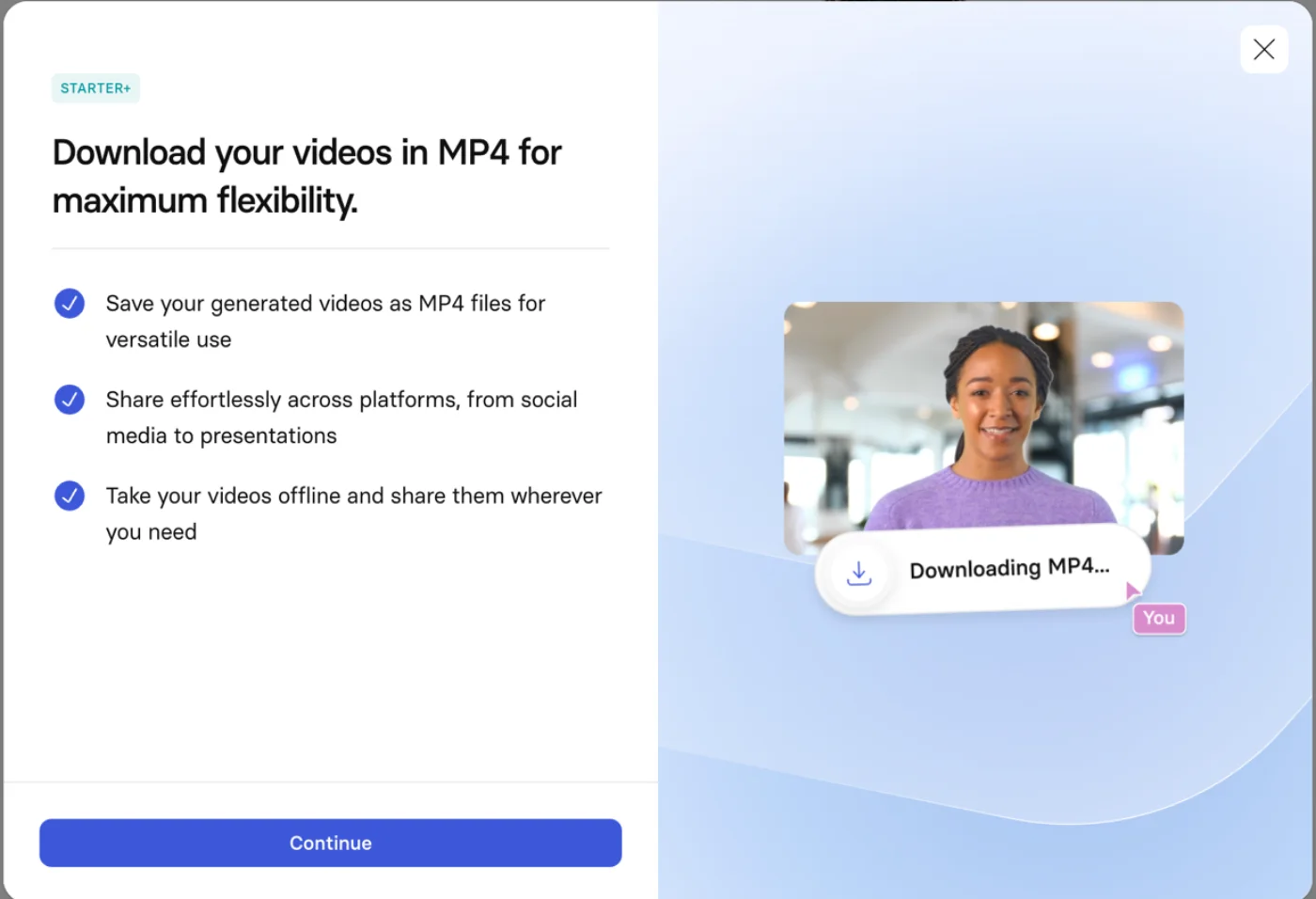
On the free plan I could generate a video, but I could not keep it. The finished clip carried a watermark, and the download button opened a “Download your videos in MP4” wall that asks you to move to the Starter plan to save the file. Combined with the roughly ten-minute total cap, the free tier is a preview with the exits locked: you can see the avatar quality and then must pay to do anything with it.
Rendering is slow
Because Synthesia moderates every video, rendering takes a while. My nine-second clip took four to five minutes to appear, most of it in the moderation step, where HeyGen returned a comparable clip in about a minute. For a training team rendering overnight, that wait is irrelevant; for anyone who wants to iterate quickly on a short clip, it is a real drag on the workflow.
Here are Synthesia’s main limits in one view, so you can weigh them against your needs:
| Limitation | The detail behind it |
|---|---|
| Free plan is capped | ~10 minutes total, watermark, no download |
| Slow to render | Script + video moderation adds minutes per clip |
| Priced by the minute | Creator’s $64/mo buys 360 minutes a year (~$2/min) |
| Enterprise-shaped | Top features (SSO, unlimited minutes, 1-click translation) are custom-priced |
It is expensive once you count minutes
The dollar prices look reasonable until you divide by the minutes. Starter’s $18 a month buys ten minutes of video a month; Creator’s $64 buys thirty. For a team producing daily video, those caps push you toward the custom-priced Enterprise tier fast, and the effective per-minute cost is higher than a creator tool that meters by video rather than by minute. Synthesia is priced for organizations, not individuals.
The avatars are less expressive than the best creator tools
Synthesia’s avatars are polished, but polished in a corporate way. Set against HeyGen’s newer avatar engines, the delivery is more composed and less lively, which is exactly right for training and exactly wrong for punchy social content. If your videos need personality and energy rather than a steady professional read, you will find Synthesia’s default register a little flat.
The best features sit behind Enterprise
The capabilities that make Synthesia the enterprise standard, unlimited minutes, one-click translation into 80-plus languages, SSO, and live team collaboration, are all on the custom-priced Enterprise plan. The self-serve Starter and Creator tiers are capable but capped, so the version of Synthesia that truly earns its reputation is the one you have to talk to sales to buy.
The money side draws complaints
While the product scores 4.6 on G2, Synthesia sits at 3.9 on Trustpilot across more than 1,800 reviews, where the recurring themes are billing, renewals, and the difficulty of cancelling. The video creation itself is well-liked; the subscription mechanics are where a meaningful share of users report frustration. It is worth going in with eyes open about the annual commitment.
Alternatives worth considering
If you decided Synthesia is not the fit, here is where to look next, depending on what pushed you away. Here is how the leading AI-avatar tools compare at a glance.
| Tool | Best for | The main trade-off |
|---|---|---|
| Synthesia (4.6) | Enterprise training, governance, and 160+ languages | A locked-down free plan; slow, priced by the minute |
| HeyGen (4.3) | Lifelike, expressive avatars for creators and social | A free-plan funnel and opaque credits |
| Tavus | Conversational, personalized video and video agents | Aimed at developers more than solo creators |
| D-ID | Turning a single photo into a talking presenter | A narrower feature set than Synthesia |
- HeyGen — if you want the more lifelike, expressive avatars and a faster render for creator and social content. HeyGen is the creator-friendly challenger to Synthesia’s enterprise standard, and the one we reach for when natural delivery matters more than governance. See our full HeyGen review for that side.
- Tavus — if you want conversational or personalized video rather than a scripted talking head. Tavus focuses on video agents and one-to-many personalized outreach, with an API-first design that suits teams embedding avatar video into a product. See our full Tavus review for that side.
- D-ID — if your need is simply animating a photo into a talking presenter. D-ID pioneered photo-to-video and is a lighter, more focused option when Synthesia’s full training-and-governance stack is more than you need.
Of these, HeyGen is the one to weigh most closely against Synthesia: the two lead the category, and the choice usually comes down to enterprise scale and governance (Synthesia) versus lifelike delivery for creator content (HeyGen).
Final word
Synthesia earns its 4.6 by being the best in the category at the job it is built for. The avatars are clean and professional, the 160+ languages and one-click translation are unmatched, the PowerPoint import and SCORM export fit how training teams actually work, and a 4.6 on G2 across 2,700-plus reviews backs up its status as the corporate default. For enterprise video at scale, it is the tool to beat.
It is held back from a higher score by a free plan that will not let you keep what you make, a moderation step that makes rendering slow, and a per-minute price that punishes high-volume individual use. None of those matter much to the enterprise buyer Synthesia is designed for, but they make it the wrong first choice for a solo creator.
So the decision is about who you are. If you are producing training, onboarding, or corporate video across a company and its languages, Synthesia is genuinely the leader and worth the price. If you want a quick, expressive, downloadable clip for social, HeyGen will serve you better for less. Try Synthesia to judge the quality, then decide which of those two you actually are.
Frequently asked questions
Is Synthesia free?
There is a free plan, but it is a preview, not a working free tool. It gives you about ten minutes of video creation in total, stamps a Synthesia logo on the result, and, in my testing, would not let me download the finished video at all.
The free plan is genuinely useful for one thing: judging whether the avatar quality and workflow fit your work before you pay. To keep, share, or publish anything, you are on the Starter plan at $18 a month, which removes the logo and unlocks downloads.
How much does Synthesia cost?
Synthesia starts at $18 a month for the Starter plan billed yearly ($29 month-to-month), which includes 120 minutes of video a year, downloads, logo removal, and 125+ avatars. The Creator plan is $64 a month ($89 monthly) for 360 minutes a year and 180+ avatars, and Enterprise is custom-priced with unlimited minutes, SSO, and one-click translation.
The number that matters is minutes, not dollars. Creator's 360 minutes a year works out to about six hours of finished video, so at $64 a month the effective cost is roughly two dollars per minute of video. For occasional use that is fine; for high-volume production it adds up quickly.
Is Synthesia better than HeyGen?
They lead the same category from different ends. Synthesia is the enterprise standard, built for training, onboarding, and corporate video, with heavier governance (content moderation, SSO, SCORM) and 160+ languages. HeyGen is the creator-friendly challenger, with more expressive, lifelike avatars and a faster render, better suited to social clips and outreach.
If you are standardizing video across a company, Synthesia is the safer pick. If you want the most natural-looking avatar for short-form content, HeyGen usually wins. See our HeyGen review for that side of the comparison.
Why is Synthesia so slow to render?
Because it moderates your content. Synthesia reviews the script before generation and then moderates the finished video before releasing it, an enterprise safety measure that guards against misuse of AI avatars. In my test, a nine-second clip took four to five minutes to appear, most of it in the moderation step, where HeyGen returned a comparable clip in about a minute. The trade-off is deliberate: the moderation is part of why enterprises trust Synthesia with their brand.
Can you remove the Synthesia watermark?
Only on a paid plan. On the free plan every video carries a Synthesia logo in the corner, and removing it is a Starter-plan feature ($18 a month). Unlike some rivals, the free watermark is a single discreet corner mark rather than a pattern tiled across the whole frame, so it is less intrusive, but it still rules the free output out for anything public.
What languages does Synthesia support?
Synthesia supports more than 160 languages and voices for its avatars, and the Enterprise plan adds one-click translation into 80+ languages, so a single video can be localized into many markets without a reshoot. This is one of its strongest features for enterprise training teams that need to ship the same onboarding or compliance video across regions. The language coverage is a major reason it is the default choice for global L&D.
Does Synthesia support SCORM and SSO?
Yes, on the Enterprise plan. Both SCORM export, which drops a finished video straight into a learning management system, and single sign-on (SSO and SAML) are Enterprise features, alongside unlimited video minutes, one-click translation, and dedicated support.
That means the integrations most training and security teams need to deploy Synthesia across a company live on the custom-priced top tier, not the self-serve Starter or Creator plans. If your rollout needs LMS delivery plus centralized identity management, Enterprise is the tier you will land on.
Keep reading
Synthesia pricing: what the minutes really cost
Synthesia starts at $18/mo, but it meters by video minutes, and they're tight: Starter is about 10 minutes a month at roughly $2 a minute. Here's the math.
Synthesia alternatives: cheaper, or more lifelike?
Leaving Synthesia over the price or the stiff avatars? HeyGen (4.8 on G2) is more lifelike and cheaper, plus 5 more picks sorted by why you're switching.
HeyGen alternatives: the best one depends on why you left
Leaving HeyGen? The best HeyGen alternative isn't one tool: Synthesia (4.6 on G2) for training, Creatify for ads, Tavus for real-time, plus 3 more by job.
Best AI avatar generator: our picks for every use case
We tested the top AI avatar generators. Synthesia (4.6) wins for enterprise, HeyGen for creators, Tavus for live conversation. The best one for your use case.