
Tavus review: the AI avatar that talks back
I had a real-time video conversation with Tavus's AI. It's the most futuristic avatar tool I've tested, the most niche, and still in beta. Who it's for.
Contents
Is Tavus worth it?

Tavus scores a 4.0 out of 5 in this review, a Power Tool, but only if you need the one thing it does. It is the strangest and most futuristic tool in the AI-avatar category, and whether it is worth it depends entirely on what you are building. This Tavus review is grounded in a hands-on test unlike any avatar tool I have used: instead of generating a video, I had a real-time video conversation with an AI human named Charlie, who talked, listened, and replied like a person on a call.
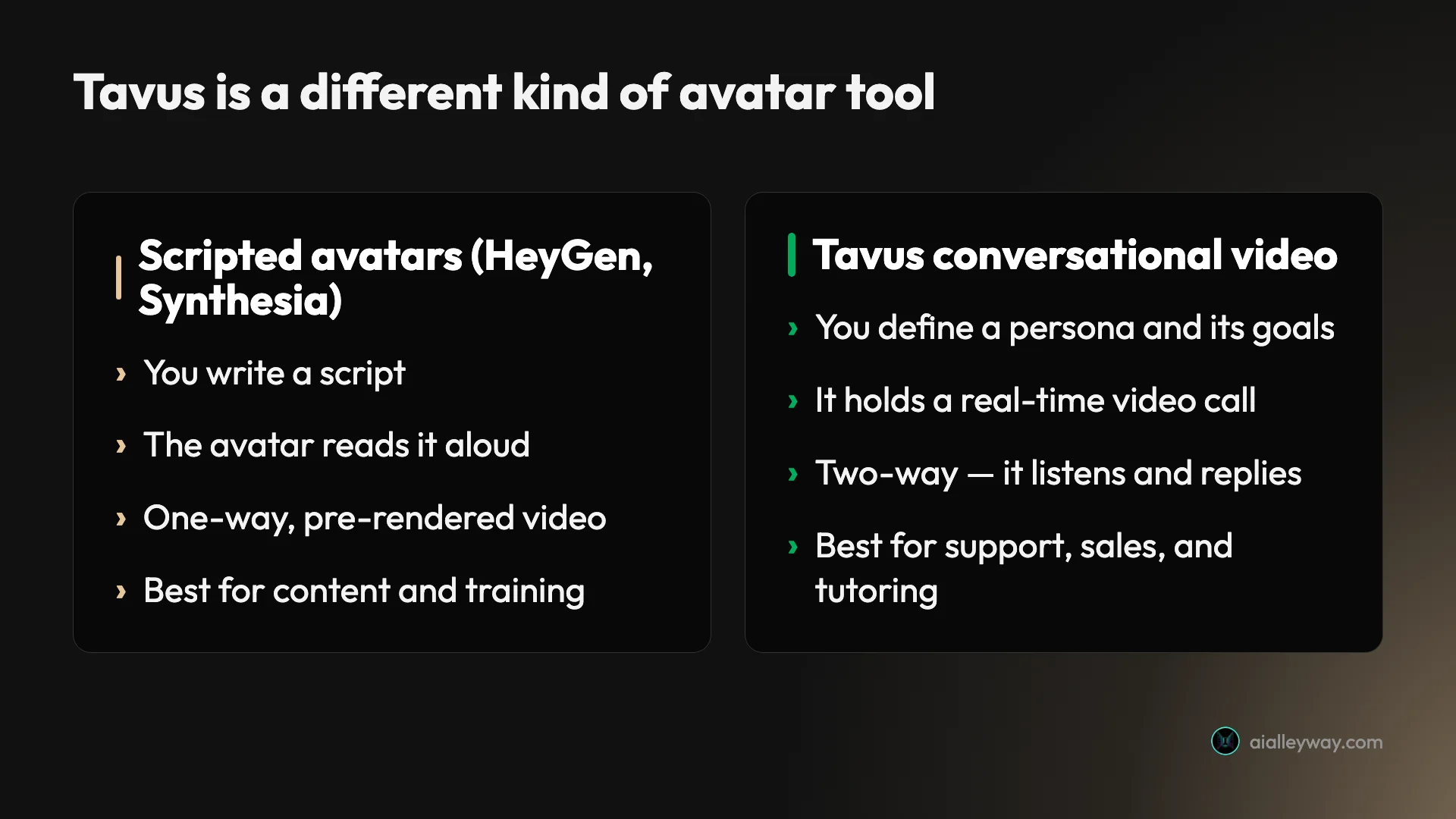
Tavus does not make scripted talking-head videos the way HeyGen and Synthesia do. It builds conversational video: real-time, two-way AI agents you speak to, aimed at developers and product teams. The technology is the most advanced I have seen in the category, and it is API-first, with whitelabeled developer APIs even on the free plan.
The catches are real. Tavus is still in beta, and my live call failed to connect once before working on a retry. It is narrow, built for support, sales, and tutoring agents rather than for a one-off video. Its pricing is metered in conversational minutes with pay-as-you-go overage. Choose Tavus if you are building a product around real-time AI conversation. For a scripted avatar clip, HeyGen or Synthesia are the better, more mature tools.
What does Tavus do?
Tavus builds AI humans you can have a conversation with. Where a scripted-avatar tool turns your text into a video of an avatar reading it, Tavus turns a persona into a live agent that holds a real-time, two-way video call, listening to you and responding on the fly. It calls these agents PALs, and it describes what it is building as “human computing.”
The difference is the whole point, and it is easy to miss if you lump Tavus in with the other avatar tools. One is a video you watch; the other is a conversation you have.
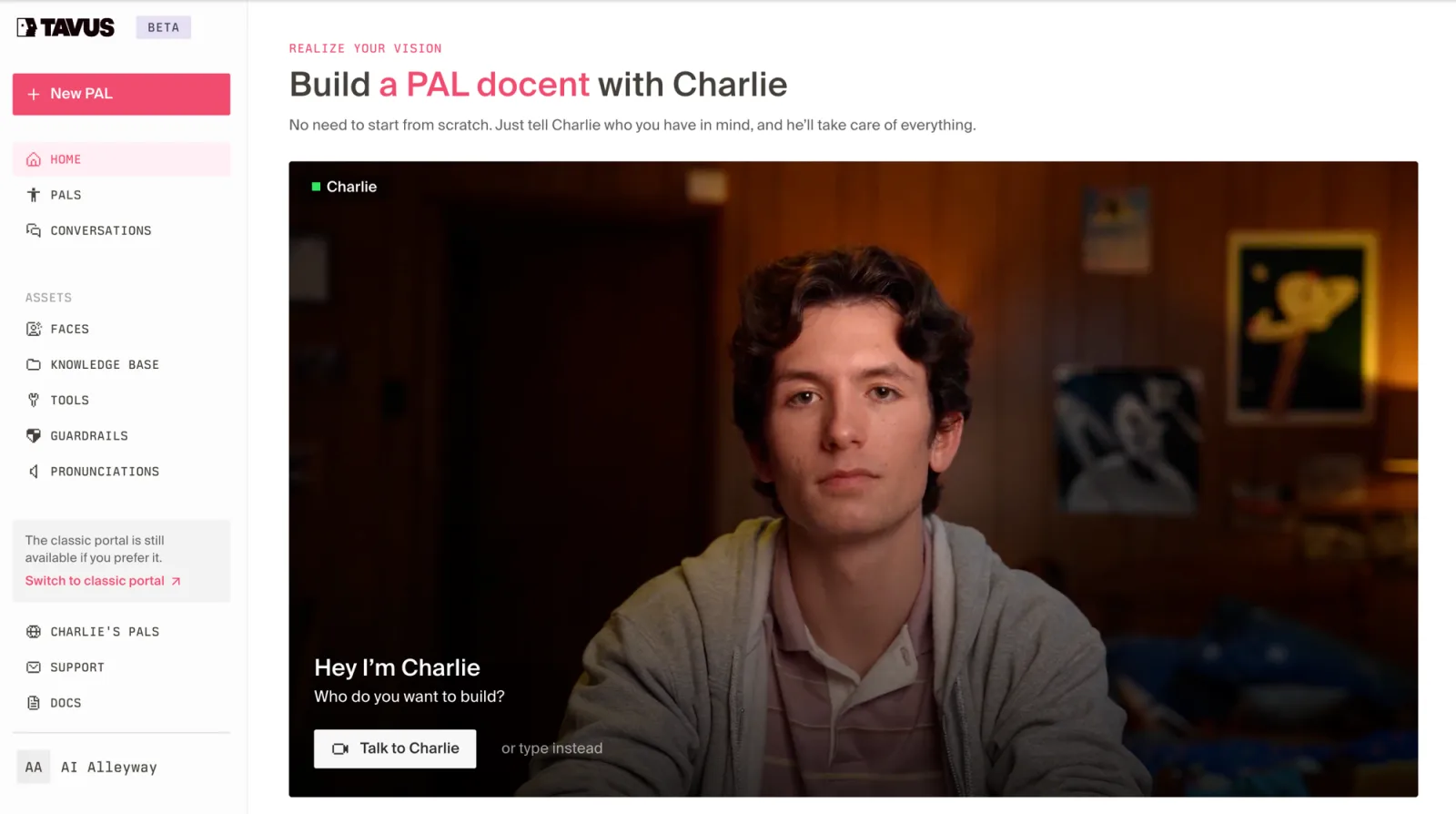
Building one is meant to be simple. The home screen puts you in front of Charlie, an AI assistant who is himself a Tavus agent, and asks “who do you want to build?” You describe the agent you have in mind, a sales rep, a tutor, a museum docent, and Charlie assembles it. There is a no-code builder for people who want to click, and a full API for teams who want to write code.
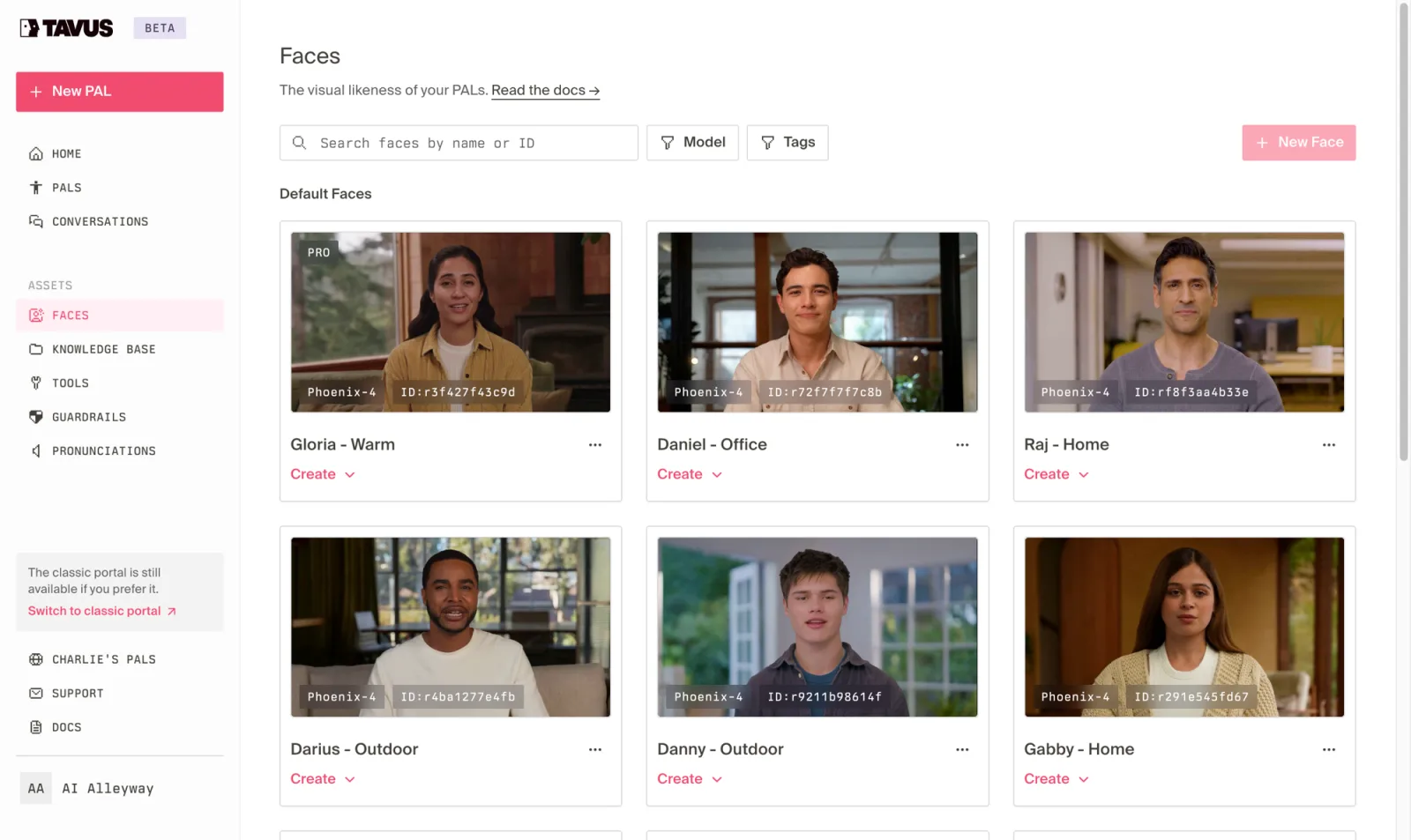
The face of each agent is a replica. Tavus ships a set of stock replicas, realistic human faces rendered with its Phoenix-4 model, and lets you create a custom replica, your own AI clone, from a short recording on the paid plans. In the dashboard each face is a tile with an ID, which tells you a lot about the product: this is a developer platform where a face is an API resource you reference, not a character you scroll past.
To test it rather than read about it, I did the thing Tavus is built for: I talked to one. I clicked “Talk to Charlie” and, after one failed connection and a retry, dropped into a live video call with a young man in a bedroom who introduced himself and waited for me to speak. The real-time render was the impressive part. This was not a pre-baked clip; it was a face reacting in the moment, and the lip-sync and micro-movements held up close to a real video call.
Around that core sit the pieces that make it a real agent platform rather than a demo: a knowledge base you can attach so the agent knows your material, tools it can call, guardrails to keep it on-topic, and a pronunciations list. It is a serious build surface, and it is why Tavus reads as infrastructure for a product, not a novelty.
How much does Tavus cost?
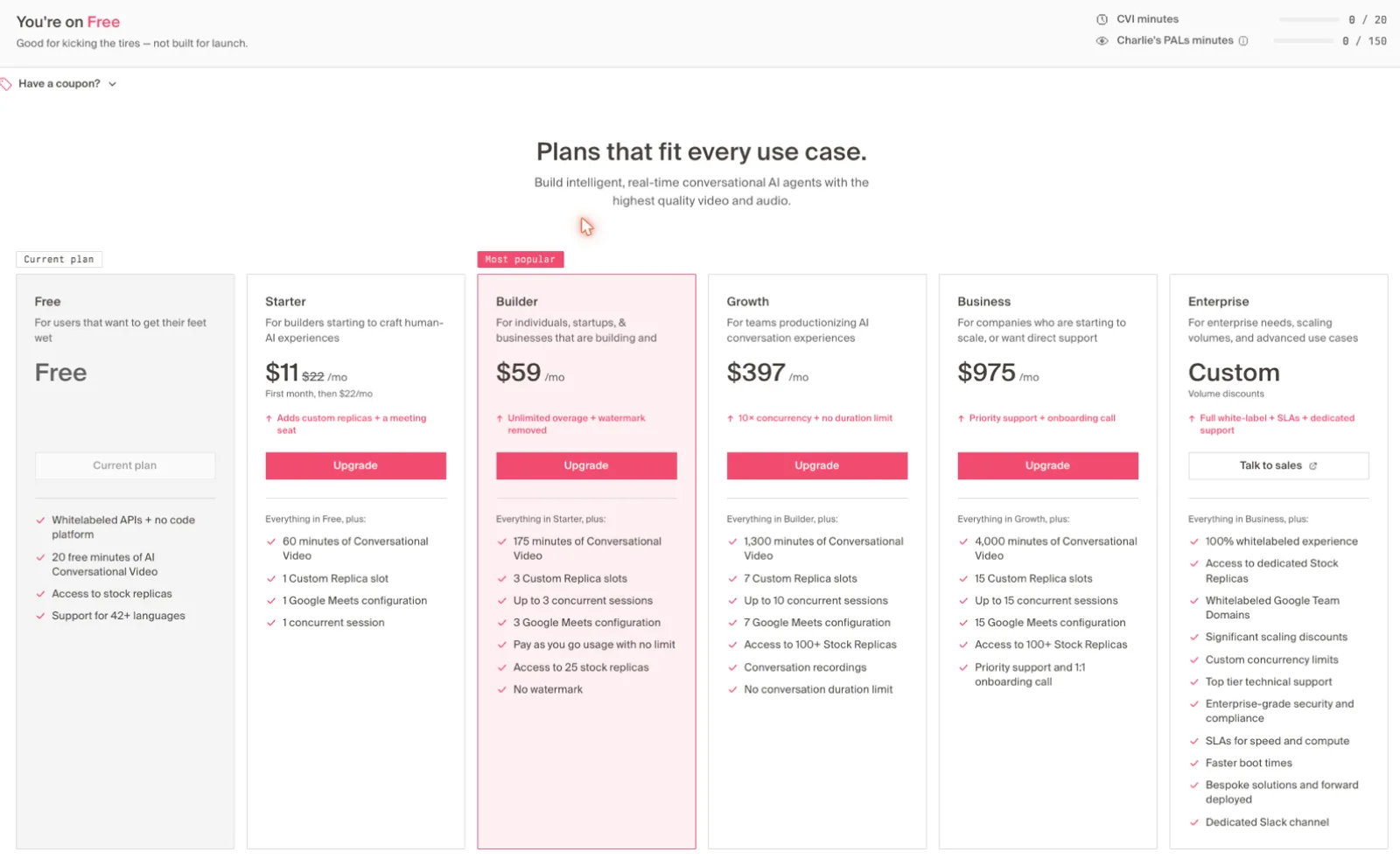
Tavus is priced like a developer platform, metered in conversational-video minutes rather than videos or credits. The tiers below are the in-app rates, verified in July 2026. Note that Tavus’s public pricing page and its live dashboard disagree on a few numbers; these are the in-app figures.
| Plan | Price (monthly) | What you get |
|---|---|---|
| Free | $0 | ~20 conversational-video minutes + 150 builder minutes, stock replicas, watermark, 42+ languages, whitelabel APIs |
| Starter | $11 first month, then $22 | 60 minutes, 1 custom replica, 1 concurrent session |
| Builder | $59 | 175 minutes, 3 custom replicas, 3 concurrent, no watermark, pay-as-you-go overage |
| Growth | $397 | 1,300 minutes, 7 custom replicas, 10 concurrent, conversation recordings, no duration limit |
| Business | $975 | 4,000 minutes, 15 custom replicas, 15 concurrent, priority support |
| Enterprise | Custom | Unlimited scale, dedicated support, white-label |
The number that governs your bill is minutes of conversation, and two details make it trickier than it looks. Once you pass your plan’s minutes, usage is billed pay-as-you-go per minute, so a popular agent has no fixed ceiling. And each conversation carries a 30-second minimum charge, which means a product built on lots of short interactions burns minutes faster than the headline allotment suggests.
The free plan is genuinely useful for evaluation. Twenty minutes of conversation is enough to build a simple agent, talk to it, and judge the realism, and the whitelabel APIs are open even at $0, which is unusually generous for a developer tool. What it withholds is what you would expect: custom replicas, watermark removal, and concurrency all start on the paid plans.
The honest read is that Builder at $59 is the first plan where Tavus behaves like a production tool, no watermark, real overage headroom, multiple replicas, and Growth and Business are where you land once real traffic hits your agent. For an individual kicking the tires, Free and Starter are plenty; for anything with users, budget for minutes the way you would budget for API calls.
Who is Tavus for?
- Developers building conversational AI products. This is the core audience. If you are shipping an app where users talk to an AI face in real time, Tavus’s APIs, replicas, and concurrency controls are built for exactly that, and it is the most capable option in the category.
- Product and support teams building AI agents. Support bots, onboarding guides, and interactive FAQs that talk back suit Tavus’s PAL model, and the knowledge base and guardrails let you scope an agent to your material and keep it on-topic.
- Sales and outreach teams wanting personalized video at scale. Tavus grew up doing personalized video, and its replicas can deliver one-to-many messages that feel individually recorded, which is a genuine fit for outbound.
- Educators and trainers building interactive tutors. A tutor or docent that a learner can question in real time is a natural use case, and the starter kits point straight at it.
- Teams that want to try the frontier of AI video. If real-time conversational avatars are where you think the puck is going, Tavus is the clearest place to experiment with them today.
- Not for: anyone who just wants a talking-head video from a script. If your job is a marketing clip, a training module, or a social video, Tavus is the wrong tool and will feel like overkill; HeyGen or Synthesia will be simpler, cheaper, and more polished for that. It is also not for anyone who needs production-grade reliability today, given the beta status.
The good
Tavus earns its 4.0 on genuinely leading technology and a developer-first design. Here are the six things that should sway you, strongest first.
The real-time conversation is remarkable
This is the headline, and it delivered. Talking to Charlie felt less like using a tool and more like a video call, the face reacted in the moment, the lip-sync tracked live speech, and the latency was low enough that the back-and-forth did not feel robotic. It is the closest thing to talking to a real person that I have tried in this category, and no scripted-avatar tool comes near it, because they are not built to do it at all.

It is genuinely API-first and developer-friendly
Tavus is infrastructure, not an app with an API bolted on. Every plan, including the free one, exposes whitelabeled developer APIs, replicas are addressable by ID, and the platform is organized around the pieces a builder needs: knowledge bases, tools, guardrails, and concurrency limits. For a team embedding conversational video into a product, that shape is exactly right, and it is rare to get full API access at $0.
The no-code builder lowers the bar
You do not have to write code to start. Charlie, the onboarding assistant, interviews you about the agent you want and assembles the persona, face, and behavior for you, and the starter kits are complete working apps you can launch in a few clicks. It is a smart way to let a non-developer feel the product before committing to an integration, and it makes the frontier tech approachable.
The replica render is the most convincing I tested
The Phoenix-4 render is what makes the whole thing work. In my test the avatar looked like a live person on a call rather than an animated character, which matters enormously for a conversation, where any uncanny stiffness would break the illusion instantly. Rendering a believable human face in real time is much harder than rendering a scripted clip, and it is the most convincing real-time render I have tried.
It is the reference tool for an emerging category
Conversational AI video is early, and Tavus is the name that comes up first for it. In the community discussions I read on Reddit and elsewhere, the recurring theme was that Tavus’s latency and realism sit ahead of what people expected from real-time AI. Being the reference implementation of a category is worth something if that is where you are placing your bets.
The free tier is a real evaluation
Twenty minutes of conversation plus open APIs is enough to actually build something and judge it, not just watch a sample reel. For a developer deciding whether to base a feature on Tavus, that hands-on runway at $0, with the whitelabel APIs included, is a genuinely useful way to de-risk the decision before spending.
The bad
Now the part the launch page skips. Tavus’s technology is ahead of the field, but it is early, narrow, and priced like the infrastructure it is.
It is still in beta, and it shows
The product is labeled beta, and my hands-on hit it directly: the first time I tried to start a conversation, it failed with “couldn’t reach the call, the service may be temporarily unavailable,” and only connected on a retry. A dropped call in a two-minute test is not a good omen for a product you would put in front of customers, and it is the clearest sign that Tavus is still maturing. If you need production-grade reliability today, that is a real risk to weigh.
It is the wrong tool for most avatar jobs
Tavus is narrow by design, and that cuts against most people who arrive looking for an “AI avatar.” If your job is a scripted video, a training module, a marketing clip, a talking-head explainer, Tavus is overkill and awkward, because it is built for live conversation, not one-way playback. The majority of avatar-video needs are better served by a scripted tool, which makes Tavus a specialist pick, not a default.
Pricing is complex and usage can run away
Metering by conversational minutes is the right model for what Tavus does, but it is harder to predict than a flat video plan. Overage is pay-as-you-go with no ceiling, and every conversation carries a 30-second minimum charge, so a product with lots of short sessions can burn through minutes and rack up per-minute costs faster than the plan’s headline number implies. Budgeting for it means thinking like you would about API spend, not a subscription.
Here are Tavus’s main limitations in one view, so you can weigh them against your needs:
| Limitation | The detail behind it |
|---|---|
| Still in beta | My live call dropped once before connecting on a retry |
| Narrow use case | Built for live conversation, not scripted talking-head video |
| Usage-based pricing | Metered per conversational minute, PAYG overage, 30-sec minimum charge |
| Thin review base | Only a handful of independent reviews (G2, Product Hunt) |
| Build effort required | Useful agents need a knowledge base, tools, and guardrails configured |
The independent proof is thin
Because Tavus is a developer platform rather than a mass-market app, there is very little independent review signal to lean on. Its G2 listing carries only a handful of reviews, its Product Hunt page a few more, and much of what surfaces for “Tavus reviews” is actually about the company as an employer rather than the product. That makes it harder to sanity-check a single hands-on test against a broad base of users than it is for HeyGen or Synthesia, which carry thousands of reviews each.
The best pieces are paid, as usual
The free plan is a real evaluation, but the things you need to ship are gated. A custom replica, your own AI clone rather than a stock face, starts on Starter, watermark removal and concurrency start higher, and the recordings and no-duration-limit features that a real deployment wants sit on Growth. None of that is unusual, but it means the version of Tavus you would actually run in production is a meaningful step up from the one you test for free.
Conversation quality is only as good as your setup
The render is excellent, but the agent’s usefulness depends on work you have to do: attaching a knowledge base, wiring tools, and setting guardrails so it stays accurate and on-topic. Out of the box a PAL will talk convincingly, but making it reliably helpful for your use case is a build effort, not a toggle. Tavus gives you the pieces; the quality of the result is on you.
Alternatives worth considering
If you decided Tavus is not the fit, here is where to look next, depending on what pushed you away. Here is how the leading AI-avatar tools compare at a glance.
| Tool | Best for | The main trade-off |
|---|---|---|
| Tavus (4.0) | Real-time conversational AI video agents | Beta, niche, and metered by the minute |
| HeyGen (4.3) | Lifelike scripted avatars for creators and social | A funnel-like free plan and opaque credits |
| Synthesia (4.6) | Enterprise training and corporate video at scale | A locked-down free plan; slow, priced by the minute |
| D-ID | Turning a photo into a talking presenter, plus agents | A narrower feature set than the leaders |
- HeyGen — if what you actually want is a scripted talking-head video for content or social, HeyGen makes the most lifelike creator avatars and is far simpler for a one-off clip. It is the tool to reach for when you need a video, not a conversation. See our full HeyGen review.
- Synthesia — if you are producing training or corporate video at scale, Synthesia is the enterprise standard, with the governance, languages, and integrations a company needs. It is the safer pick for standardized internal video. See our full Synthesia review.
- D-ID — if you want a lighter option that also dabbles in conversational agents, D-ID pioneered photo-to-video and offers real-time agents of its own, in a more consumer-friendly package than Tavus’s developer platform.
Of these, HeyGen and Synthesia are not really substitutes for Tavus so much as the right tools for the more common job. If you specifically need real-time conversation, Tavus is the one built for it.
Final word
Tavus earns its 4.0 by being the clear leader at something genuinely new. Talking to an AI human in real time, with a face that reacts in the moment, is a different experience from watching an avatar read a script, and Tavus does it more convincingly than anything else I tested, on an API-first platform that a team can actually build on. For conversational AI video, it is the tool to beat.
It is held back from a higher score by being early and narrow. The beta status bit me with a dropped call, the product is the wrong choice for the scripted-video jobs most people need, the pricing runs on hard-to-predict conversational minutes, and the independent proof is thin. None of that dents the technology; all of it means Tavus is a specialist bet, not a general-purpose pick.
So the decision comes down to what you are building. If you want users to talk to an AI face in real time, Tavus is the leading option and worth the rough edges. If you want a polished video from a script, this is not your tool, and HeyGen or Synthesia will serve you better. Try the free plan, build a small agent, and have a conversation with it; a few minutes will tell you whether the frontier is where your project lives.
Frequently asked questions
What is Tavus, exactly?
Tavus is a platform for conversational AI video, not scripted avatar clips. Instead of typing a script and getting a video of an avatar reading it, you define a persona (Tavus calls it a PAL) and its goals, and Tavus gives it a realistic face and voice so it can hold a real-time, two-way video conversation, listening and replying like a video call.
That makes it a fundamentally different tool from HeyGen or Synthesia. It is aimed at developers and product teams building things like AI support agents, sales reps, tutors, and interviewers, and it is API-first, though it now has a no-code builder too.
Is Tavus free?
There is a free plan for testing. It includes about 20 minutes of conversational video plus 150 minutes for building agents with Charlie, access to stock replica faces, and 42+ languages, with whitelabeled developer APIs even at $0.
What the free plan does not include: custom replicas (your own AI clone), watermark removal, or more than one concurrent session. It is enough to build a simple agent and talk to it, which is the point, but you will move to a paid plan quickly if you are shipping anything real.
How much does Tavus cost?
Tavus is metered in conversational-video minutes. The free plan is $0 for about 20 minutes. Starter is $11 for the first month then $22, with 60 minutes and one custom replica. Builder, the most popular plan, is $59 a month for 175 minutes, three custom replicas, no watermark, and pay-as-you-go overage. Growth is $397 for 1,300 minutes, and Business is $975 for 4,000 minutes, with Enterprise custom-priced.
The cost you have to watch is overage: once you pass your minutes, usage is billed per minute, and each conversation carries a 30-second minimum charge, so lots of short sessions add up faster than the plan minutes suggest.
Is Tavus better than HeyGen or Synthesia?
They do different jobs, so it depends on what you need. HeyGen and Synthesia make scripted talking-head videos, where an avatar reads a script you wrote. Tavus makes conversational video, where an AI agent holds a live, two-way video call.
If you want a video for content, training, or outreach, HeyGen or Synthesia are the right tools and far more mature. If you are building a product where users talk to an AI face in real time, Tavus is the leading option and neither of the other two is a real substitute.
What is a Tavus replica and the Phoenix model?
A replica is the visual likeness Tavus gives your AI agent. Stock replicas are pre-made faces you can use immediately; a custom replica is your own AI clone, trained from a short recording, and it requires a paid plan.
Both are rendered with Tavus's Phoenix model (Phoenix-4 as of July 2026), which handles the real-time human rendering and lip-sync that make the conversation look like a live person rather than a puppet. The realism of that render is Tavus's core technical advantage.
Is Tavus only for developers?
It started as a developer platform and still leans that way: every plan includes whitelabeled APIs, and replicas are referenced by ID like any API resource. But it now has a no-code builder, where an AI assistant named Charlie interviews you about the agent you want and assembles it for you.
So you do not strictly need to code to try it, and the starter kits go live in a few clicks. But the product's shape, the docs, the API-first plans, the concurrency limits, still speaks to teams building software, not to a solo creator making a one-off video.
Keep reading
Tavus pricing: what conversational video really costs
Tavus starts free and $22/mo, but you pay by the live conversation minute with a 30-second minimum on every call. Here's what your real bill looks like.
Synthesia alternatives: cheaper, or more lifelike?
Leaving Synthesia over the price or the stiff avatars? HeyGen (4.8 on G2) is more lifelike and cheaper, plus 5 more picks sorted by why you're switching.
HeyGen alternatives: the best one depends on why you left
Leaving HeyGen? The best HeyGen alternative isn't one tool: Synthesia (4.6 on G2) for training, Creatify for ads, Tavus for real-time, plus 3 more by job.
Best AI avatar generator: our picks for every use case
We tested the top AI avatar generators. Synthesia (4.6) wins for enterprise, HeyGen for creators, Tavus for live conversation. The best one for your use case.