
Tavus pricing: what conversational video really costs
Tavus starts free and $22/mo, but you pay by the live conversation minute with a 30-second minimum on every call. Here's what your real bill looks like.
Contents
How much does Tavus cost?

Tavus starts free and runs from $22 a month (Starter) up to $975 (Business), with a custom-priced Enterprise tier above that. For most teams building a real product, the $59 Builder plan is the sweet spot. The first month of any paid plan is half price, and annual billing takes 20% off.
But the plan fee is the easy part. Tavus does not charge by the video or the seat; it charges by the live conversation minute, and every call carries a 30-second minimum charge. Once you pass your plan’s monthly minutes you pay per-minute overage on top. So the real question is not “which plan” but “how many minutes will my users actually talk,” and this guide is mostly about that math. All figures are current as of July 2026, read live from Tavus’s pricing page.
| Plan | Price / mo | Conversation minutes | Custom replicas | Concurrent | Overage |
|---|---|---|---|---|---|
| Free | $0 | 20 | 0 (stock only) | 1 | — |
| Starter | $22 ($11 first mo) | 60 | 1 | 1 | pay-as-you-go |
| Builder ⭐ | $59 | 175 | 3 | 3 | ~$0.35/min |
| Growth | $397 | 1,300 | 7 | 10 | ~$0.31/min |
| Business | $975 | 4,000 | 15 | 15 | ~$0.26/min |
| Enterprise | Custom | Custom | Unlimited | Custom | Scaling discounts |
Prices and allowances current as of July 2026, read live from tavus.io/pricing. The “Overage” column is the metered rate past your included minutes; Free and Starter run pay-as-you-go without a published per-minute rate.
How Tavus pricing actually works
Tavus is not a scripted-avatar tool like HeyGen or Synthesia, and its pricing reflects that. It sells conversational video: real-time, two-way AI humans you talk to, built on its own stack of models. Raven-1 handles perception, so the agent can see and react to visual cues; Sparrow-1 handles turn-taking, so it knows when to speak and when to listen; and Phoenix-4 does the real-time face rendering that makes the result look like a person rather than a puppet.
Running all three live, per user, at once, is genuinely expensive compute, which is the reason Tavus meters time rather than selling a flat subscription like a video tool. The thing you pay for is the minutes one of those agents is live in a session, and everything else about the pricing follows from that.
A conversation minute is measured from the moment a call connects to the moment it disconnects, and it bundles the entire pipeline into one number, so there are no separate charges for the language model, the voice, or the video. That is genuinely simpler than rivals who meter tokens, characters, and render time separately: one Tavus minute already includes perception, the language model, text-to-speech, turn-taking, and WebRTC delivery. You are not assembling a bill from parts.
That simplicity is real, but it hides two mechanics that decide your bill.
The first is the 30-second minimum charge. Every conversation is billed for at least half a minute even if it lasts five seconds, and usage rounds up to the nearest six seconds. The second is subtler: a conversation is billed the moment it is created, whether or not a participant ever joins. Tavus auto-closes an empty session after five minutes, and you can pass test_mode = TRUE to avoid charges while developing, but a buggy integration that opens sessions nobody answers will still run up minutes.

One more mechanic sits on top: annual billing takes 20% off and locks your rate for the term, and you can move between plans, up or down, at any time. So the subscription side is flexible and cheap to change; it is the usage side, the minutes, that you actually have to forecast.
What each plan includes
The plans climb on three axes at once: included minutes, custom replicas (your own AI humans, each trained from a single image or a two-minute video), and concurrent sessions. Here is what each tier is really for.
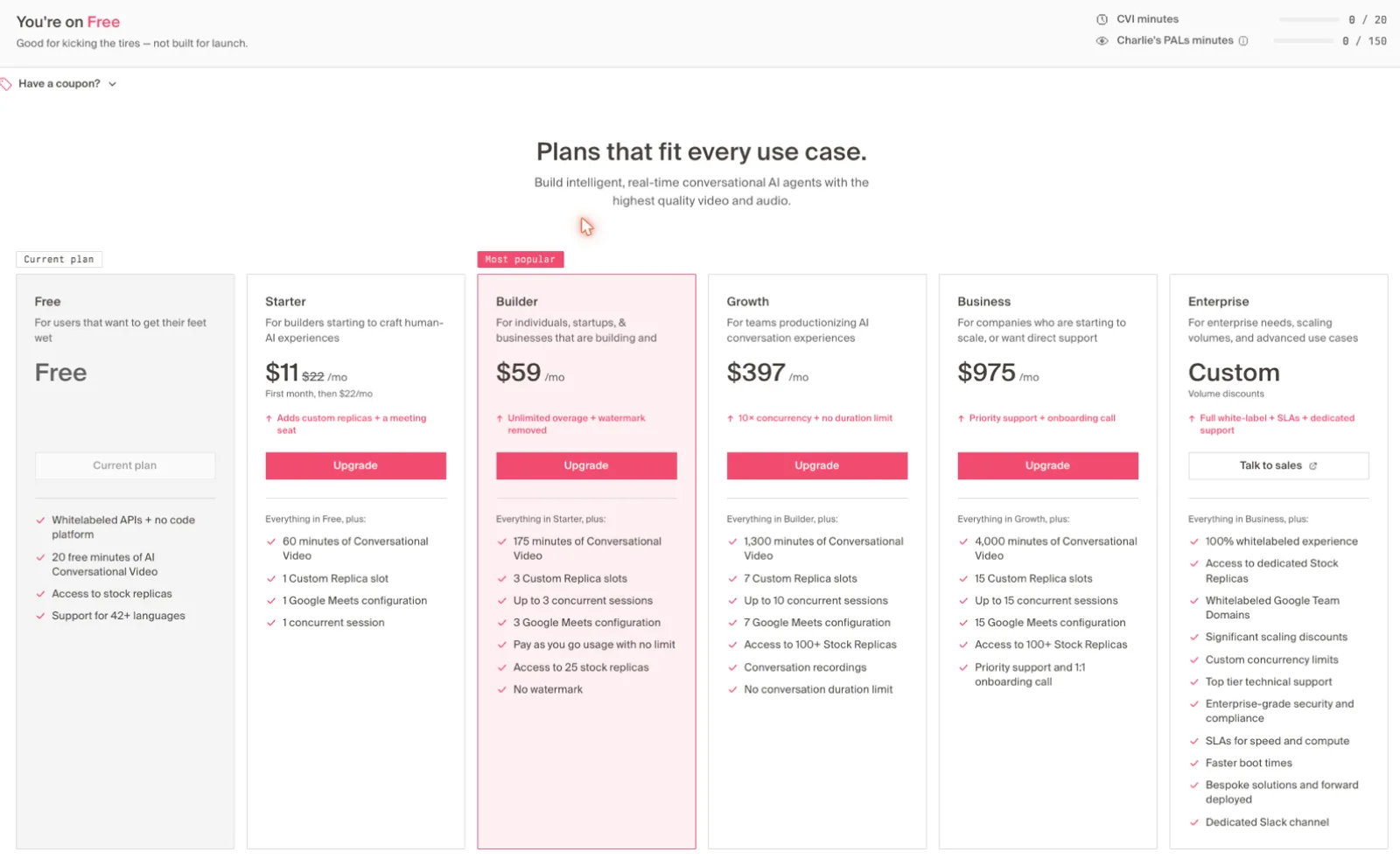
Free ($0) gives you 20 conversation minutes a month, one concurrent session, and access to Tavus’s stock replica library, with whitelabeled API access even at zero cost. What it withholds is custom replicas and watermark removal. It is a true build-and-test tier, enough to wire up an agent and talk to it, not a preview you cannot use. The 20 minutes go fast once you factor the 30-second minimum, so treat it as a proof-of-concept budget, not a runway.
Starter ($22, or $11 the first month) adds a single custom replica, 60 minutes, transcripts, and watermark-free output, still capped at one concurrent session. It suits a solo developer validating an idea, not a live product with real traffic.
Builder ($59) is the one Tavus marks most popular, and rightly so. It brings 175 minutes, three custom replicas, and up to three concurrent sessions, which is enough for a serious prototype or a low-volume production agent. Three concurrent sessions is the quiet upgrade that matters here: it is the first tier where two users can talk to your agent at the same time without one waiting. For most people shopping Tavus, this is the plan.
Growth ($397) is a real jump, not a step. It carries 1,300 minutes, seven replicas, up to 10 concurrent sessions, conversation recordings, and no per-call duration limit, and its overage rate drops to about $0.31 a minute. You move here when you are productionizing rather than testing, and specifically when either your monthly minutes push past roughly 1,150 or you need more than three simultaneous conversations. Below that, it is more plan than most builders use.
Business ($975) carries 4,000 minutes, 15 replicas, 15 concurrent sessions, the lowest overage rate at about $0.26 a minute, and priority support with a 1:1 onboarding call. It is aimed at products running real, sustained volume. Enterprise is custom-priced for unlimited replicas, a fully white-labeled experience (your branding on the whole flow, not Tavus’s), custom concurrency limits, guaranteed SLAs, and SOC 2 / HIPAA compliance, which is the tier regulated industries and large deployments land on.
What your real bill looks like
The included-minutes number is where a plan is cheap or expensive, so map it to your actual usage before you pick. Effective cost per included minute (price divided by minutes, as of July 2026) falls steadily as you climb: Starter is about $0.37 a minute, Builder around $0.34, Growth roughly $0.31, and Business closer to $0.24. Bigger plans are not just bigger buckets, they are cheaper buckets.
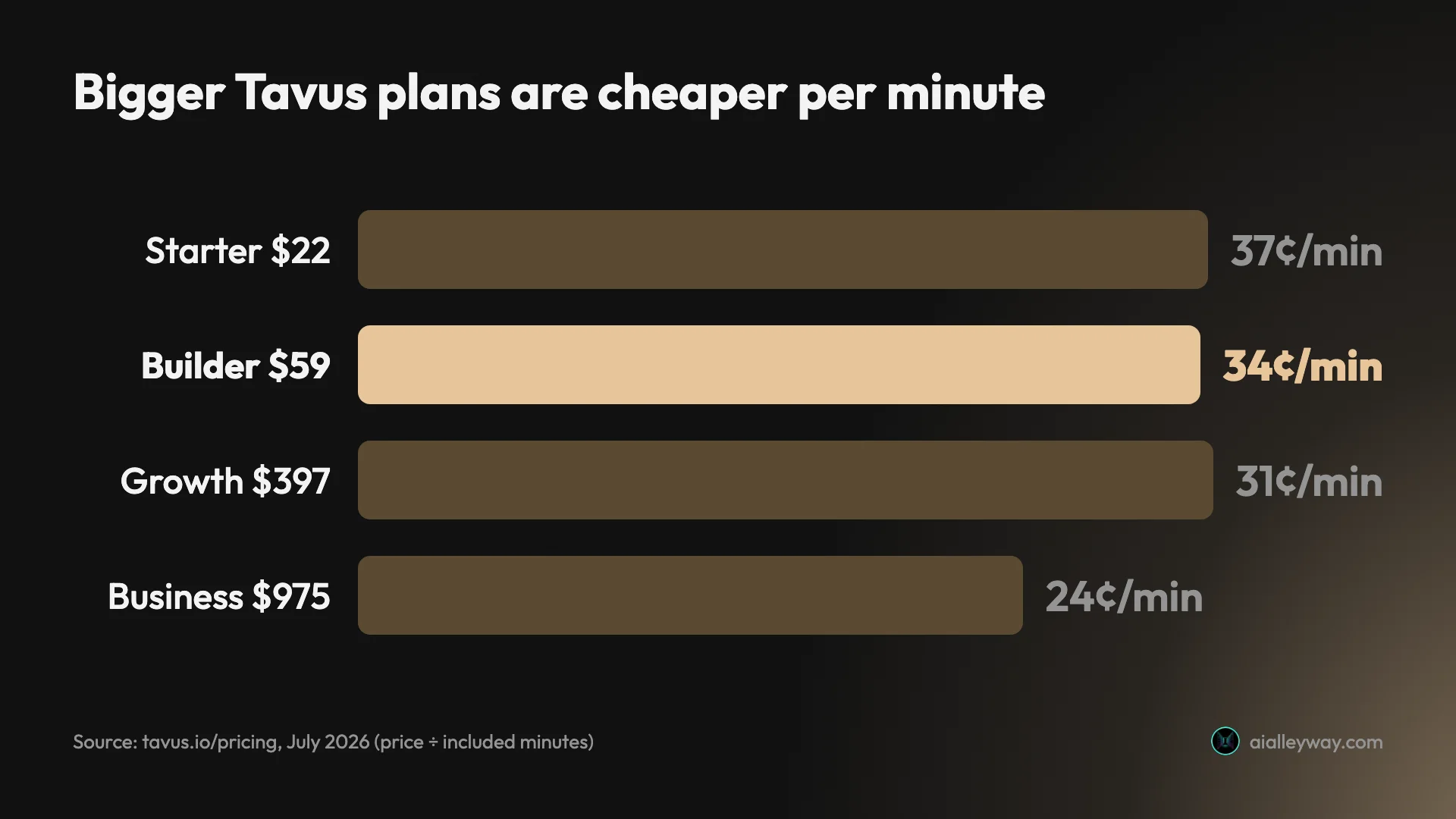
That declining rate is why the overage math decides your plan, not the sticker price. Say you run 500 conversation minutes a month. On Builder you pay $59 plus 325 overage minutes at about $0.35, roughly $173 all in. On Growth you pay a flat $397 but have 1,300 minutes included, so you are nowhere near overage. Builder wins at 500 minutes, but as your usage climbs toward 1,150, Builder’s overage catches up to Growth’s flat fee and Growth becomes the cheaper home.
Now run the same math for three real products. A weekend prototype doing 40 minutes of demo calls lives comfortably on Builder’s 175 included minutes at a flat $59. A customer-onboarding agent handling maybe 800 minutes a month is the awkward middle: on Builder it is $59 plus about 625 overage minutes at $0.35, near $278, so Growth’s flat $397 is not yet worth it, but you are one busy month from it being close.
A support bot fielding 5,000 minutes a month clearly belongs on Business: covering that on Growth runs about $1,544 (its $397 plus 3,700 overage minutes at $0.31), where Business handles it for roughly $1,235 ($975 plus 1,000 overage at its cheaper $0.26). The point where Business starts beating Growth on pure cost is around 3,200 minutes; below that, Growth is cheaper and you would only move up for the extra concurrency and replicas.
The practical rule: find the plan whose included minutes cover your realistic monthly volume, then treat overage as a buffer for spikes, not as your normal operating mode. If overage is a routine line on your bill, the next tier up is almost always cheaper. And model the busy month, not the average one, because Tavus never throttles you, so a traffic spike lands straight on the invoice.
How to keep your Tavus bill down
The per-minute model rewards a few habits, and they are worth building in early rather than discovering on your first big invoice.
| Lever | What it saves |
|---|---|
test_mode = TRUE while building | Every development minute |
| Close sessions in code on user-exit | Idle minutes up to the 5-minute auto-close |
| Right-size the plan, let overage flex | Over-provisioning to a bigger tier |
| Audio-only mode where a face isn’t needed | Discounts (Tavus says these are coming) |
| Count replica overage, not just minutes | $40–$65 per extra custom replica |
Test with test_mode on. Tavus bills a conversation the moment your code creates it, so an afternoon of debugging can quietly spend real minutes. Passing test_mode = TRUE runs the whole creation-and-connection flow without charging, which is the single biggest saving during development.
Close sessions explicitly. Because an idle session bills until it auto-closes at the five-minute mark, ending conversations in code the instant a user leaves stops you paying for dead air. For a product with lots of drop-offs, that alone can shave a real slice off the meter.
Right-size the plan, then let overage flex. Do not buy Growth to feel safe if your real volume fits Builder; the overage exists precisely so you do not have to over-provision. Buy the tier your normal month needs and let pay-as-you-go absorb the occasional spike. Only move up when overage becomes a habit.
Use audio-only where you can. Tavus runs the same pipeline in an audio-only mode as well as full video, and its pricing page says discounts for the audio-only mode are coming. If a given interaction does not need a face on screen, that cheaper mode is a lever worth watching.
Watch replicas, not just minutes. If your product spins up many branded AI humans, the per-replica overage ($65 on Builder, $40 on Growth beyond your included trainings) can rival the minute cost. Count both before you pick a tier.
Tavus pricing vs the scripted-avatar tools
It is worth being clear why Tavus costs what it does, because a lot of confusion comes from comparing it to the wrong products. Tools like HeyGen and Synthesia sell rendered videos: you write a script, they generate a talking-head clip, and you pay per credit or per finished minute of a file you keep. The cost is bounded and predictable because the output is a fixed asset.
Tavus sells live time. There is no finished file, there is a real-time agent holding a two-way conversation, and you pay for every minute it is running, plus the 30-second floor on each call. That is a fundamentally different, usage-metered model, closer to a cloud-compute bill than a video subscription. It is why Tavus can look expensive next to a $29 HeyGen plan and still be the only tool that does the job: they are not selling the same thing. If your use case is scripted video, the per-minute model is simply the wrong meter, and that is the real signal to look elsewhere.
There is also a separate consumer product to avoid confusing with the developer pricing above. Tavus’s “PALs” plans ($0, $20, and $50 a month) are personal AI-companion subscriptions billed in flat call minutes, not the API-metered CVI product a builder wants. The tiers in this guide are the developer plans; the PALs plans are a different offering entirely.
Pitfalls the pricing page soft-pedals
- The 30-second minimum punishes short sessions. A product built on quick, one-question interactions pays for 30 seconds each time, so 200 ten-second chats cost the same as 100 minutes of talk. If your sessions are short and frequent, model the minimum, not the average.
- Empty sessions still bill. Because a conversation is charged on creation, a front-end bug or an abandoned call that never connects can accrue minutes. Use
test_modewhile developing and close sessions explicitly in production. - Video generation is a separate meter. Tavus’s async MP4 video generation has its own small minute allowance (5 to 100 by tier) and its own ~$1-a-minute overage. The plan’s big headline number is CVI (live conversation) minutes; do not budget video generation against it.
- Custom replicas have their own overage. Past your plan’s included replica trainings, each extra custom replica is a one-time fee, about $65 on Builder and $40 on Growth. A team spinning up many branded personas should count replicas, not just minutes.
- Concurrency, not just minutes, can force an upgrade. Free and Starter allow only one live session at a time, so the first time two users try to talk to your agent at once, one waits, no matter how many minutes you have left. Any real product needs Builder’s three concurrent sessions or more, which means concurrency, not minute count, often sets your floor.
- Annual billing locks the rate. The 20% annual discount is real, but it commits you for the term. Take it once your volume is stable; on a monthly plan while you are still finding product-market fit, the flexibility to downgrade is worth more than the discount.
- It is still in beta. In our hands-on Tavus review the technology impressed but the first call dropped before reconnecting, so budget for some roughness alongside the bill.
Which Tavus plan should you pick?
- Just exploring the API? Start on Free (20 minutes) and use
test_modeso development does not eat them. - A solo developer validating one idea? Starter ($22) buys a custom replica and 60 minutes; enough to demo, not to launch.
- Building a real product prototype or a low-volume agent? Builder ($59) is the default answer, with three replicas, three concurrent sessions, and 175 minutes.
- Running a production agent past ~1,150 minutes a month or needing 10 concurrent sessions? Move to Growth ($397) before overage on Builder passes its flat fee.
- High volume, compliance, or white-labeling? Business ($975) or Enterprise. Skip these unless you genuinely need 15+ concurrent sessions, SOC 2 / HIPAA, or your own branding on the whole experience.
The one number that overrides all of these is concurrency. You can be well within your minutes and still need to move up because your product briefly has more simultaneous conversations than your tier allows, and that ceiling, not the minute count, is what makes an agent feel broken to a user who has to wait. Size the plan for your busiest concurrent moment first, then check the minutes.
If Tavus isn’t the right fit
Tavus is priced and built for real-time conversation, so the honest alternative depends on whether you actually need that. If you only need an avatar to read a script rather than hold a live conversation, you are paying for the wrong thing, and a scripted-avatar tool is cheaper and more mature.
See our HeyGen pricing guide for the credit-based option and our Synthesia review for the enterprise-training one; both make talking-head video far more cheaply than Tavus’s per-minute live pricing, and our best AI avatar generator roundup lines up the scripted-avatar field by use case. If you landed here after weighing Synthesia, our Synthesia alternatives guide covers where Tavus fits among them as the real-time pick.
But if you genuinely need a two-way AI human that listens and responds in real time, there is no cheap shortcut, because that is the category Tavus effectively defines. Most tools that come up as Tavus alternatives target marketing-led personalized video rather than the developer-grade real-time conversational API Tavus sells, so they solve a related but different problem. In that case the decision is which Tavus tier, not which rival, and the plan-by-plan guide above is the whole answer.
Final word
Tavus pricing looks simple, six tiers from free to custom, and it mostly is. The complexity that catches people is under the headline number: you pay by the live conversation minute, every call bills at least 30 seconds, and overage past your allowance is where the real cost lives. Pick the tier whose included minutes match your realistic volume, and the bill stays predictable.
Frequently asked questions
How much does Tavus cost?
As of July 2026, Tavus has a free plan and five paid tiers: Starter at $22 a month, Builder at $59, Growth at $397, Business at $975, and custom-priced Enterprise. The first month of a paid plan is half price, and paying annually takes 20% off.
But the plan fee is only part of the bill. Tavus meters usage in live conversational-video minutes, and once you pass your plan's monthly allowance you pay per-minute overage on top of the subscription. So two teams on the same $59 Builder plan can pay very different amounts depending on how many minutes of real-time conversation they actually run.
What is a Tavus conversation minute?
A conversation minute is the time an AI human is live in a session with a user, measured from when the video call connects to when it disconnects. It covers Tavus's whole pipeline in one number: the perception model (Raven), the turn-taking model (Sparrow), and the face-rendering model (Phoenix-4).
The detail that costs people money is the 30-second minimum charge. Every conversation is billed for at least 30 seconds even if it lasts five, and usage is rounded up to the nearest six seconds. A product that opens lots of very short sessions burns minutes far faster than the raw talk-time suggests.
Does Tavus have a free plan?
Yes. The free developer plan is $0 and includes 20 minutes of conversational video a month, access to Tavus's library of stock replicas, whitelabeled API access, and support for 40-plus languages. It is enough to build a simple agent and talk to it.
What the free plan does not include: custom replicas (your own AI human), watermark removal, or more than one concurrent session. It is a genuine build-and-test tier rather than a preview you cannot use, but you will move to Starter or Builder the moment you ship anything real.
What happens if I go over my Tavus plan minutes?
On every paid plan you keep going. Tavus's overage is pay-as-you-go with no cap, so you are billed for the extra minutes at your plan's per-minute rate rather than being paused or throttled. The rate falls as the plan gets bigger: about $0.35 a minute on Builder, $0.31 on Growth, and $0.26 on Business.
That is the number to model before you commit. If you consistently run well past your allowance, the overage can quietly exceed the subscription, and at that point the next tier up (with its lower per-minute rate and bigger bucket of included minutes) is usually cheaper than staying put and paying overage.
Which Tavus plan is the best value?
Builder, at $59 a month, is the sweet spot for most teams building a real product. It includes 175 conversation minutes, three custom replicas, up to three concurrent sessions, and no watermark, which covers a serious prototype or a low-volume production agent.
Starter at $22 is really a stepping stone (60 minutes, one replica, one concurrent session), fine for a solo developer testing an idea. Growth at $397 makes sense once you are past roughly 1,150 minutes a month or need more than three concurrent conversations, because around there Builder's overage catches up to Growth's flat fee.
Is Tavus's video generation priced separately from conversation minutes?
Yes, and mixing them up is a common budgeting mistake. Tavus's core product is the Conversational Video Interface (CVI), the real-time two-way agent, and that is what conversation minutes meter. Tavus also has a separate async video-generation feature that renders MP4 clips, and it has its own minute allowance and its own overage rate (around $1 a minute).
So a plan's headline minute count is its CVI allowance, not video generation. If your use case is rendering avatar videos rather than live conversations, you are pricing the wrong meter; check the video-generation row on each tier separately.
Keep reading
Tavus review: the AI avatar that talks back
I had a real-time video conversation with Tavus's AI. It's the most futuristic avatar tool I've tested, the most niche, and still in beta. Who it's for.
Best AI avatar generator: our picks for every use case
We tested the top AI avatar generators. Synthesia (4.6) wins for enterprise, HeyGen for creators, Tavus for live conversation. The best one for your use case.
HeyGen pricing: what the credits really cost
HeyGen starts at $29/mo, but credits decide your real cost: 600 credits is 30 min of premium avatar or 200 on the cheaper engine. Here's the full breakdown.

The Best AI Video Generator for Every Kind of Video
The best AI video generator depends on the job. We tested 10 hands-on: Google Veo for generation, Synthesia for avatars, Fliki for script-to-video, and more.