
HeyGen alternatives: the best one depends on why you left
Leaving HeyGen? The best HeyGen alternative isn't one tool: Synthesia (4.6 on G2) for training, Creatify for ads, Tavus for real-time, plus 3 more by job.
Contents
You did not come here because HeyGen is bad. You came here because something about it stopped working for you: the free plan that generates a video and then refuses to let you download it, the credit math that turns 600 Creator credits into barely 30 minutes of the good avatar engine, or the growing sense that a marketing-clip tool is not the right home for training video or ads at scale.
Short answer: for most people leaving HeyGen the best alternative is Synthesia, but the right one depends on why you are leaving, so this guide sorts six of them by the job you are switching for.
So the useful question is not “what is the best HeyGen alternative.” It is “what are you switching for.” Most alternatives lists just re-rank the same six avatar tools and call it a day. This one sorts them by the job, because the right replacement for someone building a support agent is not the right replacement for someone shipping compliance training.
We come at this having actually used HeyGen. In our HeyGen review we generated a real avatar clip on the free plan, hit the download wall first-hand, and scored it 4.3 out of 5, high marks for avatar quality, docked for the funnel. So this is not a list assembled from other people’s screenshots.
Three of the tools below we tested hands-on: HeyGen, Synthesia, and Tavus each got a full review on this site, with real clips generated and real dashboards captured. The other three, Colossyan, Creatify, and D-ID, we assessed from their pricing pages, feature docs, and aggregate ratings, and we say which is which as we go. Where a claim comes from our own testing, it reads in the first person; where it comes from research, we flag it. Here is where each one wins.
The short version
- Best overall replacement: Synthesia — the closest like-for-like, enterprise-clean, 4.6 on G2.
- Best for training and L&D: Colossyan — built for courses, quizzes, and SCORM.
- Best for UGC ads at scale: Creatify — URL-to-video, batch production, ad-platform exports.
- Best for real-time conversation: Tavus — talk to an AI face, not read a script to it.
- Best for developers: D-ID — API-first, photo-to-video, mature SDK.
- Best free plan: Vidnoz — three-minute renders and 1,800+ avatars at no cost.
How did we choose these HeyGen alternatives?
A generic “best AI avatar tool” ranking is exactly the content AI search has killed, because there is no single best. There is a best for training, a best for ads, a best for real-time, and a best for the person who just wants to stop fighting a watermark. So we scored these tools against the specific reason someone leaves HeyGen.
Three criteria did the sorting. The job: scripted talking-head video is one category, conversational real-time video is a different one, and course authoring is a third. Putting them on one leaderboard is how you end up recommending the wrong tool. The wall you are escaping: HeyGen’s free plan blocks downloads, so we noted which alternatives fix that at the free tier and which just move the wall. The real cost per minute, not the sticker price, because avatar tools meter in minutes and credits that run out faster than the monthly number suggests.
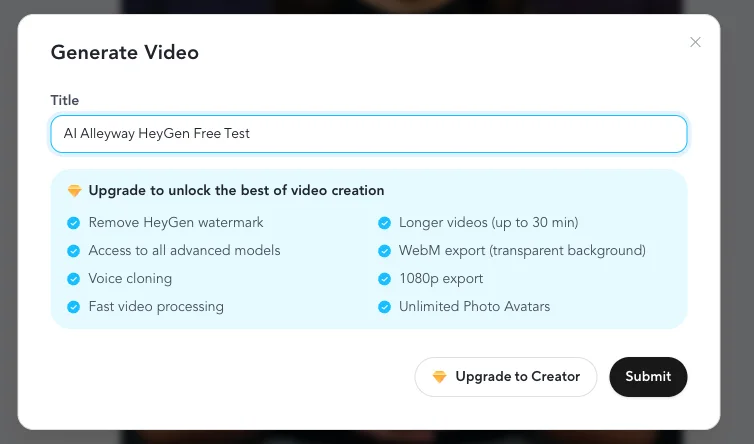
The watermark-and-download wall is worth a hard look, because it is the single most common reason people bounce off HeyGen’s free plan. This is what it looks like: a finished, genuinely impressive avatar clip you are not allowed to keep.

Here is the honest part most lists skip: if that wall is your only problem, you may not need an alternative at all. HeyGen’s $29 Creator plan removes the watermark, turns downloads and 1080p back on, and its avatars remain among the most lifelike anywhere (a 4.8 on G2 across 1,500-plus reviews as of July 2026, the highest avatar-quality score in the category). Switching tools to dodge a free-tier limit is often wasted effort. The reasons that actually justify a switch are structural, and each one points at a different tool below.
Two patterns hold across almost every tool here, and knowing them saves you a nasty surprise. The first is that the free plan is a funnel, not a gift. Synthesia, Colossyan, Creatify, and Vidnoz all watermark their free output, and most cap the length or block the download the same way HeyGen does. Vidnoz is the most generous of them, but “generous free tier” still means “watermarked preview.” Judge a free plan by whether it lets you evaluate quality, not by whether it lets you ship.
The second pattern is that the sticker price is not the price. Every one of these tools meters you in minutes or credits that expire monthly, so the number that matters is cost per finished minute, not the plan fee. A $59 plan with tight minutes can cost more per video than a $64 plan with generous ones. Before you commit, map your actual monthly output (how many videos, how long) against each plan’s allowance, because that is where the real bill hides, and it is rarely on the pricing page in plain sight.
HeyGen alternatives compared
| Tool | Best for | Free plan | Starts at | Our take |
|---|---|---|---|---|
| Synthesia | Enterprise & training video | Yes (watermark, no download) | $18/mo | The closest like-for-like; our top avatar pick |
| Colossyan | L&D, courses, SCORM | Yes (20 min/mo) | $59/mo | Purpose-built for instruction, not marketing |
| Creatify | UGC-style ads at scale | Yes (10 credits, watermark) | $39/mo | Batch ad production HeyGen doesn’t focus on |
| Tavus | Real-time conversation | Yes (~20 min) | $22/mo | A different category: two-way video agents |
| D-ID | Developers, photo-to-video | Free trial (watermark) | $4.70/mo | API-first and mature; strong SDK |
| Vidnoz | A usable free tier | Yes (3-min, 720p) | Credit-based | The most you can do without paying |
1. Synthesia — best overall replacement

If you want the HeyGen experience without HeyGen, this is it. Synthesia does the same core job (type a script, get a talking-avatar video) and does it with the polish enterprises pay for. In our hands-on Synthesia review it scored 4.6 out of 5, a Category Leader, and it is our top pick in the best AI avatar generator roundup.
The difference you feel immediately is the workflow. When I generated a clip on Synthesia’s free plan, it just worked, no switching the “Motion Engine” to an older model to get a render out of the free tier, which is the dance HeyGen made me do. The output was clean and natural on the first try.

What you are really buying is enterprise shape: 125-plus avatars, 160-plus languages with one-click translation on Enterprise, PowerPoint import, SCORM export, SSO, and content moderation that screens both the script and the finished video. That governance is why it holds a 4.6 on G2 across more than 2,700 reviews as of July 2026 and, by Synthesia’s own count, reaches most of the Fortune 100.
Pricing starts at $18 a month on the Starter plan (billed yearly), $64 for Creator, and custom for Enterprise. Two honest caveats. First, it is not cheaper than HeyGen: Creator’s 360 minutes a year works out to roughly $2 a minute of finished video, which adds up fast at volume.
Second, its free plan has the identical watermark-and-no-download limitation, and it renders slower than HeyGen because it moderates both your script and the finished video before releasing it. In my test a nine-second clip took four to five minutes, where HeyGen returned a comparable clip in about one. That moderation is a deliberate enterprise safety feature, not a bug, and it is part of why big companies trust it with their brand. You move to Synthesia for the polish and governance, not for speed or savings.
| The good | The catch |
|---|---|
| Enterprise-clean output, 4.6 on G2 (2,700+ reviews) | Not cheaper than HeyGen; ~$2/min at volume |
| 160+ languages, SCORM, SSO, content moderation | Slower renders (moderation step) |
| No engine gymnastics to get a clip out | Free plan still watermarks and blocks download |
Who it’s for: anyone standardizing training, onboarding, or corporate video across a team, and anyone who wants the safest, most-supported scripted-avatar tool on the market.
2. Colossyan — best for training and L&D

Colossyan is what you switch to when your videos are not marketing, they are teaching. Where HeyGen and Synthesia treat the finished video as the deliverable, Colossyan treats it as a lesson. You can add branching scenarios that send a learner down a different path based on their choice, embed knowledge-check quizzes directly inside the video, and export SCORM packages that drop straight into a learning management system with the scoring intact. None of that is a bolt-on; it is the point of the product.
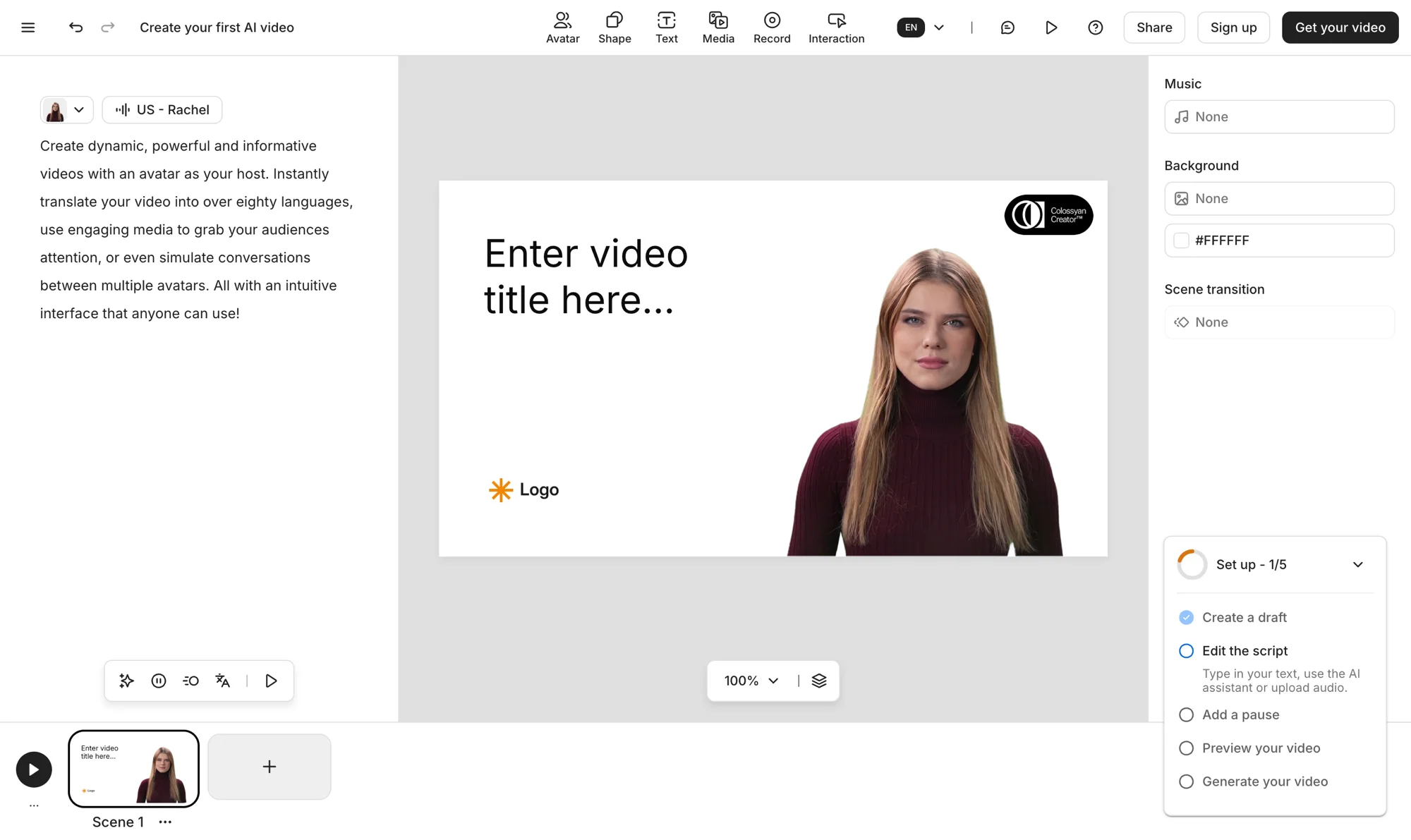
That instructional focus is why training teams pick it over the bigger names, and it shows up in every serious “HeyGen alternatives for L&D” discussion. On the video side it is no slouch either: it holds a 4.6 on G2, runs two avatar engines (its standard NEO and the more lifelike NEO2), and handles auto-translation across dozens of languages, so a single course can localize without a reshoot.
The one thing to watch is how the plan meters you. The free Starter tier gives you 20 minutes a month with NEO and a 14-day trial that needs no card, which is enough to build a real lesson and judge the fit. Professional is $59 a month billed yearly and is where the useful features live: watermark removal, unlimited MP4 downloads, AI image generation, and five SCORM exports a month, though NEO2 minutes are capped tighter than NEO. Extra editors are $30 each, and unlimited SCORM, SSO, and SOC 2 Type II sit on custom-priced Enterprise. For a solo creator that is steep; for an L&D team replacing an agency, it is not.
| The good | The catch |
|---|---|
| Built for instruction: quizzes, branching, SCORM | Pricier entry ($59) than general avatar tools |
| Two avatar engines (NEO, NEO2) + auto-translation | NEO2 minutes capped tighter than NEO on Pro |
| 14-day trial, no card, 4.6 on G2 | SSO and unlimited SCORM are Enterprise-only |
Who it’s for: learning and development teams building courses, compliance, or onboarding that has to live inside an LMS, and who need quizzes and SCORM more than they need the widest avatar library.
3. Creatify — best for UGC-style ads at scale

Creatify is built for the one job HeyGen treats as a side feature: churning out ad creative. Paste a product URL and it writes a script and generates a video ad around it; run that in batch and it produces dozens of variants at once; then it exports straight to ad platforms through a built-in launcher and performance tracker. This is a performance-marketing tool that happens to use avatars, not an avatar tool that happens to make ads.
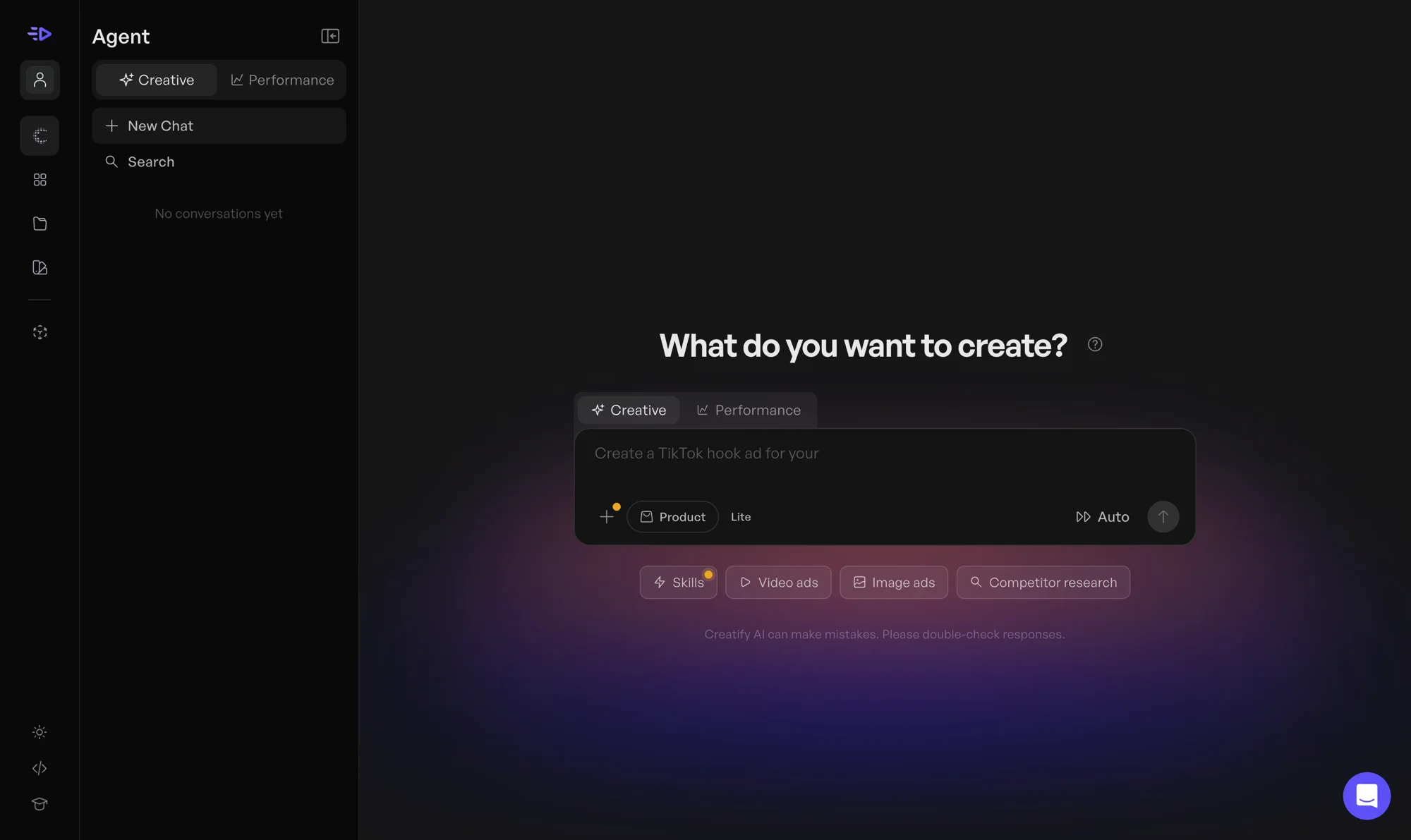
The library is sized for volume, not for one hero video. It ships hundreds of AI actors (300 on the entry tier, 1,500-plus on Pro) and hundreds of templates deliberately styled to look like scrappy, hand-held UGC rather than a polished studio spokesperson. That “real person filmed this on their phone” aesthetic is exactly what converts on TikTok and Reels, and it is a genuinely different output from a HeyGen avatar reading a corporate script. The trade is that if you want one crisp, on-brand presenter video, Creatify is the wrong shape.
Pricing runs from a free tier (10 credits a month, watermarked) to $39 a month for Starter (100 credits) and $99 for Pro (300 credits, marked most popular, up to five seats, and the ad launcher and tracker). The number that bites is credits: one credit is roughly one rendered video, so a marketer A/B testing 20 hooks a week clears the Starter allowance fast and is really shopping the Pro tier. Enterprise adds a done-for-you studio service, white-labeling, and API discounts.
| The good | The catch |
|---|---|
| Purpose-built for UGC-style ads at scale | Wrong tool for a single polished spokesperson |
| URL-to-video, batch output, ad-platform export | Credits = videos; heavy testing burns them |
| 300–1,500 AI actors, TikTok-native templates | Free tier is watermarked, 10 credits only |
Who it’s for: performance marketers and agencies producing UGC-style video ads in volume, who care about batch output and ad-platform integration more than avatar realism.
4. Tavus — best for real-time conversation

Tavus is the one tool here that is not really a HeyGen competitor, and that is exactly why it is on the list. It does not make scripted talking-head clips. It builds conversational video: real-time, two-way AI agents with a face and a voice that you can actually talk to, like a video call with a piece of software.
In our hands-on Tavus review it scored 4.0, a Power Tool. I held a live conversation with “Charlie,” its onboarding agent, and the real-time video was the closest thing to talking to a person I have tested. The rendering (its Phoenix-4 model) is the most advanced in the category.

The trade-offs are real. It is still in beta, and my first call dropped before reconnecting on a retry. It is API-first and aimed at developers: you define a persona (Tavus calls it a PAL), give it goals, and reference stock or custom replica faces by ID, though a no-code builder named Charlie now interviews you and assembles an agent for you.
It also meters in conversational minutes with pay-as-you-go overage, where each conversation carries a 30-second minimum charge, so lots of short sessions burn minutes faster than the plan number implies. Pricing runs from free (about 20 minutes) to $22 Starter to $59 Builder, the popular tier, and up to Growth and Business for heavier volume.
| The good | The catch |
|---|---|
| Real-time two-way video no scripted tool matches | Still in beta; a call dropped in testing |
| Phoenix-4 rendering; API-first with a no-code builder | Wrong tool for a plain scripted clip |
| Whitelabeled APIs even on the free plan | Overage + 30-sec minimum charge per call |
Who it’s for: developers and product teams building support agents, AI sales reps, tutors, or interviewers, where a user talks to an AI face in real time. If you only need an avatar to read a script, this is the wrong tool.
5. D-ID — best for developers
D-ID is the veteran of the group and the one built for people who want to put avatars inside their own product rather than make videos in a dashboard. Its original specialty is animating a single still photo into a talking head, and it has spent years turning that into infrastructure: the API and SDK are mature enough that D-ID quietly powers the avatar features inside plenty of other apps you have used. It also offers real-time interactive avatars, which puts it partway between the scripted tools and Tavus without fully committing to either.
For a developer, that API-first design is the entire draw. You are not clicking through a timeline; you are calling an endpoint, passing a photo and a script or a live audio stream, and getting a rendered talking head back to embed wherever you like. That makes D-ID the natural pick if avatars are a feature of the thing you are building, not the deliverable itself.
For a non-developer, D-ID’s Studio still works as a straightforward web app, and the photo-to-video path is genuinely useful when you want a specific face (a founder, a brand character) rather than a stock avatar. The honest trade is realism: we have not put D-ID through the same hands-on test as HeyGen, but independent reviews consistently find its talking heads read a touch stiffer than HeyGen’s newest Avatar IV and V engines, especially on body movement. It is a precision tool for a specific job, not the most lifelike avatar on the market.
Studio pricing starts with a free trial (3 minutes, full-screen watermark), then Lite at $4.70 a month, Pro at $16, and Advanced at $108 (all billed annually; month-to-month runs higher), up to custom-priced Enterprise. Those tiers buy monthly video minutes (10, 15, and 100 respectively) that do not roll over, and API access is billed separately on its own scale. So the entry price undercuts most rivals here, but the minute allowances are tight, which fits D-ID’s real use case: short, API-driven clips rather than long talking-head videos.
| The good | The catch |
|---|---|
| Mature API/SDK; embeds avatars in your product | Avatars less lifelike than HeyGen’s top engines |
| Photo-to-video: animate a specific real face | Tight minute caps (10–100 min/mo by tier) |
| Real-time interactive avatars available | Minutes do not roll over; trial is watermarked |
Who it’s for: developers embedding avatars via API, and anyone whose core use case is turning a photo into a talking presenter rather than picking from a stock avatar library.
6. Vidnoz — best free plan

If the reason you are leaving HeyGen is that its free plan hands you nothing to keep, Vidnoz is the most generous free tier of the bunch. It lets you render up to three minutes per video, exports at 720p, and opens up more than 1,800 avatars, 3,200-plus templates, and hundreds of voices without paying a cent, where HeyGen’s free plan generates a clip and then blocks the download outright. For someone who just wants to see whether AI avatars are good enough for their work, that is a far more honest free trial.
It is still a preview tier, to be clear. The free output carries a Vidnoz watermark and caps at 720p, so it is not a way to make finished, publishable video forever. But as a sandbox to test avatar quality, try a dozen templates, and produce a usable rough cut at no cost, it lets you do more than anyone else on this list before the paywall. That generosity is the whole pitch, and it is a real one.
The trade is realism. We tested Synthesia and HeyGen but not Vidnoz directly; by most accounts its avatars sit a visible step below their newest engines, cleaner than you would expect for free but not quite broadcast-grade. Paid plans are credit-based and add 1080p, watermark removal, 60-minute videos, faster processing, and on the Business tier voice cloning, video translation, and a brand kit. Credits do not roll over month to month, so buy for the volume you will actually use.
| The good | The catch |
|---|---|
| Most usable free tier: 3-min renders, 720p | Free output is watermarked and 720p only |
| 1,800+ avatars, 3,200+ templates, no card | Avatars less realistic than the top tools |
| Voice clone and translation on Business | Credit-based; credits don’t roll over |
Who it’s for: anyone who wants to do real work on a free plan before committing, and budget-conscious creators who value avatar and template volume over top-end realism.
Which HeyGen alternative should you pick?
The decision tree is short once you name the reason you are leaving HeyGen. Start with one question, whether you are making scripted talking-head videos or something else, and the branch you land on narrows six tools to one.
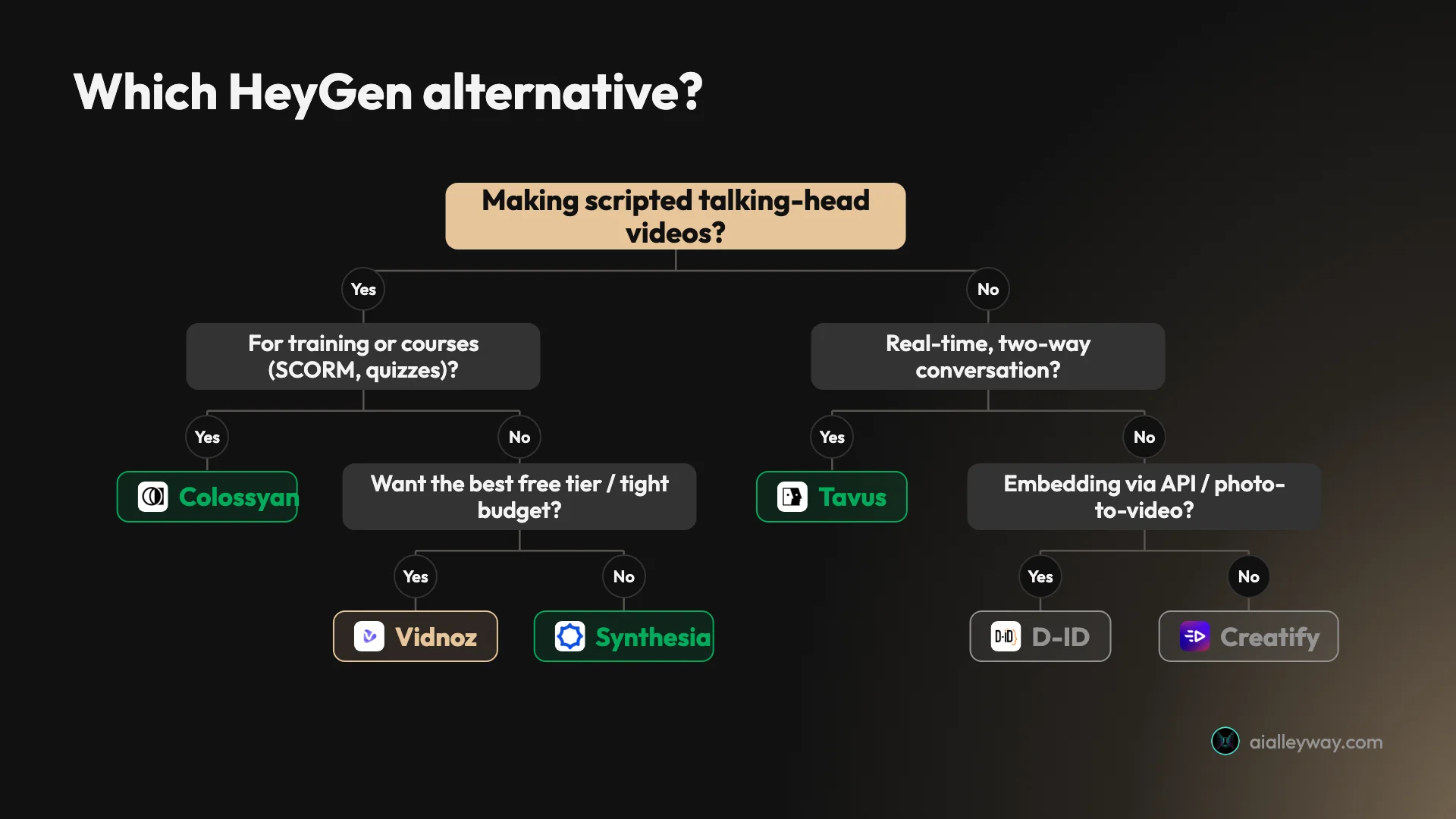
- You want the same thing, done better: pick Synthesia. It is the closest like-for-like and the safest all-round choice.
- Your videos are training or courses: pick Colossyan for quizzes and SCORM, or Synthesia if you also need heavy governance.
- You make ads at volume: pick Creatify for batch, URL-to-video, and ad-platform exports.
- You are building a product that talks back: pick Tavus for real-time conversational agents.
- You are a developer embedding avatars: pick D-ID for its API and photo-to-video.
- You want the best free ride: pick Vidnoz for the most usable no-cost tier.
- Your only issue was the watermark: stay on HeyGen and pay the $29 Creator plan. It is cheaper than re-learning a tool.
The tools that share a branch are genuinely interchangeable for that job, so let the tiebreaker be the thing you will touch every day: the price for your real monthly volume, the languages you ship in, and whether your team needs governance like SSO and SCORM. Try the free tier of your top one or two before you commit a card. Every tool here has one, and half an hour inside the editor tells you more than any comparison table, this one included.
Final word
There is no single best HeyGen alternative, only the best one for the job you are switching to. For most people migrating a scripted-avatar workflow it points at Synthesia, our top-rated avatar tool; for training it is Colossyan, for ads Creatify, and for real-time conversation Tavus. Name the reason you are leaving, and the right replacement names itself.
Frequently asked questions
What is the best HeyGen alternative overall?
Synthesia, for most people leaving HeyGen. It is the closest like-for-like scripted-avatar tool, it holds a 4.6 on G2 across more than 2,700 reviews, and in my hands-on test it produced a clean avatar clip without the engine-switching HeyGen's free plan forced on me.
The honest caveat is that Synthesia is not cheaper than HeyGen, and its free plan has the same watermark-and-no-download wall. You switch to it for the enterprise polish, governance, and 160-plus languages, not to save money. If price is the reason you are leaving, look at Vidnoz or Creatify's entry tiers instead.
What is the best free HeyGen alternative?
Vidnoz has the most generous free plan of the tools here. It gives you up to three minutes of video per render, 720p export, and access to more than 1,800 avatars at no cost, where HeyGen's free plan blocks the download entirely.
The catch is that Vidnoz's free output carries a watermark and caps you at 720p, so it is a preview tier like everyone else's, just a more usable one. For genuinely watermark-free work you still move to a paid plan. If you only need to test avatar quality before paying, Vidnoz lets you do more of it for free than the others.
What is the best HeyGen alternative for training and L&D teams?
Colossyan. It is built for instruction rather than marketing clips, with branching scenarios, in-video knowledge-check quizzes, and SCORM export that drops a finished video straight into a learning management system.
Synthesia is the bigger enterprise name and also strong for training, but Colossyan's course-authoring features are more purpose-built for L&D specifically. If your videos are onboarding, compliance, or product training that has to live inside an LMS, Colossyan is the more focused pick; if you also need brand governance and the widest language coverage, Synthesia is the safer bet.
What is the best HeyGen alternative for UGC-style ads?
Creatify. It is purpose-built for ad creative rather than corporate video, with URL-to-video, batch production, hundreds of AI actors, and exports that plug into ad platforms. That focus makes it a better fit than HeyGen for marketers pumping out volume.
HeyGen can make ad clips too, but Creatify's batch workflow and ad-launcher features are designed for the job. If your output is TikTok-style product ads at scale, Creatify earns its place; if you need a single polished spokesperson video, a general avatar tool like Synthesia or HeyGen fits better.
Is there a HeyGen alternative for real-time, interactive avatars?
Yes, and it is a different category. Tavus builds conversational video: real-time, two-way AI agents you can actually talk to, not scripted talking-head clips. I held a live video conversation with its onboarding agent and it was the closest thing to talking to a person I have tried.
No scripted-avatar tool, HeyGen included, does this. If you are building a product where users talk to an AI face in real time, Tavus is the leading option and the others are not substitutes. If you just need an avatar to read a script, Tavus is the wrong tool and overkill.
Should I leave HeyGen at all?
Not always. If your only complaint is the free plan's watermark and blocked download, that wall disappears the moment you pay for HeyGen's $29 Creator plan, and its avatars are among the most lifelike in the category. Switching tools to solve a free-tier limitation is often wasted effort.
The real reasons to leave are structural: you need enterprise governance and SCORM (Synthesia, Colossyan), you are making ads at volume (Creatify), you want real-time conversation (Tavus), or HeyGen's credit math is too expensive for your minutes. Match the switch to the reason and you will pick the right tool the first time.
Keep reading
Best AI avatar generator: our picks for every use case
We tested the top AI avatar generators. Synthesia (4.6) wins for enterprise, HeyGen for creators, Tavus for live conversation. The best one for your use case.
HeyGen review: stunning avatars, a stingy free plan
I made a real avatar video on HeyGen's free plan. The avatar was uncannily good — then it wouldn't let me download it. Here's who should pay, and who shouldn't.
Synthesia review: the enterprise standard, at a price
I made a real avatar video on Synthesia's free plan. The output is enterprise-clean, but you can't download it and the minutes run out fast. Who should pay.
HeyGen vs Synthesia: which AI avatar tool wins for you?
I tested both hands-on. HeyGen makes more lifelike avatars and renders in ~1 min; Synthesia wins on languages, governance, and price. Here's how to pick.