
HeyGen review: stunning avatars, a stingy free plan
I made a real avatar video on HeyGen's free plan. The avatar was uncannily good — then it wouldn't let me download it. Here's who should pay, and who shouldn't.
Contents
Is HeyGen worth it?

HeyGen makes some of the most lifelike AI avatars you can buy, and if you make talking-head or multilingual video at any volume, it is worth paying for. This HeyGen review is grounded in a hands-on test: I typed one line of script, picked a stock avatar, and a minute later had a presenter delivering my words with convincing lip-sync and gestures. On the strength of that output and a category-leading 4.8 rating on G2, I score it 4.3 out of 5, a Power Tool.
The catch is not the product, it is the packaging. HeyGen’s free plan is a funnel, not a free tool. It hands you exactly one avatar video, defaults to a premium engine that stops and asks you to upgrade before it will render, stamps a tiled watermark across the whole frame, and then refuses to let you download the result at all. The credit system is opaque in the same way: the “600 credits” on the entry plan sound generous until you learn the best avatars cost 20 credits a minute.
So the verdict splits in two. As a paid tool for anyone who needs avatars, translation, or scaled video, HeyGen is excellent and hard to beat on realism. As a free tool, it is a demo with the exits locked. Pay for Creator if the avatars fit your work; treat the free plan as a way to judge the quality, nothing more.
What does HeyGen do?
HeyGen turns text into video of a person talking. You write a script, choose an AI avatar and a voice, and it generates a clip of that avatar delivering your words, no camera, studio, or microphone involved. It is the leading creator-focused tool in a category it shares with Synthesia, and it has pushed hard past the basic talking head into translation, photo-to-video, and an all-in-one video agent.
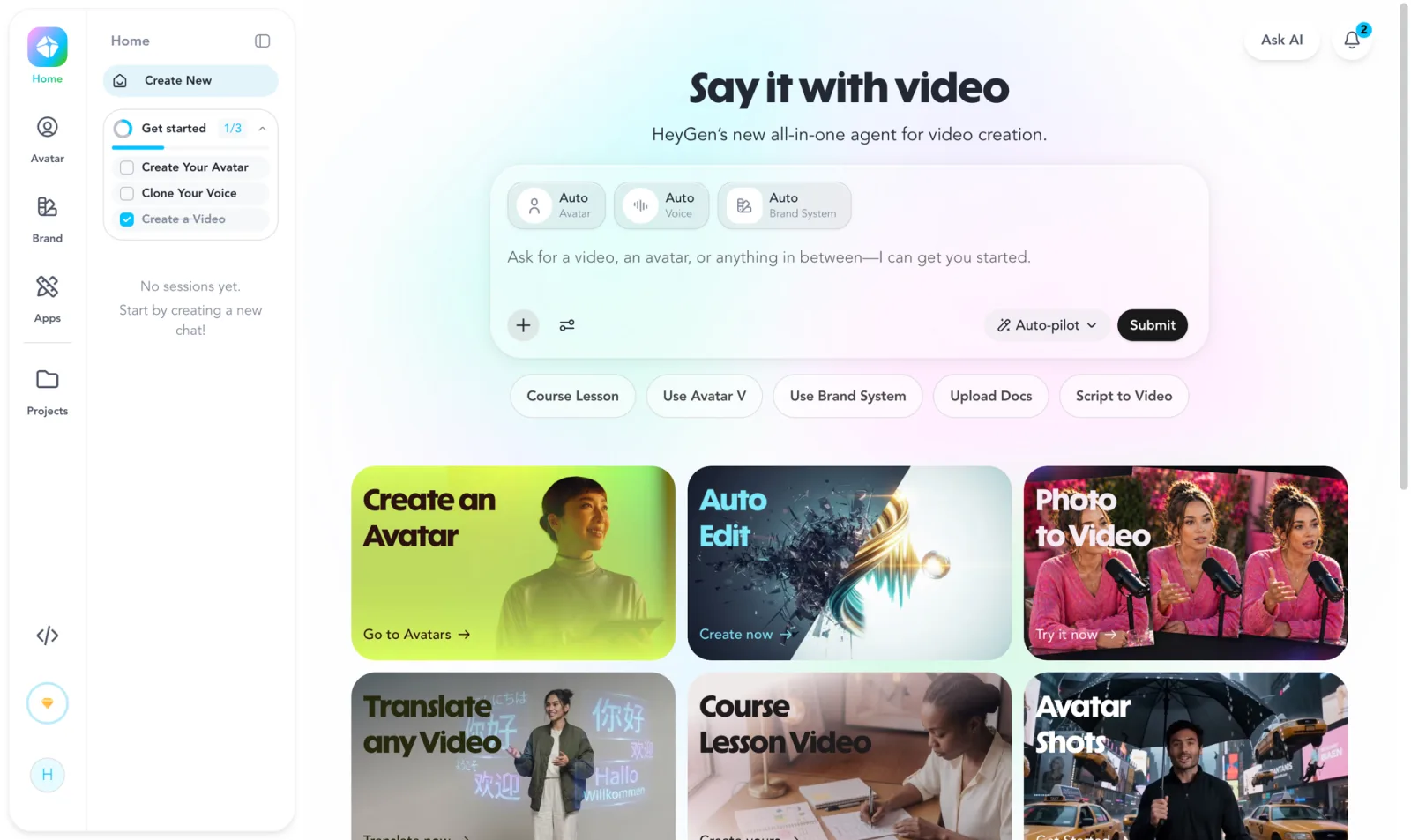
The dashboard makes the range obvious the moment you land. Alongside the core avatar builder sit Photo to Video, Translate any Video, Course Lesson Video, Avatar Shots, an AI Video Generator, Upscale Video, and an API for developers. The headline pitch now is a “Say it with video” agent that tries to assemble a whole clip from a prompt.
The everyday workflow lives in AI Studio. On the left you type or paste a script; the center shows a live preview of your chosen avatar; the right panel is where you set the avatar, the voice, and the Motion Engine. That last setting matters more than it looks, because it decides both how realistic the result is and how many credits it costs. I picked the stock avatar “Annie,” typed a short intro, and watched the preview update as I went.
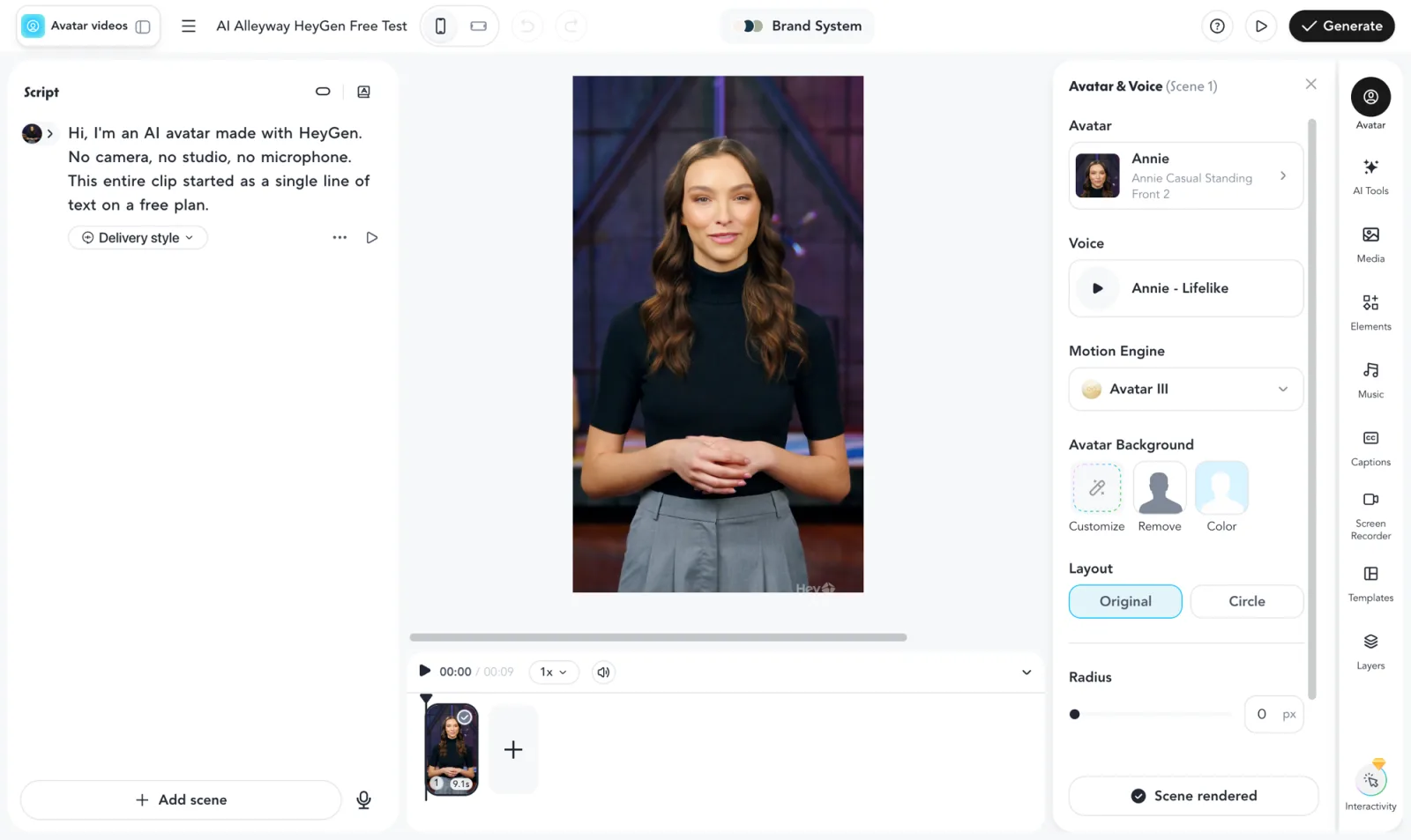
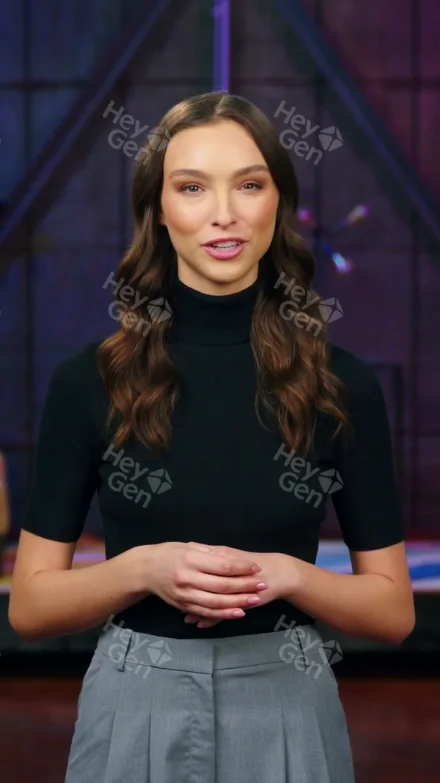
To judge the output rather than the marketing, I ran the real thing end to end on a free account. I wrote a nine-second script, hit Generate, and after a queue of about a minute the finished clip appeared: the avatar spoke my words with lip movement that tracked the audio, natural blinking, and small hand gestures that matched the cadence. At a glance it passed. The lip-sync is the part HeyGen is genuinely known for, and it held up.
Here is the actual clip I generated, straight from the free plan, tiled watermark and all, so you can judge the avatar for yourself.
Where the polish slips is the voice. The built-in AI voices are competent but a touch flat next to the visual quality, which is why so many creators pair HeyGen’s avatars with audio exported from a dedicated voice tool. The picture is the star here; the sound is the supporting act.
Translation is the other capability HeyGen is known for, though I did not put it through my own test. By its own account it dubs an existing video into 175 languages while re-syncing the speaker’s lips to the new audio, so a single recording becomes a dozen localized versions without a reshoot. For anyone selling or teaching across borders, that is the feature most likely to justify the subscription.
How much does HeyGen cost?
HeyGen pricing looks simple and hides its real cost in a second currency: credits. The dollar tiers below are the public rates on heygen.com/pricing, verified in July 2026. Paying annually lowers the paid tiers.
| Plan | Price (monthly) | What you get |
|---|---|---|
| Free | $0 | One avatar video, 720p, tiled watermark, no download; limited to the Avatar III engine in practice |
| Creator | $29 | 600 credits/mo, watermark removed, 1080p export, voice cloning, 30-min videos |
| Pro | from $49 | 1,000 credits, 4K export, faster processing, script translation |
| Business | $149 + $20/seat | 1,500 credits, 5 digital twins, SSO, SCORM/LMS export, team workspace |
| Enterprise | Custom | Flexible credits, multi-workspace control, dedicated support |
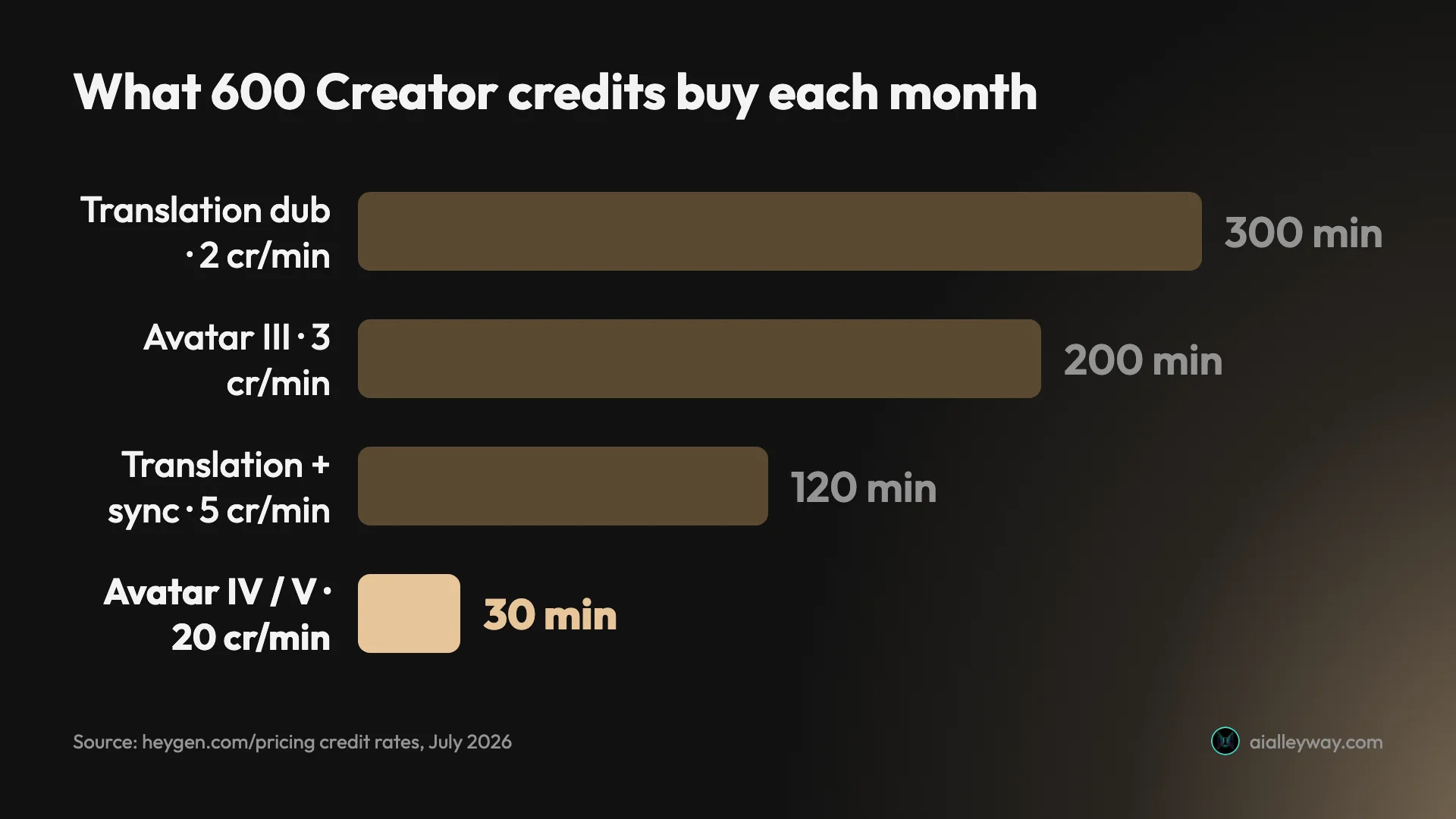
The line that actually governs your bill is the credit meter, and it is easy to misread. Credits are consumed per minute of video, and the rate depends on the engine: the older Avatar III costs 3 credits a minute, while the lifelike Avatar IV and Avatar V engines cost 20 credits a minute. Video translation runs 2 credits a minute for a simple dub and 5 for full lip-synced dubbing.
Do that math against the Creator plan and the generosity evaporates. Six hundred credits sounds like plenty until you spend them on the good avatars, where they buy just 30 minutes of Avatar IV or V video a month. Stick to the cheaper Avatar III engine and the same credits stretch to about 200 minutes, but you give up the realism that is the whole reason to choose HeyGen. That tension between quality and quantity is the real pricing story, and our HeyGen pricing guide works through it plan by plan.
The free plan deserves its own warning, because its limits are steeper than the pricing page suggests. In the app it withholds eight things at once: watermark removal, access to the advanced models, voice cloning, fast processing, longer videos, transparent-background export, 1080p export, and unlimited photo avatars. The plan comparison page lists Free as 1080p, but the live dashboard offers 1080p only as an upgrade, so free output is capped at 720p in practice.
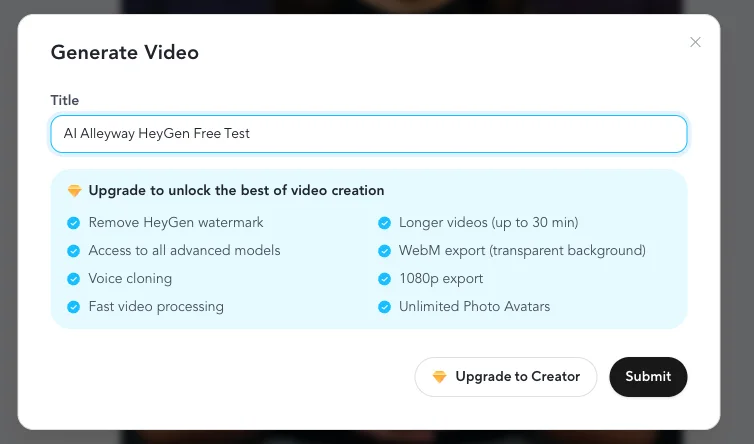
The takeaway is that $29 is the true entry point, not $0. Creator is the first plan where HeyGen behaves like a finished product: no watermark, real resolution, downloads, and voice cloning. Everything below it is a sampler.
Who is HeyGen for?
- Creators and marketers who make talking-head video at volume. If you publish social clips, ads, or explainers with a presenter, HeyGen removes the camera from the loop entirely. The lifelike avatars and fast turnaround are built for exactly this cadence.
- Anyone localizing video across languages. HeyGen’s translation and lip-synced dubbing into 175 languages is the feature it is best known for. If your content needs to ship in a dozen markets, this replaces a reshoot with a re-render.
- Course creators and L&D teams. The Course Lesson Video flow, SCORM and LMS export on the Business plan, and reusable avatars make it a fit for training content that would otherwise need a studio and a presenter on call.
- Sales and outreach teams sending personalized video. Photo-to-video and digital twins let a rep record once and scale a personalized message, which is the use case HeyGen’s newer avatar features lean into.
- Developers building video into a product. The API and Video Agent expose HeyGen’s generation as something you can call programmatically, which suits teams embedding avatar video rather than clicking through the editor.
- Not for: anyone who wants a genuinely free tool, or whose audio quality has to be flawless out of the box. The free plan cannot download a video, and the built-in voices trail the visuals, so a voiceover-first project will want a separate audio tool. If a watermark-free clip you can actually keep is the bar, you are on a paid plan from day one.
The good
HeyGen earns its 4.3 on output quality and reach, not on generosity. Here are the six things that should sway you, strongest first.
The avatars are convincingly lifelike
This is the headline, and it holds up. In my test the Avatar III render already tracked the audio cleanly, and the newer Avatar IV and Avatar V engines are the ones creators rave about, with lip-sync and micro-expressions good enough to pass at a glance. It is the single reason to pick HeyGen over a cheaper avatar tool: when the face is this believable, the video stops looking like a novelty and starts looking like content you would actually publish. The realism is why HeyGen and Synthesia sit at the top of this category.
Video translation is the feature reviewers single out
I did not test translation in my hands-on run, so I am reporting this on HeyGen’s own terms and its reviewers’, not from my own render. It is the capability HeyGen is best known for: it translates an existing video into 175 languages and dialects and re-syncs the speaker’s lips to the new audio, matching the original voice tone. For a course, a product demo, or a marketing clip that needs to run in multiple markets, that turns a full reshoot into a re-render. It is the feature most likely to justify the subscription on its own, and the one that most clearly separates HeyGen from simpler avatar tools.
Text to video is genuinely fast to learn
I went from a blank editor to a rendered avatar video in a few minutes, with no manual to read. Type a script, pick an avatar and voice, hit Generate. The AI Studio layout puts the three decisions that matter (avatar, voice, motion engine) in one panel, and the live preview means you are not rendering blind. For a first-time user, the distance between idea and finished clip is short, which is not a given in AI video tools.
The feature range is unusually broad
HeyGen is not one trick. Beyond the core avatar builder it packs photo-to-video, digital twins, an AI Video Generator, course-lesson templates, video upscaling, an auto-editor, and a developer API, all in one workspace. Where a focused rival like D-ID centers on one of these, HeyGen runs the whole pipeline, which means a team can standardize on it instead of stitching three tools together.
It is the highest-rated tool in its category
Reputation is not a feature, but HeyGen’s is hard to dismiss. As of July 2026 it holds a 4.8 on G2 across more than 1,500 reviews and a 4.7 on Capterra across 315, the strongest aggregate scores of any AI-avatar tool. That volume of independent sentiment is a solid signal that the everyday experience holds up well beyond a single test, particularly on the ease-of-use and avatar-quality dimensions reviewers cite most.
| Source | Rating | Reviews |
|---|---|---|
| G2 | 4.8 / 5 | 1,500+ |
| Capterra | 4.7 / 5 | 315 |
| Trustpilot | 3.6 / 5 | 2,400+ |
The one dissenting number is Trustpilot’s 3.6, which I dig into below; it is skewed by billing and cancellation complaints rather than the video quality.
You can try the real avatars before paying
For all the friction of the free plan, it does let you generate a genuine avatar video and judge the quality firsthand, which is the decision that actually matters. Plenty of tools show you a canned sample reel; HeyGen lets you put your own script in the avatar’s mouth and see how it lands. As a way to answer “is the output good enough for my work” before spending a cent, it does the job, even if it will not let you keep the file.
The bad
Now the part the launch pages skip. HeyGen’s product is strong; its free tier and pricing are where the frustration lives, and I hit most of it firsthand.
The free plan is a funnel, not a free tool
This is the big one. HeyGen’s pricing page markets the free plan as three videos a month, but the avatar-video quota I actually hit was one: the Generate screen told me “Available: 1 video.” I made that single clip, and every step nudged me toward upgrading. The finished video carried a watermark, capped at 720p, and, most tellingly, would not download at all: the download button opens a wall titled “Download Your Videos” that asks you to move to the Creator plan to save the file. You can create your one avatar video and then cannot take it anywhere. Calling that a free plan is generous; it is a preview with the exits locked.
Here is what the free tier actually gives and gates, from my own account:
| On the free plan | The reality I hit |
|---|---|
| Videos | Exactly 1 avatar video, then you are done |
| Engine | Defaults to premium Avatar IV, which stalls on an upsell; only Avatar III renders free |
| Resolution | 720p (the dashboard offers 1080p only on upgrade) |
| Watermark | HeyGen logo tiled across the whole frame; removal is Creator-only |
| Download | Blocked entirely — the button opens an upgrade wall |
The default engine is gated, so free renders stall on an upsell
Here is the trap I walked straight into. A new project defaults to the premium Avatar IV engine, but Avatar IV is not covered by the free plan, so hitting Generate did nothing but surface an upgrade screen. To actually render for free I had to know to open the Motion Engine dropdown and switch down to Avatar III. A first-time free user who does not find that setting would reasonably conclude the tool is broken, when it is really just steering them toward a paid plan.
The credit math is opaque
Credits are the real cost, and they are easy to misjudge. The Creator plan advertises 600 credits, which sounds ample, but the lifelike Avatar IV and V engines burn 20 credits a minute, so those 600 credits equal just 30 minutes of top-tier video a month. Nothing in the plan name tells you that; you learn it by reading the per-engine rate, which is not shown next to the credit total when you pick a tier. The dollar price is clear; what a dollar actually buys is not.
The watermark is aggressive, and removing it is paid
Free-tier watermarks are normal; a HeyGen logo tiled diagonally across the entire frame is heavier than most. It is not a discreet corner mark you could crop, it sits over the avatar’s face and body, and the in-app removal option is flatly labeled “Available with Creator Plan.” That makes the free output effectively unusable for anything public, which is the point, but it is worth knowing before you plan around it.
Rendering comes with a constant “go faster” upsell
My nine-second clip took about a minute to render, and the progress screen carried a “Get faster video generation” upsell the entire time. A minute for nine seconds is not slow in absolute terms, but the free and entry tiers make you feel the queue: the pitch to pay for faster processing sits on screen while you wait. For a one-off clip it is a minor nudge; for anyone rendering at volume on a lower plan, that wait and that upsell become a standing part of the workflow.
The built-in voices trail the visuals
The avatars are the draw, but the stock AI voices are the weak link. Reviewers on Product Hunt and elsewhere note the built-in voices can sound flat or slightly robotic, and the common workaround is to generate audio in a dedicated voice tool like ElevenLabs and import it. It is telling that HeyGen’s own community treats the voice layer as the part to replace. The split shows up in the ratings too: HeyGen sits at a strong 4.8 on G2 but only 3.6 on Trustpilot across more than 2,400 reviews, where billing and cancellation complaints pull the average down.
Alternatives worth considering
If you decided HeyGen is not the fit, here is where to look next, depending on what pushed you away. Here is how the leading AI-avatar tools compare at a glance.
| Tool | Best for | The main trade-off |
|---|---|---|
| HeyGen (4.3) | Lifelike avatars, translation, and creator workflows | A funnel-like free plan and opaque credits |
| Synthesia | Enterprise training and corporate video at scale | Less expressive for short social content |
| Tavus | Conversational, personalized video and video agents | Aimed at developers more than solo creators |
| D-ID | Turning a single photo into a talking presenter | Narrower feature set than HeyGen |
- Synthesia — if you are standardizing video across a company rather than making creator clips. Synthesia is the enterprise leader in this category, built around training and corporate communication with heavier team controls, and it is the closest head-to-head alternative to HeyGen. See our full Synthesia review for that side.
- Tavus — if you want conversational or personalized video rather than a scripted talking head. Tavus focuses on video agents and one-to-many personalized outreach, and its API-first design suits teams embedding avatar video into a product. See our full Tavus review for that side.
- D-ID — if your need is simply animating a photo into a talking presenter. D-ID pioneered photo-to-video and is a lighter, more focused option when HeyGen’s full pipeline is more than you need.
Of these, Synthesia is the one to weigh most closely against HeyGen: the two lead the category, and the choice usually comes down to lifelike delivery for creator content (HeyGen) versus governance and scale for enterprise training (Synthesia).
Final word
HeyGen earns its 4.3 by getting the hard part right. The avatars are convincingly lifelike, the translation and dubbing are the feature reviewers single out, the tool is fast to learn, and its 4.8 on G2 across 1,500-plus reviews backs up what I saw in a single test. If you make talking-head or multilingual video with any regularity, it is one of the two tools to reach for, and the strongest pick when lifelike delivery matters most.
It is held back from a higher score by a business model that fights its own free plan. One avatar video you cannot download, a default engine that stalls on an upsell, credits that quietly buy far less premium video than they seem to, and a watermark tiled across the frame all make the free tier a demo rather than a tool. None of that dents the paid product, but it does mean the on-ramp is rougher than it should be.
So the decision is clean. If you will make avatar or translated video often enough to spend $29 a month, HeyGen is very hard to beat and I recommend it. If you were hoping the free plan would carry you, it will not: it exists to sell you the paid one. Try it to judge the avatars, then pay if they fit your work.
Frequently asked questions
Is HeyGen free?
There is a free plan, but it is a preview, not a working free tool. It gives you one avatar video, caps quality at 720p, stamps a tiled HeyGen watermark across the result, and, in my testing, would not let me download the finished clip at all.
The default avatar engine (Avatar IV) is also gated, so hitting Generate on the free plan pushes you to upgrade before it renders. To actually produce a video for free I had to manually switch the Motion Engine to the older Avatar III. Treat the free plan as a way to judge avatar quality, then pay if you want to keep anything.
How much does HeyGen cost?
HeyGen starts at $29 a month for the Creator plan, which includes 600 credits, removes the watermark, and unlocks 1080p export and voice cloning. Above that, the Pro plan starts around $49 a month with 4K export, Business is $149 a month plus $20 per seat, and Enterprise is custom-priced.
The number to watch is credits, not dollars. The premium Avatar IV and Avatar V engines burn 20 credits per minute, so Creator's 600 credits equal only about 30 minutes of top-tier avatar video a month. The older Avatar III engine costs 3 credits a minute, and video translation runs 2 to 5 credits a minute.
Is HeyGen's avatar quality actually good?
Yes, this is the part HeyGen gets right. In my hands-on test the avatar's lip-sync, micro-expressions, and hand movement were convincing enough to pass at a glance, and HeyGen holds a 4.8 rating on G2 across more than 1,500 reviews, the highest in the AI-avatar category.
The newer Avatar IV and Avatar V engines are the realistic ones. The trade-off is that the built-in AI voices are the weak link, and many creators import audio from a dedicated voice tool like ElevenLabs to pair with HeyGen's visuals.
What is the difference between HeyGen and Synthesia?
They lead the same category from different angles. HeyGen leans creator-friendly, with more lifelike avatars, photo-to-video, and video translation and dubbing that its reviewers rate among the best, which suits social clips and outreach. Synthesia is built for enterprise training and corporate video, with heavier team controls and compliance features.
HeyGen tends to feel more natural for short, expressive content, while Synthesia is the safer pick for a company standardizing internal video at scale. If lifelike delivery matters most, HeyGen usually wins; if governance and scale matter most, Synthesia does.
Can you remove the HeyGen watermark?
Only on a paid plan. On the free plan the watermark is a tiled HeyGen logo repeated diagonally across the entire frame, not a small corner mark, and the in-app option to remove it is labeled 'Available with Creator Plan.' Upgrading to Creator at $29 a month removes it and unlocks downloads and 1080p export.
Why won't HeyGen let me download my video?
Because downloading is a paid feature. On the free plan you can generate and watch a video inside HeyGen, but the download button opens an upgrade wall titled 'Download Your Videos,' which asks you to move to the Creator plan to save the file. It is the single biggest limitation of the free tier: you can create exactly one watermarked avatar video and then cannot take it anywhere.
Keep reading
HeyGen pricing: what the credits really cost
HeyGen starts at $29/mo, but credits decide your real cost: 600 credits is 30 min of premium avatar or 200 on the cheaper engine. Here's the full breakdown.
HeyGen vs Synthesia: which AI avatar tool wins for you?
I tested both hands-on. HeyGen makes more lifelike avatars and renders in ~1 min; Synthesia wins on languages, governance, and price. Here's how to pick.
HeyGen alternatives: the best one depends on why you left
Leaving HeyGen? The best HeyGen alternative isn't one tool: Synthesia (4.6 on G2) for training, Creatify for ads, Tavus for real-time, plus 3 more by job.
Synthesia alternatives: cheaper, or more lifelike?
Leaving Synthesia over the price or the stiff avatars? HeyGen (4.8 on G2) is more lifelike and cheaper, plus 5 more picks sorted by why you're switching.