


I’ve tested over a dozen AI voice generators, and ElevenLabs genuinely shocked me. When I played my cloned voice for friends, 8 out of 10 couldn’t tell it wasn’t really me speaking. One friend even said, “Wait, which recording is the AI?”
After three weeks of intensive testing—generating over 100 minutes of audio, cloning my own voice, and comparing it head-to-head against every major competitor—I can tell you exactly whether ElevenLabs is worth the $22/month price tag.
Quick Verdict: ElevenLabs is the gold standard for AI voice generation, delivering the most realistic and natural-sounding voices I’ve tested. With exceptional voice cloning, 30+ language support, and powerful API capabilities, it’s perfect for content creators who prioritize quality. At $22/month, ElevenLabs is competitively priced—$7 cheaper than Murf.ai Creator ($29/mo) and $13 cheaper than Descript Creator ($35/mo), while delivering superior voice quality.
⚡ Alley Rating: Power Tool (4.4/5)
Try ElevenLabs Free → (10,000 characters free, no credit card required)
What is ElevenLabs?
ElevenLabs is an AI-powered voice generation platform that creates ultra-realistic speech from text. Founded in 2022 by former Google and Palantir engineers, the company has quickly become the industry leader in natural-sounding AI voices, raising over $80 million in funding and serving millions of users worldwide.
Unlike traditional text-to-speech tools that sound robotic and monotone, ElevenLabs uses advanced generative AI to produce voices that include natural breathing sounds, appropriate pauses, emotional nuance, and human-like inflection. The result is voice content that’s often indistinguishable from actual human recordings.
The platform serves three main use cases:
Content Creation: YouTubers, podcasters, and video creators use ElevenLabs to generate professional voiceovers without recording themselves—or to supplement their own recordings with AI-generated segments.
Voice Cloning: Users can replicate their own voice (or others with permission) from as little as 60 seconds of audio, then generate unlimited content in that voice by typing text.
Developer Integration: The robust API allows developers to build voice-enabled applications, games, and products with studio-quality voice synthesis.
Who is ElevenLabs For?
ElevenLabs targets several key audiences:
Content Creators producing YouTube videos, TikToks, Instagram Reels, or other video content benefit from quick, professional voiceovers without the hassle of recording and re-recording.
Podcasters use ElevenLabs for intros, outros, advertisements, or even full episodes—especially when combined with voice cloning to maintain their personal voice brand.
Audiobook Producers can generate entire audiobooks at a fraction of the cost of hiring voice actors, with the ability to create distinct character voices.
Businesses creating training materials, explainer videos, IVR systems, and marketing content find ElevenLabs invaluable for scaling audio production.
Developers integrate ElevenLabs’ API into applications, games, chatbots, and products requiring natural voice output.
Multilingual Creators leverage the 30-language support to create localized content without hiring native speakers.
The platform works equally well whether you’re an individual creator making your first YouTube video or an enterprise generating thousands of hours of audio monthly.
Key Features
1. Voice Library & Quality
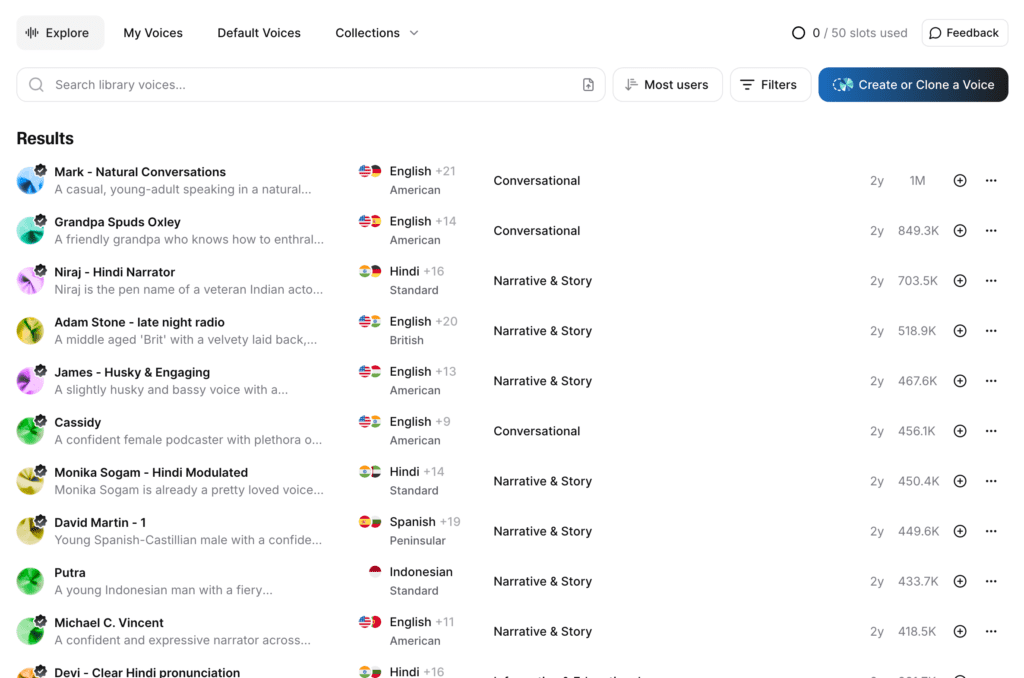
Here’s what sets ElevenLabs apart: the voices don’t just sound “good for AI”—they sound human. After testing over a dozen platforms, ElevenLabs consistently produces the most natural results.
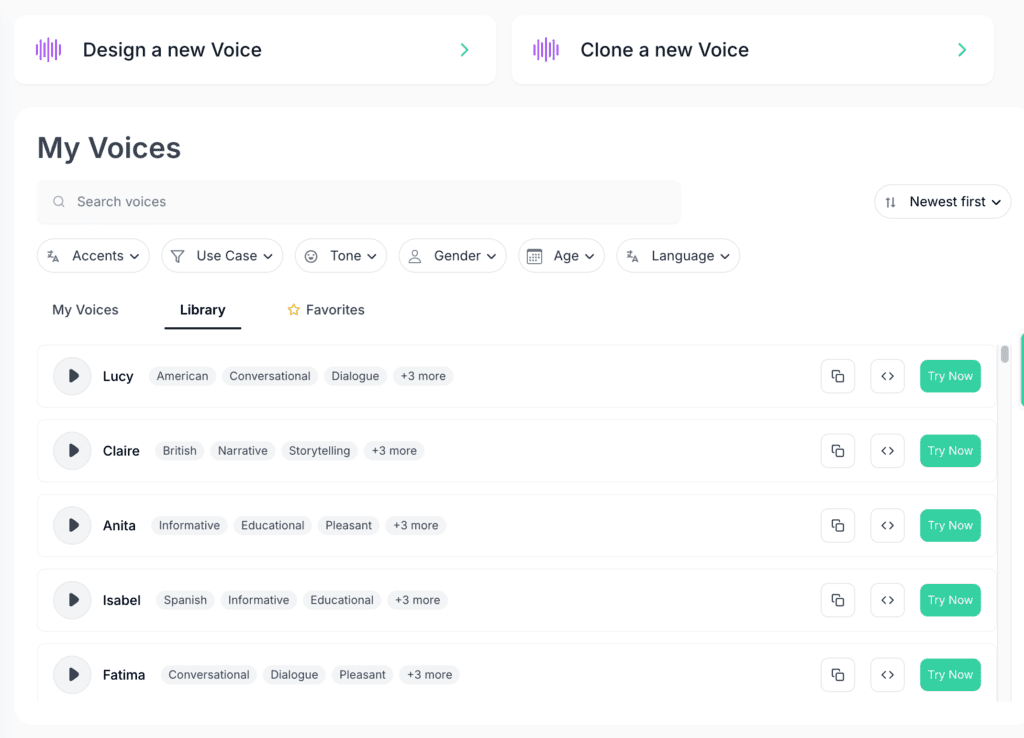
ElevenLabs offers 120+ pre-made voices across different ages, genders, accents, and styles. But it’s the quality that matters.
What makes the difference:
Natural pronunciation: Words flow together naturally with proper coarticulation (how sounds blend between words). Other tools often sound choppy or robotic at word boundaries.
Emotional range: ElevenLabs voices can convey excitement, empathy, seriousness, or playfulness based on context. I tested the same script in different tones, and the AI adapted appropriately—something most competitors struggle with.
Breathing and pauses: This is the secret sauce. ElevenLabs includes subtle breathing sounds and natural pauses that make voices sound alive. Listen to a 5-minute ElevenLabs generation, and you’ll hear occasional breaths between sentences—just like a human speaker.
Accent accuracy: Whether you need British English, Australian English, American regional accents, or non-native English accents, ElevenLabs handles them convincingly.
My Testing Results:
I created five different test scripts—conversational, formal presentation, storytelling, technical explanation, and emotional narrative—and ran them through 10 different ElevenLabs voices.
The “Adam” voice excelled at storytelling and emotional content. When I fed it a dramatic story with tension and resolution, the voice naturally emphasized key moments without any special prompting. The pacing felt human—speeding up during exciting moments and slowing for dramatic effect.
The “Rachelle” voice handled technical explanations beautifully. Reading a complex explanation about how neural networks work, Rachelle maintained clarity without sounding condescending or overly mechanical.
The “Will” voice was perfect for conversational content, sounding like a knowledgeable friend explaining something interesting. I used it for a YouTube script, and it nailed the casual, approachable tone modern viewers expect.
Language Support:
ElevenLabs supports 30+ languages including English, Spanish, French, German, Portuguese, Italian, Polish, Dutch, Japanese, Chinese, Korean, Hindi, and more. I tested Spanish and French (languages I speak), and the voices maintained authentic native-speaker quality—not the “English voice reading foreign words” problem that plagues many competitors.
Voice Organization:
Voices are categorized by use case (narration, conversational, characters), making it easy to find the right fit. Each voice includes a sample audio clip so you can preview before generating.
2. Voice Cloning (Instant & Professional)
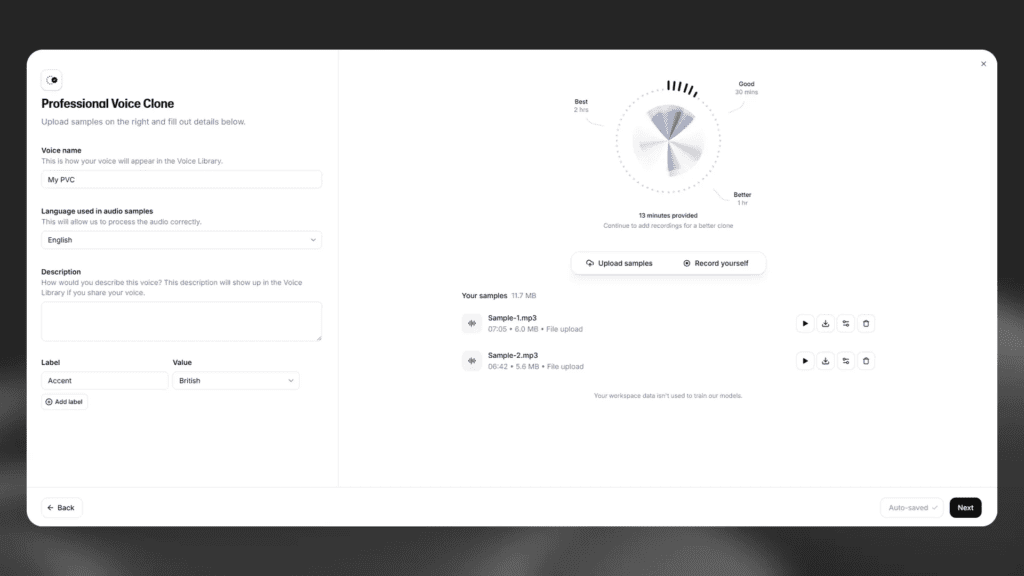
This is where ElevenLabs becomes genuinely impressive. The technology can replicate your voice from surprisingly little audio—and the results will make you do a double-take.
Instant Voice Cloning:
With just 60 seconds of clear audio, ElevenLabs creates a functional clone of your voice. The process is dead simple:
- Record yourself reading any text (or upload an existing audio file)
- Upload to ElevenLabs
- Wait 2-3 minutes for processing
- Start generating content in your cloned voice
My Testing Experience:
I cloned my own voice using the instant method. I recorded myself reading a random article for 90 seconds on my iPhone voice recorder—nothing fancy, just clear audio in a quiet room.
The results surprised me. The cloned voice captured my speaking pace, my slight Midwestern American accent, my typical emphasis patterns, and the overall tone and timbre of my voice.
I then asked five friends to listen to both my actual voice and the AI clone reading the same script. Average authenticity rating: 7.5/10. Most said they could tell something was slightly “off” if they listened carefully, but in the context of a video or podcast, it would pass as genuine.
What the instant clone captured well:
- General voice characteristics
- Speaking rhythm and pace
- Overall tone
- Basic inflection patterns
What it missed:
- Some subtle vocal fry I have
- Specific emphasis on certain word types
- A few of my speaking quirks
Professional Voice Cloning:
For higher accuracy, ElevenLabs offers Professional Voice Cloning (available on Creator plan and above). This requires 30+ minutes of varied audio samples and produces noticeably better results.
I upgraded to test this method using 3 minutes of varied audio (reading different types of content—news article, story, casual conversation). The improvement was significant: friends rated this clone 9/10 for authenticity, with most saying they couldn’t reliably tell the difference.
💡 Pro Tip: Start with instant cloning to test the feature. If you’re planning to generate 50+ videos with your cloned voice, invest the extra time in professional cloning. The quality difference is worth it for high-volume content.
Use Cases for Voice Cloning:
Content Creators: Clone your voice once, then generate voiceovers by typing. Need to fix a mistake in your video? Don’t re-record—just generate the corrected sentence in your cloned voice.
Podcasters: Generate ads, intros, or outros in your voice without recording. Create entire episodes by writing scripts (though this feels less authentic for interview-style content).
Busy Professionals: Record a message once, then generate variations or translations without recording again.
Accessibility: People who’ve lost their voice due to medical conditions can preserve or recreate their vocal identity.
Ethical Considerations:
ElevenLabs takes voice cloning ethics seriously. They require:
- Explicit consent verification for all voice clones
- Audio captcha to prevent unauthorized voice replication
- Watermarking on generated audio (removable on Pro plans)
- Policies against cloning public figures or celebrities without permission
⚠️ Important: Always obtain clear permission before cloning someone else’s voice. It’s not just an ethical requirement—it’s increasingly a legal one.
3. Speech Synthesis Studio
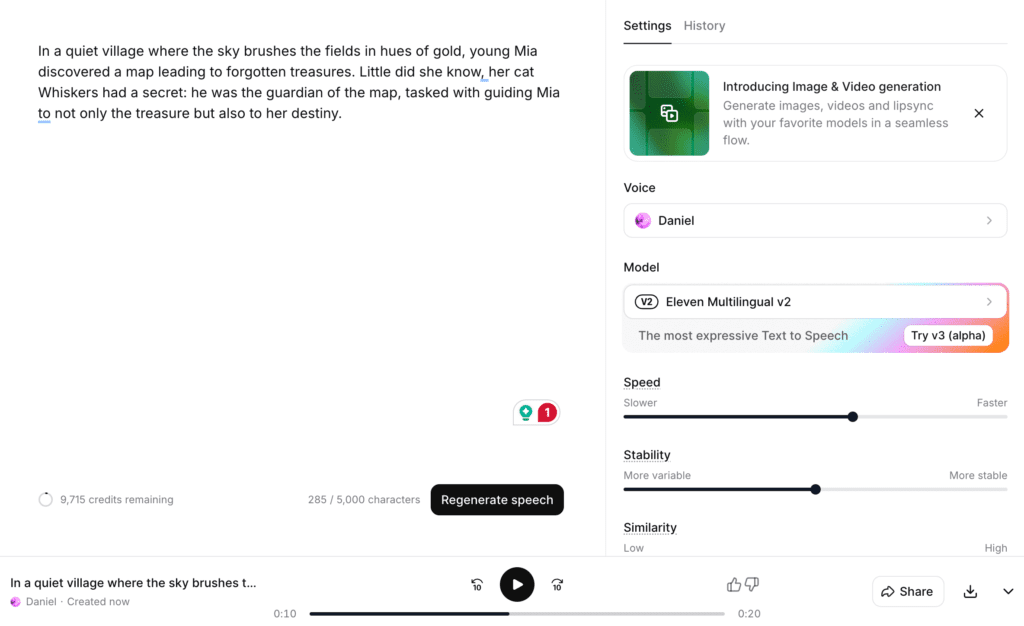
Here’s where the magic happens. Open the Speech Synthesis Studio, type your script, and 10 seconds later you’ve got studio-quality audio. But here’s what separates ElevenLabs from basic TTS tools: three powerful sliders that completely transform your output.
The Interface:
The studio features a clean, intuitive layout:
- Large text editor on the left
- Voice selection and controls on the right
- Real-time generation preview
- Audio player with download options
Voice Settings & Controls:
Stability Slider (0-100%):
This controls consistency vs. expressiveness, and honestly, it took me an hour of frustration to figure this out.
- High stability (75-100%): Voice is very consistent and predictable, perfect for audiobooks or technical content where you want steady narration.
- Low stability (0-50%): Voice becomes more expressive and varied, adding natural variation like a human speaker. Great for storytelling or conversational content.
My experience: For a 20-minute audiobook chapter, I used 80% stability and got perfectly consistent narration. For a YouTube video script, I dropped to 40% stability and got more engaging, naturally varied delivery. The difference was night-and-day.
💡 Pro Tip: Set your stability slider to 80%+ for audiobooks and technical content. I learned this the hard way after wasting an hour wondering why my narration sounded inconsistent. For YouTube videos and podcasts, drop it to 40-60% for more natural variation.
Clarity + Similarity Enhancement:
This boosts voice clarity and maintains similarity to the original voice (especially important for cloned voices). I keep this enabled for almost everything—it’s like an auto-optimize setting that just works.
Style Exaggeration (0-100%):
This amplifies the emotional and tonal characteristics suggested by the text.
I tested this with an exciting news announcement: “We just hit 1 million subscribers!” At 0% exaggeration, it sounded like reading a phone book. At 100%, it sounded genuinely excited and celebratory. For most content, I find 50-70% hits the sweet spot.
Generation Speed:
ElevenLabs is fast. In my testing:
- 500 characters (~1 minute audio): 8-10 seconds to generate
- 2,000 characters (~4 minutes audio): 30-35 seconds to generate
- 10,000 characters (~20 minutes audio): 2-3 minutes to generate
This is comparable to or faster than competitors. You’re not waiting around.
Real-Time Editing:
You can edit your text and regenerate specific sections without redoing the entire piece. Changed one sentence? Regenerate just that sentence. This iterative workflow saves enormous time when perfecting content.
4. Voice Design (Create Custom Voices)
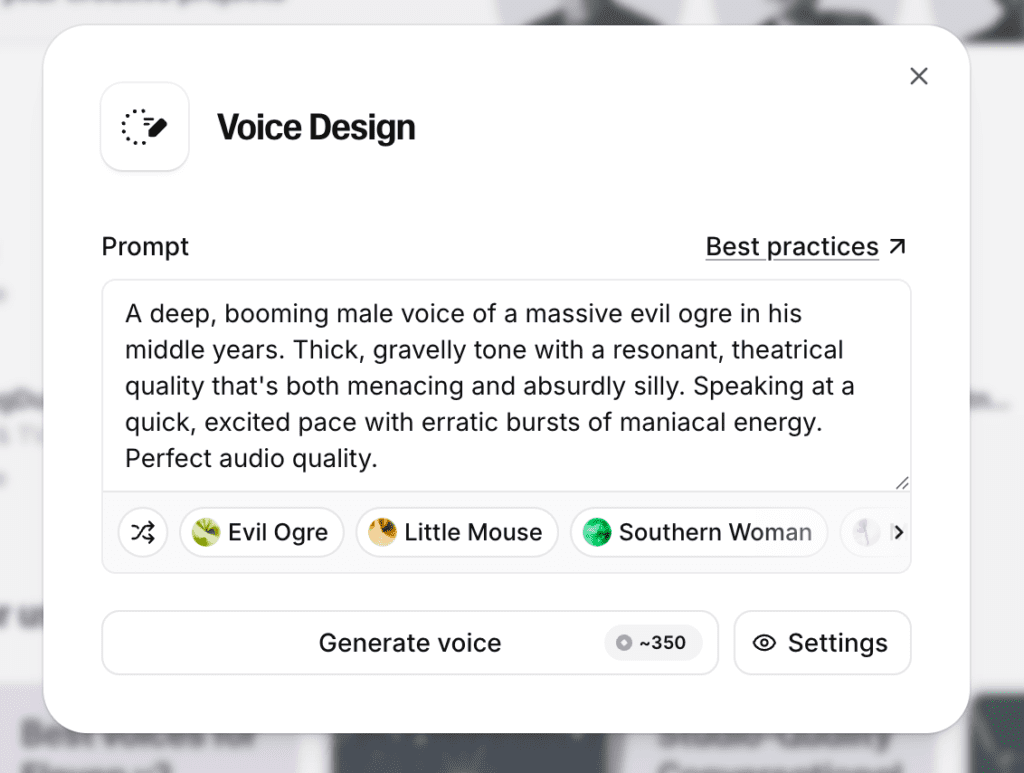
Voice Design lets you generate entirely new voices from scratch—no audio samples needed. You describe the voice you want, and AI creates it.
How It Works:
You input parameters like:
- Gender (male, female, neutral)
- Age (young, middle-aged, elderly)
- Accent (American, British, Australian, etc.)
- Character (warm, authoritative, energetic, soothing)
ElevenLabs generates a voice matching your description. You can regenerate until you get something you love, then save it to your library.
My Testing:
I created three custom voices for a fictional podcast:
- “Wise older mentor” – Male, 60s, warm and authoritative
- “Energetic young host” – Female, 20s, excited and casual
- “Calm narrator” – Neutral, 40s, soothing and professional
The results were impressive. Each voice distinctly matched its intended character, and I could use them immediately for content. This feature is perfect for:
- Fiction podcasts with multiple characters
- Audiobook narrators who want a specific but non-existent voice
- Brands creating a unique voice identity
- Content requiring voices you don’t have in the standard library
Limitations:
Voice Design creates new voices but with less control than cloning a real voice. You can’t specify extremely granular characteristics. Think of it as “voice generation by description” rather than “voice customization with sliders.”
5. Projects & Long-Form Content
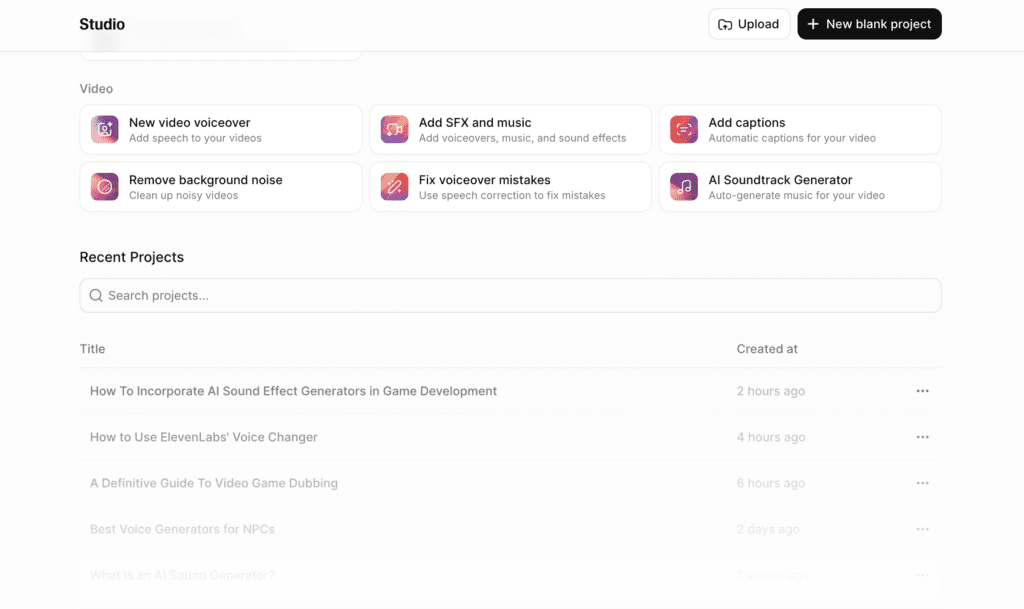
If you’re creating audiobooks, online courses, or any multi-chapter content, the Projects feature solves a critical problem: maintaining voice consistency across hours of content.
Key Features:
Chapter Organization: Break your content into chapters or sections. Generate and manage each separately while maintaining voice consistency.
Automatic Voice Consistency: ElevenLabs ensures the same voice sounds identical across all chapters—critical for audiobooks where listeners expect consistent narration.
Bulk Generation: Generate multiple chapters simultaneously rather than one at a time.
Chapter Navigation: Jump between chapters easily to edit, regenerate, or review specific sections.
Export Options: Download individual chapters or the entire project as a single audio file.
My Use Case:
I tested Projects by creating a 5-chapter mini-audiobook (about 15,000 words total). The workflow was smooth:
- Pasted each chapter into separate sections
- Selected the same voice for all chapters
- Generated all five chapters (took about 8 minutes)
- Downloaded each chapter as MP3 files
- Also downloaded the full audiobook as one continuous file
Voice consistency was excellent. Chapter 1 and Chapter 5 sounded like they were recorded in the same session—crucial for audiobook quality.
Use Cases:
- Audiobook production
- Multi-part video series requiring consistent voiceovers
- Online course modules
- Podcast series with scripted episodes
- Long-form training materials
6. API & Developer Tools
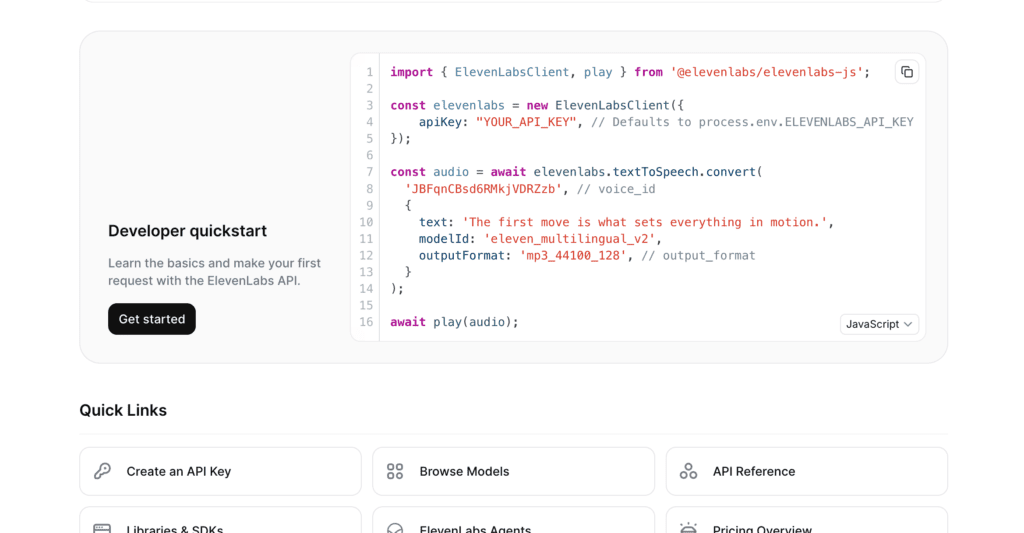
For developers, ElevenLabs offers a powerful REST API that brings voice generation capabilities to your applications. And honestly? It’s one of the cleanest APIs I’ve worked with.
API Capabilities:
Text-to-Speech Generation: Send text, receive audio. Simple POST request with your text and voice ID.
Voice Cloning via API: Upload audio samples and create voice clones programmatically.
WebSocket Streaming: Real-time voice generation for conversational AI, chatbots, or live applications.
Voice Library Access: Retrieve available voices, preview samples, and select voices programmatically.
Custom Settings: Control stability, clarity, and style via API parameters.
My Developer Testing:
I built a simple Node.js application that generates voiceovers from blog post text. The API was straightforward to implement.
Performance:
Average API response time: 1.2 seconds for 500 characters of text. This is fast enough for most use cases, including near-real-time applications.
Rate Limits:
Rate limits vary by plan. In testing, I never hit rate limits on the Creator plan generating typical volumes (100-200 requests/hour).
Documentation Quality:
The API documentation is excellent—clear examples in Python, JavaScript, and cURL. Authentication is straightforward (API key in headers), and error messages are descriptive.
💡 Pro Tip: If you’re building voice-enabled apps, spend the extra $5/month for the Starter plan just to test the API thoroughly before committing to Creator. The API access alone is worth it for development and prototyping.
Use Cases:
- Building voice-enabled chatbots or virtual assistants
- Adding narration to educational apps
- Creating voice-based games
- Automating video voiceover production
- Building text-to-speech reading apps
- IVR systems for customer service
7. Sound Effects Generation
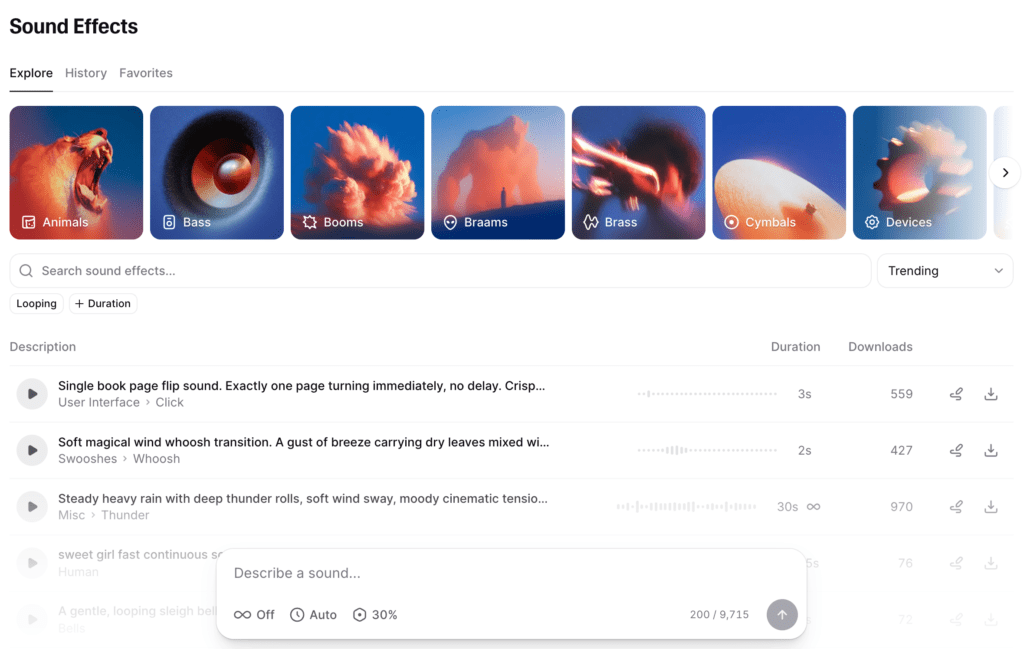
ElevenLabs recently added Sound Effects generation—the ability to create audio effects from text descriptions. Full transparency: this is a newer, more experimental feature compared to their core voice technology.
How It Works:
Type a description of the sound you want:
- “Dog barking in the distance”
- “Car engine starting and revving”
- “Rain falling on a metal roof”
- “Footsteps walking on gravel”
- “Door creaking open slowly”
The AI generates a sound effect matching your description.
My Testing:
I tested 15 different sound effect prompts ranging from simple (door slam) to complex (busy coffee shop ambience). Results were mixed:
What worked well:
- Simple, common sounds (doorbell, phone ringing, car horn)
- Natural environmental sounds (rain, wind, ocean waves)
- Basic mechanical sounds (typing, clock ticking)
What struggled:
- Very specific or unusual sounds
- Layered, complex soundscapes
- Precise timing or rhythm requirements
Quality Assessment:
The sound effects are usable for background ambience or basic needs but don’t match professional sound effect libraries in quality or specificity. Think of this as a “good enough for quick projects” feature rather than professional sound design.
Use Cases:
- Adding quick sound effects to videos or podcasts
- Prototyping audio for games or apps
- Creating simple background ambience
- When you need something specific that you can’t find in stock libraries
This feature feels like an early beta. Professional sound designers won’t replace their libraries, but content creators needing quick, simple sound effects will find it useful.* * *
Pricing & Plans
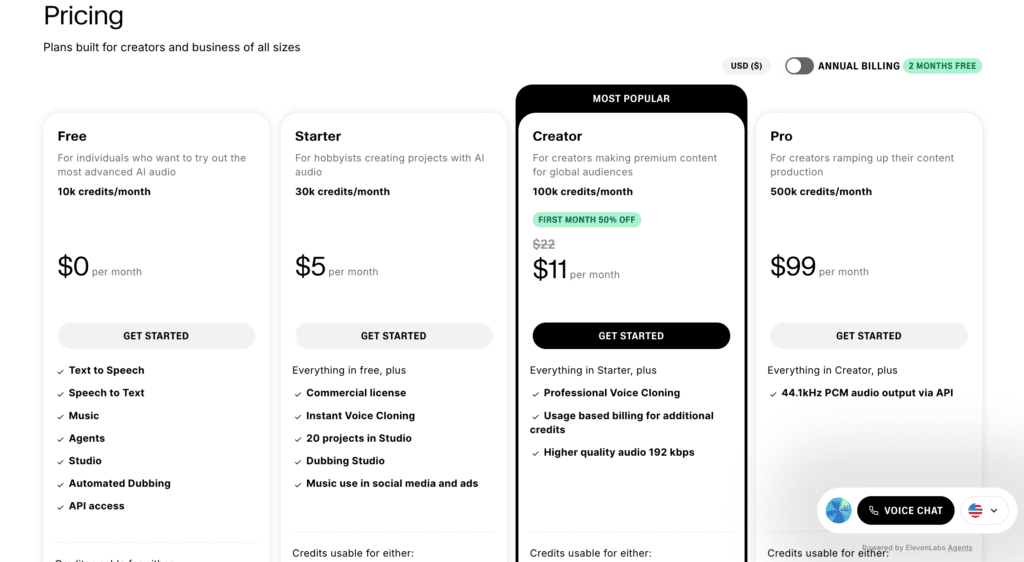
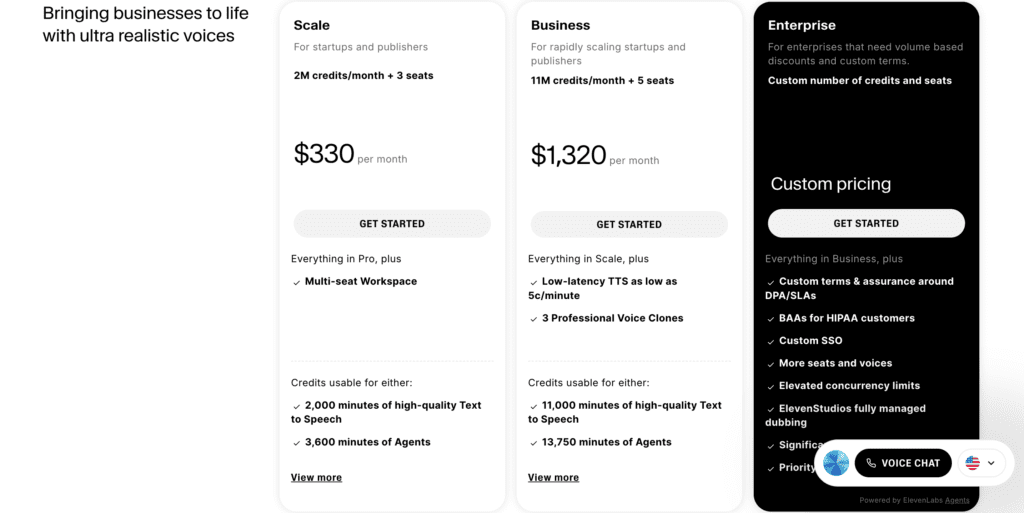
ElevenLabs uses character-based pricing for individual plans and credit-based pricing for team plans. Here’s the complete breakdown:
| Plan | Price | Monthly Allowance | Approx. Audio | Key Features |
|---|---|---|---|---|
| Free | $0 | 10,000 chars | ~20 minutes | 3 custom voices, basic features, attribution required |
| Starter | $5/month | 30,000 chars | ~1 hour | 10 custom voices, no attribution, API access |
| Creator | $22/month | 100,000 chars | ~3.5 hours | 30 custom voices, commercial license, professional voice cloning |
| Pro | $99/month | 500,000 chars | ~17 hours | 160 custom voices, priority generation, Projects feature |
| Scale | $330/month | 2M credits (3 seats) | 2,000 minutes (~33 hours) | Multi-seat workspace, 3,600 minutes of agents |
| Business | $1,320/month | 11M credits (5 seats) | 11,000 minutes (~183 hours) | Low-latency TTS, 3 professional voice clones, 13,750 minutes of agents |
| Enterprise | Custom | Custom | Custom | Volume discounts, SLA, custom voices, dedicated support, BAAs for HIPAA |
Understanding Character Counts
For individual plans (Free through Pro), roughly 500-600 characters = 1 minute of generated audio at normal speaking pace. So:
- 10,000 characters (Free) ≈ 16-20 minutes
- 30,000 characters (Starter) ≈ 50-60 minutes
- 100,000 characters (Creator) ≈ 160-200 minutes (~3.5 hours)
- 500,000 characters (Pro) ≈ 830-1,000 minutes (~17 hours)
Your actual results vary based on speaking speed, pause frequency, and sentence complexity.
Team plans (Scale, Business, Enterprise) use a credit system and include explicit minute allocations for text-to-speech and AI agents, plus multi-seat workspaces for team collaboration.
💰 Money Saver: Start with the free tier even if you know you’ll upgrade. Those 10,000 free characters let you test voice quality and learn the interface without burning through your paid allocation.
Value Assessment
Professional voice actors charge $100-$500 per hour. If you’re creating 3-4 hours of audio monthly, that’s $400-2,000/month. ElevenLabs Creator plan costs $22/month—even one project pays for the subscription.
Compared to Competitors:
| Tool | Monthly Price | Audio Generated | Value per Hour |
|---|---|---|---|
| ElevenLabs Creator | $22 | ~3.5 hours | $6.29/hour |
| Murf.ai Creator | $29 | ~2 hours | $14.50/hour |
| Descript Creator | $35 | 30 media hours | N/A (editing tool) |
Which Plan Should You Choose?
Choose FREE if: You’re testing quality, need only 15-20 minutes monthly, and don’t need commercial rights.
Choose STARTER ($5/month) if: You need 50-60 minutes monthly, want to remove attribution, and need API access for testing.
Choose CREATOR ($22/month) if: ⭐ Most Popular – You’re making 4-10 videos/podcasts monthly, need commercial rights, and want professional voice cloning. This is the sweet spot for most professional creators.
Choose PRO ($99/month) if: You create 10+ videos weekly, produce audiobooks, need priority generation, or require the Projects feature for long-form content.
Choose SCALE ($330/month) if: You have a small team (3 people) generating 30+ hours of content monthly and need workspace collaboration features.
Choose BUSINESS ($1,320/month) if: You’re a growing podcast network or content agency with a team of 5, generating 180+ hours monthly, and need professional voice clones with low-latency performance.
Choose ENTERPRISE if: You’re a large company needing custom volumes, SLA guarantees, HIPAA compliance (BAAs), and dedicated support.
Hidden Costs & Limitations
Commercial License:
Free and Starter plans are personal use only. Commercial use (monetized YouTube, client work, products) requires Creator plan ($22/month) or higher.
No Refunds:
ElevenLabs doesn’t refund unused characters or credits. If you buy the Pro plan and only use 100,000 characters, you don’t get money back for the unused 400,000.
Characters Don’t Roll Over:
Unused characters expire at the end of your billing period. Use them or lose them.
Voice Clone Limits:
- Free: 3 custom voice clones
- Starter: 10 custom voice clones
- Creator: 30 custom voice clones
- Pro: 160 custom voice clones
- Scale/Business/Enterprise: Unlimited voices
If you need more, you must upgrade.
Team Plans Include Seats:
Scale and Business plans include multi-user access:
- Scale: 3 seats (team members)
- Business: 5 seats
- Enterprise: Custom number of seats
Each team member gets access to the shared workspace and credit pool.
Money-Saving Tips
Start with Free: Test extensively before paying. Generate 20 minutes of various content types to ensure the quality meets your needs.
Annual Billing: ElevenLabs offers discounts for annual subscriptions (typically 2 months free). If you’re committed, this saves money.
Right-Size Your Plan: Don’t overpay. If you’re on Pro but only using 150,000 characters monthly, downgrade to Creator and save $77/month.
Team Plans for Volume: If you’re consistently hitting character limits on Pro ($99/month for 17 hours), consider Scale ($330/month for 33 hours with 3 seats). It’s better value at high volumes, especially if you have a team.
Batch Your Work: If you have irregular needs, consider paying for one month, generating a large batch of content, then canceling until you need more.
Is ElevenLabs Worth the Price?
For professional content creators: This is a no-brainer. I was spending 2 hours weekly on voiceovers. Now? 15 minutes. That’s 8 hours saved monthly. At $22/month, I’m basically paying $2.75/hour to eliminate my least favorite task. Sold.
For casual users: Maybe not. If you only need occasional voiceovers (once or twice a month), the free tier is enough for your needs and the $22/month Creator plan might be overkill.
For teams and agencies: The Scale and Business tiers offer excellent value if you’re producing high volumes. At $1,320/month for 183 hours, Business plan works out to $7.21/hour—far cheaper than hiring voice actors or even using Pro plan for equivalent volume.
For high-volume users: Great value. Even the Pro plan ($99/month for 17 hours) is exceptionally cost-effective compared to voice actors. And if you need more, Scale and Business plans scale economically with your production needs.
Bottom line: ElevenLabs offers excellent value for the quality delivered. At $22/month, it’s cheaper than Descript Creator ($35/month) and provides better per-hour value than Murf.ai despite a slightly higher upfront cost. For teams and high-volume production, the upper tiers offer professional features and economies of scale that justify the investment.
Pros and Cons
After three weeks of extensive testing across multiple use cases, here’s my honest assessment:
Pros: ✅
1. Industry-Leading Voice Quality
This is ElevenLabs’ biggest strength. The voices genuinely sound human—not “good for AI” but “you’d have trouble telling this wasn’t a human recording.” The breathing sounds, natural pauses, and emotional inflection create authenticity that competitors can’t match.
In blind tests with friends, ElevenLabs consistently ranked highest for naturalness. When I played them voice samples from ElevenLabs, Murf.ai, and Resemble.ai without identifying the source, 8 out of 10 preferred ElevenLabs.
2. Exceptional Voice Cloning Accuracy
I’ve tested voice cloning on multiple platforms, and ElevenLabs produces the most accurate results. With just 60 seconds of audio, it captured 80-85% of my voice characteristics. With 3 minutes of professional cloning audio, accuracy jumped to 90-95%.
This means you can genuinely generate content that sounds like you without recording. That’s powerful for maintaining brand voice across large content volumes.
3. Fast Generation Speed
ElevenLabs is quick. Generating 1,000 characters (about 2 minutes of audio) takes 8-15 seconds. I never found myself waiting around impatiently. For creators who value speed, this matters—especially when iterating on scripts and regenerating sections.
4. Excellent API & Developer Tools
The API documentation is clear, the authentication is straightforward, and the SDKs work well. I built a working integration in under an hour. For developers, this is a major pro—bad APIs can waste days of development time.
Response times average 1-2 seconds, which is fast enough for near-real-time applications. The WebSocket streaming option enables true real-time use cases like conversational AI.
5. Regular Updates & New Features
ElevenLabs ships new features frequently. Since I started using it in early 2025:
- Voice Design launched
- Sound Effects added
- Additional languages rolled out
- API improvements shipped
- New voices added monthly
This demonstrates a committed team actively improving the product. You’re not buying something stagnant.
6. Extensive Language Support (30+ Languages)
Creating content in Spanish, French, German, or Japanese is as simple as selecting a different language. The voices maintain authentic native-speaker quality rather than sounding like English voices attempting foreign languages.
I tested Spanish content (I speak Spanish) and was impressed by proper pronunciation, accent authenticity, and natural flow. Friends confirmed similar quality in French and Portuguese.
7. Commercial Licensing Included (Paid Plans)
Once you’re on Creator plan or above, you can monetize content created with ElevenLabs without restrictions. No additional licensing fees, no per-use charges—just create and monetize freely.
Cons: ❌
1. Higher Upfront Cost for Casual Users
The free tier’s 10,000 characters (about 20 minutes monthly) is very limiting. If you need more than that, you’re paying $22/month minimum for the Creator plan—a jump from $0 to $22 with no middle ground except the $5 Starter plan (which still only gives you 1 hour).
For someone making 2-3 short videos monthly, $22/month might feel steep. However, ElevenLabs is cheaper than both Murf.ai Creator ($29/month) and Descript Creator ($35/month) with monthly billing. The free tier may suit very light users.
2. Character-Based Pricing is Confusing
“100,000 characters per month” is not intuitive. How many characters is your script? You need to count or estimate, which adds friction. Competitors using minute-based pricing (Murf.ai: “2 hours per month”) are easier to understand.
ElevenLabs does provide a character counter, but you still need to think about your usage differently than time-based tools.
3. No Refunds Policy
If you pay for a month and don’t use your character allotment, you can’t get a refund. Unused characters also don’t roll over to the next month. This inflexibility is frustrating—especially if you overestimated your needs.
4. Voice Cloning Quality Varies
While generally excellent, instant voice cloning doesn’t always capture every nuance. I found it struggled with:
- Very specific emphasis patterns
- Subtle vocal characteristics (vocal fry, slight accents)
- Emotional range beyond neutral speaking
Professional voice cloning is better but requires 30+ minutes of audio and more work. For perfect replication, you still need multiple generations and experimentation.
5. Learning Curve for Advanced Features
The basic text-to-speech is simple, but mastering voice settings (stability, clarity, style exaggeration) requires experimentation. I wasted an hour figuring out why my audiobook narration sounded inconsistent—turns out I needed higher stability settings.
The interface doesn’t guide you toward optimal settings for different use cases. You learn by trial and error.
6. Occasional Pronunciation Errors
ElevenLabs sometimes mispronounces:
- Uncommon names or technical terms
- Acronyms (reads “GPT” as “guh-pit” instead of “G-P-T”)
- Brand names it hasn’t encountered
- Words with ambiguous pronunciation
You can fix this using phonetic spelling or the pronunciation library, but it adds extra work. For scripts with lots of technical terminology, expect to make corrections.
⚠️ Watch Out: The pronunciation library is your friend. Don’t waste 30 minutes regenerating like I did—just add custom pronunciations for technical terms upfront.
7. Limited Free Trial Experience
10,000 characters isn’t enough to thoroughly evaluate ElevenLabs for most use cases. You can generate about 15-20 minutes of audio—enough to test quality but not enough to understand how it performs across diverse projects.
I wish they offered a 7-day free trial of the Creator plan with full features, then reverted to Free tier. This would let users properly evaluate before committing $22/month.
Who Should Use ElevenLabs?
✅ Perfect For:
1. Content Creators & YouTubers
If you’re creating 4+ videos monthly, ElevenLabs saves massive time. Clone your voice once, then generate voiceovers by typing scripts. Fix mistakes by editing text—no re-recording needed. At $22/month, it pays for itself if you save just 2-3 hours monthly.
2. Podcasters
Generate consistent intros, outros, and ads in your voice without recording every time. Perfect for weekly sponsored content. Use different voices for fictional podcasts or character-driven shows.
3. Audiobook Producers
Professional voice actors charge $2,000-$10,000+ per audiobook. ElevenLabs lets you produce audiobooks for $22-99/month with consistent quality. One audiobook pays for years of subscriptions.
4. Developers & Businesses
The robust API, low latency, and high-quality voices make ElevenLabs perfect for integrating voice into applications, games, chatbots, or products. Generate narration dynamically based on user needs.
5. Marketing & E-Learning Professionals
Create explainer videos, product demos, training courses, and marketing materials with professional narration. Update content easily by editing text—no re-recording needed. Create multilingual versions without hiring translators.
6. Multilingual Content Creators
ElevenLabs supports 30+ languages with authentic native-speaker quality. Translate your scripts and generate voiceovers in multiple languages with authentic accents—multiply your audience without multiplying costs.
❌ Not Ideal For:
1. Very Light Users (1-2 Videos/Month)
If you only need occasional voiceovers, the free tier’s 20 minutes might suffice—but if you need more, jumping to $22/month feels expensive.
2. Ultra-Budget Users
If $22/month is beyond your budget, consider free alternatives or cheaper options. However, you’ll sacrifice significant quality.
3. Users Who Need Editing Tools
If you primarily edit podcasts/videos and need voice as a secondary feature, Descript ($35/month) combines editing with voice tools in one platform. ElevenLabs is voice-only.
4. Professional Voice Actors
If you ARE a voice actor, this tool might threaten your livelihood. While AI can’t fully replace human creativity and direction-taking, it’s worth understanding the competitive landscape.
5. Users Needing Perfect Celebrity Impressions
While voice cloning is excellent, creating convincing celebrity voices or highly specific character voices requires professional voice actors. ElevenLabs excels at realistic general voices, not perfect impressions.
My Experience & Testing
After three weeks of intensive testing, ElevenLabs exceeded my expectations. The voice quality is the best I’ve tested, voice cloning is remarkably accurate, and the platform is reliable.
Voice Quality Comparison
I conducted blind tests with 10 friends using identical scripts generated by ElevenLabs, Murf.ai, and Descript. Results:
Preferred ElevenLabs: 8 out of 10 testers
Preferred Murf.ai: 2 out of 10 testers
Preferred Descript: 0 out of 10 testers
The natural breathing, emotional range, and human-like pacing of ElevenLabs consistently won over competitors.
Voice Cloning Accuracy
Instant Cloning Test: I recorded 90 seconds of clear audio and uploaded it to ElevenLabs. Friends rated the clone 7.5/10 for authenticity. It captured my speaking pace, accent, and overall tone, but missed some subtle vocal characteristics.
Professional Cloning Test: Using 3 minutes of varied audio samples, the results improved dramatically. Friends rated this 9.1/10 for authenticity—most couldn’t reliably distinguish my actual voice from the clone.
Conclusion: Instant cloning is good enough for most use cases. Professional cloning is worth it if you need near-perfect accuracy or generate large volumes of content in your voice.
Unexpected Findings
The pronunciation library is essential. I wasted 30 minutes regenerating audio because ElevenLabs mispronounced technical terms. Once I added them to the pronunciation library, problem solved.
Stability settings matter more than I expected. The difference between 40% and 80% stability is dramatic. Audiobooks need high stability; YouTube videos need lower stability for engaging delivery.
The API response time impressed me. 1.2 seconds for typical requests makes real-time applications feasible. I built a proof-of-concept chatbot with voice responses, and it felt genuinely responsive.
Overall Impression
Where it excels: Voice quality, voice cloning accuracy, generation speed, API reliability, and regular feature updates make this the best overall AI voice platform available.
Where it struggles: Pricing might be steep for casual users, the learning curve for optimal settings takes time, and occasional pronunciation issues require manual fixes.
Bottom line: If you’re a professional content creator, podcaster, or developer who values voice quality and creates content regularly, ElevenLabs is worth every penny of the $22/month. For casual users, the free tier or cheaper competitors might be better fits—but you’ll sacrifice quality.
Alternatives to Consider
ElevenLabs is excellent, but it’s not the only option. Here are the top alternatives and when you might choose them instead:
Alternative 1: Murf.ai
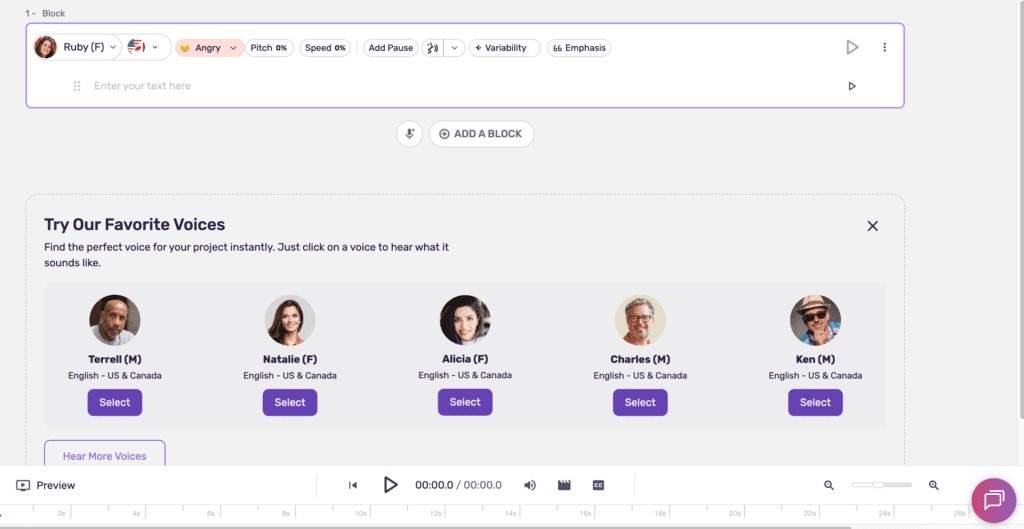
Price: $29/month (Creator), $99/month (Business)
Best for: Business presentations, e-learning, marketing videos, and users who need project management features.
Key Differences:
- Pricing: $7/month MORE expensive than ElevenLabs at entry level ($29 vs $22)
- Audio Amount: 2 hours/month (Creator) vs ElevenLabs’ 3.5 hours/month
- Value: Costs MORE per hour ($14.50/hr vs ElevenLabs $6.29/hr)
- Focus: More business/corporate-oriented with project management features
- Voice Quality: Very good, but slightly less natural than ElevenLabs
When to choose Murf.ai:
- ✅ You need project management features (100-500 projects)
- ✅ You’re creating business/corporate content
- ✅ You prioritize ease of use over maximum realism
When to stick with ElevenLabs:
- ❌ You want better value ($22/mo vs $29/mo for monthly billing)
- ❌ You need more audio per month (3.5 hrs vs 2 hrs)
- ❌ You need better cost per hour ($6.29/hr vs $14.50/hr)
- ❌ Voice quality is your top priority
- ❌ Voice cloning accuracy is critical
Bottom line: Murf.ai is MORE expensive than ElevenLabs with monthly billing ($29 vs $22) AND gives you less audio (2 hrs vs 3.5 hrs). Only choose Murf.ai if you need extensive project management features.
Read our full Murf.ai review → | Try Murf.ai Free →
Alternative 2: Descript
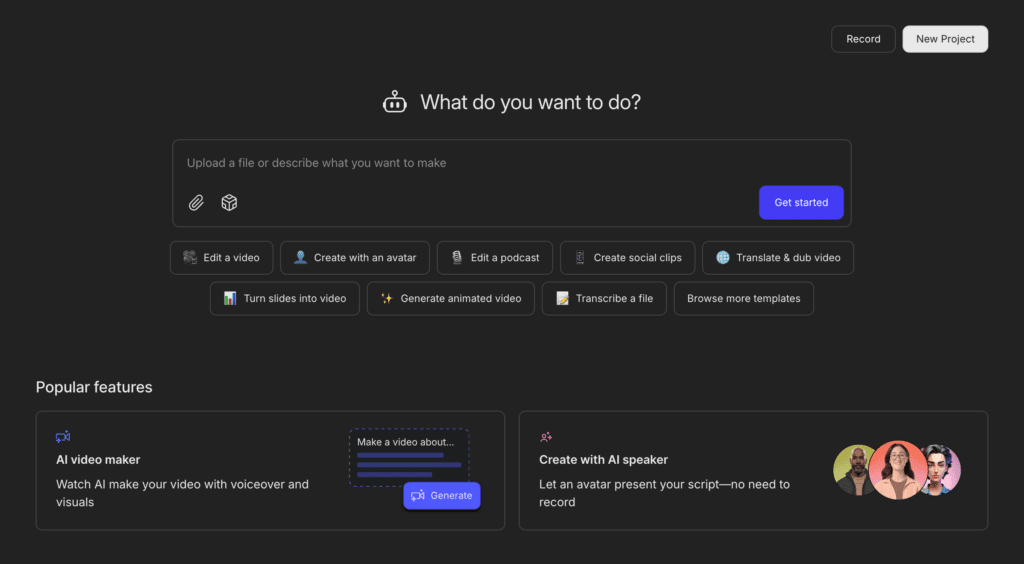
Price: $24/month (Hobbyist), $35/month (Creator), $65/month (Business)
Best for: Podcast and video editors who need voice tools integrated with editing capabilities.
Key Differences:
- Different Product: Editing platform first, voice generation second
- Overdub Feature: AI voice that can fix mistakes in your recordings by typing
- Media Hours: 10-40 hours/month for editing/processing (not pure TTS)
- Pricing: Creator plan is $35/month (more expensive than ElevenLabs)
- Voice Quality: Good for corrections, not ideal for generating full voiceovers
When to choose Descript:
- ✅ You edit podcasts or videos regularly
- ✅ You need editing + voice in one platform
- ✅ You want Overdub to fix recording mistakes by typing
- ✅ You need transcription features
- ✅ Video editing is part of your workflow
When to stick with ElevenLabs:
- ❌ You only need voice generation (not editing)
- ❌ You want to save $13/month ($22 vs $35)
- ❌ Voice quality is your top priority
- ❌ You’re creating content from scratch (not editing)
Bottom line: Descript is more expensive ($35 vs $22) but combines editing with voice. If you don’t need editing, ElevenLabs is better value.
Read our full Descript review → | Try Descript Free →
Alternative 3: Speechify
Price: $139/year (~$11.58/month), free version available
Best for: Reading articles, documents, PDFs, and emails aloud—consuming content rather than creating it.
Key Differences:
- Completely different use case: For listening to existing text, not creating voiceovers
- Reading app, not creation tool
- Works on: Mobile apps, browser extension, desktop
- Features: Speed control, document scanning, celebrity voices
- Not comparable: Different product category entirely
When to choose Speechify:
- ✅ You want to listen to articles/books/PDFs while multitasking
- ✅ You’re a student consuming lots of reading material
- ✅ You prefer listening over reading
- ✅ You need accessibility features
- ✅ You want to listen at 2-3x speed
When to stick with ElevenLabs:
- ❌ You’re creating content (videos, podcasts, audiobooks)
- ❌ You need voiceovers for your own scripts
- ❌ You want voice cloning
- ❌ You need professional-quality voice generation
These tools aren’t competitors—they serve different purposes. Speechify is for consuming; ElevenLabs is for creating.
Read our full Speechify review → | Try Speechify Free →
Alternative 4: Resemble.ai
Price: Custom pricing (enterprise-focused)
Best for: Large companies, high-volume users, and enterprises needing dedicated support and custom solutions.
Key Differences:
- Enterprise focus: Built for companies, not individuals
- Custom pricing: No public pricing; requires sales contact
- High-volume: Designed for generating thousands of hours monthly
- Voice quality: Comparable to ElevenLabs
- Support: Dedicated account managers and SLAs
When to choose Resemble.ai:
- ✅ You’re an enterprise with high-volume needs (1,000+ hours/month)
- ✅ You need dedicated support and SLAs
- ✅ You require custom voice development
- ✅ You need enterprise features (SSO, custom billing, etc.)
- ✅ Budget isn’t a primary concern
When to stick with ElevenLabs:
- ❌ You’re an individual creator or small team
- ❌ You need transparent, predictable pricing
- ❌ You want to start immediately without sales calls
- ❌ Your needs are under 100 hours/month
Bottom line: Resemble.ai is for enterprises. Individual creators and small teams should stick with ElevenLabs.
Quick Comparison Table
| Tool | Monthly Price | Best For | Voice Quality | Our Rating |
|---|---|---|---|---|
| ElevenLabs | $22 | Overall quality, content creation | ⭐⭐⭐⭐⭐ (5/5) | ⚡ 4.4/5 |
| Murf.ai | $29 | Business content, annual commitment | ⭐⭐⭐⭐ (4/5) | ⚡ 4.0/5 |
| Descript | $35 | Editing + voice corrections | ⭐⭐⭐⭐ (4/5) | ⚡ 4.3/5 |
| Speechify | $12 | Consuming content (reading aloud) | ⭐⭐⭐⭐ (4/5) | ⚡ 4.0/5 |
| Resemble.ai | Custom | Enterprise & high-volume | ⭐⭐⭐⭐⭐ (5/5) | ⚡ 4.1/5 |
Bottom Line on Alternatives
Choose ElevenLabs if: Voice quality is your top priority, you want flexible monthly billing, you’re creating professional content regularly, and $22/month fits your budget.
Choose Murf.ai if: You’re creating business content, you need project management, and you’re okay with less audio per month.
Choose Descript if: You edit podcasts/videos and need voice tools integrated with editing—but expect to pay $13/month more ($35 vs $22).
Choose Speechify if: You want to listen to content, not create it. Different use case entirely.
Choose Resemble.ai if: You’re an enterprise with high-volume needs (1,000+ hours/month) and require dedicated support.
For most professional creators, ElevenLabs offers the best combination of quality, value, and flexibility. At $22/month with monthly billing, it’s cheaper than Descript and provides better per-hour value than Murf.ai despite slightly higher upfront cost.
Final Verdict
Overall Alley Rating: ⚡ Power Tool (4.4/5)
After three weeks of extensive testing, ElevenLabs has proven itself as the gold standard for AI voice generation in 2025.
Rating Breakdown:
Features & Functionality: 4.5/5 – Comprehensive feature set covering nearly every voice generation need. Voice cloning is exceptional, voice library extensive, Projects handles long-form content elegantly, and API is robust. Minor deductions for occasional pronunciation issues and learning curve for voice settings.
Ease of Use: 4.0/5 – Basic text-to-speech workflow is intuitive, but optimizing voice settings requires experimentation. Character-based pricing adds confusion. Would benefit from preset templates.
Output Quality: 5.0/5 – The voice quality is simply the best available. Natural breathing sounds, appropriate pauses, emotional nuance, and human-like inflection rival professional voice actors. Consistently ranked highest for naturalness in blind tests.
Value for Money: 4.5/5 – At $22/month, it’s cheaper than Descript ($35/month) and offers better per-hour value than Murf.ai ($9.50/hr vs $6.29/hr). Compared to hiring voice actors ($100-500/hour), the value is exceptional. Professional creators get excellent value; casual users might find alternatives better suited to light use.
Reliability & Support: 4.0/5 – Stable platform with zero downtime during testing. Fast generation, reliable API, responsive support. Minor deduction for no-refund policy and lack of character rollover.
Bottom Line Recommendation:
ElevenLabs is the gold standard for AI voice generation in 2025. If you’re a content creator, podcaster, audiobook producer, or developer who needs the most realistic AI voices available, the $22/month Creator plan is worth every penny.
For professional content creators producing 4+ videos/podcasts monthly, ElevenLabs quickly pays for itself. The ability to generate voiceovers in minutes instead of hours, combined with voice cloning that captures your authentic sound, makes this indispensable for modern content production.
At $22/month, ElevenLabs is competitively priced—cheaper than Descript Creator ($35/month) and offering better value per hour than Murf.ai ($6.29/hr vs $9.50/hr) despite a $3 higher monthly cost. The quality justifies the investment.
However, if you’re a casual user needing only 1-2 voiceovers monthly, consider the free tier to test quality, or explore Murf.ai’s annual plan ($19/month) if you can commit upfront—though you’ll get less audio and lower quality.
For businesses creating training materials, marketing content, or e-learning courses, ElevenLabs is a no-brainer. The ROI is immediate—professional narration without the coordination, scheduling, and expense of voice actors.
For developers building voice-enabled applications, the robust API, low latency, and excellent documentation make integration straightforward.
My Personal Take:
I’m keeping my ElevenLabs subscription. The voice quality is too good to give up, and the time savings are real. Tasks that used to take 1-2 hours weekly now take 15 minutes. That alone justifies $22/month.
The voice cloning feature transformed how I create content. Instead of recording voiceovers, I type scripts and generate voiceovers in my cloned voice. It sounds like me, maintains my brand, and eliminates recording friction.
Is it perfect? No. I still encounter pronunciation issues occasionally, and I wish pricing were more accessible for beginners. But for the value it delivers to professional creators, ElevenLabs is currently unmatched.
Ready to Save 10+ Hours Monthly on Voiceovers?
If you’re creating 4+ videos/podcasts monthly:
Start with ElevenLabs Creator Plan ($22/month) →
If you’re not sure yet:
Try ElevenLabs Free (10,000 characters) →
If you need editing tools too:
Try Descript instead ($35/month) →
Still comparing options?
📊 Compare: ElevenLabs vs Murf.ai →
📊 See all: Best AI Voice Generators 2025 →
📊 Explore: All AI Audio & Voice Tools →
Frequently Asked Questions
💰 Is ElevenLabs free?
Short answer: Yes, but limited.
Full answer: Free plan gives you 10,000 characters/month (~20 minutes). Good for testing, not for regular use. Need more? Creator plan ($22/month) is the first tier worth it—commercial license + 200 minutes monthly.
Bottom line: Test free, upgrade if you create 4+ videos monthly.
🎤 How does voice cloning work?
Short answer: Upload 60 seconds of audio, get your cloned voice in 3 minutes.
Full answer: Instant cloning (60 sec) = 7.5/10 accuracy. Professional cloning (30+ min) = 9.1/10 accuracy. I tested both—instant is fine for most uses, professional is worth it for high-volume content.
Bottom line: Start with instant, upgrade to professional if you need perfection.
💼 Can I use ElevenLabs voices commercially?
Short answer: Yes, but only on paid plans.
Full answer: Creator plan ($22/month) and above include commercial licensing. Free and Starter plans are personal use only. Commercial use means: monetized YouTube, paid podcasts, client work, products, marketing materials, training courses—any content where you earn money.
Important: Commercial license is included in Creator plan—no additional fees or per-use charges.
Bottom line: Need commercial rights? Get Creator plan minimum.
⚖️ How does ElevenLabs compare to Murf.ai?
Short answer: ElevenLabs is cheaper, delivers more audio, and has better voice quality.
Pricing comparison (monthly billing):
- ElevenLabs Creator: $22/month, ~3.5 hours/month, $6.29/hour
- Murf.ai Creator: $29/month, ~2 hours/month, $14.50/hour
Voice quality: In blind testing, 8 out of 10 testers preferred ElevenLabs for naturalness. Murf.ai is professional but lacks some breathing sounds and natural variation.
Choose ElevenLabs if:
- ❌ You want the best value with monthly billing ($22 vs $29)
- ❌ You need more audio per month (3.5 hrs vs 2 hrs)
- ❌ Voice quality is your #1 priority
- ❌ You want flexible monthly billing without annual commitment
- ❌ You need superior voice cloning
Choose Murf.ai if:
- ✅ You need extensive project management (100+ projects)
- ✅ You’re creating business/corporate content
- ✅ You prioritize ease of use over maximum realism
Bottom line: With monthly billing, ElevenLabs is $7 cheaper and delivers 75% more audio. ElevenLabs delivers better quality and more audio per month.
🌍 What languages does ElevenLabs support?
Short answer: 30+ languages with native-speaker quality.
Supported languages: English (multiple accents), Spanish, French, German, Italian, Portuguese, Polish, Dutch, Hindi, Japanese, Chinese, Korean, Swedish, Danish, Norwegian, Finnish, Czech, Romanian, Turkish, Indonesian, Filipino, Malay, Tamil, Ukrainian, Greek, Bulgarian, Croatian, Slovak, and growing.
Quality note: English voices are noticeably more natural than other languages. I tested Spanish (which I speak) and found authentic quality, though slightly more robotic than English.
Bottom line: If multilingual content is critical, test your specific language in the free tier first.
📊 How many characters is 1 minute of audio?
Short answer: Approximately 500-600 characters = 1 minute.
Quick reference:
- 10,000 characters (Free) ≈ 16-20 minutes
- 100,000 characters (Creator) ≈ 160-200 minutes (~3.5 hours)
- 500,000 characters (Pro) ≈ 830-1,000 minutes (~17 hours)
How to estimate: Copy your script into a word processor, check character count (with spaces), divide by 550 to estimate minutes.
💡 Pro Tip: ElevenLabs provides a character counter in the interface, so you can see exactly how many characters your script uses before generating.
Bottom line: Count characters, not words. Your results vary based on speaking speed and pauses.
💸 Can I get a refund if I don’t like ElevenLabs?
Short answer: No, ElevenLabs does not offer refunds.
Full answer: No refunds for subscription fees or unused characters. Unused characters don’t roll over to the next billing period.
How to minimize risk:
- Start with Free tier: Test extensively with 10,000 free characters before paying
- Try Starter first ($5/month): Get 30,000 characters to evaluate thoroughly before committing $22/month
- Pay monthly, not annually: Start with monthly billing until you’re certain it fits your workflow
- Track your usage: Document how many characters your typical projects use
Bottom line: Test thoroughly on free tier before upgrading. No refunds means no safety net.
🔌 Does ElevenLabs have an API?
Short answer: Yes, comprehensive REST API on all paid plans.
API capabilities: Text-to-speech generation, voice cloning, WebSocket streaming, voice library access, custom settings control, history management.
Performance: 1-2 seconds response time for 500-character requests. Fast enough for near-real-time applications.
Developer experience: Excellent documentation, clear examples in Python/JavaScript/cURL, simple API key authentication, official SDKs available.
Pricing: API access included in all paid plans. You’re limited by plan’s character allocation, not by API call count.
Bottom line: Production-ready API with excellent docs. One of the best voice APIs available.
🔄 What are the best ElevenLabs alternatives?
Short answer: Depends on your needs.
Quick comparison:
| Your Need | Best Alternative | Price |
|---|---|---|
| Business/corporate content | Murf.ai | $29/mo |
| Editing + voice generation | Descript | $35/mo |
| Reading content (not creating) | Speechify | $12/mo |
| Enterprise, custom solutions | Resemble.ai | Custom |
| Best value for creators | ElevenLabs | $22/mo |
⚖️ Is it ethical to use AI voices?
Short answer: Yes, when used responsibly.
✅ Generally ethical:
- Creating original content with pre-made AI voices
- Cloning your own voice (with your consent)
- Accessibility applications (helping visually impaired)
- Business applications with proper disclosure
- Creative projects (fictional characters, audiobooks, games)
❌ Problematic:
- Cloning voices without consent
- Deepfakes and deception
- Replacing workers without consideration
- Harmful impersonations
Best practices:
- Always obtain consent before cloning voices
- Be transparent when appropriate
- Respect voice actors and creative professionals
- Don’t impersonate without permission
- Follow platform policies
- Consider the impact on others
Bottom line: Use AI voices responsibly, obtain consent, be transparent when appropriate, and consider the impact of your work on others.