
Synthesia pricing: what the minutes really cost
Synthesia starts at $18/mo, but it meters by video minutes, and they're tight: Starter is about 10 minutes a month at roughly $2 a minute. Here's the math.
Contents
How much does Synthesia cost?

Synthesia’s cheapest paid plan is Starter at $18 a month billed yearly ($29 monthly), but that $18 buys only about 10 minutes of video a month, because Synthesia meters by video minutes and they are tight. Creator is $64 a month ($89 monthly) for roughly 30 minutes, and Enterprise is custom-priced; the free plan is $0. The price, in other words, is not the number that decides your bill.
What decides it is those video minutes, and they are tighter than the plans look. Do the division and you are paying roughly two dollars per finished minute on annual billing, closer to three if you pay month to month. This guide is about that math, because with Synthesia the minutes matter far more than the dollars. All figures are current as of July 2026.
| Plan | Price / month | Video minutes | What you get |
|---|---|---|---|
| Free | $0 | ~10 min/mo | 9 avatars, watermark, no download |
| Starter | $18 ($29 monthly) | ~10 min/mo (120/yr) | 125+ avatars, 3 personal, downloads, logo removed |
| Creator | $64 ($89 monthly) | ~30 min/mo (360/yr) | 180+ avatars, 5 personal, API, interactive videos |
| Enterprise | Custom | Unlimited | SSO, SCORM, 1-click translation, collaboration |
How does Synthesia’s pricing work?
Synthesia now meters usage with a shared credit pool, its own words being that credits are the common currency across everything you create. The number that translates credits into something you can picture is this: it takes about 120 credits to make one minute of video. So Starter’s 1,200 monthly credits are roughly 10 minutes, and Creator’s 3,600 are about 30.
That is why the minute figure, not the credit figure, is the one to hold onto. The plans advertise generous-sounding credit totals, but at 120 credits a minute they resolve to small amounts of finished video. The allowances are the real constraint, and they are modest. It is the same lesson HeyGen’s pricing teaches from the other direction: both tools now price in credits, and in both cases the credit total flatters the plan until you convert it into minutes of actual video.
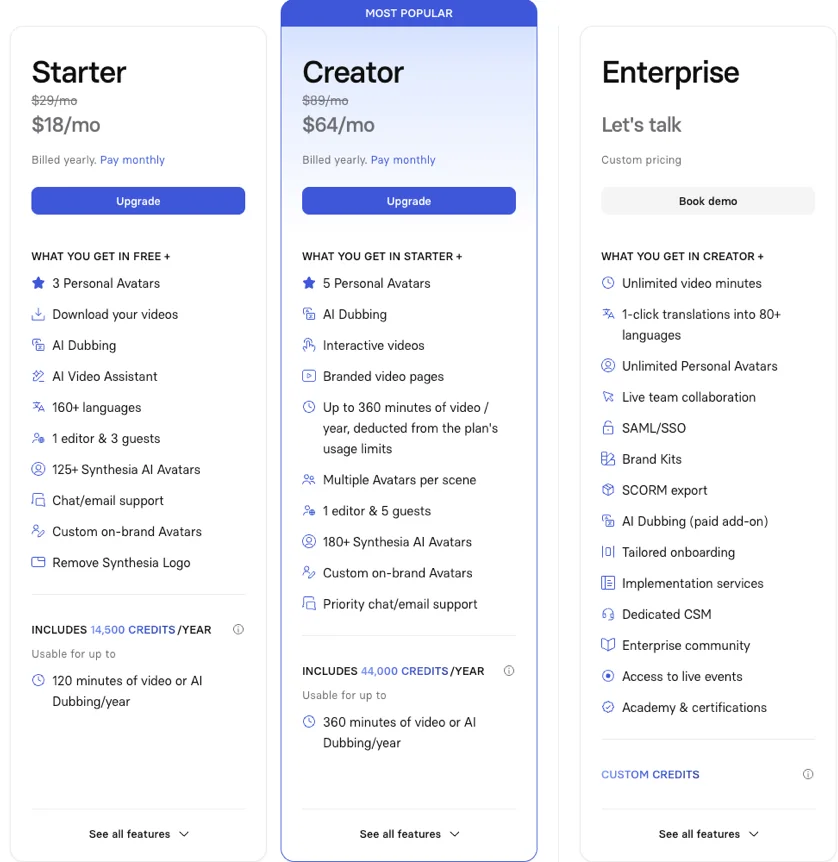
Two details make the model trickier than a flat minute count. First, annual and monthly billing deliver minutes differently: pay monthly and you get about 10 minutes each month on Starter (use it or lose it); pay yearly and you get a 120-minute bucket for the whole year that you can spend unevenly. Second, and easier to miss, AI Dubbing draws from the same credit pool as video. Translating a finished video into another language spends credits that would otherwise make new video, so a localization-heavy workflow burns through the allowance faster than the headline number implies.
Put it concretely. A single five-minute video on Starter spends 600 of your 1,200 monthly credits, half the month gone on one clip. Dub that same video into three languages and the dubbing alone costs roughly 1,800 credits, more than the entire monthly plan, which is how a modest-sounding project quietly forces an upgrade or a wait for next month’s refill.
The upside of the model is predictability. Unlike a tool whose per-minute cost swings with which avatar engine you pick, Synthesia charges a flat rate per minute, so once you know your monthly minutes you know your bill. The downside is that the flat rate is not cheap, and the minutes run out quickly, which is the tension every Synthesia buyer has to price around.
The plans in detail
Free — a preview you cannot download
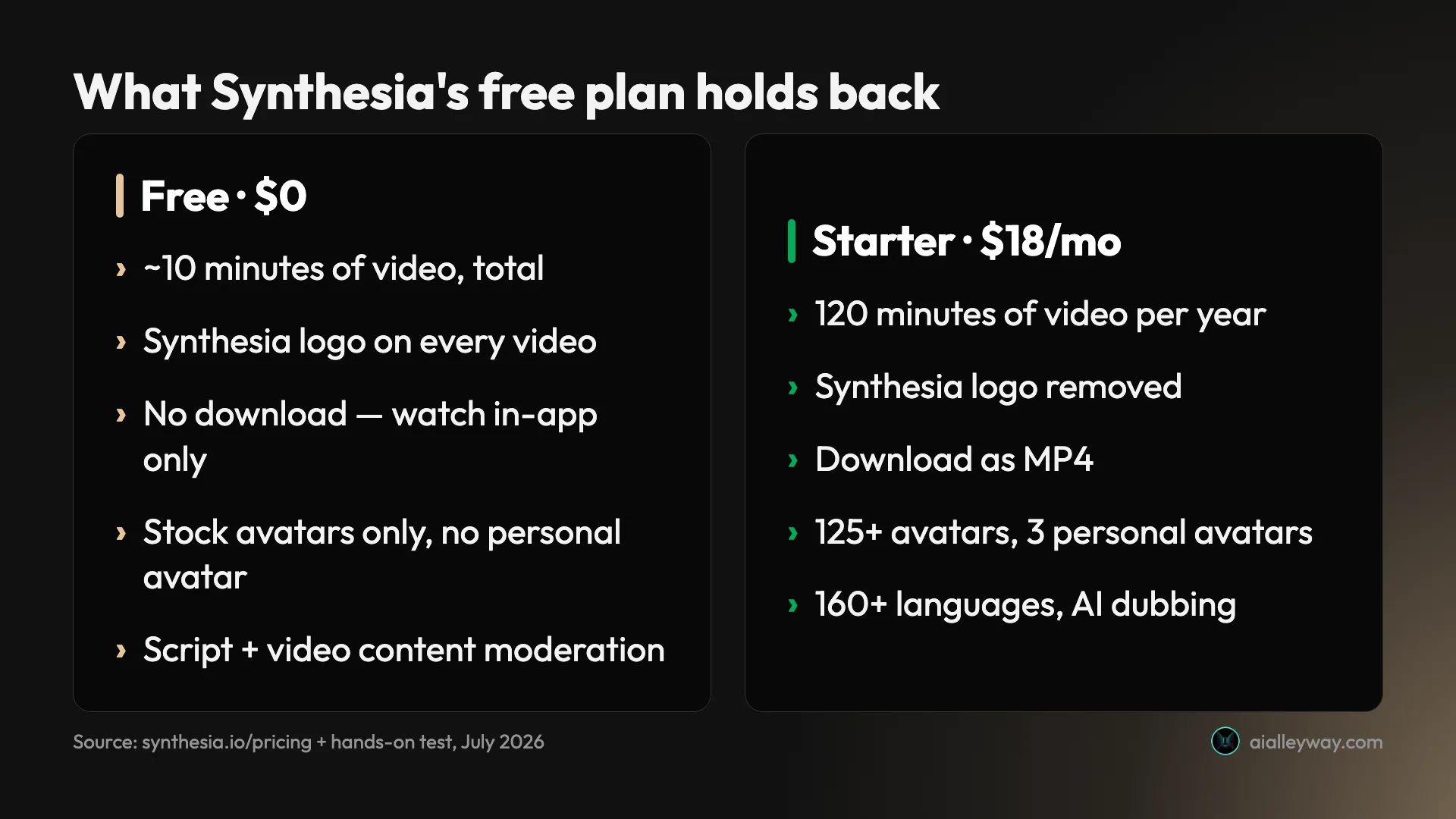
The free plan costs nothing and gives you about 10 minutes of video a month, 9 stock avatars, and the full range of 160+ languages, which is genuinely enough to judge whether Synthesia’s avatars suit your work. It is a real test drive.
Its limits are what make it a preview rather than a tool. Every video carries a Synthesia logo, and in our hands-on testing the free plan would not let us download the finished video at all. There is no API and no AI Video Assistant. Use it to evaluate quality, then expect to pay to keep anything.
Compared with HeyGen’s free tier, which tiles a watermark across the whole frame, Synthesia’s single corner logo is less intrusive, and the 10 free minutes are more generous than a one-video cap. But the download wall is the same dealbreaker on both: a free plan you can watch but not export is a demo, not a production tool.
Starter — $18/month, the real entry point
Starter at $18 a month billed yearly ($29 monthly) is where Synthesia becomes usable: it removes the logo, enables downloads, and opens up 125+ stock avatars plus 3 personal avatars, on about 10 minutes of video a month (120 minutes a year on annual billing).
The ten-minutes-a-month ceiling is the thing to internalize. That is enough for a couple of short explainer or update videos, but a single longer piece can consume most of it. For an individual making the occasional avatar video, Starter is the right plan; for anyone producing regularly, it will feel tight fast.
One nuance rewards attention: on annual billing Starter’s allowance arrives as a 120-minute bucket for the year rather than a strict 10 each month, so you can spend it unevenly, a heavier month here balanced by a quiet one there. On monthly billing the 10 minutes reset each month and do not carry over, which makes the annual plan not just cheaper but more forgiving for bursty workloads.
Creator — $64/month, triple the minutes
Creator at $64 a month billed yearly ($89 monthly) roughly triples the allowance to about 30 minutes of video a month (360 a year), expands the library to 180+ avatars with 5 personal avatars, and adds API access and interactive videos. It is the plan for someone producing avatar video as a regular part of their work.
The math still bites, though. Thirty minutes a month is about six hours of finished video across a year, and at $768 annually that works out to roughly two dollars a minute. If your output climbs past 30 minutes a month, there is no self-serve tier above Creator; the next step is an Enterprise quote.
Enterprise — custom, where the governance lives
Enterprise is quote-only and adds the pieces a company actually needs: unlimited video minutes, SSO and SAML, SCORM export into a learning management system, one-click translation into 80+ languages, live collaboration, brand kits, 240+ stock avatars, unlimited personal avatars, and a dedicated customer success manager.
The important takeaway is that most enterprise-grade features are here and only here. If your rollout needs single sign-on, LMS delivery, or scaled translation, you are on Enterprise regardless of your video volume, and that is a sales conversation rather than a checkout.
Synthesia does not publish an Enterprise price, and it varies with seats, minutes, and features, so the only way to know your number is to ask. What you are buying at that tier is less about raw video and more about governance and scale: the controls that get a tool through procurement, the languages to ship one course worldwide, and the support to roll it out. For a single company standardizing training video, that is often exactly the package worth paying for; for an individual, it is far more than the job needs.
What Synthesia’s minutes really cover
The abstract “10 minutes a month” becomes concrete once you attach it to real work. Here is what the tiers cover for a few typical users, using the roughly two-dollars-a-minute annual rate.
| User | Monthly video | Minutes used | Fits |
|---|---|---|---|
| Solo creator, two 2-min updates | ~4 min | well inside Starter | Starter |
| SaaS team, three 3-min clips | ~9 min | inside Creator, room to revise | Creator |
| L&D video library | ~150+ min/yr | past Starter’s 120/yr | Creator |
| One video into five languages | a large share of a month | shared pool drains fast | Enterprise |
A solo creator making short updates who posts two 2-minute videos a month uses 4 of Starter’s 10 minutes, comfortably inside the plan. This is the profile Starter is priced for, and at $18 a month it is a reasonable deal for occasional avatar video.
A team building a training library of, say, a couple of hours of finished onboarding and compliance video a year runs past Starter’s 120 annual minutes, and revisions push it further because re-rendering a corrected scene spends minutes again. That workload points at Creator’s 360 annual minutes, or Enterprise if the course must ship in several languages.
A marketing team localizing one video into five languages runs into the shared-pool catch directly: the original video plus five dubbed versions all draw credits from the same allowance, so a single multilingual campaign can eat a large share of a month’s minutes. For steady localization, the one-click translation and larger allowances of Enterprise are the realistic home.
A SaaS team making product and feature videos that ships, say, three 3-minute clips a month uses about 9 of Creator’s 30 minutes, leaving room for revisions, which is a comfortable fit for the $64 plan. The moment that cadence doubles, or each video needs a few takes, the 30-minute ceiling starts to feel close, and the team is weighing whether the jump to Enterprise is worth it purely for more minutes.
The pattern across all four is that Synthesia’s cost is governed almost entirely by minutes of finished video, and every re-render and every translation spends them. Estimate your monthly minutes honestly, add a margin for revisions, and match that to a tier rather than trusting the headline allowance to be enough.
What to watch on Synthesia pricing
The plan price is what Synthesia advertises; these are the details that change what you actually spend or get.
| Cost trap | The detail |
|---|---|
| Tight minutes | Starter is ~10 min/month; a long video eats most of it |
| Shared credit pool | AI Dubbing spends the same credits as new video |
| Effective rate | ~$2/min on annual billing, ~$3/min month-to-month |
| Enterprise-gated | SSO, SCORM, and 1-click translation are Enterprise-only |
| No free download | The free plan watermarks and blocks downloads |
The minutes are the real ceiling
The single thing to understand is that Synthesia’s plans are small in minutes. Ten a month on Starter and thirty on Creator go quickly once you account for multiple takes, and there is no way to top up minutes on a self-serve plan short of upgrading. Budget by minutes of finished video, not by the credit total.
AI Dubbing spends your video budget
Because dubbing draws from the same credit pool as generation, localization is not a free add-on; it competes with new video for the same allowance. A team that translates heavily should size its plan for the total, originals plus every language, not just the source videos.
The effective cost is around two dollars a minute
Run the annual math and Creator’s $768 a year for 360 minutes is about $2.13 a minute; Starter is about $1.80. Pay month-to-month and it climbs toward three dollars a minute. That is fine for occasional, high-value video and steep for anyone producing at volume. It is also worth remembering what that buys: a polished, moderated, on-brand presenter video, not raw footage, so the comparison is against a production budget rather than a stock-clip subscription.
The features enterprises need are Enterprise-only
SSO, SCORM, one-click translation, and collaboration all sit behind a custom quote. Training and IT teams evaluating the $64 Creator plan should know upfront that a governed, LMS-integrated deployment is a different, pricier tier.
Rendering is slow by design
Synthesia moderates every video before releasing it, which in our testing pushed a nine-second clip to four or five minutes. It is a deliberate safety step, not a bug, but it means iteration is slower than tools that render instantly, and that is a real cost in time if you revise a lot.
How to keep your Synthesia bill down
Because Synthesia’s cost is almost all in the minutes, the ways to control it are about spending those minutes carefully rather than finding a discount. A few habits make a real difference.
- Pay annually. The gap is large here: Starter drops from $29 to $18 a month on annual billing (nearly 40% off) and Creator from $89 to $64 (close to a third). If you are committing for a year anyway, monthly billing is simply the expensive way to pay.
- Script and proof before you render. Every re-render of a corrected scene spends minutes again, and Synthesia’s slow moderated render makes each attempt costly in time too. Locking the script and the on-screen text first is the single biggest way to stop minutes leaking into revisions.
- Plan localization deliberately. Because AI Dubbing draws from the same credit pool, translating into several languages can quietly double or triple a project’s cost in minutes. Batch it, and size your plan for the total languages, not just the source video.
- Right-size the plan to your real output. If you genuinely make only a few minutes a month, Starter’s 10 minutes are enough and Creator is money spent on headroom you will not use. Upgrade when you actually hit the ceiling, not in anticipation of it.
- Use the free plan to evaluate, not to produce. It cannot download, so treat it purely as a quality check, then move to Starter the moment you need a usable file.
Which Synthesia plan should you choose?
- Just evaluating? Use Free to judge avatar quality and the editor, but remember you cannot download the result; plan to pay the moment you need to keep a video.
- An individual making occasional video? Starter at $18 a month is the plan, as long as 10 minutes a month covers your output. It removes the logo and enables downloads, which is the real win.
- Producing avatar video regularly? Creator at $64 a month and its ~30 minutes is the step up, and it adds API access and interactive video for more serious workflows.
- Rolling out across a company, or localizing at scale? You are on Enterprise, where SSO, SCORM, one-click translation, and unlimited minutes live. Price it as a deployment, not a subscription.
- Skip Synthesia if your work is high-volume short-form video where the tight minutes and ~$2-a-minute rate make it expensive; a credit-based tool may stretch further.
If the minutes run short, look here
Synthesia’s per-minute model rewards standardized, moderate-volume video and punishes high output. If your use case is the second kind, these are worth pricing against it.
- HeyGen — the closest head-to-head alternative, and often cheaper for short-form because it meters by credits that vary with the avatar engine rather than a flat per-minute rate. See our HeyGen pricing guide for how its credits work, and the HeyGen vs Synthesia comparison for the direct matchup.
- Colossyan — if your need is specifically interactive training, Colossyan builds quizzes and branching into the video and can be a more focused spend than a full Synthesia rollout.
- Vidnoz — if budget is the whole constraint, Vidnoz has the most generous genuinely-free tier, with daily credits and downloads allowed, trading polish for price.
The bottom line on Synthesia pricing
Synthesia’s pricing is easy to state and easy to underestimate: $18 a month for Starter, $64 for Creator, but the plans buy about 10 and 30 minutes of video a month, at roughly two dollars a finished minute. Get your monthly minutes right, remember that revisions and dubbing spend from the same pool, and the tool is a predictable, high-quality choice for standardized video.
So price Synthesia by the minutes, not the dollars, and be honest about how many you will actually use. For the full hands-on verdict, see our Synthesia review, and for where it sits among the alternatives, our best AI avatar generator guide.
Frequently asked questions
How much does Synthesia cost?
Synthesia's cheapest paid plan is Starter, at $18 a month billed yearly or $29 month-to-month. The Creator plan is $64 a month billed yearly ($89 monthly), and Enterprise is custom-priced. There is also a free plan at $0.
The number that actually governs your bill is video minutes, not dollars. Starter includes about 10 minutes of video a month (120 minutes a year on annual billing), and Creator about 30 minutes a month (360 a year). At those allowances the effective cost lands near two dollars per finished minute on annual billing, and closer to three dollars a minute if you pay monthly.
Is the Synthesia free plan any good?
The free plan gives you about 10 minutes of video a month and 9 stock avatars, which is enough to judge whether the avatars and workflow fit your needs. It is a genuine test drive of the product.
But it is a preview, not a working free tool, for one decisive reason: every free video carries a Synthesia logo and, in our hands-on testing, could not be downloaded at all. So you can build and watch a video for free, but to save, share, or publish it you need the Starter plan at $18 a month, which removes the logo and enables downloads.
How does Synthesia meter usage, by minutes or credits?
Both, and they are linked. Synthesia now runs on a shared credit pool, where credits are the common currency across all its AI features, and it takes about 120 credits to make one minute of video. So Starter's 1,200 monthly credits equal roughly 10 minutes of video, and Creator's 3,600 equal about 30.
The catch in the credit model is that AI Dubbing draws from the same pool. Translating a video into another language spends credits that would otherwise make new video, so a heavy localization workflow eats into your monthly minutes faster than the headline figure suggests.
What is the difference between Synthesia Starter and Creator?
The core difference is minutes and avatars. Starter at $18 a month gives about 10 minutes of video a month and 125+ stock avatars with 3 personal avatars. Creator at $64 a month roughly triples that to about 30 minutes a month and 180+ avatars with 5 personal avatars, and it adds API access and interactive videos.
So Starter suits an individual making the occasional short video, while Creator is for someone producing regularly enough that 10 minutes a month would run out. Neither includes the enterprise features, SSO, SCORM, and one-click translation, which are Enterprise-only.
What features are Enterprise-only on Synthesia?
The pieces most training and IT teams need are gated to the custom-priced Enterprise plan. That includes SSO and SAML for login, SCORM export to drop videos into a learning management system, one-click translation into 80+ languages, live team collaboration, brand kits, and a dedicated customer success manager, alongside unlimited video minutes.
This matters if your goal is deploying Synthesia across a company. The self-serve Starter and Creator plans can make individual videos, but a governed, LMS-integrated, multilingual rollout is an Enterprise conversation, not a $64-a-month checkout.
Is Synthesia cheaper than HeyGen?
It depends on what you make. Synthesia's entry plan is cheaper to start ($18 a month versus HeyGen's $29), and its per-minute model is more predictable for standardized video. But Synthesia's minutes are tight, roughly 10 a month on Starter, so high-volume creators can hit the ceiling fast.
HeyGen meters by credits that vary with the avatar engine, which can be cheaper for short-form or for its lower-cost engine. The honest answer is that Synthesia is more predictable and HeyGen more flexible; our HeyGen pricing guide and HeyGen vs Synthesia comparison break the two models down side by side.
Keep reading
Synthesia review: the enterprise standard, at a price
I made a real avatar video on Synthesia's free plan. The output is enterprise-clean, but you can't download it and the minutes run out fast. Who should pay.
Synthesia alternatives: cheaper, or more lifelike?
Leaving Synthesia over the price or the stiff avatars? HeyGen (4.8 on G2) is more lifelike and cheaper, plus 5 more picks sorted by why you're switching.
HeyGen alternatives: the best one depends on why you left
Leaving HeyGen? The best HeyGen alternative isn't one tool: Synthesia (4.6 on G2) for training, Creatify for ads, Tavus for real-time, plus 3 more by job.
Best AI avatar generator: our picks for every use case
We tested the top AI avatar generators. Synthesia (4.6) wins for enterprise, HeyGen for creators, Tavus for live conversation. The best one for your use case.