
How to Use Seedance AI Without the Paywall
How to use Seedance AI: the cheap route to top-tier video is a developer platform, not the gated app. Which version, what it costs, tested hands-on.
Contents
The fastest way to make a Seedance clip
The quickest route to a Seedance video is to skip its official app and run the model on a developer platform instead. Go to fal.ai, open the Seedance 1.0 Pro playground, type a prompt, set 1080p, and generate — a five-second clip comes back for about $0.62, clean, watermark-free, and commercially licensed. That is the entire loop, with no subscription behind it.
The reason this guide is not just those two sentences is that Seedance is unusually hard to reach for a tool this good. Its own app gates video behind a paywall, the model is split across a maze of versions, and the cheapest one has no sound. Here is the fast version, then the parts that trip people up.
Seedance fast-path: the quick version
| Step | What you do | Notes |
|---|---|---|
| 1 | Pick a platform | fal.ai or Replicate — not Dreamina’s free tier |
| 2 | Choose a version | 1.0 Pro is cheapest; silent |
| 3 | Set resolution and length | 480p ~$0.12, 720p ~$0.27, 1080p ~$0.62 |
| 4 | Write a prompt, generate | Pay-as-you-go, per clip |
| 5 | Download and check the licence | Commercial, no watermark on the API route |
The single most important line in that table is the first one: where you run Seedance decides almost everything about the price and the experience. So that is where the guide starts.
How Seedance actually works
The thing to understand before anything else is that Seedance is a model, not a product. ByteDance trains it; other surfaces host it. So “using Seedance” really means picking one of those surfaces and running the model through it, and the surfaces differ enormously in price and polish.
There are two that matter. ByteDance’s own Dreamina app is the official consumer product, a designed interface that runs the current Seedance family alongside image and avatar tools. And developer API platforms like fal.ai and Replicate let you run Seedance straight from a browser playground, paying per generation, with no code and no subscription. The counterintuitive part, which the rest of this guide keeps coming back to, is that the developer platform is the cheaper and less restrictive route, not the official app.
The second thing to grasp is that everything is metered per generation, and the version you pick changes both the price and what you get. There is no monthly seat that makes clips free; you pay for each one, and a 1.0 Pro clip and a 2.0 clip cost different amounts on different surfaces. Hold those two ideas — surface first, then version — and the steps below have a logic to them.
Step 1: Pick where to run it
Where you run Seedance is the decision that sets your whole experience, so it comes first. For most people the answer is a developer platform, because it is dramatically cheaper and the only route that reliably makes a clip without a subscription.
Where to run Seedance: developer platform vs Dreamina
| Route | Cost | Free? | Best for |
|---|---|---|---|
| fal.ai / Replicate (API playground) | ~$0.12–0.62 per clip, pay-as-you-go | No (cheap, not free) | The cheapest clean clips, no subscription |
| Dreamina (paid plan) | ~$9–40/mo credit plans | Free tier gates video | The newest 2.0/2.5 family in a polished app |
Among the developer platforms, fal.ai and Replicate both run Seedance the same way — a web playground where you pick the model, set the options, and pay per generation — so the practical choice is usually whichever you already have an account and credit on. fal.ai is the one most people land on and the one I priced in testing; Replicate is a close equivalent. The per-clip economics are close enough that the platform matters far less than the model version you pick, which is the next step.
Go with fal.ai if you want the cheapest route to a clean, commercially licensed clip and you are comfortable with a settings-panel playground rather than a designed app. Go with Dreamina only if you specifically want the newest models inside a polished interface and you do not mind buying a monthly plan. What you should not do is expect Dreamina’s free tier to make you a video, because it will not — more on that trap below.
Step 2: Choose the model version
Seedance’s version lineup is a genuine maze, and picking the wrong one is the most common way to overpay or lose a feature you needed. The naming does not help, so here is the whole family and what each is for.
Seedance version lineup
| Version | Where you run it | What it gives you |
|---|---|---|
| Seedance 1.0 / 1.0 Pro | fal.ai, Replicate, most API platforms | Original benchmark leader; cheapest; no audio |
| Seedance 1.5 Pro | Some API platforms, Dreamina | Adds synced sound |
| Seedance 2.0 (+ Mini, Fast) | Dreamina, some API platforms | Newer flagship family; Mini and Fast are cheaper |
| Seedance 2.5 | Newest (July 2026), rolling out | Native 30-second clips and audio; pricing not yet public |
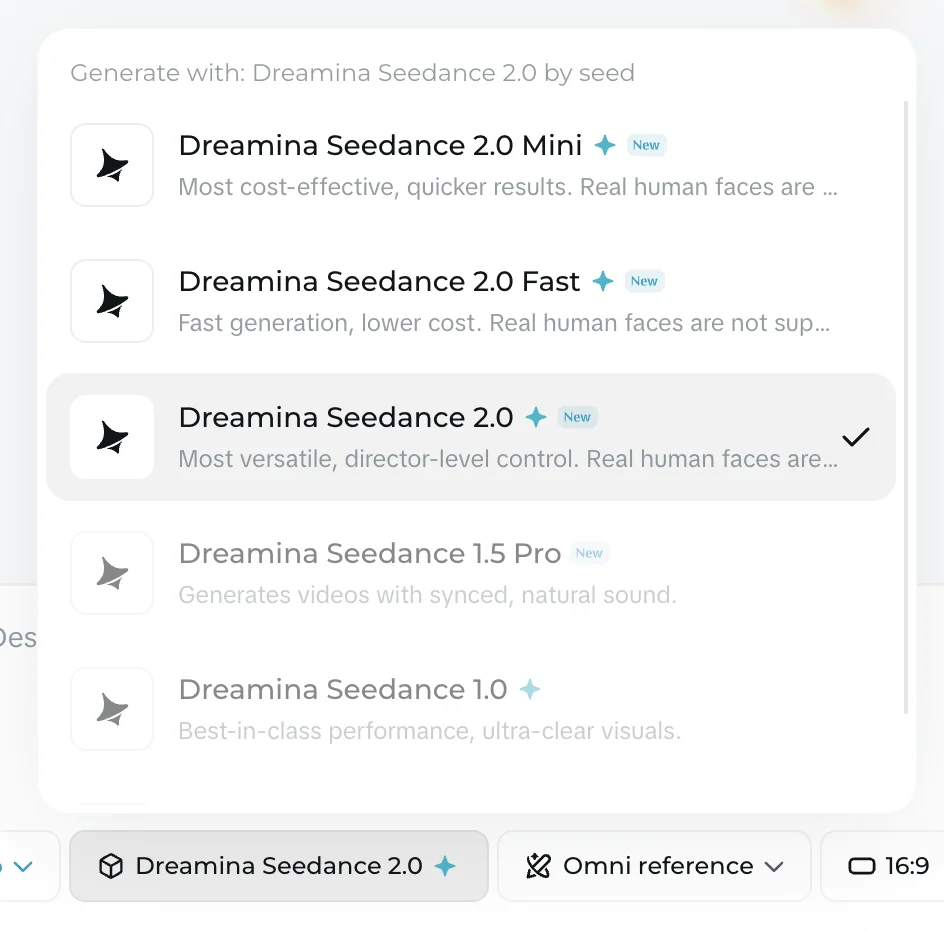
The practical rule is to draft cheap and move up only when a shot needs it. Seedance 1.0 Pro is where most work belongs: it is the version fal.ai exposes, it topped independent benchmarks in its generation, and the jump to the newest model is smaller in practice than the rising version numbers imply. Its one real limit is that it is silent. Reach for 1.5 Pro when you need sound, the 2.0 family for the newest flagship quality inside Dreamina, and 2.5 when you need a long continuous shot with audio — bearing in mind ByteDance had not published 2.5 pricing when this was written, so budget it as an estimate.
Step 3: Set the resolution and length
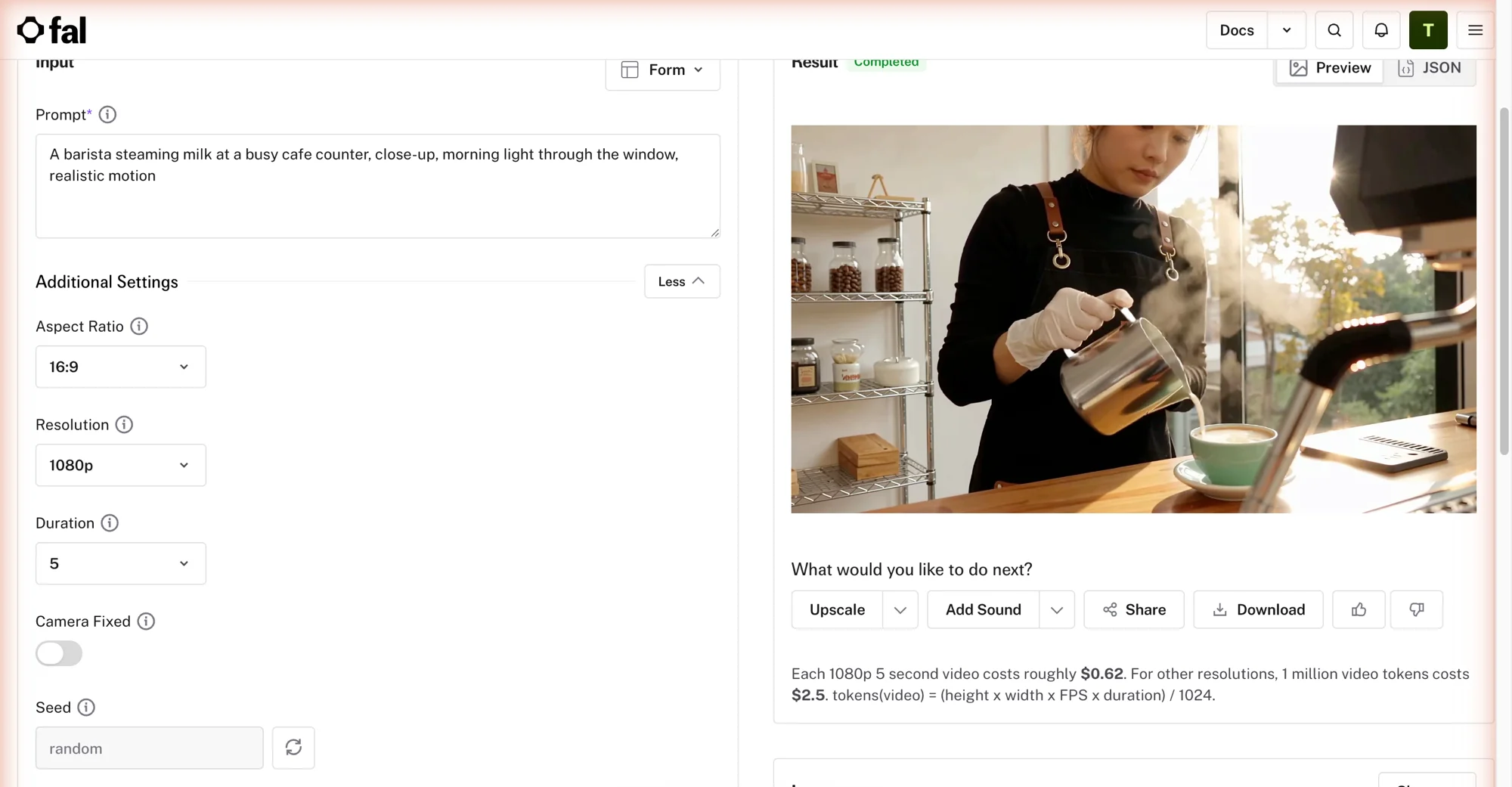
On a developer platform, resolution and length are your cost dial, and Seedance makes the maths unusually transparent. fal.ai prices a 1080p five-second clip at about $0.62 and everything else by a token formula, so you can predict any clip before you run it.
Seedance clip cost by resolution (fal.ai)
| Resolution (5-second clip) | Approx. cost on fal.ai |
|---|---|
| 480p | ~$0.12 |
| 720p | ~$0.27 |
| 1080p | ~$0.62 |
The formula behind those numbers is $2.50 per million video tokens, where tokens equal height times width times frame rate times duration, divided by 1,024. The stated 1080p rate implies about 24 frames per second, so you can price any clip yourself: a ten-second clip is simply double the five-second figure, and a 720p eight-second clip works out to about 43 cents. The takeaway is to draft at 480p or 720p, where a clip costs pennies, and reserve 1080p for the takes you actually keep.
Step 4: Write a prompt and generate
Generating a Seedance clip is the simple part once the platform, version, and resolution are set. Type a prompt describing the scene and the motion, or upload a first frame and describe how it should move, then run it. Seedance responds well to plain, physical description — for my hands-on test I gave fal.ai a single line, the same barista prompt I have used across this whole video cluster, at 1080p for five seconds.
The result was genuinely photorealistic, with convincing motion, for about 62 cents. The one thing missing is sound: the 1.0 Pro model produces no audio, so if your clip needs it, you generate silent here and add sound in an editor, or move up to a version that includes it.
Seedance works two ways, and it is worth knowing both. Text-to-video takes a prompt alone and invents the whole scene, which is fastest for exploring an idea. Image-to-video takes a starting frame you upload — a photo, or a still you made in another tool — and animates it, which gives you far more control over the look, framing, and characters before any motion is added. For anything where the first frame matters, start from an image; for quick exploration, describe it from scratch.
Seedance input modes: text-to-video vs image-to-video
| Input mode | You provide | Best for |
|---|---|---|
| Text-to-video | A prompt only | Fast exploration of an idea from scratch |
| Image-to-video | A starting frame plus a motion prompt | Control over the look, framing, and characters |
Either way, generate a cheap 480p draft first to check the model reads your prompt, then re-run the keeper at 1080p.
Step 5: Download the clip and check the licence
Downloading a Seedance clip is straightforward once it looks right, and this is where the developer route quietly pays off again. A clip generated on fal.ai comes down clean: no watermark, and a commercial licence included, so you can use it in client and commercial work without stripping anything or buying an upgrade.
That is not true everywhere. Dreamina’s free tier watermarks and gates output, and getting clean, higher-resolution, 60fps exports means moving up its paid plans. So if a watermark-free commercial clip is what you need — and for most paid work it is — the API route hands it to you by default, which is one more reason it beats the official app for anything beyond casual play. The download is a standard video file, so it drops straight into any editor for trimming, sound, or stitching several clips into a longer piece.
Getting better results: how to prompt Seedance
Seedance rewards specific, physical prompts, and a little structure goes a long way. The reliable pattern is to name four things in order: the subject, the action, the camera, and the style. “A barista steaming milk behind an espresso machine, a slow push-in with shallow depth of field, warm morning light, cinematic 35mm” gives the model a clear brief, where “a nice coffee video” leaves it guessing.
Because the cheap 1.0 Pro model is silent, describe what the eye should see, not what the scene should sound like — the motion, the light, and the camera carry the whole clip. Give it one clear action per shot, too: in testing, a single well-described movement like “steam rising and drifting left” came back far cleaner than a prompt juggling several actions at once, which tended to muddy all of them across a five-second clip.
The other Seedance-specific habit is to iterate harder than you would on a pricier tool, because a 480p draft costs around twelve cents. Where a metered subscription makes you ration re-rolls, here you can generate a cheap draft, see exactly how the model read your wording, tweak it, and run it again, paying the full 1080p rate only on the take you keep. That near-free iteration is one of the real advantages hiding behind Seedance’s awkward access, and it is how you turn a run of near-misses into a keeper without watching a bill.
What a batch of Seedance clips really costs
Because Seedance is priced per clip rather than per month, it helps to cost a real project rather than a single generation. The per-clip price is low, but a finished piece is usually a dozen clips or more once you add the re-rolls for the prompts that miss.
At about $0.62 for a 1080p clip, a dozen keepers runs roughly $7.50, and thirty of them about $18.60 — for benchmark-quality, watermark-free, commercially licensed video with no subscription attached. Draft those at 480p first, where each attempt costs around 12 cents, and the iteration barely registers on the bill.
Put that next to the alternatives and the gap is stark. The same dozen keepers would run roughly $24 in Google Veo Quality credits, or a monthly subscription elsewhere, where Seedance charges you only for the clips you keep and nothing when you are not generating. That per-clip economy is the whole reason to put up with Seedance’s access friction: for quality-first, high-volume, or cost-conscious work, almost nothing else generates comparable video this cheaply.
What to watch out for with Seedance
Seedance’s output is excellent and its price is unbeatable, but the way you reach it is full of traps. These are the ones that catch people.
| Trap | What to do |
|---|---|
| Free tier will not make a video | Use a pay-as-you-go platform |
| Cheapest version is silent | Add sound in an editor, or use 1.5 Pro or 2.5 |
| Six versions under one name | Check which version your platform runs |
| 2.5 pricing not published | Do not budget on a quoted 2.5 figure |
| Reported training-data scrutiny in the US | Brand-sensitive teams may prefer another model |
The free tier will not make a video
Dreamina shows a free credit balance, but in testing it would not turn those credits into a video: every generate on the free plan met a paywall instead. Treat Seedance as cheap, not free, and go straight to a pay-as-you-go platform.
The cheapest version is silent
Seedance 1.0 Pro, the version most API platforms expose, produces no audio at all. If your clip needs sound, either add it in an editor afterward or move up to 1.5 Pro or 2.5, which means leaving the cheapest route.
The version maze costs you if you ignore it
Between 1.0, 1.5 Pro, 2.0, 2.0 Mini, 2.0 Fast, and 2.5, the same “Seedance” can mean very different prices and features on different surfaces. Working out which version your platform runs, and which you actually need, is part of the job.
2.5 pricing is not public yet
Seedance 2.5 is the newest model, with native thirty-second clips and audio, but ByteDance had not published its rates when this was written. Do not budget a project around a 2.5 figure quoted on another site — it is an estimate until it is confirmed.
The provenance caveat
Like other Chinese frontier models, Seedance has reportedly drawn legal scrutiny in the US over training data. It does not affect how the tool runs, but brand-sensitive teams may prefer a Western model, so it is worth knowing before you build a workflow on it.
Which route and version you actually need
The right setup follows what your work needs, not the newest version number.
- Cheapest clean clips, no commitment? fal.ai with Seedance 1.0 Pro, drafting at 480p and finishing at 1080p.
- You need in-clip sound? Move up to 1.5 Pro or 2.5 — the cheap 1.0 Pro route is silent.
- You want a long continuous shot? Seedance 2.5’s native thirty-second clips, once its pricing is public.
- You prefer a polished app over a playground? Dreamina on a paid plan, for the 2.0 family and 2.5 as it rolls out — just not the free tier.
- Building it into a pipeline? fal.ai and Replicate expose Seedance as an API endpoint, so the same pay-as-you-go route scales from the playground to automated, programmatic generation.
- Skip Seedance if you want a genuinely free clip, in-the-box audio by default, and a finished consumer app — Google Veo gives you all three.
For the full cost breakdown across every route, see our Seedance pricing guide.
When Seedance isn’t the right tool
Seedance is built for cheap, high-quality raw generation, and it asks you to tolerate a developer-platform experience to get it. If that trade is wrong for you, three tools in the same cluster fit different needs better.
If you want the best free clip, native audio, and a polished app, Google Veo is the pick — it costs more per premium clip but hands you a finished product. If you want top-tier quality with sound in a real consumer app, Kling gives you a usable free clip and native audio for a little more than Seedance. And if your real need is editing rather than generation, Runway is the studio Seedance is not. Our best Seedance alternatives roundup ranks the wider field by the reason each person is switching.
The final word
Using Seedance well comes down to one decision made early: run it on a developer platform, not the official app that gates it. Do that, pick 1.0 Pro for price and move up only when a shot needs sound or length, and you get some of the best AI video in the field for cents a clip, clean and commercially licensed. The output more than repays the effort, and the effort is largely just knowing which door to use.
The honest catch is that all of this is friction you would not face on a polished tool. If the developer-platform route and the version maze are more than your work justifies, a friendlier tool is worth the higher price. But if cost and raw quality are what you are optimising for, nothing here beats a $0.62 Seedance clip. For the full hands-on assessment, see our Seedance review.
Frequently asked questions
How do you use Seedance for free?
You mostly cannot, and this is the first thing to know. Seedance's official home, ByteDance's Dreamina app, dangles a free credit balance and then refuses to spend it on video — on the free plan, every attempt I made to generate bounced to a paid upgrade while the credits sat untouched. The one surface that looks free does not, in practice, produce a clip.
The realistic route is cheap rather than free: a developer platform like fal.ai runs Seedance pay-as-you-go, at roughly $0.12 for a 480p clip up to $0.62 for 1080p, billed per generation with no subscription. There is no genuinely free way to make a Seedance video, but the API route costs cents, comes with a commercial licence, and carries no watermark, which for most people is close enough.
Where do you run Seedance?
Two places, and the choice matters more than any setting. The first is ByteDance's own Dreamina app at dreamina.capcut.com, a polished consumer product that hosts the Seedance 2.0 family alongside image and avatar tools — but its free tier will not generate video, and paid access is a monthly credit plan of roughly $9 to $40. The second is a developer platform like fal.ai or Replicate, which exposes Seedance as a pay-as-you-go endpoint you drive from a simple web playground, no code required.
For most people the developer platform is the better route: it is cheaper per clip, it needs no subscription, and its output is watermark-free with a commercial licence. Use Dreamina if you specifically want the newest models in a designed app and do not mind the plan. Use fal.ai if you want the cheapest clean clip with the least commitment.
Which Seedance version should you use?
For the cheapest clean clips, Seedance 1.0 Pro — it is the version most API platforms like fal.ai expose, it topped independent benchmarks in its generation, and it is only a step behind the newest model on quality. The catch is that 1.0 Pro is silent: it produces no audio, so a clip from the cheap route has no sound.
If you need sound or length, you move up the lineup. Seedance 1.5 Pro adds synced audio, the Seedance 2.0 family (2.0, plus cheaper 2.0 Mini and 2.0 Fast) is the newer flagship that lives mainly in Dreamina, and Seedance 2.5, released in July 2026, adds native thirty-second clips and audio. ByteDance had not published 2.5 pricing at the time of writing, so treat any 2.5 cost you see as an estimate. The practical answer: draft on 1.0 Pro for price, move up only when a shot genuinely needs sound or length.
Does Seedance cost money?
Yes, but very little. There is no usable free tier, and the cheapest route is a developer platform like fal.ai, where a 1080p five-second clip costs about $0.62, a 720p clip about $0.27, and a 480p clip about $0.12, all billed per generation with no subscription. fal prices everything by a token formula — $2.50 per million video tokens, where tokens are height times width times frame rate times duration divided by 1,024 — so you can work out any resolution and length yourself.
The official Dreamina app is credit-metered instead: a full Seedance 2.0 clip cost 172 credits in testing, on paid plans of roughly $9 to $40 a month, which works out to about 32 to 40 cents a clip once you spread the plan across its credits. So Seedance is genuinely cheap either way, as long as you avoid expecting the free tier to make you a video.
Keep reading
Seedance Review: The Best Video Model You Can't Easily Use
Seedance makes some of the best AI video anywhere for about $0.62 a clip, but its own app gates it behind a paywall. My hands-on take on quality and price.
Seedance vs Veo 3: Cheapest Quality vs the Best Model
Seedance makes benchmark-quality clips for ~$0.62; Veo 3 is the best model at ~$2 a clip. I tested both — which wins depends on price, access, and audio.
Seedance vs Kling: I Tested Both AI Video Models
Seedance and Kling both make elite AI video and both score 4.2. I ran one prompt through each: Seedance wins on price and licensing, Kling on audio and ease.
Seedance Pricing: What It Really Costs by Route
Seedance has no single price — it depends where you run it: ~$0.62 a 1080p clip on fal.ai, credits on Dreamina. Full route-by-route breakdown, tested hands-on.