
Runway AI Review: Best Editing Suite, Most Locked Free Tier
Runway has the best editing tools in AI video, but its free tier was the most locked I tested: image-to-video only, watermarked, no audio. My hands-on take.
Contents
Is Runway AI worth it?

Runway has the best editing tools in AI video, and the most locked free tier I have tested. Where most generators hand you a prompt box, Runway is a full studio: an editing model, character tools, an AI agent, and a marketplace that runs Seedance, Kling and Veo inside one subscription. For directing and revising shots, nothing in this category comes close.
Then you try to make something for free, and the studio locks up. Runway’s flagship Gen-4.5 model would not run on my free plan at all, only image-to-video on the older Gen-4 Turbo, and the clip came back watermarked and silent. Google Veo and Kling both let me generate a real clip free; Runway did not. The workflow is best-in-class; the free experience is the weakest here.
So Runway earns its 4.2 if editing control and a predictable subscription matter more than winning the raw-quality contest, and if you will pay for at least the Standard plan. If you only want the best-looking clip for free, Google Veo is the pick.
I ran it the way I would actually use it: a free account, the live pricing page open in another tab, and one real prompt taken from image to finished video. Every number below, from the 25-credit clip cost to the plan prices, comes from that session, not from marketing copy.
What is Runway, and how do you use it?
Runway is an AI video platform from the New York company Runway AI, used in the browser at runwayml.com. You sign in, pick a model, and work across three connected tabs: Image, Video, and Audio. That structure is the first clue that Runway is not a single generator but a production tool: you are meant to make a still, animate it, add sound, and edit, all in one place.
The headline model is Gen-4.5, Runway’s flagship text-to-video and image-to-video system, joined by Gen-4 Turbo and the older Gen-4 for image work. But the most surprising thing about the current Runway is that it is no longer only Runway. Open the model dropdown and you find a marketplace.
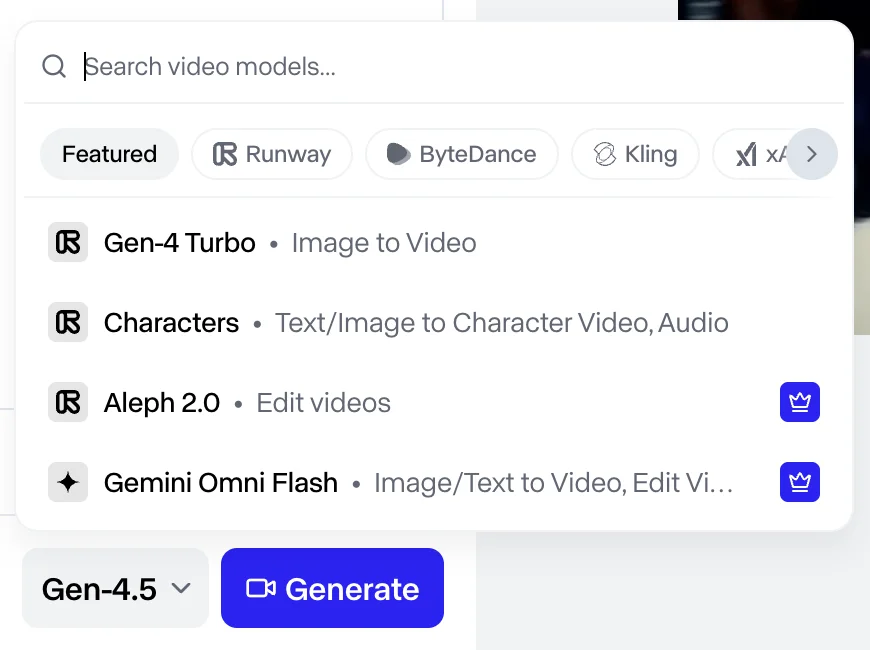
The providers listed span Runway’s own models plus ByteDance (Seedance), Kling, xAI (Grok), and Google (Veo and the Gemini image models). In other words, a Runway subscription partly buys you an aggregator: several of the field’s best models, run from one account and one credit balance, then edited in the same workspace. That is a genuinely different pitch from a single-model tool, and it is central to why Runway suits people who care about workflow over any one model’s fidelity.
Where Runway pulls clear air from its rivals is editing. The current suite includes:
- Aleph, an editing model that revises an existing video from a prompt, changing elements, weather, or camera angle rather than regenerating from scratch.
- Character and Act tools for driving a consistent character or transferring a performance across shots.
- An Agent plus MCP access, so you can plan, generate, and edit a whole project by chatting, and connect Runway to Claude or ChatGPT.
None of that exists to win a single-generation quality benchmark. It exists so you can take a shot that is nearly right and make it right, which is exactly what client and production work demands. That is the tool’s real identity: not the model that makes the prettiest clip, but the one that lets you direct and revise like an editor.
The catch, which the rest of this review is about, is that almost all of it is metered in credits, and the free tier hands you very few of them.
How much does Runway cost?
Runway is free to start and runs from $12 to $95 a month on its Creative plans, but as with every credit-metered tool, the real cost is measured per generation, not per month. There are two layers: the plan you buy, and the credits each job spends.
Here is the live pricing from the plans page, shown at the yearly rate.
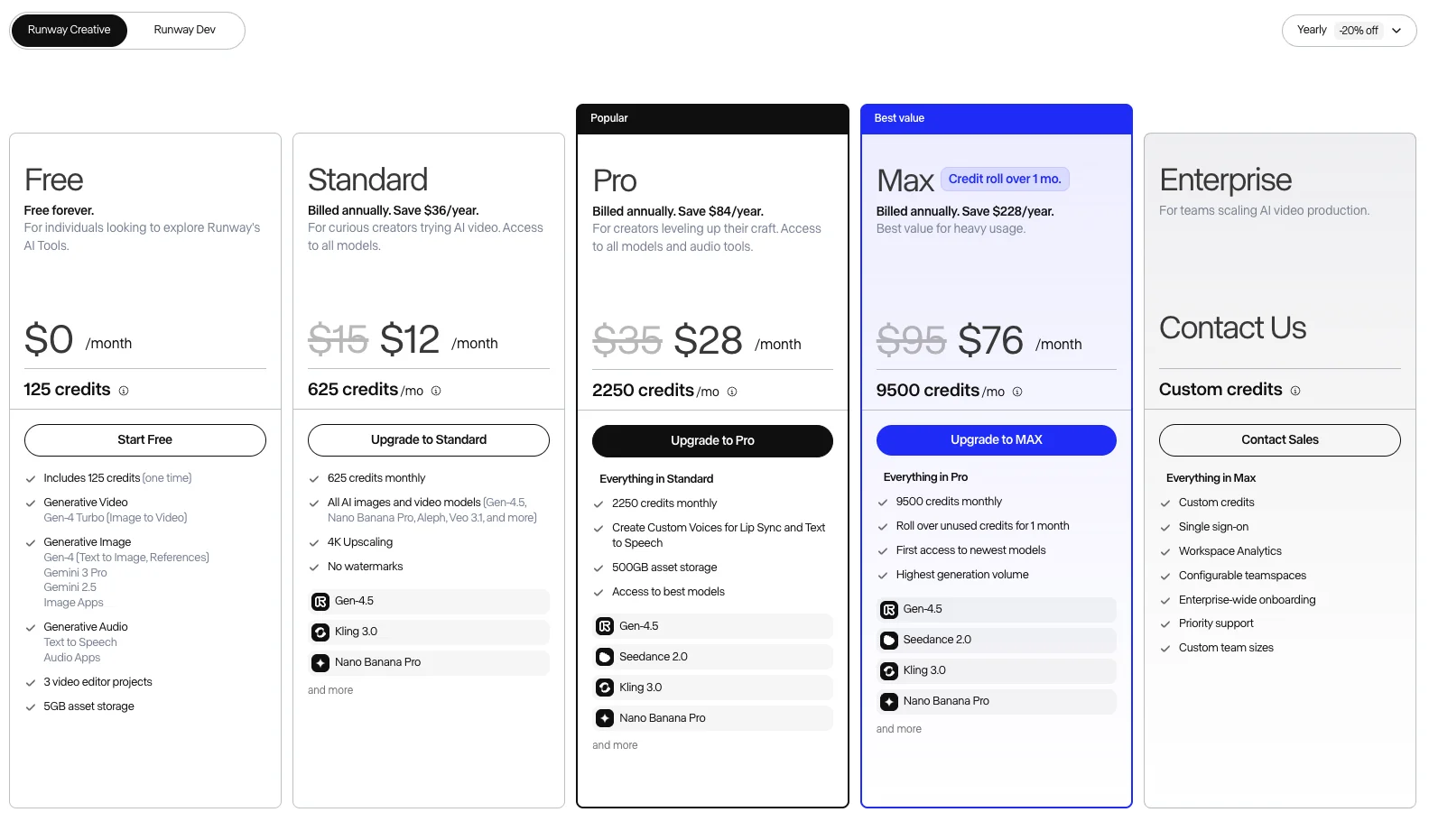
| Plan | Yearly (per mo) | Monthly | Credits / month | Notable |
|---|---|---|---|---|
| Free | $0 | $0 | 125 (one-time) | Gen-4 Turbo image-to-video only, watermarked |
| Standard | $12 | $15 | 625 | All models, 4K upscaling, no watermarks |
| Pro | $28 | $35 | 2,250 | Custom voices, 500GB storage, best models |
| Max | $76 | $95 | 9,500 | Credits roll over 1 month, first access to new models |
| Enterprise | Custom | Custom | Custom | SSO, workspace analytics, priority support |
Two things in that table matter more than the headline prices. First, the free plan’s 125 credits are a one-time grant, not a monthly allowance, so once they are gone the free tier effectively stops. Second, credits do not roll over on any plan except Max, which carries them for a single month. On Standard or Pro, capacity you do not use each month simply expires, so a quiet month is wasted money.
The second layer is the credit cost per generation, and this is what decides whether a plan is generous. I measured it directly. A Gen-4 text-to-image still cost 8 credits, and animating it into a 5-second clip on Gen-4 Turbo cost 25 credits.
That reframes the plans. On the free tier’s 125 credits, you get roughly four or five short clips total before the plan is spent, for good. On Standard’s 625 monthly credits, you get about 25 Gen-4 Turbo clips a month, and fewer once you move to the pricier flagship and hosted models. It helps to think in finished clips per plan at that 25-credit rate.
| Plan | Credits / month | Gen-4 Turbo clips (~25 credits each) |
|---|---|---|
| Free | 125 (one-time) | ~5 total, then done |
| Standard | 625 | ~25 |
| Pro | 2,250 | ~90 |
| Max | 9,500 | ~380 |
Then scale it to a real project. Because clips run a few seconds each, a one-minute video is a dozen or more generations stitched together, plus re-rolls for the prompts that miss. At 25 credits a clip that is several hundred credits for a single finished minute, which on Standard is most of the month gone on one short piece, before you touch the flagship Gen-4.5 or a hosted model like Seedance, which cost more per second. Read the credit table, not the monthly price, and assume real projects burn faster than the clip count suggests.
Compared with Kling’s aggressive first-month specials and expiring credits, Runway’s pricing is at least predictable: a clear monthly rate that does not spring a renewal jump on you. That predictability is a real point in its favor, and I will come back to it.
Who is Runway for?
Runway is for people who care more about controlling and editing a shot than about squeezing out the single best-looking generation. If your work involves revising clips, directing camera moves, keeping a character consistent, or running several models in one place, this is the strongest tool in the category.
Three groups get the most from it. Editors and post-production creators get the Aleph editing model, which turns AI video from a slot machine into something you can actually direct. Client and agency work benefits from the predictable subscription, the character and performance tools, and 4K export, where reliability and revision matter more than a viral-quality one-off. And multi-model power users get real value from the marketplace, running Seedance, Kling, and Veo from one account and editing all of it in the same workspace.
It is a weaker fit for the opposite priorities. If you just want the best free clip with the least friction, Runway’s locked free tier will frustrate you where Google Veo will not. If raw fidelity is the whole job, the Chinese models and Veo generally out-render Gen-4.5. And if you generate at high volume on a budget, the credit math on the lower plans, with no roll-over, bites faster than it looks.
What does Runway get right?
An editing suite nothing else matches
This is the reason to choose Runway. Every other tool in this category is essentially a generator: you prompt, you wait, you re-roll if it is wrong. Runway lets you fix it instead. The Aleph model revises an existing clip from a prompt, so you can change a background, adjust the weather, or shift a camera angle without starting over. That closes the gap between “the model gave me something close” and “I got the shot I wanted,” which is the gap that kills most AI video projects.
| Runway editing tool | What it does |
|---|---|
| Aleph 2.0 | Prompt-based editing of an existing clip (change elements, weather, angle) |
| Character / Act tools | Keep a character consistent or transfer a performance |
| Agent + MCP | Plan and edit whole projects by chat; connect from Claude or ChatGPT |
For client work, that control is worth more than a couple of points of raw fidelity. A slightly less photoreal clip you can actually revise beats a stunning one you have to regenerate ten times to fix, and Runway is the only tool here built around that idea.
A model marketplace in one subscription
The second thing Runway gets right is that it stopped pretending to be the only good model. Its generator now hosts a marketplace, so from a single account and credit balance you can run ByteDance’s Seedance, Kling, Google’s Veo, and Runway’s own Gen-4.5, then edit the output in the same place. That is a real convenience: instead of juggling four subscriptions and four exports, you pick the best model for each shot and keep everything in one workspace.
It also future-proofs the subscription. When a new frontier model lands, Runway tends to add it to the marketplace, so you are buying access to the moving field rather than to one company’s roadmap. For a multi-model workflow, that alone can justify the plan.
Runway is not the only one doing this. Higgsfield runs the same play across a wider shelf, fifteen video models on one credit balance, but with nothing like Aleph’s prompt-based revision behind it. Our Higgsfield review works out what that access costs per shot.
Predictable pricing and a real production stack
After reviewing Kling, Runway’s pricing felt refreshingly honest. There is no first-month bait price that doubles on renewal; the monthly rate is the rate. You still have to watch the credit burn and the lack of roll-over on lower plans, but you are not going to be surprised by a renewal charge, and that matters for a tool you subscribe to long-term.
The surrounding stack is genuinely deep, too. Beyond video, Runway does image generation, audio and custom voices for lip sync (on Pro and up), 4K upscaling, and asset storage, plus the Agent and MCP integration that let you drive it from an AI assistant. It is a production platform, not a single endpoint, which is exactly what its target user, the editor or agency, actually needs.
Where does Runway fall short?
The free tier is the most locked in the category
This is the headline weakness, and I ran straight into it. On the free plan, Runway’s flagship Gen-4.5 model simply will not generate. Typing a prompt and clicking generate does not make a clip; it opens an Upgrade to Pro screen.
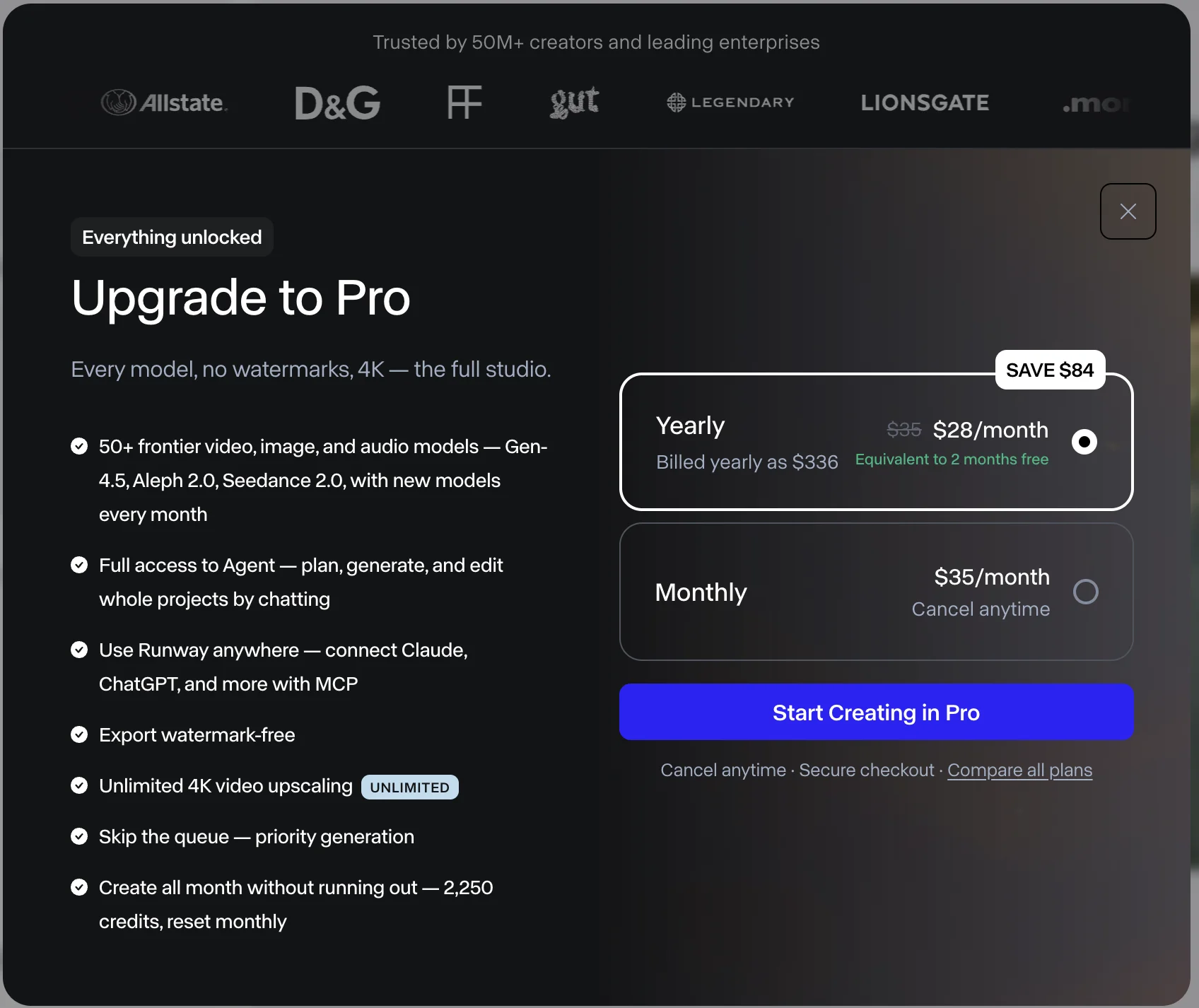
What the free tier does allow is image-to-video on the older Gen-4 Turbo model, so I generated a still with Gen-4 text-to-image, then animated it. That worked, but the result tells the story of the free plan on its own.
| Test detail (Runway free tier) | Result |
|---|---|
| Flagship Gen-4.5 (text-to-video) | Blocked — Upgrade to Pro wall |
| What free allows | Gen-4 Turbo image-to-video, Gen-4 text-to-image |
| Credits spent | 8 (still) + 25 (5s clip) |
| Output | 5 seconds, 720p, watermarked, no audio |
This is the actual clip, straight from the free tier.
The motion is decent and the steam holds together, but look at what the free plan cost me to learn: no flagship model, a watermark burned into the corner, and a silent clip. Contrast that with the rest of the category. On Google Veo I generated a full text-to-video clip free, with native audio; our July export had no visible mark, though an October export (tested from a region where Google applies a visible watermark automatically) carried a small “Veo” label.
On Kling I generated a flagship clip free, watermarked but with audio baked in. Runway’s free tier gave me neither the flagship model nor sound, and stamped the output. As a way to judge whether Runway can make good video, the free plan barely helps; it is a locked demo that pushes you to pay before you have really seen the tool work.
Raw quality trails the leaders
Even on a paid plan, Runway is not where you go for the single best-looking shot. Independent testing consistently places Google Veo and the Chinese models above Gen-4.5 on pure fidelity, motion, and prompt adherence, and hands-on comparisons tend to score Runway’s flagship in the middle of the pack rather than at the top. My own free-tier Gen-4 Turbo clip was competent, not jaw-dropping, and it is a generation behind the flagship, so it is not a fair test of Gen-4.5, but the broader pattern is clear: Runway competes on control, not on raw fidelity.
| What you’re optimizing for | Category leader | Runway’s position |
|---|---|---|
| Raw fidelity & motion | Google Veo, Kling, Seedance | Middle of the pack |
| Editing & shot control | Runway | Category leader |
| Usable free clip | Veo, Kling | Locked (Pro-gated) |
| Predictable subscription pricing | Runway | Category leader |
That is fine if you understand what you are buying. The whole argument for Runway is that editing control beats a couple of points of quality for real work. But if you came expecting Runway to out-render Veo or Kling shot for shot, it generally will not, and you should choose it for the studio around the model, not the model itself.
Credits that expire, and billing complaints
Runway’s credit model has the same sharp edge as most of the field: on every plan except Max, credits do not roll over, so unused capacity expires each month. Buy a plan for a heavy month, have a light one, and you have paid for generations you never made. Only the top Max plan carries credits forward, and only for a single month.
The tool’s public reputation reflects some of this friction. Runway’s Trustpilot score sits low, around 1.2 stars across a few hundred reviews, with complaints clustering on credits and cancellations rather than on the software itself. It is a smaller and less scandal-driven pattern than Kling’s billing reputation, and it is worth keeping in proportion, but if you subscribe, treat it the way you would any metered creative tool: cancel through the account settings before a renewal you do not want, and budget your generations against the monthly expiry rather than assuming credits bank. None of that undoes the strength of the product, but it is the fine print the pricing page will not stress.
Alternatives worth considering
If Runway’s locked free tier or middling raw quality do not fit, three models are worth a look. Here is how they compare.
| Tool | Where it beats Runway | Where Runway beats it | Best for |
|---|---|---|---|
| Google Veo | Free clip, raw quality, clean audio | Editing suite, multi-model workflow | The best free clip and cleanest experience |
| Kling | Raw 4K quality, cost per clip | Editing control, predictable pricing | Best-looking output for the money |
| Seedance | Benchmark scores, price | Editing tools, first-party workflow | Frontier quality on a budget |
Google Veo is the pick if you want the best free clip with none of Runway’s friction. Its free tier generates a full text-to-video clip with audio, where Runway’s free plan gives you none of that. Runway wins on editing and its model marketplace, but Veo wins on the thing most people try first. See our full Google Veo review or Runway vs Veo 3.
Kling is the choice when raw quality and cost per clip matter most. Kling 3.0’s native 4K and physics-aware motion out-render Gen-4.5, and it lets you generate a flagship clip free, though its billing reputation is worse. See our full Kling AI review or Runway vs Kling.
Seedance ranks near the top of public video benchmarks and undercuts most rivals on price, but it is reached through ByteDance’s Dreamina or CapCut apps rather than a dedicated studio, so it lacks Runway’s editing workflow. Fittingly, you can also run it inside Runway’s marketplace. See our full Seedance review or Runway vs Seedance.
The final word
Runway earns its 4.2 rating on workflow, not fidelity. It is the only tool in this category that feels like a real editing studio: the Aleph editing model, character controls, an Agent, MCP access, and a marketplace that runs Seedance, Kling, and Veo from one subscription. For directing and revising shots, for client work, and for a multi-model workflow, nothing here matches it.
| The verdict | |
|---|---|
| Alley Rating | 4.2 / 5 — Power Tool |
| Best for | Editing control, multi-model workflow, client work |
| Weakest point | The most locked free tier in the category |
| Pick instead if | You want the best free clip → Google Veo |
The honest caveat is the free tier and the raw-quality ceiling. Runway’s free plan was the most locked I tested: no flagship model, a watermark, and no audio, where both Google Veo and Kling let me generate a real clip for nothing. And even paid, Gen-4.5 competes in the middle of the field on pure fidelity rather than at the top. Runway is a control tool, not a fidelity tool, and it is priced and gated as a professional product rather than a free toy.
So here is the simple way to decide. If you are an editor, an agency, or a power user who values directing shots and running several models in one place, and you will pay for at least the Standard plan, Runway gives you a production stack no rival can match. If you mostly want the best-looking clip with the least friction, and you want to try it for free first, use Google Veo. Try Runway free to see the editing suite for yourself, but go in knowing the free plan is a locked preview, and that Runway’s real value only shows once you subscribe.
For more, see our Runway pricing guide, the best Runway alternatives, the Luma vs Runway and Runway vs Pika comparisons, and our best AI video generator hub.
Frequently asked questions
Is Runway AI free?
There is a free plan, but it is the most locked I tested. You get 125 credits as a one-time grant, not a monthly refill, and they run only the older Gen-4 Turbo model for image-to-video — the flagship Gen-4.5 is walled off behind an Upgrade screen — with the output watermarked and silent.
So it works to tour the interface, not to make anything you would publish, where Google Veo and Kling both hand you a real free clip. For exactly how far the credits go and what each paid plan costs, see our full Runway pricing guide.
How much does Runway AI cost?
Runway is credit-metered across four Creative plans plus Enterprise, running from about $12 a month (annual) at Standard up to $76 for Max, with the free plan's 125 one-time credits below them. But the monthly figure is not the real cost: a five-second Gen-4 Turbo clip spends 25 credits, and the flagship and hosted models cost more, so a Standard month buys only around 25 short clips.
The one genuine relief is predictability — unlike Kling, Runway's price does not jump on renewal. For the per-clip math, the no-roll-over credit rule, and how to keep the bill down, see our full Runway pricing guide.
What makes Runway different from other AI video tools?
Two things: the editing suite and the model marketplace. Where most rivals give you a prompt box and a single model, Runway is built as a studio. Its Aleph editing model and character tools let you direct and revise a shot rather than just re-roll it, which is why it is the pick for edit-heavy and client-facing work.
Runway is also no longer one model. Its generator hosts a marketplace of outside models, including ByteDance's Seedance, Kling, Google's Veo, xAI's Grok and Google's Gemini image models, alongside its own Gen-4.5. So a Runway subscription is partly an aggregator: you can run several of the field's best models from one account and one credit balance, then edit the results in the same place.
Is Runway better than Google Veo or Kling?
On raw output quality, no. Independent testing consistently rates the Chinese models and Google Veo above Runway's Gen-4.5 for pure fidelity and motion, and both Veo and Kling let you generate a real clip on their free tiers, which Runway does not.
On workflow, Runway wins. Its editing suite, character tools, predictable subscription pricing, and MCP integration make it the stronger choice when you need to revise and control shots for client work rather than chase the single best-looking generation. The honest split: pick Google Veo for the best free clip and cleanest experience, pick Kling for raw quality and cost per clip, and pick Runway when editing control and a real production workflow matter more than winning the fidelity contest. Our full Google Veo review covers the quality leader in detail.
Keep reading
How to Use Runway AI: A Hands-On Walkthrough
How to use Runway AI: generate a clip, revise it with Aleph, then run Seedance or Veo from one account. All tested hands-on, updated for Gen-4.5.
Runway vs Seedance: The Studio vs the Cheapest Engine
Runway vs Seedance: both score 4.2 but sit at opposite ends — Runway edits footage, Seedance generates it cheap. I tested both; here's which your work needs.
Runway vs Veo 3: Editing Studio vs Cinematic Engine
Runway and Google Veo 3 do different jobs: Veo generates the best clip (4.6), Runway edits it (4.2). I tested both — here's which one your work actually needs.
Runway vs Pika: The Studio vs the Effects Toy
Runway vs Pika, tested hands-on. They barely compete: Runway is a pro editing studio, Pika a playful one-tap effects tool. Which AI video tool you need.