
Runway AI Pricing: What Every Plan Really Costs
Runway pricing runs $0 to $95 a month, but the free tier is a locked demo and every plan meters credits per generation. The real cost, tested hands-on.

Contents
How much does Runway AI cost?
Runway AI costs anywhere from nothing to $95 a month, but the dollar figure only tells you which door you walked through. Every Runway plan meters generation in credits, so the number that actually decides your bill is credits per clip — in hands-on testing for our full Runway review, a five-second clip on the Gen-4 Turbo model cost 25 credits. The real question is how many clips those credits buy, and that is what this guide works out, with prices checked against Runway’s pricing page and credit costs measured directly inside the app.
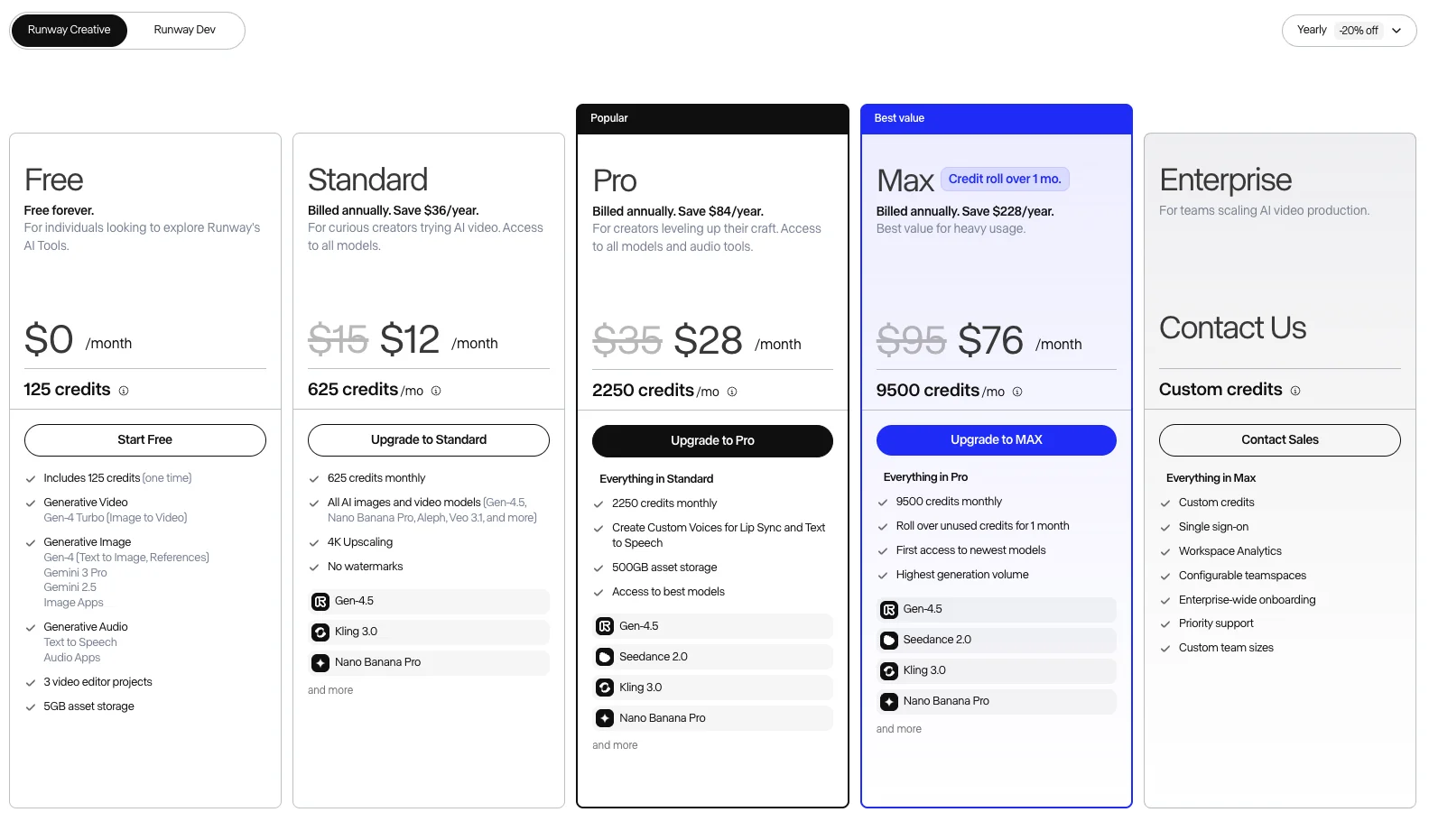
Here is the quick version. Runway has a free plan and three paid Creative tiers — Standard at $12 a month, Pro at $28, and Max at $76 when billed annually (or $15, $35, and $95 month to month) — plus a custom Enterprise plan. Those plans grant 625, 2,250, and 9,500 credits a month respectively, and annual billing runs about 20 percent below the monthly rate.
| Plan | Billed annually | Month to month | Credits / month |
|---|---|---|---|
| Free | $0 | $0 | 125 (one-time, not monthly) |
| Standard | $12/mo | $15/mo | 625 |
| Pro | $28/mo | $35/mo | 2,250 |
| Max | $76/mo | $95/mo | 9,500 |
| Enterprise | Custom | Custom | Custom |
One thing to note before anything else, because older guides get it wrong: Runway’s current lineup is Standard, Pro, and Max, not the “Unlimited” tier some pages still list, and its flagship model is now Gen-4.5. The rest of this guide breaks down what those credits buy, why the free plan is a locked demo rather than a usable free tier, and which plan fits which kind of creator.
How Runway’s credit system works
Runway does not sell videos, it sells credits, and every generation spends them. That is why the monthly price is only a starting point: two people on the same $28 Pro plan can get very different value depending on which models they run and how long their clips are. A creator making short drafts on the cheaper Gen-4 Turbo model stretches 2,250 credits a long way; one rendering flagship Gen-4.5 shots burns through the same allowance far faster. If the credit math does not work for you, the Runway alternatives price the same job differently, and how to use Runway covers stretching the credits you have.
Two rules shape how those credits behave. First, annual billing discounts the rate by roughly 20 percent, so committing to a year drops Standard from $15 to $12 a month and Pro from $35 to $28 — a real saving if you will use Runway for more than a month or two. Second, and more important, credits mostly do not roll over. On Standard and Pro, whatever you do not spend in a billing cycle expires; only the top Max plan carries unused credits forward, and only for a single month. So an allowance you buy for a busy month cannot be banked for a quiet one on the lower plans.
The credit cost itself varies by model, which matters more on Runway than on most rivals because Runway is also a marketplace. Alongside its own Gen-4.5, Gen-4 Turbo, and the Aleph editing model, the generator hosts outside models — ByteDance’s Seedance, Kling, Google’s Veo, and more — each with its own per-second credit cost. Running a premium hosted model spends credits faster than a Runway draft model, so the same plan buys wildly different amounts of video depending on what you generate.
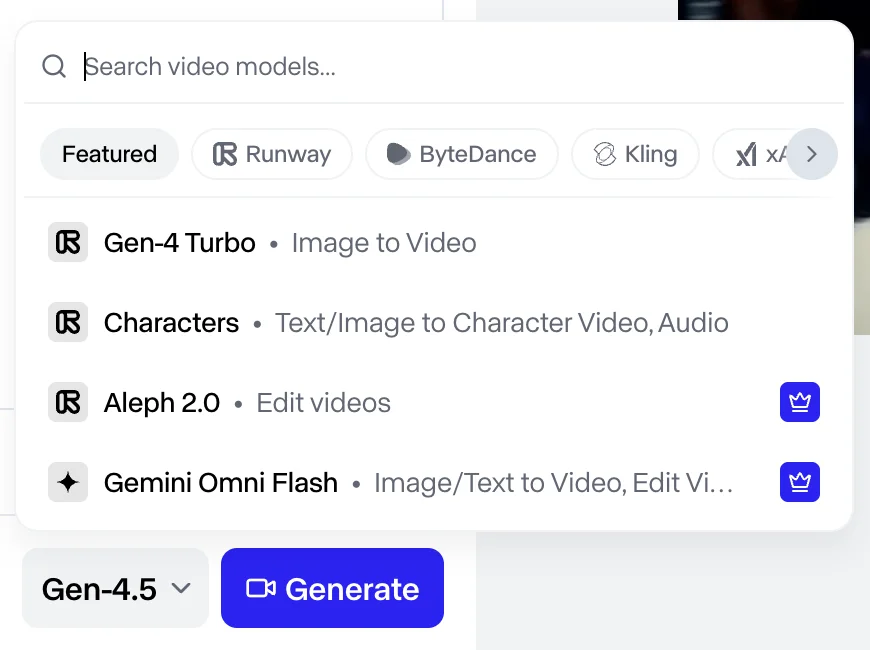
In practice this makes Runway harder to budget than a flat subscription but more flexible, and it rewards knowing your tools. A creator who drafts on Gen-4 Turbo, edits with Aleph instead of re-rolling, and only reaches for Gen-4.5 or a hosted model on final shots can make a Standard plan stretch a surprisingly long way. One who runs every generation on the flagship or a premium marketplace model will find even Pro’s 2,250 credits gone in a couple of dozen clips. The credits are the same; the discipline is what changes the value.
The upshot is that the plan you buy and the value you get are only loosely related. Reading the per-generation credit cost, and knowing which models are cheap drafts versus expensive finals, does more to control your Runway bill than picking a tier.
The Runway plans in detail
Runway’s tiers climb steeply in both price and credits. Here is how they line up, then what each includes.
| Plan | Watermark | Flagship Gen-4.5 | 4K export | Credits / month |
|---|---|---|---|---|
| Free | Yes | No (gated) | No | 125 (one-time) |
| Standard | Removed | Yes | Yes | 625 |
| Pro | Removed | Yes | Yes | 2,250 |
| Max | Removed | Yes | Yes | 9,500 |
| Enterprise | Removed | Yes | Yes | Custom |
Free — $0. A locked demo, not a plan. You get 125 credits once, not monthly, output carries a Runway watermark, and the flagship Gen-4.5 model is off limits. Enough to try the interface, not to produce anything.
Standard — $12 a month (annual), 625 credits. The entry paid tier. It removes the watermark, enables Gen-4.5 and 4K export, and 625 credits buy roughly 25 short Gen-4 Turbo clips a month. Right for an individual doing occasional finished work.
Pro — $28 a month (annual), 2,250 credits. The step up for regular creators. Around 90 short clips a month, plus the headroom for the constant re-rolling real production involves. This is the plan most serious solo users land on.
Max — $76 a month (annual), 9,500 credits. For heavy users and small teams. About 380 short clips a month, and the only plan where unused credits roll over for a month, which softens the credit-expiry problem.
Enterprise — custom. Adds SSO, workspace analytics, priority support, and custom credit volumes for teams standardizing on Runway.
The jump from Standard to Pro is the one most people feel: it is where credits stop constraining routine work. Above Pro, you are buying volume and the credit roll-over for professional workloads.
What a Runway generation actually costs
This is the section that converts credits back into dollars. In hands-on testing, a Gen-4 text-to-image still cost 8 credits, and a five-second Gen-4 Turbo image-to-video clip cost 25 credits, or about five credits a second. The flagship Gen-4.5 text-to-video model and the hosted marketplace models cost more per second — Gen-4.5 is gated to paid plans, so the free-tier path runs the cheaper Gen-4 Turbo.
Now put credits into dollars. Because each plan gives a different number of credits for its price, the cost of that same 25-credit clip falls as you move up.
| Plan | Credits per dollar (annual) | A 25-credit clip costs |
|---|---|---|
| Standard | ~52 | ~$0.48 |
| Pro | ~80 | ~$0.31 |
| Max | ~125 | ~$0.20 |
That is the quiet logic of Runway’s pricing: the bigger plans are not just more credits, they are cheaper credits, so heavy users pay less per clip. A 25-credit Gen-4 Turbo clip is about 48 cents on Standard but only 20 on Max.
The trap, as with every credit tool, is thinking in single clips. A finished minute of video is a dozen or more generations once you count re-rolls, so a minute of short Gen-4 Turbo clips runs a few hundred credits — a meaningful chunk of a Standard month — and a minute built on the flagship or a premium hosted model costs considerably more. Draft on the cheap models, reserve the expensive ones for final shots, and budget in finished projects rather than single generations.
The free tier: the most locked demo in AI video
Runway’s free plan deserves its own warning, because it is genuinely the most restrictive free tier I tested across the category. Three things define it. The credits are a one-time grant of 125, not a monthly refill, so once they are gone the free plan effectively stops. The flagship Gen-4.5 model is gated entirely — trying to run it opens an Upgrade to Pro wall. And output is watermarked and silent, on the older Gen-4 Turbo image-to-video model only.
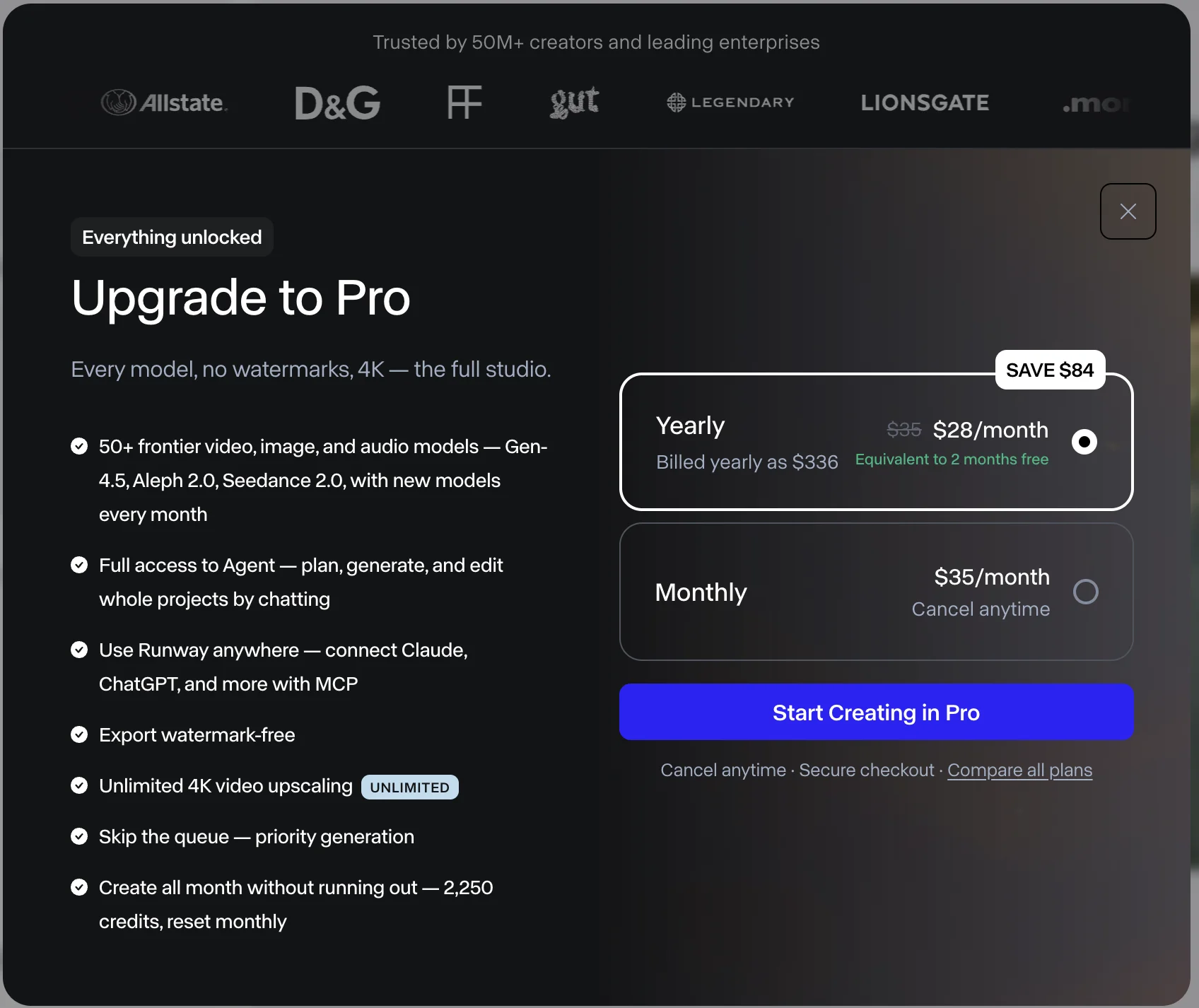
Put that next to the rest of the field and the gap is stark. Google Veo’s free tier generates a full clip with audio, Kling’s gives you a watermarked flagship clip with sound, and even those are called trials. Runway’s free plan gives you neither the flagship model nor a monthly allowance — 125 credits, once, on a draft model. The only reason to use it is to see the interface before you decide on a paid plan.
So treat the free tier as a demo and nothing more. If Runway’s editing suite and marketplace appeal to you, the real decision is between Standard and Pro, and the free plan will not tell you much about production beyond confirming the app is one you want to pay for.
What real Runway projects cost
Single-clip pricing is easy; real projects are where credits add up, so it helps to run the math on a few common jobs before you pick a plan.
A one-minute video built from short Gen-4 Turbo clips is a dozen-plus generations once you count re-rolls, so at 25 credits a clip that is roughly 300 to 400 credits for a finished minute — over half a Standard month on a single piece. Move to the flagship Gen-4.5 or a premium hosted model and that figure climbs steeply.
A week of short social clips — say ten five-second Gen-4 Turbo posts — runs about 250 credits, so Standard covers roughly two such weeks a month while Pro covers a month of daily posting with room to spare. And editing-led work, where you generate a base clip and then revise it with Aleph rather than re-rolling from scratch, is where Runway’s credit spend is most efficient, because you are refining one generation instead of paying for ten. Here is the same math in one view.
| Real project | Rough credits | Fits comfortably on |
|---|---|---|
| One minute of Gen-4 Turbo video | ~300–400 | Pro (over half a Standard month) |
| A week of ten social clips | ~250 | Standard (twice a month) or Pro |
| Editing one base clip with Aleph | Low — you refine, not re-roll | Standard |
| One minute on flagship Gen-4.5 | Considerably higher | Pro or Max |
The lesson repeats across every credit tool: which model you run, and whether you edit or re-roll, moves your Runway bill far more than which plan you buy.
Annual billing and add-on credits
Two pricing details sit around the standard plans and are worth knowing before you commit.
Annual billing is the clearest saving on offer. Runway discounts the yearly rate by about 20 percent across all three tiers, which works out to roughly two and a half months free over a year. If you expect to use Runway for more than a couple of months, annual is the cheaper path — just weigh it against the credit-expiry rule, since a yearly plan still meters credits monthly and still does not roll them over below Max.
Add-on credits are the release valve when a plan’s monthly allowance runs out before the cycle resets. Rather than upgrading the whole subscription, you can buy extra credits on top of your plan to finish a busy month, which is usually the cheaper fix than jumping a full tier for a one-off overflow. Because Runway adjusts these details periodically, confirm the current add-on rate on the pricing page before you rely on it.
How to keep your Runway bill down
A few habits keep Runway’s credit meter from running away with your budget.
Draft on the cheap models, finalise on the expensive ones. Gen-4 Turbo costs about five credits a second; the flagship Gen-4.5 and the premium hosted models cost more. Rough out your timing and composition on the cheaper model, and only spend the flagship on the shots you are keeping.
Edit instead of re-rolling. Runway’s real advantage over a pure generator is that Aleph lets you revise a clip rather than regenerate it. Refining one generation is far cheaper than paying for ten re-rolls, and it is where Runway’s credits stretch furthest — lean on the editing tools you are paying for.
Choose annual if you will stay. The 20 percent yearly discount is the equivalent of roughly two and a half months free over a year, so unless you genuinely only need Runway for a single project, annual billing is the cheaper path.
Size the plan to your median month, not your busiest. Because credits do not roll over below Max, a plan sized for your peak month wastes credits in your quiet ones. Buy for the typical month and cover the occasional spike with add-on credits rather than a permanent tier jump.
Watch which marketplace model you run. A premium hosted model can cost several times a Runway draft clip for the same length. If the exact model matters less than the cost, generate on Runway’s cheaper own tiers and save the marketplace for when you need a specific model’s look.
| Tactic | Why it saves |
|---|---|
| Draft on Gen-4 Turbo, finalise on Gen-4.5 | The draft model costs a fraction per second |
| Edit with Aleph over re-rolling | You refine one clip instead of paying for ten |
| Choose annual billing | About 20% off — roughly 2.5 months free a year |
| Size the plan to your median month | Credits expire below Max, so don’t overbuy |
| Add-on credits over a tier jump | Cheaper for an occasional monthly overflow |
How Runway’s pricing compares
Runway’s pitch is a predictable subscription and an editing workflow rather than the cheapest or sharpest clip, and against its rivals that trade-off is clear.
- Google Veo also meters credits (a top clip runs 100 Flow credits) and its plans start higher, but it adds reliable native audio, a genuinely usable free tier, and cleaner cinematic output. You pay for polish. See our full Google Veo review.
- Kling is cheaper per clip and often sharper, but it runs on first-month promo prices that jump on renewal and expiring credits, plus a poor billing reputation. Runway’s flat, honest subscription is the counterpoint. See our full Kling AI review.
- Seedance is the value leader outright — a clean 1080p clip runs about $0.62 through a developer platform — but its access is fragmented and its official app gates the free tier. See our full Seedance review.
The pattern is consistent: Runway costs more per clip than the value picks and trails them on raw quality, but it wins on editing control, model breadth, and pricing you can actually predict. For where it sits among the alternatives, our roundup of the best Sora alternatives ranks all four.
The short version on value is this. Runway is the most expensive per clip of the four, but it is the only one you buy for a workflow rather than a model. If your job is to generate the single best-looking shot, you are overpaying here and Veo, Kling, or Seedance will serve you better. If your job is to revise, direct, and deliver client work from one predictable subscription, the credit premium buys you an editing suite and a model marketplace the cheaper tools simply do not have. Price Runway against what you need it to do, not against Kling’s or Seedance’s cost per clip, and the number stops looking high.
Which Runway plan should you buy?
Match the plan to your workflow, not your ambition.
- Just curious? Use the Free plan once to see the interface, then decide. Do not expect to produce real work on 125 one-time credits.
- Occasional finished work? Standard at $12 a month (annual) enables Gen-4.5, 4K export, and watermark-free output, with about 25 short clips a month.
- Regular creator? Pro is the sweet spot — 2,250 credits stop the meter from dictating your work, and your cost per clip drops to around 31 cents.
- Heavy user or small team? Max, for the 9,500-credit allowance, the credit roll-over, and the lowest cost per clip; Enterprise if you need SSO and custom volumes.
Whichever you pick, choose annual billing if you will stay more than a couple of months, and remember that below Max, credits you do not use each month are gone.
The bottom line on Runway pricing
Runway’s pricing is refreshingly honest and quietly complicated at the same time. The plans run $0 to $95 a month, annual billing saves about 20 percent, and there is no first-month promo that doubles on renewal — a genuine relief after the credit-promo games elsewhere. But every plan meters credits per generation, credits do not roll over below Max, and the free tier is the most locked demo in the category, with 125 one-time credits and no access to the flagship model.
So price Runway the way you would any credit tool: by the cost per generation, not the monthly headline. In dollars, a short Gen-4 Turbo clip is roughly 48 cents on Standard and 20 on Max, which is fair rather than cheap — you are paying for the editing suite and the model marketplace, not the lowest cost per clip. If that workflow is what you need, Standard or Pro on annual billing is the sensible entry, and Max is the plan for volume. For the hands-on quality verdict and where Runway wins and loses, read our full Runway review.
Frequently asked questions
How much does Runway AI cost?
Runway has four Creative plans plus Enterprise, and all of them meter generation in credits. Billed annually the prices are Standard at $12 a month (625 credits a month), Pro at $28 (2,250 credits), and Max at $76 (9,500 credits); paid month to month they are $15, $35, and $95. Enterprise is custom-quoted, and there is a free plan below all of them.
The monthly figure is only half the picture, because what you actually spend is credits per generation. In hands-on testing a five-second Gen-4 Turbo clip cost 25 credits, so the plan that fits you depends on how many clips you make, not the headline dollar amount.
Is Runway's free plan any good?
It is the most limited free tier I tested in this category. A free account gets 125 credits as a one-time grant rather than a monthly refill, and it cannot run Runway's flagship Gen-4.5 model at all — clicking generate on it opens an Upgrade to Pro screen. What the free plan does allow is image-to-video on the older Gen-4 Turbo model and text-to-image on Gen-4.
In testing that path cost 8 credits for a still and 25 for a five-second clip, and the finished video came back with a visible Runway watermark and no audio. So the free plan is fine for a look at the interface, but where Google Veo and Kling both let you generate a real clip free, Runway's free tier is closer to a locked demo. For anything you would publish, you are on a paid plan.
How many credits does a Runway video cost?
It depends on the model and length. In hands-on testing, a Gen-4 text-to-image still cost 8 credits and a five-second Gen-4 Turbo image-to-video clip cost 25 credits — about five credits a second. The flagship Gen-4.5 text-to-video model and the hosted marketplace models (Seedance, Kling, Veo) cost more per second, and Gen-4.5 is gated to paid plans.
Converted to dollars, a 25-credit clip works out to roughly $0.48 on the Standard plan, dropping to about $0.31 on Pro and $0.20 on Max as the bigger plans lower your cost per credit. Read the credit cost per generation, not just the monthly price, because the flagship models spend faster.
Do Runway credits roll over, and is annual cheaper?
Annual billing is cheaper — Runway discounts the yearly rate by about 20 percent, so Standard is $12 a month billed annually versus $15 month to month, and Pro is $28 versus $35. If you will use Runway for more than a couple of months, annual is the better deal.
Credits, though, mostly do not roll over. On Standard and Pro, unused monthly credits expire at the end of the cycle; only the top Max plan carries unused credits forward, and only for one month. So buy the plan whose monthly allotment matches your typical month, because banking a quiet month's credits for a busy one is not an option below Max.
Is Runway worth the price?
It depends what you want from AI video. Runway is not the tool to buy for the single best-looking clip — its raw fidelity trails Google Veo and the Chinese models. It is the tool to buy for editing control and workflow: the Aleph editing model, character tools, and a marketplace that runs Seedance, Kling, and Veo from one subscription.
So Runway is worth it for edit-heavy and client work where revising and directing a shot matters more than winning a fidelity contest, and where a predictable monthly subscription beats a credit-promo lottery. If you mainly want the best free clip, Google Veo is the better value. Our full Runway review covers the hands-on verdict.
Keep reading
How to Use Runway AI: A Hands-On Walkthrough
How to use Runway AI: generate a clip, revise it with Aleph, then run Seedance or Veo from one account. All tested hands-on, updated for Gen-4.5.

Runway AI Review: Best Editing Suite, Most Locked Free Tier
Runway has the best editing tools in AI video, but its free tier was the most locked I tested: image-to-video only, watermarked, no audio. My hands-on take.
Runway vs Seedance: The Studio vs the Cheapest Engine
Runway vs Seedance: both score 4.2 but sit at opposite ends — Runway edits footage, Seedance generates it cheap. I tested both; here's which your work needs.
Runway vs Veo 3: Editing Studio vs Cinematic Engine
Runway and Google Veo 3 do different jobs: Veo generates the best clip (4.6), Runway edits it (4.2). I tested both — here's which one your work actually needs.