
ChatGPT for coding: 41 of 41 hidden tests passed on the free plan
ChatGPT for coding, tested on the free plan with four fixed tasks and 41 hidden tests. It passed all 41 and caught every planted bug, then over-built a parser.
Contents
Is ChatGPT good for coding?

OpenAI’s ChatGPT scores 4.4 out of 5 for coding on its free plan, from our fixed four-task test in November 2026. Its code passed all 41 hidden test cases and its review caught every problem I planted, with a one-line bug fix. For function-sized work, the free chat is a strong coding partner.
Overall we rate ChatGPT 4.6 in our full ChatGPT review. Coding alone, on the plan most people use, earns a slightly lower score, and the reason is not correctness: nothing it wrote was wrong. It just wrote too much.
The clearest example is a duration parser I asked it to write from a spec. It passed all 20 hidden cases. It checked the input with a regular expression, then checked that it had found something, rebuilt the string to compare, and checked the unit order again in a loop. The first check already did the job of the other three.
Everything here was tested on the free plan, with no trial and no paid model. Where I mention a paid feature, it comes from OpenAI’s pricing page and is marked as untested.
How did ChatGPT do on our coding test?
ChatGPT passed all 41 hidden tests across four tasks and found all three planted bugs; it lost points only for length. Every tool in this series gets the same brief, one task per fresh chat, with no follow-up prompts. Each task is small and self-contained, so it fits in one message, and each answer is scored by running it against tests the model never sees. No marking by eye where a test can decide.
Here is the whole result before the detail.
| Task | What I asked for | What ChatGPT did |
|---|---|---|
| C1: add a feature | a discount-code method on a Python shopping cart, three codes with rounding rules | complete file back; 11 of 11 hidden cases passed |
| C2: fix a bug | find why a JavaScript range-merging function drops ranges, change as little as possible, explain in 1–2 sentences | one-line fix; 10 of 10 passed; explanation ran to six sentences |
| C3: write from a spec | a Python duration parser (“1h 30m” to seconds) that rejects 11 kinds of bad input | 20 of 20 passed; 36 lines where about 14 do |
| C4: review code | list every bug in a 14-line database function, most serious first, then fix it | 3 of 3 planted problems found, 0 false claims, injection ranked first |
What this test can and can’t tell you. Each task ran once, on one account, on 24 November 2026. The chat never named the model it used and showed no picker, so a later session may get a different model. No limit or fallback message appeared, and “Think”, the extended reasoning toggle on the free plan, stayed off, as I found it. The tasks are deliberately function-sized; they say nothing about work across a whole codebase. The quality and explanation scores are our editorial judgment against a fixed rubric applied the same way to every tool; the correctness score is a test count.
The feature came back complete and correct
The first task gave ChatGPT a 24-line Python shopping cart and asked for one new method: apply a discount code and return the total in cents. Three codes, each with its own rule. SAVE10 takes 10% off with the discount rounded down to a whole cent; FLAT500 takes 500 cents off orders of 2,500 or more; BULK takes 20% off each line with ten or more items, rounding each line separately.
The answer was a bare code block with a Run button and no commentary. It returned the whole file as asked, left the existing methods alone and used nothing outside the standard library. The tricky rounding came out right in two short expressions, subtotal // 10 for SAVE10 and a per-line // 5 for BULK, and all 11 hidden cases passed, including the one that catches rounding the total instead of each line.
The bug fix was one line
The second task was a JavaScript function that merges overlapping ranges, with a user report: one input worked, another returned [[10, 12]] instead of [[2, 5], [10, 12]]. The cause is a classic. JavaScript’s sort() with no comparator sorts arrays as text, so “10,12” lands before “2,4”.
ChatGPT named that cause in its first sentence and changed exactly one line.
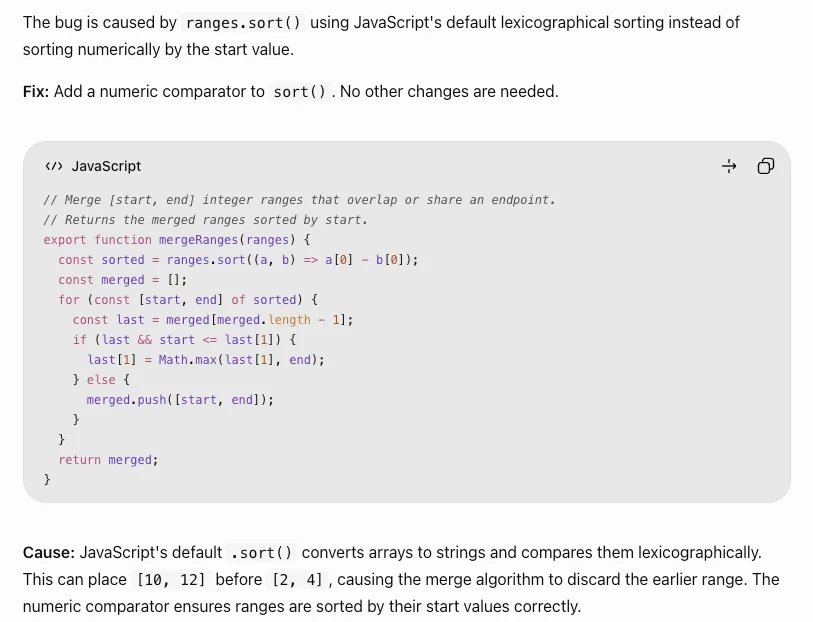
All 10 hidden cases passed, including negative numbers, contained ranges and an empty list. The miss was the brief’s other instruction: explain the cause in one or two sentences. It gave a lead sentence, a “Fix” line and a three-sentence “Cause” paragraph. Every sentence was accurate, but that’s six sentences where two were asked for.
One thing it didn’t mention: the fixed function still sorts the caller’s array in place, because sort() modifies the array it is called on. The brief asked for the smallest change, so I didn’t score this. I’d still want it pointed out.
The parser passed everything, then checked it all again
The third task was a spec with no starter code: write parse_duration, turning strings like “2h”, “45m” or “1h 30m 15s” into seconds, and raise an error for anything else. The spec listed what “anything else” means, from an empty string to a repeated unit, a decimal or a number with no unit. The hidden tests try 9 valid strings and 11 invalid ones.
ChatGPT passed all 20, and replied with code only, as instructed. Here is the core of what it wrote:
pattern = r"(?:\d+h)?(?:\s*\d+m)?(?:\s*\d+s)?"text = text.strip()
if not re.fullmatch(pattern, text) or not re.search(r"\d", text):    raise ValueError("Invalid duration")
components = re.findall(r"(\d+)([hms])", text)
if not components:    raise ValueError("Invalid duration")
if "".join(f"{n}{u}" for n, u in components) != re.sub(r"\s+", "", text):    raise ValueError("Invalid duration")
That full-match pattern already enforces the order (hours, then minutes, then seconds) and allows each unit only once. The answer then pulls out the parts (needed for the total), checks it found some, rebuilds the string to compare it, and finally loops through the units checking order and repeats a second time. Each check is correct. Those three can never fail once the first has passed.
It works, it is readable, and you would delete half of it in review. That is what held code quality at 4.
The review caught every planted problem
The last task was a 14-line Python function that fetches a customer’s recent orders from SQLite. I planted three problems: the email goes straight into the SQL string, which allows SQL injection; ORDER BY created_at sorts oldest first, though the docstring promises newest first; and the database connection is never closed.
ChatGPT found all three. It ranked the injection “Critical”, with an example attack string, put the wrong sort order second, and listed the unclosed connection fourth, after flagging the limit value as a second injection route.
It also got a sqlite3 detail right. Python’s sqlite3 connection works as a context manager, but that only manages transactions; it doesn’t close the connection. ChatGPT said so and used contextlib.closing instead.
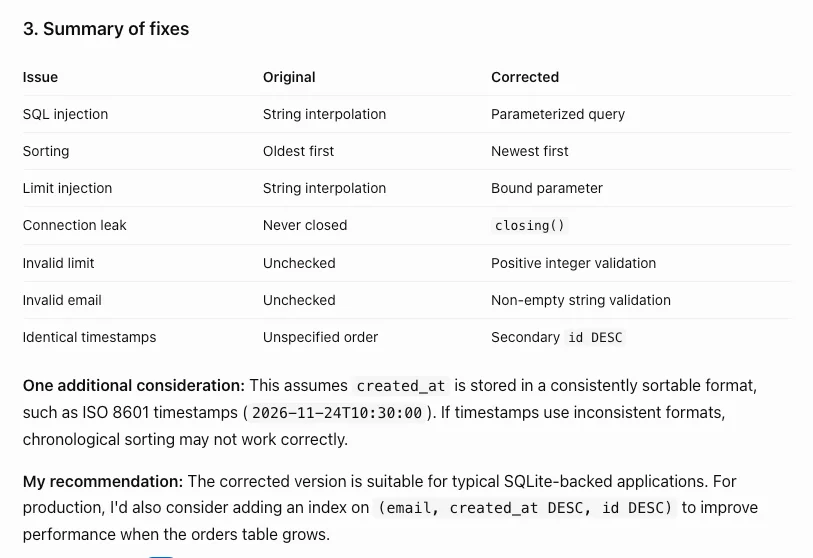
I checked each claim it made, including that a negative LIMIT removes the limit in SQLite and that the default lock timeout is five seconds. All were correct. The corrected version fixed everything on its list.
The cost was length. Eight numbered items, two of them hedged by ChatGPT itself (error handling “isn’t necessarily a bug”, and a timeout change that “depends on application requirements”), a seven-row summary table, a note on timestamp formats and advice on adding an index: 680 words, code included, for a 14-line function.
How the score adds up
Each task feeds five criteria scored from 0 to 5, the same rubric every tool in this series gets.
| Criterion | Score | Why |
|---|---|---|
| Correctness | 5 | 41 of 41 hidden test cases passed |
| Bug finding | 5 | 3 of 3 planted problems, 0 false claims |
| Following instructions | 4 | 1 miss: the bug explanation ran past two sentences |
| Code quality | 4 | the feature and fix are clean; the parser repeats three checks the first already covers |
| Explanation | 4 | accurate throughout, but the review is padded |
| Coding rating | 4.4 | the average of the five |
On our rating bands that is a “Power Tool”: dependable at the job, with a habit that costs you editing time. The gap to a Category Leader score is restraint, not correctness.
What does ChatGPT cost for coding?
ChatGPT’s free plan is enough for the kind of coding this review tested, and it is the plan I used. All four tasks ran without a limit message, and two of the answers came as Python code blocks with a Run button.
| Plan | Price | What changes for coding |
|---|---|---|
| Free (tested) | $0 | chat with no model picker; limited Codex access; ads may appear |
| Go | $8/mo | more messages and uploads; ads may appear |
| Plus | $20/mo | advanced reasoning models; fuller Codex access; no ads |
| Pro | $100, $200 or $500/mo | the highest limits and maximum Codex access |
Plan contents from chatgpt.com/pricing (22 November 2026) and our ChatGPT review. Only Free was tested here.
The free plan’s limit for coding is not a message cap but the missing picker. The chat never says which model answered, and you can’t choose a stronger one for a hard problem. Your only lever is the “Think” toggle, which I left off, because the default already passed every test.
Is Plus worth it for coding? Not for function-sized work like this. ChatGPT’s upgrade banner on my first answer said Plus would “debug code, work through systems, and solve math or science problems” with increased reasoning. On this brief there was nothing left to improve on correctness. Where Plus could matter is Codex, if you want an agent working in your repository every day; our Codex pricing guide covers what each plan allows.
Who should use ChatGPT for coding?
ChatGPT’s chat suits anyone whose coding question fits in one message.
- Developers who want a second pair of eyes. Paste a function, ask what is wrong, and you’ll get a ranked list. In my test it found every planted problem and made no false claims.
- People learning to code. It explains causes accurately and shows working code you can run. The lengthy answers that cost it points here are an asset when you’re learning.
- Anyone fixing a specific bug. Give it the input, the expected output and what you got. It traced my bug report to its one-line cause on the first try.
- People writing small utilities from a clear spec. Validation functions, parsers, data clean-up. It met all 20 cases of a fussy spec. Expect to trim the result.
It is a weaker fit for two groups.
- Teams working across a whole codebase. The chat only sees what you paste. For changes that span files, use Codex or another coding agent; our best AI for coding roundup compares seven.
- Anyone who wants terse output. Asked for two sentences, it gave six. You can steer it, but the default is thorough rather than brief.
What is ChatGPT good at for coding?
Its code works the first time
41 of 41 hidden test cases, across Python and JavaScript, with no second attempt. That includes the edge cases that catch careless code: rounding each line rather than the total, a repeated unit, a decimal, an empty list.
It finds the real bug, not a nearby one
The range-merging report described a symptom, not a cause. ChatGPT named the cause, JavaScript’s text-based default sort, in its first sentence and changed only the line responsible.
It reviews in order of risk
The SQL injection came first, labelled critical, with an example attack. The wrong sort order came second. That ranking is what a busy developer needs from a review, and it matched mine.
It knows the library details
The context-manager point about Python’s sqlite3, the negative-limit behaviour in SQLite, the five-second default timeout: all checkable, all correct. A reviewer that is precise about the details is one you can act on.
Where does ChatGPT fall short for coding?
It over-builds
The duration parser runs to 36 lines, with three checks that can never fail once the first has passed. Correct code that is twice as long as it needs to be is code you have to read twice in review.
It explains at length even when asked not to
Two sentences were asked for, six came back. The review ran to 680 words, code included, for a 14-line function. Every point was true, but a long list makes the critical item easier to miss.
The chat hides the model
As in the test above, Free shows no picker and no model name. You can’t confirm which model wrote your code, choose a stronger one, or tell whether two sessions used the same one.
It only sees what you paste
This is the chat’s design rather than a flaw, but it limits the job. It can’t run your test suite, read the file next door or check your dependency versions. Anything that depends on the rest of your project has to be pasted in, or handed to an agent.
Alternatives worth considering
If you’ve decided ChatGPT’s chat isn’t the right coding tool for you, these are where I’d look next.
- Codex is OpenAI’s own answer to “it only sees what I paste”. It works inside your repository, and in our roundup it built a complete app from one brief in 2 minutes 44 seconds on the free tier. We rate it 4.4.
- Claude Code produced the best code in our coding roundup. It has no free tier, so it is a paid choice from the start.
- Cursor puts the AI inside a full code editor, so it sees your files without copying and pasting. It was the fastest tool in our coding roundup.
For the full field, our best AI for coding roundup ranks seven tools on one identical build, and ChatGPT for writing runs the same free plan through our writing brief, where it scored 3.4.
Final word
ChatGPT’s free chat is a strong coding partner for anything you can fit in one message. On our brief its code passed every hidden test, its bug fix was a single line, and its review caught every planted problem. Its fault is excess: more checks, more explanation and more review items than the job needed.
So use it the way you’d use a sharp, wordy colleague. Paste the function, ask for the short answer, run what it gives you, and trim. For coding alone on the free plan that earns a 4.4, and for anything bigger than one message, open Codex instead.
Frequently asked questions
Is ChatGPT good for coding?
For function-sized work, yes, and better than its reputation for confident mistakes suggests. On our fixed four-task test on the free plan in November 2026, its code passed all 41 hidden test cases, its bug fix changed a single line, and its code review found all three problems we had planted, with the SQL injection ranked first. We rate it 4.4 out of 5 for coding, against 4.6 for ChatGPT overall.
Two limits matter. First, the tasks were small and fully specified, which is the kind of job chat assistants do best; we did not test work spread across a whole codebase, which is what OpenAI's Codex agent is for. Second, its weak spot was restraint: it wrote more explanation and more code than the job needed. Run its code before you trust it, and ask for the short version when you want one.
Is ChatGPT free for coding?
Yes. Every task in our test ran on the free plan, with no trial, and no limit or fallback message appeared. The free chat writes, fixes and reviews code, and on two of our Python answers it showed a Run button on the Python code block. The catch is that the chat shows no model name and offers no model picker, so you cannot choose a stronger model for a hard problem.
The free plan also includes limited access to Codex, OpenAI's agent for working inside a repository. Paid plans start with Go at $8 a month and Plus at $20, and OpenAI's pricing page (22 November 2026) says Plus adds advanced reasoning models; Codex access grows with each plan. We did not test the paid plans here. On the free plan, ChatGPT showed an upgrade banner promising Plus would 'debug code, work through systems' with increased reasoning.
What is the best ChatGPT mode for coding?
It depends on the size of the job. For a single function, a bug you can describe, or a review of code you can paste, the normal chat is enough: our whole test ran in it with Think switched off, and it passed every hidden test. I left Think, the free plan's extended reasoning toggle, switched off, and the default still passed every hidden test, so this brief gave it nothing left to fix.
For anything that spans several files, the chat is the wrong tool, because it only sees what you paste into it. That is where Codex comes in. It is OpenAI's coding agent, it works inside a repository, and it is bundled with ChatGPT plans. Our Codex review covers it in detail, and our best AI for coding roundup measured it against six rivals on one identical build.
Can ChatGPT find bugs in my code?
In our test it found every one we planted. We gave it a 14-line Python database function with three problems: a SQL injection, a sort that returned the oldest orders when the docstring promised the newest, and a connection that was never closed. ChatGPT listed all three, ranked the injection as critical, and wrote a corrected version that fixed everything it listed. None of its claims were wrong when we checked them.
The trade-off was volume. Its review ran to eight numbered items and 680 words including code, including two it hedged itself: error handling, which it said isn't necessarily a bug, and a timeout change it said depends on the application. That is thorough, but on a long file the signal could get buried. Ask it to list only real bugs, most serious first, and it has less room to pad. Separately, in our bug-fix task it traced a reported symptom to a one-line cause in JavaScript's default sort.
Should I use ChatGPT or Codex for coding?
Use the chat when you can fit the problem in one message, and Codex when you can't. The chat only saw the code we pasted, which is ideal for a function, a failing test or a code review, and useless for a change that touches ten files it has never seen.
Codex is OpenAI's coding agent, bundled with ChatGPT plans. It works in a repository, runs commands and edits files across a project. In our best AI for coding roundup it built a complete app from one brief in 2 minutes 44 seconds on the free tier, in the tightest code of the seven tools we tested, and our Codex review rates it 4.4. I'd use both: Codex for the build, the chat for a quick question in between.
Keep reading
ChatGPT review: the free tier is the story, not the $20 one
A ChatGPT review from a year on the free tier plus one month of Plus. Six rungs from $0 to $500, and ads now run on both the Free and $8 Go tiers.
Best AI for coding: 7 tools, one identical brief, measured
The best AI for coding, measured rather than listed. I gave seven tools one identical brief and used every app. All seven passed. Here is what separated them.
OpenAI Codex review: it deleted the rule that made it wrong
OpenAI Codex renamed 33 references across 7 files and 3 languages in a single run. Then it edited my rules file, ungated, deleting the line that made it wrong.
ChatGPT for writing: fast free drafts that still need a fact check
ChatGPT for writing, tested on the free plan with four fixed tasks. It got 10 of 10 facts right in a news piece, then added a claim it was told not to.