
Jasper AI review: accurate copy, a real Brand Voice, a $69 seat
A Jasper AI review from a 7-day Pro trial: 6 pieces of copy with every fact kept, a Brand Voice that worked, and a trial that bills without warning.
Contents
Is Jasper AI worth $69 a month?

Yes for a marketing team that needs every writer in one brand voice, no for a single writer on a budget. On a 7-day Jasper Pro trial it wrote six pieces of copy from one brief without dropping or inventing a fact, and its Brand Voice genuinely changed how the copy sounded. At $69 a month for one seat, with the team features on a custom-priced plan, it costs more than three times ChatGPT Plus or Claude Pro.
What Jasper did with one coffee brief
Jasper was one of the first AI copywriters, and it has outlived several of the template apps it launched alongside. It no longer leads with templates. It sells a marketing workspace: a chat that turns requests into separate documents, a Brand Voice you train on your own copy, an IQ layer of audiences and product facts, and a library of Agents for common jobs.
I tested it the way a buyer would. I gave it one brief for a fictional product, scored what came back against the facts I supplied, then trained a Brand Voice and ran the same email again. The writing held up. The friction is in the price, the plan limits and the way the trial turns into a bill.
Jasper AI turns a marketing brief into finished copy, and keeps that copy inside a workspace built around your brand. You type a request into chat, and Jasper writes each deliverable as its own Canvas document that you can edit.
How I tested it
On 5 November 2026 we started Jasper’s 7-day Pro trial with a normal card, and I ran every test below from that account. I used an expanded version of the brief we prepared for our Copy.ai review, with a contact line and a no-invention rule added: a fictional Portland coffee roaster launching “Office Beans”, an office coffee subscription, with six facts to keep and four tasks.
Company: Northwind Coffee, a small roaster in Portland, Oregon (fictional).Product: "Office Beans", a wholesale coffee subscription for offices of 10 to 50 people.Facts to keep exactly:1. $89 a month for 5 lb of whole beans, delivered every two weeks.2. Free grinder on loan with any 6-month plan.3. Roasted within 48 hours of shipping.4. Cancel or pause any time from the account page.5. Launch offer: first month half price with code OFFICE50, ends 31 December 2026.6. Contact: [email protected]Do not add any facts that are not listed.Tasks:A. Cold email to an office manager, subject line plus a body under 120 words.B. Three Facebook ads, primary text under 125 characters plus a headline.C. A product description for the web page, about 100 words.D. A follow-up email for an office manager who did not reply.I pasted it into the chat on Jasper’s home screen once, with no Brand Voice selected, and scored every piece for facts kept, facts invented and length limits. Then I built a Brand Voice and ran task A again.
Canvas: where the copy lives
Every piece Jasper writes lands in Canvas, a board of documents with the chat docked on the left. Each document carries a DRAFT label, an Open editor button, and two selectors at the top for Brand Voice and Audience, so you can switch the voice on one asset without touching the others. Under each reply, the chat offers next steps; after my Agent email they were “Proofread the cold email for formatting errors” and “Create a short follow-up email after nonreply”.
Jasper asks you to pick an Agent first
Jasper did not start writing straight away. After about 35 seconds of “Retrieving IQ Context”, where it searched my brand voices, audiences and knowledge, it replied that it had found four Agents that could help and asked me to choose one or continue without an Agent. The four were Cold Email, Social Media Ad, Product Description and Follow-up Email, one per task in my brief.
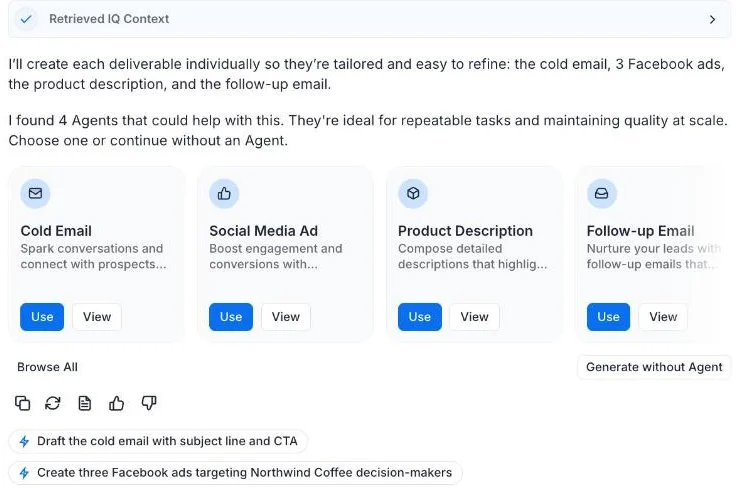
That is Jasper’s pitch in one screen: it would rather route your request into a reusable Agent than answer it once. I chose “Generate without Agent” so the result would compare cleanly with other tools on the same brief. The Agent suggestion is a toggle in the Jasper IQ menu, called Agent Suggestions, and it is on by default.
Six documents in about three minutes
Without an Agent, Jasper wrote each deliverable separately and narrated as it went: “Cold email ready! Moving on to Facebook ads next.” The cold email, three ads, product description and follow-up arrived as six Canvas documents, all inside about three minutes from my click. That is slower than a single chat reply, but each piece lands as its own editable asset rather than one long message you have to cut apart.
| Piece | Limit in the brief | Jasper’s result | Facts kept | Facts invented |
|---|---|---|---|---|
| A. Cold email | Body under 120 words | 105 words | 6 of 6 | 0 |
| B1. Facebook ad | Under 125 characters | 111 characters | Price, delivery, roast time, offer in headline | 0 |
| B2. Facebook ad | Under 125 characters | 121 characters | Cancel or pause, grinder, offer in headline | 0 |
| B3. Facebook ad | Under 125 characters | 119 characters | Price, delivery, offer and end date in headline | 0 |
| C. Product description | About 100 words | 99 words | 6 of 6 | 0 |
| D. Follow-up email | None given | About 102 words | 6 of 6 | 0 |
Every limit was met and nothing was made up. That matters more than it sounds: AI copy that adds a plausible “free shipping” or “ethically sourced” line creates legal and customer-service problems, and Jasper added nothing. Two of the ads used “Shop now” as a call to action, which is a button label rather than a claim.
Accurate, but plain until you add a voice
The weakness of the first run was tone, not accuracy. The cold email opened with “I’m reaching out from Northwind Coffee”, listed the four product facts as bullets almost word for word from the brief, and signed off “Warm regards”. The product description did the same. It was clean, correct copy that a marketer would still rewrite before sending.
Subject: Fresh coffee for your office, first month half off
Hi [Name],
I'm reaching out from Northwind Coffee, a small roaster in Portland, Oregon.We made Office Beans to take coffee off your to-do list.
Here's how it works for offices of 10 to 50 people:
$89 a month for 5 lb of whole beans, delivered every two weeksRoasted within 48 hours of shippingFree grinder on loan with any 6-month planCancel or pause any time from the account page
Our launch offer gives you your first month half price with code OFFICE50.It ends 31 December 2026.
Would Office Beans be a good fit for your team? Reply here or reach us at
Warm regards,[Your Name]Northwind CoffeeThe three Facebook ads were the most useful pieces in the first run. Each took a different angle, and each moved the launch offer into the headline, which is where it belongs on a short ad. They read like a competent junior copywriter’s first pass: nothing wrong, nothing memorable.
Ad 1  Primary text: Whole beans roasted within 48 hours of shipping. 5 lb to your      office every two weeks for $89 a month. Shop now.      Headline: Fresh Office Coffee: First Month Half Price With Code OFFICE50
Ad 2  Primary text: Office coffee on your terms. Pause or cancel any time from your      account page. Free grinder on loan with any 6-month plan.      Headline: First Month Half Price: Code OFFICE50
Ad 3  Primary text: Office coffee, handled. 5 lb of whole beans arrive every two      weeks for $89 a month. One less thing to manage. Shop now.      Headline: First Month Half Price With OFFICE50, Ends 31 December 2026
The product description landed at 99 words against a target of about 100, with a one-line hook (“Keep your team’s coffee stocked without adding another task to your week”), the four product facts as bullets, the offer and the contact address. The follow-up email added “I know your inbox is busy, so here’s the short version” after its opening line and repeated every fact in prose rather than bullets. Both were usable as they stood.
Brand Voice: the feature that justifies Jasper
Brand Voice is where Jasper pulls away from a plain chat assistant. You give it a name, choose whether the whole workspace can use it, and add up to eight examples of your own copy, with a 1,000-character minimum. I pasted 1,242 characters of invented Northwind copy written in a dry, understated style, including lines like “Our grinder is older than two of our staff.”
In under a minute Jasper produced a 4,059-character description of the voice, opening “The voice is deadpan, unpretentious, and wry”, plus four short excerpts taken from my samples. The description was specific enough to be useful: short declarative sentences, plain words, a three-part list with “a deflating third beat”. You can edit the description, the excerpts, or both.
Feed it copy you would actually be happy to publish again. My three short samples were enough for an accurate description, and the excerpts it kept were lifted straight from them, so anything off-brand in your samples will end up in the voice too. Read that description before you use the voice, because it is the instruction every later draft follows. If you write in two tones, such as formal emails and playful social posts, Pro has room for two voices, so keep them separate.
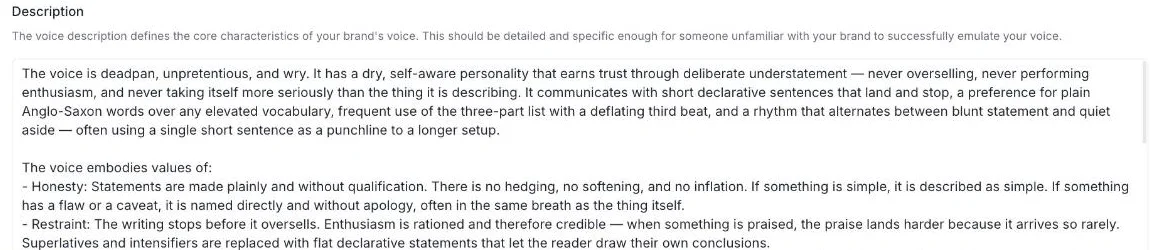
Then I selected that voice in the Jasper IQ menu and asked for the cold email again. The result kept all six facts at 107 words, and it sounded like the samples: “You keep the office running. Somehow the coffee is also your job.” Later: “Every batch is roasted within 48 hours of shipping. Fresh is the point.” The bullet list and “Warm regards” were gone.
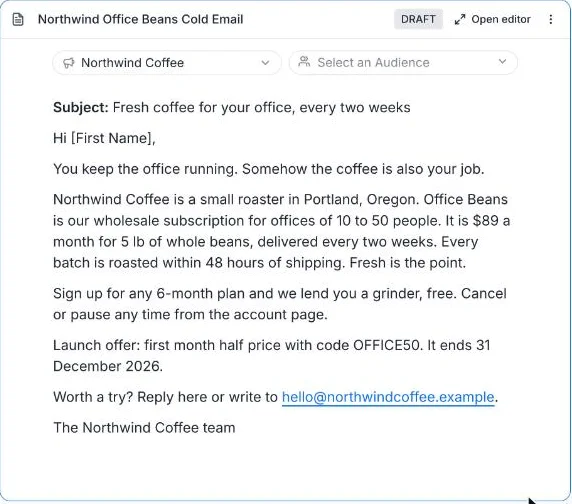
The Cold Email Agent wrote the best draft
For a third run I sent the cold-email task again with no Brand Voice selected, and this time clicked “Use” on the Cold Email Agent Jasper offered. Instead of writing straight away, the Agent opened a short form already filled in from my message. It had split my brief into the questions a copywriter would ask: what challenges the audience faces, what the product’s benefits are, what action the reader should take, and any custom instructions.
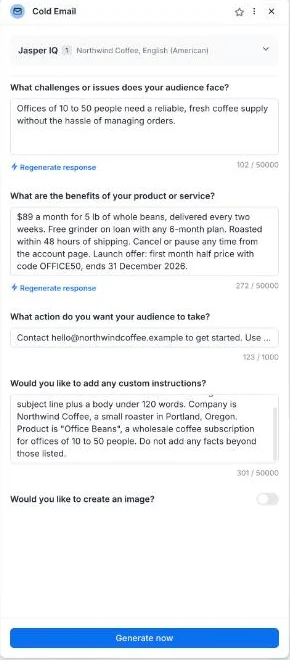
Two things stood out. Jasper wrote one answer itself, describing the audience as offices that “need a reliable, fresh coffee supply without the hassle of managing orders”, which is an inference rather than one of my facts, though a fair one. And the form’s header read “Jasper IQ 1 Northwind Coffee, English (American)”: the Auto IQ setting had attached my Brand Voice even though I had not selected it in the chat.
The draft that came back about 30 seconds later was the strongest of the three, in the Brand Voice and with a sharper hook.
Subject: Office coffee, sorted every two weeks
Hi there,
Running coffee for 10 to 50 people usually means someone's job becomes"coffee person." That's not a job. That's a favor nobody signed up for.
Office Beans is a wholesale subscription from Northwind Coffee, a small roasterin Portland. $89 a month gets you 5 lb of whole beans, delivered every twoweeks, roasted within 48 hours of shipping. Sign up for 6 months and we lendyou a grinder. Pause or cancel any time from your account page.
Right now the first month is half price with code OFFICE50, throughDecember 31, 2026.
Email [email protected] to get started.
That's the whole pitch.
It was not perfect. The grinder lost the word “free”, “any 6-month plan” became “Sign up for 6 months”, and “Portland, Oregon” became “Portland”. It invented nothing, but it did soften a selling point. I replied in the same chat: “Put the word free back in front of the grinder, and say Portland, Oregon. Change nothing else.” Within 30 seconds the document was edited in place with exactly those two changes and every other line untouched, and Jasper confirmed “I updated the email with those two exact changes and left everything else alone.”
Jasper IQ: voice, audiences and product facts
Brand Voice sits inside a wider settings layer Jasper calls Jasper IQ. In the chat composer, the IQ menu holds Content settings (Brand Voice, Audiences, Language), Context (Knowledge Base and Products) and three Agent Tools that were all switched on by default: Auto IQ, Agent Suggestions and Web Search. The badge on the IQ button counts what is attached; it read 1 once my Brand Voice was selected and 2 when the Knowledge item was added as well.
Pro caps this layer at 2 Brand Voices, 5 Knowledge items and 3 Audiences, according to both the pricing page and the in-app Plans screen. Business makes it unlimited. For a single brand that is enough; for an agency juggling clients it is a hard ceiling.
The Jasper IQ page itself lists six kinds of stored context. These are Jasper’s own descriptions, with the Pro limits from the Plans screen where they apply.
| IQ item | What Jasper says it does | Pro limit |
|---|---|---|
| Brand Voice | “Use your unique personality in your outputs” | 2 |
| Audiences | “Create targeted content for your specific audience segments” | 3 |
| Knowledge Base | “Upload company information and assets” for more accurate content | 5 items |
| Products (new) | Product details discovered from URLs, files or the Knowledge Base | Not stated |
| Style Guides | “Set and enforce rules for your organization’s term usage, grammar and punctuation” | Business feature |
| Visual Guidelines | “Ensure pictures align with your brand” | Business feature |
Knowledge Base: write the facts once
The Knowledge Base is the other half of Jasper IQ, and it fixes the tedious part of the brief: typing the same product facts into every request. You add an item from text, a file upload or a URL, name it, and choose whether the whole workspace can use it. I pasted the six Office Beans facts as one paragraph and saved it.
Then I opened a fresh chat and asked for three SMS messages under 160 characters “announcing Office Beans to existing Northwind Coffee customers”, with no facts in the prompt at all, only “Use only facts from our knowledge base.” Jasper reported “Configured IQ with 2 items”, picked up both the Knowledge item and the Brand Voice on its own, and wrote three texts in about 80 seconds.
1. Office Beans: 5 lb of our whole beans every two weeks, $89/mo, for offices of 10-50. Half off month one with OFFICE50 until Dec 31. Same coffee. More of it. (156 characters)2. Office Beans: a free grinder on loan with any 6-month plan. Pause or cancel any time. Loan means loan. First month half off with OFFICE50. Ends Dec 31. (151 characters)3. Office Beans: roasted within 48 hours of shipping, delivered every two weeks. First month half off with OFFICE50, ends Dec 31. The beans do not sit around. (155 characters)Every fact came from the saved item, nothing was invented, and all three stayed under the limit while sounding like the Brand Voice. The one slip was the year: “Dec 31” instead of 31 December 2026, which matters if the message is read next year. This is the workflow Jasper is really selling: facts and voice stored once, then every request inherits both. Keep each Knowledge item short and current, and delete an offer once it expires, since the model draws on whatever it finds there. Writing the date in full did not stop it dropping the year, so check dates in every draft.
Agents, Grid, Studio and the rest
The Agent Library on my trial listed 118 Agents, from Blog Outline and White Paper Outline to Instagram Caption, Keywords and Content Brief, each with a Use button; the Cold Email one I ran opened a short pre-filled form. A “Create in Studio” button sat at the top for building your own. Having them in one place, able to draw on your Brand Voice and Knowledge, is what turns Jasper from a chat box into a shared toolkit.
Beyond chat, the sidebar on my trial offered Projects, an Agent Library, Create Canvas, Create Grid, Create in Studio and Create Document. Home featured three Agents: AI Readiness Score, an SEO/AEO/GEO Rewriter and Blog Post. Jasper’s credits rate card lists standard Agents and prompts as “Unlimited”, while Grid rows, GEO Hub queries and the Research and Translation Agents spend credits that come with Business plans.
Grid, a spreadsheet that runs a prompt across many rows, is listed as a Business feature on both the pricing page and the in-app Plans screen. On my Pro trial it opened anyway, with a “Welcome to Grid” tour and an empty sheet; I did not run it. Studio, Jasper’s tool for building custom Agents, is also listed under Business.
Jasper also connects outward. It publishes an MCP server, and in August 2026 its blog announced an official connector in Claude’s Connector Marketplace. Its model page says it routes each task to models from “OpenAI, Google, Anthropic, and Meta” so that marketers never have to choose one. I saw no model picker in the chat or Canvas.
Who is behind Jasper in 2026
| Date | Milestone | Source |
|---|---|---|
| October 2022 | Raises $125 million at a $1.5 billion valuation | Crunchbase News |
| July 2023 | Staff cuts | Voicebot.ai |
| September 2023 | Timothy Young, ex-Dropbox president, becomes CEO | MarTech Series |
| February 2024 | Buys Clipdrop from Stability AI | ThePrint |
| September 2025 | Announces the Jasper MCP server | Jasper blog |
| November 2025 | Announces Grid | VKTR |
| June 2026 | Launches the GEO Agent | MarTech Series |
| August 2026 | Claude connector; new CMO and CFO named | Jasper blog, MarketScale |
Jasper was one of the first AI copywriting apps and has reinvented itself several times since. It raised $125 million at a $1.5 billion valuation in October 2022, according to Crunchbase News, then cut staff in July 2023 as cheaper general chatbots arrived. Timothy Young, formerly president of Dropbox, has been chief executive since September 2023, and in August 2026 the company named a new chief marketing officer and chief financial officer.
The product has moved with it. Jasper bought the Clipdrop image tools from Stability AI in February 2024, announced Grid in November 2025, and launched a GEO Agent in June 2026 for marketers tracking how their brand appears in AI search answers. It now calls itself a “marketing agents platform” rather than a writing tool. I found no reputable reports of layoffs in 2025 or 2026.
Jasper AI pricing: one seat, no free plan
Jasper has no free plan. Pro costs $69 a month for one seat, or $59 a month billed yearly, and Business is priced by sales. These are the US prices I saw on 5 November 2026 on the pricing page, at checkout and on the in-app Plans screen.
| Plan | Monthly billing | Yearly billing | Seats | What it adds |
|---|---|---|---|---|
| Free trial | $0 for 7 days, card required | n/a | 1 | Full Pro for 7 days, then $69 is charged |
| Pro | $69 a month | $59 a month, 12-month commitment | 1 only | Chat, Canvas, Agent Library, 2 Brand Voices, 5 Knowledge items, 3 Audiences |
| Business | Custom | Custom, 12-month commitment | Multiple | Grid, custom Agents and builder, unlimited IQ, API, admin controls, credits for advanced Agents |
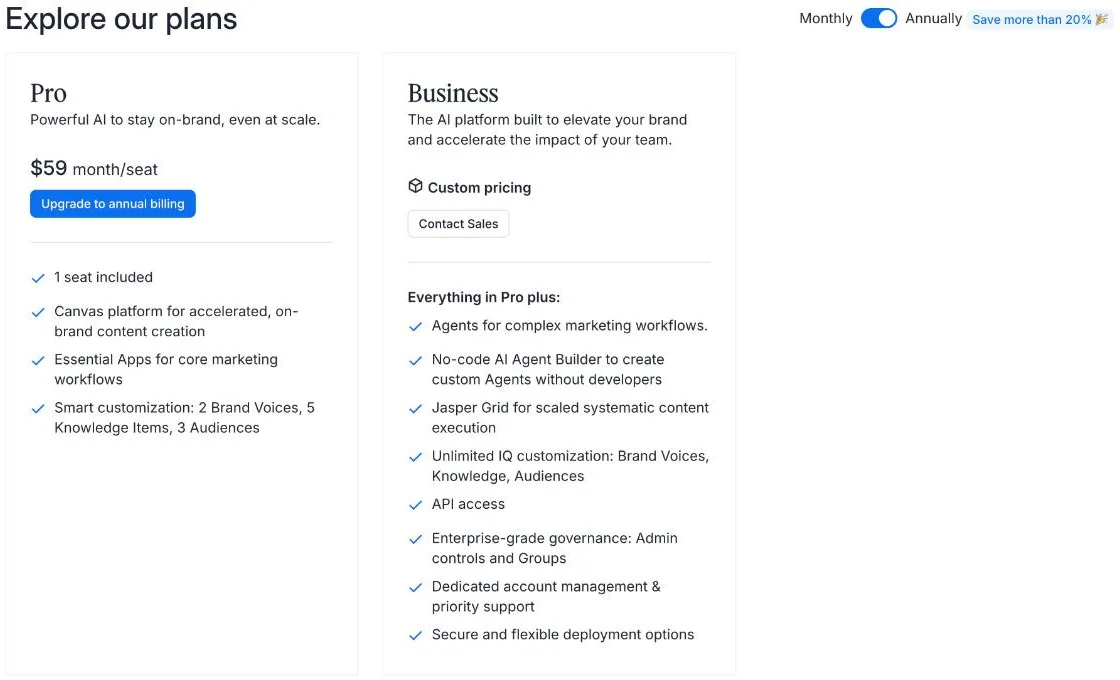
The headline number hides two limits. Pro is one seat only: Jasper’s help centre says “Our Pro plan is limited to 1 seat”, and its pricing FAQ tells you to contact sales if you need more than one user. So the first time a second person needs access, you are negotiating a Business contract with no published price.
The discount label is also generous to itself. The in-app Plans screen advertises yearly billing as “Save more than 20%”, the trial checkout called it “Save 14%”, and the real saving is $59 against $69, about 14.5%. The pricing FAQ says yearly billing saves “~20%”. Only the checkout figure matches the arithmetic.
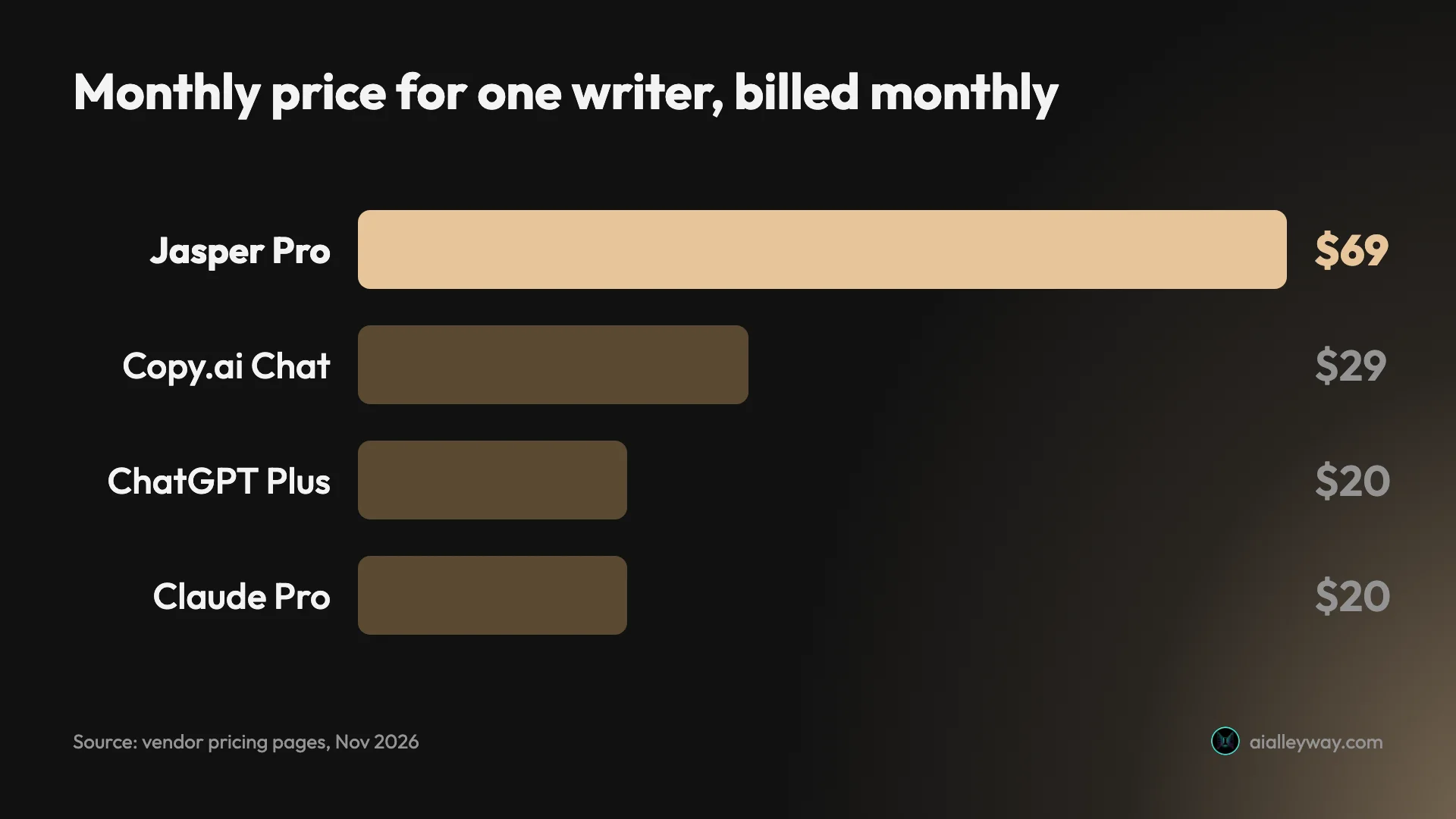
What the extra $49 a month buys
ChatGPT Plus and Claude Pro cost $20 a month, so Jasper Pro is $49 more for one person. In my test that money bought four things a general assistant does not give you out of the box: a Brand Voice that rewrites the style of every draft, a Knowledge Base whose facts are pulled into requests automatically, separate Canvas documents for each deliverable, and 118 ready-made Agents that can draw on the same voice and facts.
Whether that is worth $49 depends on how often you write the same kind of copy. A marketer producing ads, emails and product pages every week will use all four. Someone writing a launch email twice a year will not, and Claude’s Projects or ChatGPT’s custom instructions can hold a style guide and product notes for a fraction of the price.
What Business adds, and what you cannot see
The in-app Plans screen lists what Business adds over Pro: Agents for complex marketing workflows, a no-code Agent builder, Grid, unlimited Brand Voices, Knowledge and Audiences, API access, admin controls and Groups, dedicated account management and “secure and flexible deployment options”. Jasper’s credits help article adds that Business includes a credit allowance for Grid and the advanced Agents, with extra credits bought separately.
What it does not show is a price. Business starts with a sales call and a 12-month commitment, and Jasper publishes no per-seat or per-credit rate. Budget for it as an annual contract, not a monthly subscription.
How the trial becomes a bill
The trial is genuinely free for seven days, but it is built to convert. The checkout showed “Due today (7 days free) $0” and “Due after trial ends $69”, with billing starting seven days later. Jasper’s help centre says a card is required and that you are moved to the plan you chose when the trial ends.
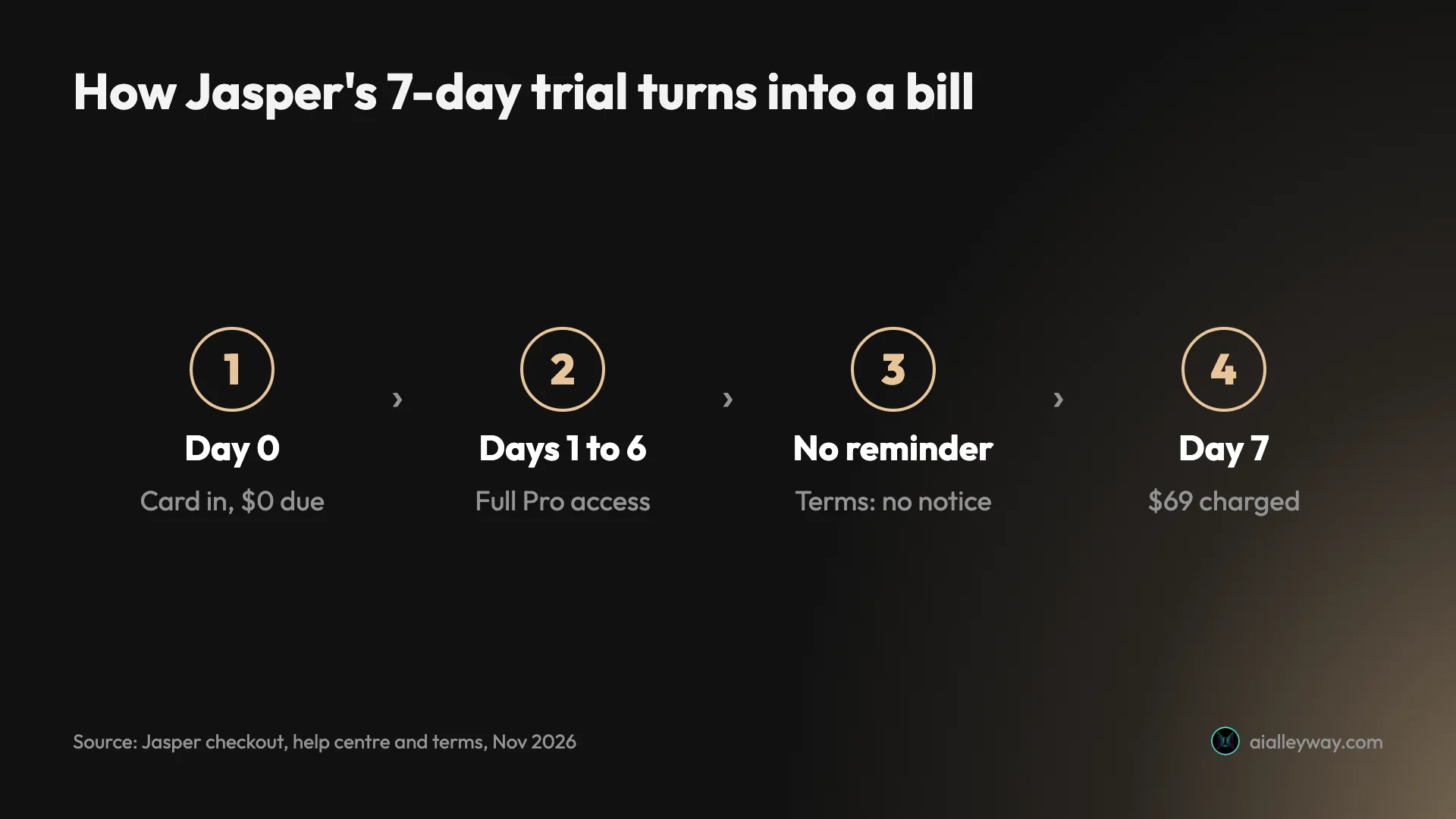
The terms are blunt about what happens next: “You will not receive a notice that your free trial has ended and that payment for your subscription is due.” You must cancel before midnight Pacific time on the last day. The good news is in the help centre: a trial cancelled early “will be set to cancel at the end of the trial period, and you will not be charged”, so you can cancel on day one and keep testing for the full week.
A one-week trial plan
If you start the trial, plan the week so the deadline never matters. This is the order I would use.
- Day one: cancel straight away. Jasper’s help centre says a cancelled trial runs to the end of the period without charging you, so there is no reason to leave it open.
- Day one: build a Brand Voice from three or four real pieces of your own copy, at least 1,000 characters in total, and read the description it writes.
- Day two: add your product facts to the Knowledge Base, then ask for something without restating them and check every number.
- Days two to five: run your real work through one Agent you would use weekly, and compare the drafts with what a free ChatGPT or Claude account gives you on the same brief.
- Day six: decide. If Jasper’s drafts need fewer edits, resubscribe deliberately on monthly billing. If not, you have spent nothing.
Yearly plans, refunds and credits
Yearly billing is a commitment. Jasper’s help centre offers “two free months by paying for 10 months upfront”, with “a 7-day cancellation and refund period” after which yearly plans “are one-year commitments and cannot be canceled at any time within the year”. Do not pick yearly billing to save $120 until you are sure.
Refunds depend on which page you read. The terms say “there are no refunds for cancellation”. The help centre, updated in September 2026, says Jasper will “honor the 7-day money-back guarantee for those who reach out within 7 days of the charge”. If a charge surprises you, email support inside a week.
Credits only matter on Business. Jasper’s rate card, updated in June 2026, lists Grid at 10 credits a row, a GEO Hub query run at 10 credits and the Research and Translation Agents at 40 credits a run, and publishes no price per credit. Pro users do not get a credit allowance, and standard writing in chat and Canvas does not use credits.
Payment methods and discounts
Jasper’s pricing FAQ says it does not accept PayPal or prepaid cards, and its help centre adds virtual cards to that list, so the trial needs an ordinary credit or debit card. Non-profits get a 20% discount, according to the same FAQ. Pro users get email support; priority support is a Business feature.
| Cost check | Pro, monthly | Pro, yearly |
|---|---|---|
| Per month | $69 | $59 |
| Per year | $828 | $708 |
| Saving against monthly | n/a | $120, about 14.5% |
| Cancel any time? | Yes, ends after the paid month | No, 12-month commitment after a 7-day window |
Who should pay for Jasper?
Jasper makes sense when the problem is consistency across people, not getting words onto a page.
- An in-house marketing team that needs every writer, and every campaign, in one trained brand voice, and can budget for a Business contract.
- A content lead or brand manager who wants one person’s Pro seat to produce on-voice drafts for a team to edit, with Brand Voice doing the policing.
- A marketer who writes the same formats every week (cold emails, ads, product pages) and would use ready-made Agents instead of writing prompts from scratch.
- A team already working in Claude that wants its brand voice and product facts available there too, through Jasper’s Claude connector.
- Not for a freelancer or solo writer. One seat costs $69 a month, there is no free plan, and ChatGPT Plus or Claude Pro cost $20 a month; in our best AI writing tools test, even ChatGPT’s free plan wrote an accurate email from a brief.
The dividing line is volume and consistency. If several people write copy for one brand every week, Jasper’s stored voice and facts stop them drifting apart, and the $69 seat pays for itself in edits saved. If you write occasionally, or for many unrelated clients, you will hit the Pro limits or pay for structure you do not use.
Where Jasper earned its price
The strengths showed up in the test itself, and the first is that Jasper did not make anything up.
| Run | Setup | Pieces | Facts invented | Limits met | Notes |
|---|---|---|---|---|---|
| 1 | Plain chat, no Brand Voice | 6 | 0 | 6 of 6 | Accurate, generic tone |
| 2 | Chat with Brand Voice | 1 | 0 | 1 of 1 | Voice clearly matched the samples |
| 3 | Cold Email Agent, Auto IQ | 1 | 0 | 1 of 1 | Best hook; dropped “free”, fixed on request |
| 4 | Knowledge Base, no facts in prompt | 3 | 0 | 3 of 3 | Facts pulled from memory; year dropped |
It kept every fact and invented none
Across six pieces written from one brief, Jasper kept all six facts in the cold email, the product description and the follow-up, and added nothing I had not supplied. Every Facebook ad stayed under 125 characters, the longest at 121. For marketing copy, an invented claim is the expensive failure, and Jasper avoided it on every piece.
Brand Voice works from very little input
From 1,242 characters of sample copy, Jasper wrote a 4,059-character voice description that named the style correctly as “deadpan, unpretentious, and wry”. With that voice selected, the next cold email dropped the bullet list and opened “You keep the office running. Somehow the coffee is also your job.” It kept all six facts while doing it. It was the biggest single change in my whole test.
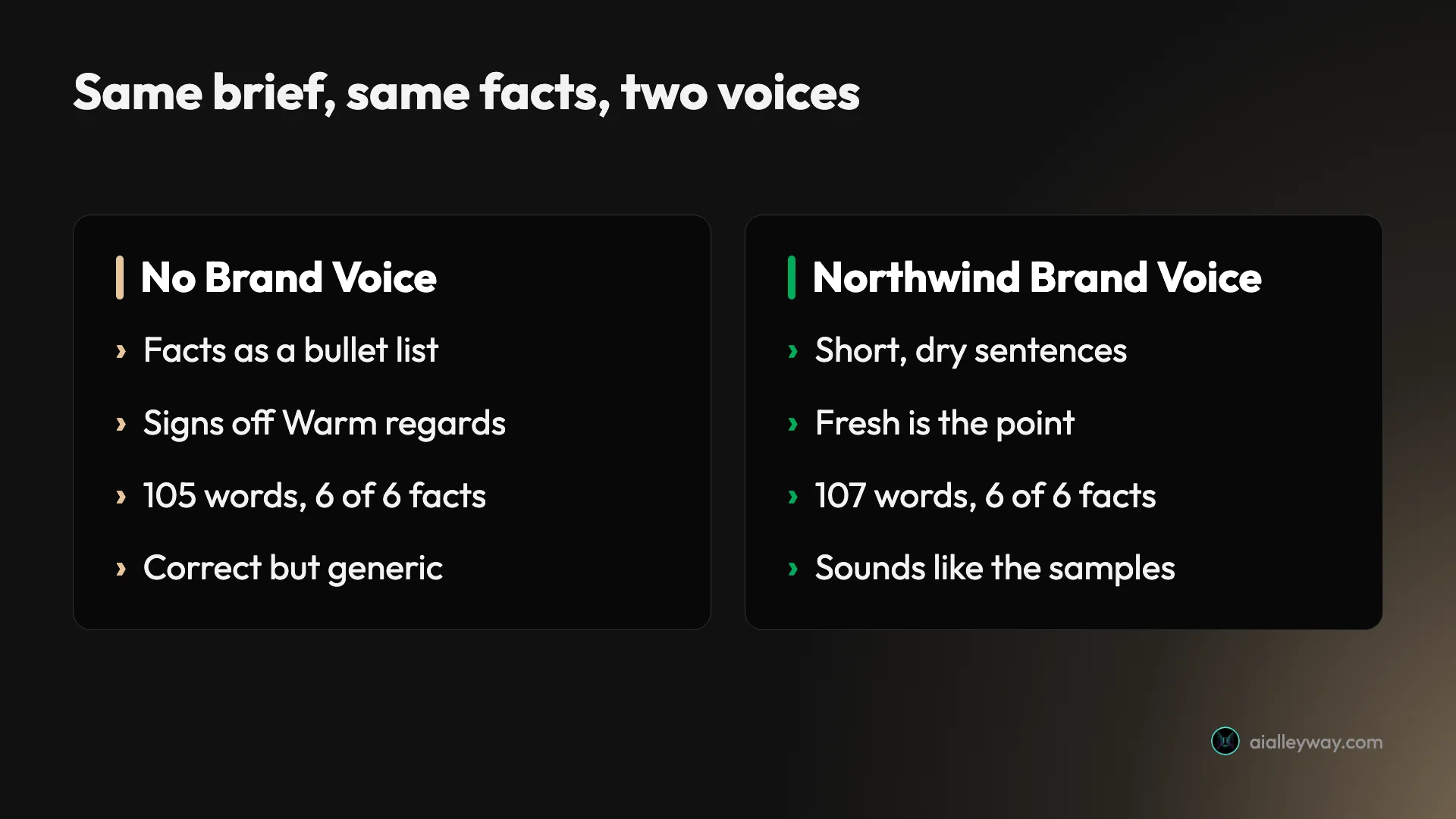
Each deliverable becomes its own document
One brief produced six separate Canvas documents, each with its own title, a DRAFT label and an Open editor button, and the Brand Voice email’s document header showed its voice selector set to Northwind Coffee. For a team that reviews and edits copy, separate assets beat one long chat reply that someone has to cut apart and paste into docs.
Agents package the jobs marketers repeat
Jasper matched my four tasks to four ready-made Agents (Cold Email, Social Media Ad, Product Description and Follow-up Email) without being asked. Standard Agents are listed as “Unlimited” on Jasper’s credits rate card, so a Pro user can lean on them without watching a meter. I skipped them on the first run, but for repeat work they save writing the same prompt every week.
Facts stored once are used everywhere
With six facts saved in the Knowledge Base, a prompt containing no facts at all produced three accurate SMS messages, each under 160 characters, in the Brand Voice. For a team, that removes the most common source of AI copy errors: someone pasting an old price or an expired code into a prompt. In principle, updating the Knowledge item updates every later request; I did not test an edit.
Edits land exactly where you ask
When the Agent’s draft dropped the word “free”, I asked Jasper to restore it and change nothing else. It edited the document in place within 30 seconds, made exactly the two changes I asked for and left every other line as it was. Plenty of chat assistants rewrite the whole piece when you ask for one fix; Jasper treated the draft as a document, not a conversation.
The trial is long enough to judge it
Seven days of full Pro access was enough to run a real brief, train a Brand Voice and compare the results. Jasper’s help centre also lets you cancel early without losing the remaining days. Compare that with our Copy.ai review, where a new account could not generate a single word without paying first.
Where Jasper falls short
The writing was fine. The problems are price, limits and billing.
$69 buys one seat, and the team features cost extra
Pro costs $69 a month on monthly billing for exactly one seat, more than three times ChatGPT Plus or Claude Pro at $20. Jasper’s help centre is plain: “Our Pro plan is limited to 1 seat.” The moment a colleague needs access, the only option is Business, and Grid, the no-code Agent builder, custom Agents, unlimited Brand Voices, admin controls and API access all sit on that plan too. Those are the features that make Jasper a team platform, and a buyer cannot see what they cost without a sales call.
The trial bills without a reminder, and cancelling can become a pause
The trial needs a card, converts to $69 automatically, and Jasper’s terms say “You will not receive a notice that your free trial has ended”. Then there is the exit. Jasper’s help centre says the cancellation flow offers to pause your plan for 30, 60 or 90 days instead, and that “Your billing cycle will resume after the chosen time frame.” A June 2026 Trustpilot reviewer wrote that Jasper “forced an unprompted three month service suspension on us instead of processing the cancellation” and later billed their card again. Cancel on day one, choose cancel rather than pause, and check the Plans page afterwards.
Ratings depend on when you look
Jasper’s G2 page shows 4.7 out of 5 from 1,319 reviews, with “Cost” and “Expensive” among the most-tagged cons. Trustpilot shows 3.3 from 4,138 reviews, and while most of those are five-star, 7 of the 12 newest reviews, from October 2025 to June 2026, are one-star and mostly about billing and cancellation. The older praise and the newer complaints are describing different years of the product. Jasper’s own pricing page goes further, saying over 100,000 businesses “rate their experience 4.8/5 stars in over 10k reviews”, without saying where. Neither platform I could check shows anything like 10,000 reviews: G2 has 1,319 and Trustpilot 4,138.
| Where | Score on 5 November 2026 | What stands out |
|---|---|---|
| G2 | 4.7 out of 5, 1,319 reviews | Cons tagged AI Limitations, Cost, Misleading Marketing, Expensive |
| Trustpilot | 3.3 out of 5, 4,138 reviews | 3,592 five-star and 225 one-star overall; 7 of the 12 newest are one-star |
The pricing copy does not add up
The in-app Plans screen says yearly billing will “Save more than 20%”, but $59 against $69 is about 14.5%, and Jasper’s own trial checkout said 14%. The help centre’s “two free months by paying for 10 months upfront” does not match either: 10 months at $69 is $690, while a year at $59 is $708. None of this costs money directly, but a buyer comparing plans should do the arithmetic rather than trust the labels.
Pro’s IQ limits suit one brand, not several
Pro allows 2 Brand Voices, 5 Knowledge items and 3 Audiences. One brand with a formal and a casual voice fits; an agency with three clients does not, and the only way past the cap is Business. Five Knowledge items also fills up quickly once you add a product sheet, a style guide, a pricing page and a couple of campaign briefs.
Jasper second-guesses the request
On the two runs I timed, Jasper’s first reply was not copy but a suggestion to use an Agent, after about 30 to 35 seconds of retrieving context, and it offered an Agent again on every later run. The six-piece first run took about three minutes in total.
On my third run I had not selected a Brand Voice, and the chat composer’s IQ badge read 0, yet the Cold Email Agent’s form showed my Northwind voice attached: Jasper’s Auto IQ setting, on by default, chose it for me. That produced a better email, but two people sending the same request can get different copy depending on what Jasper attaches. Teams that need predictable output should check the IQ header on every Agent run, or switch Agent Suggestions and Auto IQ off in the IQ menu.
First drafts still sound like a template
Without a Brand Voice, Jasper’s copy was accurate but generic: a bulleted list of the brief’s facts, “I’m reaching out from”, “Warm regards”. A Trustpilot reviewer in May 2026 put it more harshly: “Not worth the money, quality is meh.” If you will not spend a few minutes training a voice, you are paying $69 for drafts a $20 assistant also writes.
Alternatives worth considering
If the single $69 seat or the billing terms rule Jasper out, these are where I would look.
| Tool | Try before paying? | Entry paid plan | Tested by us |
|---|---|---|---|
| Claude | Yes, free plan | Pro $20 a month, $17 billed yearly | Yes |
| ChatGPT | Yes, free plan | Plus $20 a month | Yes |
| Copy.ai | No | Chat $29 a month for 5 seats | Account and paywalls only |
| Jasper | 7-day trial, card required | Pro $69 a month for 1 seat | Yes, this review |
Claude: the cheaper writer
Our Claude review is the place to start if you mainly want good copy. Claude is our top pick for copywriting, its free plan lets you test drafts before paying, and Pro costs $20 a month. Claude’s Projects can hold a style guide and sample copy for every chat in the project, which covers much of what Jasper’s Brand Voice does for one person. In our Claude Projects test, a project with three files found a single line inside a 1.46 MB file, though it could not count across that file, which is most of the Knowledge Base job done for $20. You lose the 118 ready-made Agents and the per-document voice switching.
Jasper vs ChatGPT: ChatGPT is free to test first
Our ChatGPT review covers the other obvious choice. ChatGPT has a free plan, Plus costs $20 a month, and in our best AI writing tools test its free plan wrote an accurate email from a brief. A team that wants shared seats can buy ChatGPT Business instead. What you give up is Jasper’s structure: there is no Brand Voice editor or Knowledge Base built for marketing, so consistency depends on custom instructions and whoever writes the prompt.
Copy.ai: five seats, no trial
Our Copy.ai review covers the most direct rival. Its Chat plan is $29 a month for five seats, far cheaper per person than Jasper, and its help centre shows a Brand Voice option in the chat window. The catch is that a new account cannot generate anything without paying first, so you buy before you can test.
Final word
Jasper did the hard part of copywriting well: it kept every fact, invented nothing, hit every length limit, and with a few minutes of setup it wrote in a voice that matched our samples. That Brand Voice, and the Knowledge Base that fed facts into copy without my repeating them, are the reasons to choose it over a general chat assistant. Across four runs and eleven pieces of copy, it never invented a fact.
What holds it back is everything around the writing. One seat costs $69 a month, the team features sit on an unpriced plan, and the trial bills you without a reminder. Buy Jasper if a marketing team needs one enforced voice and will train it; otherwise start with Claude or ChatGPT for $20, and if you do try Jasper, cancel the trial on day one and test for the full week.
Frequently asked questions
Is Jasper AI free?
No. Jasper has no free plan. It offers a 7-day free trial of the Pro plan, and its help centre says a credit card is required to start it. When I started the trial on 5 November 2026, the checkout showed $0 due today and $69 due when the trial ends, with billing starting seven days later.
The trial gave me the full Pro product: chat, Canvas documents, Brand Voice and the Agent library, and Grid opened as well. Jasper's terms say you will not receive a notice that the trial has ended, so if you only want to test it, cancel before the last day. The help centre says a trial cancelled early stays open until the trial period ends and is not charged, so cancelling on day one costs you nothing and leaves the full week for testing.
How much does Jasper AI cost?
Jasper Pro costs $69 a month billed monthly, or $59 a month billed yearly, for one seat. The Business plan has custom pricing through Jasper's sales team and adds Grid, custom Agents, the no-code Agent builder, unlimited Brand Voices and API access. All prices are in US dollars and were read on 5 November 2026.
Pro is limited to one seat, so a second person means talking to sales about Business; Jasper publishes no add-on seat price. Yearly billing is a 12-month commitment that Jasper's help centre says cannot be cancelled after a 7-day refund window. Pro also caps you at 2 Brand Voices, 5 Knowledge items and 3 Audiences. Over a year, monthly billing comes to $828 and yearly billing to $708, a saving of $120, but only if you are sure you will use Jasper all year.
Jasper vs ChatGPT: which is better for copywriting?
For one person writing occasional copy, not by enough to justify the price. In my test Jasper's first drafts were accurate and kept every fact, but they read like a clean rearrangement of the brief until I added a Brand Voice. ChatGPT Plus and Claude Pro cost $20 a month and both have free plans you can test first.
Jasper earns its price in a team. Its Brand Voice turned my test copy into a recognisable house style, its Canvas keeps each piece as a separate document, and its Agents package common jobs like cold emails. If several people must write in one voice, that structure is worth paying for. If it is just you, start with ChatGPT or Claude. In my four runs Jasper invented no facts at all, which is the strongest argument for it when accuracy matters more than price.
How do I cancel Jasper?
Jasper's help centre says to open your workspace settings, go to Plans, scroll to the very bottom and click Cancel, then follow the prompts. On my trial account the Plans page ended with a section titled Need to cancel your account? and a Cancel account button.
Watch the prompts. Jasper's help centre says the flow offers to pause your plan for 30, 60 or 90 days instead of cancelling, and that billing resumes after the pause. Two recent one-star Trustpilot reviews describe being billed again after a pause they did not mean to choose. If you want out, choose cancel, then check the Plans page shows no upcoming charge. On a trial, cancelling early is safe: the help centre says the trial keeps running to its end and you are not charged.
Does Jasper offer refunds?
It depends which Jasper page you read. Jasper's terms, version 4.1, say there are no refunds for cancellation. Its help centre, updated in September 2026, says Jasper will honour a 7-day money-back guarantee for people who contact it within 7 days of a charge.
For yearly plans, the help centre offers a 7-day cancellation and refund period, after which the plan is a one-year commitment that cannot be cancelled. In practice, if you are charged by mistake, email support inside 7 days and keep the reply. Do not rely on a refund later than that. The safest route is to avoid the charge entirely by cancelling the trial on day one, which the help centre says does not shorten the trial. Jasper's terms also say a cancellation sent by email takes effect in the month after the month you give notice.
Keep reading
Copy.ai review: I signed up, and every tool was locked
A Copy.ai review from a new account: no free plan, Chat at $29 a month, workflows behind a $249 plan and a 1.8 Trustpilot score. Who should still pay?
Best AI writing tools: one to draft, one to check
The best AI writing tools, tested on one email brief and 23 planted errors. Claude drafted best, Grammarly checked best, and Gemini changed a promise.
Claude AI review: brilliant at words, strange about limits
A Claude AI review from a paying Max account. My $100 Max plan invoiced at $111.11, three usage meters run at once, and overflow is billed at API rates.
ChatGPT review: the free tier is the story, not the $20 one
A ChatGPT review from a year on the free tier plus one month of Plus. Six rungs from $0 to $500, and ads now run on both the Free and $8 Go tiers.