
Best AI automation tools: which one fits how you build
We tested the top three and ranked six AI automation tools by who each is for — and what their very different billing actually costs.
Contents
The best AI automation tools, at a glance
The best AI automation tool is the one whose billing model matches how you work. These six tools charge in six different ways, and that gap decides your real bill more than any feature list does. After running the top three in production and assessing the rest against their live pricing and docs, here is the short version.
- Best overall: n8n. The cheapest at volume and the deepest for AI, if you have technical hands. We run our entire content pipeline on it.
- Best for non-coders: Zapier. The easiest start and the widest app library, at a price that climbs with use.
- Best value visual builder: Make. More logic than Zapier, friendlier than n8n, from $9 a month if you watch the meter.
- Best for Microsoft shops: Power Automate. Cloud flows plus desktop RPA, native to Microsoft 365.
- Best for AI agents: Lindy. An AI assistant built around agents, for non-developers.
- Best AI-native workflows: Gumloop. Credit-based AI automation aimed at marketing and ops teams.
How we picked
We did not score these six the same way, and you should know how before you trust the ranking. The top three (n8n, Zapier, and Make) we ran ourselves. n8n powers the entire AI Alleyway content pipeline: ten production workflows on a self-hosted box, turning trend signals into scripts, voiceovers, and scheduled posts every day. We built a real lead-routing scenario in Make through its API, and we ran Zapier’s new MCP layer live across Gmail, Google Calendar, and Slack.
The other three (Power Automate, Lindy, and Gumloop) we assessed from their live pricing, documentation, and aggregate reviews, not production use. We say which is which in every section, because “we tested this” and “we read about this” are not the same claim, and you deserve to know which one you are getting. Hands-on time changes a verdict: it is how you learn that Make’s meter drains on polling, or that Zapier’s task count climbs faster than the plan name suggests, the kind of thing a spec sheet never tells you.
One criterion mattered more than the rest, and it is the calculation most roundups skip: how the tool bills you. Automation tools meter in wildly different ways, and the unit decides everything once your workflows get long or run often. n8n charges per execution, where one whole workflow run counts once no matter how many steps it has. Zapier charges per task, where every single app action counts. Make charges per operation, where every module run counts. Those three words, execution and task and operation, are the difference between a $20 bill and a $200 one.
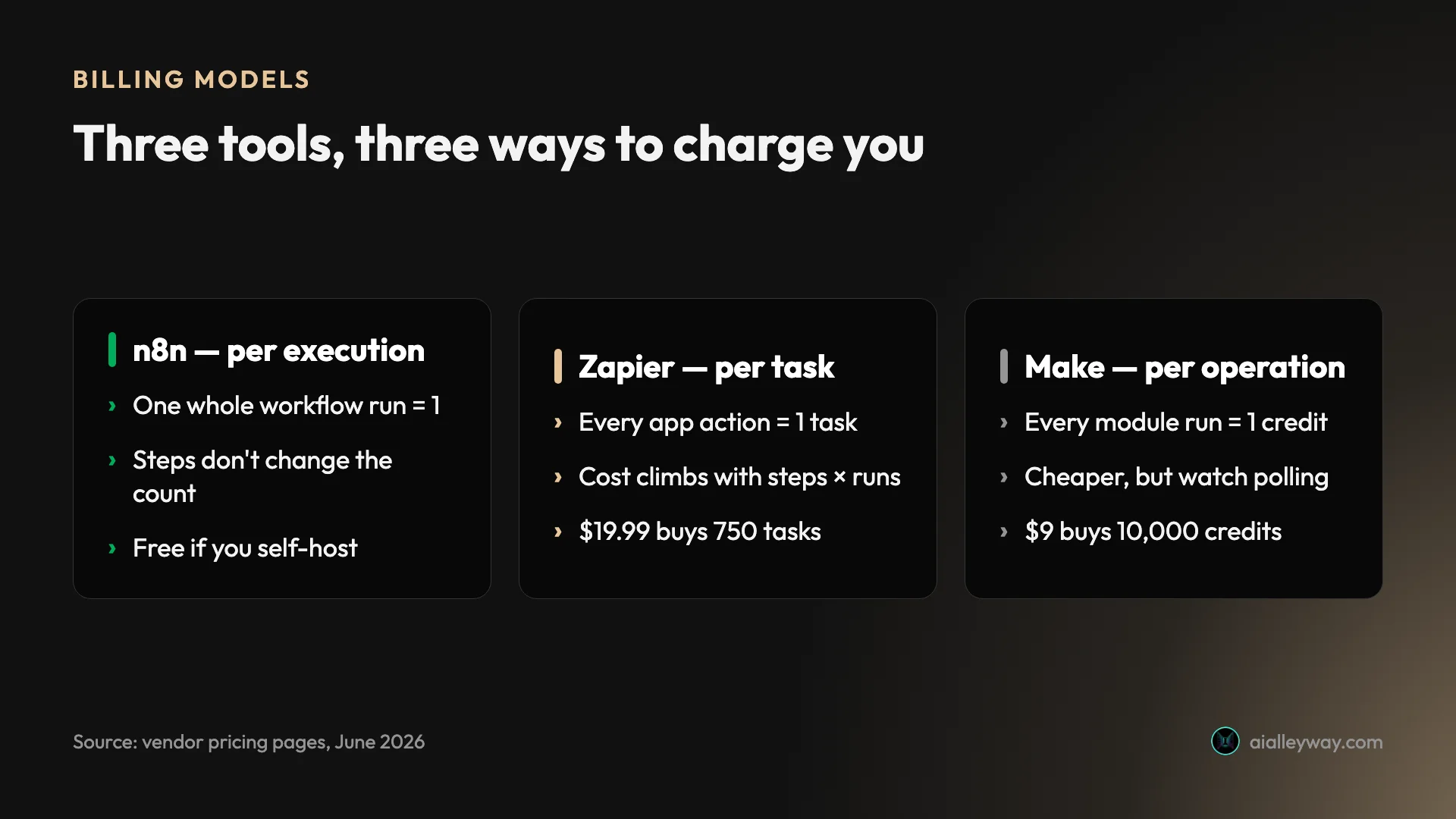
The math is worth doing concretely, because it is the thing the spec-sheet roundups skip. Picture a 30-step workflow run 1,000 times a month. On n8n that is 1,000 executions, inside the €20 Starter plan’s 2,500, and free if you self-host. On Zapier the same workflow is 30 steps times 1,000 runs, up to 30,000 tasks, far past the 750 a $19.99 plan includes and into a tier several times more expensive. On Make it is roughly 30,000 operations, cheaper than Zapier but still well beyond a $9 Core plan’s 10,000 credits.
Same automation, three very different invoices, and the gap only widens as the workflow gets longer or runs more often. That single calculation reorders this entire list depending on your volume, which is why we lead with it. A handful of simple automations run fine and cheap on any of the six; it is scale and step-count that separate them.
From there we weighed two more things: the real capability ceiling (can it handle branching, AI, and the specific app you need), and who each tool is genuinely for. We ignored vendor “best all-around” claims and aggregate star averages taken on their own, because a 4.8 from power users and a 2.7 about billing surprises describe the same tool from two honest angles. Every pick below gets a plain verdict instead: good for this person, wrong for that one.
The 6 best AI automation tools compared
Here is the whole field at a glance. The “how it bills” column is the one to read first, because it is the axis that decides your real cost, and the “tested?” column is the one to trust, because it separates what we ran in production from what we assessed on paper.
| Tool | Best for | How it bills | Free tier | Paid from | Tested? |
|---|---|---|---|---|---|
| n8n | Technical teams, high volume | Per execution (whole run) | Yes (self-host, unlimited) | €20/mo Cloud | ✅ 4.6 |
| Zapier | Non-coders, app coverage | Per task (per action) | Yes (100 tasks) | $19.99/mo | ✅ 4.3 |
| Make | Visual builders on a budget | Per operation / credit | Yes (1,000 credits) | $9/mo | ✅ 4.2 |
| Power Automate | Microsoft 365 shops | Per user / per bot | 30-day trial | $15/user/mo | From docs |
| Lindy | AI agents & assistants | Usage allowance | No (7-day trial) | $49.99/mo | From docs |
| Gumloop | AI-native workflows | Per credit | Yes (5k credits) | $37/mo | From docs |
1. n8n — best for technical teams and high volume

n8n is the tool we trust with our own production pipeline, and it is the best overall pick for anyone with technical hands. It is a source-available workflow automation tool you can self-host, and the reason to care is the billing: it charges per execution, so our 28-node render workflow costs exactly one execution per run, the same as a two-node one. That math is why teams outgrow per-task tools and land here. We run ten workflows on it, and the busiest is 33 nodes that still counts as a single execution every time it fires, which on a per-task tool would be dozens.
The capability is real, not a no-code sandbox. Code is a first-class citizen — you write plain JavaScript or Python in Code nodes — and the HTTP Request node calls any API that exists. It also ships LangChain-based nodes for LLM calls, agents, and retrieval, which is why it is increasingly the home for serious AI automation. Our pipeline drives Anthropic, ElevenLabs, and Buffer from inside n8n every day.

Two things keep it in production rather than just impressive in a demo. First, every workflow exports to a JSON file, so our automations live in Git next to the rest of our code: we review changes in a pull request and deploy with a script instead of clicking around a dashboard, and a bad change is one revert away. No hosted tool offers that. Second, it is genuinely reliable. Pulling our live execution history from the n8n API in June 2026, the last 93 stored runs across the pipeline came back at 100% success, which is the bar that matters for a stack that renders video and posts to three social platforms with no one watching.
Pricing: the self-hosted Community edition is free with unlimited executions; you pay only for a server. n8n Cloud starts at €20 a month for 2,500 executions on annual billing, and the jump from the €50 Pro tier to the €667 Business tier is a genuine cliff. Our full n8n pricing breakdown explains where the cliffs are and how to dodge them.
The cost is the on-ramp. n8n expects comfort with APIs, JSON, and a little JavaScript, and Capterra reviewers name the learning curve as the top complaint (ease of use 4.1 against a 4.6 overall). Self-hosting adds an operations burden — you own the upgrades and the backups. It scores 4.7 on G2 and 4.6 on Capterra from developers, but 3.4 on Trustpilot, where the complaints are about support and the free tier rather than the product.
One caveat to know before you build on it: n8n is source-available under a fair-code license, not true open source. You can self-host and automate your whole company for free, but you cannot resell n8n as your own hosted service, a distinction that caused enough confusion that a widely-seen Hacker News post was retitled away from calling it an “open source Zapier alternative.” For almost everyone that line never matters. And the prebuilt AI Agent node, while real, is younger than the hype, so for our critical path we call models over HTTP directly and keep control of the prompt rather than hand it to the agent abstraction.
Buy n8n if you have technical hands and care about cost at scale or data control. Skip it if you want something that just works on day one. The full hands-on story is in our n8n review, where we score it 4.6, a Category Leader.
2. Zapier — best for non-coders and app coverage
Zapier is the easiest place to start in automation, and it is the right pick for most non-coders. It connects more than 9,000 apps, more than any rival, so the thing you want to automate is almost certainly supported, and a first automation takes minutes. When we ran its new MCP server live across Gmail, Google Calendar, and Slack, an AI assistant drove our connected apps directly without a single line of setup code.
The trigger-then-action format is the simplest in the category, and Copilot drafts a Zap from a plain-English sentence on every plan, including Free. The 2026 additions — Agents, Tables, Interfaces, and the MCP layer — turn it from a connector into a light app-building platform. Reach and polish are its whole pitch, and it earns the highest aggregate ratings here: 4.5 on G2 from over 2,000 reviews and 4.7 on Capterra from over 3,000.
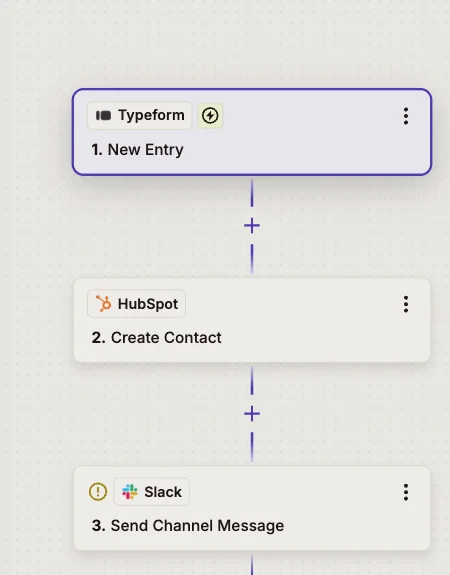
The 2026 build-out is more than a connector now. Tables gives you a lightweight database, Interfaces builds simple front ends, and Agents and Chatbots add an AI layer, so a Zap can increasingly be a small app rather than a single automation. One change to budget for, though: from June 2026 the built-in AI by Zapier bills by model tier with a task multiplier (Standard 1x, Advanced 3x, Premium 5x), and you can connect your own model key to stay at 1x. It is exactly the kind of detail that turns a predictable bill into a surprising one if you lean on the AI steps.
Pricing: Free for 100 tasks a month and two-step Zaps. Paid plans start at Professional, $19.99 a month for 750 tasks on annual billing, with Team at $69. Triggers, filters, and built-in tools are free, which softens the meter but does not change the per-task shape of the bill.
The catch is that meter. Zapier bills per task, where every successful app action counts, so a long multi-step Zap run thousands of times a month burns tasks fast and a $20 plan can become hundreds. Make and n8n are dramatically cheaper at scale. Trustpilot sits at 1.4 from 303 reviews, almost entirely about billing and cancellation — the standard tax of a usage-metered market leader.
When we ran its MCP server, the appeal was obvious: an AI assistant read a Gmail thread, checked a Google Calendar, and posted to Slack with zero glue code, because Zapier had already done the connecting. That is the whole pitch in miniature. It is the tool we would hand a non-technical founder on day one, and the first one they should leave once a single Zap costs more in tasks than the staff time it saves.
Buy Zapier for the easiest setup and the biggest app library at modest volume. Look elsewhere if cost at scale is your priority. Our Zapier review scores it 4.3, a Power Tool.
3. Make — best visual builder for the money

Make is the visual middle ground, and the best value if you want more logic than Zapier without managing a server. It gives you a drag-and-connect scenario builder with routers, filters, and iterators that handle branching Zapier charges a premium for, plus more than 3,000 app connectors. When we built a real lead-routing scenario through the Make API, the visual canvas made multi-step branching genuinely legible in a way a list of Zap steps never is.
It starts cheap and stays cheaper than Zapier at most volumes because its entry plans pack far more included runs for the money. Power users rate it highly — 4.8 on Capterra and 4.6 on G2 — for exactly that flexibility-per-dollar.
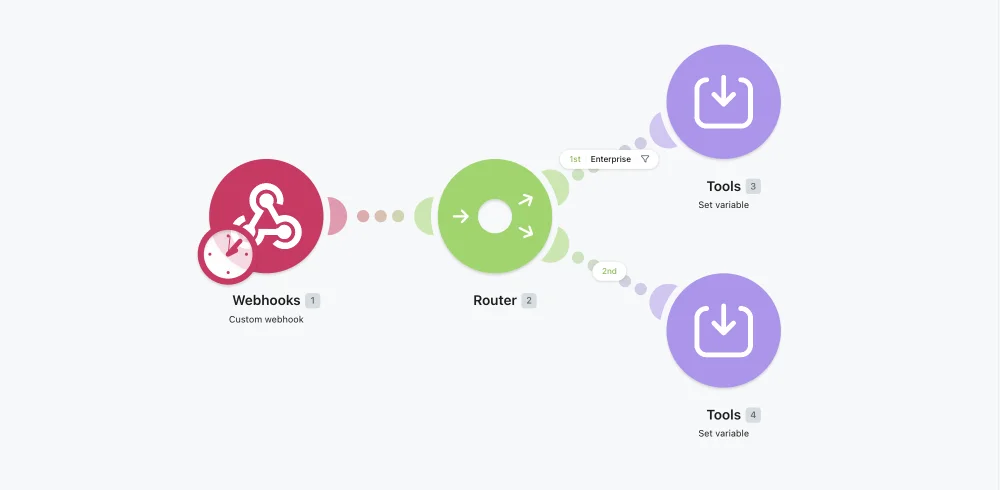
The logic is where Make earns its spot between the other two. Routers split a scenario down multiple paths, iterators loop over arrays, and filters gate each branch, so one scenario can fan out to handle cases that would need several separate Zaps on Zapier. The 3,000-plus connector library is narrower than Zapier’s 9,000 but covers nearly everything a small team actually touches, and the free tier is usable for real learning: 1,000 credits a month and two active scenarios, enough to build something that works before you pay a cent.
Pricing: Free for 1,000 credits a month and two scenarios. Paid plans start at Core, $9 a month for 10,000 credits on annual billing, with Pro at $16. The credit count, not the tier name, drives your bill.
The catch is the same shape as Zapier’s, one level deeper. Make bills per operation, where every module run is one credit, so a multi-step scenario or a frequent polling trigger drains credits fast. A trigger polling every five minutes burns roughly 8,640 of a Core plan’s 10,000 credits just checking for data, before any real work happens.
The August 2025 switch from operations to credits quietly raised costs for AI and bulk workflows, though a November 2025 adjustment softened the worst of it, capping Core at 300,000 credits, extending Pro to 8 million, and letting you bring your own AI API key to dodge the premium AI-credit rates. Trustpilot sits at 2.7, on interface and account-security complaints.
Buy Make if you want a visual tool with real branching that just works without a server. Skip it if you need predictable flat-rate billing or run heavy polling. Our Make.com review scores it 4.2, a Power Tool.
4. Microsoft Power Automate — best for Microsoft 365 shops

Power Automate is the obvious pick if your work already lives in Microsoft 365. Based on Microsoft’s documentation and pricing, it combines two things most rivals split: cloud flows for app-to-app automation and desktop flows for robotic process automation (RPA) that clicks through legacy software a human would otherwise drive. Inside the Microsoft ecosystem — Outlook, SharePoint, Teams, Dynamics — it is the native option, and that integration is the entire reason to choose it over a neutral tool.
It is also the enterprise answer for unattended RPA, where a bot runs a process on a schedule without anyone watching. A desktop flow can open a legacy accounting app that no API touches, key in invoice data, and click through the screens a temp worker would otherwise handle, on a schedule and unattended. That is a capability Zapier and Make do not really offer, and it is why large organizations standardize on it.
| Plan | Price | Bills by |
|---|---|---|
| Premium | $15/user/mo | Per user (cloud + attended desktop) |
| Process | $150/mo | Per bot (unattended RPA) |
| Hosted Process | $215/mo | Per bot (Microsoft-hosted RPA) |
It leans hard into AI now too: a Copilot builds flows from a plain-English description, and the tie-in to Microsoft’s Copilot Studio puts agents where your company data already lives. For a shop already paying for Microsoft 365 and Dynamics, that is an advantage no neutral tool can match, because the automation, the data, and the AI sit inside one license and one security boundary.
The cost model is the catch, and it is a different shape from the others. Power Automate bills per user or per bot, not per run, so it scales with headcount and automation count rather than volume. The per-bot RPA tiers climb fast, and the licensing is famously confusing — what is included free with a given Microsoft 365 plan versus what needs Premium is the single most common source of confusion in its community.
There is one more reason it wins inside the enterprise: governance. Admin controls, data-loss-prevention policies, and audit trails are built for IT departments that have to sign off on what automation can touch, which is a different world from a solo builder wiring up a Zap. That is also why it feels heavy if you are that solo builder. Its aggregate ratings skew enterprise and are harder to compare with the others, but reviewers consistently name the Microsoft 365 integration, not the automation engine itself, as the reason they chose it.
Choose Power Automate if you are a Microsoft 365 shop that wants RPA and native Office integration. Skip it if you are outside that ecosystem, where a neutral tool like Make or Zapier will be simpler and cheaper to reason about.
5. Lindy — best for AI agents and assistants

Lindy is the pick when the automation itself is an AI assistant, not a wiring diagram. Based on its product and pricing pages, it positions as an AI work assistant that handles routine professional tasks — drafting email, scheduling meetings, taking notes, managing a calendar — across more than 100 app integrations. Where n8n gives you agent building blocks to assemble, Lindy ships the agent and asks what you want it to do.
That makes it faster to start for a non-developer who wants an assistant rather than a workflow. The trade is flexibility: you work within Lindy’s idea of what an assistant does, not an open canvas where any logic is possible.
| Plan | Price | For |
|---|---|---|
| Plus | $49.99/mo | Individuals, 1–2 inboxes |
| Pro | $99.99/mo | Power users, more volume |
| Max | $199.99/mo | Heavy workloads, multiple inboxes |
In practice Lindy is sold as outcomes rather than building blocks: an assistant that triages your inbox, books meetings from email threads, joins calls to take notes, and updates your CRM, across more than 100 integrations. For someone who wants those jobs done and has no interest in wiring them together, that packaging is the whole appeal. For someone who already runs automations, it is a narrower and pricier version of things you could assemble yourself with an LLM node in n8n or Make.
The cost is the real consideration. Lindy has no free tier — only a 7-day trial — and it starts at $49.99 a month, several times the entry price of the general-purpose tools. The plans are sold on a usage allowance that scales steeply, so the AI assistant convenience carries a premium that a workflow you build yourself in n8n or Make would not.
Choose Lindy if you want a ready-made AI assistant for email and meetings and will pay for the convenience. Skip it if you want general-purpose automation or a free tier to learn on — start with Make or n8n and add AI nodes there instead.
6. Gumloop — best for AI-native workflows

Gumloop is built for AI-first workflows from the ground up, and it is the pick for marketing and ops teams whose automations are mostly AI steps. Based on its pricing and positioning, it is a no-code platform for things like content creation, lead generation, CRM automation, and support agents, with named customers including Gusto, Instacart, and Shopify. The pitch is “easy to start, easy to grow,” and the canvas is designed around AI nodes rather than retrofitting them onto a classic connector tool.
That AI-native framing is its edge over Zapier and Make, where AI is a feature bolted onto an automation engine. If your workflow is fundamentally “read this, reason over it, write that,” Gumloop is shaped for it.
| Plan | Price | Credits |
|---|---|---|
| Free | $0 | 5,000/mo, 1 seat |
| Pro | $37/mo | 20,000+/mo, unlimited seats |
| Enterprise | Custom | Custom + SSO, audit logs |
The canvas is the tell. Instead of a trigger and a list of app actions, you chain AI steps that read, extract, summarize, and write, with the model reasoning at each node rather than bolted onto the end of a classic flow. That is why teams reach for it on content, lead-gen, and support work where the value is in the reasoning, not the plumbing.
The cost model is credit-based, which carries the same watch-the-meter caveat as Make: AI steps consume credits by how much work they do, so a heavy reasoning workflow drains a balance faster than a simple one. The free tier (5,000 credits, one seat, a single active trigger) is generous enough to evaluate it honestly, which is more than Lindy offers, and Pro at $37 with unlimited seats is reasonable for a small team.
The honest limit is breadth. Gumloop’s connector library and community are smaller and younger than Zapier’s or Make’s, so for plain app-to-app plumbing it is the wrong tool, doing less for more. Its case is narrow and real: workflows where the reasoning is the work, and you would otherwise be gluing an LLM onto a general automation tool anyway.
Choose Gumloop if your automations are mostly AI and you want a no-code canvas built for that. Skip it if your work is classic app-to-app plumbing, where a cheaper general tool will do the same job for less.
How to pick
The six split cleanly once you know your constraint. Match yours to the pick:
- You have technical hands and care about cost at volume → n8n. Per-execution billing and free self-hosting make it the cheapest serious option, and the AI nodes are the deepest here.
- You do not code and want the easiest start → Zapier. The widest app library and the gentlest learning curve, as long as your volume stays modest.
- You want visual branching logic without a server, on a budget → Make. More power than Zapier, friendlier than n8n, from $9 a month.
- Your work lives in Microsoft 365, or you need RPA → Power Automate. Native Office integration and unattended bots that the others do not match.
- You want a ready-made AI assistant, not a workflow → Lindy, if the $49.99 entry fits.
- Your automations are mostly AI steps → Gumloop, built AI-native with a real free tier.
A word on budget, since price is usually the real constraint. If you are spending nothing today, start with the free options in order of power: n8n self-hosted (unlimited and free), then Make’s 1,000-credit tier, then Gumloop’s 5,000 credits. If you already pay for Zapier and the bill has started to sting, the move is almost always Make first, a gentler switch that keeps you no-code, or n8n if you have someone technical who can carry a server. And if your company already runs on Microsoft 365, check what Power Automate you may already be licensed for before buying anything new at all.
One rule cuts through all of it: model your real run frequency against the billing unit before you commit. A simple, infrequent automation runs fine and cheap on any of them. A long workflow firing thousands of times a month is where per-execution (n8n) pulls away from per-task (Zapier) and per-operation (Make), and where the wrong choice quietly turns a $20 plan into a $200 one.
The final word
There is no best AI automation tool, only the best one for how you build and how often you run. For most technical teams that want the lowest cost and the deepest AI, it is n8n. Start with the free self-hosted edition and read our full n8n review to see how far it goes. For everyone who wants to wire up apps without thinking about a server, Zapier and Make are the easy and the value picks, with Make pulling ahead on cost as soon as your scenarios get long.
The two that look like outliers earn their place for one buyer each: Power Automate if your company already lives in Microsoft 365, and Lindy or Gumloop if the automation you want is fundamentally an AI agent rather than a pipe between apps. But the rule that survives all six is the same one we opened with: model your real run frequency against the billing unit first. Pick by the meter, not the marketing.
Pricing and ratings verified June 2026 from each vendor’s pricing page and our own hands-on reviews of n8n, Zapier, and Make.
Frequently asked questions
What is the best AI automation tool?
There is no single best one; the best AI automation tool is the one whose billing model and skill level match yours.
For technical teams that want the lowest cost at volume, n8n wins, because it bills per whole-workflow execution and self-hosts free: a 30-step workflow run 1,000 times costs 1,000 executions on n8n versus up to 30,000 tasks on Zapier. For non-coders who want the widest app coverage and the easiest start, Zapier is the pick. For visual builders who want more logic than Zapier without managing a server, Make is the value choice from $9 a month. Power Automate suits Microsoft 365 shops that need RPA, and Lindy or Gumloop suit AI-agent work.
We tested the first three in production and rate n8n 4.6, Zapier 4.3, and Make 4.2.
Which AI automation tool is cheapest?
n8n, by a wide margin, if you can self-host: the Community edition is free with unlimited executions, so you pay only for a server.
Among the hosted tools the answer depends on volume, because they meter differently. At low volume Make's $9 Core plan, with 10,000 credits, is the cheapest hosted entry, undercutting Zapier's $19.99 plan and its 750 tasks. At high volume n8n's per-execution model pulls far ahead, because one run counts once no matter how many steps it has, while Zapier counts every action and Make counts every module run. Power Automate bills per user (about $15 a month) or per bot ($150 and up), so it scales with headcount rather than volume.
Model your real run frequency against the billing unit before you decide; the sticker price rarely tells the real story.
What is the easiest automation tool for beginners?
Zapier. The trigger-then-action format is the simplest in the category, its Copilot can draft an automation from a plain-English sentence on every plan including the free one, and its 9,000-plus app library means setup is mostly clicking and connecting rather than configuring. A non-technical founder can wire a form to a CRM and a Slack alert in minutes without reading documentation.
Make is more powerful but has a steeper visual learning curve, with routers and iterators that reward a little patience, and n8n expects comfort with APIs and a little JavaScript. Start on Zapier and move to Make or n8n only when cost at volume or branching logic starts to bite.
The easiest tool to start with is rarely the cheapest to scale, which is the trade beginners should plan for.
Which AI automation tool is best for building AI agents?
It splits by how much control you want. n8n ships LangChain-based nodes for LLM calls, agents, and retrieval, so it is the strongest pick for developers who want agents wired into a wider workflow they fully control, and it is what we use, calling models over HTTP for the critical path.
Lindy and Gumloop are AI-native platforms built around agents and assistants from the ground up, which makes them faster to start for non-developers but less flexible than n8n's building blocks. Lindy ships a ready-made assistant for email and meetings from $49.99 a month; Gumloop offers a credit-based AI workflow canvas with a free tier. Zapier and Make also add AI steps, but as features on a classic engine.
If you already run automations, add agents in n8n; if agents are the whole point and you do not code, look at Lindy or Gumloop.
Do I need to know how to code to use these tools?
Mostly no. Zapier, Make, Power Automate, Lindy, and Gumloop are all no-code or low-code; you build by connecting blocks on a canvas, and code helps but is optional.
n8n is the exception: its visual canvas gets you started, but anything ambitious rewards comfort with APIs, JSON, and a few lines of JavaScript, which is also why it is the most powerful of the six. The practical rule is that the no-code tools cover the common cases cleanly, like syncing a form to a sheet, posting to Slack, or drafting an email, and you only hit a wall when you need to reshape data between steps or call an API with no pre-built connector.
If you never want to see code, start with Zapier or Make; if you have technical hands and want the most power and the lowest cost, n8n rewards them.
Keep reading
n8n vs Make: which is cheaper, and which is easier?
We run n8n in production and built a real scenario in Make. The honest n8n vs Make verdict: who's cheaper at scale, who's easier to start, who wins.
n8n vs Zapier: which is cheaper, and which is easier?
We run n8n in production and tested Zapier hands-on. The honest n8n vs Zapier verdict: who's cheaper at scale, who's easier to start, and which fits you.
n8n pricing: what you'll really pay (and when it's free)
n8n is free self-hosted or €20/mo on Cloud — but the per-execution model decides what you actually pay. The real cost, plan by plan, with worked math.