
Make.com review: more power than Zapier, if you watch the meter
Make is the visual middle ground between Zapier and n8n: router logic and 3,000+ apps, at a price that depends entirely on how fast you burn operations.
Contents
Is Make worth it?

Yes, with one number to keep an eye on. Make, the visual automation platform formerly called Integromat and now owned by Celonis, is the middle ground of the category: more branching logic than Zapier, a far gentler on-ramp than n8n, and a connector library in the thousands. As of June 2026 I score it 4.2 out of 5, a Power Tool. This Make.com review is grounded in its live pricing, its documented billing model, and what more than 800 reviewers across Capterra, G2, and Trustpilot report, rather than a production deployment of our own.
The thing that decides whether Make is a bargain or a budget leak is its billing unit. Make charges per operation, where every single module that runs counts as one. A tidy two-step Zap becomes a ten-operation scenario the moment your logic gets real, and a trigger that polls every few minutes burns credits around the clock. Get that math right and Make is excellent value. Ignore it and the bill arrives larger than the plan price suggested.
What does Make do?
Make is a workflow automation platform, formerly known as Integromat, now owned by Celonis. You build automations as visual “scenarios” on a canvas: a trigger module starts the flow, and you wire action modules left to right so data passes from one app to the next. If you have used Zapier, the idea is familiar. What is different is the shape and the depth.
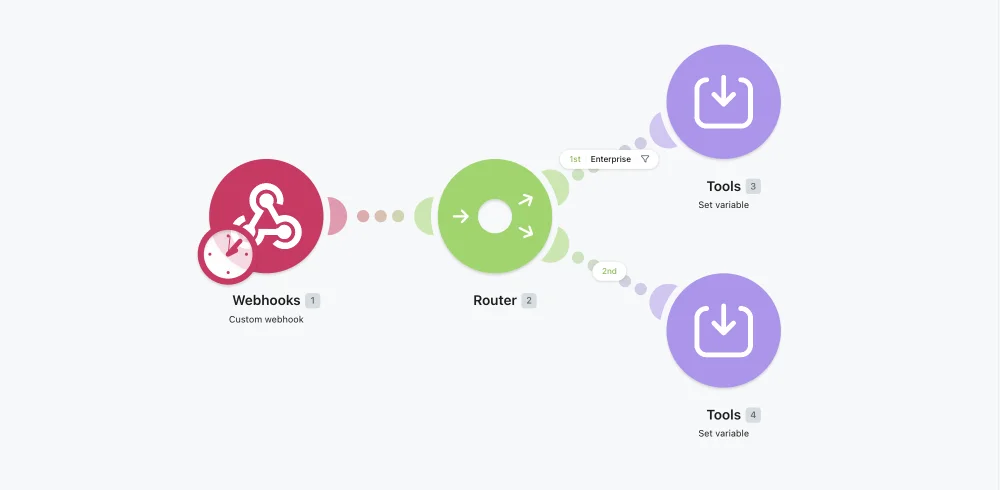
Where Zapier draws automations as a straight vertical list, Make draws them as a flowchart. That sounds cosmetic until your logic branches. Make’s router module splits one scenario into multiple conditional paths, iterators loop over lists, and aggregators collapse results back together. This is the kind of logic that needs custom code or a premium tier elsewhere, and Make puts it on the canvas as draggable modules.
The breadth backs up the builder. Make markets 3,000-plus app integrations, and as of June 2026 its G2 listing (filed under “Integromat by Celonis”) describes it as a visual platform for building, managing, and scaling automations and AI agents, with Model Context Protocol support for wiring AI into the rest of your stack. In 2026 the AI angle is front and center: Make ships AI agent modules and an AI Toolkit alongside the classic connectors, so an automation can call a model, branch on the result, and write it somewhere, all without leaving the canvas.
It helps to know Make’s vocabulary, because these few module types compose into everything else:
| Module type | What it does |
|---|---|
| Trigger | Starts the scenario, instant via webhook or on a schedule |
| Action | Performs one step in an app, such as creating a row or sending a message |
| Router | Splits the flow into conditional branches |
| Filter | Gates a path; only matching data passes through |
| Iterator | Runs the following modules once per item in a list |
| Aggregator | Collapses iterated results back into a single bundle |
| HTTP | Calls any REST API when no native module exists |
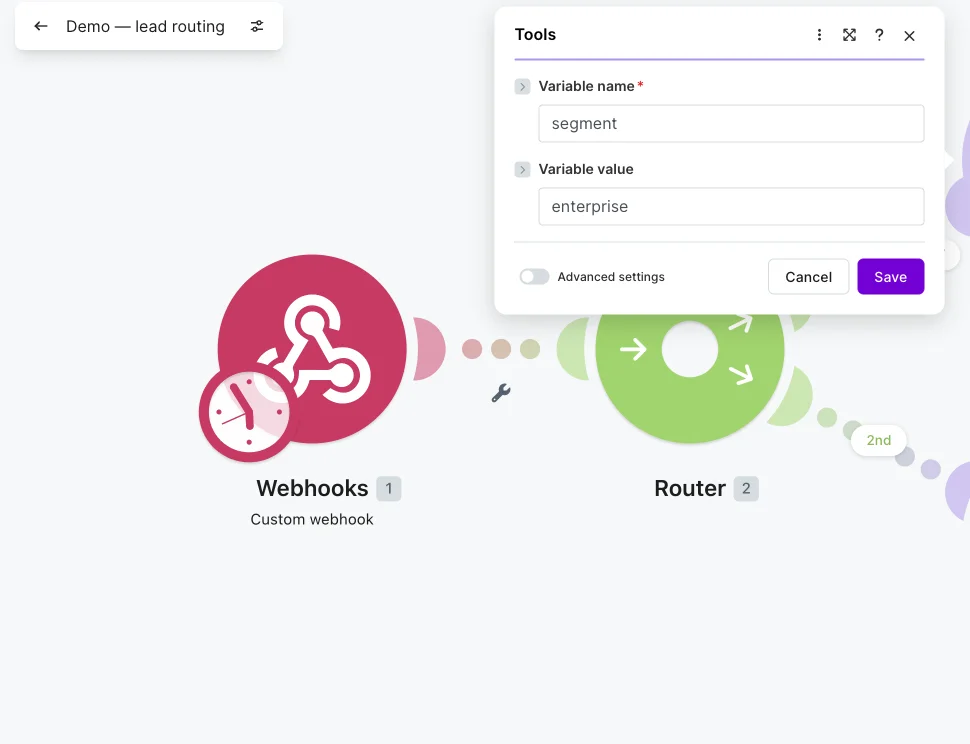
To make that concrete, picture a lead-routing scenario, one of Make’s most common jobs. A webhook fires when a form is submitted. A router checks the company size: the enterprise branch enriches the lead through an HTTP call, creates a contact in your CRM, and posts an alert to a sales Slack channel; the small-business branch drops the lead into a nurture sheet and sends a templated email. An aggregator collects the results, and an error handler retries any step that fails. That whole flow is a dozen draggable modules on one canvas, no code, and you watch each module light up as the data passes through it on a test run.
Two features quietly carry a lot of the weight. Data Stores give Make a built-in database, so a scenario can remember state between runs, deduplicate records, or hold a lookup table without bolting on Airtable. And scheduling plus error handling are first-class: you set how often a scenario runs, add retry logic and fallback paths to modules that might fail, and read a full execution log to see exactly what happened on any run. These are the parts that turn a demo into something you can trust with real work.
Getting going is genuinely quick. You pick a trigger app, authorize it once, and Make walks you through connecting the next module, with a searchable list of 3,000-plus apps and a gallery of pre-built templates to start from. A first useful scenario, something like a new form submission becoming a CRM contact and a Slack ping, is a twenty-minute job. The depth is there when you need it, but the floor is low enough that a non-developer can ship something real on day one, which is the whole reason Make wins converts from spreadsheets and manual copy-paste.
That power comes with a unit of account you have to internalize, because it is unlike its two main rivals. Make bills per operation, Zapier per task, and n8n per whole-workflow execution. (Make renamed operations to “credits” in August 2025, but for most modules one operation is one credit, so this review uses the two terms interchangeably.) The difference is not academic, it is the whole cost story.
| Make | Zapier | n8n | |
|---|---|---|---|
| Billing unit | per operation / credit (one module run) | per task (one action) | per execution (one whole run) |
| A 10-step scenario, 1,000 runs/mo | ~10,000 operations | ~6,000 tasks (only billable actions) | 1,000 executions |
| Self-host option | No | No | Yes, free |
In plain terms: on Make, a scenario that does more work costs more every time it runs, because each module is metered. That is fair and predictable once you understand it, and it is exactly why the pricing section below matters more than usual.
How much does Make cost?
The short answer: Make is free for light use, and paid plans start at $9 a month for 10,000 credits. The longer answer is that the plan price is almost a distraction, because what you actually pay is governed by how many operations your scenarios run.
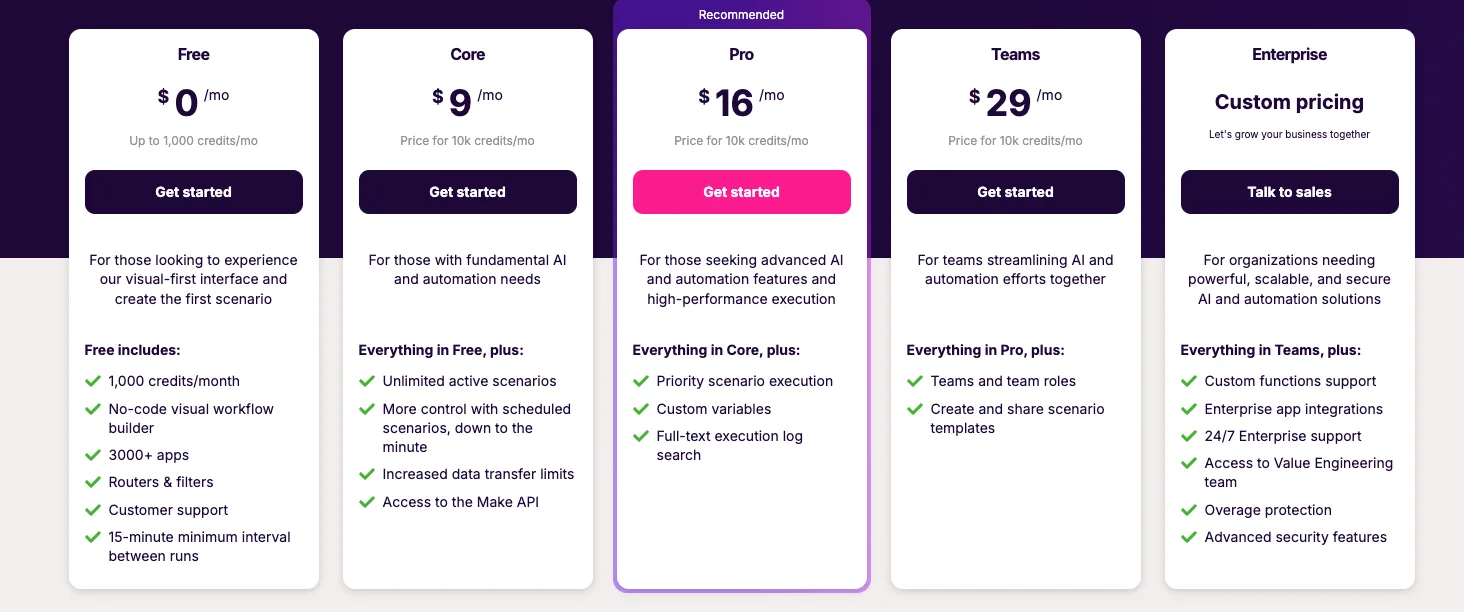
Here are the tiers, verified live on make.com/en/pricing in June 2026. The headline $9 / $16 / $29 figures are the annual-billing rates; pay month to month and they rise about 15% (the page’s “Save 15%” banner is exactly that gap, since $10.59 times 0.85 is $9).
| Plan | Annual (/mo) | Monthly (/mo) | Credits/mo | Notes |
|---|---|---|---|---|
| Free | $0 | $0 | 1,000 | 2 active scenarios, 15-min interval |
| Core | $9 | $10.59 | 10,000 | unlimited scenarios, 1-min interval, Make API |
| Pro | $16 | $18.82 | 10,000 | priority execution, custom variables, log search |
| Teams | $29 | $34.12 | 10,000 | team roles, shared scenario templates |
| Enterprise | Custom | Custom | Custom | SSO, 24/7 support, overage protection |
Notice that every paid tier starts at the same 10,000 credits. The tiers buy you features and ceilings, not more runs by default; you scale the credit allowance up a slider, with Core topping out at 300,000 credits a month and Pro reaching 8 million after the November 2025 adjustment. So two people on the Pro plan can have wildly different bills depending on how many operations they consume.
That slider is the part newcomers miss when they compare plan prices. The $9 and $16 you see are the price at 10,000 credits; drag the slider to 50,000 or 150,000 and the monthly figure climbs with it. The right way to read Make’s pricing is to first estimate your monthly operations from your real scenarios, then find the plan and credit level that covers them, rather than picking a tier by name and hoping the included credits are enough. The tier names tell you which features you get; the slider tells you what you will actually pay.
One sizing gotcha that catches everyone: what counts as an operation. Every module run is one. Per Make’s own docs, the August 27, 2025 switch renamed operations to “credits” and converted them 1:1, so for most non-AI apps one operation is still one credit. But AI-native modules and Make’s code module now cost more than one credit per run, billed by token count, file size, or seconds of execution. Bulk and AI workflows quietly got pricier, which is the core of the practitioner complaints in Make’s own community forum.
The trap that drains budgets fastest is polling. A trigger that checks an app on an interval runs whether or not there is new data, and each check is an operation. The math is unforgiving:
| Polling interval | Operations per month (just checking) | Share of Core’s 10,000 |
|---|---|---|
| Every 1 min | ~43,200 | over budget alone |
| Every 5 min | ~8,640 | ~86% |
| Every 15 min | ~2,880 | ~29% |
| Every 60 min | ~720 | ~7% |
A single five-minute polling trigger eats most of a Core plan before any real work happens. The fixes are real but require knowing they exist: use instant webhook triggers instead of polling where the app supports them, widen your intervals, and remember that failed or partial runs still bill for the operations already executed, and that a filter costs an operation even when it stops the flow. Budget by your real run frequency, not your tidy step count.
A worked example makes it concrete. Say the lead-routing scenario above is a dozen modules and runs 500 times a month: that is roughly 6,000 operations, comfortably inside Core’s 10,000 credits. Add a second scenario that polls an inbox every 15 minutes, another 2,880 operations, and you are at nearly 8,900, brushing the ceiling before a third workflow exists. That is the point where you either slide the credit allowance up, which raises the bill, or move the polling to an instant trigger. Modeling two or three real scenarios against the allowance, on the free plan, before you pay, is the most useful hour you can spend.
The AI modules deserve their own line in the budget. Where an ordinary module costs one credit, Make’s built-in AI and image modules bill at variable rates by token count or file size, and the code module runs at roughly two credits per second of execution. So an AI-heavy scenario can cost several times what its module count suggests. The November 2025 option to bring your own model API key is the escape: route calls through the HTTP module on your own key and they bill at the standard one credit, while you pay the model provider directly for tokens.
A few mechanics round out the picture. Credits reset monthly on your billing date and do not roll over, so unused allowance is lost. Run out mid-month and overage credits bill at a 25% markup over your plan rate, or scenarios pause until the reset; Enterprise adds overage protection for teams that cannot afford a stalled automation. None of this is buried, but all of it rewards reading the usage screen rather than the plan name.
Who is Make for?
Make is the friendly-but-capable middle of the market, so fit comes down to how much logic you need and how comfortable you are watching a meter.
- People who outgrew Zapier’s price or its straight-line flows. If you keep hitting “you need a higher Zapier plan for that,” Make’s routers and per-operation pricing usually do the same job for less, and the branching you were paying a premium for comes standard from the Core tier.
- Visual thinkers who want branching without code. If you can picture your automation as a flowchart, Make’s canvas, routers, and iterators will feel natural in a way a linear builder never does. The run-and-inspect loop rewards people who like to see their data move.
- Solo operators and small teams automating real business processes. Lead routing, content pipelines, onboarding flows, cross-posting: Make handles multi-app, multi-branch jobs at a small-business price, and the free plan is enough to prove a real scenario before you pay.
- Teams adding AI to existing automations. The AI agent modules and MCP support make Make a reasonable home for LLM-in-the-loop workflows that still need to touch a dozen ordinary apps, especially if you bring your own model key to control the cost.
- Not for: anyone who needs predictable flat-rate billing, or who runs heavy high-frequency polling. If a metered bill makes you anxious, or your use case means checking sources every minute, the operations model will fight you the whole way. Look at a flat-rate tool, or at n8n’s per-execution pricing, where a busy workflow costs the same one run no matter how often it fires.
Where Make shines
It helps to see what people actually build with Make, since the strengths below are what make these jobs easy:
| Use case | What the scenario does |
|---|---|
| Lead routing | Form/webhook → router by company size → CRM + Slack + email |
| Content pipeline | Schedule → AI module drafts → format → publish to CMS and social |
| Onboarding | Signup webhook → create accounts across tools → welcome sequence |
| Cross-posting | New post → reformat per platform → post to each channel |
| Data sync | Schedule → fetch → transform → upsert to a sheet or Data Store |
The visual scenario builder is the best in its class
This is the reason people pick Make and stay. Laying an automation out as a left-to-right flowchart, rather than a vertical list of steps, makes multi-app logic legible in a way Zapier’s format does not. Reviewers consistently name the canvas as Make’s standout: as of June 2026 its G2 profile leads with “visual AI automation platform,” and the builder is what earns the high marks from power users. For anything past a two-step automation, seeing the whole flow at once is a genuine productivity win, and you can run a single module in isolation to inspect exactly what it returned before committing the scenario to a schedule.
Routers and iterators put real logic on the canvas
Make’s router module is the feature that separates it from simpler tools. It splits one scenario into parallel conditional paths, so a single trigger can fan out to “if enterprise lead, do this; if SMB, do that” without separate automations. Iterators loop over arrays, aggregators recombine them, and filters gate each path. This is branching logic that would need custom development in many tools, and Make makes it draggable.
The iterator-aggregator pair is the part people underestimate. An iterator takes a list, say the line items on an order, and runs the next modules once per item; an aggregator then collapses the results back into a single bundle, so you can email one summary instead of fifty. That loop-and-collect pattern is everyday work in real automation and clumsy or impossible in a linear tool. It is the concrete payoff behind Make’s “more powerful than Zapier” reputation.
3,000-plus connectors, and an HTTP module for the rest
Make advertises more than 3,000 app integrations, and its Capterra listing (4.8 out of 5 across 407 reviews) repeatedly credits how fast users connect their stack. When a native connector is missing, the HTTP module calls any REST API directly, and you can build reusable custom apps for an internal API, so the practical ceiling is “anything with an API,” not “anything on the supported list.” For a no-code-first tool, that escape hatch is why Make rarely runs out of road for a small or mid-sized stack.
It genuinely undercuts Zapier at scale
| Make Core | Zapier (comparable tier) | |
|---|---|---|
| Branching / multi-step | included | gated to higher tiers |
| Billing unit | per operation | per task |
| Active automations | unlimited | capped on lower plans |
| Entry price | $9/mo annual ($10.59 monthly) | ~$20/mo for 750 tasks |
The per-operation model is cheaper than per-task billing for most real workloads, and the entry plans pack far more included runs for the money. The common refrain in user comparisons is that a $9 Make plan covers what a much costlier Zapier plan does.
The structural reason is that Make and Zapier draw the line differently. Zapier’s lower tiers gate the multi-step Zaps and branching that Make includes from Core, so the logic that pushes you onto an expensive Zapier plan is often standard on a cheap Make one. Make’s Core at $9 a month for 10,000 credits, with unlimited active scenarios and routers included, simply gives a small operator more room than the comparable Zapier tier.
If your automations are multi-step or high-volume, the savings are real and compound monthly. The one place the advantage flips is heavy polling or very long scenarios, where the per-operation meter can erase the gap, which is exactly the trade the cost section spelled out.
The AI tooling is current, not bolted on
Make’s 2026 push into AI agent modules, the AI Toolkit, and Model Context Protocol support means you can wire a model into a scenario as a first-class step, branch on its output, and act on it. The November 2025 change to allow your own AI API key is a meaningful cost lever: route model calls through the HTTP module on your own key and they bill at the standard one-credit rate while you pay the provider directly for tokens, sidestepping Make’s premium AI-module credit pricing.
Power users rate it highly
The developer-and-operator aggregates are strong: Capterra 4.8 from 407 reviews and G2 4.6 from 325. Those are the audiences building real scenarios, and they reward Make for capability and value. As with most automation tools, the people who invest the time to learn the routers and iterators are the ones who love it.
The execution log makes debugging tractable
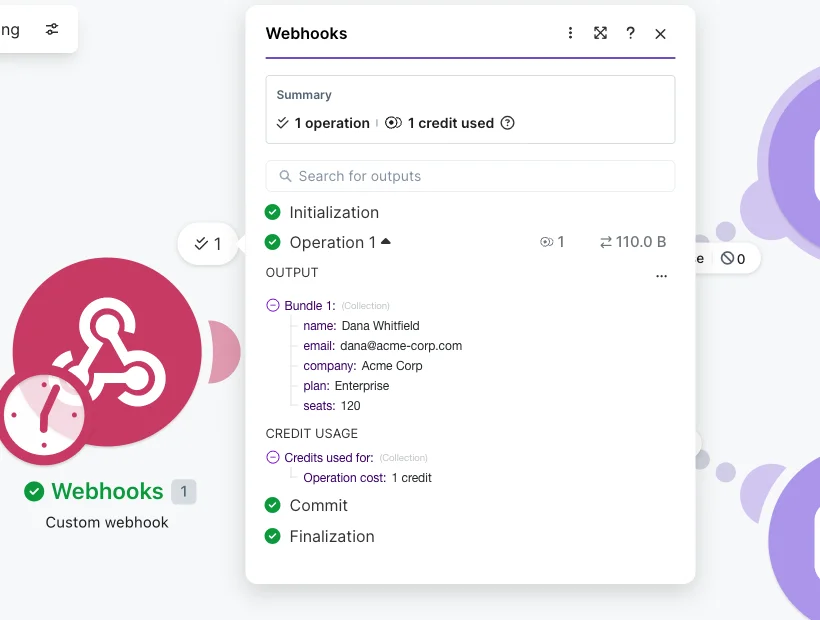
Every scenario run is recorded in a full execution history, and you can open any past run to see exactly what each module received and returned.
| Reliability feature | What it gives you |
|---|---|
| Execution history | a full log of every run, with per-module data |
| Error handlers | retry or fallback paths on modules that may fail |
| Scheduling | control over how often a scenario runs |
| Incomplete executions | failed runs queued for a manual retry |
When something breaks, you are not guessing: you click into the failed run, find the module that errored, and read the actual payload that tripped it. Combine that with Make’s per-module error handling, where you attach retry logic or a fallback path to the steps that might fail, and you can build automations that recover on their own instead of silently stopping. For unattended workflows, that visibility is the difference between trusting the tool and checking it every morning.
Where Make frustrates
Operations burn faster than newcomers expect
This is the defining complaint, and it is structural. Because every module run is metered, a scenario that does meaningful work consumes credits quickly, and polling triggers do it around the clock. Make’s own community forum is full of users asking for a concrete list of which modules cost more than one credit before they commit, and reports of quotas drained in days are common.
The failure mode is almost always invisible until the bill or the pause notice arrives. A runaway polling trigger or a loop that fans out wider than expected can quietly chew through a month’s allowance, and because the meter does not announce itself, newcomers often discover the problem only when scenarios stop running.
| What burns credits | Why it adds up |
|---|---|
| Polling triggers | every interval check is an operation, all day |
| Multi-module scenarios | each module run counts separately |
| Failed / partial runs | already-executed modules still bill |
| Filters | cost an operation even when they stop the flow |
| AI and code modules | bill at variable rates above one credit |
The tool is fairly priced, but the pricing assumes you treat the usage screen as part of the build, not an afterthought. That is a real ongoing tax on attention that flat-rate tools do not charge.
The August 2025 credits change quietly raised real costs
When Make renamed operations to credits, the 1:1 conversion looked cosmetic, but AI-native modules and the code module moved to variable, usage-based credit pricing. Practitioners on Make’s forum described bulk data processing effectively becoming a premium feature, and several noted they did not notice until the bill came in higher.
The deeper issue is predictability. Before the change, an operation was an operation; after it, the same scenario can cost a different number of credits depending on which modules it uses and how much data flows through them, which makes a monthly bill harder to forecast. Make softened the blow in November 2025 by letting you bring your own AI API key and capping some tier behaviors, but the episode left a mark: a metered tool lives or dies on trust in the meter, and a change that surprised paying users on the invoice is a real dent in that trust, even if the new pricing is defensible on paper.
Failed runs still bill, and filters cost an operation
Two smaller edges compound the operations problem. If a scenario fails halfway, you still pay for every module that already executed, which makes heavy testing and debugging genuinely expensive. And a filter step consumes an operation even when it stops the flow, where Zapier’s filters are free. Neither is a dealbreaker, but together they mean the meter runs during exactly the moments, debugging and gating, when you least expect to be charged.
The learning curve for advanced features is real
Basic scenarios take an hour. Routers, iterators, aggregators, and solid error handling take noticeably longer, and large scenarios become dense, overlapping webs that are hard to read and modify later. The visual builder that makes simple flows clear can work against you at scale, and the documentation thins out exactly where the edge cases live.
| Getting to | Roughly takes |
|---|---|
| First simple scenario | under an hour |
| Comfortable with the basics | 2-3 hours |
| Fluent with routers, iterators, and error handling | 1-2 weeks |
The template library helps less than you would hope. Make ships pre-built scenarios to start from, but reviewers note the quality is uneven, and a template usually still needs its modules remapped to your own apps and accounts before it runs. The honest expectation is two to three hours to be comfortable with the basics and a week or two to be fluent with the advanced modules and error handling that make a scenario production-ready. Make is friendlier than n8n, not effortless, and the gap between “first automation” and “automation I trust unattended” is wider than the marketing suggests.
Support and interface complaints are pointed
Here the rating picture splits hard. Against Capterra 4.8 and G2 4.6, Make scores just 2.7 out of 5 on Trustpilot across 164 reviews, rated “Poor.” The negative reviews there are specific and pointed: one calls the interface “a waste of time” and hard to revise, another describes an account compromise and thousands of dollars lost with no way to reach a human, only an outdated wiki. To Make’s credit, as of June 2026 Trustpilot notes it has replied to 56% of negative reviews, typically within a week, so the company is not ignoring them.
| Source | Rating (June 2026) | Reviews |
|---|---|---|
| Capterra | 4.8 / 5 | 407 |
| G2 | 4.6 / 5 | 325 |
| Trustpilot | 2.7 / 5 | 164 |
The split is the signal: power users building scenarios rate Make highly, while the Trustpilot complaints skew toward support, billing surprises, and account issues rather than the automation engine itself. It is a real caveat, but it tells you where the risk is, in support and cost management, not in whether the product works.
AI module limits push you toward your own key
As of late 2025, Make’s AI tools defaulted to a lightweight model on lower plans with a monthly token cap, which power users on Make’s community forum questioned. The November 2025 bring-your-own-key option addresses it, but the takeaway stands: to get serious AI work done economically on Make, plan to supply your own model API key rather than lean on the built-in AI modules at their premium credit rates.
The practical effect is that Make’s AI is best treated as orchestration, the glue that calls a model and routes its output, rather than as a managed AI service you pay Make a premium to host. Read the model defaults and the credit cost of each AI module before you build a scenario that leans on them, or the AI convenience will quietly become the line item that blows your budget.
Alternatives worth considering
If you decided Make is not for you, the reason is usually one of two things: you want flatter, more predictable billing, or you want either less complexity or more raw power. Here is where to look.
| Make | n8n | Zapier | |
|---|---|---|---|
| Billing unit | per operation | per execution (whole run) | per task |
| Self-host | No | Yes, free | No |
| Best for | visual logic at a mid price | technical teams, volume, AI | the simplest possible setup |
- n8n is the pick if you are technical and care about cost at scale. It bills per whole-workflow execution rather than per operation, so a complex scenario costs the same one run as a simple one, and the self-hosted edition is free. It is our category winner, rated higher than Make, in exchange for a steeper learning curve and the work of running it. Read our full n8n review for the detail.
- Zapier is the pick if you want the absolute simplest path and the widest, most polished integration set, and your automations are simple enough that per-task billing stays cheap. It is the least technical option, at the cost of the branching logic Make gives you and a price that climbs fast with volume.
Two is the right number here. The real decision is your tolerance for a metered bill and your need for branching logic, and on both axes Make sits squarely in the middle, which is exactly its appeal.
The verdict
Make earns its reputation as the visual middle ground. The scenario builder is the best in the category, the router-and-iterator logic is genuinely powerful, the connector library is deep, and it undercuts Zapier for most real workloads. For visual thinkers who have outgrown a linear tool but do not want to run a server, it is the natural next step.
It is a 4.2, a Power Tool, and the half-point that keeps it short of the leaders is the operations meter. The per-operation model is fair but demands active management, and the August 2025 credits change raised real costs with too little warning. The Trustpilot 2.7 does not drag the score lower because it tracks support and billing friction rather than a product that fails; the Capterra 4.8 and G2 4.6 from people building real scenarios are what the 4.2 leans on. None of that is fatal, and most of it is manageable once you know to watch for it.
The practical move is to let Make prove itself on your own work. Start on the free plan, build one real scenario, and keep the usage screen open; within a week you will know whether Make’s power is worth its meter. For most who have outgrown Zapier, the answer is yes. If you want the cheaper engine at serious volume, our n8n review is the next stop.
Frequently asked questions
Is Make.com worth it?
For most people who have outgrown Zapier but do not want to self-host, yes. Make gives you a visual scenario builder with routers, filters, and iterators that handle branching logic Zapier charges a premium for, plus 3,000-plus app connectors, starting at $9/month on annual billing.
The one thing to understand before you commit is the billing unit: Make charges per operation, so a multi-step scenario or a frequent polling trigger burns credits quickly.
Budget by your real run frequency, not your happy-path step count, and it is a strong value. Ignore the operations meter and the bill will surprise you.
How much does Make.com cost?
Make's Free plan is $0 for 1,000 credits a month, two active scenarios, and a 15-minute minimum interval.
Paid plans start at 10,000 credits a month: Core is $9/month, Pro $16/month, and Teams $29/month on annual billing (about 15% more month to month, so $10.59, $18.82, and $34.12 respectively). Every paid tier starts at 10,000 credits and scales up via a slider, Core to 300,000 and Pro to 8 million credits a month. Enterprise is custom-priced.
The credit count, not the tier name, is what actually drives your bill.
Is Make cheaper than Zapier?
Usually, yes, especially at scale. Make bills per operation and Zapier bills per task, but the deciding factor is that Make's entry plans pack far more included runs for the money.
A common rule of thumb from user comparisons is that Make's Core plan does what a much pricier Zapier plan costs: even Make's monthly price of $10.59 undercuts Zapier's comparable tier at around $20/month for just 750 tasks, and Make's annual rate drops to $9.
The exception is high-frequency polling or very long scenarios, where Make's per-operation model can erase the savings. If your automations are simple and infrequent, Zapier's polish may be worth the premium; if they are complex or high-volume, Make wins on price.
Why do Make operations run out so fast?
Because every module run is one operation, and the costs you do not see add up.
A scenario with 10 modules uses about 10 operations every time it runs. A trigger that polls every five minutes runs 288 times a day, roughly 8,640 times a month, before doing any real work. Failed or partial runs still bill for the operations already executed, and a filter step costs an operation even when it stops the flow.
Slow your polling intervals, use instant webhook triggers where you can, and watch the usage screen.
Did Make change its pricing in 2025?
Yes. On August 27, 2025 Make renamed its billing unit from operations to credits, converting existing operations 1:1, so for most non-AI apps one operation still equals one credit.
The catch is that AI-native modules and Make's code module now cost more than one credit per run, billed by token count, file size, or execution time, which raised real-world costs for AI and bulk workflows.
A November 2025 adjustment capped Core at 300,000 credits, extended Pro to 8 million, and let you bring your own AI API key to avoid the premium credit rates.
Is Make better than n8n?
They serve different people. Make is friendlier, fully hosted, and faster to start, with a polished visual builder.
n8n is the technical-depth pick: it self-hosts for free, bills per whole-workflow execution instead of per operation, and treats code as first-class, which makes it dramatically cheaper at high volume.
Choose Make if you want a visual tool that just works without managing a server; choose n8n if you have technical hands and care most about cost at scale or data control. See our n8n review for that side of the comparison.
Keep reading
Make.com pricing: what you'll really pay per operation
Make is free for 1,000 credits, then $9/mo Core — but every module run spends a credit, so the operations meter sets your real Make.com pricing.
Make vs Zapier: which is cheaper, and which is easier?
We built in both. The honest Make vs Zapier verdict: who's cheaper at scale, who's easier to start, and which one actually fits how you work.
Zapier alternatives: 8 cheaper, more capable picks
Zapier's per-task pricing is the top reason to leave. The 8 best Zapier alternatives, cheaper or more powerful, and who each one actually fits.