
n8n review: the tool that runs our whole content pipeline
We run 10 production workflows on self-hosted n8n. Where it beats Zapier on price, where the learning curve bites, and who should actually use it.
Contents
Is n8n worth it?

Yes, if you have technical hands. n8n is a source-available workflow automation tool you can self-host, and after running it in production I score it 4.6 out of 5, a Category Leader for technical teams. The edge is per-execution billing that stays cheap as your workflows grow; the cost is a real learning curve and, if you self-host, the ops burden that comes with it.
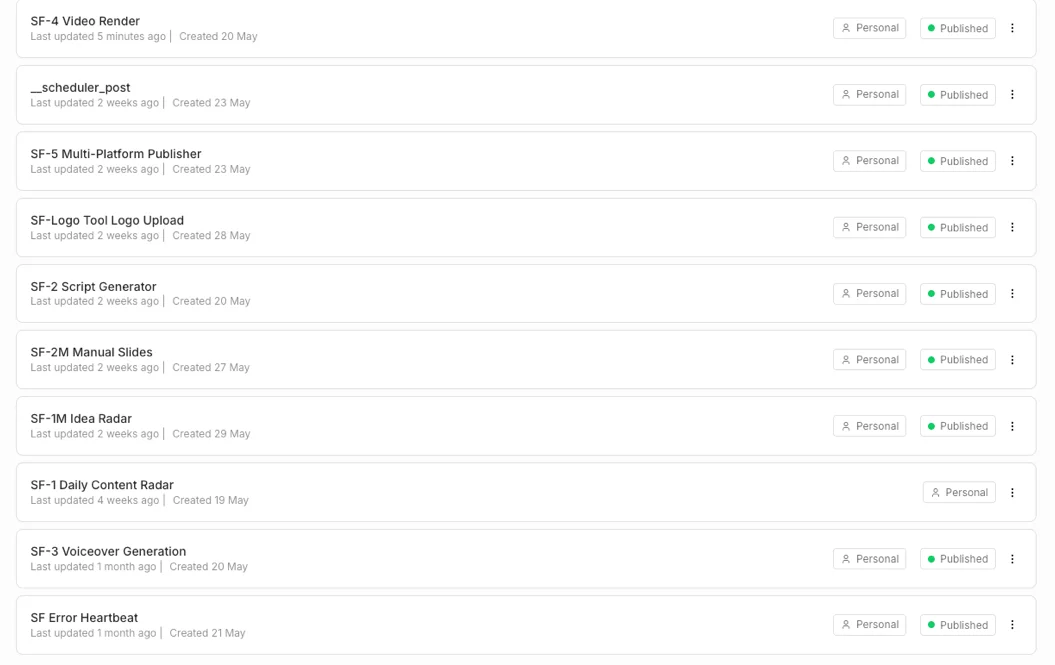
I can write this n8n review with more confidence than usual, because n8n is not a tool I trialed for a week. It runs our entire content pipeline: 10 workflows, around 209 nodes, on one small self-hosted box, quietly turning trend signals into scripts, voiceovers, rendered videos, and scheduled posts every day.
The single reason to care is the billing model. n8n charges per workflow execution, not per task, so our 28-node render workflow costs exactly one execution, the same as a two-node one. That math is why teams outgrow Zapier and land here. The catch is the on-ramp: n8n expects you to be comfortable with APIs, JSON, and the occasional line of JavaScript, and if you self-host, you own the upgrades and the 2am debugging. Buy it if that sounds fine. Skip it if you want a no-code tool that just works on day one.
What does n8n do?
n8n is a workflow automation tool. You build automations on a visual canvas by dropping in nodes, a trigger to start the flow and action nodes to do the work, then wiring them together so data passes from one to the next. If you have seen Zapier or Make, the shape is familiar: when X happens, do Y, then Z. The difference is what sits underneath, and how much rope it gives you.
The headline difference is that n8n is source-available and self-hostable. Source-available is not quite open source: the code is public, but it is licensed under n8n’s fair-code Sustainable Use License, so you can self-host freely for your own use yet cannot resell n8n as a hosted service. You run it on your own server for free instead of renting a hosted seat, which means your automation data and your API keys never leave infrastructure you control. That is not a footnote for us. It is the reason we picked it.
Here is the honest test of any automation tool: not a toy “send a Slack message” demo, but whether it survives real production. Ours does. The pipeline behind AI Alleyway is ten n8n workflows, grouped by stage below, and every one is a genuine job, not a tutorial.
| Workflow | Nodes | What it does |
|---|---|---|
| SF-1 / SF-1M Radar | 30 / 26 | Pull trend signals from RSS, Reddit, Product Hunt into a candidate queue |
| SF-2 Script Generator | 27 | Call Anthropic to draft a short-form script from a candidate |
| SF-2M Manual Slides | 30 | Build slide and infographic decks on demand |
| SF-3 Voiceover | 13 | Generate the voiceover via the ElevenLabs API |
| SF-4 Video Render | 28 | Drive the render service and stitch the final video |
| SF-5 Publisher | 33 | Push the finished post to TikTok, Reels, and Shorts via Buffer |
| SF Error Heartbeat | 4 | Catch any failure and alert Slack |
| SF-Logo / scheduler | 18 | Upload tool logos to the CDN; schedule posts |
Nine of those ten run live right now on n8n v2.10.2. That is the real product: not “n8n can do this,” but “n8n has done this, every day, for months.”
Take SF-2, the script generator, as a concrete example of the shape. A webhook node receives a content candidate’s ID. A Postgres node fetches that row. A Code node assembles the prompt, an HTTP node sends it to Anthropic, and a second Code node parses the JSON response into clean fields. A pair of If nodes guard against a malformed draft, a Postgres node writes the result back, and a Respond node closes out the webhook. Twenty-seven nodes, one execution, finished in seconds. Nothing there is exotic, and that is the point: every job in the pipeline is the same legible chain of small, inspectable steps.

Three things make that possible, and they are the same three things that define n8n. First, code is a first-class citizen: every workflow above leans on Code nodes where you write plain JavaScript (or Python) to reshape data, not a watered-down expression box. Second, the HTTP Request node is a universal escape hatch: if a service has an API, n8n can call it, even when there is no pre-built integration. Third, the AI nodes are real: n8n ships LangChain-based nodes for LLM calls, agents, and retrieval, which is why “AI workflow automation” is the category n8n is increasingly winning in 2026.
Getting started is less scary than the reputation suggests, at least for the first hour. The self-host path is a single Docker command plus a Postgres database, and you are looking at the canvas in about 30 minutes if you can follow a Docker tutorial. From there the build loop is genuinely pleasant: drag in a trigger, add a node, run that one node in isolation, and inspect its output in the execution panel before wiring the next one. Being able to test a single node with real data, rather than firing the whole workflow blind, is the feature I missed most every time I went back to a hosted tool.
You pass data between nodes with small expressions, like this one that pulls a field from an earlier node by name:
{{ $('Fetch candidate').item.json.title }}Get comfortable with that syntax and most of the canvas opens up. Fight it, and every node feels like a puzzle box.
Credentials are handled well, and it is worth understanding early because it shapes everything. n8n stores credentials, an API key, an OAuth connection, a database login, separately from the nodes that use them, so you set up a service once and reference it everywhere. We reuse a single render-service token credential across every HTTP node that calls our renderer, and rotating it is a one-place change. The flip side, which we will get to, is that n8n is strict about where secrets are allowed to appear, and that strictness trips people up.
For the on-ramp itself, n8n leans on a large template gallery and a connector library in the hundreds, so common jobs (sync a form to a sheet, post to Slack, summarize an email) start from a working example rather than a blank canvas. You will outgrow the templates fast, but they are a fair way to learn the node vocabulary before you start writing your own logic.
Put simply: Zapier is the tool you reach for to connect two SaaS apps. n8n is the tool you reach for when the automation is the product.
How much does n8n cost?
The short answer: n8n is free if you self-host, and n8n Cloud starts at €20 a month for 2,500 executions on annual billing, or €24 month to month. That number hides the thing that actually matters about n8n’s pricing, so it earns a careful read rather than a single figure.
There are two ways to run n8n, and they are priced completely differently. The Community edition is free: you self-host it on your own server, with unlimited workflows and unlimited executions, and you pay nothing for the software itself. n8n Cloud is the hosted version, where n8n runs the servers and bills you per execution.
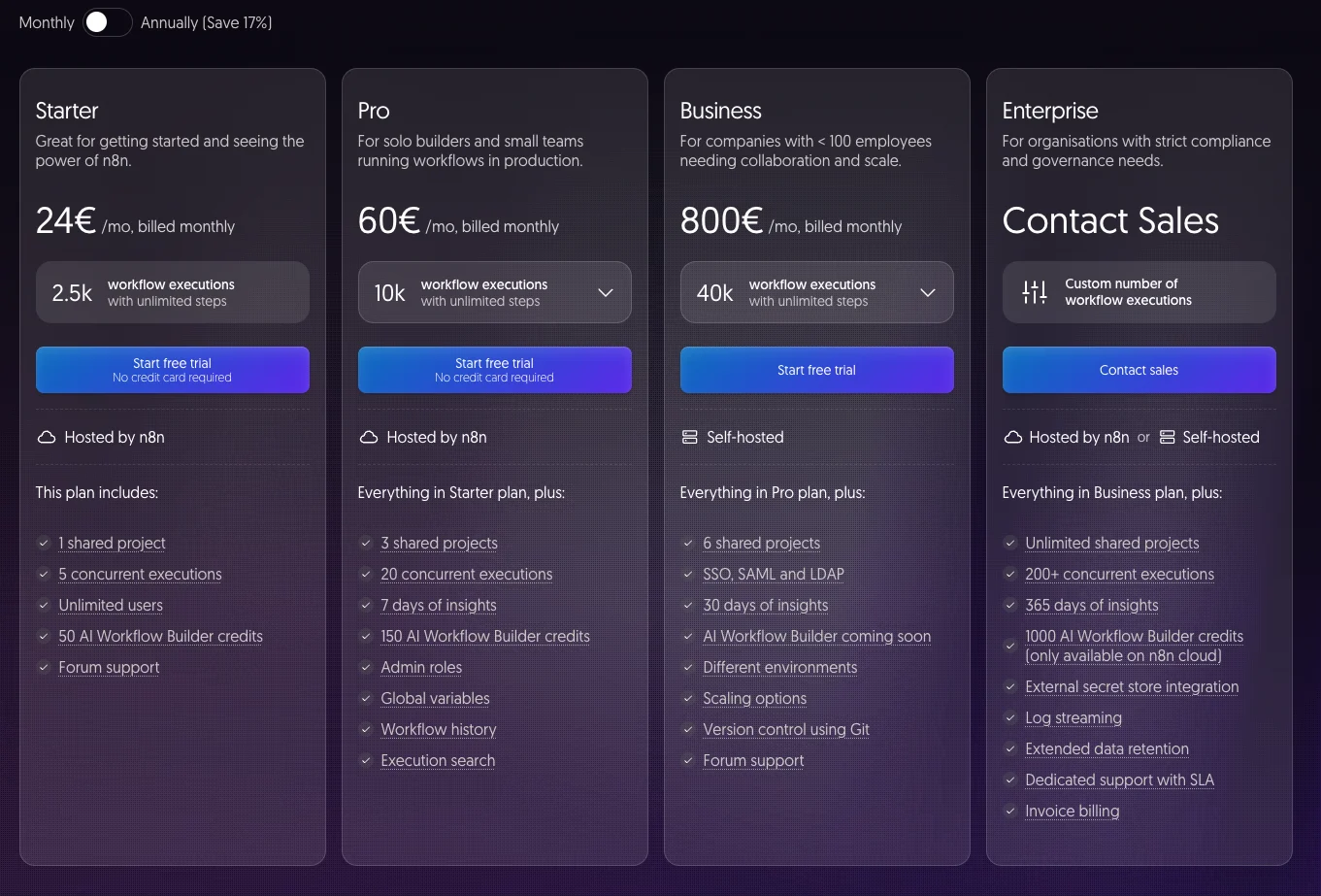
Here are the Cloud plans, verified live on n8n.io/pricing in June 2026 (euros; the screenshot above shows the monthly toggle, and the table lists both cadences):
| Plan | Monthly | Annual (per mo) | Executions / mo | Notes |
|---|---|---|---|---|
| Community (self-hosted) | Free | Free | Unlimited | Your own server, fair-code license, forum support |
| Starter | €24 | €20 | 2,500 | 5 concurrent, 1 project, unlimited steps |
| Pro | €60 | €50 | 10,000 | 20 concurrent, admin roles, workflow history |
| Business | €800 | €667 | 40,000 | Self-hosted, SSO/SAML, Git version control |
| Enterprise | Contact sales | Contact sales | Custom | 200+ concurrent, dedicated SLA, log streaming |
Two notes on that table. Paying month to month runs about 17% higher than the annual rate, the usual discount for committing for a year, which is why Starter reads as €24 on the screenshot but €20 annually. And the jump from Pro to Business is deliberately steep, from €50 to €667 a month, because Business is the team-and-compliance tier, not the natural next step up for a solo builder. It is also the first paid self-hosted tier, with SSO, scaling options, and Git-based version control, while the free Community edition self-hosts with only forum support and a dedicated SLA arrives at Enterprise. Most individuals live on Starter or the free Community edition.
The number that matters is not the price, it is the unit. n8n bills per execution, where one execution is a single run of your whole workflow, however many steps it has. Zapier bills per task, where every single action is a task. n8n’s own comparison page states it plainly: a simple two-step workflow and a complex 200-step AI-powered agent both count as a single execution.
| n8n Starter (EUR) | Zapier Pro (USD) | |
|---|---|---|
| Entry price | €20/mo | $19.99/mo |
| Quota | 2,500 executions | 750 tasks |
| What the unit counts | one full workflow run | one action / step |
| A 200-step AI agent run | 1 execution | up to ~200 tasks |
That table is the whole argument. Our SF-5 publisher is 33 nodes. On n8n it is one execution per run. On a per-task tool, a 33-step flow firing for every post would shred a task budget. This is why the “is it worth it” answer flips entirely on volume: for a handful of simple Zaps, Zapier’s polish is worth the price; once your workflows get long or run often, n8n is dramatically cheaper, and free if you self-host.
One sizing gotcha: what exactly counts as an execution is subtler than it looks. A normal workflow run is one. But sub-workflows you call, manual test runs while you build, and automatic retries each count too, so a flow that retries on failure can quietly use more of your quota than the run count suggests. n8n lets you control whether it even saves successful production executions, which keeps your logs and your database lean. None of this is hidden maliciously, but it is the kind of detail that turns a “2,500 should be plenty” estimate into a surprise, so model your real run frequency, not your happy-path count.
One honest caveat on price: the free path is only free if your time is. Self-hosting means you provide the server, the database, the upgrades, and the monitoring. Our compute bill for running the whole pipeline is a single small 4-vCPU cloud box, a rounding error next to a stack of hosted automation seats. But the real cost is attention: someone has to patch the host, watch the logs, and own the upgrade when a new major version lands. For a team with technical hands that is a rounding error. For a team without them it is the whole reason to pay for Cloud instead. We will get to that bill in The bad.
Who is n8n for?
n8n is best for technical teams running high-volume or complex workflows who are comfortable with APIs and JSON; it is the wrong tool for non-coders who want zero-setup automation. The same traits that make it the leader for one group make it the wrong call for another, so here is who gets the most out of it, and who should look elsewhere.
- Technical teams automating at volume. If you run long workflows or fire them thousands of times a month, the per-execution model and free self-host make n8n the cheapest serious option by a wide margin. Our whole content pipeline runs for the price of a small server.
- Developers who want code, not a sandbox. If your automations need real data transformation, custom API calls, or AI orchestration, n8n’s Code and HTTP nodes give you room a no-code tool never will. You write the JavaScript; the tool gets out of the way.
- Privacy- and compliance-minded shops. Self-hosting keeps automation data and credentials on infrastructure you own, which matters for regulated work, client data, or a wall of sensitive API keys you would rather not hand to a third party.
- Builders of AI agents. The LangChain-based nodes make n8n the natural home for LLM-driven workflows and agentic automation in 2026, especially when you want the agent wired into the rest of your stack rather than living in a separate app.
- Engineering teams that treat automation as code. Because workflows export to JSON, n8n fits a Git-based, review-and-deploy way of working that a UI-locked tool simply cannot match.
- Not for: non-technical users who want plug-and-play for anything beyond basic flows. If “API” and “JSON” make you flinch and you want something that just works without a setup project, n8n will frustrate you more than it helps. Start with Zapier instead and come back when you outgrow it.
Where n8n shines
The per-execution billing is a structural cost advantage
This is the reason to switch, and it is not marketing. Because one execution covers a whole workflow run regardless of step count, n8n’s cost does not balloon as your automations get sophisticated. Our 28-node SF-4 render workflow is one execution. On a per-task tool the same logic would be counted dozens of times. n8n’s own vs-Zapier page quantifies the entry gap: 2,500 executions for €20 versus 750 tasks for $19.99.
The gap widens fast with complexity. Picture a 30-step workflow that runs 1,000 times a month. On n8n that is 1,000 executions, comfortably inside the Starter plan’s 2,500. On a per-task model, 30 steps times 1,000 runs is 30,000 tasks, which sails past every entry tier and lands you on a plan that costs several times more. The more your automation actually does, the more lopsided the math gets, and that is before you consider self-hosting for free.
Self-hosting is real ownership, and free
We run n8n on a single self-hosted cloud box, in Docker, alongside Postgres, for zero software license cost. That is not a stripped trial tier, it is the full product with unlimited executions. For a small team that wants control over its data and keys, that combination, full features plus self-host plus no per-run bill, does not exist anywhere else in this category.
Ownership also means your secrets stay yours. Every API key our pipeline touches, Anthropic, ElevenLabs, Buffer, our storage, lives in credentials on our own machine, never handed to a third-party automation vendor as a data processor. For anyone handling client data or regulated work, “the keys never leave infrastructure I control” is not a nice-to-have, it is the requirement that rules hosted tools out entirely.
Code as a first-class citizen, not an afterthought
Every workflow we run uses Code nodes, between four and twelve each, because real automation always needs to reshape data. n8n lets you write plain JavaScript or Python with the workflow’s data in scope, like this Code node from our script generator:
// Parse the model's JSON response into one item per sceneconst draft = JSON.parse($json.content[0].text);return draft.scenes.map((scene) => ({ json: scene }));No no-code tool gives you that. It is the difference between bending the tool to your data and bending your data to the tool. And when even the Code node is not enough, n8n lets you build and install custom nodes, so a niche internal API can become a first-class block on the canvas instead of a pile of raw HTTP calls.
The AI and HTTP nodes make it the agent platform of choice
n8n ships LangChain-based nodes for LLM calls, agents, and retrieval, and where those do not fit, the HTTP Request node calls any API directly. Our pipeline uses both: SF-2 drives Anthropic, SF-3 hits the ElevenLabs API, SF-5 calls Buffer, all from inside n8n. When people say n8n is winning AI automation in 2026, this is what they mean: the building blocks for agentic workflows are native.

One honest note on the AI nodes: the prebuilt AI Agent node is younger than the hype. Community reports of uneven tool selection and weak context handling match my own caution, so for our critical path we call the model over HTTP directly and keep full control of the prompt and the parsing rather than handing it to the agent abstraction. The capability is there; the polish on the highest-level node is still arriving.
In production, it is genuinely reliable
The fairest reliability test is your own logs. Pulling our live execution history from the n8n API, the last 93 retained executions across the pipeline came back 100% success, no failures in the window. n8n prunes old execution records by age, not by outcome, so the retained log is a fair sample rather than an all-time tally, and across it there was not a single failure to report. For a stack that renders video and posts to three social platforms unattended, that is the bar I care about, and n8n clears it.
| Our live n8n | Value |
|---|---|
| Version | 2.10.2, self-hosted |
| Workflows live | 9 of 10 active |
| Executions sampled | last 93 retained |
| Success rate in window | 100% |
Part of that confidence is by design, and n8n makes it easy: a dedicated error-trigger workflow catches any failure anywhere in the pipeline and fires a Slack alert, so when something does break I hear about it in seconds instead of discovering a silent gap days later. The platform gives you the hook; you decide how loud the alarm is.
Your workflows are JSON, so they can live in Git
This is the n8n feature I would least want to give up, and the one no hosted tool offers. Every workflow exports to a plain JSON file, which means our automations live in version control next to the rest of our code: we commit each workflow, review changes in a pull request, and deploy with a script rather than clicking around a UI. When SF-4 changed last, the diff was readable and the old version was one revert away.
Zapier and Make keep your logic locked inside their dashboards, with no real history and no rollback. Treating automation as code, with review and a deploy pipeline, is a different way of working, and once you have it you do not go back. It also makes a workflow portable: the same JSON runs on a teammate’s instance or a staging box without a re-build.
The community and integration breadth are deep
On the developer-facing aggregates n8n rates near the top, 4.7 on G2 and 4.6 on Capterra as of June 2026, where reviewers consistently praise the connector library and the flexibility. The project also carries one of the largest followings in open automation, with the GitHub repo over 190k stars as of June 2026. When you hit a wall, someone has usually hit it first and posted the fix on the community forum, which matters more than it sounds when the official advanced docs run thin.
Where n8n frustrates
The learning curve is steep, and it is the top complaint
Capterra reviewers name the learning curve as the number one con, and the sub-scores show it: ease of use sits at 4.1 on Capterra, noticeably below the 4.6 overall. I agree. n8n assumes comfort with APIs, JSON, and a little JavaScript. The visual canvas gets you started, but the first time a downstream node needs reshaped data or a branching error path, you are in expression-and-Code-node territory. The usual first wall is data shape: a node hands you a nested object, the next node wants a flat list, and suddenly a “no-code” task needs a Code node and an understanding of how n8n passes items between steps.
A non-coder can build a basic flow; an ambitious one rewards a developer, and the gap between those two is where most people bounce off.
Upgrades can break things
This is the real self-host tax. The n8n community forum has a documented case where upgrading a self-hosted instance to v2.x in queue mode pushed the execution failure rate from 1-2% up to 5-20% with no infrastructure change, traced to a removed retry variable, with n8n staff engaged but no clean in-thread fix at the time. Whether or not that exact regression is patched now, the lesson holds: major-version upgrades deserve a staging test before you trust them in production.
The saving grace, again, is that your workflows are JSON in Git, so a bad upgrade is recoverable: you can pin the old container image and your automations come back exactly as they were. That does not undo the time lost diagnosing the regression, but it does mean an upgrade gone wrong is an inconvenience rather than a catastrophe.
When something breaks, you are mostly on your own
When a workflow fails, n8n does not always tell you why in plain terms. Downstream nodes can fail with empty output and no obvious cause, and the advanced docs are thin exactly where you need them most. The queue-mode reliability thread is a good example of the genre: the surfaced error reads “This execution failed to be processed too many times and will no longer retry,” which tells you that something gave up but not what or why. Capterra reviewers flag both the debugging experience and the documentation gaps.
Support is the other half of this, and it is where the rating picture splits. n8n scores 3.4 on Trustpilot against 4.6 to 4.7 on the developer aggregates, and the recurring Trustpilot complaints are about support rather than the product: lost account access, unanswered tickets, credentials that expire and break live flows, and little help for people on the free self-hosted edition.
| Aggregate | Rating (June 2026) |
|---|---|
| G2 | 4.7 / 5 |
| Capterra | 4.6 / 5 (45 reviews) |
| Trustpilot | 3.4 / 5 (46 reviews) |
The split is the point, and it is why I do not let the 3.4 sink the score: it reflects support and free-tier friction, not the product, while the 4.6 to 4.7 developer scores reflect using n8n itself. The lesson is to read the execution view node by node, add your own logging, and lean on the community forum rather than expect official support to rescue you.
Some friction only shows up once you are deep in self-hosting
Self-hosting surfaces sharp edges the marketing pages never mention. Two we hit firsthand: n8n’s strict mode blocks environment variables inside expressions, so an HTTP header like this throws an error rather than reading your secret:
Authorization: Bearer {{ $env.RENDER_TOKEN }}// → "access to env vars denied"// Fix: use a predefined httpHeaderAuth credential instead.Separately, the Code-node task runner ships with a hardcoded built-in allowlist that overrides the environment variable you would expect to control it, so enabling a Node built-in like crypto means editing a config file on the host, not flipping an env var. A third small one: after you toggle a workflow active or inactive, its webhook sometimes needs a manual re-save in the editor before it registers again, a quirk you simply learn to expect. None of these is a dealbreaker on its own, but each one cost us an afternoon the first time, and the marketing pages mention none of them.
Database quirks will bite you once
n8n’s Postgres nodes return JSONB columns as real JavaScript objects, which is convenient, until a query that omits a JSONB column leaves downstream code referencing undefined rather than an empty value. It is the kind of thing that passes in testing and fails on the one row shaped differently. Worth knowing before you build on it.
A single box has a ceiling, and you will meet it
Self-hosting on one server is cheap and simple right up until it is not. On our small box, two heavy jobs cannot run at once: we serialize the headless-Chromium renders behind a Postgres advisory lock because the machine cannot handle two at the same time, and a heavy redeploy can saturate the CPU enough to cause transient timeouts in live workflows.
The fix is real but not free: scaling past one box means queue mode, separate worker processes, and a Redis instance, which is exactly the configuration that the v2.x reliability thread above shows can go wrong. n8n scales, but the moment you outgrow a single node, the ops work steps up a level, and that is effort a hosted tool simply absorbs for you.
”Fair-code” is not open source, and the difference matters
n8n is source-available under its Sustainable Use License, not an OSI open-source license. The GitHub license file restricts use to “your own internal business purposes or for non-commercial or personal use,” which means you can self-host and automate your whole company for free, but you cannot offer n8n as a hosted or white-labeled service to others. That distinction caused enough confusion that a widely-seen Hacker News submission was retitled away from calling n8n an “open source Zapier alternative.” Read the license before you build a business model on top of it.
Alternatives worth considering
If you decided n8n is not for you, here is where to look. The most likely reason is the learning curve, and both alternatives below trade some of n8n’s power for an easier start.
| n8n | Zapier | Make | |
|---|---|---|---|
| Billing unit | per execution (one full run) | per task (one action) | per operation (one module step) |
| Self-host | Yes, free | No | No |
| Best for | technical teams, volume, AI workflows | non-technical, quick app-to-app links | visual builders wanting a middle ground |
- Zapier is the one to pick if you want zero setup and the widest, most polished integration library. It is fully hosted, so there is nothing to self-host and nothing to upgrade. The trade-off is the per-task billing that gets expensive at volume, and no self-host option at all. Best for non-technical users connecting a few SaaS apps.
- Make sits in the middle: a visual, drag-and-connect builder that is friendlier than n8n but more flexible than Zapier, with operation-based pricing. It is the natural step up if Zapier feels limiting but n8n feels like too much. It is also fully hosted, so you trade the data-ownership and free-self-host benefits.
Two is enough. If you are comparing four or five tools, the differences come down to your comfort with code and your volume, not a missing feature, and on both axes n8n is where heavy users end up.
The verdict
n8n is the automation tool I would hand to anyone technical, and it is the one I actually trust with our own production pipeline. The per-execution billing is a structural cost win, the self-host path gives you real ownership for free, and code and AI are first-class instead of bolted on. Those are not trial-week impressions; they are weeks of it running our business unattended at 100% success across the executions we keep.
It is a 4.6, a Category Leader, with eyes open about who it is for. The learning curve is real, the self-host tax is real, and the fair-code license is not what some people assume. None of that lands against the people n8n is built for: teams with technical hands who want control and value at scale.
The honest way to decide is to look at your own situation. If you are connecting two SaaS apps and never want to think about a server, this is not your tool. If your automations are getting long, running often, or starting to lean on AI, and you have someone who can read JSON and write a few lines of JavaScript, n8n will save you real money and give you control nothing else in the category offers. If that is you, start with the free self-hosted edition and see how far it goes. If it is not, Zapier will make you happier on day one.
Frequently asked questions
Is n8n free?
Yes, the self-hosted Community edition is free. You run it on your own server under n8n's fair-code Sustainable Use License, with unlimited workflows and unlimited executions at no license cost. You only pay for your own hosting.
The paid plans are n8n Cloud, which is the hosted version: Starter is €20/month for 2,500 executions on annual billing, or €24 month to month. So n8n is free if you are willing to self-host, and paid if you want n8n to run the servers for you.
Does n8n bill per task like Zapier?
No, and this is the main reason teams move to it. n8n bills per workflow execution, where one execution is a single run of your entire workflow no matter how many steps it has.
Per n8n's own comparison page, a simple two-step workflow and a complex 200-step AI-powered agent both count as one execution. Zapier counts each action as a separate task, so a two-step Zap processing 10 rows can burn 10 tasks. At volume, the execution model is far cheaper.
Can I self-host n8n on my own server?
Yes. Self-hosting is n8n's whole identity. The standard path is Docker: a single container plus a Postgres database, which takes about 30 minutes to stand up if you can follow a Docker tutorial. We run it ourselves on one small cloud box.
The catch is that at scale, queue mode and worker tuning require real environment-variable configuration, and you own the upgrades, backups, and monitoring that a hosted tool would handle for you.
What are the disadvantages of n8n?
The biggest one is the learning curve, which Capterra reviewers cite as the top complaint. It expects comfort with APIs, JSON, and a bit of JavaScript. Error messages can be vague, advanced docs are thin, and upgrades between major versions can introduce breaking changes.
Self-hosting adds an operations burden. And the fair-code license is more restrictive than people assume: it is source-available, not OSI open source, so you cannot resell n8n as your own hosted service.
Is n8n good for non-coders?
Only partly. The visual canvas lets you drag, drop, and connect nodes without writing code for simple flows. But the moment you need to reshape data between steps, handle an error branch, or call an API that needs custom auth, you are in Code-node and expression territory.
Non-coders can build basic automations; anything ambitious rewards someone who can read JSON and write a few lines of JavaScript.
How does n8n compare to Make and Zapier?
Zapier is the easiest and most polished but the most expensive at scale, and it is fully hosted with no self-host option. Make is the visual middle ground with operation-based pricing. n8n is the technical-depth leader: it self-hosts, bills per execution, treats code as first-class, and ships the deepest AI nodes, in exchange for a steeper learning curve.
If you have technical hands and care about cost at volume or data control, n8n wins. If you want zero setup, Zapier wins.
Keep reading
n8n vs Make: which is cheaper, and which is easier?
We run n8n in production and built a real scenario in Make. The honest n8n vs Make verdict: who's cheaper at scale, who's easier to start, who wins.
n8n vs Zapier: which is cheaper, and which is easier?
We run n8n in production and tested Zapier hands-on. The honest n8n vs Zapier verdict: who's cheaper at scale, who's easier to start, and which fits you.
n8n pricing: what you'll really pay (and when it's free)
n8n is free self-hosted or €20/mo on Cloud — but the per-execution model decides what you actually pay. The real cost, plan by plan, with worked math.