
Zapier review: easiest to start, priciest to scale
Zapier connects 9,000+ apps with the easiest setup in automation. The catch is per-task pricing that climbs fast — here's who it's actually worth it for.
Contents
Is Zapier worth it?

Yes, if your priority is ease and reach over price. Zapier, the original no-code automation tool, connects more apps than anything else (9,000-plus) and is the fastest place to get a working automation, often in minutes. As of June 2026 I score it 4.3 out of 5, a Power Tool. This Zapier review is grounded in its live pricing, its documented task model, a firsthand run of its new MCP layer, and what more than 5,000 reviewers report, rather than a production deployment of our own.
The decision really comes down to one number: the task. Zapier bills per task, where every successful action a Zap takes in a third-party app counts, so a multi-step automation run often burns several tasks a time. At low volume that is a non-issue and the polish is worth it. At high volume the meter is the whole story, and Make or n8n will cost a fraction of the same workload.
What does Zapier do?
Zapier connects the apps you already use so they pass data to each other automatically. You build a “Zap”: a trigger in one app starts the flow, and one or more action steps do work in other apps. New form submission creates a CRM contact and posts to Slack. New Stripe payment adds a row to a sheet and sends a receipt. If you have used any automation tool, the shape is familiar; what sets Zapier apart is reach and ease, not raw power.
Reach is the headline. Zapier advertises more than 9,000 app integrations, far ahead of Make’s roughly 3,000 and n8n’s roughly 1,100, as of June 2026. In practice that means the app you want to automate is almost certainly supported, so building is mostly clicking and connecting rather than wiring up a custom API call. For a non-technical team, that breadth is the entire pitch.
Ease is the other half. The trigger-then-action format is the simplest in the category, and in 2026 Zapier leans hard into AI to make it simpler still: Copilot drafts a Zap from a plain-English description, and the platform now spans Tables (a database), Interfaces (app pages), Chatbots, Canvas (visual planning), and Agents. The logic tools are deliberately approachable: Paths add conditional branches and Filters stop a Zap when conditions are not met, both without code.
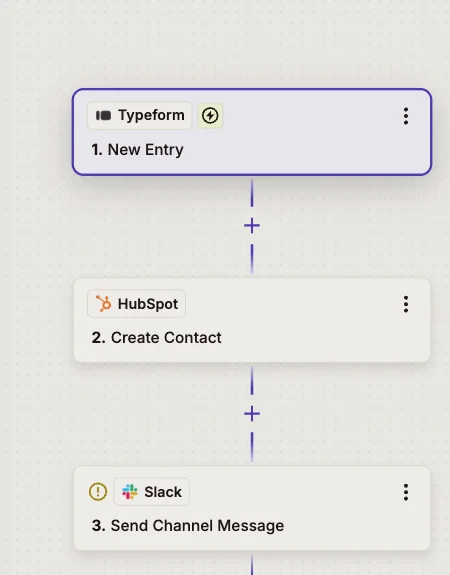
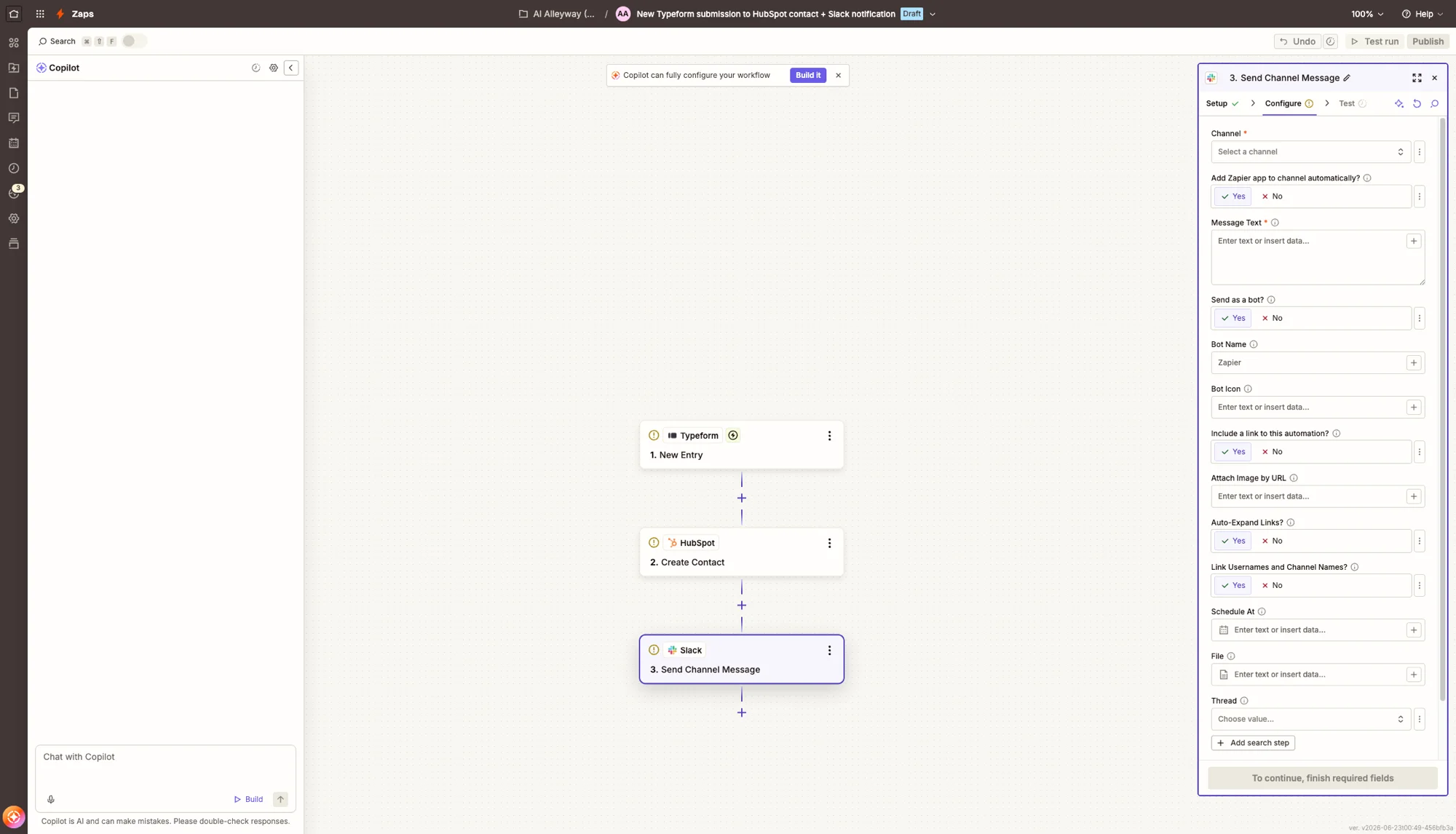
To make that concrete, picture a common Zap. A new response hits a Typeform; that is the trigger. A Filter checks whether the lead is a real prospect and stops the Zap if not. A Formatter step cleans up the name and phone number. Then two actions fire: create a contact in HubSpot and post a note to a Slack channel. You build all of that by picking apps from dropdowns and mapping fields, no code, and you can run a test on real data before you turn it on. That single, legible chain is what most Zaps look like. It helps to know the pieces, because which ones cost money is the whole pricing story:
| Building block | What it does | Costs a task? |
|---|---|---|
| Trigger | Starts the Zap when an event happens | No |
| Action | Does something in an app: create, send, update | Yes, per app action |
| Filter | Stops the Zap unless conditions match | No |
| Path | Branches the Zap down conditional routes | No |
| Formatter | Reshapes data: dates, text, numbers | No |
Zapier in 2026 is also more than Zaps. Tables give you a built-in database, Interfaces let you publish simple forms and pages, Chatbots and Agents add an AI layer, and Canvas is a visual space to plan workflows. Most people still come for the connectors, but the platform has quietly grown into a place you can build a small app, not just wire two together. A support team, for example, could take requests through an Interface, store them in a Table, route them with a Zap, and answer common questions with a Chatbot, all inside Zapier and all without code. That ambition is newer and less proven than the core automation, but it changes what Zapier is competing on.
For a non-technical team, getting going is genuinely fast. Connect an app once and Copilot can draft your first working Zap from a sentence like “when I get a new Stripe payment, add a row to my sheet and email me,” then you tweak the field mapping rather than build from scratch. Before you turn a Zap on, you can run it against real data and see exactly what each step would do, which is exactly the guardrail that wins over cautious first-timers. That low floor, build-by-describing and test-before-trust, is a real part of why Zapier converts beginners that the more powerful tools scare off.
That approachability comes with a unit of account you have to understand, because it is unlike its two main rivals. Zapier bills per task (each successful app action), Make per operation (each module run), and n8n per execution (one whole workflow run, regardless of how many steps it has). The difference decides what you pay.
| Zapier | Make | n8n | |
|---|---|---|---|
| Billing unit | per task (one successful app action) | per operation (one module run) | per execution (one whole run) |
| A 10-step automation, 1,000 runs/mo | ~6,000 tasks (billable actions only) | ~10,000 operations | 1,000 executions |
| Self-host option | No | No | Yes, free |
The nuance that saves Zapier here, and that most people miss, is what does not count. Triggers are always free. Filters and Paths are free. Zapier’s built-in tools (Formatter, Tables, Delay, Looping, Digest) are free. Only successful actions in outside apps bill. So a Zap that triggers on a form, filters, formats text, and creates one contact is one task, not four. It is still per-action billing, but it is gentler than “every step costs,” and the section below shows exactly how it adds up.
How much does Zapier cost?
The short answer: Zapier is free for 100 tasks a month, and paid plans start at $19.99 a month for 750 tasks (Professional, annual billing, verified June 2026). The longer answer is that the plan price barely matters next to your task count, which is what actually determines the bill.
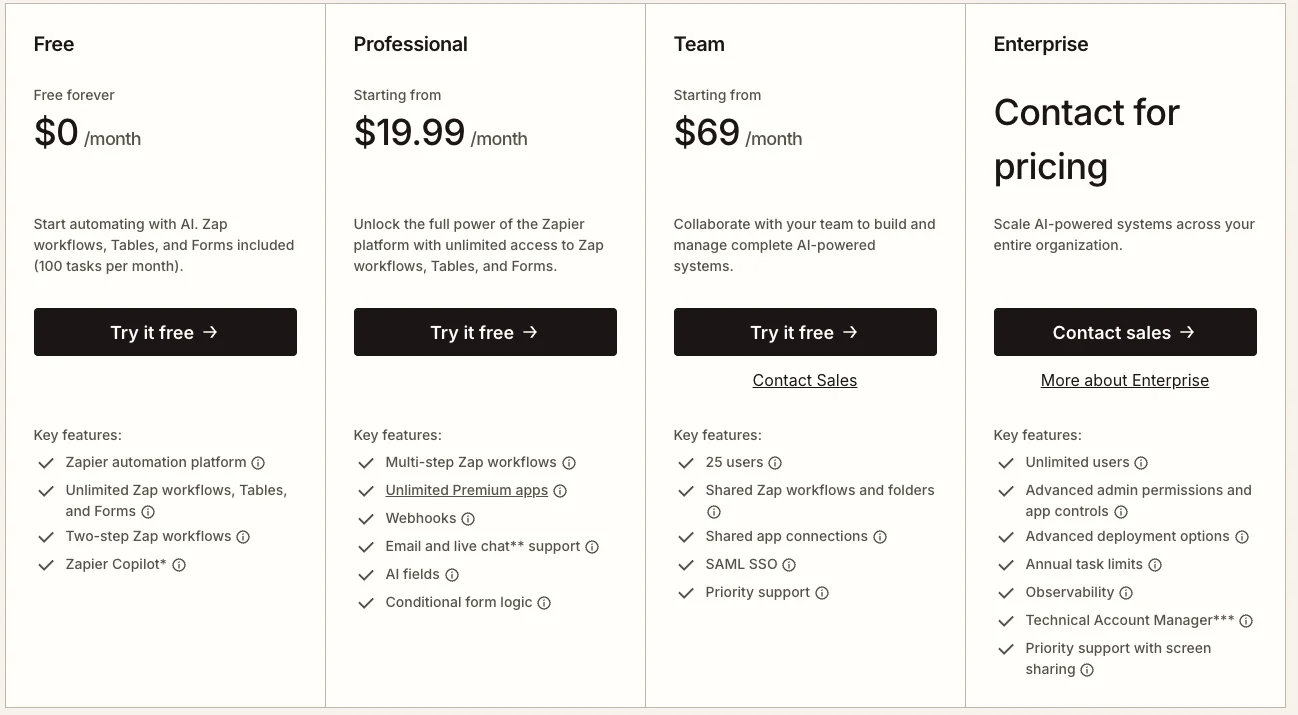
Here are the tiers, verified live on zapier.com/pricing in June 2026 (annual billing, which the page defaults to and which runs about 33% cheaper than monthly):
| Plan | Price (annual /mo) | Tasks /mo | What you get |
|---|---|---|---|
| Free | $0 | 100 | Two-step Zaps only, Copilot, Tables, no premium apps |
| Professional | $19.99 | 750 (scales up) | Multi-step Zaps, premium apps, Paths, Filters, webhooks |
| Team | $69 | scales | Up to 25 users, shared connections, SAML SSO |
| Enterprise | Custom | Custom | Governance, analytics, advanced admin, dedicated support |
Two things stand out. First, the Free plan is genuinely limited: 100 tasks a month and two-step Zaps only, so the moment you need a third step or a premium app, you are on Professional. Second, the task quota scales within a tier: Professional starts at 750 tasks but you pay more to lift the ceiling, so two people on the same plan can have very different bills. The tier name buys you features; the slider buys you runs.
The trap is multi-step Zaps at frequency. Because each successful app action is a task, cost grows with both your step count and your run count:
| Zap shape | Tasks per run | At 1,000 runs/mo |
|---|---|---|
| 2-step (1 app action) | 1 | 1,000 |
| 5-step (3 app actions) | 3 | 3,000 |
| 10-step (6 app actions) | 6 | 6,000 |
A handful of busy multi-action Zaps clears Professional’s base 750 tasks quickly, which is why the common refrain is that a $20 plan becomes $80 or more as you grow. The fix is built into the model if you use it: add a Filter early to stop Zaps that should not proceed (filters are free), lean on the free built-in tools instead of paid app actions where you can, and watch the task-usage screen. Budget by your real run frequency, not your happy-path step count.
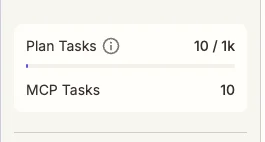
A worked example makes the math real. Say you run that lead Zap above, with two billable app actions, 500 times a month: that is 1,000 tasks, already over Professional’s base 750, so you are paying to lift the ceiling. Add a second Zap that syncs new orders, three actions, running 1,000 times a month, and you have added another 3,000 tasks.
Two ordinary automations and you are near 4,000 tasks a month, well past the base plan. The same two workflows on Make or n8n would cost a fraction of that, which is exactly why heavy users migrate. The honest way to price Zapier is to estimate your monthly task count from real run frequency before you commit, not to pick a tier by name.
One recent change is worth flagging. From June 15, 2026, AI by Zapier moved to model-based pricing: AI steps bill with a task multiplier by model tier (Standard 1x, Advanced 3x default, Premium 5x), and a safeguard pauses any Zap that hits 75 tasks in a single run for manual approval. You can connect your own model API key to keep AI steps at the standard 1x rate. If your automations lean on AI, model choice now directly drives the bill.
Who is Zapier for?
Zapier is the easy, broad end of the market, so fit comes down to how much you value simplicity and reach against price and logic depth.
- Non-technical teams and solo operators. If you want the shortest path from idea to working automation and would rather not think about APIs, Zapier is the easiest tool there is, and Copilot drafts the first Zap for you. The time you save in setup is the real return.
- Anyone whose stack is unusual or wide. With 9,000-plus integrations, Zapier is the safest bet that your specific apps are supported. If a niche tool matters, it is more likely here than anywhere else, and that single fact ends the comparison for a lot of buyers.
- Low-to-moderate volume automations. If your Zaps run hundreds or low thousands of times a month, the per-task bill stays reasonable and the polish is worth the premium. This is Zapier’s sweet spot, and it is a large one.
- Businesses that need governance. SOC 2 compliance, SSO, shared connections, and audit logging make Zapier an easy approval for IT, where a self-hosted or younger tool would face more scrutiny.
- People adding AI to simple workflows. Copilot, Agents, and the new MCP server make Zapier a friendly on-ramp for AI-assisted automation without leaving a familiar tool. If you want to ask an assistant to act across your apps rather than build a Zap by hand, Zapier is further along that path than most.
- Teams that value time over money. If an hour of your team’s time is worth more than the difference between Zapier’s bill and a cheaper rival’s, the easiest tool is the right tool. Zapier wins on the axis that often matters most for small teams: how fast a non-specialist can ship something that works.
- Not for: cost-sensitive or high-volume users. If you run long multi-step Zaps thousands of times a month, the task meter will hurt, and Make’s per-operation or n8n’s per-execution pricing will save you real money. Heavy automation at a budget is the one case where Zapier is clearly the wrong pick, and it is worth being honest with yourself about your trajectory: a workflow that is cheap on Zapier today can become expensive fast if it succeeds and you scale it up.
Where Zapier shines
The strengths below are why Zapier remains the default name in automation despite being the priciest at scale.
The biggest app library, by a wide margin
This is the reason most people choose Zapier and stay. With more than 9,000 integrations, against roughly 3,000 for Make and 1,100 for n8n, the odds that your exact apps are supported are simply higher here. That breadth turns building into clicking: connect the apps, pick the trigger and action, done. For a team with a sprawling or unusual stack, no rival comes close on coverage, and that is the whole game for a no-code tool.
| Tool | Pre-built integrations |
|---|---|
| Zapier | 9,000+ |
| Make | ~3,000 |
| n8n | ~1,100 (plus HTTP to anything) |
The depth of each integration matters as much as the count. Popular apps expose dozens of triggers and actions, not just one, so you can react to granular events and write back specific fields rather than settle for a generic “new item.” And when an app is missing or you need an edge-case endpoint, the Webhooks and API Request steps call any service directly. The practical ceiling is “almost anything,” which for a no-code audience is rare.
It is the easiest automation tool to learn
Zapier’s trigger-then-action format is the simplest in the category, and reviewers say so consistently. Its Capterra rating of 4.7 from 3,054 reviews leads its rivals, and ease of use is the most-cited strength. A first useful Zap takes minutes, not an afternoon, and Copilot will draft one from a plain-English sentence. Make and n8n are more capable but ask more of you up front; Zapier meets a beginner where they are.
Filters and Paths give you logic without burning tasks
The per-task model has a genuinely user-friendly side. Filters, which stop a Zap when conditions are not met, and Paths, which branch a Zap down different routes, both cost zero tasks. So you can gate and route logic for free and only pay for the actions that actually run. Put a filter early and a Zap that should not proceed costs nothing that run. It is a real lever for controlling cost that newcomers often miss.
It is enterprise-grade on security and governance
For a tool you are handing your data and credentials to, the trust layer is solid. Connections are managed centrally, so a team can share an app login without sharing the password, and the compliance posture is what a real company looks for before routing its workflows through a third party.
| Trust and governance | Available on |
|---|---|
| SOC 2 Type II compliance | All plans |
| SAML single sign-on | Team and up |
| Advanced admin, app restrictions, audit logging | Enterprise |
None of this is glamorous, but it is the box that has to be ticked, and Zapier ticks it more thoroughly than the younger tools in this space. For a business deciding whether to trust an automation vendor with its data, that maturity is a real point in Zapier’s favor.
Reliability that businesses trust at scale
For typical workloads, Zapier is dependable, and the aggregate numbers back it up: G2 4.5 from 2,080 reviews and Capterra 4.7 from 3,054, the strongest product validation of any tool in this category. Reviewers describe their Zaps as essential infrastructure they rarely have to think about. When you are automating real business processes, that track record across thousands of paying users is worth a premium to many teams. It is also the longest track record in the space: Zapier has been running mission-critical automations since 2011, and the maturity shows in the small things, clear run histories, automatic retries, error notifications, that keep a broken Zap from failing silently.
The AI layer is broad, and I ran it live
Zapier’s 2026 AI push is real and wide: Copilot on every plan, plus Agents, Tables, Interfaces, Chatbots, Canvas, and a Model Context Protocol server. I tested that last piece firsthand. I connected Gmail, Google Calendar, and Slack to Zapier’s MCP, then had the agent pull a live rundown across all three — recent email, upcoming calendar events, and the latest Slack #shortform activity — with no Zap pre-built. Each request reached straight into the live apps and came back with real data.
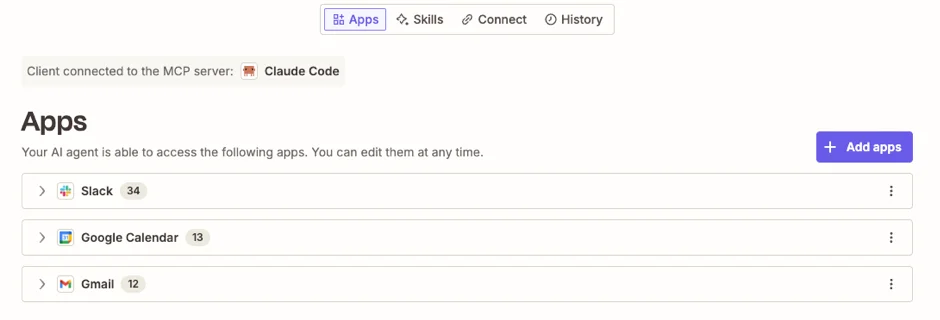
| What I ran on Zapier’s MCP (June 2026) | Result |
|---|---|
| Live pull across connected apps | Recent Gmail email, Google Calendar events, and Slack #shortform messages |
| Apps reached, live | 3 (Gmail, Google Calendar, Slack), authorized once each |
| Build required | None — agentic, on demand |
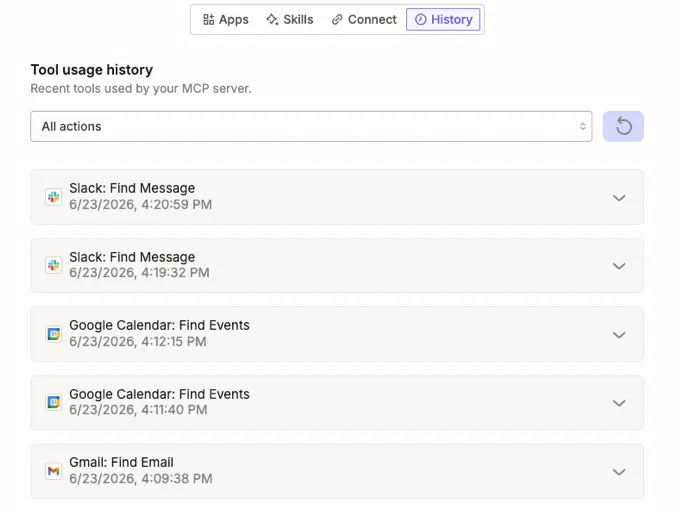
That is a different paradigm from building a Zap and walking away, and it is one the older automation tools are racing to match. As a buyer, it means Zapier is investing where the category is heading, not just maintaining a connector list. The same 9,000-app library that powers Zaps also powers the agent, so the breadth that made Zapier the easy choice for static automation carries straight over to the agentic, ask-on-demand model, which is a genuinely strong position to be in as the category shifts.
Where Zapier frustrates
Cost at scale is the defining problem
This is the number-one complaint, and it is structural. Because every successful app action is a task, a multi-step Zap run often consumes several tasks each time, and a busy automation drains a plan’s allowance fast. Practitioner comparisons routinely note that a $20 Professional plan becomes $80 or more as steps and runs grow, and that Make and n8n cost a fraction of the same high-volume workload.
The reason it stings is that the cost scales with success, not effort. The better your automations work and the more you lean on them, the more you pay, and the jump from one tier’s task ceiling to the next can be steep. Teams routinely start on Zapier, build something they depend on, and then discover the bill has quietly tripled as adoption grew. Zapier is fairly priced for the convenience; it is simply the most expensive way to automate once volume is real, and the model rewards exactly the heavy use it then charges most for.
The branching logic is shallower than rivals’
Paths and Filters cover the common cases, but they are deliberately simple. Make offers routers, iterators, and aggregators for genuinely complex, looping, multi-branch logic, and n8n adds code as a first-class step. Users who outgrow Zapier almost always cite the same two reasons for leaving: the price climbed, and they hit a logic ceiling Paths could not handle.
The specific gap shows up with loops and heavy transforms. If you need to process every line item in an order, or reshape a nested payload before sending it on, Zapier makes you work around the limitation, often by chaining extra Zaps or paying for a code step, where Make’s iterator or n8n’s Code node would do it in one. For simple “when this, do that” automation, none of this matters. For ambitious workflows, it is the wall you eventually hit.
Trustpilot tells a harsh, specific story
Here the rating picture splits violently. Against Capterra 4.7 and G2 4.5, Zapier scores just 1.4 out of 5 on Trustpilot across 303 reviews, rated “Bad.” The complaints there are pointed and consistent: unexpected overage charges, subscriptions that are hard to cancel, and support described as slow or unreachable. Trustpilot also notes the company has no history of inviting reviews, so the sample skews to people with a grievance.
| Source | Rating (June 2026) | Reviews |
|---|---|---|
| Capterra | 4.7 / 5 | 3,054 |
| G2 | 4.5 / 5 | 2,080 |
| Trustpilot | 1.4 / 5 | 303 |
The split is the signal, and it is the same pattern across this whole category. The 5,000-plus business reviewers on G2 and Capterra (2,080 plus 3,054, not the 303 on Trustpilot) rate the product highly because the automations work; the 303 on Trustpilot are overwhelmingly about billing, cancellation, and support, not whether Zaps run.
Read the 1.4 as a real warning about Zapier’s commercial side rather than a verdict on the product. The practical advice that falls out of those reviews is concrete: turn off auto-renew if you are not sure you will keep the plan, keep an eye on the task meter so an overage does not surprise you, and do not count on fast human support if a billing dispute comes up. The automations are reliable; it is the account and billing experience that the unhappy reviewers are describing, and forewarned is the best you can do there.
Support quality does not match the price
For a tool at the premium end of the market, the support experience is a recurring sore point. Email and live-chat support are gated to paid plans, and the Trustpilot reviews above describe slow, template-driven, or hard-to-reach responses when billing or account issues come up. When you are paying more than the alternatives, “the support is mediocre” stings more than it would on a budget tool.
The free plan is more of a trial than a tier
Zapier’s Free plan looks generous next to nothing, but at 100 tasks a month and two-step Zaps only, it is really an extended trial. Any genuinely useful automation, the moment it needs a third step or a premium app, pushes you to Professional. By contrast, Make’s free plan allows multi-step scenarios and 1,000 monthly runs, and n8n’s self-hosted edition is unlimited, so Zapier’s free tier is the most limited of the three. That is a fair business model, but go in expecting to pay; the free tier proves the concept rather than running real work.
AI steps now cost more, and quietly
The June 15, 2026 move to model-based AI pricing is sensible but adds a layer of cost most users will not notice until the bill. AI by Zapier steps now bill with a task multiplier by model tier:
| AI model tier | Task cost per step |
|---|---|
| Standard | 1x |
| Advanced (default) | 3x |
| Premium | 5x |
| Your own model key | 1x |
| Zapier MCP tool call | 2x |
So an AI-heavy Zap can cost several times what its step count suggests, and a single Advanced-default step run a few thousand times a month can quietly become the biggest line in your task budget. The runaway-cost safeguard, which pauses a Zap that hits 75 tasks in one run, and the bring-your-own-key option both help. The same meter applies to the MCP layer I ran earlier: each MCP tool call bills at 2x tasks, so the agentic convenience has a cost too. The takeaway stands: read the model tier before you lean on AI steps, or the convenience becomes the line item that surprises you.
Alternatives worth considering
If you decided Zapier is not for you, the reason is almost always cost at scale or a logic ceiling. Both of our higher-value picks address exactly that.
| Zapier | Make | n8n | |
|---|---|---|---|
| Billing unit | per task | per operation | per execution (whole run) |
| Apps | 9,000+ | ~3,000 | ~1,100 + HTTP |
| Best for | easiest start, widest library | visual logic at a mid price | technical teams, lowest cost at scale |
- Make is the pick if you want more branching power than Zapier without going technical. It bills per operation rather than per task and includes routers and iterators from a cheap tier, so it is usually cheaper and more capable for multi-step work, in exchange for a steeper learning curve. Read our Make review for the detail.
- n8n is the pick if you are technical and cost at scale is the priority. It bills per whole-workflow execution and self-hosts for free, which makes it dramatically cheaper at high volume, and it treats code as first-class. It is our category winner, rated higher than Zapier, at the cost of having to run it. See our n8n review.
Two is the right number here, because the real decision is simple: if Zapier’s price or logic limits are the problem, Make solves the logic and some of the cost, and n8n solves the cost outright. On ease and app breadth, though, Zapier still leads both.
The verdict
Zapier is the original no-code automation tool, connecting 9,000-plus apps, and as of June 2026, after verifying its pricing and running its MCP layer firsthand, I score it 4.3 out of 5, a Power Tool: the easiest and broadest way to automate, held back only by per-task pricing that climbs at scale. It is the easiest tool to learn, its free Filters and Paths control cost cleverly, and its 2026 AI layer shows it is building toward where the category is going. For a non-technical team that values reach over price, nothing gets you to a working automation faster.
The half-point that keeps it short of the leaders is the price. The per-task model is the most expensive way to automate at volume, the branching logic is shallower than Make’s, and the Trustpilot 1.4 is a real flag on the billing and support side that the glowing G2 and Capterra scores paper over.
None of that lands hard on Zapier’s core audience: people automating a few apps at modest volume, who will find it excellent. It edges our 4.2-rated Make on ease, breadth, and the category’s highest third-party ratings; Make wins on flexibility and price, and n8n leads both on cost and control. If cost at scale or deeper logic is your priority, our Make review and our n8n review are the next two stops.
Frequently asked questions
Is Zapier worth it?
For most people automating a handful of apps without writing code, yes. Zapier is the easiest tool to start with and connects more apps than any competitor, 9,000-plus, so the thing you want to automate is almost certainly supported. A first Zap takes minutes.
The one thing to weigh before you commit is the billing: Zapier charges per task, meaning each successful app action counts, so cost rises with both your number of steps and how often they run. At low to moderate volume it is excellent value; at high volume, or with long multi-step Zaps, Make and n8n cost far less.
How much does Zapier cost?
Zapier's Free plan is $0 for 100 tasks a month and two-step Zaps only. Paid plans (billed annually, about 33% cheaper than monthly) start at Professional, $19.99/month for 750 tasks, which adds multi-step Zaps, premium apps, Paths, Filters, and webhooks.
Team is $69/month for up to 25 users with shared connections and SAML SSO, and Enterprise is custom-priced. Task quotas scale up as you pay more within a tier. The task count, not the plan name, is what drives your bill.
What counts as a task in Zapier?
A task is each successful action Zapier completes in a third-party app. Triggers are always free, and so are filters, Paths, and Zapier's built-in tools like Formatter, Tables, and Delay. Errored or filtered-out steps do not bill.
So a Zap that fires a Gmail trigger, runs a filter, formats some text, and creates one HubSpot contact uses just one task, not four. Multi-action Zaps are where tasks add up: every successful app action in the chain is one task, every time the Zap runs.
Is Zapier cheaper than Make or n8n?
Usually not, at scale. All three bill differently: Zapier per task (per app action), Make per operation (per module run), and n8n per execution (one whole workflow run, regardless of steps).
Because Zapier counts every action, a long Zap run thousands of times a month burns tasks fast, and Make or n8n often cost a fraction of the same workload. n8n self-hosted is effectively uncapped for the price of a server. Zapier wins on ease and app coverage, not price at volume.
Does Zapier have AI features?
Yes, and they expanded a lot in 2026. Copilot helps build Zaps from a plain-English description on every plan including Free. Zapier Agents, Tables, Interfaces, Chatbots, and Canvas add an AI and app-building layer, and Zapier now offers an MCP server so an AI assistant can run your connected apps directly.
Note a recent change: from June 15, 2026, AI by Zapier bills by model tier with a task multiplier (Standard 1x, Advanced 3x, Premium 5x), and you can connect your own model key to stay at 1x.
Is Zapier good for beginners?
It is the best automation tool for beginners. The trigger-then-action format is the simplest in the category, Copilot can draft a Zap from a sentence, and the 9,000-plus app library means setup is mostly clicking and connecting rather than configuring.
Make and n8n are more powerful but have steeper learning curves. The trade-off is that Zapier's simplicity also means weaker branching logic than Make and a higher price as you grow.
Keep reading
Zapier pricing: what you'll really pay as tasks add up
Zapier is free for 100 tasks, then $19.99/mo — but the per-task bill climbs fast as you scale. The real Zapier pricing, plan by plan, with worked cost math.
Zapier alternatives: 8 cheaper, more capable picks
Zapier's per-task pricing is the top reason to leave. The 8 best Zapier alternatives, cheaper or more powerful, and who each one actually fits.
Make.com pricing: what you'll really pay per operation
Make is free for 1,000 credits, then $9/mo Core — but every module run spends a credit, so the operations meter sets your real Make.com pricing.