
Zapier MCP tested in Claude Code: one command, two tasks a call
I connected Zapier MCP to Claude Code on a free Zapier plan and ran real tool calls. Setup, what each call cost in tasks, and the traps in onboarding.
Contents
The short answer on Zapier MCP
Zapier MCP lets an AI client such as Claude Code run actions in the 9,000-plus apps Zapier connects to. It is included on every Zapier plan, Free included. The price is in tasks: each successful tool call uses two from your plan’s allowance, and failed calls use none. Our Zapier review covers the rest of the product.
On 4 November 2026 I connected it to Claude Code 2.1.318 on a free Zapier account with one command and a browser sign-in, then ran five test sessions. Three real actions ran: two text conversions and one web request. With the one Gmail search Zapier’s onboarding ran during sign-in, the account showed 8 of its 100 monthly tasks used.

| What I checked | Result |
|---|---|
| Setup in Claude Code | One claude mcp add command, then a browser sign-in |
| Tools Claude Code received | 17 meta-tools, not one tool per app action |
| Cost per successful call | 2 tasks, confirmed on the account counter |
| Three items in one Formatter call | 2 tasks, not 6 |
| Free plan budget | 100 tasks a month, so 50 calls |
How Zapier MCP works
MCP, the Model Context Protocol, is a standard way for an AI app to call outside tools. Zapier runs a hosted MCP server, and your AI client connects to it at one address, https://mcp.zapier.com/api/v1/connect. Behind that address sits your Zapier account, with the apps you have already connected.
The useful part is who holds the passwords. Zapier’s MCP page says your app credentials “stay in Zapier’s managed connection layer instead of being passed into the model.” Claude Code never sees a Gmail or Slack key. It asks Zapier to run an action, and Zapier runs it through your existing connection.
A server, a mode and a history
Each account has an MCP server that holds four things, according to Zapier’s server docs: the apps and actions your AI can use, saved skills, the AI clients connected to it, and a History of every call. Several clients can share one server, so Claude Code, Cursor and ChatGPT can all use the same setup.
Each server also runs in one of two modes.
| Agentic mode | Managed mode | |
|---|---|---|
| Who adds actions | Zapier and your agent | You, at mcp.zapier.com |
| What the AI client sees | A fixed set of meta-tools | One tool per action |
| Skills | Yes | No |
| Best for | Open-ended requests across many apps | A short, fixed list of actions |
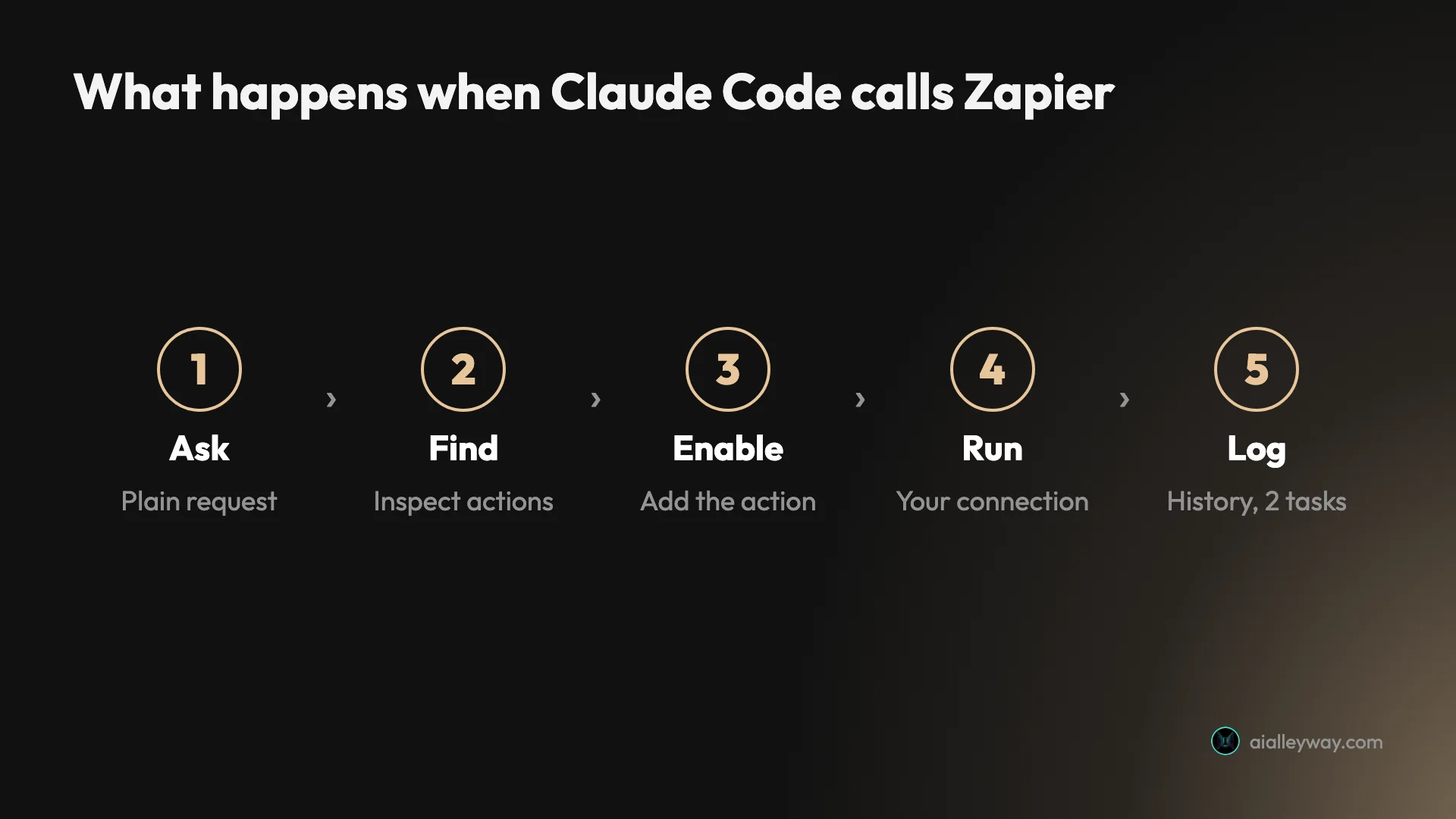
New servers start in agentic mode, and mine was in agentic mode. In that mode the agent searches Zapier’s catalogue, switches on the action it needs and runs it, all mid-conversation. Zapier’s tools docs list 16 meta-tools, plus a write_code_action tool that is still rolling out. My server had all 17.
OAuth for Claude Code, tokens for everything else
There are two ways to connect, and your client decides which. Clients on Zapier’s supported list, which includes Claude, ChatGPT, Cursor and VS Code, sign in with OAuth. The client stores and refreshes the token, and you never handle it.
Everything else uses a connection token you create at mcp.zapier.com. Zapier’s connection docs are blunt about it: the token is long-lived and “grants whoever holds it the ability to run the server’s tools and read the data they return.” Zapier also supports only the Streamable HTTP transport. A client that can only speak the older SSE transport cannot connect.
Setting up Zapier MCP in Claude Code
Zapier’s Claude Code page reduces setup to one command. I ran it with one change, a --scope project flag, so the server lives in one folder’s .mcp.json instead of every project on the machine:
claude mcp add --transport http --scope project "Zapier-MCP" https://mcp.zapier.com/api/v1/connectClaude Code printed “Added HTTP MCP server Zapier-MCP” and wrote a short config with the URL and nothing secret in it:
{ "mcpServers": { "Zapier-MCP": { "type": "http", "url": "https://mcp.zapier.com/api/v1/connect" } }}That is the point of OAuth: the file is safe to look at, and safe to commit, because the credential lives elsewhere.
The sign-in
The sign-in has to happen in an interactive session. Open Claude Code in that folder, type /mcp, pick Zapier-MCP and choose Authenticate. A browser tab opens on Zapier.
The Zapier screen has one odd step. You must click Copy prompt before the Continue button works, then review the access Claude Code is asking for and click Allow. Back in the terminal, claude mcp list showed “Zapier-MCP … ✔ Connected.”
Zapier did not create a new server for me. The account already had one from a test in June 2026, and the sign-in connected Claude Code to it, with Gmail, Google Calendar and Slack actions still switched on. Zapier’s docs describe this as the default server: it is created the first time you connect any client and reused after that.
What the copied prompt does
The prompt Zapier makes you copy asks Claude Code to run its onboarding skill and show you “a few of my apps to work together, live.” Live means real calls. In my sign-in session the onboarding ran one Gmail inbox search, which shows in History and cost 2 tasks. Zapier’s Claude Code page says the two-task rate applies “including the ones onboarding runs.” If you do not want an agent searching your inbox on day one, do not paste that prompt.
Two other ways in, and the way out
| Way to connect | How | Credential you handle |
|---|---|---|
claude mcp add command | One terminal command, then /mcp sign-in | None |
| Official plugin | /plugin install from a marketplace | None |
| Connection token | Create a server at mcp.zapier.com, paste the token | A long-lived token |
Zapier also publishes an official Claude Code plugin. If Anthropic’s plugin marketplace is already added, its docs give /plugin install zapier@claude-plugins-official; otherwise you add the zapier/zapier-mcp marketplace first. I used the plain command because it is easier to scope to one folder.
Two practical notes from the same page. On WSL, the browser’s sign-in callback may never reach Claude Code, so Zapier suggests running it from a native Windows or macOS terminal. And on a Claude Team or Enterprise plan, an Owner may have to approve MCP servers before you can add one.
Leaving is as simple as joining. Zapier’s docs say you revoke an OAuth connection from the client or from mcp.zapier.com. With a project-scoped setup, deleting the folder’s .mcp.json also removes Zapier from that project.
The same server works from other clients too. Zapier’s docs list Claude, ChatGPT, Cursor, Grok Bot and VS Code among the OAuth clients, and a server can hold several of them, so a skill saved from Claude Code is there when you open Cursor.
Approving each tool run
In an interactive session, Claude Code asks before it calls a tool from a new MCP server. Zapier’s quickstart says your client asks you to approve the first Zapier tool run, and that approving for the session “saves you a prompt on every action.”
That prompt is a real safety feature, so think before you wave it through. Approving execute_zapier_write_action for a session lets the agent send, create and delete in any enabled app without asking again. For my headless runs, which used the same claude -p approach as our Claude Code hooks guide, I allowed only the Zapier server’s tools with --allowedTools, and only on a server where I had checked what was enabled.
What I ran, and what it cost
After sign-in I closed the interactive session and ran each test as a separate headless Claude Code session from the same folder, using claude -p and allowing only the Zapier tools. I stuck to Zapier’s own utility apps, Formatter and Webhooks, which need no third-party account. The one web request went to our own site.
| Run | What I asked | Time | Zapier calls that cost tasks |
|---|---|---|---|
| 1 | List the Zapier tools and enabled apps | 17 s | None |
| 2 | Find and enable a Formatter text action and a Webhooks GET action | 48 s | None |
| 3 | Title-case one sentence with Formatter | 20 s | 1 |
| 4 | Fetch aialleyway.com/robots.txt with Webhooks GET | 23 s | 1 |
| 5 | Title-case three headlines | 30 s | 1 |
Times are for the whole Claude Code session, model thinking included, not just Zapier.
Listing and enabling cost nothing
The first run listed the 17 tools and three enabled apps: Gmail with 12 actions, Google Calendar with 14 and Slack with 35. It also flagged that Calendar and Slack had no default account set, so their actions would not run until I picked one. That is a quiet failure mode. The apps look enabled, and the first real request fails.
The second run took 14 turns, the longest of the five. The catalogue search returned only how many actions each app had, not their names, so Claude guessed the action keys. The guess for GET was exact. The guess for Formatter landed on the line-item version of its Text action, which turned out to matter later.
The calls themselves
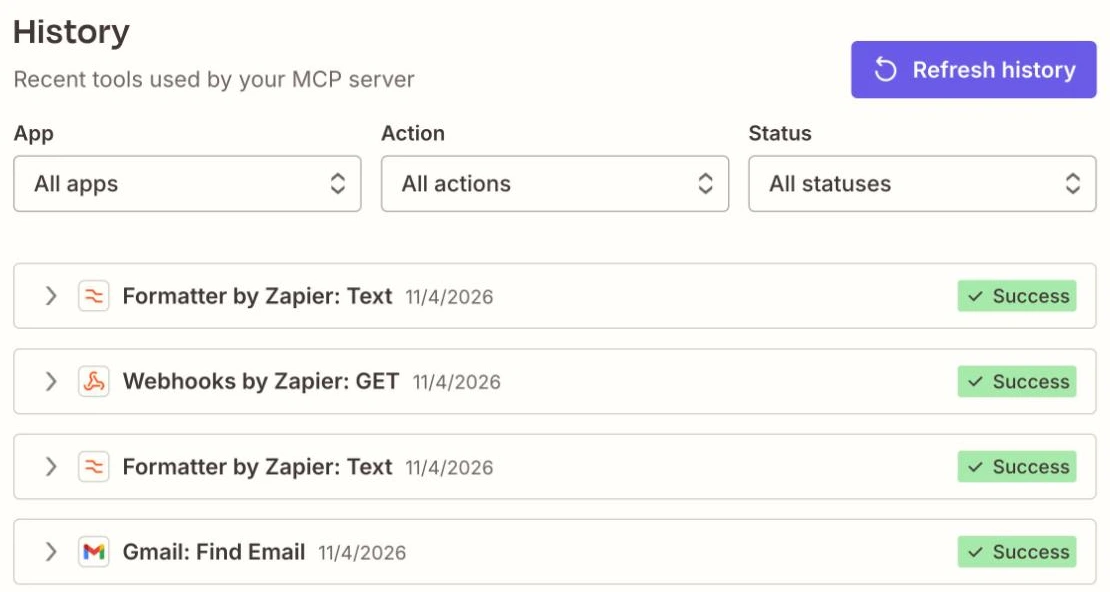
Run 3 sent “the agent button is gone, the agent is not” through Formatter’s title case and got back “The Agent Button Is Gone, the Agent Is Not.” Formatter follows title-case rules, so a short word after a comma stays lowercase. The raw response was one line of JSON with the output and no status field.
Run 4 fetched our robots.txt through Webhooks GET. The body came back, “User-agent: *” and “Allow: /”, but no HTTP status code or headers. If your workflow needs to know whether a request returned 200 or 404, this action will not tell your agent.
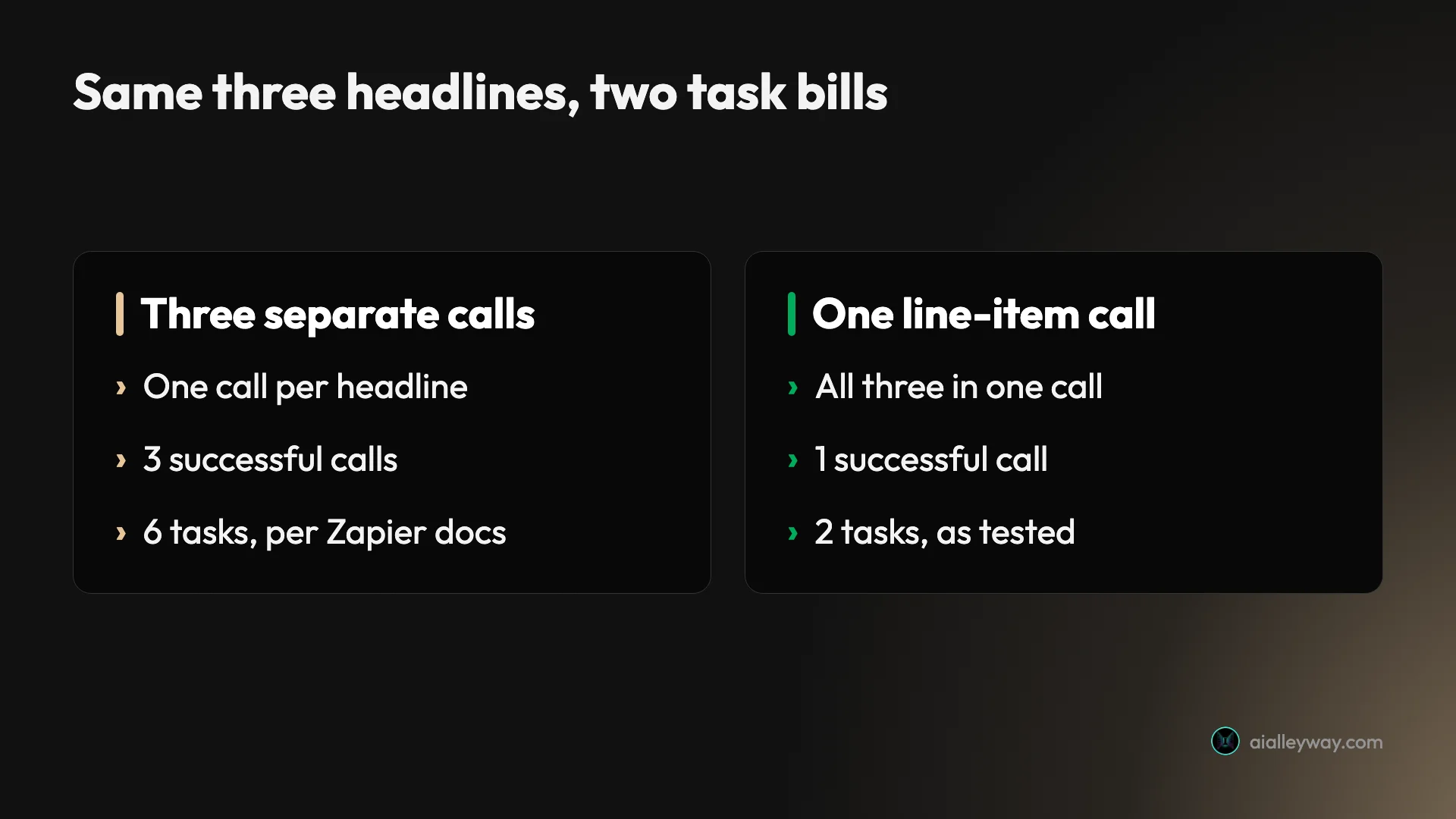
Run 5 asked for three headlines in title case. Because the enabled action was the line-item version, Claude sent all three in one call. “zapier mcp costs two tasks a call” came back as “Zapier Mcp Costs Two Tasks a Call”, so acronyms typed in lowercase stay wrong.
The task counter
Zapier’s Billing and usage page showed the free plan at “Plan tasks 8 / 100”, resetting on 7 November. Four successful calls at two tasks each is eight, so the counter matches the documented rate exactly: three of my calls and the onboarding search. Listing tools, searching the catalogue and enabling actions cost nothing.
The batch result is the one to remember. Three headlines in one line-item call cost 2 tasks. Zapier’s own example of adding five spreadsheet rows counts five calls and ten tasks. How the agent structures the work changes the bill.
What Zapier MCP costs on each plan
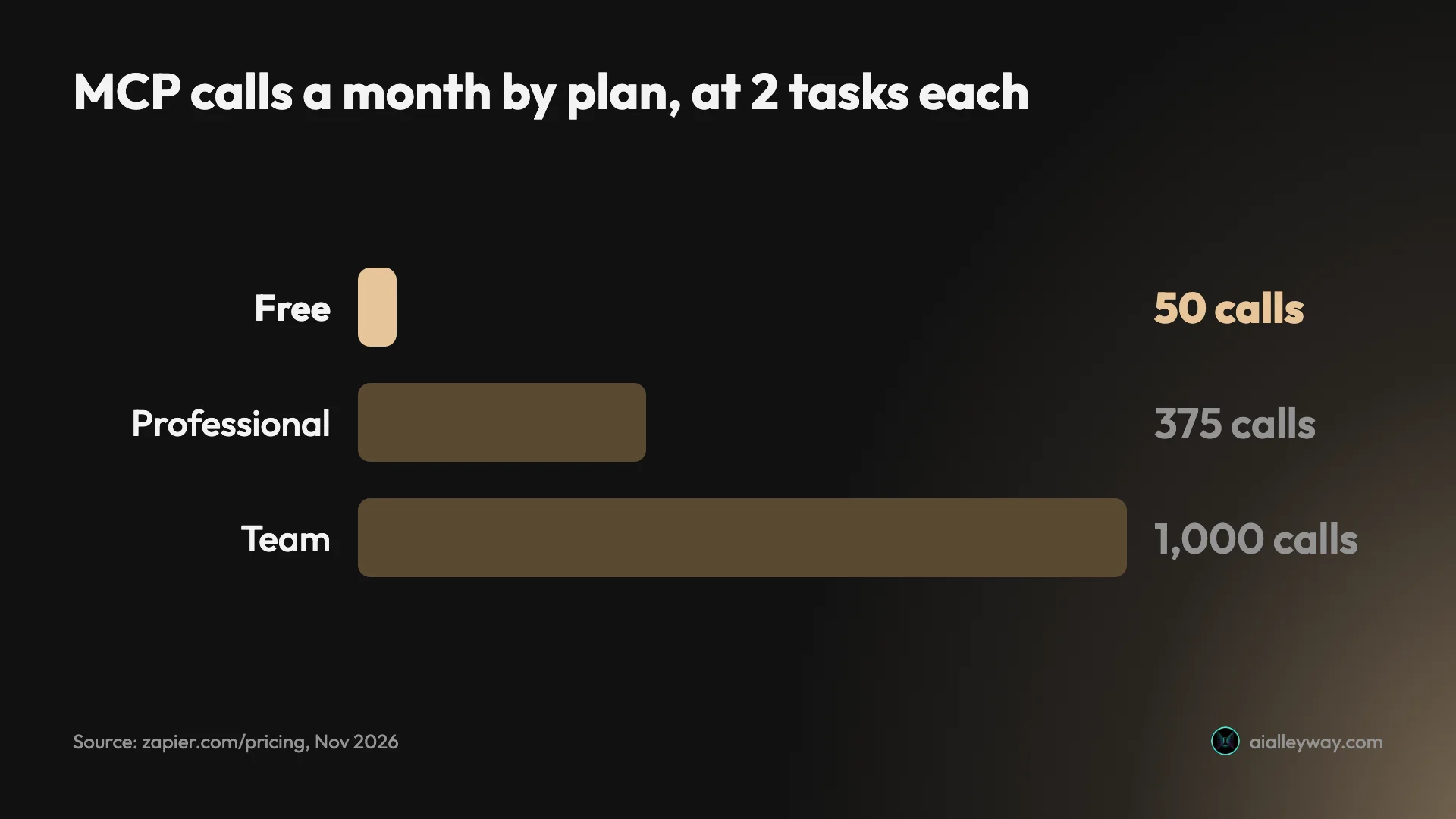
There is no MCP price list, because MCP has no price of its own. Zapier’s usage page says it runs on your existing plan and draws on the same task allowance as your Zaps. So the real question is how many tasks you have, and what else is spending them.
| Plan | Price (US) | Tasks a month | MCP calls if nothing else runs |
|---|---|---|---|
| Free | $0 | 100 | 50 |
| Professional | $19.99 a month billed annually, $29.99 monthly | 750 | 375 |
| Team | $69 a month billed annually, $103.50 monthly | 2,000 | 1,000 |
| Enterprise | Quoted by sales | Custom | Custom |
Prices are the lowest task tier on Zapier’s pricing page on 4 November 2026. Professional and Team climb as you buy more tasks, which our Zapier pricing guide breaks down.
What happens at the limit
It depends on pay-per-task billing, which Zapier offers on Professional, Team and Enterprise but not Free. With it on, calls keep working and Zapier charges for the extra tasks at a higher per-task rate than your plan’s own tasks. Your billing settings show the exact rate, and usage pauses at three times your plan’s task limit. With it off, or on Free, calls stop and return an error saying the account has reached its task limit.
That error is useful. Zapier’s docs say a failure at the limit names the limit, so if a call fails while you still have tasks left, the cause is somewhere else.
Six traps before you rely on Zapier MCP
| Trap | What I saw | What to do |
|---|---|---|
| Onboarding runs live actions | One Gmail inbox search, 2 tasks | Skip the copied prompt |
| Old server returns | 61 actions already enabled | Review the server’s apps first |
| Enabled is not ready | Calendar and Slack had no default account | Set a default connection |
| Guessed action names | Catalogue search gave counts only | Ask which action was enabled |
| Thin responses | No HTTP status from Webhooks GET | Check History for Success |
| Connection tokens | Not needed for Claude Code | Use a header, never a URL |
Onboarding runs real actions on your apps
The copied prompt is not a tour. It asks the agent to put your apps “to work together, live”, and in my case that meant a search of a real Gmail inbox. Skip the prompt if you want to choose the first action yourself.
An old server comes back with all its tools
If you have ever connected an AI client to Zapier MCP, the next sign-in reuses that server. Mine came back with 61 Gmail, Calendar and Slack actions enabled, including Send Email, Delete Email and Delete Message. Open the server’s Apps tab at mcp.zapier.com, or ask the agent to list what is enabled, before the first real request.
Enabled does not mean ready
Calendar and Slack showed as enabled with 14 and 35 actions, but neither had a default account, so nothing would run. Zapier’s docs say the agent can fix that with manage_zapier_connections. Check it before you build a routine on an app.
The agent may guess action names
The catalogue search returned counts, not action names, so Claude guessed the keys. It guessed well here, but the Formatter guess picked a different variant of the Text action than a person might choose. Ask the agent which action it enabled and read the inputs before it runs anything that writes to an app.
Some actions tell you less than you expect
Webhooks GET returned the page body with no status code. Formatter returned output with no status field. Zapier’s History tab marks each call Success or Failed, so check there when an answer from the agent looks too clean.
A connection token is a key to everything on the server
OAuth clients never show you a token, but any client off Zapier’s list needs one. Zapier says to send it in an Authorization header rather than the URL, because a URL is “more likely to end up in a log, a shell history, or a committed config file.” Treat it like a password.
Sharing a setup: skills, bundles and server access
Once the server does something useful, Zapier gives you three ways to reuse it. They differ in who pays and whose accounts the actions run on.
| Option | What it shares | Whose app accounts | Plan |
|---|---|---|---|
| Skill | Saved Markdown instructions your agent loads on demand | Yours | Any, agentic mode only |
| Tool bundle | A link to your enabled apps and actions | The recipient’s own | Any |
| Server access | Your actual server | Yours | Team or Enterprise |
Skills are the most interesting for a solo user. My server already listed two Zapier skills, Onboarding and Mcp-roast, and the agent can save new ones with create_zapier_skill. A skill is a recipe, such as “find this week’s invoices and summarise them”, that the agent can run again without being taught.
Tool bundles, per Zapier’s bundle docs, give the recipient an independent copy connected to their own accounts, with calls billed to their own plan. That makes a bundle the safe way to hand a setup to a colleague. Server access shares your server and your connections, which is why Zapier keeps it to Team and Enterprise.
When an AI agent in your apps pays off
- Use it if you already pay for Zapier. MCP costs nothing extra, and your existing app connections are ready on day one, once each app has a default account.
- Try it on Free for a week. Fifty calls is enough to learn whether an agent with app access helps you, and Free cannot overspend.
- Pick managed mode for a team or a production job. A fixed list of actions is easier to audit than an agent that can switch on whatever it finds.
- Skip it for high-volume work. At two tasks a call, an agent that loops over hundreds of records burns a plan quickly. A Zap built once is cheaper for repeat jobs.
- Skip it if you need raw API responses. Status codes and headers did not reach the agent in my test.
Cheaper or more controllable options
- n8n. Its MCP Server Trigger node exposes your own n8n workflows as tools, over SSE or Streamable HTTP, with OAuth, bearer or header authentication. Self-hosted, there is no per-task meter at all. Our n8n vs Zapier comparison covers the trade-off.
- Make. Make’s MCP server can run your scenarios from Claude or ChatGPT on every plan, and manage your account on paid plans, according to its developer docs. Our Make vs Zapier comparison covers how Make’s operations compare with Zapier’s tasks.
Final word
Zapier MCP is a fast way to give Claude Code real hands in real apps: one command, one sign-in, and 9,000 apps behind it. The cost model is simple once you see it in the counter, two tasks per successful call. The free plan’s 100 tasks buy 50 calls a month, which is plenty for trying it and thin for daily agent work.
Set it up in one project, skip the onboarding prompt, and check which actions your server already has before you ask it to do anything that writes. If you already pay for Zapier, there is no reason not to try it this week.
Frequently asked questions
Is Zapier MCP free?
Yes, within limits. Zapier's pricing page lists MCP on every plan, including Free, and there is no separate MCP charge. Each successful tool call uses two tasks from your plan's allowance, and failed calls cost nothing.
The Free plan has 100 tasks a month, which is 50 MCP calls if nothing else uses tasks. Free also has no pay-per-task billing, so when the tasks run out, Zapier's docs say tool calls stop until the cycle resets or you upgrade. My three test calls used 6 of the 100, and one Gmail search that Zapier's onboarding ran during sign-in used 2 more, for 8 in all.
How do I add Zapier MCP to Claude Code?
Run one command: claude mcp add --transport http "Zapier-MCP" https://mcp.zapier.com/api/v1/connect. Then open Claude Code, type /mcp, choose Zapier-MCP and authenticate. A browser window opens for the Zapier sign-in.
There is no API key to paste. Claude Code stores the OAuth token, and Zapier connects it to your default MCP server, creating one if you have none. I added the server to one project folder rather than globally, which keeps Zapier out of every other project.
How many tasks does a Zapier MCP call use?
Two tasks per successful tool call, at a fixed rate, according to Zapier's usage docs. Looking up which tools exist, authentication and failed calls do not count.
The unit is the call, not the item. My test changed three headlines in one Formatter call, and the account total of 8 tasks after four calls means that call cost two tasks, not six. Zapier's own examples show the other side: adding five spreadsheet rows as five calls costs ten tasks.
Is Zapier MCP safe to use?
Safer than pasting app keys into an AI tool. Zapier keeps your app credentials in its own connection layer, and the model never sees them. Every call is logged in the History tab at mcp.zapier.com.
The risk is what you let the agent do. On my account the server already had Gmail and Slack actions enabled from an earlier setup, including Gmail's Send Email and Slack's Delete Message. An agent with those tools can act on real data, so disable what you do not need, and keep any connection token out of URLs and committed files.
What is the difference between Zapier MCP agentic and managed mode?
In agentic mode, the default for new servers, your AI client gets a fixed set of meta-tools and finds, enables and runs actions itself as requests come up. My server exposed 17 of them.
In managed mode you choose the actions at mcp.zapier.com, and each one becomes its own tool in the client. Managed mode suits a fixed job with a short list of allowed actions. Agentic mode suits open-ended requests, but it means the agent decides what to switch on.
Keep reading
Zapier review: easiest to start, priciest to scale
Zapier connects 9,000+ apps with the easiest setup in automation. The catch is per-task pricing that climbs fast — here's who it's actually worth it for.
Zapier pricing: what you'll really pay as tasks add up
Zapier is free for 100 tasks, then $19.99/mo — but the per-task bill climbs fast as you scale. The real Zapier pricing, plan by plan, with worked cost math.
Claude Code hooks tested: the one rule Claude couldn't read first
Claude Code hooks, tested: an rm -rf blocker, injected context, a syntax check and Stop rules. What each did, the exit codes, and the configs.
n8n vs Zapier: the real cost at 100, 1,000 and 10,000 runs
n8n vs Zapier on today's prices: one 10-step workflow run 10,000 times a month is €50 on n8n and about $361 on Zapier. Here's who should still pick Zapier.
Make vs Zapier: which is cheaper, and which is easier?
We built in both. The honest Make vs Zapier verdict: who's cheaper at scale, who's easier to start, and which one actually fits how you work.