
Luma AI review: the video generator became an agent
Luma AI review: Dream Machine is now an agentic, multi-model platform that runs Veo, Kling, and its own Ray. The output is great; you pay for the breadth.
Contents
Is Luma AI worth it?

Luma AI is worth it, and it earns a 4.0 (Power Tool) — but with a caveat no other Luma review will tell you: the tool you came searching for barely exists anymore. It is the pick for a marketer or product team that wants one agent-driven workspace across many models, and the wrong pick if you want the cheapest raw clips or the single best video model, which you can reach more directly elsewhere.
What was Luma Dream Machine, a clean text-to-video generator, is now Luma AI Creative Agents: an agentic, multi-model platform where you describe what you want and an AI agent plans and builds it on a canvas. The video model is still in there — it is just no longer the product. In hands-on testing the new Luma turned a one-line prompt into a cinematic clip in a couple of minutes, put nearly every leading video, image, and audio model behind one login, and made the agent workflow a real convenience. The catch is that you pay for the breadth, and Luma is no longer the single best or cheapest at any one thing.
So this review covers what Luma actually is in 2026, not the Dream Machine the search results still describe.
What Luma AI actually does now
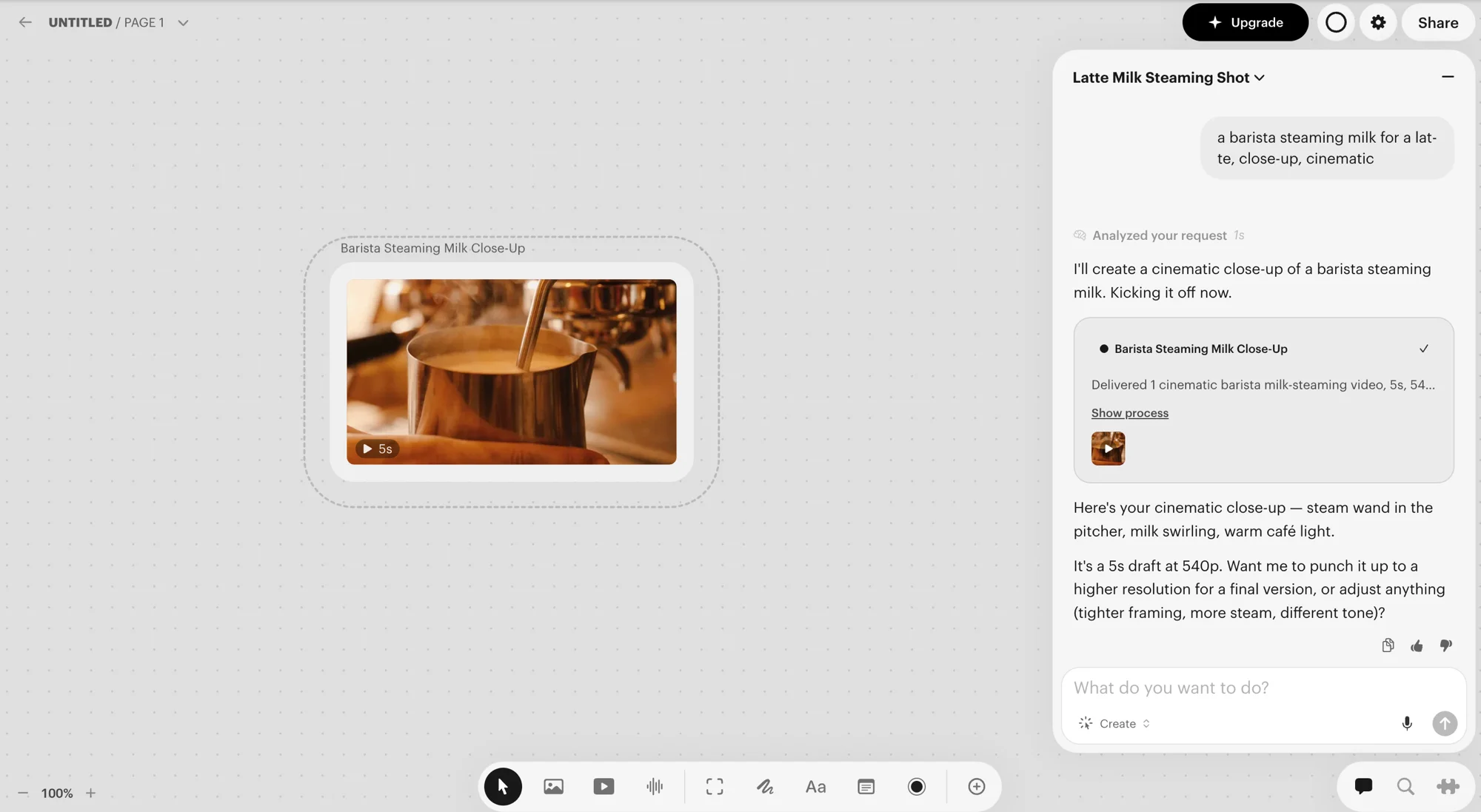
Sign in expecting a prompt box and you get a whiteboard. The home screen asks “What do you want to create today?”, and when you describe something, Luma spins up a board — a canvas workspace — and an AI agent takes over: it analyses the request, tells you its plan, and starts generating. It is much closer to a creative agent than to a generator with a render button.
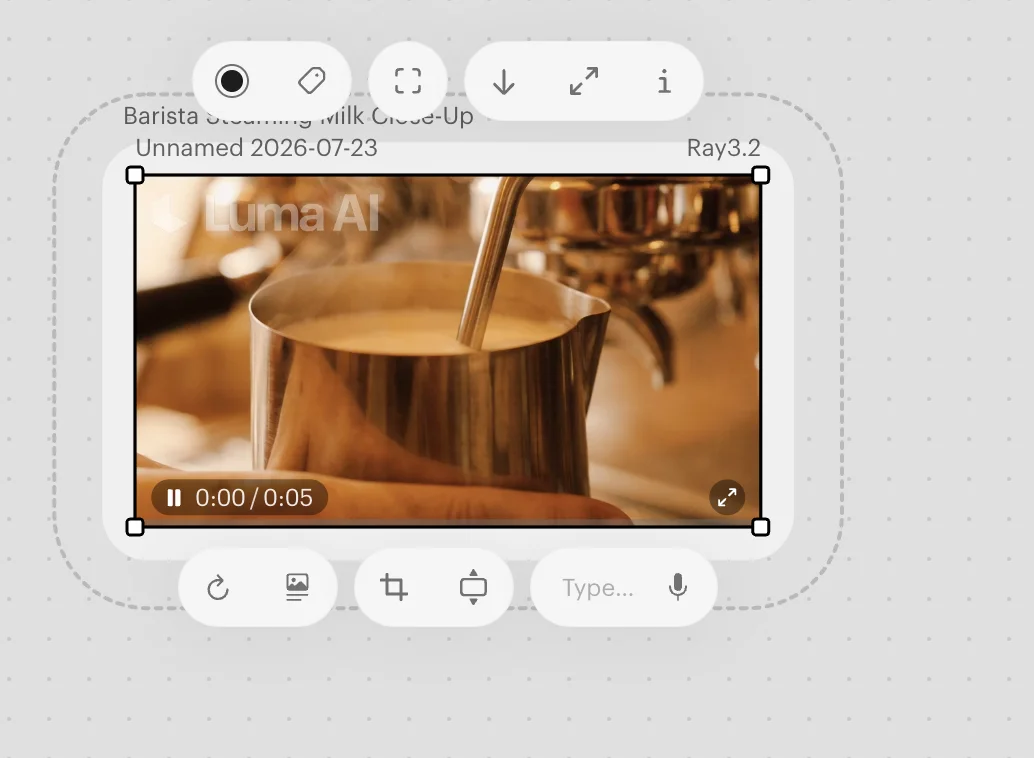
I ran our standard test prompt, “a barista steaming milk for a latte, close-up, cinematic.” The agent named the job “Latte Milk Steaming Shot,” replied “I’ll create a cinematic close-up of a barista steaming milk. Kicking it off now,” and a couple of minutes later delivered a photorealistic five-second clip: a steel pitcher under an espresso machine, warm café light, clean motion on the milk and the steam wand. It was rendered on Luma’s own Ray 3.2 model and, on the free trial, stamped with a “Luma AI” watermark.
Then it asked whether I wanted to punch it up to a higher resolution or adjust the framing, steam, or tone. That draft-then-refine loop is the whole personality of the tool — when I asked for a longer, 1080p final, the agent simply replied “Upgrading to a final version, 10 seconds at 1080p, same scene,” and started a fresh render on the board.
The other half of the pivot is the model library. Luma no longer relies only on its own engine; a single plan reaches nearly every leading model across video, image, and audio, one canvas and one credit pool for all of them. That makes Luma an aggregator in the mould of Runway’s marketplace, but wider.
| What Luma runs | Models included in a plan |
|---|---|
| Luma’s own video | Ray 3.14, Ray 3.2 |
| Third-party video | Google Veo 3 / 3.1, Kling 2.6 / Kling Omni |
| Image | Seedream 4.0, Nano Banana Pro, GPT Image |
| Audio & lip-sync | ElevenLabs (Music, SFX, TTS v3), Synthesia Lipsync, Sync Lipsync |
It is also worth noticing where the product now points. The Discover feed that greets you is dominated by product photography and marketing templates — brand-asset ad variants, virtual try-ons, product hero shots, UGC-style posts — not cinematic film reels. Luma has clearly aimed the agent at commercial creative work: turning a product photo into a campaign, not turning a prompt into a short film. The video model is present, but marketing imagery is the centre of gravity.
How much does Luma AI cost?
Luma runs on a credit system with a free trial and three paid tiers. Everything you generate spends credits, and video costs more than an image, so the number that matters is credits per month, not the headline dollar figure.
| Plan | Price (monthly) | Credits | For |
|---|---|---|---|
| Luma Trial | Free | 3,000 (one-time) | Evaluating the tool |
| Plus | $30/mo | 10,000 | Makers exploring |
| Pro | $90/mo | 40,000 | Weekly creators |
| Ultra | $300/mo | 150,000 | Production-scale work |
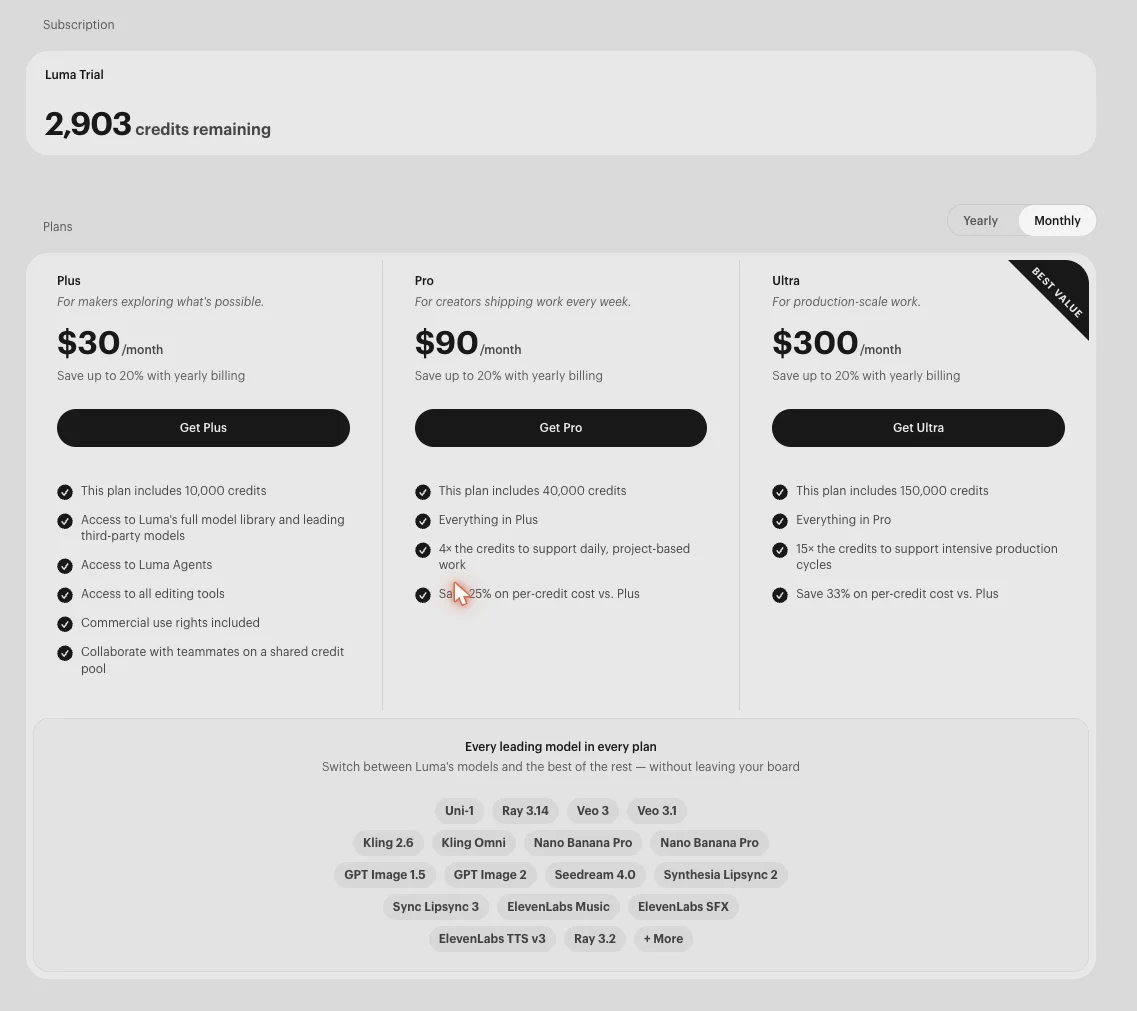
A few things stand out. The free tier is a trial pool, not a refilling free plan — our account held 3,000 credits, enough for a handful of clips to judge quality, then you are on a paid plan. Plus at $30 for 10,000 credits is the real entry point, and it includes the full model library, the Luma Agents, all editing tools, commercial-use rights, and a shared credit pool for teammates. Pro and Ultra buy 4× and 15× the credits with a lower per-credit cost (Luma quotes roughly 25% and 33% savings versus Plus on the pricing screen above), and yearly billing shaves up to another 20%.
The honest framing on price is that you are paying for breadth and convenience. Our five-second 540p barista draft cost about 97 credits, so the free trial is roughly 30 drafts and the $30 Plus plan around 100 a month, with a higher-resolution final costing more again. And because you can reach models like Veo and Kling through Luma rather than through their own apps, you are effectively paying Luma a margin for the aggregation. That is worth it if you value one workspace and one bill; it is not the cheapest way to reach any individual model.
Who is Luma AI for?
- Marketing and product teams who want to turn product photos into campaigns — ads, hero shots, try-ons, localised variants — from one agent-driven workspace. This is squarely what the new Luma is built for.
- Multi-format creators who work across video, image, and audio and would rather not juggle separate Veo, Kling, ElevenLabs, and image-model subscriptions. The single library is the draw.
- People who like directing, not dialing in settings. If describing what you want and refining conversationally suits you better than a panel of sliders, the agent flow is a genuine fit.
- Small teams that want a shared credit pool and boards to collaborate on, rather than scattered individual accounts.
- Not for: anyone who wants the cheapest raw clips or the single best video model. If your only job is “generate the best possible eight-second shot as cheaply as possible,” a dedicated model like Google Veo or a pay-as-you-go option like Seedance is a more direct, cheaper route than paying for Luma’s whole platform.
The good
| Luma AI at a glance | |
|---|---|
| Our rating | 4.0 / 5 (Power Tool) |
| Best for | Agent-driven multi-model creative production |
| Free tier | Trial only, 3,000 one-time credits |
| Cost | Plus $30/mo (10k credits); Pro $90; Ultra $300 |
| Standout | Every leading model + an AI agent, in one canvas |
Every leading model behind one login
The strongest thing about the new Luma is the model list on the billing page: Ray 3.14/3.2, Veo 3/3.1, Kling 2.6/Omni, Seedream 4.0, Nano Banana Pro, GPT Image, ElevenLabs, and Synthesia Lipsync, all included in a single plan. For anyone who currently pays for and switches between several of these, consolidating into one workspace and one credit pool is a real, quantifiable convenience.
In testing it proved more than convenience: when Luma’s own Ray model returned a lifeless upscale, I re-routed the same scene to Veo 3 without leaving the board and got back a clip with genuine motion and native audio. That in-place fallback to a stronger model is something a single-model tool simply cannot do.
The output quality is genuinely there
This is not a case of breadth over substance. Our barista test came back photorealistic — warm café lighting, believable motion on the milk and the steam wand, no obvious artefacts on the frame — competitive with the better models in the category. The video model that started as Dream Machine has kept up.
The agent drafts fast and talks back
The conversational agent turned one line into a named, planned, generated clip in a couple of minutes, then proactively offered upscaling and specific adjustments (“tighter framing, more steam, different tone”). For iterating toward a result rather than gambling on a single generation, that back-and-forth is faster and less frustrating than re-prompting a blank box.
Built for teams, not just solo prompts
Boards give you a shared canvas, and every paid plan runs on a shared team credit pool with collaboration built in. That is a genuine step up from tools where every seat is a separate account and there is no shared workspace — it makes Luma usable as a small studio’s creative surface, not just an individual’s toy.
Commercial rights are included on paid plans
The Plus plan and up explicitly include commercial-use rights, stated on the pricing page. For a business turning out product creative, that clarity matters — it is one less licensing question than free tiers elsewhere that restrict output to personal use or leave the terms ambiguous.
It stays current without you chasing releases
Because Luma aggregates, new flagship models show up in your existing plan rather than requiring a new subscription. The library already lists very recent models (Ray 3.14, Veo 3.1, Kling Omni, Seedream 4.0), so the platform absorbs the field’s churn on your behalf — you switch models from a dropdown instead of opening another account.
The bad
The pivot buries the thing you came for
If you searched “Luma AI” for a straightforward text-to-video generator, the agentic canvas is a jarring change. There is no simple prompt-to-video mode front and centre; you go through the agent and a board every time. That is powerful once you adapt, but it is a real learning curve and a mismatch with what most search results still promise Luma is.
You pay a margin for the aggregation
Reaching Veo or Kling through Luma is convenient, but it is not free convenience — you are spending Luma credits to run models you could subscribe to directly, so at the per-model level you are paying an aggregator’s margin. For someone who only uses one of these models, going direct is cheaper than Luma’s $30 entry for the whole library.
| If you only need one thing | The cheaper direct route |
|---|---|
| The best cinematic video model | Google Veo at $19.99/mo, usable free tier |
| The cheapest top-tier clips | Seedance, ~$0.62 a clip pay-as-you-go |
| Raw 4K quality on a budget | Kling, ~$0.66–0.80 a flagship clip |
The free trial is a one-time pool, and it is watermarked
Our account’s 3,000 trial credits are a fixed evaluation pool, not a monthly refill, and every clip it produces carries a “Luma AI” watermark stamped across the corner. That is enough to judge the tool but not to publish anything for free, and unlike rivals whose free tiers refill each month, once the pool is gone you are on a paid plan. Treat Luma as paid-only for real work.
The draft-then-upscale loop can go backwards, and it over-states resolution
The agent delivered a 540p draft and offered to upscale to a “final version,” but that step is not reliably an upgrade. When I asked for a longer 1080p final, the agent announced “10 seconds at 1080p” and produced a near-static clip that turned out to be 720p, not 1080p. Comparing frames across the ten seconds, the picture was effectively frozen: the milk and steam barely shifted, and the liveliest thing on screen was Luma’s own watermark drifting around the corner.
Re-running the same scene through Veo 3 fixed the motion outright, where the frame-to-frame change jumped several times over and kept building through the shot, but that clip also came back at 720p despite the same 1080p billing. So the agent over-states the resolution it delivers, at least on the trial, and its upscale can quietly hand you a worse clip than the draft.
It is a jack-of-all-models, master of none
By design, Luma does not try to be the single best at any one thing — it routes to whichever model you pick. The upside is range; the downside is that for any specific job, a specialist beats it. The best cinematic shot still comes from Veo, the cheapest top-tier clip from Seedance, the best editing from Runway. Luma’s advantage is having them together, not out-performing them individually.
Credit costs per generation are not obvious up front
The plans are quoted in bulk credits, but how many credits a given video or upscale actually costs is not shown before you generate. Our five-second draft turned out to spend about 97, which you only learn by watching the balance drop from 3,000 to 2,903 afterward. For a credit-metered tool, that opacity makes it hard to predict how far a plan’s allotment really goes before you have spent it.
Alternatives worth considering
If Luma’s agent-and-aggregator model isn’t the fit, three tools cover the ways you might go instead.
- Runway is the closest comparison — the other multi-model creative platform. It pairs the best editing suite in AI video (Aleph revision) with a marketplace that runs Veo, Kling, and Seedance. If your work is video editing and revision rather than agent-driven multi-format creation, Runway is the stronger version of the same idea — see Luma vs Runway head to head.
- Google Veo is the pick if you want the single best video model rather than a library of many. It is the most cinematic generator we have tested (4.6), with reliable native audio and a usable free tier, at $19.99/mo — cheaper than Luma if video is all you need.
- Kling is the value play for raw quality: native 4K and elite motion at roughly $0.66–0.80 a flagship clip, far below Luma’s platform price if you only want great clips and will manage its credit system.
The verdict on Luma AI
Luma in 2026 is a good product that is no longer the product most people are looking for. The video generator became an agent, and the agent is genuinely capable — fast, conversational, drawing on nearly every leading model, and backed by output that held up in testing. For a marketing or product team that wants one agent-driven workspace across video, image, and audio, with commercial rights and a shared credit pool, it earns its 4.0 and its place on the shortlist.
Just go in knowing what you are buying: breadth and convenience, not the cheapest clips or the single best model. If you want to see how far the platform has come from the Dream Machine days, the free trial is enough to judge it — start there, and reach for a specialist like Google Veo only if one particular job outgrows the all-in-one.
For more, see our Luma AI pricing guide, the best Luma alternatives, and our best AI video generator hub.
Frequently asked questions
Is Luma AI still Dream Machine?
Not in the way it was. Luma has folded Dream Machine into a broader product it now calls Luma AI Creative Agents, an agentic canvas where you describe what you want and an AI agent plans and builds it. The Dream Machine video model (now the Ray line) is still in there, but it is one engine among many rather than the whole product.
So a review of the old standalone text-to-video Dream Machine describes something that no longer exists as a separate tool. If you sign in expecting a simple prompt-to-video box, you get a whiteboard-style workspace with a conversational agent instead. The capability is still there, and arguably better, but the shape of the product has changed completely.
Is Luma AI free?
There is a free trial rather than a permanent free tier. A new account gets a pool of trial credits (3,000 in our account), enough to generate a handful of clips and genuinely evaluate the tool, but not to run a workflow. Paid plans start at $30 a month.
The important thing to understand is the credit model. Everything you make spends credits, and a video costs more than an image, so the trial pool goes quickly once you start iterating. Treat the free trial as a proper test drive to judge quality and the agent workflow before you commit, not as a way to produce free video at any volume.
What models does Luma AI run?
Nearly all of them, which is the whole point of the pivot. Alongside its own Ray 3.14 and Ray 3.2 video models, Luma's plans include Google Veo 3 and 3.1, Kling 2.6 and Kling Omni, Seedream 4.0, Nano Banana Pro, GPT Image, ElevenLabs (Music, SFX, and TTS v3), and Synthesia Lipsync, among others.
That turns Luma from a single video model into an aggregator: one subscription and one canvas that reach the leading video, image, and audio models without leaving the board or juggling separate accounts. It is the same idea as Runway's marketplace, but wider, spanning image and audio as well as video.
Is Luma AI good for video?
Yes, the video output is genuinely good. In hands-on testing, a single cinematic barista prompt produced a photorealistic five-second clip with warm café lighting and clean motion on the pitcher and steam, delivered as a 540p draft the agent then offered to upscale. It is competitive with the better models in the field.
The caveat is workflow, not quality. Video arrives through the agent as a low-resolution draft first, and you refine or upscale from there, which is a different rhythm from a tool that hands you a finished clip in one pass. If you want raw one-shot quality, a dedicated model like Google Veo is more direct; if you like iterating conversationally toward a final, Luma's flow fits.
Luma AI or Runway — which is better?
They are converging on the same idea from opposite directions. Both now offer a multi-model workspace: Runway pairs the best editing suite in AI video (Aleph) with a marketplace that runs Veo, Kling, and Seedance, while Luma pairs an agentic canvas with an even broader model library that adds image and audio. If your work is video editing and revision, Runway is stronger; if it is multi-format creative production driven by an agent, Luma is broader.
On price they are close at the entry level, and both are aggregators, so the deciding factor is usually the workflow you prefer, a conversational agent (Luma) or a hands-on editor (Runway), rather than the model list, which overlaps heavily. Our full Runway review covers that side in depth.
Keep reading
Luma vs Runway: The Agent vs the Editing Studio
Luma vs Runway, tested hands-on: both put many models in one workspace, but Luma is an AI agent that builds for you and Runway is an editing studio you control.
Luma AI pricing: what the credits really cost
Luma AI pricing: the free tier is a one-time trial, Plus is $30/mo for 10,000 credits, and a clip runs ~97. What each plan really buys, tested hands-on.
The Best Luma AI Alternatives, Tested Hands-On
Luma AI is a multi-model aggregator you pay a margin for. The 6 best Luma alternatives — go direct to one model, or switch aggregators — each tested hands-on.

The Best Free AI Video Generator (No Trial Traps)
Most free AI video generators are watermarked or trials in disguise. Google Veo's free tier gives a real clip with sound, refilled daily, for $0.