
InVideo AI pricing: what a video actually costs
InVideo AI starts at $20/mo, but credits decide everything: a stock clip costs 2, a Veo or Sora clip 40. The real per-plan cost, and the credit trap.

Contents
How much does InVideo AI cost?

InVideo AI costs $0 on the free plan, $20 a month for Plus, $100 for Max, $200 for Generative, and $1,000 for Elite when billed monthly, with annual billing trimming about 15% off each. But the monthly price is the number InVideo wants you to look at, and it is not the one that decides what you can make. That number is credits. The free plan cannot export a usable video, so the real entry point is Plus at $20.
| Plan | Monthly | Credits/mo | Best for |
|---|---|---|---|
| Free | $0 | ~1 (can’t export usable video) | looking around |
| Plus | $20 | 75 | solo creators, mostly stock |
| Max | $100 | 390 | regular generative use |
| Generative | $200 | 800 | daily generative output |
| Elite | $1,000 | 4,250 | agencies and teams |
Prices and credit pools verified in InVideo’s in-app Generate screen (June 2026); the public pricing page is JS-rendered. Annual billing is roughly 15% cheaper.
That table answers the search, but it buries the thing that actually governs your bill: a single video can cost anywhere from 2 credits to 40, depending on the footage. Here is how the credits meter, what a video really costs, and the trap the pricing page does not lead with.
How does InVideo AI’s pricing actually work?
InVideo does not charge per video. It charges a flat monthly fee for access, then meters every generation against a monthly credit pool that refills with your plan. The twist that makes InVideo different from a flat script-to-video tool is that the credit cost per video is not fixed — it depends entirely on the kind of footage you ask for.
| What you’re paying for | How InVideo meters it |
|---|---|
| Access and the model hub | a flat monthly (or annual) fee |
| How much you generate | a monthly credit pool, spent per render |
| The kind of footage | per-generation cost, from 2 to 40 credits |
| Re-doing a clip | the full credit cost again, no discount |
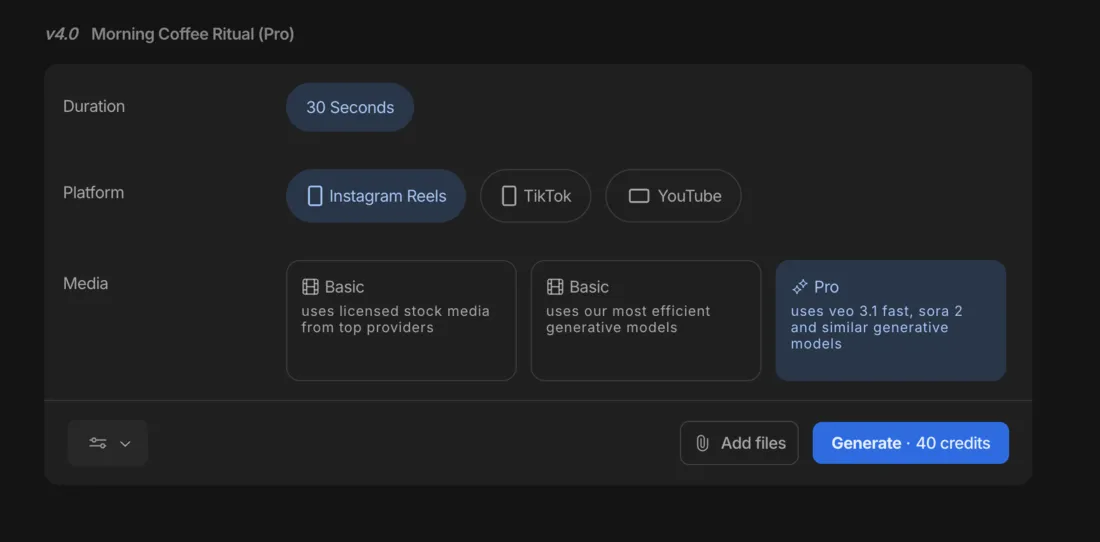
Generating the same 30-second brief, InVideo quotes wildly different prices for three media settings: cheap stock footage, mid-priced efficient-generative clips, and expensive premium generation that taps Google’s Veo 3.1 and OpenAI’s Sora 2. So two creators on the identical $20 Plus plan can have completely different effective costs, because one is assembling stock and the other is generating cinematic footage. That is the single most important thing to understand before you pay: your plan sets the credit pool, but your footage choice sets how fast you drain it.
The reason for the spread is what InVideo actually is under the hood. It bills itself as a hub with access to 200-plus models, and the credit cost of a generation roughly tracks the compute behind the model you invoke. Pulling a licensed stock clip is nearly free, so it costs about 2 credits; running a frontier video model like Veo 3.1 or Sora 2 is expensive to compute, so it costs 40. The credit system is really InVideo passing that cost straight through to you per generation, which is why the price of a video is a choice you make each time rather than a fixed rate the plan sets.
The other catch is that there is no loyalty discount on iteration. Regenerate a clip you did not like and InVideo charges the full rate again, so a premium clip that misses can cost 40 credits, then 40 more. The headline prices are the easy part; the real question is how many finished videos your credit pool covers once you account for the footage you want and the retries you will need.
Keep that framing for the rest of this guide, because every section below is really answering one question in a different way: given the footage you make and how often you regenerate, how far does your plan’s credit pool actually stretch? Get that number right and InVideo’s pricing is straightforward to plan around; ignore it and the friendly $20 sticker turns into a monthly surprise.
What does a video actually cost in credits?
This is where InVideo’s pricing becomes real, and it is the number the plan table hides. In our hands-on testing, InVideo quoted three very different credit costs for the same 30-second video depending on the media setting.
| Footage setting | What it uses | Credits (30s) |
|---|---|---|
| Stock (Basic) | licensed stock clips | ~2 |
| Efficient generative | InVideo’s cheaper AI models | ~15 |
| Premium (Pro) | Google Veo 3.1, OpenAI Sora 2 | 40 |
Now run those rates against the $20 Plus plan’s 75 monthly credits, and the picture sharpens fast.
| On Plus (75 credits/mo) | Credits/video | Videos/month |
|---|---|---|
| Stock footage | 2 | ~37 |
| Efficient generative | ~15 | ~5 |
| Premium (Veo / Sora) | 40 | fewer than 2 |
Seventy-five credits is roughly 37 stock videos a month, which is plenty, but only about five efficient-generative videos and fewer than two premium clips. A single 30-second video using the best models eats more than half your monthly pool, and because regenerating charges full price again, a misjudged prompt on the Pro tier can cost 40 credits twice. That is the trap running through InVideo’s user reviews: people describe paying real money for clips they never finished, because each attempt burned more credits.
The higher tiers lift the ceiling — Max’s 390 credits and Generative’s 800 are sized for people who generate constantly — but the per-clip cost never drops. A premium clip is 40 credits on Elite just as it is on Plus. So the honest way to budget InVideo is to decide what footage you actually need, multiply by its credit cost, add a generous margin for retries, and pick the plan whose pool clears that.
Put it in money terms and the split is stark. On the $20 Plus plan, a stock-first creator effectively pays about 50 cents a video ($20 spread across roughly 37 clips), while a premium-generative creator pays closer to $11 a clip, because the same $20 buys fewer than two. Add the regenerations a Veo or Sora prompt usually needs, and the true cost of one finished premium clip can climb past $20 on its own — more than the entire monthly plan. That is why “InVideo is $20 a month” is both true and misleading: it is the price of the door, not of the video.
Monthly versus annual billing
Annual billing takes about 15% off every tier, so the $20 Plus plan drops to roughly $17 a month, or around $200 for the year. That is a genuine saving if you are confident InVideo fits your workflow, though it is a gentler discount than the 40-to-50% some rivals give on annual commitments.
| Plan | Monthly | Annual (per mo, approx) |
|---|---|---|
| Plus | $20 | ~$17 |
| Max | $100 | ~$85 |
| Generative | $200 | ~$170 |
The trade is the standard one: an annual plan is a year-long commitment, and cancelling stops the renewal rather than refunding the unused months. But with InVideo the billing cycle is the secondary decision. The primary one is credits, because a heavy generative month can exhaust your pool whether you pay monthly or annually, and no discount changes the 40-credit cost of a premium clip. Take the annual saving if you are sure, but size your plan by the credits your footage demands first.
It is also worth noting that the 15% annual discount is modest by category standards. Fliki halves its price on an annual plan, and Pictory cuts roughly 40% on its upper tiers, so the annual lever is a bigger deal on those tools than on InVideo. With InVideo the money question that actually moves the needle is not the billing cycle at all — it is whether you can keep your generative habit inside the credit pool you are paying for, because that is where the real cost lives.
What to watch before you pay
InVideo’s marketing leads with the low $20 entry price and the breadth of models. These are the details that decide whether that price holds up for you.
The free plan cannot make a usable video
InVideo’s free tier watermarks every export, caps your weekly export time, and gives a credit pool a single generation can exhaust. It is an interface tour, not a free video maker, and several reviewers called that misleading. A rival like Fliki lets you actually build and export a watermarked video for free; InVideo makes you pay before you can produce anything publishable, so the real entry price is $20, not $0.
The sharper problem is that you cannot honestly evaluate the thing InVideo is best at — its generative footage — without paying first. The free plan shows you the interface and the model list, but the moment you try to generate and export something usable, you hit the wall. For a tool whose whole appeal is the quality of its Veo and Sora output, not being able to test that output before committing is a real friction. Budget the first month of Plus as an extended trial rather than expecting the free plan to answer whether InVideo is worth it.
The premium credit cost is the whole story
The gap between a 2-credit stock clip and a 40-credit premium one is the single fact that decides InVideo’s value for you. If you will mostly use stock, the $20 plan is genuinely cheap and you will rarely run dry. If you want the Veo and Sora footage that is InVideo’s main draw, you are budgeting for fewer than two clips a month on Plus, and the tool gets expensive fast. Know which creator you are before you pay.
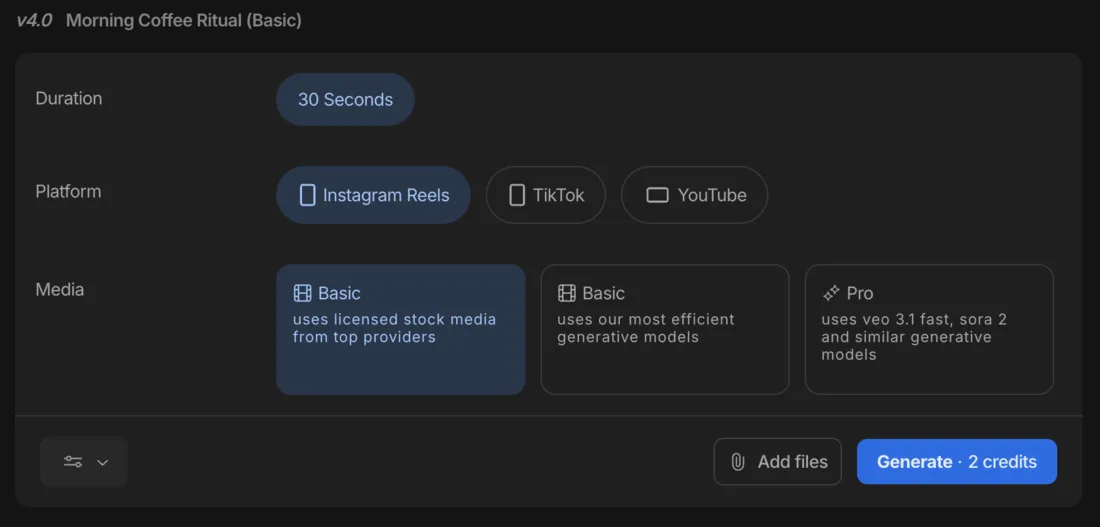
The two screens above are the same 30-second video priced twenty times apart, and that single decision — which media tier you pick each time you generate — matters far more to your monthly bill than which plan you are on. It is the reason two people paying the identical $20 can have wildly different experiences of whether InVideo is cheap or ruinous.
Regeneration charges full price
There is no discount for fixing the AI’s mistakes. Every regeneration of a clip spends the full credit cost again, so the effective price of a finished premium video is often double or triple the per-clip number once you account for the retries a generative model inevitably needs. Budget for the misses, not just the hits.
In practice a Veo or Sora prompt rarely lands perfectly on the first try: you adjust the wording, regenerate, tweak a scene, regenerate again. Two or three attempts at 40 credits each is 80 to 120 credits for a single finished clip — more than the entire 75-credit monthly pool on Plus. That is the mechanism behind the recurring review complaint of paying for videos that were never finished, and it is why the premium tier’s real cost is impossible to know in advance: it depends on how many tries your prompt takes, and the meter runs on every one.
Stock licenses are a separate meter
On paid plans the watermark is gone, but InVideo’s stock footage is licensed only at export, and each export draws from a monthly iStock quota (100 on Plus). It is rarely the limit you hit first, but it is a second meter running alongside credits, and worth knowing exists before a high-volume month surprises you.
Which InVideo AI plan should you pick?
The plan you need is set almost entirely by one question: how much generative footage you will actually use. Because stock costs so little, a stock-first creator can live on the cheapest paid plan indefinitely, while a generative-first creator will climb the tiers fast no matter how disciplined they are. So decide your footage habit first, then match it to the pool below rather than starting from the price.
- Just evaluating → Free ($0). Useful only to click around the interface, since it cannot export a usable video. Treat it as a demo, not a trial you can produce from.
- Solo creator, mostly stock footage → Plus ($20/mo). The right plan for most individuals: watermark-free 1080p export and 75 credits, which is roughly 37 stock videos a month. It is only tight if you lean on generative footage.
- Regular generative use → Max ($100/mo). The step up when Plus’s 75 credits run dry on generative work. Its 390 credits cover meaningfully more Veo and Sora clips, and it is the tier for creators who generate rather than assemble.
- Daily generative output → Generative ($200/mo). For people producing premium generative video every day; 800 credits is sized for that cadence. Below that volume it is overkill.
- Agency or team → Elite ($1,000/mo). Only once a single lower plan is genuinely exhausted; the 4,250-credit pool and team features are for constant, multi-seat production.
For most people evaluating InVideo, the honest recommendation is Plus, used mostly for stock with the occasional premium clip as a treat. That is the tier where the $20 price and the 200-model access actually line up, and it is the only plan most creators need until a genuinely generative-heavy workflow forces the jump to Max. Start there, watch your credit burn for a month, and upgrade only when the pool really runs dry — not before, because you cannot get the money back by downgrading mid-cycle.
If InVideo AI’s price doesn’t fit
If the credit economics or the no-export free plan put you off, two tools in the same lane price more predictably.
| Tool | Entry price | The trade |
|---|---|---|
| Fliki | $8/mo (Basic) | cheaper, a free tier that actually exports, better voices — but basic visuals and no generative footage |
| Pictory | $25/mo (Starter) | cleaner blog-to-video repurposing and a deep stock library — but a robotic default voice and stock-only visuals |
- Fliki is the budget-and-voice pick: it starts at $8 a month, its free tier actually exports a (watermarked) video where InVideo’s cannot, and its 2,000-plus AI voices outclass InVideo’s narration. You give up InVideo’s generative range, but the cost is far more predictable. See our Fliki review, or the head-to-head in Fliki vs InVideo.
- Pictory is the pick if your job is turning existing articles into video rather than generating from a prompt; its URL-to-video repurposing is cleaner and its stock library deeper, with predictable stock-only costs and no 40-credit cliff. See our Pictory review, or Pictory vs InVideo.
Weighed against those two, InVideo’s pricing is the most powerful and the least predictable in the lane. It is the only tool here that puts Veo and Sora generation behind a $20 door, which is genuinely remarkable value if you use it sparingly and ruinous if you lean on it.
If you want predictable cost, Fliki and Pictory meter far more gently; if you want the generative ceiling and can discipline yourself around the credit meter, InVideo is worth its complexity. Either way, the number to write down before you subscribe is not $20 — it is how many premium clips a month you actually need, because that is what decides whether InVideo is a bargain or a money pit.
The bottom line on InVideo AI pricing
InVideo’s pricing looks simple and is anything but. You pay $20 a month for Plus, and for a creator who mostly assembles stock footage that is genuine value, with 75 credits covering dozens of videos a month. The moment you reach for the Veo and Sora generative footage that is InVideo’s headline feature, the same plan turns stingy: 40 credits a clip means fewer than two a month, and regeneration charges full price again.
So budget InVideo by the footage you actually want, not the monthly sticker. If you will live in stock, it is cheap and capable; if you want generative video at any volume, price the credits carefully and expect to climb to Max or Generative. And go in knowing the free plan is a demo, not a trial — the real entry cost is the $20 Plus plan, and the credit pool, not the fee, is the limit you will actually hit.
InVideo is one of the picks in our best script-to-video AI tools roundup, and if the credits are what worry you, Fliki pricing meters far more gently for voice-led video. Our InVideo alternatives guide covers the rest of the field, mapped to what sends people looking.
Frequently asked questions
How much does InVideo AI cost?
Billed monthly, InVideo AI is Free at $0, $20 a month for Plus, $100 for Max, $200 for Generative, and $1,000 for Elite, with annual billing trimming roughly 15% off each. But the monthly price is not the number that matters, because InVideo runs on credits. Each plan includes a monthly credit pool (75 on Plus, 390 on Max, 800 on Generative, 4,250 on Elite), and every generation spends from it.
In our testing a stock-footage video cost about 2 credits, an efficient generative one around 15, and a premium Veo or Sora clip 40 — so on the $20 Plus plan you can make dozens of stock videos a month but fewer than two premium generative ones. The free plan cannot export a usable video at all. So the honest answer is that InVideo costs $20 a month to start, but what you can actually produce is decided by the credit pool and the kind of footage you generate, not the sticker price.
Is InVideo AI free?
There is a free plan, but unlike some rivals it cannot produce a usable video. The free tier stamps an InVideo watermark on every export, caps your weekly export time, and gives a credit pool so small that a single generation can exhaust it, so in practice it is an interface tour rather than a way to publish. By contrast, a rival like Fliki gives a free tier that actually exports a finished (watermarked) video.
This was the most common complaint we found in InVideo's user reviews, and it matches the product's design: InVideo wants you on a paid plan before you make anything you can post. To remove the watermark, export at 1080p, and actually generate video, you need the Plus plan at $20 a month, which is where the tool becomes usable. Treat the free plan as a look around the interface, not a free video maker, and budget the $20 Plus plan as the real entry price.
How do InVideo AI credits work?
InVideo meters usage in credits, and the cost per video depends entirely on the footage you choose rather than being a flat rate. In our testing the same 30-second brief cost about 2 credits on the stock-footage setting, around 15 on the efficient-generative setting, and 40 on the premium setting that taps Google's Veo 3.1 and OpenAI's Sora 2. Each plan refills a monthly credit pool — 75 on Plus, 390 on Max, 800 on Generative, 4,250 on Elite.
The catch that surprises people is that there is no discount for regenerating: if a clip comes out wrong and you generate it again, it charges the full rate a second time. So a misjudged prompt on the premium tier can cost 40 credits twice. That makes the credit pool, not the monthly fee, the real limit on how much you produce, and it is why budgeting InVideo means estimating credits per finished video (including the retries) rather than counting the videos your plan nominally allows.
How many videos can you make with InVideo AI?
It depends almost entirely on the footage type, because the credit cost swings so widely. On the $20 Plus plan's 75 monthly credits, stock-footage videos at about 2 credits each stretch to roughly 37 a month, which is plenty for a stock-heavy creator. But efficient-generative videos at around 15 credits drop that to about five a month, and premium Veo or Sora clips at 40 credits mean fewer than two before the pool runs dry.
That is the whole tension of InVideo's pricing: the same $20 plan is generous for stock and stingy for generative. Higher tiers lift the ceiling — Max's 390 credits and Generative's 800 are sized for regular generative use — but the per-clip cost never changes, so a premium clip is always 40 credits whatever plan you are on. Budget by multiplying your target number of videos by the credit cost of the footage you actually want, then add margin for the regenerations that charge full price again.
Is InVideo AI's annual plan worth it?
Annual billing takes roughly 15% off, so the $20 Plus plan drops to about $17 a month (around $200 for the year). That is a real saving if you are confident you will keep using InVideo, though the discount is gentler than the 40-to-50% some rivals offer on annual plans. The trade is the usual one: an annual plan is a year-long commitment, so cancelling stops the renewal rather than refunding the unused months.
The more important budgeting question with InVideo is not annual-versus-monthly but which tier and how many credits you need, since the credit pool is what you actually run out of. A 15% annual saving does not change the fact that a heavy generative month can exhaust your credits regardless of billing cycle. So take the annual discount if you are sure InVideo fits, but size your plan by the credits your footage demands first, and treat the billing-cycle saving as secondary.
Does InVideo AI put a watermark on videos?
On the free plan, yes — every export carries an InVideo watermark, which is one reason the free tier is evaluation-only. On any paid plan, starting with Plus at $20 a month, the download screen gives you separate switches: one removes the watermark, a second strips InVideo's own branding, and a third sets resolution up to 1080p, so a clean, unbranded export is the default once you pay.
One detail worth knowing: InVideo's stock footage is licensed only when you export, and each export consumes iStock licenses from your monthly quota (100 on Plus), shown to you at download. So the watermark question is really a plan question — pay and it is gone, along with the InVideo branding — but the stock-license meter is the thing to watch on a paid plan, not a watermark. Budget the $20 Plus plan as the price of a clean, watermark-free 1080p export.
Keep reading
InVideo AI review: the fastest prompt-to-video, at a price
I ran one script through InVideo AI three ways. It's the fastest, broadest AI video tool I've tested, but the credits bite hard. My hands-on 4.2/5 verdict.
The 5 best InVideo AI alternatives, ranked by job
InVideo alternatives ranked: Fliki from $8 for voice and a free tier, Runway for generative footage, Pictory for blog-to-video, plus avatar and editing picks.

The Best AI Video Generator for Every Kind of Video
The best AI video generator depends on the job. We tested 10 hands-on: Google Veo for generation, Synthesia for avatars, Fliki for script-to-video, and more.

The Best Free AI Video Generator (No Trial Traps)
Most free AI video generators are watermarked or trials in disguise. Google Veo's free tier gives a real clip with sound, refilled daily, for $0.