
Fliki pricing: what $8 a month really gets you
Fliki starts at $8/mo (or about $4 with the annual promo), and its free tier actually exports a video. The real per-plan cost, the credits, and the catch.
Contents
How much does Fliki cost?

Fliki costs $0 on the free plan, $8 a month for Basic, $28 for Standard, and $88 for Premium when billed monthly. Annual billing plus Fliki’s current promo takes roughly 50% off, so Standard drops to about $14 a month on a yearly commitment. Unlike most rivals, the free plan actually exports a finished (watermarked, 720p) video rather than just previewing one, and the real entry point for clean, watermark-free 1080p output is Basic at $8.
| Plan | Monthly | Annual + promo (per mo) | Best for |
|---|---|---|---|
| Free | $0 | — | evaluating (720p, watermark, 1-min) |
| Basic | $8 | ~$4 | solo creators, short clips |
| Standard | $28 | ~$14 | voice-first and multilingual creators |
| Premium | $88 | ~$44 | daily, long-form, multilingual output |
| Enterprise | Custom | Custom | teams needing API and bulk |
Monthly prices verified in Fliki’s in-app upgrade modal (June 2026); credits, length caps, and the 50%-off annual promo re-confirmed on fliki.ai/pricing (July 2026). Promo pricing is a moving target — plan around the standard monthly rates.
That table answers the search, but it hides the number that actually decides how much you can produce: credits. The monthly fee gets you in the door; the yearly credit pool is what runs out. Here is how Fliki meters, what each plan really buys, and the catch behind the cheap sticker.
How does Fliki’s pricing actually work?
Fliki does not charge per video. It charges a flat fee for access, then meters your usage against a yearly credit pool that refills with your plan, and every generation and re-render spends from it. When the pool runs dry you wait for the next cycle or upgrade. Two other things scale with the tier alongside credits: the maximum length of a single video, and the number and quality of AI voices you can use.
| What you’re paying for | How Fliki meters it |
|---|---|
| Access to the tool | flat monthly (or annual) fee |
| How much you can generate | a yearly credit pool, spent per render |
| How long a video can be | a per-plan length cap, 1 to 40 minutes |
| Voice quality and choice | more and better voices on higher tiers |
That last point is the key to Fliki’s whole pricing logic. What you pay more for as you climb is not better visuals — the AI-generated images and stock stay basic at every tier — it is the voice and the length. Basic removes the watermark and reaches 1080p; Standard adds the ultra-realistic voices and cloning that are the real reason to use Fliki; Premium opens the full 2,000-plus voice catalog and 40-minute videos. If the picture is what you care about, no Fliki plan fixes that, and you are looking at a different tool.
The structure also explains why Fliki feels cheaper than its rivals even where the paid prices are close. Its free plan exports a real video, so the ladder starts at genuine $0 rather than at a locked trial, and its entry paid tier is $8 where Pictory’s is $25 and InVideo’s is $20. You are paying a low price for a narrow, voice-focused product, which is a better deal than the sticker suggests if voice is your priority and a worse one if you needed the visuals or the generative footage those pricier tools include.
So the headline prices are the easy part. The real question is “how much video does my credit pool and length cap actually allow,” and the answer changes with how long your videos are and how much you regenerate. Real numbers on that below.
What does each Fliki plan include?
The jump that matters most is from Basic to Standard, because that is where the ultra-realistic voices, voice cloning, and longer exports arrive — the features Fliki is actually known for. These are the allotments from Fliki’s own plan details, re-confirmed on its pricing page.
| Plan | Monthly | Credits/yr | Max length | Voices (ultra) | Voice cloning |
|---|---|---|---|---|---|
| Free | $0 | 36 | 1 min, 720p | 300 (0) | no |
| Basic | $8 | 720 | 5 min, 1080p | 1,000 (200) | no |
| Standard | $28 | 2,160 | 15 min, 1080p | 1,000 (500) | 1 voice |
| Premium | $88 | 7,200 | 40 min, 1080p | 2,000+ (1,000+) | 3 voices |
Free ($0) is a genuine test drive, not a locked preview: it exports a real watermarked 720p video, capped at one minute, with 300 standard voices and a small 36-credit yearly pool. It is enough to see exactly what Fliki makes and even post a rough clip, but not to publish polished, branded video.
Basic ($8/mo) is the true entry point. It removes the watermark, reaches 1080p, lifts the length cap to five minutes, and adds 200 ultra-realistic voices on top of the standard library, with a 720-credit yearly pool. For a solo creator making short, voice-led social clips on a budget, it is a complete pipeline and the cheapest clean-export plan in the category.
Standard ($28/mo) is the tier Fliki pushes hardest, and for most voice-first creators it is the right one. It roughly triples the credit pool to 2,160, triples the max length to 15 minutes, adds 500 ultra-realistic voices, and includes voice cloning so your channel can use a consistent custom voice. If narration carries your videos and you publish regularly, this is the plan.
Premium ($88/mo) opens the full catalog: 2,000-plus voices with 1,000-plus ultra-realistic, three cloned voices, 40-minute exports, and a 7,200-credit pool sized for daily output. It is the tier for multilingual channels and anyone producing long or high-volume video, and it is where Fliki stops being the cheap option.
Enterprise is custom-quoted for teams needing API access, bulk credits, and dedicated support.
The annual promo: how real is the 50% off?
Fliki leans hard on an annual discount, and right now a promo code takes it further: annual billing plus the FLIKISUMMER50 code cuts roughly 50%, so Standard’s $28 a month becomes about $14, and the other tiers drop by a similar share. On a yearly commitment that is a large saving, and if you already know Fliki fits your workflow, it is the clear way to pay.
| Plan | Standard monthly | Annual + promo (per mo) |
|---|---|---|
| Basic | $8 | ~$4 |
| Standard | $28 | ~$14 |
| Premium | $88 | ~$44 |
The honest caveat is that promos are temporary. A code like FLIKISUMMER50 is a seasonal offer, so the discount you see today may not be the one available when you subscribe, and it is the wrong number to build a long-term budget on. Plan around the standard monthly prices, and treat any active promo as a bonus that lowers your first year rather than a permanent rate. The other trade is the usual one: an annual plan is a year-long commitment, and cancelling stops the renewal rather than refunding unused months, so take the discount only once you are confident.
To put a number on it: a year of Standard costs about $336 paid month to month ($28 times twelve), or roughly $168 with the annual promo — a saving of around $168 over the year for committing up front, and the gap is wider still on Premium. That is real money for a solo creator, which is why the annual plan is the default once you are past the trying-it-out stage. The only sound reason to pay the monthly premium is that you genuinely might stop within the year.
How much video can each plan actually make?
Because Fliki meters in credits tied to how much content you generate, the useful question is not “how many videos” but “how much video.” Each plan pairs a yearly credit pool with a maximum length per video, and together those set the ceiling.
| Plan | Credits/yr | Max length/video | Roughly suits |
|---|---|---|---|
| Free | 36 | 1 min | testing, the odd rough clip |
| Basic | 720 | 5 min | steady short-form social |
| Standard | 2,160 | 15 min | regular multi-format publishing |
| Premium | 7,200 | 40 min | daily or long-form, multilingual |
We did not get a single fixed “credits per video” figure in our hands-on Fliki testing, because the cost scales with length and how much you regenerate, so the honest way to read the table is by the pool and the cap together. Basic’s 720 credits and five-minute limit comfortably cover a creator posting a few short clips a week; Standard’s larger pool and 15-minute cap suit someone publishing regularly across formats; Premium’s 7,200 credits and 40-minute videos are built for daily or long-form output, especially multilingual channels that produce the same script in several languages.
That multilingual case is where Fliki’s credit math turns from generous to tight, and it is worth planning for. Because Fliki’s one-click translation re-voices a finished video into another language, a creator running five language channels is generating the same script five times, and each localized version spends from the same pool. What looks like a comfortable allowance for one English channel becomes the reason to size up to Premium the moment you are publishing seriously in several languages. If multilingual reach is why you chose Fliki in the first place, budget for the higher tier from the start rather than being surprised by the ceiling mid-year.
The trap, as with every credit tool, is iteration. Every regeneration of a scene and every re-render after an edit spends from the same pool, so the effective cost of a finished, published video is higher than a clean first pass suggests. Budget by your realistic monthly volume and length, then add a margin for the re-runs you will inevitably need, and check that against the plan’s pool rather than its price.
What to watch before you pay
Fliki’s pricing is friendlier than most, but a few details decide whether the cheap sticker holds up for your use.
What you pay for is voice, not visuals
Climbing Fliki’s tiers buys you better and more numerous voices, cloning, and longer videos — not better-looking footage. The AI-generated images and stock are basic at every price, so if your complaint is the visuals, no upgrade fixes it.
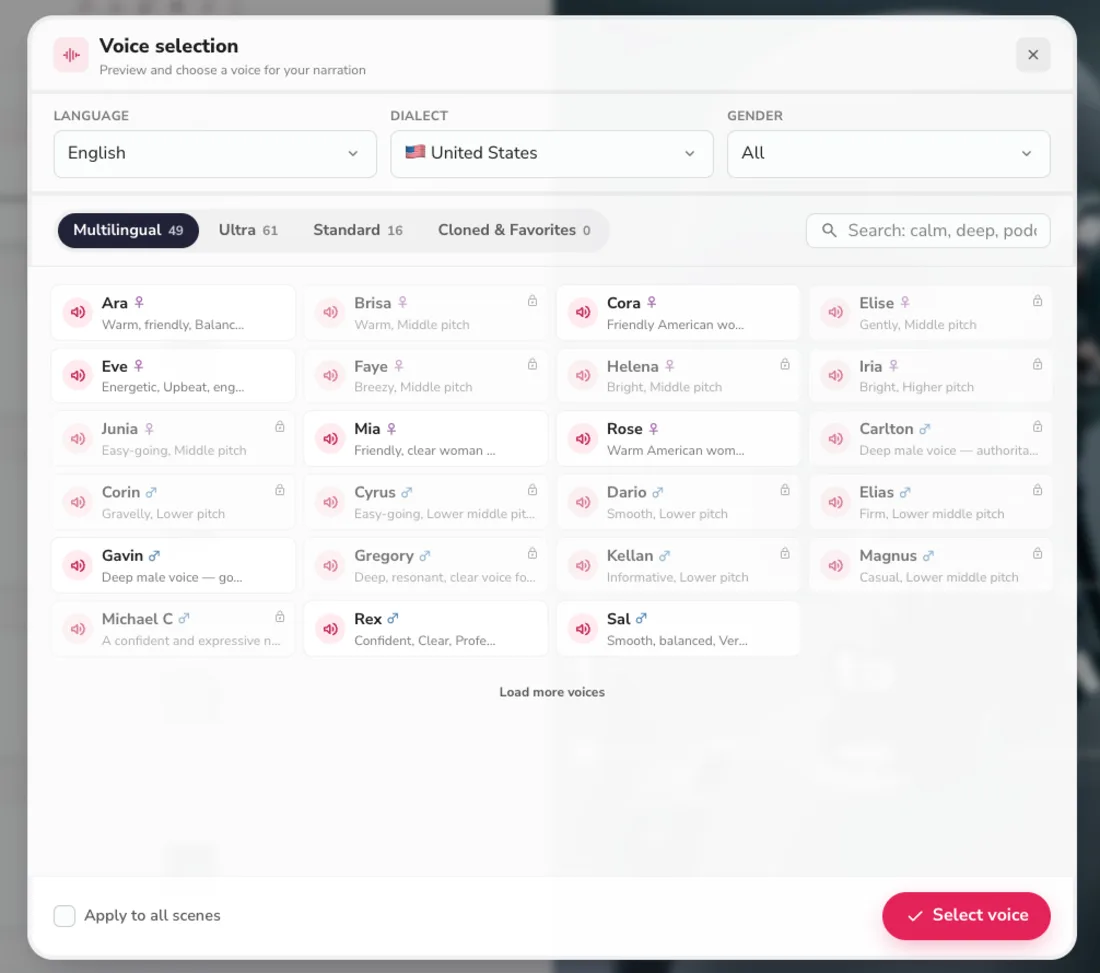
That is the right trade for a voice-first creator and the wrong one for anyone who needs original or cinematic footage. It also means the value of Standard and Premium is almost entirely in the ultra-realistic voices and cloning, so if the standard voices on Basic sound fine to you, there is little reason to climb.
The free tier is generous but capped hard
Fliki’s free plan is one of the best in the category because it actually exports a video, but it is capped on every axis: 720p, a Fliki watermark, a one-minute length limit, only standard voices, and a tiny 36-credit yearly pool. It is a real test drive and enough to post a rough clip, not a way to run a channel for free. A clean, watermark-free 1080p video and the ultra-realistic voices both require a paid plan from $8 a month.
Credits drain faster than $8 suggests
The Basic price feels almost free, and for light use it is. But because every generation and regeneration spends credits, the 720-credit pool empties faster than the price implies once you are iterating on real projects, and high-volume or multilingual creators hit the ceiling well before the monthly fee would suggest. The low sticker is real; the yearly credit pool is the number that actually bounds your output.
The practical way to avoid a surprise is to size the plan to your real cadence, not your best case. Count the videos you will actually publish in a month, multiply by their typical length, add a margin for the scenes and voices you will regenerate, and pick the tier whose pool clears that with room to spare. It is cheaper to start one tier up than to run dry in month two and scramble, especially since the annual promo rewards committing to the right plan rather than the smallest one.
The promo is not the permanent price
The ~50% annual discount is genuine but seasonal. It is easy to see “$14 a month” and budget around it, then find the code has changed by the time you renew. Plan on the standard monthly rates and let any active promo be a first-year bonus, not the rate you count on long term.
Which Fliki plan should you pick?
Because Fliki’s tiers scale on voice and length rather than features you either have or do not, the right plan falls out of two questions: how much you publish, and whether you need the ultra-realistic voices and cloning. Most people land on Basic or Standard, and the line between them is simply whether the standard voices are good enough for you or the narration needs to sound genuinely human.
- Just testing, or posting the odd rough clip → Free ($0). It genuinely exports a watermarked 720p video, so you can confirm Fliki fits before paying anything — a real advantage over rivals whose free plans cannot export.
- Solo creator on a budget, short social clips → Basic ($8/mo). The cheapest clean-export plan in the category: watermark-free 1080p, five-minute videos, and 200 ultra-realistic voices. For most individuals starting out, this is the plan.
- Voice-first or regular publisher → Standard ($28/mo). The tier to choose the moment the voice matters: 500 ultra-realistic voices, voice cloning for a consistent channel sound, 15-minute videos, and triple the credits. This is the sweet spot for serious voice-led creators.
- Multilingual or high-volume, long-form → Premium ($88/mo). The full 2,000-plus voice catalog, three cloned voices, 40-minute exports, and a 7,200-credit pool built for daily output across languages. Worth it only once Standard is genuinely running dry.
- Take the annual promo if you already know Fliki fits — it cuts roughly 50%. Pay monthly if you are still unsure, and keep the freedom to leave after thirty days.
If Fliki’s price doesn’t fit
If Fliki’s basic visuals are the dealbreaker, or its voice-first focus is simply not the job you need done, two tools in the same lane price differently for a different strength. Both cost more than Fliki’s $8 entry, but each buys something Fliki does not, so the higher price is only worth it if you actually need what it adds.
| Tool | Entry price | The trade |
|---|---|---|
| Pictory | $25/mo (Starter) | cleaner blog-to-video repurposing and a deeper stock library, but a robotic default voice and a trial that paywalls export |
| InVideo AI | $20/mo (Plus) | generative Veo and Sora footage, but a credit system that punishes generative use and no usable free export |
- Pictory is the pick if your job is turning existing articles into video rather than leading with voice; its URL-to-video repurposing is cleaner and its stock library deeper, though its voices are a step behind Fliki’s and its trial will not export clean. See our Pictory review, or the head-to-head in Pictory vs Fliki.
- InVideo AI is the more powerful all-rounder if you want generative, cinematic footage instead of stock, with access to models like Veo and Sora — but its premium generations burn credits far faster, and its free plan cannot export a usable video. See our Fliki vs InVideo comparison for how the two stack up.
The bottom line on Fliki pricing
Fliki’s pricing is the most approachable in its category, and honest underneath. You pay nothing to test it and genuinely export a watermarked clip, $8 a month for clean 1080p short-form video, or $28 for the ultra-realistic voices and cloning that are the real reason to use it — and annual billing with the current promo roughly halves those.
Go in clear on two things, though. What you pay more for is voice and length, not visuals, so no plan fixes Fliki’s basic footage; and the limit you actually hit is the yearly credit pool, not the monthly fee, so budget around credits and the length of the videos you make. Pick Basic if you are a budget solo creator, Standard the moment the voice carries your content, and treat the promo as a first-year bonus rather than the permanent price.
For the creator Fliki is built for — voice-first, multilingual, publishing at volume on a budget — it is the best-value pricing in the category, and the free tier means you can prove that for yourself before spending a cent. For anyone who needs the visuals to carry the video, the cheap price is a false economy. Match the plan to the job, and Fliki’s pricing is as honest as it looks.
Fliki tops our best script-to-video AI tools roundup, if you want to see it against the whole field.
Frequently asked questions
How much does Fliki cost?
Billed monthly, Fliki is Free at $0, $8 a month for Basic, $28 for Standard, and $88 for Premium, with a custom Enterprise tier above that. Annual billing plus Fliki's current promo code roughly halves those, so Standard drops from $28 to about $14 a month on a yearly commitment. Each paid plan lifts the same three things as you climb: the yearly credit pool, the maximum video length, and the number and quality of AI voices.
Unlike most rivals, Fliki's free plan is genuinely usable: it exports a finished, watermarked 720p video rather than just previewing one. For a solo creator the $8 Basic plan is the real entry point to clean, watermark-free 1080p output; voice-first creators who want the ultra-realistic voices, cloning, and longer exports move up to Standard or Premium. The figure worth checking before you commit is the credit pool, not the monthly fee, because credits are what actually run out.
Is Fliki free?
Yes, and this is one of the real reasons to choose it: Fliki has a permanent free plan that actually builds and exports a video, not just a preview. In our testing we generated a full clip and downloaded it without paying. The free tier gives a small 36-credit yearly pool and 300 standard voices, and it exports at 720p with a Fliki watermark and a one-minute length cap per video.
So it is enough to evaluate the tool honestly and even post a watermarked clip in a pinch, which is more than rivals like InVideo offer, since their free plans cannot export a usable video at all. What the free tier does not include is the ultra-realistic voices that are the main reason to use Fliki, watermark-free 1080p export, or the longer videos. To get those you need a paid plan, which starts at $8 a month for Basic. Treat the free plan as a real test drive built to convert you.
Is Fliki's annual or monthly plan cheaper?
Annual is much cheaper, especially with Fliki's current promo. Annual billing plus the FLIKISUMMER50 code takes roughly 50% off, so Standard falls from $28 a month to about $14, and the other tiers drop by a similar share. If you are confident you will keep using Fliki, the annual commitment is a large saving over paying month to month.
The catch is that promos end, so the safer numbers to plan a budget around are the standard monthly prices ($8, $28, $88), with the annual discount treated as a bonus rather than a guarantee. Annual billing is also a year-long commitment, so cancelling stops the renewal rather than refunding the unused months. The one reason to pay monthly is genuine uncertainty: if you are not sure Fliki fits your workflow, the higher monthly price buys the freedom to leave after thirty days instead of locking in a year.
How many videos can you make with Fliki?
It depends on length, because Fliki meters in credits tied to how much content you generate, not in a flat number of videos. The yearly credit pools are 36 on Free, 720 on Basic, 2,160 on Standard, and 7,200 on Premium, and each also caps the maximum length of a single video: one minute on Free, five on Basic, fifteen on Standard, and forty on Premium. So Basic's pool covers a steady stream of short social clips, while Premium is sized for someone producing long or multilingual video daily.
The credit pool, not the monthly price, is the real limit to plan around, and because every regeneration and re-render also spends credits, heavy iteration drains it faster than the low sticker suggests. For a light, steady schedule the lower tiers are fine; for daily multilingual output at length, Premium's 7,200 credits are the tier that actually fits, and that is where Fliki stops being the cheap option.
Does Fliki put a watermark on free videos?
Yes. On the free plan every export carries a Fliki watermark and is capped at 720p and one minute, so it is fine for evaluating the tool or posting a rough clip but not for polished, branded video. The watermark disappears the moment you move to any paid plan, starting with Basic at $8 a month, which also lifts you to 1080p and removes the one-minute length limit.
So the watermark is really a free-versus-paid signal rather than a separate add-on: there is no watermark-removal purchase on the free tier, only the upgrade to a paid plan. That said, Fliki's free tier is more generous than most, because it actually exports the watermarked video for you to use, where several rivals only let you preview. If a clean, watermark-free 1080p export is what you need, budget for the $8 Basic plan as the true entry price.
Can you cancel Fliki anytime?
You can cancel a Fliki subscription, but how cleanly depends on the billing cycle you chose. A monthly plan can be cancelled before the next billing date, and you simply stop paying while keeping access to the end of the period you already paid for. An annual plan is a year-long commitment, so cancelling stops the auto-renewal at the end of the term rather than refunding the remaining months.
That is the standard SaaS model, but it is worth knowing before you take the annual promo to save around 50%: the discount comes with a year-long commitment. If you are unsure whether Fliki fits your workflow, the monthly plan costs more per month but keeps you free to leave after thirty days, which can be the cheaper choice if you end up not using it. Either way, downgrading to the free plan is always an option, since Fliki's free tier is permanent rather than a trial that expires.
Keep reading
Fliki vs InVideo: I tested both — voice or visuals?
Fliki vs InVideo, both tested hands-on: Fliki (4.3) wins on voice, languages, price, and a free tier; InVideo (4.2) wins on generative visuals and speed.
Fliki AI review: the voices carry it, the visuals don't
I ran a script through Fliki's free tier: a captioned video with a genuinely good AI voice in minutes. The voices are why you'd use it. My 4.3/5 verdict.
The best script-to-video AI tools, by job
The best script-to-video AI tools ranked by job: Fliki wins overall, InVideo for generative footage, Pictory for blog-to-video, plus avatar and editing picks.