
Fathom pricing: what you'll pay, and who pays nothing
Fathom pricing starts at $0, and most people stay there. Here's what each paid tier costs, the 30-day free-preview catch, and which plan you actually need.
Contents
Fathom has one of the most generous free plans in the entire software category, which makes its pricing unusual: the real question is not how much it costs, but whether you ever need to pay at all. For a lot of people the answer is no. We have run Fathom ourselves, so here is what each plan actually costs, what the free tier really includes, and the one 30-day catch worth understanding before you decide.
The short answer: most people pay nothing
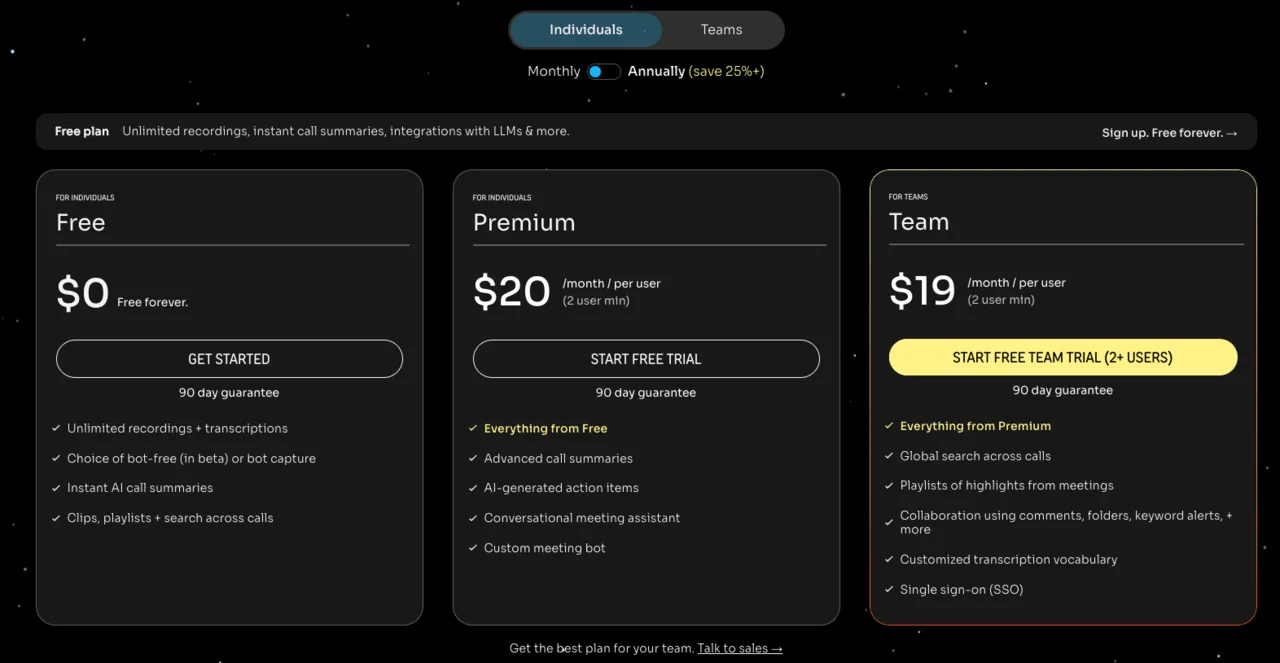
Fathom’s free plan records, transcribes, and summarizes unlimited meetings forever, so most individuals never pay. When you do, Premium is $20 a month (or $16 annually) for one person, and Team and Business run $19 and $34 a user for groups.
| Plan | Monthly | Annual (per mo) | Best for |
|---|---|---|---|
| Free | $0 | $0 | Almost everyone — unlimited recording + summaries |
| Premium | $20 | $16 | One person who wants the AI assistant + templates |
| Team | $19/user | $15/user | Groups needing shared search + collaboration |
| Business | $34/user | $25/user | Sales teams needing CRM sync + coaching |
| Enterprise | Custom | Custom | Large orgs |
Prices verified on Fathom’s pricing page as of June 2026. The honest headline is that Fathom’s free tier is the reason to use it, and the paid plans exist for the AI assistant, team collaboration, and sales features specifically.
How Fathom’s pricing works: the free plan is the product
Before the per-plan detail, the mental model: Fathom inverts the usual freemium playbook. Where most notetakers cap the free tier hard to push you to pay, Fathom gives the core away unlimited and charges only for the layers on top.
The free plan is genuinely unlimited. Recording, transcription, and a basic AI summary of every call are free forever, with no monthly minute cap and no limit on how many meetings you keep. That alone is more than most rivals give on their paid plans.
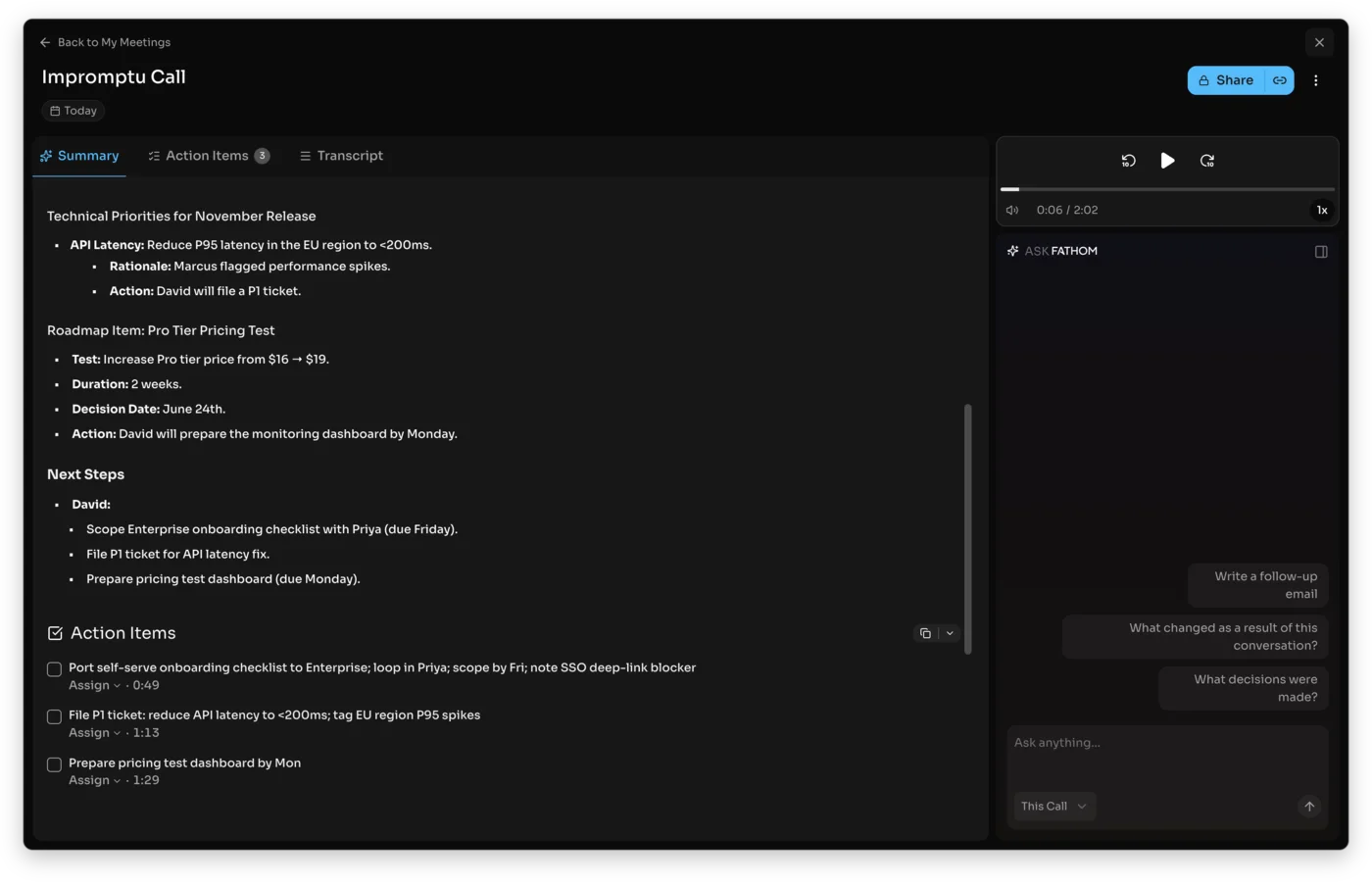
The premium AI is a 30-day preview, then paid. When you sign up, you get a 30-day taste of the advanced features, the Ask Fathom assistant, the expert summary templates, and AI action items. After that preview ends, those features need a paid plan, while everything in the core free tier stays free. This is the one nuance the marketing leads past, and it is covered in Fathom’s own help docs.
The paid tiers are about scope, not minutes. You do not pay Fathom for more recording time, the way you do with Otter. You pay for smarter AI (Premium), for sharing and collaboration (Team), or for sales and CRM features (Business). Pick the tier for the capability you need, not for a usage ceiling.
If the four tiers feel like more than Fathom used to have, that is because they are. Fathom started with a simpler free-and-premium split and added the Team and Business plans as it grew into team collaboration and sales features, which is why the structure looks more involved in 2026 than it did a year or two ago. The upside for a casual user is that none of that complexity touches the free plan, which has only become more generous.
Here is the free-versus-paid split at a glance, which is the only distinction most people need:
| Capability | On the free plan | Paid plan needed |
|---|---|---|
| Recording + transcription | Yes, unlimited | No |
| Basic AI summary of each call | Yes | No |
| Ask Fathom assistant | 30-day preview | Premium |
| Expert summary templates + AI action items | 30-day preview | Premium |
| Shared search + team collaboration | No | Team |
| CRM sync + coaching scorecards | No | Business |
What each Fathom plan costs
Here are the four tiers in full, with prices verified live on Fathom’s pricing page in June 2026. Annual billing lowers the per-month rate on every paid plan.
| Plan | Price (monthly) | Annual (per mo) | What it adds |
|---|---|---|---|
| Free | $0 | $0 | Unlimited recording, transcription, basic AI summaries |
| Premium | $20 | $16 | Ask Fathom assistant, action items, expert templates |
| Team | $19/user | $15/user | Shared search, collaboration, custom vocab, SSO |
| Business | $34/user | $25/user | CRM sync, Deal View, coaching scorecards |
| Enterprise | Custom | Custom | Advanced admin, security, retention |
Free: unusually complete
The free plan gives you unlimited recordings, unlimited transcripts, and a basic AI summary of every meeting, kept forever. It records your Zoom, Google Meet, or Microsoft Teams calls, and you can choose a visible bot or the newer bot-free audio capture, which is still in beta. For the first 30 days you also get the premium AI features as a preview.
The honest read on the free plan is that it is a home, not a trial. Where Otter’s free tier strands you at 300 minutes and Granola’s hides your older history, Fathom’s free plan keeps everything and caps nothing on the core features. A large share of Fathom users never upgrade, and that is by design.
Premium ($20/mo): the AI assistant, for one person
Premium is the individual upgrade. For $20 a month, or $16 on annual billing ($192 a year), it adds the Ask Fathom conversational assistant, AI-generated action items, and more than 15 expert summary templates such as BANT and Sandler for sales calls. It also lets you customize the meeting bot.
What you are really buying is the smarter, queryable AI: the ability to ask a past call a question in plain language and get structured, templated summaries instead of the basic recap. For a power user who lives in meetings, that is worth $16 a month; for a light user, the free summary is plenty.
Team ($19/user/mo): for groups, with a two-user minimum
Team is built for sharing. At $19 a user a month, or $15 on annual billing with a two-user minimum, it adds global search across all your team’s shared calls, shared playlists of highlights, collaboration with comments and folders and keyword alerts, custom transcription vocabulary, and single sign-on. It is the plan for a team that wants one searchable library of meetings rather than individual silos.
Business ($34/user/mo): for sales and revenue teams
Business is the sales plan. At $34 a user a month, or $25 on annual billing, it adds the features a revenue org pays for: native CRM field sync into HubSpot and Salesforce, a Deal View that summarizes insights across a deal, AI coaching scorecards, and custom data retention policies. If your notes need to land in a CRM without manual entry and your managers want call coaching, this is the tier that justifies its price, and it is the reason Fathom competes with heavier sales tools.
Enterprise: custom
Enterprise is a quote, adding advanced administration, security controls, and retention options for large organizations. If you are pricing Fathom for a company big enough to need it, you will be talking to sales rather than reading a number off the page.
What Fathom costs by use case
The plan table gives the price; here is what it works out to for the people who actually use Fathom, because the answer is usually “nothing.”
| Who you are | What you need | Right plan | Cost |
|---|---|---|---|
| Solo user, basic notes | Record + summarize calls | Free | $0 |
| Power user / salesperson | AI assistant + templates | Premium | $16/mo annual |
| Small team sharing notes | Shared search + collaboration | Team | $15/user annual |
| Sales / revenue team | CRM sync + coaching | Business | $25/user annual |
The solo note-taker. If you record calls and want clean summaries, the free plan covers you completely and forever. This is the most common case, and it costs nothing. You only leave free if you find yourself wanting to ask the AI questions after the call or needing the templated summaries.
The power user or individual salesperson. Someone who runs many calls a day and leans on the AI to draft follow-ups, pull action items, and apply a sales framework will get real value from Premium’s $16-a-month annual rate. It is the cheapest serious upgrade Fathom offers.
The small team. A few people who want to search each other’s calls and collaborate pay $15 a user on Team’s annual plan, with a two-user minimum, so a three-person team is about $540 a year. That buys a shared, searchable meeting library no free plan provides.
The sales org. A revenue team pays Business at $25 a user annually, so a five-seat team runs about $1,500 a year, in exchange for CRM sync, Deal View, and coaching. For a team already paying for a CRM, the automatic sync usually pays for itself in saved admin time.
The annual math, and the Premium-vs-Team quirk
Two pricing details are worth pausing on, because neither is obvious from the plan cards.
Annual billing is a real discount across the board. Premium drops from $20 to $16 a month, Team from $19 to $15 a user, and Business from $34 to $25 a user. The savings run roughly 20 to 26 percent, so if you are sure you will keep Fathom for a year, annual billing is the better deal. As always, the trade is paying the year up front, so start monthly if you are still deciding.
The quirk is the Premium-versus-Team price. Premium, the individual plan, is $20 a month, while Team is $19 a user, so on paper Team looks a dollar cheaper. The catch is that Team has a two-user minimum, so the real floor for Team is $38 a month for two seats. A single user cannot save a dollar by picking Team; Premium is the individual plan, and Team only makes sense once you have at least two people.
What Fathom’s pricing page doesn’t tell you
These are the details that shape what you actually get, drawn from running the product and from Fathom’s own docs, and they are the parts the pricing page leads past.
The premium features expire after 30 days
The most important catch is the one new users miss: the advanced AI you try on day one is a 30-day preview, not a permanent part of the free plan. After 30 days the Ask Fathom assistant largely switches off unless you pay. The expiry is softer than a hard cutoff, though: per Fathom’s own docs, the free plan still gives you advanced summaries for your first 5 calls each month, after which you drop to the general Enhanced template. So it is not a bait and switch, the core product stays free forever, but if you live in the AI assistant after week one, keeping it in full costs $16 a month.
Team and Business have a two-user minimum
Neither team plan can be bought for a single seat. Team and Business both require at least two users, so the real entry price is double the per-seat figure, $38 a month for Team or $68 for Business at monthly rates. A solo user who wants a team feature cannot get it cheaply; they are on Premium.
No in-person or mobile recording
Fathom records online meetings on Zoom, Google Meet, and Microsoft Teams. It does not record in-person conversations and has no native mobile recording, so it is built for calls at a computer. If you need to capture a meeting in a room, Fathom is not the tool, regardless of plan.
The bot-free mode is still in beta
Fathom’s headline capture is a visible bot that joins your call. It now offers a bot-free audio-capture option, but that mode is still in beta and Mac-only, so if a bot in the participant list is a problem for you, do not assume the bot-free path is fully ready yet.
Budget considerations beyond the sticker price
A few things shape what Fathom really costs you, beyond the number on the plan card.
- You may not need to pay at all. The most common overspend is signing up, upgrading during the 30-day preview because the AI assistant is impressive, and never checking whether the free plan would have covered you. If your need is recording and summaries, let the preview lapse and pay nothing.
- The two-user minimum changes the team math. Because Team and Business require two seats, a solo founder who wants a team feature is really choosing between Premium for themselves or paying for an empty second seat. Size the plan to your actual headcount.
- Annual billing is up front and non-refundable. Fathom bills the annual discount as a full year at once, so the 20-to-26 percent saving only lands if you stay the year. Start monthly if you are unsure, then switch once you know you will keep it.
- There is no per-minute overage. Unlike Otter, Fathom does not meter minutes, so there is no surprise overage charge. Your bill is exactly the plan you chose, which makes it easy to budget.
Wait — is this the right Fathom?
A quick but important detour, because three unrelated products share the name and the search results mix them up. This guide is about Fathom the AI meeting notetaker (fathom.video and fathom.ai), which records and summarizes your calls and runs from $0.
It is not Fathom Analytics (usefathom.com), a privacy-first website analytics tool priced by pageviews from around $15 a month, and it is not Fathom (fathomhq.com), a financial reporting and forecasting platform for accountants with plans starting around $65 a month. If you searched “Fathom pricing” and landed on pageview tiers or accounting plans, those were the other two companies. Every price in this guide is for the meeting notetaker.
Is Fathom worth paying for?
For most individuals, the honest answer is no, and that is the highest compliment you can pay a free plan. Fathom’s free tier covers unlimited recording, transcription, and summaries, which is the entire job for a lot of people, and in our testing it produced the cleanest summary and most accurate transcript of any notetaker we ran. It is the highest-rated notetaker on G2, at a near-perfect 5.0 across more than 6,000 reviews, and a big part of that goodwill is the generous free plan.
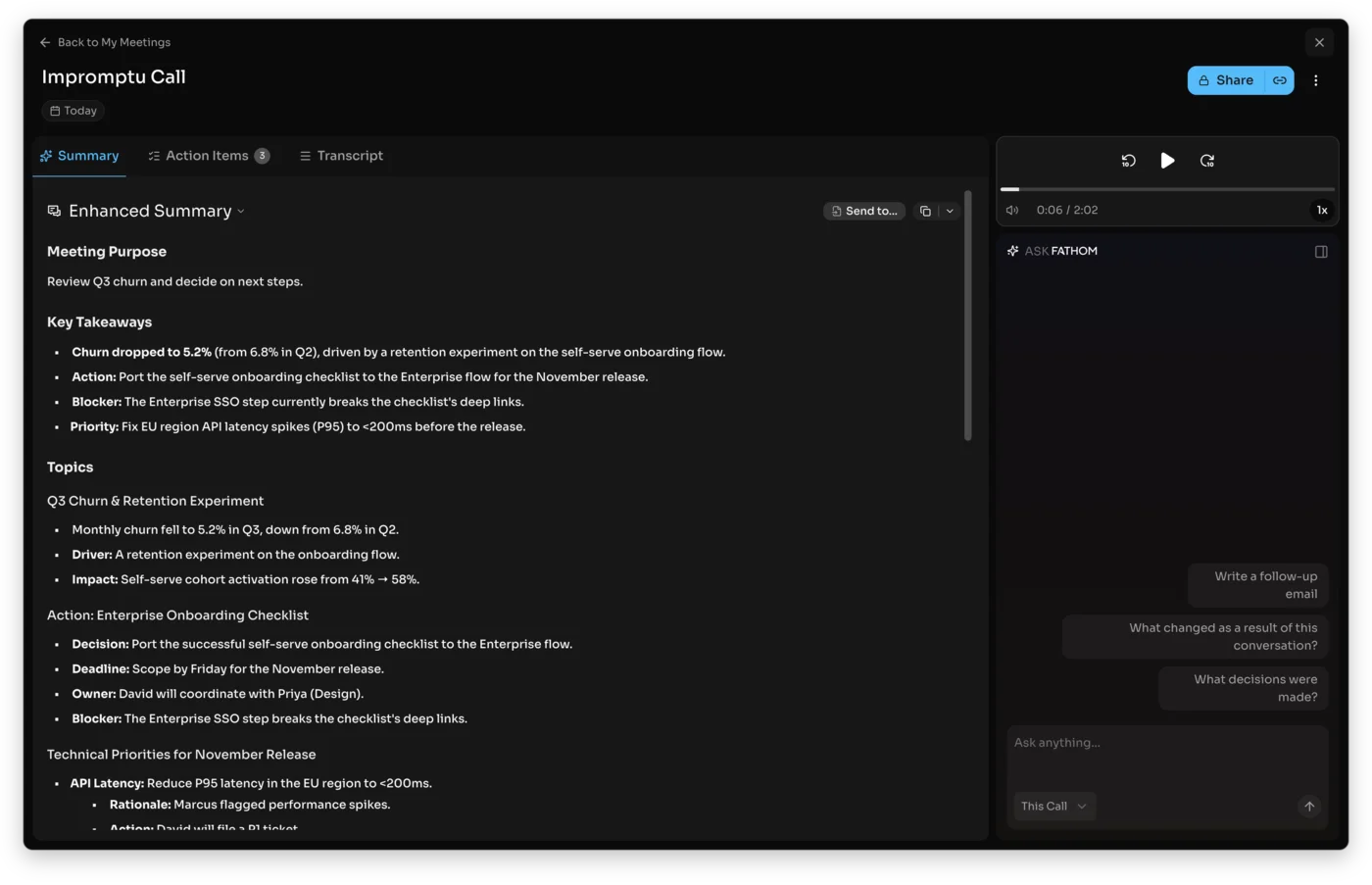
You start paying when you specifically want something the free tier withholds. Premium earns its $16 a month for a power user who leans on the Ask Fathom assistant and the templated summaries. Business earns its $25 a user for a sales team, because the CRM sync and coaching replace manual work that costs more than the subscription. Team sits in between for groups that just want shared search.
So the verdict is split by who you are: free for the individual who wants clean notes, Premium for the power user, Business for the sales org. The one group that should hesitate is anyone whose entire need is the basic summary, because they are being asked to pay for features they will not use when the free plan already does their job.
It is worth contrasting this with how the other notetakers price the same value. Otter makes you pay just to lift a minute cap, and Granola makes you pay to keep your older notes, so with both you are buying back something the free plan took away. Fathom does not do that: the free plan never expires or caps the core, so when you pay Fathom, you are buying genuinely new capability rather than removing an artificial limit. That is a more honest pricing model, and it is part of why Fathom’s free users speak about it the way they do, and why so few of them feel any pressure to upgrade.
Which Fathom plan should you pay for
Match the plan to what you actually need beyond recording:
- Stay on Free if you want to record, transcribe, and summarize your meetings, which is most people. It is unlimited and permanent, and there is no reason to pay for less than you would use.
- Pay for Premium if you are one person who wants the Ask Fathom assistant, AI action items, or the expert summary templates. At $16 a month annually it is the cheapest meaningful upgrade.
- Pay for Team if you are a group of two or more who need to search and collaborate across each other’s calls, not just keep individual notes.
- Pay for Business if you run a sales or customer-success team that needs CRM sync, Deal View, and coaching scorecards. The automation is what justifies the $34 a user.
- Skip Fathom’s paid tiers if your only need is a basic summary, since the free plan already covers that, or if you need in-person recording, which no Fathom plan offers.
How Fathom’s price compares to other notetakers
Fathom’s pricing only makes sense next to its rivals, because the thing that makes it cheap is not its paid tiers, which sit mid-pack, but its free plan, which is the most generous in the category.
| Tool | Free plan | Paid from | Notable |
|---|---|---|---|
| Fathom | Unlimited record, transcribe, summarize | $20/mo Premium | The most generous free tier |
| Granola | Unlimited notes, 30-day history | $14/user Business | Bot-free, cheaper paid |
| Otter | 300 min/mo, 30-min cap | $16.99/mo Pro | Speaker labels, searchable archive |
| Fireflies | Unlimited transcription, 400-min storage | ~$10/user | Cheapest per seat, team search |
On paid plans Fathom is not the cheapest. Granola undercuts it at $14 a user, and Fireflies is cheaper per seat. But that comparison rarely matters, because Fathom’s free plan keeps unlimited recording and transcription while every rival caps something, Otter at 300 minutes a month, Granola at 30 days of history, Fireflies at a monthly minute allowance. For most individuals the real comparison is $0 versus $0, and Fathom is the tool that gives the most away for free. You pay Fathom’s competitors sooner than you pay Fathom.
If Fathom isn’t the fit: alternatives
Fathom’s price is rarely the problem, since the free plan is so generous, but the tool itself does not suit everyone. Two notetakers we have tested fix what Fathom does not:
- Granola is the pick if a recording bot is the issue. It is bot-free by design, captures device audio quietly, and turns your own notes into a polished summary, at $14 a user for its paid plan. See our Granola review and the Fathom vs Granola comparison.
- Otter.ai is the pick if you need a verbatim, speaker-labeled transcript and a deep searchable archive, though its free plan is far stingier than Fathom’s. Our Otter pricing guide breaks down its tiers.
For the wider field, our Fathom alternatives shortlist and the best AI note taker roundup line up every option.
Final word
Fathom’s pricing is the easiest in the category to summarize: most people pay nothing, and the free plan is the reason to use it. The advanced AI you preview for 30 days settles into a paid Premium plan at $16 a month annually, a team pays $15 to $25 a user for collaboration and sales features, and the core recording and transcription stay free forever. Start on the free plan, run a few real meetings through it, and upgrade only if you find yourself reaching for the AI assistant or the CRM sync. For most of us, that day never comes, and that is exactly why Fathom is worth using.
Frequently asked questions
How much does Fathom cost per month?
Fathom has a free plan and three paid tiers, and most individuals pay nothing. Premium, the individual paid plan, is $20 a month, or $16 a month if you pay annually ($192 for the year). Team is $19 per user a month, or $15 on annual billing, with a two-user minimum. Business is $34 per user a month, or $25 on annual billing, also two users minimum. Enterprise is custom-quoted.
The number that matters for most people, though, is $0: Fathom's free plan records, transcribes, and summarizes unlimited meetings forever, so the paid tiers are for people who want the advanced AI assistant, team collaboration, or CRM sync.
A solo user upgrades to Premium for the Ask Fathom assistant and expert summary templates; a team pays for Team or Business to get shared search and sales features.
Is Fathom free or paid?
Both, and the free plan is unusually complete. Fathom's free tier gives you unlimited recordings, transcripts, and a basic AI summary of every meeting, kept forever, which is more generous than almost any rival's free plan.
When you first sign up you also get a 30-day preview of the premium AI features, and after that preview ends those advanced features (the Ask Fathom assistant, the expert summary templates, and AI-generated action items) need a paid plan, while the core recording, transcription, and basic summaries stay free.
So Fathom is genuinely usable for free indefinitely; you only pay if you want the smarter AI, team collaboration, or CRM sync. For a lot of solo users, the free plan is the whole product and they never upgrade at all, and that unusually generous free tier is the single biggest reason people pick Fathom over rivals with tighter limits.
What is the difference between Fathom Premium, Team, and Business?
Premium is $20 a month, Team is $19 per user, and Business is $34 per user, and each adds a different layer on top of the free recording and transcription.
Premium ($20/mo) is the individual plan: it adds the Ask Fathom conversational assistant, AI-generated action items, and 15-plus expert summary templates like BANT and Sandler. Team ($19/user/mo, two-user minimum) is for groups: it adds global search across shared calls, shared playlists, collaboration with comments and folders, custom transcription vocabulary, and single sign-on. Business ($34/user/mo) is the sales and revenue plan: it adds CRM field sync into HubSpot and Salesforce, a Deal View, AI coaching scorecards, and custom data retention.
The quirk worth knowing is that Premium at $20 is actually a dollar more per month than Team's $19 per user, because Premium is priced for a single user while Team assumes at least two. So a single user picks Premium, and Team only becomes the cheaper route once two or more people share it.
What happens after Fathom's 30-day free trial?
When you sign up for Fathom's free plan, you get a 30-day preview of the premium AI features. After those 30 days, you keep using Fathom free of charge, but you lose access to the premium-only features, the Ask Fathom assistant, the advanced summary templates, and AI action items, unless you upgrade to a paid plan.
What you keep on the free plan is the part most people care about: unlimited recording, unlimited transcription, and a basic AI summary of every call, all of it forever.
So nothing forces you off Fathom after 30 days; you simply drop back to a still-very-usable free tier, and you upgrade only if you missed the advanced AI enough to pay for it. There is also no separate paid trial to remember to cancel: the preview simply expires on its own, so you are never charged unless you actively choose to upgrade.
Is Fathom worth paying for?
For most individuals, no, and that is a compliment to the free plan rather than a knock on the product. Fathom's free tier covers unlimited recording, transcription, and summaries, which is all a lot of people need, and in our testing Fathom produced the cleanest summary and most accurate transcript of any notetaker we ran.
You start paying when you specifically want the Ask Fathom assistant and expert templates (Premium), when a team needs shared search and collaboration (Team), or when a sales org needs CRM sync and coaching (Business). For a salesperson or a revenue team, Business at $34 a user earns its price through the CRM automation alone.
For everyone else, the honest answer is that the free plan is the reason Fathom is worth using, and you may never need to pay.
Is this the same Fathom as Fathom Analytics?
No, and the confusion is common because three different products share the name. This guide is about Fathom the AI meeting notetaker, found at fathom.video and fathom.ai, which records and summarizes your calls.
It is not Fathom Analytics (usefathom.com), a privacy-focused website analytics tool priced by pageviews, and it is not Fathom (fathomhq.com), a financial reporting and forecasting platform for accountants. All three are real companies with the same name, so if you searched 'Fathom pricing' and saw accounting plans starting around $65 a month or pageview-based analytics tiers, those were the other two.
The prices in this guide, from a $0 free plan to $34-a-user Business, are for the meeting notetaker, so if you are shopping for a meeting-notes tool, this is the Fathom you want; the other two are unrelated companies that simply happen to share the name, and their prices will only confuse your budget.
Keep reading
Fathom vs Fireflies: solo notetaker or team brain?
Fathom vs Fireflies, both run through one test meeting: Fathom wins the free plan and clean summaries, Fireflies wins team search and CRM. Which fits you.
Fathom vs Granola: we ran one meeting through both
We fed the same meeting to Fathom and Granola. Fathom wins on the free plan and video; Granola wins on bot-free notes. Here's which AI notetaker fits you.
Fathom review: the best free AI notetaker, tested
I fed Fathom a fake meeting and it wrote the cleanest summary of any notetaker I tested. With a genuinely unlimited free plan, it's where to start.