Granola AI review: it took better notes than I did
I fed Granola six rough bullets and a messy call; it returned a clean summary with details I never typed. Why this bot-free notepad earns its hype.
Is Granola worth it?

Yes, and it is the meeting notepad I would point a busy professional to first. This Granola AI review is grounded in a hands-on test, and the test is what sold me: I typed six rough bullets during a call, and Granola handed back a structured summary that included names, numbers, and deadlines I never typed but that were said out loud. I score it 4.6 out of 5, a Category Leader.
Granola is the 2026 breakout in this space, fresh off a $125M raise at a $1.5 billion valuation, and the hype is mostly earned. It is bot-free, so nothing visibly joins your call, and the note quality is the best I have seen from an AI notetaker. The catches are real but mostly deliberate: it deletes the audio so there is no playback, it runs only on Mac, Windows, and iPhone, and the free plan hides your older notes. Buy it if you live in back-to-back calls and want discreet, high-quality notes. Look elsewhere if you need audio playback, Android, or a free transcript archive.
What does Granola do?
Granola is an AI notepad for people in back-to-back meetings. Instead of sending a bot to sit in your call, it captures the audio directly on your device, listens to both sides of the conversation, and then writes you a clean set of notes. The pitch is that you stay present in the meeting and let the AI handle the writing afterward.
The part that makes Granola different is how it treats your own notes. During a call you jot whatever rough fragments you want in its editor, the way you would scribble on a notepad. When the meeting ends, Granola enhances those fragments, folding in everything it heard, and turns your shorthand into a structured document with headings, decisions, and action items. It is augmentation, not just transcription. That is the core difference from a bot-based notetaker, which records the whole call and hands you a wall of transcript to wade through. Granola assumes you already know which two sentences mattered, and it builds the document around them.
To see how good that actually is, I ran a controlled test rather than a real meeting, so I would know the correct answer. I started a Quick Note, typed six terse bullets, and played an 80-second, two-speaker product meeting through my Mac for Granola to capture. Then I hit Enhance notes.
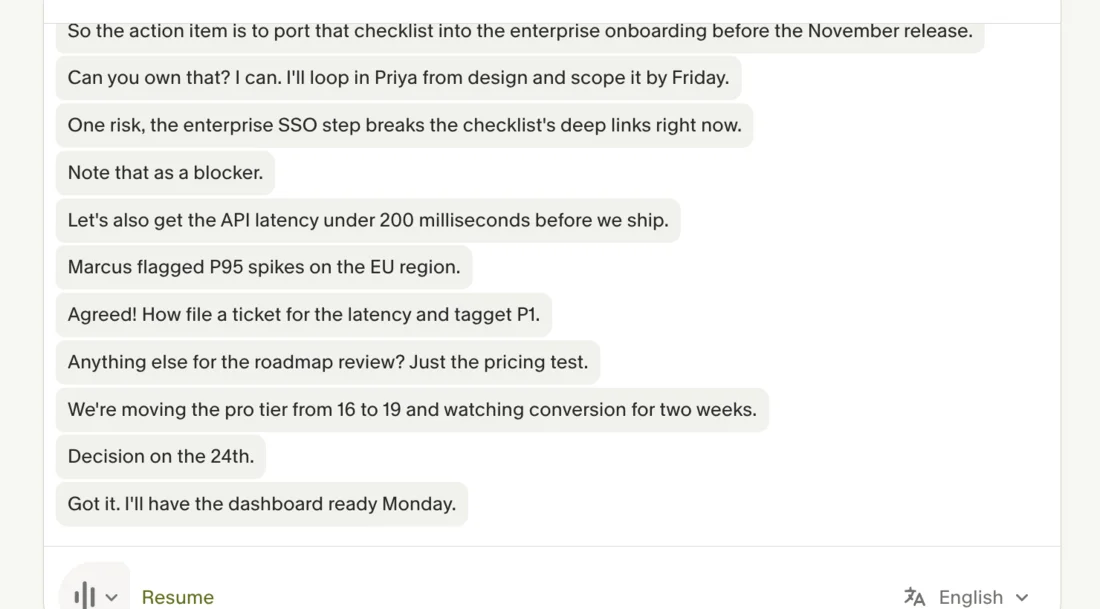
The result was better than my input deserved. My bullets were things like “get API latency under 200ms, file P1.” Granola’s enhanced version organized everything into five sections, and it pulled in specifics I never typed: that activation rose “from 41% to 58%,” that “Marcus flagged P95 spikes on the EU region,” that the owner should “loop in Priya from design,” and a whole Next Steps block with deadlines. All of that came from the audio it captured, not my notes.
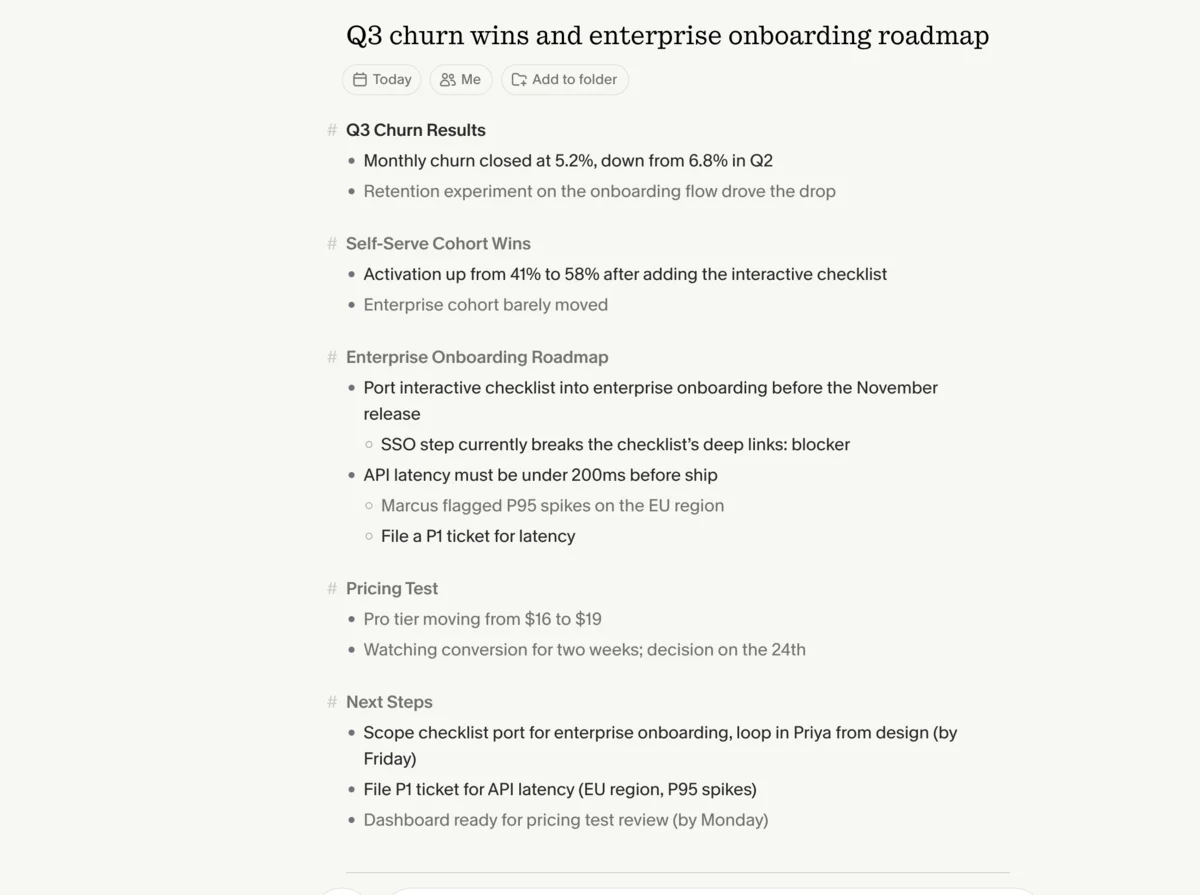
The underlying transcription was accurate on exactly the details that matter. Here is what the clip said against what Granola captured.
| What the clip said | What Granola captured | Verdict |
|---|---|---|
| ”loop in Priya from design" | "loop in Priya from design” | correct |
| ”Marcus flagged p95 spikes on the EU region" | "Marcus flagged P95 spikes on the EU region” | correct |
| ”API latency under 200 milliseconds" | "API latency under 200 milliseconds” | correct |
| ”moving the Pro tier from 16 to 19" | "moving the pro tier from 16 to 19” | correct |
| ”decision on the 24th" | "Decision on the 24th.” | correct |
| ”I’ll file a ticket and tag it P1" | "How file a ticket… and tagget P1” | two slips |
That is strong, and on a couple of specifics it edged out what I saw from a bot-based rival: Granola wrote “P95” cleanly and kept “$16 to $19” and “Q2” intact, where the other tool dropped digits. Granola also auto-named the note “Q3 churn wins and enterprise onboarding roadmap” from my bullets alone, which is a small thing that saves a real chore across a week of meetings.
Granola is also the category’s current darling. It raised a $125 million Series C in March 2026 at a $1.5 billion valuation, led by Index Ventures and Kleiner Perkins, and its own pricing page carries testimonials from names like Brex’s CEO and the investor Nat Friedman. The funding matters less than the product, but it explains the pace: in the months I have watched it, Granola has shipped an iPhone app for notes and phone calls on the go, customizable note templates, AI chat that spans every meeting, and an MCP server that lets other AI tools read your meeting context.
Privacy is wired into how Granola works rather than bolted on after. It only starts capturing when you open a meeting or click its notification, so it is not listening in the background. It deletes the meeting audio as soon as the transcript is written, keeping only the text, and you can opt out of model training at any time. For anyone nervous about the wave of AI-notetaker privacy complaints, that design is the honest reason Granola feels less invasive than a bot that records and stores everything.
How much does Granola cost?
Granola has three plans, and the structure changed recently, so most older reviews quote it wrong. The prices below are per user and verified live on granola.ai/pricing on June 13, 2026.
| Plan | Price (monthly) | What you get |
|---|---|---|
| Basic | $0 | AI notes, AI chat, templates, opt-out training — but only limited meeting history |
| Business | $14/user | Unlimited notes & history, advanced AI models, integrations, API, MCP |
| Enterprise | $35/user | Everything in Business plus SSO, admin controls, org-wide auto-deletion |
The headline change is that there is now a free Basic tier at $0. A lot of reviews still claim Granola has “an $18/month Individual plan and no permanent free tier,” and that is out of date. New accounts also get a 30-day Business trial, which is the plan I was on during testing.
The catch on Basic is the phrase “limited meeting history.” You can take notes for free, but your older notes disappear behind the paywall, so the free plan works as a trial of the experience rather than a place to keep a searchable archive. For that you need Business at $14 a user, which opens up unlimited history plus the integrations (Notion, Slack, HubSpot, Zapier, Attio, Affinity), API access, and the more advanced AI models. Enterprise at $35 adds the security and admin layer most individuals will never touch.
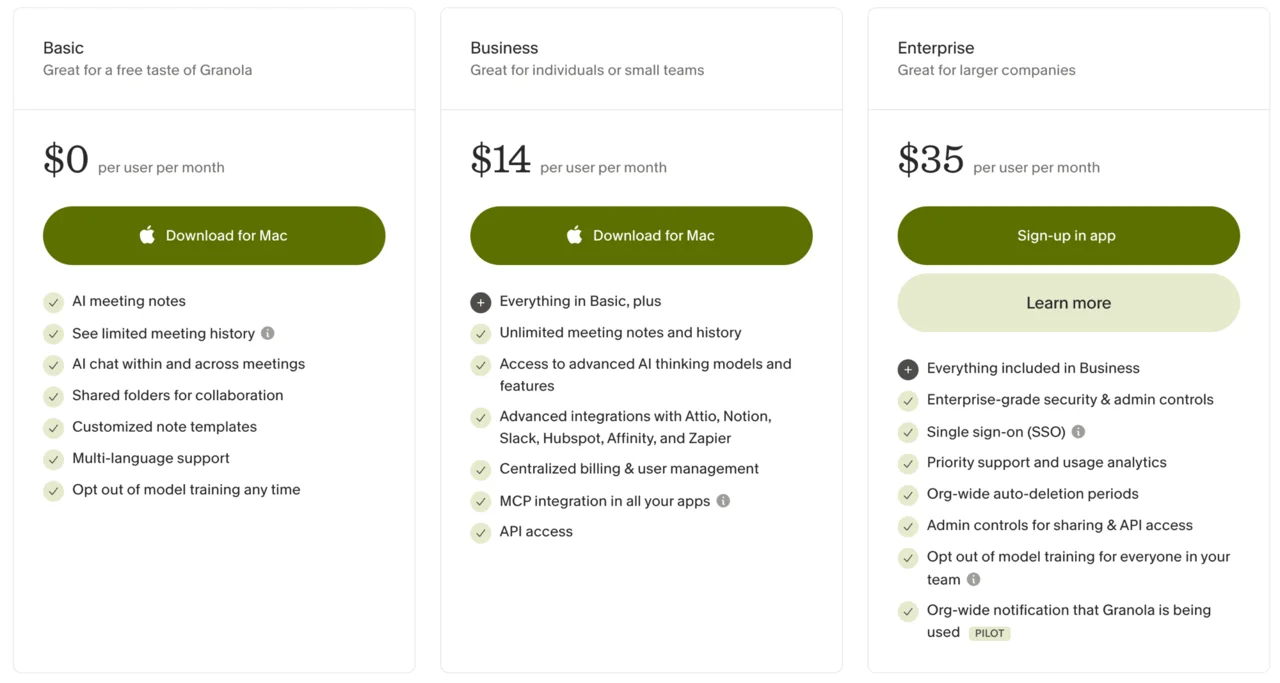
What the $14 Business plan actually buys, beyond unlimited history, is the connective tissue: native integrations with Notion, Slack, HubSpot, Zapier, Attio, and Affinity, plus API access and an MCP server so other AI assistants can pull your meeting context. It also turns on Granola’s more advanced reasoning models for notes and chat. For a solo user, those integrations are the difference between notes that sit in Granola and notes that flow into the CRM or doc tool where the work actually happens. Enterprise at $35 layers on SSO, admin controls, org-wide auto-deletion windows, and team-wide training opt-out, which are the boxes a security review checks rather than features a single user feels.
For a solo professional, the honest read is that Granola is a $14/month tool. Basic is how you try it; Business is where you actually live once you want your past meetings to stay searchable. The 30-day Business trial is long enough to put it through a real month of meetings before you pay. Compared with the bot-based tools that gate unlimited use higher, $14 for unlimited notes is fair, and there is a small green footnote that Granola puts 1.5% of your subscription toward carbon removal through Stripe Climate.
Who is Granola for?
- Consultants, founders, and salespeople in back-to-back calls. This is the core audience, and it is genuinely the best fit there. Granola’s whole reason to exist is high-quality notes for people whose day is wall-to-wall meetings, where remembering what was decided in the 9 a.m. by the time you are in the 4 p.m. is the actual job. The cross-meeting chat turns a week of calls into something you can query instead of re-read.
- Anyone running client calls where a bot would be awkward. Because nothing joins the call, you never have to explain why a “Granola Notetaker” is sitting in the participant list, and you never trip a client’s policy against recording bots. For external sales and consulting calls, that discretion is the killer feature, and it is the single clearest reason to pick Granola over a bot-based tool.
- People in privacy-sensitive or regulated work. Because Granola stores no audio and joins no call, it is far easier to clear with a security team than a tool that records and retains everything. If you have ever had legal push back on AI notetakers, Granola’s design is the one that survives that conversation.
- People who want to stay present. If you take notes mainly to look engaged but then miss half the conversation, Granola’s jot-rough-notes-and-enhance model is built exactly for you. You write less and catch more.
- Mac and iPhone power users. The Mac app and iPhone app are polished, the cross-device sync is clean, and the iPhone version even handles notes for ordinary phone calls, not just video meetings.
- Not for: Android users, people who need to re-listen to audio, or anyone who wants a free, permanent transcript archive. Granola deletes audio by design, ships no Android or web app, and hides history on the free plan. If any one of those is a dealbreaker, it is the wrong tool no matter how good the notes are.
The good
Granola earns its score on the quality of what it produces and how little it asks of you. Here are the six things that should sway you, strongest first.
The note enhancement is the best I have tested
This is the feature, and it lives up to the hype. I gave Granola six sloppy fragments and it returned a structured, accurate summary that pulled real specifics out of the audio my notes left out: the 41%-to-58% activation jump, the P95 latency spikes, Priya as the design owner, and a Next Steps list with deadlines. No other notetaker in this round turned my own thin notes into something I would actually send.
The output kept my framing where I had one and filled the gaps from the audio where I did not, which is a harder trick than it sounds: a pure auto-summary ignores your emphasis, and a pure transcript ignores the meeting. Granola sits in the middle and gets both. For people who jot during calls, this alone is the reason to switch.
It stays out of the meeting
Granola is bot-free. It captures the audio on your device, so there is no “recording bot” joining the call, no participant-list awkwardness, and no consent dance with a client who did not expect a third party. The bot-free model is the feature reviewers keep returning to as Granola’s defining advantage, and it is the clearest reason to choose it over a bot-based tool. For external calls, the absence of a visible bot is not a small nicety; it is the whole point.
I have watched clients visibly relax once they realize nothing is “in the room,” and that ease changes the conversation in a way no summary quality can make up for. It is the kind of advantage you only notice by its absence, the first time a client frowns at a recording bot sitting in someone else’s call.
The Ask-anything chat actually reasons
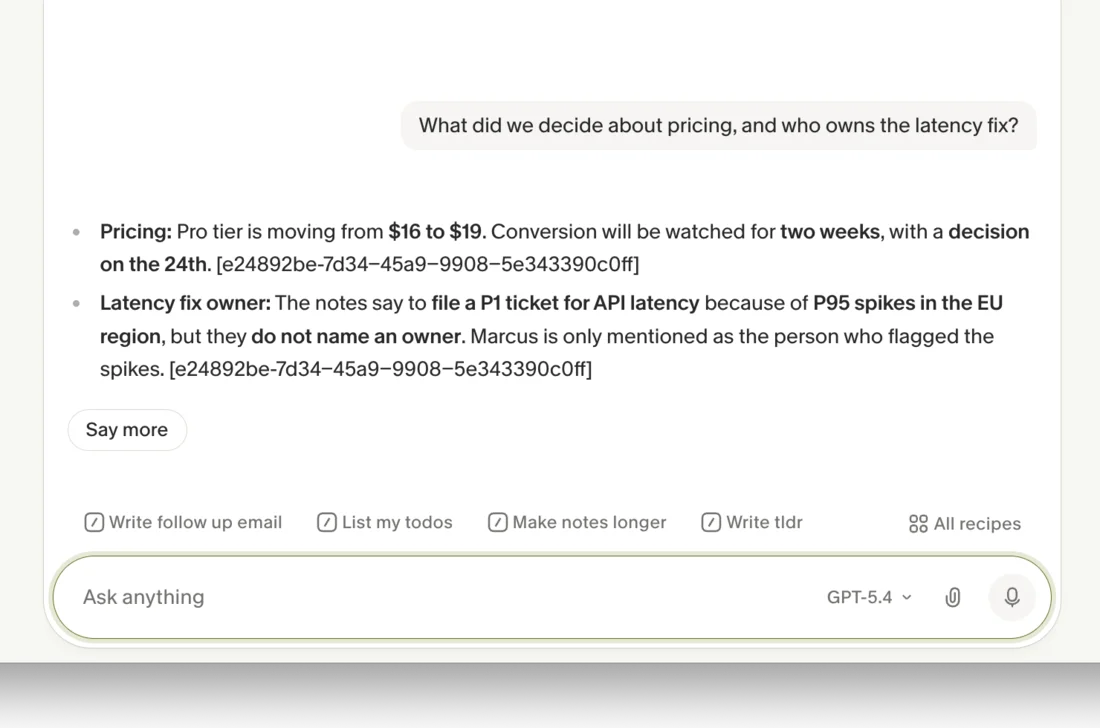
Granola’s chat is more than search. I asked, “What did we decide about pricing, and who owns the latency fix?” and it answered with the pricing change ($16 to $19, decision on the 24th) and then made a careful distinction: the notes “do not name an owner” for the latency fix, and Marcus was only the person who flagged the spikes. It refused to invent an owner, and it cited the source note. It ran on a GPT-5.4 model.
Its memory spans every meeting
That same chat works across all of your past notes, not just one. You can ask what was discussed about a project months ago and get an answer without scrolling through transcripts, which is the feature G2 reviewers single out most. Granola is quietly becoming a searchable memory of your meetings rather than a folder of dead transcripts, and that compounding value is what justifies keeping it. The longer you use it, the better the chat gets, because it has more context to draw on. A transcript folder gets heavier with age; Granola’s memory gets more useful, which is the opposite and much rarer property.
The transcription nails the specifics
As the test table above shows, Granola kept the names, numbers, and jargon intact: Priya, Marcus, P95, the EU region, 200 milliseconds, the 24th. Because the enhanced notes are only as trustworthy as the transcript under them, that accuracy is load-bearing, and Granola passed where it counts.
It does the busywork for you
Beyond notes, Granola auto-titled my meeting, and its chat offers one-click recipes to “write a follow-up email,” “list my todos,” or “write a TLDR.” These are the small after-meeting chores that usually eat ten minutes, and handing them to a sidebar that already has the full context is the kind of time saving that adds up across a calendar.
It is private by design
Granola’s privacy model is a genuine selling point, not a checkbox. It only listens when you open a meeting, it deletes the audio the moment the transcript is written, and you can opt out of training its models at any time, with Business and Enterprise adding team-wide and org-wide controls.
In a year when AI notetakers are drawing privacy lawsuits for recording people without consent, a tool that stores no audio and joins no call is the conservative choice for sensitive conversations. It is the rare case where the privacy story and the product story are the same story, and it is why Granola is an easier tool to defend to a cautious client or a security team.
The bad
Now the part the launch threads skip. Most of Granola’s limits are deliberate design choices, but they are still limits, and a couple of them are dealbreakers for the wrong buyer.
There is no audio playback
Granola deletes the meeting audio as soon as it has the transcript. That is great for privacy, and it is the honest reason the notes feel trustworthy, but it means you can never go back and listen to verify a tone, a quote, or a word the transcript got wrong. Google’s AI Overview flags this as the main drawback, and it is real: if your work depends on an exact audio record, a tool that keeps the recording is the safer call.
Journalists who need to defend a quote, anyone in a compliance-heavy field, and people who simply do not fully trust a transcript will all feel the absence. It is a deliberate privacy trade, but you do not get to opt back into the recording when you wish you had it.
Quick notes do not label speakers
When I captured an ad-hoc Quick Note, Granola told me up front it “won’t know who is speaking,” and the transcript bore that out: it was one unlabeled stream with no Speaker 1 and Speaker 2. Calendar meetings give it more to work with, but for impromptu captures the lack of diarization means you lose track of who said what, which a bot-based rival handled cleanly in the same test.
It is Mac, Windows, and iPhone only
There is no Android app and no web version. Per multiple independent reviews, this rules Granola out for Android users entirely and for anyone who wants to open their notes in a browser on a locked-down work laptop. For a tool this good, the platform gap is the most common complaint, and it is a hard wall, not a preference.
A bot-based notetaker does not care what device you are on, because the bot lives in the cloud; Granola’s whole model depends on running on your machine, so the platforms it does not support are platforms it simply cannot serve. If half your team is on Android, Granola is a non-starter for the team even if it is perfect for you.
The free plan is a teaser, not a tier
Basic costs $0 but only shows “limited meeting history,” so your older notes vanish behind the $14 Business wall. It is a fair way to try Granola, but it is not a place to live: the thing that makes Granola valuable over time, a searchable archive of every meeting, is exactly what the free plan takes away. Treat Basic as a 30-day audition, not a permanent home.
Most of Granola’s limits are deliberate, and it helps to see them together:
| Deliberate limit | The trade-off behind it |
|---|---|
| No audio playback | Privacy — the audio is deleted right after transcription |
| Mac, Windows, iPhone only | It runs on your device, so no Android and no web app |
| Free tier hides old notes | Pushes you to $14 Business once you want an archive |
| Thin export and sharing | Built for one person’s notes before a team’s workflow |
Export is thin
Getting your notes out of Granola is weaker than getting them in. Independent reviews that scored the app on workflow marked its export options near the bottom, and there is no rich set of formats or bulk export to lean on. What you get is copy-paste plus the Business-tier integrations into tools like Notion and Slack, rather than a one-click send to whatever doc system you already use. If your process depends on pushing clean files into another platform, expect friction, or plan to live inside Granola and let the integrations carry your notes onward instead.
It rewards a habit you may not have
Granola’s magic is enhancing the notes you take, which quietly assumes you take notes. If you type nothing, it still summarizes the transcript, but you lose the augmentation that makes it special, and some reviewers describe the jot-then-enhance model as extra manual overhead compared with a tool that just records everything for you. It is a small behavior change, but it is the difference between Granola feeling magical and feeling ordinary, and if you are the kind of person who would rather a bot capture everything and sort it out later, that mismatch will nag at you.
Sharing and distribution take friction
Granola is built for one person’s notes first, and getting those notes to other people is where independent teardowns score it lowest. Reviewers who graded it on workflow flagged weak post-meeting distribution and clunky sharing, and one titled the whole review around there being “too much friction to share.” If your team’s process depends on pushing a clean recap into a shared channel or a project tool the moment a call ends, expect to do more manual steps than a collaboration-first notetaker would ask of you.
Alternatives worth considering
If you decided Granola is not the fit, here is where to look next, depending on what pushed you away.
- Otter.ai — if you need speaker labels, audio you can play back, and a more generous free tier. Otter sends a bot and auto-transcribes with diarization, the opposite of Granola’s bot-free model. See our Otter review for the full picture.
- Fathom — if the free plan is your sticking point. Fathom is known for one of the most generous free tiers in the category and records video as well as audio, so you keep the playback Granola throws away.
Final word
Granola earns its 4.6 because it does the hard part of meeting notes better than anything else I tested. The enhancement turned my throwaway bullets into a document I would actually send, the chat reasons across every past meeting without making things up, and the bot-free capture means it fits the client calls where a recording bot would not. For a professional buried in back-to-back meetings, that combination is worth the price on its own.
It is held back from a higher score by deliberate trade-offs: no audio playback, no Android or web app, thin export, and a free tier that hides your history. Independent reviewers who weight export, sharing, and platform coverage heavily score it lower, around 3.6 out of 5 in a couple of hands-on teardowns.
I land higher because the thing Granola is best at, turning a real meeting into notes you trust without a bot in the room, is what I value most in a notetaker, and nothing else does it as well right now. Match the rating to your own weighting: if the best notes are the point, Granola is the one to beat.
Start on the free Basic plan or the 30-day Business trial, run a week of your real meetings through it, and see whether the enhanced notes change how present you are in the room.
Frequently asked questions
Is Granola free to use?
Yes, there is a free Basic plan at $0. It includes AI meeting notes, AI chat, templates, and the option to opt out of model training, but it only shows limited meeting history. To keep unlimited notes and history you need the $14/user/month Business plan. New accounts also get a 30-day Business trial.
Is Granola safe and private?
Granola is built around privacy. It deletes the meeting audio after it makes the transcript, so only text is stored, and you can opt out of model training at any time. It also only starts capturing when you open a meeting or click its notification, not constantly. The trade-off is there is no audio to play back later.
Is Granola AI always listening?
No. Per Granola's own docs, it only starts capturing audio and transcribing when you actively open a meeting from your home screen or click its notification. It is not listening in the background the rest of the time.
Which AI model does Granola use?
Granola uses frontier large language models for its notes and chat. In testing, its 'Ask anything' chat ran on a GPT-5.4 model, and the Business plan adds access to more advanced AI thinking models.
Is Granola better than Otter.ai?
They take opposite approaches. Granola is bot-free and enhances the notes you type; Otter sends a bot to auto-transcribe and labels speakers. Granola wins for discreet client calls and note quality; Otter wins if you need speaker labels, audio playback, and a more generous free tier. See our Otter review for that side.
Does Granola work on Android?
No. As of June 2026 Granola runs on Mac, Windows, and iPhone only. There is no Android app and no web version, which rules it out for Android users and anyone who wants a browser-based notepad.