Otter vs Fireflies: solo transcriber or team brain?
We tested Otter and dug into Fireflies. Otter wins for the individual and live transcription; Fireflies for team search, analytics, and CRM. Which fits you?
Contents
Otter.ai is the better notetaker for an individual; Fireflies is the better system for a team. That is the whole comparison in one line, because these two are a genuine fork rather than a better-or-worse: they are built for different people. Otter is a personal transcription tool that happens to scale to small teams; Fireflies is a team meeting-intelligence platform that happens to transcribe. Pick the wrong one and you either pay for a team brain you do not need or outgrow a personal notetaker in a month.
We reviewed Otter in full and ran a controlled test through it, and we have since put Fireflies through the same hands-on test for our full Fireflies review. Here is the honest split: which one fits the individual, which fits the team, and the few axes — price, accuracy, and where your notes end up — where the difference actually decides it.
The verdict: Otter for the individual, Fireflies for the team
For one person, Otter is the better notetaker. It has the most accurate live transcription with speaker labels, a mature mobile app, and a clean searchable archive, which is exactly what a student, journalist, consultant, or solo professional needs. We rated it 3.8 out of 5.
For a whole team, Fireflies is the better tool. It is built around the archive rather than the single call: AI search across everyone’s meetings, conversation analytics a manager can act on, deep CRM and Slack integrations, and 100-plus languages. That is a different category of product, and it is why a sales or success org reaches for it.
The deciding question is not which is “better” but whether you are buying for yourself or for a team. One caveat worth naming up front: neither has a generous free plan, so if cost is your real driver, Fathom beats both with an unlimited free tier — more on that below.
Otter vs Fireflies at a glance
The short version of every section that follows, in one table:
| Otter.ai | Fireflies | |
|---|---|---|
| Best for | Individuals, live transcription | Teams, search + analytics |
| Free plan | 300 min/mo, 30-min cap | Unlimited transcription, 400 min storage/team |
| Paid from | $16.99/mo Pro; $30/user Business | ~$10/user Pro; ~$19/user Business |
| Transcription accuracy | Slight edge (~93-95%) | Strong (~90-93%) |
| Live in-meeting transcript | Yes, with speaker labels | Limited |
| Team-wide AI search | No | Yes, across all calls |
| Conversation analytics | No | Yes (talk-time, topics, trends) |
| CRM / Slack sync | Shallow | Deep (Salesforce, HubSpot, Slack) |
| Languages | Primarily English | 100+ |
| Video replay | Top (Enterprise) tier only | Yes |
| Bot | Visible bot (OtterPilot) | Visible bot (bot-free optional) |
| Tested? | Yes — hands-on, 3.8/5 | Yes — hands-on, 4.4/5 |
The pattern is consistent: Otter wins the rows about one person capturing a meeting well, and Fireflies wins the rows about a team making sense of many meetings.
Where Otter is stronger
Otter’s whole design points at the individual in the room, and that focus is where it beats Fireflies outright.
Live, in-the-room transcription. Otter shows the words appearing in real time as people speak, with speaker labels, which makes it genuinely useful in a live meeting and not just after it. You can watch the transcript build, highlight a line as it is said, and add a comment in the moment. Fireflies is built to deliver its value after the call, so for real-time capture Otter is the clear pick.
Raw transcription accuracy. In our controlled test Otter transcribed a planted two-speaker meeting cleanly, slipping on only one detail, and the independent comparisons we have reviewed generally put it slightly ahead of Fireflies on transcription and speaker recognition. The lead is narrow, but if the verbatim transcript itself is your deliverable — for a journalist or researcher — Otter is the safer default.
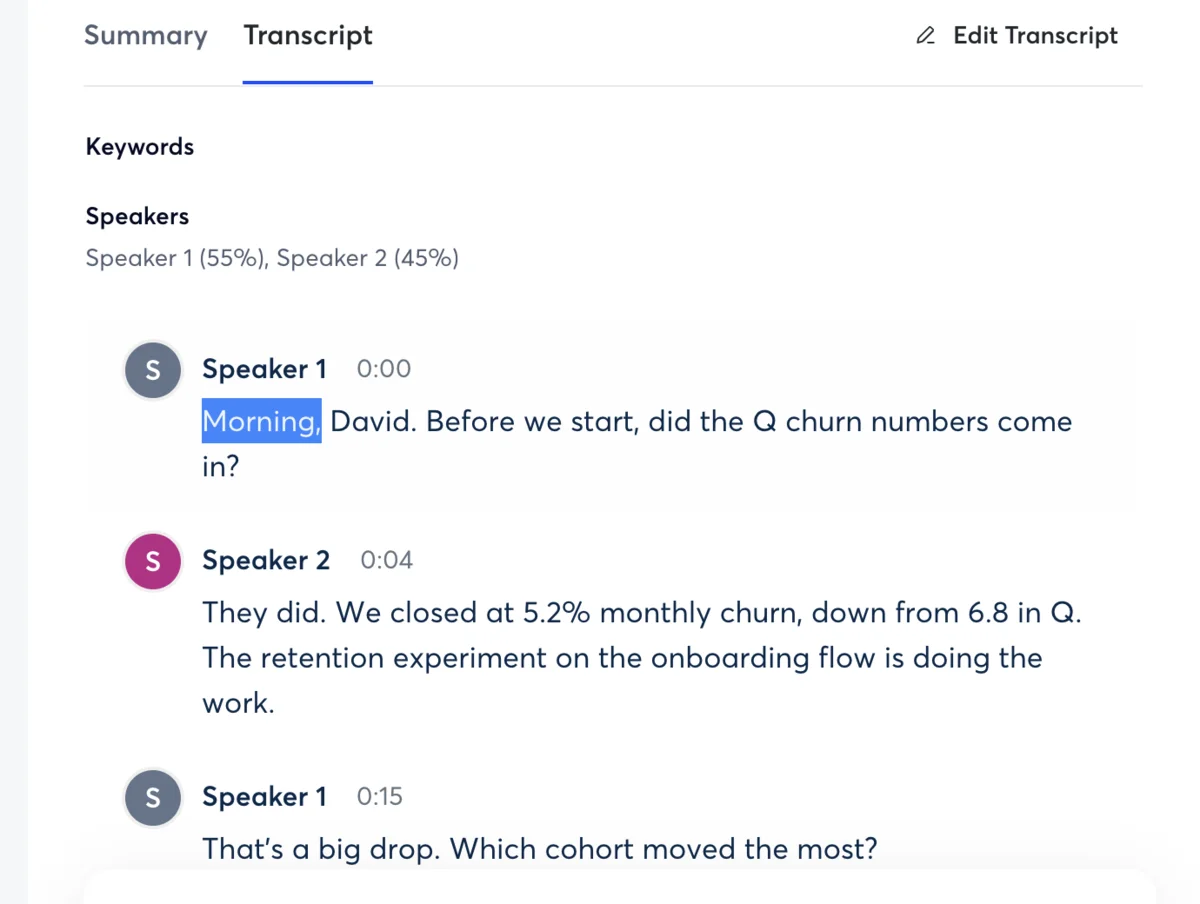
The mobile app and in-person capture. Otter has a mature iOS and Android app that records in-person conversations, not just video calls, which makes it the better tool for someone capturing a hallway chat, a lecture, or a client meeting in a room. Fireflies is built around the online meeting bot and is weaker away from a scheduled video call.
Real-time collaboration. Because Otter transcribes live, several people can open the same meeting as it happens, highlight passages, and drop comments inline, so a team taking notes together works off one shared, building transcript rather than waiting for a recap. Fireflies’ collaboration is post-call by design, so for live, in-the-moment teamwork during the meeting itself, Otter is the more natural fit.
Otter Chat for your own meetings. Otter’s built-in assistant lets you ask questions of a call after the fact and draft follow-up emails or summaries from it, the same idea as Fireflies’ AskFred but scoped to your own meetings rather than a whole team’s archive. It is metered on the cheaper plans — 20 questions a month on free, more on Pro — but for an individual querying their own calls, it covers the job without a team subscription.
Simplicity. Otter does fewer things and asks less of you. For a solo user, that is a feature: hit record, get a clean transcript and summary, search it later. Fireflies’ analytics, integrations, and team controls are power a single person will never use, and the simpler tool is the one you will actually keep. There is a real cost to buying a platform when you needed a notetaker, and for one person Otter avoids it.
Where Fireflies is stronger
Everything Fireflies does best is about scale — making a whole team’s meetings searchable, measurable, and connected to the rest of the stack.
Team-wide AI search. This is the headline. Fireflies’ search runs across every meeting the whole team has recorded, not just your own, and its assistant, AskFred, answers questions spanning that entire history. A manager can ask what an account said about pricing last quarter and get an answer pulled from dozens of calls. Otter searches your own archive; Fireflies searches the organization’s.
Conversation analytics. Fireflies turns months of calls into talk-time ratios, sentiment, topic trends, and coaching signals — the reporting a sales or success leader actually wants. Otter never set out to build this, so for a team that wants to measure how its conversations go, not just record them, Fireflies stands alone here.
Deep integrations and CRM sync. Fireflies pushes notes, action items, and call data into Salesforce, HubSpot, Slack, Notion, and Zapier automatically, so the record lands in the systems the team works in. Otter has integrations, but CRM sync is shallow by comparison and not its focus. For a revenue team, this plumbing is often the whole reason to buy.
| Fireflies’ team edge | What it means |
|---|---|
| AskFred + team search | Query every call the whole org has recorded |
| Conversation analytics | Talk-time, sentiment, topic and coaching insight |
| CRM + Slack sync | Notes and action items flow into Salesforce, HubSpot, Slack |
| 100+ languages | Works for global teams, not just English |
| Video + unlimited free transcription | More captured for free than Otter’s 300-minute cap |
Structured recaps built for handoff. Fireflies’ summaries lean toward the structure a team passes around: an overview, action items by owner, and topic-tagged notes that drop cleanly into a CRM record or a Slack channel. Otter’s recap is perfectly good for one person reviewing their own call, but Fireflies is built so the output is a team artifact, not a personal note, which is the difference between a summary you read and one your whole pipeline acts on.
Soundbites and smart filtering. Fireflies lets you clip key moments into shareable “Soundbites” and filter its search by speaker, sentiment, topic, or date, so a manager can pull every moment a competitor was mentioned across a quarter of calls, or every objection a rep heard, without scrubbing through recordings. That is archive-level tooling Otter’s simpler search does not attempt, and it is the kind of thing that only earns its keep once you have a large body of calls to mine.
Custom topic trackers and AI apps. You can tell Fireflies to flag specific topics — pricing pushback, a named feature, a competitor — every time they come up across the team’s meetings, and run automated “AI Apps” that extract structured data from each call. For a sales org standardizing what it captures from every conversation, that consistency is the point, and it is well beyond a personal notetaker’s remit.
Languages, video, and the free allowance. Fireflies supports 100-plus languages to Otter’s mostly-English focus, records video where Otter reserves transcript-synced replay for its top Enterprise tier, and its free tier offers unlimited transcription, capped only by 400 minutes of stored history for the whole team, against Otter’s hard 300-minute monthly cap. On raw allowances and breadth, Fireflies gives a team more.
How they compare on price
Pricing is where the individual-versus-team split shows up in dollars, and the two tools invert each other depending on scale.
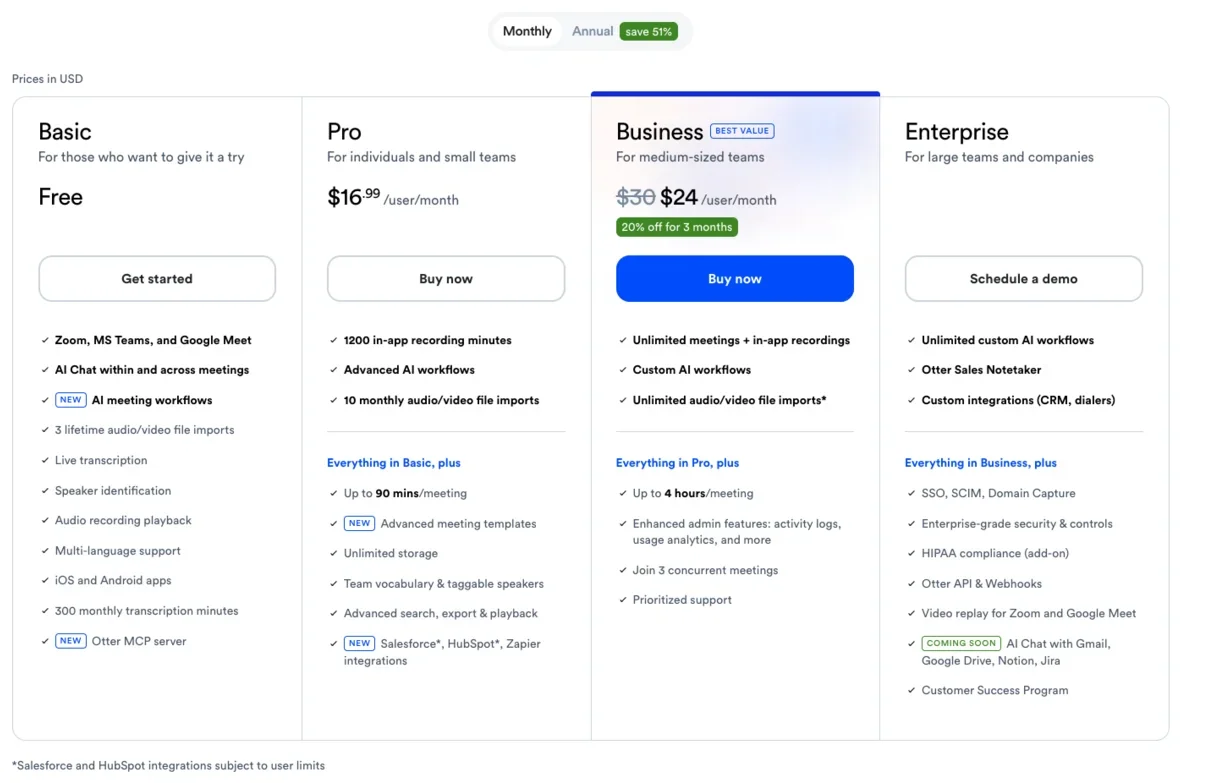
Otter starts free with 300 minutes a month, a 30-minute cap per conversation, and three lifetime file imports — enough to try it, not to live on. Pro is $16.99 a month and mostly lifts those caps; Business is $30 a user a month and adds unlimited transcription, meeting recording, and admin controls, while transcript-synced video replay is reserved for the top Enterprise tier. The jump to Business is steep for what are, for many people, table-stakes features.
Fireflies starts free with unlimited transcription, capped only by 400 minutes of stored history for the team rather than a hard limit on what you can record, a more generous free tier than Otter’s 300-minute monthly allowance. Its Pro plan is about $10 a user a month billed annually, and Business is around $19, with the team search, analytics, and integrations included. For an organization, that is the telling number: Fireflies’ roughly $10 a seat undercuts Otter’s $30 Business tier by a wide margin while including the team features a team is actually paying for.
Run the math for a real team and the gap is stark. A five-person sales team that wants unlimited transcription, search, and admin controls pays Otter Business at $30 a user, about $150 a month, or $1,800 a year. The same five seats on Fireflies Pro at roughly $10 land near $50 a month, and even Fireflies Business at around $19 is about $95 — roughly half the Otter bill, with the CRM sync and analytics that a team is buying a notetaker for in the first place. Otter’s pricing is built for the individual who upgrades alone; Fireflies’ is built for the seat count of a team, and it shows on the invoice.
The figures above are the annual rates, and paying month to month costs noticeably more on both: Otter Pro is about $8.33 a month on the annual plan against $16.99 billed monthly, and Fireflies Pro is $10 a month annually against roughly $18 monthly. For a team sizing a budget, that monthly-versus-annual gap is real money stacked on top of the per-seat difference. If you are still deciding, start each on its free tier rather than committing a year up front, since both let you run real meetings through them before you pay.
The flip side holds for one person. A solo user does not need Business on either tool, so the comparison is Otter Pro at $16.99 against Fireflies Pro at about $10 — close enough that the cheaper sticker should not decide it, since a single user gets little from Fireflies’ team machinery and more from Otter’s cleaner solo experience.
So the price verdict tracks the whole comparison. For one person, Otter’s free or $16.99 Pro plan is the simpler, cheaper-to-reason-about buy. For a team of several people, Fireflies is both cheaper per seat and more capable. And if a genuinely free plan is your priority, Fathom beats both, with unlimited recording and transcription at no cost — see our Otter pricing guide for the full breakdown of Otter’s tiers.
Which one is more accurate?
Otter holds a slight edge on raw transcription accuracy, but the gap is narrow and should not decide your choice. Here is the evidence, stated plainly. We ran our controlled test — an 80-second, two-speaker meeting generated with synthetic voices and loaded with names, numbers, and jargon — through Otter directly, and it transcribed cleanly apart from dropping the quarter off one figure, turning “Q3” into a vaguer reference.
We have since run that same clip through Fireflies for our Fireflies review, and it came back near-flawless, holding the “Q3” detail Otter dropped, with only a single punctuation slip. On that one clip Fireflies edged it, so treat the difference as negligible; across broader independent testing as of mid-2026, Otter keeps a narrow lead, commonly cited around 93 to 95 percent to Fireflies’ 90 to 93.
What Otter got right is worth naming, because a single dropped detail can read worse than it was. It kept both speakers correctly labeled, held the dollar figures and the action items intact, and only softened that one quarter reference — the kind of slip that matters if you are quoting the transcript verbatim but not if you are reading the summary. Speaker recognition, the thing that most often goes wrong in a multi-person call, was solid, which tracks with Otter’s reputation as the stronger live transcriber.
Put in numbers, that edge is commonly placed at around 93 to 95 percent for Otter in good conditions to Fireflies’ 90 to 93, on transcription and speaker recognition, and our Otter result is consistent with that. Fireflies is sometimes credited with coping a little better with overlapping or accented speech, and it clearly wins on language breadth, with 100-plus languages to Otter’s largely English focus. That last point is its own kind of accuracy: for a meeting in Spanish or Japanese, Fireflies’ broad language support will beat a tool optimized for English, so “more accurate” can flip depending on what language you actually speak in.
The real takeaway is that the gap is small. Both tools get the substance of a meeting right; neither will embarrass you. An accuracy difference of a few percentage points is not what should decide this — it is swamped by the individual-versus-team question, which changes everything about which tool you should actually buy.
Individual tool or team brain: the difference that decides it
Strip away the feature lists and one distinction is doing all the work: Otter is a tool for capturing your meeting, and Fireflies is a system for understanding your team’s meetings.
Map it onto your actual week and it gets concrete fast. If your problem is “I sit in calls and want a clean, accurate record I can search later,” you are describing Otter, and adding Fireflies’ analytics and CRM machinery would be paying for a dashboard you never open. If your problem is “my team runs a hundred calls a month and a manager needs to search them, measure them, and pipe the outcomes into Salesforce,” you are describing Fireflies, and Otter simply does not have those parts.
Two quick scenarios make it concrete. A freelance UX researcher runs five client interviews a week and needs accurate transcripts she can quote and search; she wants Otter, where the live transcript, the mobile capture, and the clean personal archive do exactly her job, and Fireflies’ analytics would be noise. A ten-person SDR team books forty discovery calls a week and the manager needs to see which objections recur, coach reps on talk-time, and land every call summary in HubSpot; that team wants Fireflies, and Otter would leave them copying notes by hand and flying blind on the trends. Same category of tool, opposite right answer.
This is why the accuracy and even the price comparisons are secondary. A solo consultant on Fireflies Business is overpaying for team intelligence; a ten-person sales org on Otter is missing the search and sync that justify a notetaker at that scale in the first place. Decide which sentence above is yours, and the tool is chosen — everything else is detail.
| Your situation | The tool | Why |
|---|---|---|
| One person capturing meetings | Otter | Accurate live transcript, mobile, simple |
| A team searching + measuring calls | Fireflies | Org-wide search, analytics, CRM sync |
| Cost is the main driver | Fathom | Unlimited free plan beats both |
Who should pick Otter
Otter is the tool for the person whose meetings are their own to manage. If most of your week is calls, lectures, or interviews where you want a fast, accurate record you can revisit and quote, Otter does that with less setup and a better live experience than Fireflies, and the things Fireflies adds on top would be weight you carry without using. It is the safer default for anyone who is not buying on behalf of a team. It is the better pick when:
- You want the best live, in-the-room transcript with speaker labels appearing in real time, not just a summary after the call.
- You are a student, journalist, or researcher for whom the verbatim transcript itself is the deliverable and a slight accuracy edge matters.
- You record in person, not only on scheduled video calls, and want a strong mobile app.
- You want simplicity — one tool that records, transcribes, and lets you search, without team dashboards you will not use.
The catches to go in with: Otter’s free plan is tight at 300 minutes, transcript-synced video replay is reserved for its top Enterprise tier, and it has faced privacy scrutiny, including a 2025 class-action and a default opt-in to training on your data. Our full Otter.ai review has the detail.
Who should pick Fireflies
Fireflies is the tool for the team that has outgrown “we record our calls” and needs to do something with them at scale. Once several people are generating meetings every week and someone has to find a pattern across them, coach against them, or feed their outcomes into a pipeline, Fireflies stops looking like an expensive notetaker and starts looking like the cheapest way to get team-wide meeting intelligence. The per-seat price that looks high next to a solo Otter plan is low next to what the search, analytics, and CRM sync replace. It is the better pick when:
- You need to search across everyone’s calls, not just your own, and have a manager ask questions spanning the whole history through AskFred.
- You want conversation analytics — talk-time, topics, sentiment, and coaching signals across the team.
- CRM and workflow sync is central, pushing notes and action items into Salesforce, HubSpot, Slack, and Notion automatically.
- Your team is global, needing 100-plus languages rather than Otter’s mostly-English coverage.
The catches: the bot is unavoidable and visible, the interface is busier than Otter’s, and a solo user will pay for a great deal they never touch. As with any notetaker, confirm consent and your data policy before recording sensitive calls. If Fireflies is close but not quite right, our Fireflies alternatives shortlist covers the nearest swaps.
Final word
Otter versus Fireflies is one of the few tool comparisons where “it depends” is the genuinely correct answer, because the two are not really competing for the same job. Otter is the better personal notetaker — more accurate live transcription, a real mobile app, and a simplicity a single user will thank it for. Fireflies is the better team brain — search, analytics, and CRM sync across a whole organization’s calls that Otter was never built to provide.
So skip the feature-by-feature scorekeeping and answer one question: are you equipping yourself or your team? A person picks Otter; an organization picks Fireflies. And if what actually pushed you to compare them was the price of either, look at Fathom first — its unlimited free plan and the cleanest notes we tested make it the tool to beat before you pay for either of these. For the wider field, our best AI note taker roundup lines up every option side by side.
Frequently asked questions
Is Otter or Fireflies better?
It depends on whether you are an individual or a team, because they are built for different jobs. Otter is the better personal notetaker: it has the most accurate live, in-the-room transcription with speaker labels, a mature mobile app, and a clean searchable archive, which suits a student, journalist, consultant, or anyone who mainly needs their own meetings captured well.
Fireflies is the better team brain: it runs AI search and conversation analytics across everyone's calls, pushes notes and action items into Slack and a CRM, and supports 100-plus languages, which a sales or success org needs once it is generating hundreds of calls a month.
Neither is the most generous on free use, so if cost is the deciding factor, Fathom's unlimited free plan beats both. Choose Otter for personal transcription, Fireflies for team-wide meeting intelligence.
Is Fireflies more accurate than Otter?
No, Otter holds a slight edge on raw transcription accuracy, though both are strong and the gap is narrow. In our own controlled test we ran a planted two-speaker meeting through Otter and it transcribed cleanly apart from dropping the quarter off one figure, and independent 2026 testing generally puts Otter ahead on transcription accuracy and speaker recognition, commonly around 93 to 95 percent to Fireflies' 90 to 93. Fireflies is sometimes credited with handling overlapping or accented speech a touch better, and it supports far more languages.
We have now run both Otter and Fireflies end to end on the same clip: Fireflies actually kept the "Q3" detail Otter dropped, so on our own test the two are level, and the narrow overall edge independent testing gives Otter does not decide the choice. The honest takeaway is that the accuracy difference is small enough that it should not decide your choice; the team-versus-individual split matters far more.
Is Otter or Fireflies cheaper?
Fireflies is cheaper for a team, and Otter is simpler for a solo user, so the answer depends on scale. Fireflies starts free with unlimited transcription, capped only by 400 minutes of stored history for the whole team, and its paid Pro plan is about $10 a user a month billed annually, with Business around $19.
Otter's free plan gives 300 minutes a month with a 30-minute cap per conversation, its Pro plan is $16.99 a month, and Business is $30 a user. For a whole team, Fireflies' roughly $10 a seat undercuts Otter's $30 Business tier substantially, while including the search and CRM features a team is paying for.
For one person who just wants transcription, Otter's free or Pro plan is the simpler buy. And if free is your priority, Fathom's unlimited free plan beats either tool's capped free tier.
Can Fireflies and Otter sync notes to a CRM like Salesforce?
Fireflies does this far better, and it is one of the main reasons teams pick it over Otter. Fireflies integrates deeply with Salesforce, HubSpot, Slack, Notion, and Zapier, so meeting notes, action items, and call data flow automatically into the systems a sales or success team already works in, without anyone copying and pasting.
Otter has integrations too, including Salesforce on its higher plans and connections to Zoom, Google Meet, and Microsoft Teams, but CRM sync is not its focus and the automation is shallower than Fireflies'.
If pushing structured meeting data into a CRM and triggering downstream workflows is central to how your team works, Fireflies is built for that and Otter is not. For a solo user with no CRM to feed, this difference does not matter, and Otter's simpler setup is the easier path.
What is better than Otter and Fireflies for a free plan?
Fathom, on the strength of its free plan, which is more generous than either Otter's or Fireflies'. Where Otter caps you at 300 minutes a month and Fireflies keeps only 400 minutes of stored history for the whole team, Fathom records, transcribes, and summarizes unlimited meetings for free with no minute cap, and it keeps your full history rather than hiding older notes.
In our hands-on testing across the category, Fathom also produced the cleanest summary and the most accurate transcript of the notetakers we ran, and it records replayable video that Otter reserves for its priciest tier.
It joins as a visible bot by default, like both Otter and Fireflies, and its bot-free mode is still in beta. If your reason for comparing Otter and Fireflies is mainly cost, it is worth looking at Fathom first; see our Fathom review and the best AI note taker roundup.
Is Fireflies safe and trustworthy for meetings?
Fireflies is widely used by teams and carries enterprise security credentials, but as with any notetaker you should check your own policy before recording. It is SOC 2 and GDPR compliant and offers private storage options on higher plans, and it joins calls as a visible bot so participants can see it is recording.
The broader caution applies to this whole category: an AI notetaker records and stores your conversations, so for sensitive or client calls you should confirm consent and your data-handling obligations, especially in two-party-consent states.
Otter has faced more public scrutiny here, including a 2025 class-action over how it records people and a default opt-in to training its AI on your data. If a silent footprint or minimal data retention is your priority, a bot-free tool like Granola is calmer than either Otter or Fireflies; for most teams, Fireflies' visible bot and compliance posture are enough.
Keep reading
Otter vs Fathom: live transcript or polished summary?
We tested both. Fathom wins for most — unlimited free plan, video, cleaner summaries; Otter for live transcription and in-person notes. Which fits you?
Otter.ai pricing: what you'll actually pay in 2026
Otter.ai pricing runs from free to $30 a user. Here's what each tier really costs, the limits the pricing page soft-pedals, and which plan you actually need.
Otter vs Granola: we ran one meeting through both
We fed the same meeting to Otter and Granola. Otter wins on transcription and search; Granola wins on bot-free notes. Here's which AI notetaker fits you.