
InVideo AI review: the fastest prompt-to-video, at a price
I ran one script through InVideo AI three ways. It's the fastest, broadest AI video tool I've tested, but the credits bite hard. My hands-on 4.2/5 verdict.
Contents
Is InVideo AI worth it?

Yes, if you want the fastest possible path from a one-line idea to a finished video and you can be disciplined about credits. I typed a single sentence into InVideo’s Agent One, and a few minutes later it handed back a captioned, narrated 9:16 video with footage, voiceover, and music already assembled. No other tool I have tested in this price range turns a prompt into a complete draft this fast, or reaches as many top video models from one place. I score it 4.2 out of 5, a Power Tool.
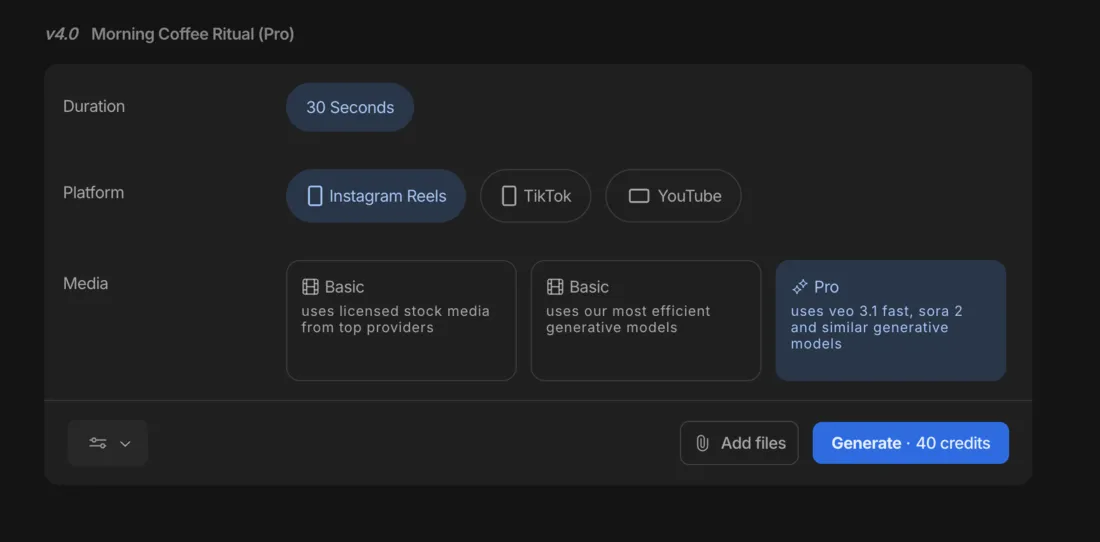
The reason it is not higher is the same reason it is impressive: it does a lot, and it charges for all of it. InVideo runs on credits, and the gap between cheap and expensive is enormous. A video built from stock footage cost me about 2 credits; the same brief built with premium Veo and Sora footage cost 40 — more than half of the $20 Plus plan’s entire monthly allowance for one 30-second clip. The free plan cannot export a usable video at all. So InVideo is powerful and fast, no argument, and whether it is worth it comes down to whether you will live inside its economics.
What does InVideo AI do?
InVideo turns a written brief into a finished video. Its current flagship is Agent One (the v4 generation of what InVideo still calls its Autopilot agent), and the pitch is blunt: give it a topic, a point of view, and some instructions, and it writes a script, picks footage, generates an AI voiceover, lays in captions and music, and assembles the whole thing into a video up to 30 minutes long. You skip the recording booth, the stock search, and the timeline, and start from a draft instead of a blank canvas.
What sets InVideo apart from Pictory and Fliki, its closest script-to-video rivals, is breadth. Where Pictory leans on stock B-roll and Fliki leads with its voice library, InVideo positions itself as a hub: it advertises access to more than 200 image, video, audio, and music models, and for generative footage it can call on Google’s Veo 3.1, OpenAI’s Sora 2, Kling, and Seedance, all from the same workflow. Instead of subscribing to several AI tools, you reach the best of them in one.
Here is the actual output. I gave Agent One a single brief (a 30-second vertical explainer about how AI voiceover tools let faceless creators make videos without recording their own voice), kept its smart defaults, and this is what came back on the stock-footage setting.
The speed is the headline. From one sentence, InVideo wrote a tight script, matched each line to a stock clip, generated a clean AI voiceover, and timed bold captions to the narration — all without a single manual step from me. The voiceover is clear and well-paced, the captions are readable, and for a faceless social clip it is most of the way to publishable.

The visuals are where the stock setting shows its seams. The footage is competent but generic: a man checking his phone, a glowing “AI” logo, an abstract clip that captioned itself “Drop in upbeat music.” It is the kind of recognizable stock that other channels are also using. That is the trade you make on the cheap tier, and it is exactly why InVideo offers the generative models as a step up. More on what those cost, and whether they are worth it, below.
Once the draft exists, you are not stuck with it. You can revise the whole video with natural-language commands (type an instruction and Agent One rebuilds the relevant part) or open the timeline and edit any scene by hand: swap the clip, change the voice, restyle the captions, adjust the music. When the model reads your instruction correctly, the editing loop is quick.
How much does InVideo AI cost?
InVideo’s real price is credits, not the monthly sticker: a stock video costs about 2 credits, an efficient generative one about 15, and a premium Veo/Sora clip 40 — out of the 75 a month the $20 Plus plan gives you. The monthly fee is the number you see; the credits are the number that decides whether InVideo is for you.
Billed monthly, the plans look like this, and annual billing trims roughly 15% off each.
| Plan | Monthly | Credits/mo | Best for |
|---|---|---|---|
| Free | $0 | tiny (can’t export usable video) | looking around |
| Plus | $20 | 75 | solo creators, mostly stock |
| Max | $100 | 390 | regular generative use |
| Generative | $200 | 800 | daily generative output |
| Elite | $1,000 | 4,250 | agencies and teams |
The headline is that every plan runs on a monthly credit pool, and every generation spends from it. That sounds ordinary until you see how much the credit cost varies by the footage you choose. Generating the same 30-second brief, InVideo quoted me three very different prices depending on the media setting:
- Stock footage (Basic): ~2 credits. Licensed clips from top providers — the setting my first demo used.
- Efficient generative (Basic): ~15 credits. AI-generated footage from InVideo’s most cost-efficient models.
- Premium generative (Pro): 40 credits. Google’s Veo 3.1 and OpenAI’s Sora 2.
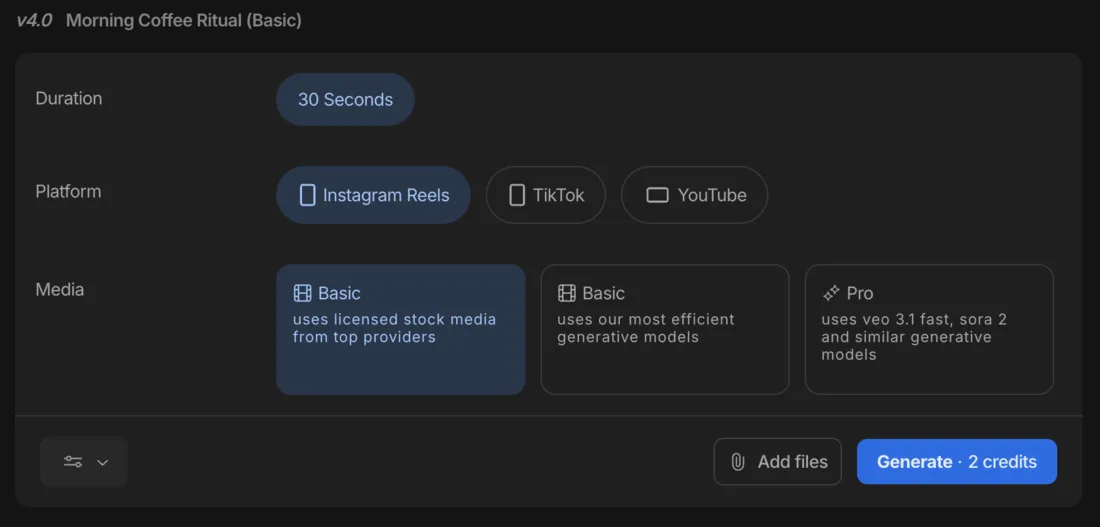
Put that against the Plus plan’s 75 monthly credits and the picture sharpens fast. Seventy-five credits is roughly 37 stock videos a month — plenty. But it is only about five efficient-generative videos, and fewer than two premium Veo/Sora clips. A single 30-second video using the best models eats more than half your month. And there is no loyalty discount on iteration: regenerate a clip you did not like and it charges the full rate again, so a misjudged prompt on the Pro tier can cost 40 credits twice.
That is the single most important thing to understand before you pay InVideo. As a fast stock-video tool, the $20 Plus plan is genuinely good value and you will rarely run dry. As a generative video tool, the credits are the real meter, and the premium models are priced like a luxury — which is exactly the complaint that runs through InVideo’s user reviews, where people describe paying real money for clips they never finished.
One smaller cost to know about: InVideo’s stock footage is licensed only when you export, and each export draws iStock licenses from a monthly quota (100 on Plus). On any paid plan you export watermark-free, at up to 1080p, and can strip InVideo’s branding entirely — the watermark is purely a free-plan limitation.
Who is InVideo AI for?
InVideo suits creators who value speed and breadth over predictable cost, and who will mostly work in stock. A few profiles fit it especially well.
- Fast, high-volume social creators who want a finished faceless video from one prompt and will publish mostly stock-footage clips, where the per-video cost is trivial and the speed is the whole point.
- Creators who want premium models without juggling tools. If you occasionally need Veo or Sora footage, reaching them inside InVideo — alongside the script, voiceover, and editing — beats subscribing to several separate generators, as long as you treat the premium tier as an occasional splurge.
- Marketers and agencies on the higher plans. The Max, Generative, and Elite tiers exist for people who generate constantly; the credit math that strains a solo creator on Plus is the point of the bigger pools.
- Not for you if you need a usable free tier (InVideo’s cannot export a real video — Fliki can), predictable cost at volume on generative footage, or distinctive non-stock visuals without spending heavily. Heavy iterators in particular should go in clear-eyed about the no-discount regeneration.
What InVideo does well
It is the fastest one-prompt video tool I have tested
This is InVideo’s real edge. From a single sentence, Agent One produced a complete, captioned, narrated video in a few minutes with zero manual steps. It read my brief, wrote a sensible script, matched footage, generated a voiceover, and timed captions — the entire assembly that usually stalls non-editors, done automatically. For getting from idea to first draft, nothing else in this class is quicker.
The premium models are a real step up
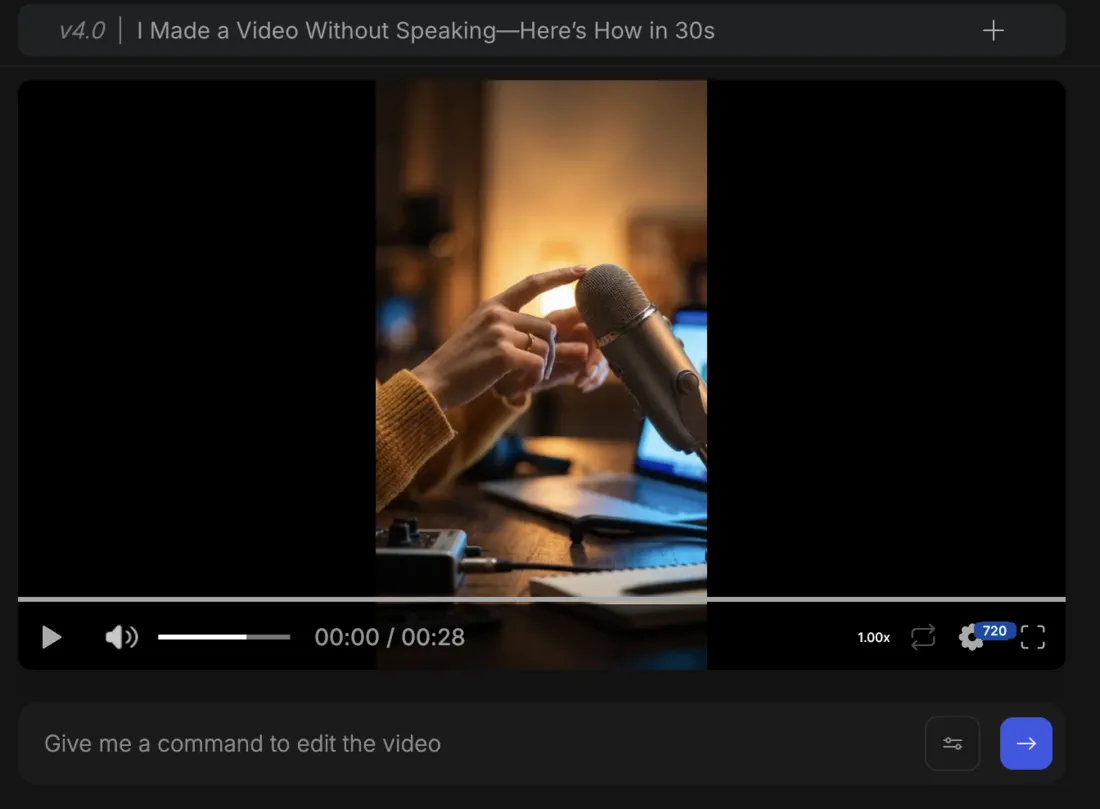
InVideo’s pitch as a hub is not marketing fluff. Reaching Google’s Veo 3.1, OpenAI’s Sora 2, Kling, and Seedance, plus a deep stock and template library, from one $20 workflow is something none of its direct rivals offer. To see the difference, I ran the exact same brief again on the Pro generative setting, and the footage came back genuinely cinematic: warm, shallow-focus shots of a glowing laptop and a studio microphone, original and atmospheric rather than recognizable stock.

The jump in quality is obvious next to the stock version, and for a creator who wants to experiment across the top video models without subscribing to each separately, that breadth and polish is a genuine reason to choose InVideo. Look closely and the AI tells are still there, like the garbled keycaps on that laptop, but for fast b-roll it is impressive. The catch, as ever, is the meter: this clip cost 40 credits against the stock version’s 2, so the premium look is a luxury you ration, not a default you reach for.
Natural-language editing makes revisions fast
Once the draft exists, you can refine it by typing instructions in plain English, and Agent One rebuilds the relevant part, or open its media, music, and script panels for manual control over footage, voice, captions, and music. When the model interprets the request correctly, the loop is quick and beginner-friendly — InVideo consistently earns praise for its low learning curve, and the editing experience is a big part of why.
Watermark-free, branding-free exports on the cheap plan
Plenty of AI video tools reserve clean exports for their mid or top tiers. InVideo gives you watermark-free 1080p output, with the option to remove its branding entirely, on the entry-level $20 Plus plan. For a creator publishing to TikTok or Reels, getting unbranded exports without climbing to an expensive tier is a meaningful, practical win.
The template and stock library is deep
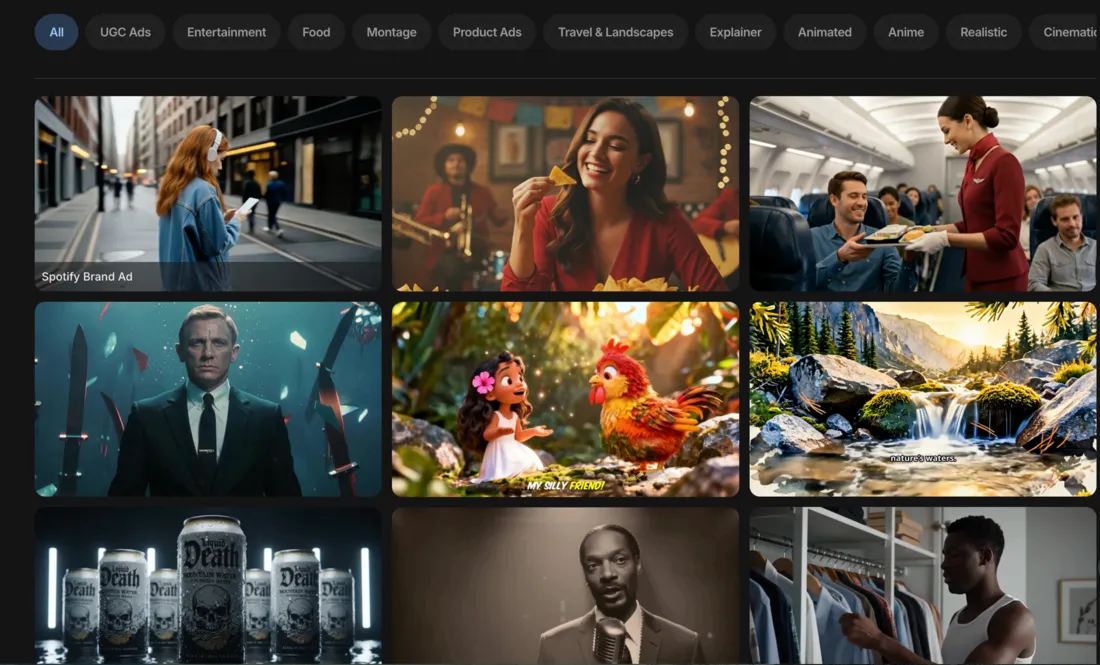
Beyond the AI generation, InVideo ships a large template library and licensed stock access — its iStock integration is frequently called the best stock access at this price point. The Explore gallery also shows finished example videos with the exact prompts that produced them, which is a smart way to learn what the agent can do. For fast, templated marketing and social content, the raw material is all there.
Where does InVideo fall short?
The credit economics are the real price
This is the defining knock, and my hands-on test made it concrete. Generating the same 30-second brief three ways, InVideo quoted me wildly different credit costs, and on the $20 Plus plan’s 75-credit monthly pool that translates to very different output ceilings.
| On the $20 Plus plan (75 credits/mo) | Credits per 30s video | Videos per month |
|---|---|---|
| Stock footage | 2 | ~37 |
| Efficient generative | ~15 | ~5 |
| Premium (Veo 3.1 / Sora 2) | 40 | fewer than 2 |
A premium generative video costs more than half your monthly pool for one 30-second clip, and InVideo charges the full rate again every time you regenerate, with no discount for fixing the AI’s mistakes. Across user reviews this is the dominant complaint: people describe paying for videos they never completed because each attempt burned more credits. The monthly price is approachable; the cost per finished generative video, once you account for the inevitable retries, runs well above it.
The free plan cannot make a usable video
InVideo’s free tier watermarks every export, caps your weekly export time, and gives a credit pool a single generation can exhaust. It is an interface tour, not a free video maker, and several reviewers called that misleading. A rival like Fliki lets you actually build and export a (watermarked) video for free; InVideo makes you pay before you can produce anything publishable, which is a worse first run for anyone trying to evaluate before they commit.
On the cheap tier, the visuals look generic
The stock-footage setting that keeps costs low also produces the most forgettable output. My demo’s footage was competent but recognizable — the same kind of stock other channels lean on — and one clip literally captioned itself “Drop in upbeat music.” The fix is the generative tier, but that is where the credits drain, so you are choosing between cheap-and-generic or distinctive-and-expensive, with little middle ground on a budget.
The AI does not always get it right
When Agent One misreads an instruction or ignores an uploaded asset — both documented in user reviews and visible in my own test — your options are coarse, and every correction spends more credits. The natural-language editing is a strength when it works and a cost multiplier when it does not, and on the premium tier those misses are expensive.
Support and refunds draw complaints
InVideo’s softer Trustpilot score — about 4.0 across some 800 reviews, against a stronger 4.5 on Capterra — tracks a recurring theme: slow or unhelpful support, and friction getting refunds on failed generations that still deducted credits. It is not universal, but if a 40-credit render goes wrong, the path to getting those credits back is not a smooth one, and that is worth knowing before you rely on the premium models.
If InVideo AI isn’t for you
If the economics or the stock-heavy visuals are not the right fit, three tools cover the gaps depending on what you need instead.
| Tool | Best for | The trade |
|---|---|---|
| Fliki | voice-first, multilingual, budget video | better voices and a real free tier, weaker generative visuals |
| Pictory | turning blog posts into video | cleaner article-to-video, narrower feature set |
| Synthesia | avatar / talking-head video | polished presenters, but a different category and pricier |
- Fliki is the better pick if voice quality, multilingual reach, and value matter most. Its free plan actually exports a video, its paid plans start at $8, and its 2,000+ voices outclass InVideo’s narration — at the cost of InVideo’s breadth and premium models. See our Fliki review.
- Pictory is the cleaner choice if your real job is turning written articles into video; its URL-to-video repurposing is more focused, though it lacks InVideo’s generative range. See our Pictory review.
- Synthesia is the move if you want a polished AI presenter talking to camera rather than a stock-and-generative montage. It is a different category — avatar video, not prompt-to-video — and it costs more, but for training and explainer content with a human face it is the stronger tool.
The verdict
InVideo AI is a Power Tool at 4.2 out of 5, and it earns that on speed and breadth. It is the fastest tool I have tested at turning a one-line brief into a finished video, and the only one in its price class that reaches Google’s Veo 3.1, OpenAI’s Sora 2, Kling, and Seedance from a single workflow. If you want one place to draft fast and experiment across the top video models, nothing else offers this much.
Go in understanding the economics, though, because they are the whole story. A stock video costs almost nothing in credits and the $20 Plus plan is real value; a premium generative video costs 40 credits, the free plan cannot export anything usable, and regenerating charges full price every time. InVideo gives you enormous capability and hands you the bill for exactly how much of it you use. Buy it for fast, mostly-stock video with premium models on tap — and keep one eye on the credit meter.
InVideo is one of the picks in our best script-to-video AI tools roundup. To see how it stacks up head-to-head, read Fliki vs InVideo and Pictory vs InVideo.
Frequently asked questions
Is InVideo AI worth it?
For creators who want the fastest path from a one-line brief to a finished video, and who will mostly use stock footage, yes. In my hands-on test InVideo's Agent One built a captioned, narrated 9:16 video from a single sentence in a few minutes, and it can reach Google's Veo 3.1, OpenAI's Sora 2, Kling, and Seedance from one workflow, which no rival in its price class matches.
The catch is cost: a stock video runs about 2 credits, but a premium generative one costs 40 of the Plus plan's 75 monthly credits, and regenerating charges full price again. The free plan cannot export a usable video. So it is worth it as a fast stock-video drafting tool with optional access to premium models, less so if you need cheap, repeatable generative output. I score it 4.2 out of 5, a Power Tool.
Is InVideo AI free?
There is a free plan, but unlike some rivals it cannot produce a usable video. The free tier stamps an InVideo watermark on every export, caps your weekly export time, and gives a tiny credit pool that a single generation can exhaust, so in practice it is an evaluation sandbox rather than a way to publish. By contrast a rival like Fliki gives a free tier that actually exports a finished (watermarked) video, where InVideo's free plan is closer to a preview mode.
This was the most common complaint I found in user reviews, and it matches the tool's design: InVideo wants you on a paid plan before you make anything you can post. To remove the watermark, export at 1080p, and actually generate video, you need the Plus plan at $20 a month, which is where the tool becomes usable. Treat the free plan as a look around the interface, not a free video maker.
How much does InVideo AI cost?
Billed monthly, the plans are Free $0, Plus $20, Max $100, Generative $200, and Elite $1,000; annual billing trims roughly 15%, so Plus drops to about $17 a month. But the price you see is not the cost that matters — credits are. Each plan includes a monthly credit pool (Plus 75, Max 390, Generative 800, Elite 4,250), and every generation spends from it: in my testing a stock-footage video cost about 2 credits, an efficient generative one about 15, and a full Veo/Sora generative one 40.
So on Plus you can make dozens of stock videos a month but fewer than two premium generative ones, and regenerating a clip charges the full rate again. Budget around the credits and the kind of footage you need, not the monthly sticker price, because the credit ceiling is the limit you actually hit first.
Is InVideo AI better than Fliki or Pictory?
It depends on what you weigh. InVideo is the more powerful all-rounder: it is faster from a one-line prompt, has the deepest model access (Veo 3.1, Sora 2, Kling, Seedance), and the largest template and stock library of the three. Fliki wins on voice quality, a working free tier, and price, and Pictory is cleaner specifically for turning blog posts into video.
Where InVideo loses is economics: Fliki's free plan actually exports a video and its paid plans start at $8, while InVideo's free plan cannot generate and its premium footage burns credits fast. So pick InVideo if you want speed, breadth, and premium model access in one tool; pick Fliki if voice and value matter most, or Pictory if your job is article-to-video. In my testing Fliki scored 4.3 and Pictory 4.1 against InVideo's 4.2.
What AI models does InVideo use?
InVideo positions itself as a hub rather than a single model, advertising access to 200+ image, video, audio, and music models from one workflow. For generative video the headline names are Google's Veo 3.1, OpenAI's Sora 2, Kling, and Seedance, and you pick the footage type when you generate: a stock-footage pass (cheapest at about 2 credits), an efficient-generative pass (around 15), or the Pro pass that taps Veo and Sora (40, the priciest).
That breadth is the real draw — instead of subscribing to several tools you reach the top video models in one place. The trade-off is that the best models are the most expensive in credits, so model access and cost are the same decision. In my test the Pro generative tier cost 40 credits for a 30-second clip versus 2 for stock.
Can InVideo AI edit a video after it generates one?
Yes, and the editing is one of its better features. After Agent One builds the first draft you can revise it with natural-language commands — typing an instruction like change the third scene or swap the voice — as well as edit any scene by hand in the timeline, replace footage, adjust captions, and change the voiceover. When the model understands the request it feels genuinely fast.
The caveat, echoed across user reviews and my own test, is that the AI does not always interpret edits correctly, and because every regeneration spends credits, a misread instruction costs you both the fix and the credits it burned. So the editing is powerful but not free to iterate on, which is the recurring theme with InVideo: the capability is there, but the cost discipline is on you, and that trade-off quietly defines the whole tool.
Does InVideo AI put a watermark on videos?
On the free plan, yes — every export carries an InVideo watermark, which is one reason the free tier is evaluation-only. On any paid plan, starting with Plus at $20 a month, the download screen gives you separate switches: one removes the watermark, a second strips InVideo's own branding, and a third sets resolution up to 1080p, so a clean unbranded export is the default once you pay.
One detail worth knowing: InVideo's stock footage is licensed only when you export, and each export consumes iStock licenses from your monthly quota (100 on Plus), shown to you at download. So the watermark question is really a plan question — pay and it is gone, along with the InVideo branding, but the stock-license meter is the thing to watch on a paid plan, not a watermark.
Keep reading
The best script-to-video AI tools, by job
The best script-to-video AI tools ranked by job: Fliki wins overall, InVideo for generative footage, Pictory for blog-to-video, plus avatar and editing picks.
Fliki vs InVideo: I tested both — voice or visuals?
Fliki vs InVideo, both tested hands-on: Fliki (4.3) wins on voice, languages, price, and a free tier; InVideo (4.2) wins on generative visuals and speed.
The 5 best Pictory alternatives, ranked by job
The best Pictory alternatives, ranked: Fliki for voice, InVideo for generative video, Lumen5 for blog-to-video, Synthesia for avatars, Descript for editing.