Granola AI alternatives: 5 better notetakers, tested
The best Granola alternatives for AI meeting notes, tested. Need Android, saved video, or team-wide search? Here's the notetaker that fixes Granola's gaps.
Contents
Granola, the AI meeting notetaker, earned its following for a reason: it joins nothing, captures your call quietly, and turns the rough notes you jot into a polished summary. We rated it 4.6 out of 5. But it is also a deliberately narrow tool, and the moment your needs grow past its edges — a teammate on Android, a call you need to re-watch, an archive the whole team can search — you start looking for something that does more.
Search “Granola alternatives” and you mostly get listicles ranking a dozen tools the writer never opened, which is no help when you have one specific reason for leaving and need the one tool that fixes it. We took a different route. We had just run the same controlled meeting through Granola and its two leading rivals and written full reviews of each, so we can tell you which alternative actually solves the thing pushing you off Granola, whether that is the platform gap, the missing video, the note-taking it asks of you, or the lack of team features.
The best Granola alternatives at a glance
We tested the top three head-to-head and surveyed the rest of the field. Here is where they land:
- Best overall, and best free: Fathom — keeps the clean summaries you like about Granola, but adds saved video, a fuller free plan, and cross-platform access. 4.6 / 5.
- Best for cross-platform and Android: Otter.ai — a real Android and web app, plus live in-the-room transcription Granola never shows. 3.8 / 5.
- Best for large teams: Fireflies — organization-wide search across hundreds of calls, plus deep CRM and Slack integrations Granola lacks.
- Best for sales and revenue teams: Avoma — call scoring, talk-time analytics, and pipeline insight built for revenue orgs.
- Best free with saved video: tl;dv — unlimited free recordings across Zoom, Meet, and Teams, with the replayable video Granola deletes.
If you just want the short version: leaving because you need video or a fuller free plan? Start with Fathom. Leaving because your team is on Android or the web? Otter. A big team that needs to search every call? Fireflies.
Why people leave Granola
Most “best alternatives” lists skip the obvious first question: what is actually wrong with the tool you are leaving? Granola is not a bad product, and we said so in our full Granola review. It is a narrow one, built around a specific way of working — one that drew a reported $1.5 billion valuation and a devoted following — and naming the edges of that design is the fastest way to find the right replacement, because each gap points at a different alternative.
The platform gap is the big one. Granola runs on Mac, Windows, and iPhone — and nowhere else. There is no Android app and no web version, so the moment a teammate on an Android phone or someone who lives in a browser needs to use it, they cannot. For a team split across devices, that single limitation ends the conversation, and it is the most common reason people go looking.
It keeps no recording to re-watch. By design, Granola captures your device audio, writes the transcript, and deletes the audio. That is a clean privacy posture, but it means there is no video or audio of the call to replay later. If you ever need to go back and watch how something was said, check a quote against the recording, or send a clip to a colleague, Granola has nothing to give you.
You still have to take notes. Granola’s whole model is enhancement: you jot a few lines during the call, and it folds in what it heard to produce the summary. That is brilliant when you are present and typing, but it means the quality leans on your participation. If you want to sit in a call hands-off, say nothing, and still get a complete summary, a fully automated tool like Fathom or Otter does more of the work for you.
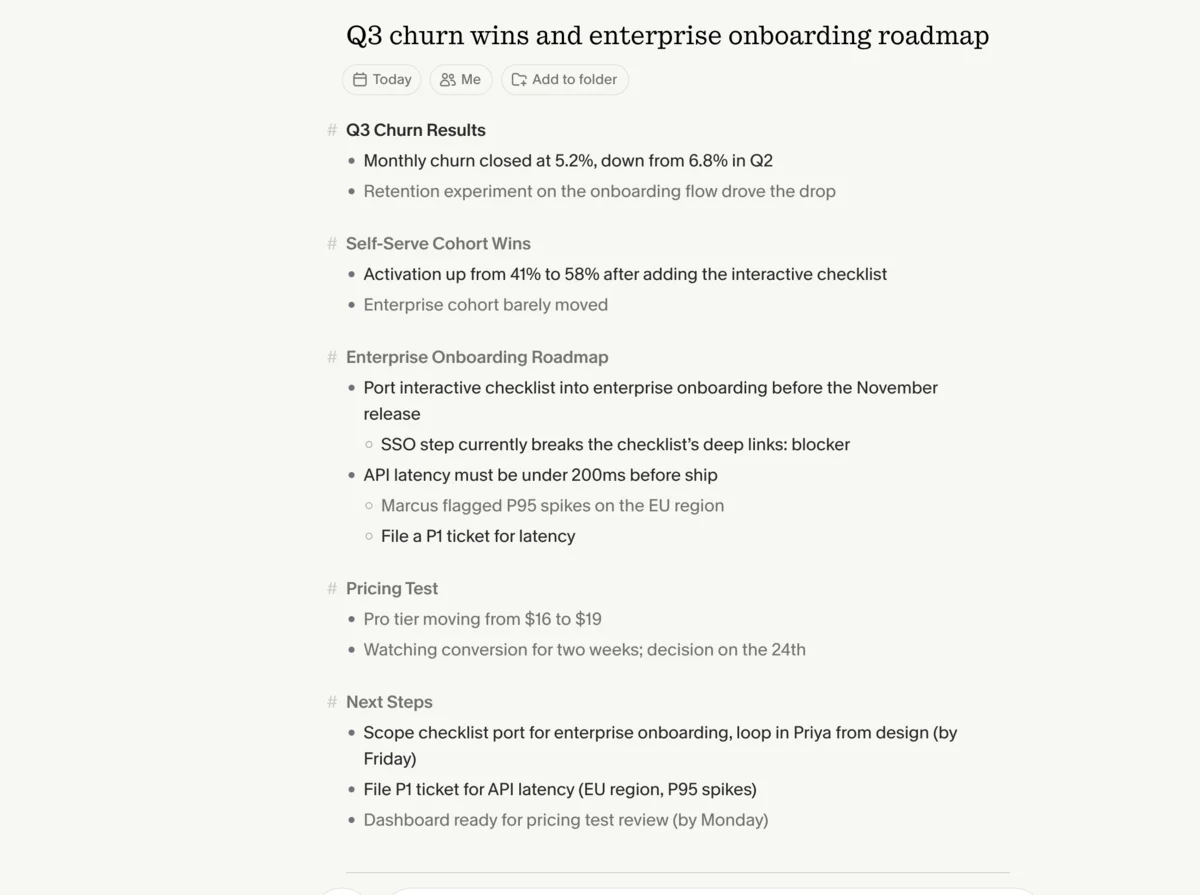
The free plan hides your history. Granola’s free Basic plan lets you record, but it tucks your older meetings away until you move to the $14-a-user Business plan. Several rivals keep your full archive searchable for nothing, so if you want a permanent, free record of every call, Granola’s free tier is more of a rolling window than a home.
It is built for one person, not a team. Granola has no organization-wide search, no conversation analytics, and no talk-time or coaching layer. For an individual that simplicity is the point. For a sales or success team that needs to search across everyone’s calls, track how reps talk, and feed a CRM, the features simply are not there, and that is a different class of tool.
These are limits, not failures. For discreet, notes-driven capture on a laptop, Granola is still the tool we reach for, which is why it earned a 4.6 in our review. But if one of those five gaps is what brought you here, there is an alternative built to close it.
What to look for when you switch
Granola has trained you to expect certain things from a notetaker — a silent footprint, a clean summary, no fuss. The alternatives differ on exactly the axes that matter most when you move, so weigh these before you commit your meetings to a new tool.
Which platforms it runs on. This is the variable that sends most people looking, so check it first. If you need Android or a browser, Otter is the safe answer and Fathom works through the web; if you are all-Apple or all-desktop, the field is wider. Do not assume a tool covers your devices — Granola taught that lesson.
Whether it saves a recording. Granola keeps none, so if re-watching a call or sharing a clip matters, you need a tool that stores video. Fathom and tl;dv both do; the bot-free tools tend not to. Decide whether the recording is something you will actually use or whether the privacy of deleting it is worth more to you.
How hands-off it is. Granola wants you typing; some alternatives want nothing from you. If you would rather join a call, stay quiet, and get a full summary anyway, a fully automated bot like Fathom or Otter fits better than another enhancement-style tool. Match the workflow to how you actually sit in meetings.
How real the free plan is. “Free” hides a lot of variation. Fathom’s free plan is unlimited and keeps your whole history; Granola’s hides older notes; Otter’s caps you at 300 minutes a month. Read the actual limits, because that is what you will live on day to day.
| What to weigh when you switch | Why it decides the pick |
|---|---|
| Platform coverage | Granola has no Android or web — Otter and Fathom (browser) close the gap |
| Saved recording | Granola deletes audio; only video-keeping tools let you re-watch |
| Hands-off vs notes-driven | Fathom/Otter capture fully automated; Granola needs you typing |
| Free-plan reality | Fathom keeps full history free; Granola hides it; Otter caps minutes |
| Team search + analytics | The whole point of Fireflies and Avoma; absent in Granola |
| Bot vs bot-free | Leaving but want silence? Only Fathom’s beta or Jamie match Granola |
Team search and where notes land. If you are leaving because Granola cannot serve a team, the deciding features are organization-wide search, conversation analytics, and CRM or Slack sync. That is the whole reason Fireflies and Avoma exist, and it is where a tool built for individuals will always fall short.
Whether it keeps the silent footprint. Granola’s bot-free capture is the thing its fans love most. If you are leaving for other reasons but want to keep that, note that most big alternatives join as a visible bot; only Fathom’s beta mode and a couple of niche tools stay silent.
How we picked
We did not assemble this from vendor marketing and press releases. We wrote full, hands-on reviews of the three leading notetakers and ran one controlled test through all of them: an 80-second, two-speaker product meeting we generated with synthetic voices, loaded with names, numbers, and jargon, so we knew the exact right answer in advance. Granola captured it as a quick note, Fathom recorded it bot-free, and Otter took it as a file import, all in June 2026.
That shared test is what lets us rank the top tools honestly. Granola garbled one line of audio but made up for it by merging our typed notes with what it heard into the most complete write-up of the three; Fathom’s transcript was the most accurate, keeping “Q3”, “$16 to $19”, and “tag it P1” intact; and Otter dropped the quarter off “Q3”. For the wider field — the tools we have not run end to end — we lean on the vendors’ own pricing and documentation, public ratings, and our broader testing across the category, and we say so rather than implying we tested everything.
Read the full test-meeting script we scored against
These are the exact words in the clip above. The synthetic voices are Sarah (ElevenLabs’ Rachel) and David (Adam), and we scored each tool’s transcript and summary against this ground truth.
Sarah: Morning, David. Before we start, did the Q3 churn numbers come in?
David: They did. We closed at 5.2% monthly churn, down from 6.8% in Q2. The retention experiment on the onboarding flow is doing the work.
Sarah: That’s a big drop. Which cohort moved the most?
David: The self-serve cohort. Activation went from 41% to 58% after we added the interactive checklist. Enterprise barely moved.
Sarah: So the action item is to port that checklist into the enterprise onboarding before the November release. Can you own that?
David: I can. I’ll loop in Priya from design and scope it by Friday. One risk: the enterprise SSO step breaks the checklist’s deep links right now.
Sarah: Note that as a blocker. Let’s also get the API latency under 200 milliseconds before we ship. Marcus flagged P95 spikes on the EU region.
David: Agreed. I’ll file a ticket for the latency and tag it P1. Anything else for the roadmap review?
Sarah: Just the pricing test. We’re moving the Pro tier from $16 to $19 and watching conversion for two weeks. Decision on the 24th.
David: Got it. I’ll have the dashboard ready Monday.
We weighted the things that decide whether a switch sticks: platform coverage, whether the tool saves a recording, how hands-off it is, how generous the free plan really is, team search, and price. The two tools we recommend first, Fathom and Otter, we have run end to end and scored, so those verdicts come from use rather than marketing copy. The wider field we have assessed from documentation, public ratings, and our broader work across the category — enough to place each tool accurately, not to claim we lived in it. Below, the alternatives that came out ahead, starting with the two we would switch to first.
| Tool | Best for | Platforms | Saves video | Free plan | Paid from | Tested? |
|---|---|---|---|---|---|---|
| Fathom | Overall + free | Mac, Win, web | Yes | Unlimited, full history | $20 | Yes, 4.6/5 |
| Otter | Cross-platform + Android | All, incl. Android + web | Yes (Business) | 300 min/mo | $16.99/user | Yes, 3.8/5 |
| Fireflies | Large-team search | All, incl. web | Yes | Yes (capped) | ~$10/user | Yes, 4.4/5 |
| Avoma | Sales analytics | All, incl. web | Yes | No (14-day trial) | $19/user | Surveyed |
| tl;dv | Free, with saved video | All, incl. web | Yes | Unlimited | Free / paid | Surveyed |
1. Fathom — the best Granola alternative overall

Fathom is the switch we would recommend to most people leaving Granola, because it keeps what you like about Granola and adds back the things Granola leaves out. Its summaries are just as clean — in our test Fathom’s Enhanced Summary broke the meeting into a purpose, key takeaways, topics, and next steps, with every number and name correct — but it does not ask you to type notes during the call to get there. It captures hands-off, so a quiet call still produces a complete write-up.
Crucially, it closes Granola’s three most-felt gaps at once. It saves a replayable video of every call, where Granola keeps no recording. Its free plan is genuinely unlimited and keeps your entire history searchable, where Granola’s free plan hides older notes behind the $14 Business tier. And it runs through the browser on any operating system, so it sidesteps Granola’s Mac-Windows-iPhone-only limitation for anyone on the web.
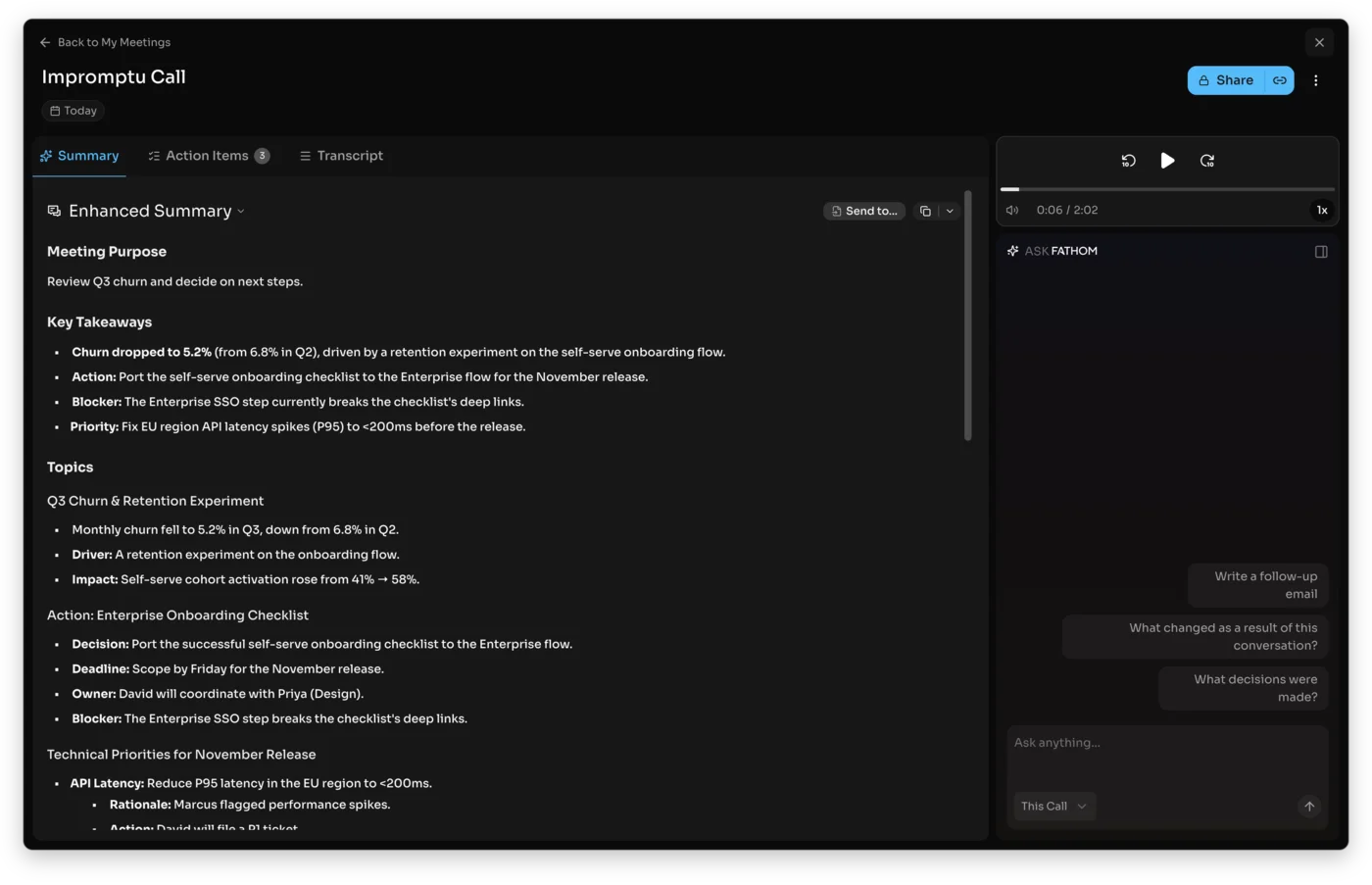
It is also the highest-rated notetaker on G2, at a near-perfect 5.0 across more than 6,000 reviews as of mid-2026, and its action items were the most usable part of the output in our test: each one timestamped to the moment it was agreed and assignable to a person, so the summary doubled as a to-do list. When you do pay, Premium at $20 a month ($16 annually) adds the Ask Fathom assistant and unlimited AI summaries, and the Team and Business plans ($19 and $34 a user) add native CRM sync into HubSpot and Salesforce — the feature that makes Fathom the strongest pick for sales teams specifically.
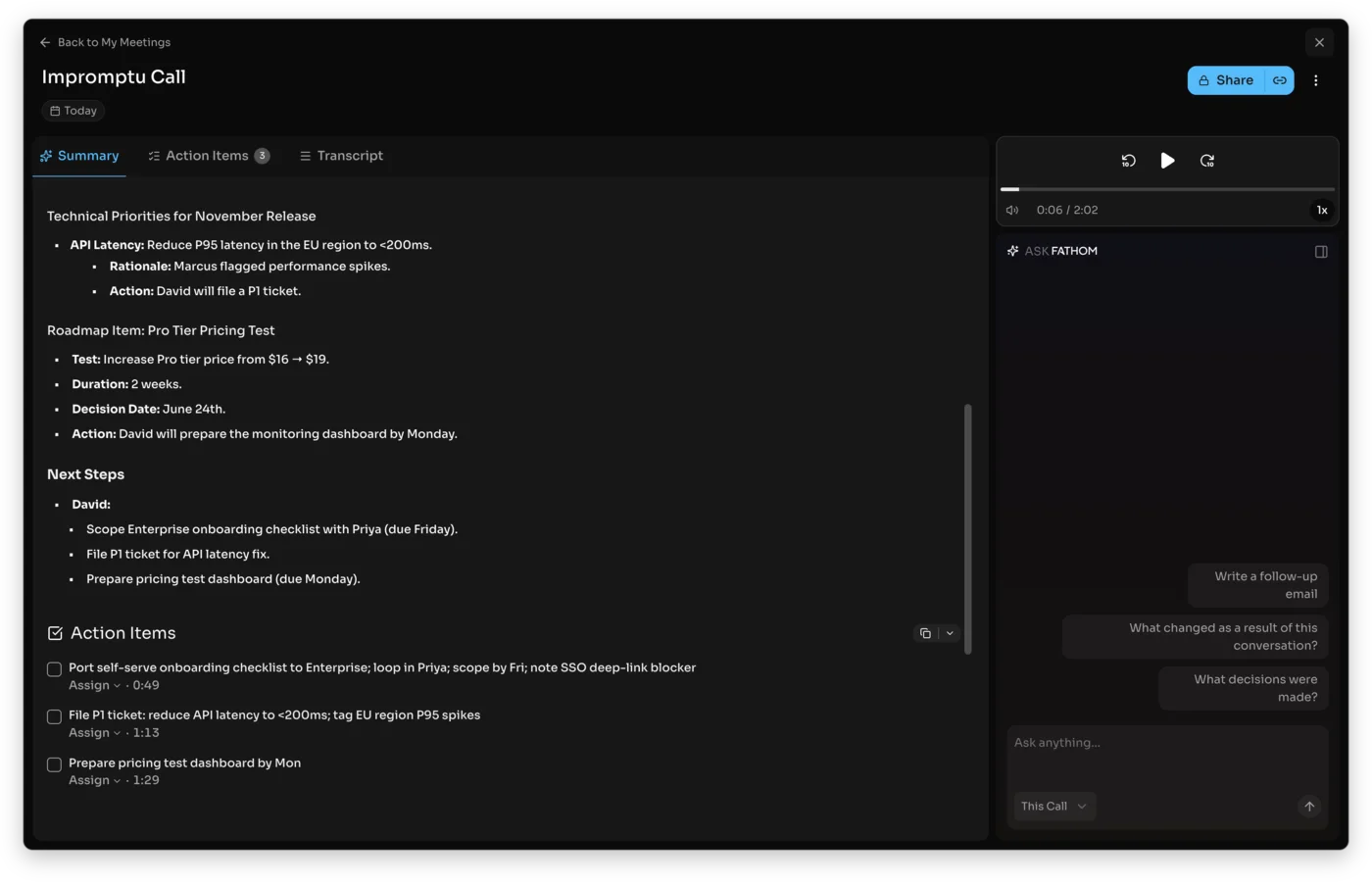
The honest catches, and the case for staying with Granola: Fathom joins by default as a visible meeting bot, which is exactly the thing Granola fans switched away from, and its bot-free mode is still in beta and Mac-only. There is no native mobile recording app, and the summaries lean a little formal. If a silent footprint is the whole reason you use Granola, that matters. But if your reason for leaving is the missing video, the hidden free history, or the platform gap, Fathom answers all three while matching Granola on summary quality. Our Fathom vs Granola comparison goes deeper on the head-to-head.
Switch to Fathom if you want saved video, a fuller free plan, hands-off capture, or CRM sync, without giving up the clean summaries. Read our full Fathom review for the hands-on detail.
2. Otter.ai — the best cross-platform alternative

If the reason you are leaving Granola is the platform gap, Otter is the cleanest fix, because it runs everywhere Granola does not. It has a mature Android app, a full web app, and a strong iPhone app, so a team split across devices all records the same way — the single thing Granola cannot offer. It also shows live, in-the-room transcription as the meeting happens, with speaker labels, where Granola gives you the summary only after the call.
That makes Otter the better personal transcriber and the better fit for anyone who wants to watch the words appear in real time, or who needs an accurate, speaker-labeled record more than a polished recap. Its mobile app is genuinely useful for in-person meetings, an area where Granola, tied to a laptop, is weak.
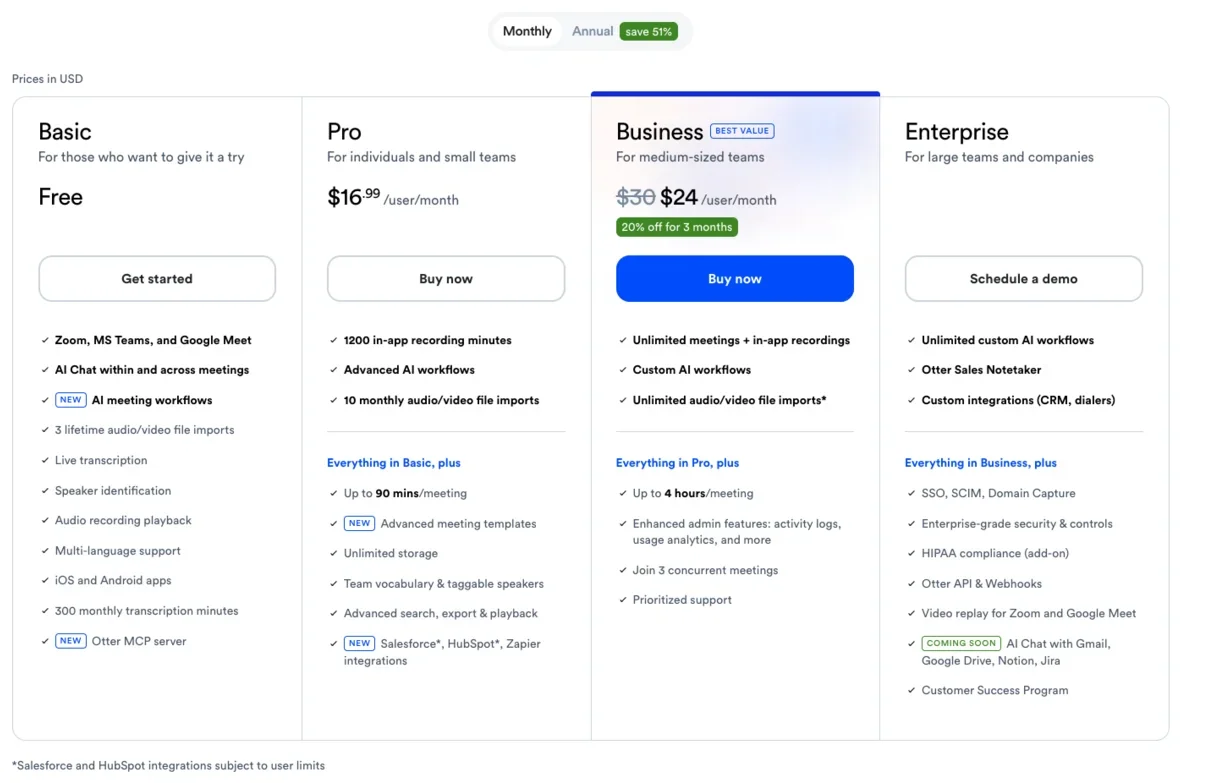
The trade-offs are real, which is why we rated Otter 3.8 to Granola’s 4.6. Its free plan is tight — 300 minutes a month, a 30-minute cap per conversation, and three lifetime file imports — so it is more of a trial than a home. A 2025 class-action, Brewer v. Otter.ai, hangs over how it records people, and it trains its AI on your conversations by default unless you opt out, a busier privacy posture than Granola’s delete-the-audio model. And video replay plus unlimited transcription both sit on the $30 Business plan. In our test it also dropped the quarter off “Q3,” a small slip that adds up across a week.
For the specific job of covering every device and showing live transcription, none of that outweighs the reach. If half your team is on Android or in a browser, Otter makes the choice for you. Our Otter pricing guide breaks down which tier you actually need.
Switch to Otter if you need Android or web access, live transcription, or a strong mobile app for in-person meetings. Read our full Otter.ai review for the detail.
3. Fireflies — the best alternative for large teams
Granola gives one person clean notes; it gives a team nothing to share. There is no organization-wide search, no analytics, and no way for a manager to see across everyone’s calls. For a group leaving Granola, Fireflies is less an upgrade than the first time the whole team gets a searchable archive at all, which is why it is the answer whenever the reason for leaving is “this does not scale past me.”
It is built entirely around that archive. Ask it a question and the search runs across every meeting the team has recorded, not just yours, and its conversation-intelligence layer turns months of calls into talk-time, sentiment, and topic trends a manager can act on — a reporting layer Granola never set out to build. Its assistant, AskFred, fields questions that span your whole history, so a lead can ask what an account said about pricing last quarter and get an answer pulled from dozens of meetings at once.
Where it pulls furthest from Granola is the plumbing. Fireflies pushes notes and action items straight into Slack, HubSpot, Salesforce, and Notion, so the record lands in the systems the team already works in rather than in a notes app nobody reopens. It joins calls as a visible bot and starts free with unlimited transcription but stores only 400 minutes for the whole team, with paid tiers from around $10 a user, cheaper per seat than most rivals at team scale.
The reasons it is not our top pick read like a list of what people liked about Granola: the bot is unavoidable, the interface is busier, and a solo user pays for a team’s worth of features they will never touch. But for the one job Granola flatly cannot do — make a whole team’s meetings searchable and measurable — Fireflies is the answer.
| Fireflies at a glance | |
|---|---|
| Best for | Large-team search + conversation analytics |
| Free plan | Yes, unlimited transcription (400-min storage) |
| Bot | Yes, joins as a visible participant |
| Paid from | Around $10 a user per month |
| Skip if | You are solo or want Granola’s silent footprint |
Switch to Fireflies if your team needs to search and analyze hundreds of calls across everyone’s history, the thing Granola never let you do. Skip it if you are solo, where Granola or the unlimited-free Fathom stays lighter and quieter.
Read the full Fireflies review for the hands-on test and the team-tier breakdown.
4. Avoma — the best alternative for sales and revenue teams

Avoma answers the same Granola gap as Fireflies, but for a narrower audience: the revenue team. Granola hands a rep a tidy note and hands a sales manager nothing measurable. Avoma is built the other way around. It scores calls, tracks talk-to-listen ratios and topic trends, flags whether the agreed next steps were actually set, and ties each conversation back to the pipeline — the revenue-intelligence layer a sales leader actually reports on, not a personal notetaker.
The honest fork for a Granola-leaving sales team is Avoma versus Fathom’s Business plan. Fathom Business gives you CRM sync and clean call activity at $34 a user; Avoma earns its higher all-in price only if your managers need scorecards, AI coaching, and deal-level analytics rather than just synced notes. Past that you are into Gong territory and a much larger budget.
It is more tool than an individual needs, and it is priced for teams: there is no permanent free plan, only a 14-day trial, and paid seats start at $19 a user, with the call scoring and coaching sitting in a $29-a-user Conversation Intelligence add-on on top. But if you are leaving Granola precisely because it gives your revenue team no coaching or deal insight, that is the exact hole Avoma is shaped to fill.
| Avoma at a glance | |
|---|---|
| Best for | Sales and CS conversation analytics |
| Free plan | No — 14-day trial |
| Bot | Yes |
| Paid from | $19 a user; call scoring on the $29 add-on |
| Skip if | You just want clean individual notes |
Switch to Avoma if you run a sales or customer-success team that needs call scoring, coaching, and pipeline analytics, not just notes. Skip it if you are an individual after clean meeting notes, where it is far more than you would use.
5. tl;dv — the best free alternative with saved video
If the reason you are leaving Granola is that it keeps no recording, tl;dv answers that directly, and it costs nothing. Its Free Forever tier records unlimited meetings across Zoom, Google Meet, and Microsoft Teams, and where Granola deletes the audio, tl;dv saves the full video, so you can go back, re-watch a moment, or pull a clip weeks later. For anyone who left Granola because they could never point a colleague at the exact thing that was said, that saved recording is the whole pitch.
The clip workflow is its signature. You scrub to a moment, mark it, and share a short timestamped highlight, which lands far better with a sales or research team than forwarding a long transcript and hoping someone reads it. Around that it does the notetaker basics — transcription in 30-plus languages, AI summaries, and integrations into the usual tools — so the free tier is best read as unlimited recording plus light AI, with the deeper AI features on paid plans.
Usefully for a Granola refugee, tl;dv is no longer bot-only: alongside the visible meeting bot it now offers a bot-free desktop capture mode, so it can match Granola’s silent footprint and still beat it on saved video — a pairing Granola itself does not offer. Against Fathom it is a close call: pick Fathom for the cleaner summaries and CRM sync, and tl;dv if saved video, clip-sharing, and language breadth matter more to you.
| tl;dv at a glance | |
|---|---|
| Best for | Free, unlimited recording with saved video |
| Free plan | Yes, unlimited recordings |
| Bot | Optional — visible bot or bot-free desktop mode |
| Standout | Timestamped clip-and-share highlights |
| Skip if | Summary quality is your priority — Fathom’s edge out |
Switch to tl;dv if you want a free, unlimited recorder that keeps the video Granola deletes, with the option of a silent desktop mode and easy highlight-sharing. Skip it if the cleanest AI summary is what you are after, where Fathom’s recaps and CRM sync do more.
Other Granola alternatives worth knowing
The category is crowded, and a few more names come up often enough to place on the map so you know where they fit:
- Jamie is the closest bot-free match to Granola, German-built with a GDPR-first posture. It records via system audio with nothing in the participant list, so it is the natural switch if you are leaving Granola for other reasons but want to keep the silent footprint, especially in Europe. Paid plans run in the mid-€20s a month.
- Notion AI is the pick if you want meeting notes tied directly into a wider workspace. It folds transcription and summaries into the same place your docs, wikis, and projects already live, which suits teams that want the meeting record inside their knowledge base rather than in a standalone app.
- Fellow is built around the team meeting itself, with collaborative agendas, templates, and organization-wide notes, plus both bot and bot-free recording. It is a reasonable pick for a mid-market team that wants structured agendas as much as it wants the AI summary.
- MeetGeek leans toward automated meeting intelligence, syncing action items into your folders and organizing conversation analytics, a lighter alternative to Fireflies for a team that wants reporting without the full conversation-intelligence suite.
- Krisp is best known for noise cancellation but includes a bot-free notetaker that records device audio and summarizes it, so it is worth a look if call audio quality matters as much as the notes and you want to keep a silent footprint.
| Also worth knowing | Best for |
|---|---|
| Jamie | Bot-free, German-built, GDPR-first — closest to Granola |
| Notion AI | Meeting notes inside a wider workspace and wiki |
| Fellow | Collaborative agendas and team meeting structure |
| MeetGeek | Automated meeting intelligence and reporting |
| Krisp | Bot-free capture plus noise cancellation |
We are not ranking these above the five picks because, for the jobs most people leaving Granola actually have, Fathom, Otter, and Fireflies cover them better and we have tested the first two ourselves. But a complete list should show you the whole field, and that is the field.
Granola versus the top alternatives, head to head
If you are weighing Granola directly against the tools people most often compare it to, here is the short version of each matchup.
Granola vs Fathom. This is the one that matters for most people, and it is genuinely close — we rated both 4.6. Granola wins on the silent footprint and on folding your typed notes into the summary; Fathom wins on saved video, a fuller free plan that keeps your history, cross-platform access, and CRM sync. If you take notes during calls and want the quietest tool, stay with Granola. If you want a fuller product that does more of the work, switch to Fathom. Our Fathom vs Granola comparison has the full breakdown.
Granola vs Otter. These two barely compete, because they solve different problems. Granola joins nothing, captures device audio quietly, and turns your rough notes into a summary; Otter joins your calls as a visible assistant, shows live transcription, and runs on every platform including Android and the web. If a silent footprint is what you value, Granola wins. If you need cross-platform reach or live, speaker-labeled transcripts, Otter is the better fit. We put them side by side in Otter vs Granola.
Granola vs Fireflies. This comes down to scale. Granola is the better individual notetaker; Fireflies is the better team brain, with AI search and analytics across your whole call history and deeper CRM integration. For one person, Granola is lighter and quieter. For a whole org that needs to search and analyze hundreds of calls, Fireflies pulls ahead.
| Matchup | Winner | Why |
|---|---|---|
| Granola vs Fathom | Depends | Granola for the silent, notes-driven footprint; Fathom for video, fuller free plan, CRM |
| Granola vs Otter | Depends | Granola for bot-free capture; Otter for Android, web, and live transcription |
| Granola vs Fireflies | Depends | Granola for solo notes; Fireflies for team search and analytics |
The pattern holds across every matchup: Granola is rarely beaten outright, it is simply out-scoped on the one axis you happen to need, and the right alternative is whichever one covers that axis.
How to pick your Granola alternative in 30 seconds
The fastest way to choose is to match the alternative to the exact reason you are leaving Granola:
- You left because your team is on Android or the web → Otter, the only pick with a full Android and browser app, or Fathom through the browser.
- You left because Granola keeps no video to re-watch → Fathom or tl;dv, both of which save a replayable recording.
- You left because you do not want to take notes during calls → Fathom or Otter, both fully automated hands-off capture.
- You left because the free plan hides your history → Fathom, whose unlimited free plan keeps your entire archive searchable.
- You lead a large team that needs to search every call → Fireflies for search and analytics, or Avoma if it is a sales team that needs coaching.
- You are leaving for other reasons but want to keep the silent footprint → Jamie, or Fathom’s bot-free beta on Mac.
If you are still unsure, the lowest-risk move is the same one we would make: start on Fathom’s free plan, since it costs nothing, caps nothing, and keeps your full history, run a real week of meetings through it, and fall back to Otter only if a teammate on Android or a need for live transcription decides it. For the wider context on how these tools rank, our best AI note taker roundup puts the top picks side by side.
How to switch from Granola without losing your notes
Leaving Granola is lighter work than it sounds, because almost nothing has to physically move — but there is one Granola-specific trap to clear first.
Rescue your old notes before you downgrade. Granola’s free plan may already be walling off meetings past its history window, and exporting is the only way to keep them, so pull down anything that still matters before you touch your subscription. This step matters more with Granola than with most tools precisely because the free tier can hide your back-catalogue while you are still deciding.
Then point the new tool at your calendar and let the two overlap. Fathom and Otter connect in minutes, so you can run one alongside Granola for a week of real meetings and read the summaries side by side. With Granola keeping no recording, that parallel week is also your only chance to compare how each tool captured the very same call, since you cannot go back to Granola’s audio afterward.
Leave once the replacement has earned it. There is no lock-in beyond the notes you already exported, so you can cancel Granola the moment the new tool proves itself, which for most people is a handful of meetings, not a migration project.
Final word
Granola is not a tool people flee; it is one they grow out of, and only on specific axes. You rarely leave because it is bad — you leave because your team landed on Android, or you needed to re-watch a call, or one rep’s notes suddenly had to become the whole team’s searchable record. Name that single axis and the replacement is obvious: Otter for the platform reach, Fathom for saved video and a fuller free plan, Fireflies for the team archive Granola never built.
For most people that one switch is Fathom. It keeps the quiet capture and clean summaries that drew you to Granola, and hands back the saved video, the full free history, and the cross-platform access Granola withholds — closing the three gaps we hear about most without changing how the tool feels to use. Start there, and read our Fathom, Otter, and Granola reviews for the detail behind each verdict.
Frequently asked questions
What is the best Granola alternative?
For most people it is Fathom. We ran the same meeting through Granola, Fathom, Fireflies, and Otter, and Fathom matched Granola's clean summaries while fixing the three things Granola users most often want: it saves a replayable video of every call, it works anywhere through the browser rather than only on Mac, Windows, and iPhone, and its free plan keeps your full meeting history instead of hiding older notes. It also captures hands-off, so you do not have to type notes during the call for the summary to be good.
If you are leaving Granola because you need a tool the whole team can search across hundreds of calls, Fireflies pulls ahead instead, and if you run a sales org, Avoma is built for coaching and pipeline. But as a like-for-like upgrade from Granola, Fathom is the closest fit and the one we would switch to first.
Is there a free Granola alternative?
Yes, and the most generous is Fathom. Its free plan records, transcribes, and summarizes unlimited meetings with no monthly cap and, unlike Granola's free Basic plan, it does not hide your older meeting history behind a paywall, so your full archive stays searchable for nothing.
In our hands-on test Fathom's free output was also the strongest of any tool we tried, with a clean structured summary and timestamped action items. tl;dv is the other genuinely free option, with unlimited recordings across Zoom, Google Meet, and Microsoft Teams plus saved video Granola never keeps, and Otter has a free tier too, though it caps you at 300 minutes a month.
If a real free plan is your reason for leaving Granola, start with Fathom and keep tl;dv in mind if you want the saved video.
Is there a Granola alternative that works on Android or the web?
Otter is the strongest pick here, because the platform gap is Granola's clearest limitation. Granola runs only on Mac, Windows, and iPhone, with no Android app and no browser version, so a team split across devices is stuck.
Otter fixes that directly: it has a mature Android app, a full web app, and a strong iPhone app, so everyone records the same way regardless of device, and it adds live in-the-room transcription Granola does not show. Fathom is the other cross-platform answer, since it runs through the browser and joins calls on any operating system, though it has no native mobile recording app.
If the reason you are leaving Granola is that half your team is on Android or lives in a browser, Otter is the cleanest switch, with Fathom a close second for desktop-and-web teams.
Granola vs Fathom — which is better?
Fathom is the stronger all-round product, while Granola wins on a silent footprint and note-driven capture — we rated both 4.6 out of 5, and they win different jobs. Granola is the better tool if you take notes during calls and want the quietest possible footprint, because it captures device audio with nothing in the participant list and folds your typed notes into the summary.
Fathom is the better tool if you want a fuller product: it saves a replayable video of every call where Granola keeps none, its free plan keeps your entire history where Granola's free plan hides older notes, it runs cross-platform through the browser, and it adds native CRM sync for sales teams.
In our test Fathom's transcript was a touch more accurate on the hard specifics, while Granola produced the most complete write-up by merging our typed notes with the audio. Pick Granola for discreet, notes-driven capture; pick Fathom for saved video, a fuller free plan, and CRM workflows.
What is a bot-free Granola alternative?
The closest bot-free matches to Granola are Fathom's beta capture mode and Jamie. Granola's signature is that nothing joins your call, so if you are leaving but want to keep that silent footprint, those two come nearest: Fathom now offers a bot-free audio-capture mode, still in beta and Mac-only, which is best if you want bot-free plus saved video and a fuller free plan, and Jamie is a German-built, GDPR-first notetaker that records via system audio, a good fit in Europe.
Krisp, better known for noise cancellation, also captures device audio without a visible bot, and tl;dv has added a bot-free desktop mode alongside its meeting bot.
Otter and Fireflies, by contrast, only join as a visible bot, so if a silent footprint is non-negotiable, lean on Fathom's beta mode, Jamie, or tl;dv's desktop capture as the closest swaps for Granola.
What is the best Granola alternative for teams?
Fireflies, which we reviewed hands-on and scored 4.4 out of 5. Granola is built around the individual note-taker and is thin on team features, with no organization-wide search and no conversation analytics, which is exactly the gap Fireflies fills.
It runs AI search across every meeting the whole team has recorded, tracks talk-time and topic trends a manager can act on, and integrates deeply with Slack, HubSpot, Salesforce, and Notion, so notes and action items flow into the systems work actually happens in. Its assistant, AskFred, answers questions across your entire meeting history rather than a single call.
It is bot-based and starts free, with paid plans from around $10 a user, cheaper per seat than most rivals at team scale. For a solo user the bot-free Granola or the unlimited-free Fathom are lighter, but for a whole sales or success org that needs to search and analyze hundreds of calls, Fireflies pulls ahead.
Keep reading
Granola vs Fireflies: quiet notepad or team brain?
Granola vs Fireflies: Granola is the bot-free notepad for client calls, Fireflies the bot-based team brain for search and CRM. Which one fits your meetings?
Granola pricing: the AI notetaker's free-plan catch
Granola pricing, for the AI notetaker, runs free or $14 a user. Its free plan hides your older notes, and that limited history is the catch that makes you pay.
Granola AI review: it took better notes than I did
I fed Granola six rough bullets and a messy call; it returned a clean summary with details I never typed. Why this bot-free notepad earns its hype.