
HeyGen video translation: one free minute, one changed meaning
I ran a 55-second talk through HeyGen video translation on the free plan. The Spanish was mostly right, ran 2.5 seconds short, and used my only free video.
Contents
The short answer: good Spanish, one free video

It is worth it if you are paying, and only as a test if you are not. I put a 55-second clip of a conference talk through HeyGen video translation on the free plan and got back a Spanish version that kept every argument, fixed a mistake in YouTube’s own captions, and ran 2.5 seconds shorter. It also changed the meaning of the opening question, and it used up my entire free allowance in one go.
That is the shape of the tool. The translation is good enough to publish after a human read-through. The free plan is a single sample: one video, one minute, 720p at most, a watermark, and a Download button that asks you to upgrade.
From upload to translated video in three screens
You give HeyGen a finished video of someone talking, and it hands back the same video in another language. It transcribes the speech, translates the transcript, generates new speech in a voice modelled on the original speaker, and, on the lip-sync engines, reworks the mouth so it matches the new words.
HeyGen’s translation page claims more than 175 languages and dialects and says your “tone and delivery” are preserved. On the free plan, the language list I saw had 32 targets, from Arabic to Vietnamese, with a note to upgrade for more accents. English is on that list, so translating a video into English is available free too; I read that from the list rather than testing it.
The flow is three screens. Upload a file, or paste a YouTube or Google Drive link. Pick the source language, which can be left on Auto-detect, the target languages, and an engine. Then press Translate and wait.
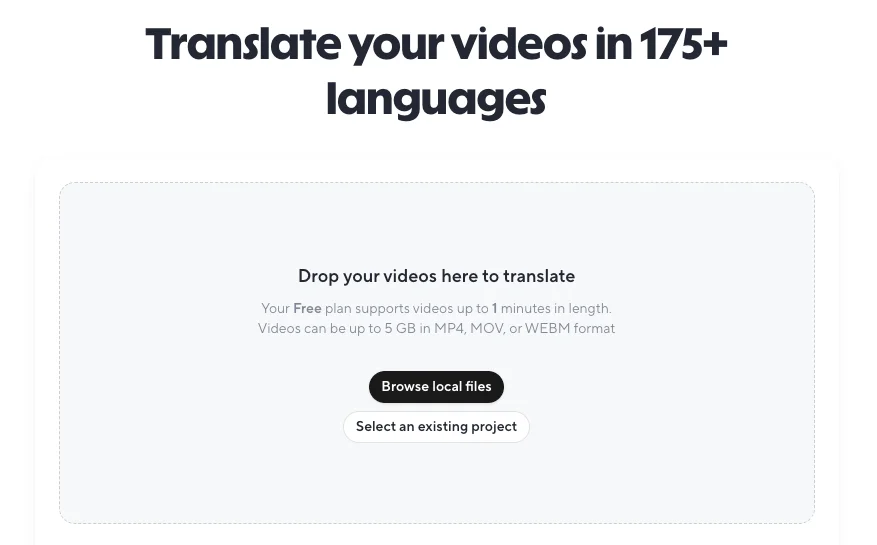
HeyGen’s getting-started article fills in the limits the screen leaves out. Files can be MP4, MOV or WEBM up to 5 GB and between 2 seconds and 5 hours long. You can select up to 10 target languages per job. The source must be a single spoken language, and the article warns that mixed-language audio can fail.
It also explains a choice the upload screen does not spell out: Base or Localized voices. A Base variant keeps the original speaker’s voice and accent in the new language. A Localized variant uses a native accent for that language.
Two controls shape the script before any voice is generated, and both sit under Advanced Settings. A brand glossary tells HeyGen how to translate or pronounce key terms, so a product name is not translated into a common noun. And on paid plans you can upload your own source transcript as an SRT or ASS file, which replaces HeyGen’s automatic transcription.
That second option matters more than it sounds. Every later step builds on the transcript, so a misheard word becomes a mistranslated word and then a confidently spoken wrong word. On my test the Spanish output got right a word that YouTube’s own English captions got wrong, but on footage with jargon, accents or crosstalk, supplying a corrected transcript is the cheapest quality fix available.
Captions come along too. The help article says that turning captions on produces two downloads, one with captions burned in and one without, and that caption files export as SRT only. My Spanish video also carried a subtitle track inside the file itself, which most players can switch on or off.
The three translation engines
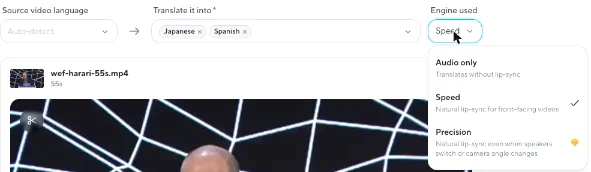
The engine dropdown is where the real decision sits, because it sets both the quality ceiling and the price. HeyGen offers three, and the help article prices each in credits per minute of video.
| Engine | What it does | Credits a minute | Free plan |
|---|---|---|---|
| Audio only | Re-voices the video, lips unchanged | 4 | Yes |
| Speed | Lip-sync for a front-facing speaker, within about 45 degrees | 6 | Yes, the default |
| Precision | Lip-sync through speaker switches, side profiles and partly hidden faces | 10 | No, paid badge |
The help article is specific about when Speed stops being enough. It is built for one person facing the camera; Precision is for multi-person conversations, turned heads and faces blocked by a hand or a microphone. If your footage is an interview filmed from two angles, Speed is the wrong engine, and the cheaper rate will not save you anything if you have to redo it.
Audio only is the overlooked option. It costs the least and avoids the uncanny moments lip-sync can produce, at the cost of lips that no longer match. For a screen recording with a small face in the corner, or a talk filmed from the back of a hall, nobody will notice.
A failed job is cheaper than you might fear. The help article says a source language HeyGen does not support fails instantly and uses no credits. A bad result in a supported language is a different matter: the credits are spent whether or not you like what comes back, which is the argument for proofreading on longer videos.
What I tested, and how
I wanted a clip that would stress the free plan without breaking its rules. I cut the first 55 seconds of a two-minute section of a World Economic Forum panel from its 2026 annual meeting, “An Honest Conversation on AI and Humanity”, which carries a Creative Commons Attribution licence. The section is one speaker at a podium, filmed mostly head-on, at 854×480 and 30 frames a second.
That is close to ideal footage for the Speed engine, with one wrinkle. The speaker reads from a laptop, so he looks down and to the side for parts of the clip. HeyGen says Speed works within about 45 degrees of front-facing, and I left it on Speed anyway, because that is the engine the free plan offers by default.
I left every advanced setting on its default. Enhance translated voice was off. Keep source quality and format was off, and it is a paid option. Adjust video length to fit speech was on, and so was Keep original music.
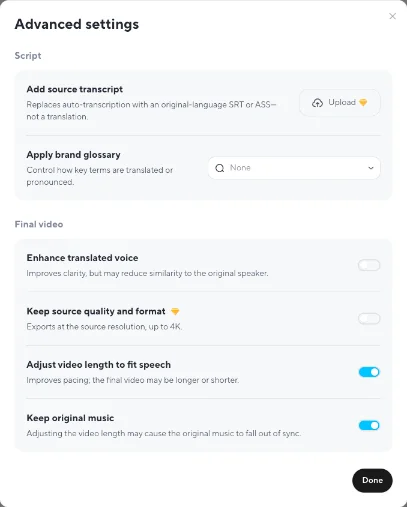
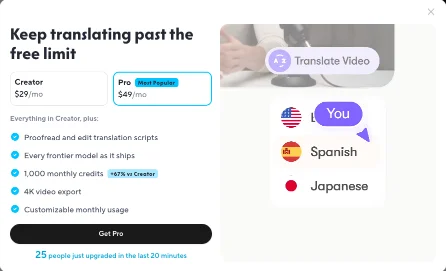
I asked for two languages, Spanish and Japanese, in one job. HeyGen answered with an upgrade window titled “Keep translating past the free limit”, offering Creator at $29 a month and Pro at $49. I closed it, removed Japanese, and pressed Translate again with Spanish alone. That one went through.
For a reference, I used YouTube’s English auto-captions for the same 55 seconds of the panel. They are machine captions, not a human transcript, and as you will see they contain at least one error of their own.
What came back
The job took about five minutes for a 55-second clip. The progress counter read 51% after two minutes and 90% after four, and the finished video sat in my projects list labelled Spanish, with a transcript tab beside the player.
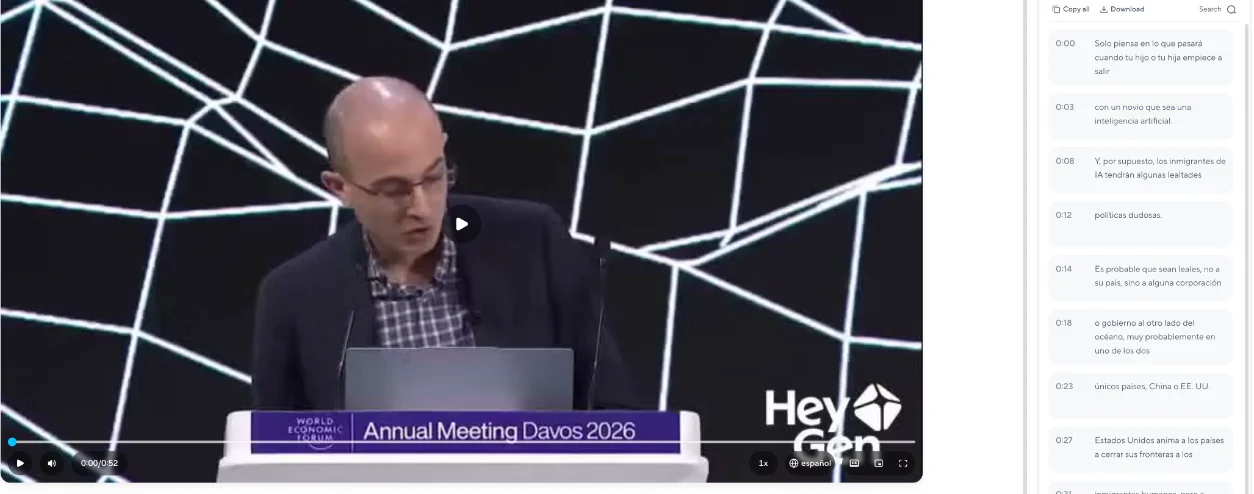
I measured the translated video against the original. Several things changed that HeyGen’s settings screen never mentions.
| Original clip | HeyGen Spanish | |
|---|---|---|
| Length | 55.0 s | 52.5 s |
| Resolution | 854×480 | 854×480 |
| Frame rate | 30 fps | 25 fps |
| Average loudness | -27.0 dB | -33.1 dB |
| Peak loudness | -9.6 dB | -13.4 dB |
| Pauses of 0.4 s or more | 15 | 7, but longer |
| Subtitles | none | Spanish track embedded |
| Watermark | none | HeyGen logo, bottom right |
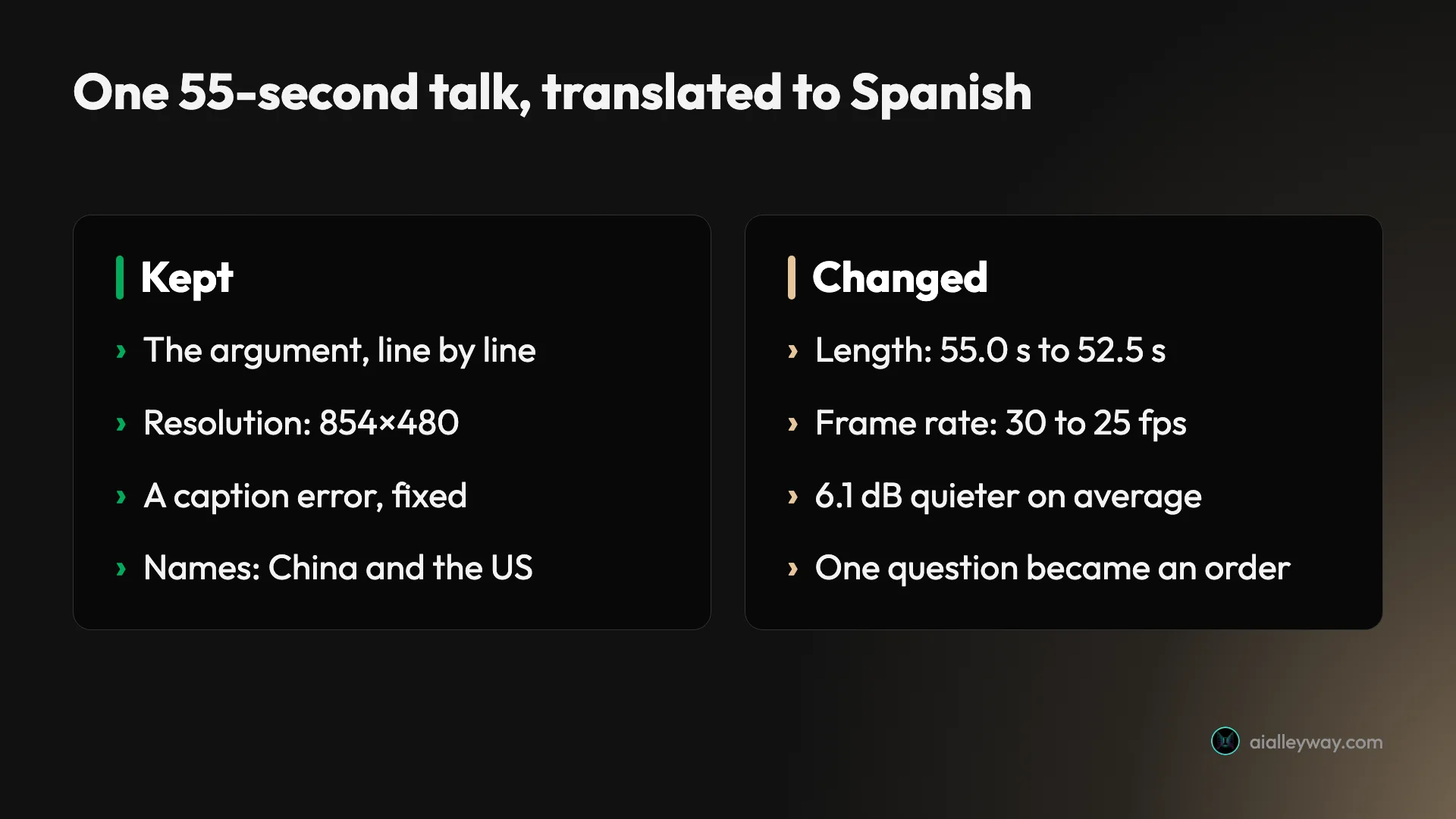
The length change is the setting doing its job. With “Adjust video length to fit speech” on, HeyGen fitted the video around the new audio, and the Spanish ran 2.5 seconds shorter. The pauses tell the same story: 15 short gaps in the English became 7 longer ones in Spanish, so the rhythm of the delivery is HeyGen’s, not the speaker’s.
The quieter audio is worth knowing before you publish. The Spanish track averaged 6.1 dB below the original, which is enough that a viewer switching between language versions would reach for the volume. Normalise it in your editor.
The frame rate dropped from 30 to 25 frames a second, and the file carried an embedded Spanish subtitle track. Neither is a problem for most uses, but if your project runs at 30 fps, check the export before you cut it into a longer edit.
One thing I did not judge: lip-sync and voice likeness. I am not going to rate lips I have only seen in still frames, or a voice I have not compared side by side with a native listener. Those are the two qualities HeyGen sells hardest, and they are the two you should check yourself on your own footage.
How accurate was the Spanish?
Better than the captions it was checked against, with one change in meaning that a reviewer would catch. Here is the clip line by line, with the Spanish turned back into English so you can compare.
| English, from YouTube’s captions | HeyGen’s Spanish | What the Spanish says |
|---|---|---|
| What would these people think when their son or daughter starts dating an AI boyfriend? | Solo piensa en lo que pasará cuando tu hijo o tu hija empiece a salir con un novio que sea una inteligencia artificial. | Just think what will happen when your son or daughter starts dating a boyfriend who is an AI. |
| The AI immigrants will have some dubious political loyalties. | Los inmigrantes de IA tendrán algunas lealtades políticas dudosas. | Same |
| …to some corporation government across the ocean… China or the USA. | …a alguna corporación o gobierno al otro lado del océano… China o EE. UU. | Same, with “or” added |
| …open them very very wide to USA immigrants. | …abrirlas de par en par a los inmigrantes de IA estadounidenses. | …open them wide to US AI immigrants |
| Will your country recognize the AI immigrants as legal persons? | ¿Reconocerá su país a los inmigrantes de IA como personas legales? | Same |
| AIs are obviously not persons. They… | Las IA son | AIs are |
Three of those changes are quiet wins. YouTube’s captions heard “USA immigrants”, which makes no sense in context; HeyGen’s Spanish says “US AI immigrants”, which is what the argument needs. The caption’s “corporation government” became “corporation or government”. And a stumble, “but but”, disappeared.
The first row is the miss. The speaker asks what “these people”, the worried parents he has been describing, would think about their own child dating an AI. The Spanish turns that into an instruction to the listener: just think about what will happen when your son or daughter does it. The point survives, but the voice of the argument shifts from describing others to addressing you, which matters in a speech built on that distinction.
The last row is my fault as much as HeyGen’s. My clip cut the speaker off mid-sentence, and the Spanish kept only “Las IA son”, “AIs are”, dropping “obviously not persons”. If you trim source clips, cut at a full stop, or the translation will end on a fragment that means something different from what was said.
Where the free plan stops
The free plan is a demonstration, and HeyGen’s own pages cannot agree on how big it is. That is the most useful thing I can tell you before you upload anything.
| Source | What it says about free translation |
|---|---|
| The upload screen in the app | Videos up to 1 minute |
| HeyGen’s pricing page | 1-minute maximum, 30+ languages, 3 videos a month with a watermark |
| HeyGen’s help centre | 1 to 3 free videos, depending on region; videos up to 1 minute; 720p sharing link |
| HeyGen’s translation page FAQ | Up to 3 videos a month, each up to 3 minutes |
| My account, 30 Oct 2026 | One translation, then the free-limit window on the next upload |
Four pages, three different answers on length and count. The app is the one that enforces the rules, so trust the upload screen: one minute. On count, the help centre’s plan article is the honest version, because it admits the number varies by region. Mine was one.
After the translation finished, I uploaded the same file again to try a second language. The upgrade window appeared straight after the upload, before I could pick a language. That was the end of my free allowance, and I stopped there.
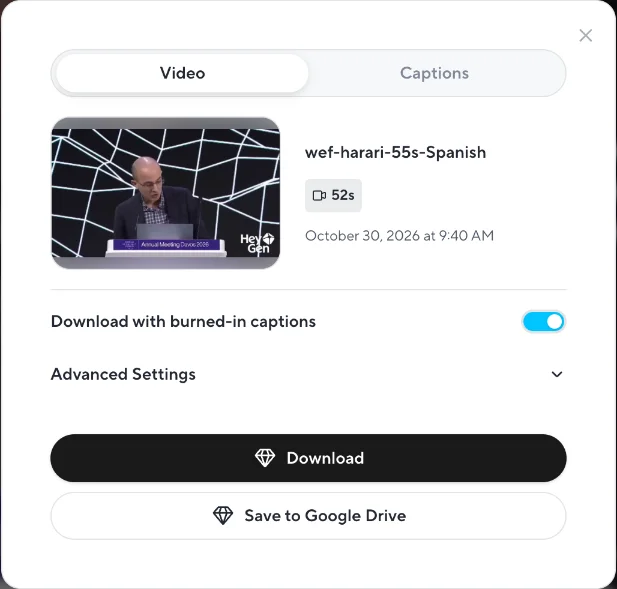
The other walls are about getting the result out. The finished video carried a HeyGen watermark, with a Remove Watermark option labelled “Available with Creator Plan”. The download dialog offered burned-in captions and a Google Drive export, and both the Download and Save to Google Drive buttons carried the paid badge. On the free plan you can watch and share the result inside HeyGen, and that is it.
What HeyGen video translation costs on paid plans
Once you pay, translation draws on the same credits as everything else in HeyGen. The help article’s rates turn the plan prices into minutes, which is the number you actually need.
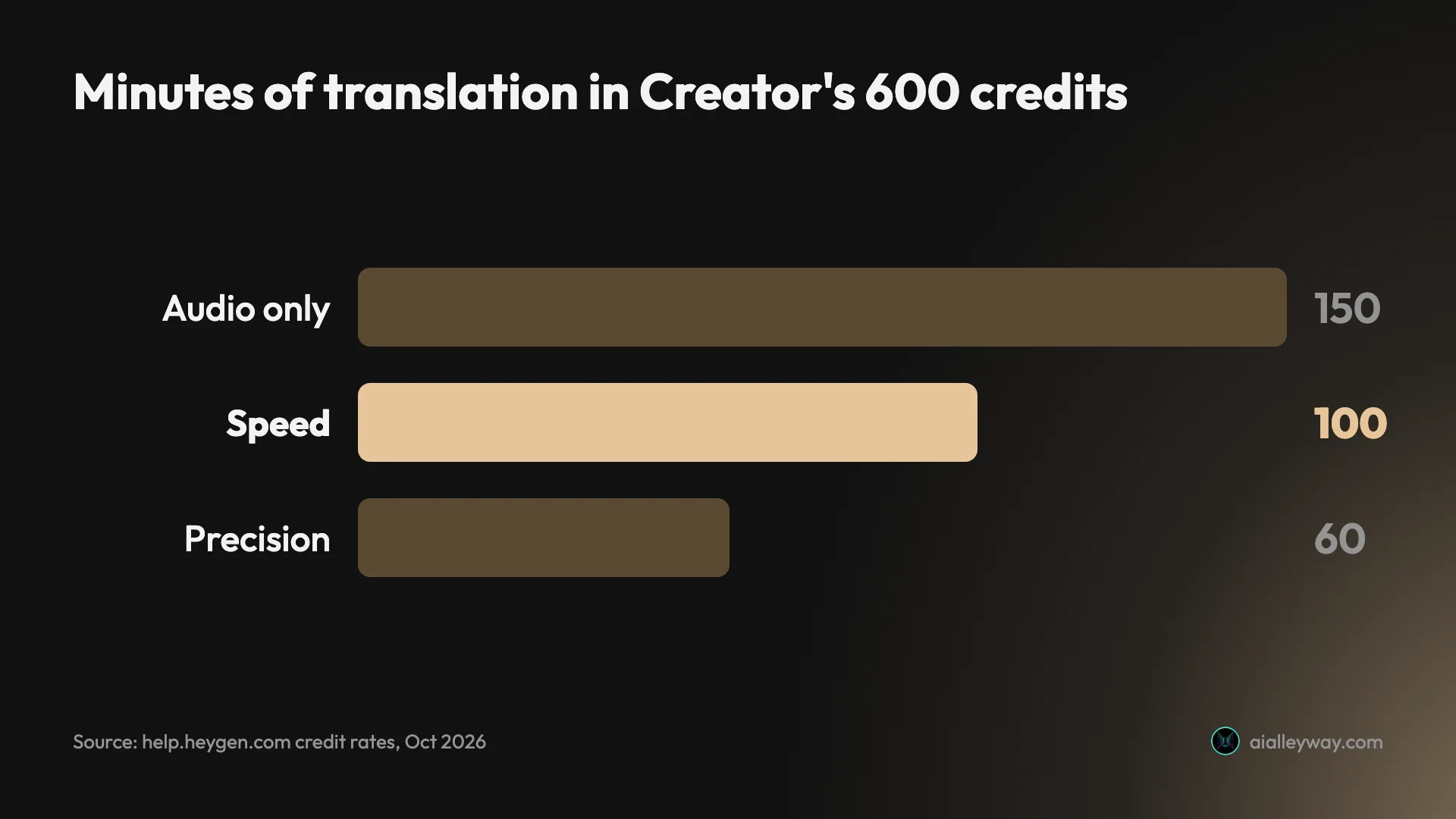
| Plan | Price | Credits a month | Minutes on Speed | Per-video limit | Export |
|---|---|---|---|---|---|
| Free | $0 | no credits, a video quota | 1-minute videos | 1 minute | 720p, watermark |
| Creator | $29 a month | 600 | about 100 | 30 minutes | 1080p |
| Pro | from $49 a month | 1,000 | about 166 | 30 minutes | 4K |
| Business | $149 a month, first seat | 1,500 | about 250 | 60 minutes | 4K |
Prices and credits are from HeyGen’s pricing page and help centre, read on 30 October 2026. The pricing page’s FAQ puts Creator at $24 a month on annual billing.
Divide price by minutes and the plans land close together. Creator works out at about 29 cents a minute on Speed, and Pro at about 29 cents too, so Pro is not cheaper per minute; it is more minutes plus features. Business is the expensive one at about 60 cents a minute from its own allowance, but its extra credits cost 5 cents each, which puts a top-up minute at 30 cents on Speed and 50 cents on Precision.
Two Pro features matter specifically for translation. Proofreading, which lets you edit the translated script before HeyGen generates the video, is a Pro, Business and Enterprise feature according to the help article. On the free plan the “Proofread first, translate later” option carries the paid badge. Keeping the source’s original resolution, up to 4K, is also Pro and above.
Proofreading is the feature I would have wanted on my test. It would have caught the changed question before it was voiced, instead of after. If your translations go to customers or into training material, that alone is the case for Pro over Creator.
The proofreading step has its own small charge. The help article says that if you proofread a translation and then generate it, you pay only the normal translation rate; the 4-credits-a-minute proofreading fee applies only when you review a script and never generate the video. In practice, proofreading is free whenever it leads to a finished video.
Video translation, subtitles or a new avatar video?
Lip-synced translation is the most impressive option and not always the right one. Before you spend credits, it is worth asking which of three jobs you actually have.
If viewers will read along, subtitles are cheaper and keep the speaker’s real voice. The Spanish subtitle track HeyGen embedded in my file shows it can produce them as a by-product, and a subtitle file can be checked line by line far faster than a dubbed video can be watched.
If the speaker is on screen and the audience expects to hear their language, translation with lip-sync is the job HeyGen is built for. That is talks, interviews, founder videos and courses where the presenter’s face is the point.
If the video was scripted in the first place, a new avatar video in the target language may be cleaner than translating footage. HeyGen can generate the presenter speaking the translated script directly, with no retiming and no lip changes to check. The HeyGen review covers how those avatar videos look.
Common mistakes with HeyGen video translation
Most failed translations come from the footage, not the language. These are the traps the help article warns about and the ones my test ran into.
- Mixed languages in one video. The source must be one spoken language. A presenter who switches into English for product names is fine; a bilingual interview is not.
- Two people talking over each other. Speed is built for a single speaker. Use Precision for conversations, or expect lips that do not match.
- Turned heads. Speed expects a face within about 45 degrees of the camera. A speaker reading from notes, as mine did, is at the edge of that.
- Clips cut mid-sentence. The translation will end on a fragment with its own meaning. Trim at a full stop.
- Publishing without a read-through. Even a good translation can shift tone, as my first line did. Have a speaker of the target language watch it before it goes out.
- Forgetting the loudness. My Spanish track came back 6.1 dB quieter on average. Normalise before you publish next to the original.
Free, Creator, Pro or Business for translation
Start on the free plan to see what your own footage does, then pick by how much you translate and whether a human checks it. The free test costs nothing but that one video.
- One test: the free plan, with a clip under a minute, cut at a full stop, of a single speaker facing the camera.
- A few videos a month, checked by you: Creator at $29. About 100 minutes on Speed, 1080p, no watermark, and a 30-minute cap per video.
- Anything customer-facing: Pro from $49, for proofreading before the voice is generated. It is the cheapest way to fix a changed line before anyone hears it.
- Long videos or a team: Business at $149, for 60-minute videos and 5-cent top-up credits.
- Skip it if viewers will read along or the speaker is off camera, where subtitles or Audio only cost less, or if the video was scripted, where a new avatar video in the target language is cleaner than translating footage.
If you need translation without lip-sync, Audio only stretches any plan the furthest, at 4 credits a minute against Speed’s 6. For a broader look at the tool, the HeyGen review covers the avatars, and HeyGen pricing covers the credits across every feature. If you are weighing it against its main rival, see HeyGen vs Synthesia, or HeyGen alternatives for cheaper options.
Final word
HeyGen video translation produced Spanish I would publish after one correction, from a free plan that let me make exactly one video; test your own footage on that free minute, then pay for Pro if anyone other than you will hear the result.
Frequently asked questions
Is HeyGen video translation free?
Partly. HeyGen's free plan can translate a video, but only a short one, and only a few times. The upload screen on my free account said the plan supports videos up to 1 minute long, the free plan's language list showed 32 target languages, and the result carried a HeyGen watermark with the Download button marked as a paid feature.
How many free videos you get is less clear. HeyGen's help centre says the free plan includes 1 to 3 free videos depending on region, and its translation page says 3 videos a month of up to 3 minutes each. My account hit the free limit after one translation, and asking for two languages in a single job triggered the upgrade window before anything was generated. Plan on one free test of under a minute, in one language, and choose the clip carefully: a single speaker facing the camera, cut at the end of a sentence. That one video tells you most of what you need to know before paying.
How much does HeyGen video translation cost?
On paid plans it costs credits by the minute, and the rate depends on the engine. HeyGen's help centre lists Audio only at 4 credits a minute, Speed at 6 and Precision at 10. Creator costs $29 a month for 600 credits, which works out to about 100 minutes on Speed, 60 on Precision or 150 with audio only.
In dollars, that is roughly 29 cents a minute on Speed at the monthly Creator price. Pro at $49 for 1,000 credits comes to about the same per minute, and adds proofreading and 4K. Business extra credits are 5 cents each, so a top-up minute on Speed costs 30 cents. Credits are shared with every other HeyGen feature, so avatar videos made in the same month come out of the same balance.
How accurate is HeyGen's video translation?
On my 55-second test it was accurate on content and loose on framing. Every argument in the English talk survived into Spanish, a mistake in YouTube's own English captions came out correctly, and a verbal stumble was cleaned up.
Two things changed. The opening question, about what other people would think if their son or daughter dated an AI, became an instruction telling the listener to imagine their own child doing it. And the final sentence, cut off by my clip, lost its meaning entirely. That is one test in one language, so treat it as a sample, not a score. I did not judge the lip-sync or how closely the cloned voice matched the speaker, which are the two things to check on your own footage. Have a native speaker watch the result before it goes out, and use Pro's proofreading if the video is customer-facing.
Can you download HeyGen translated videos on the free plan?
Not through the normal button. On my free account, the translated video played in HeyGen with a watermark, but the Download and Save to Google Drive buttons both carried the paid-feature badge. HeyGen's help centre describes the free plan's output as a 720p sharing link.
To download a translated video without the watermark you need at least the Creator plan at $29 a month, which also raises the length limit to 30 minutes a video and the export ceiling to 1080p. Pro, from $49 a month, raises the export ceiling to 4K when the source matches. The download dialog also offers a version with captions burned in, and HeyGen's help centre says caption files export as SRT.
Which HeyGen translation engine should you use?
Speed for a single speaker facing the camera, Precision for anything else. HeyGen's help centre says Speed is optimised for front-facing video within about 45 degrees, while Precision handles speaker switches, side profiles and faces that are partly hidden. Audio only re-voices the video without changing the lips.
Precision costs 10 credits a minute against Speed's 6, so it buys 40% fewer minutes. On the free plan only Speed and Audio only are available; Precision carries the paid badge. For a talk filmed head-on, like the one I tested, Speed is the sensible default. Audio only, at 4 credits a minute, is the cheapest choice when the face is small or off screen, because nobody can see whether the lips match.
Keep reading
HeyGen review: stunning avatars, a stingy free plan
I made a real avatar video on HeyGen's free plan. The avatar was uncannily good — then it wouldn't let me download it. Here's who should pay, and who shouldn't.
HeyGen pricing: what the credits really cost
HeyGen starts at $29/mo, but credits decide your real cost: 600 credits is 30 min of premium avatar or 200 on the cheaper engine. Here's the full breakdown.
HeyGen vs Synthesia: which AI avatar tool wins for you?
I tested both hands-on. HeyGen makes more lifelike avatars and renders in ~1 min; Synthesia wins on languages, governance, and price. Here's how to pick.
HeyGen alternatives: the best one depends on why you left
Leaving HeyGen? The best HeyGen alternative isn't one tool: Synthesia (4.6 on G2) for training, Creatify for ads, Tavus for real-time, plus 3 more by job.