
Cartesia review: the fastest AI voice, made for agents
Cartesia's Sonic model is the lowest-latency AI voice going: a developer's dream for real-time agents, but creators hit its limits fast. My hands-on review.
Contents
Is Cartesia worth it?

If you are a developer building a real-time voice agent, yes. Cartesia is the fastest AI voice platform I have tested, and I score it 4.0 out of 5, a Power Tool. Its Sonic model is built around a single obsession — latency — and on that one axis nothing else I have used keeps up.
If you are a creator who wants voices for narration, podcasts, or audiobooks, look elsewhere first. The voice library reads like a call-center roster, the long-form tooling is not there, and the best all-round AI voice for that work is still ElevenLabs. Cartesia is a scalpel, not a Swiss Army knife.
Start on the free tier, which hands you 20,000 credits with no card, and judge the speed for yourself before you commit a project to it.
What Cartesia actually does
Cartesia turns text into speech fast enough to hold a live conversation. That is the entire pitch, and the product is organized around it rather than around a catalog of voices to browse.
The headline model is Sonic — the playground currently runs Sonic 3.5 — and Cartesia advertises sub-90ms time-to-first-audio. That number matters in exactly one place: a phone call or a live agent, where the gap between a human finishing a sentence and the bot starting to answer is the difference between a conversation and an awkward pause. Amazon’s own marketplace listing calls Sonic “the fastest text-to-speech model for real-time conversations,” at “2-3x faster than alternatives.”
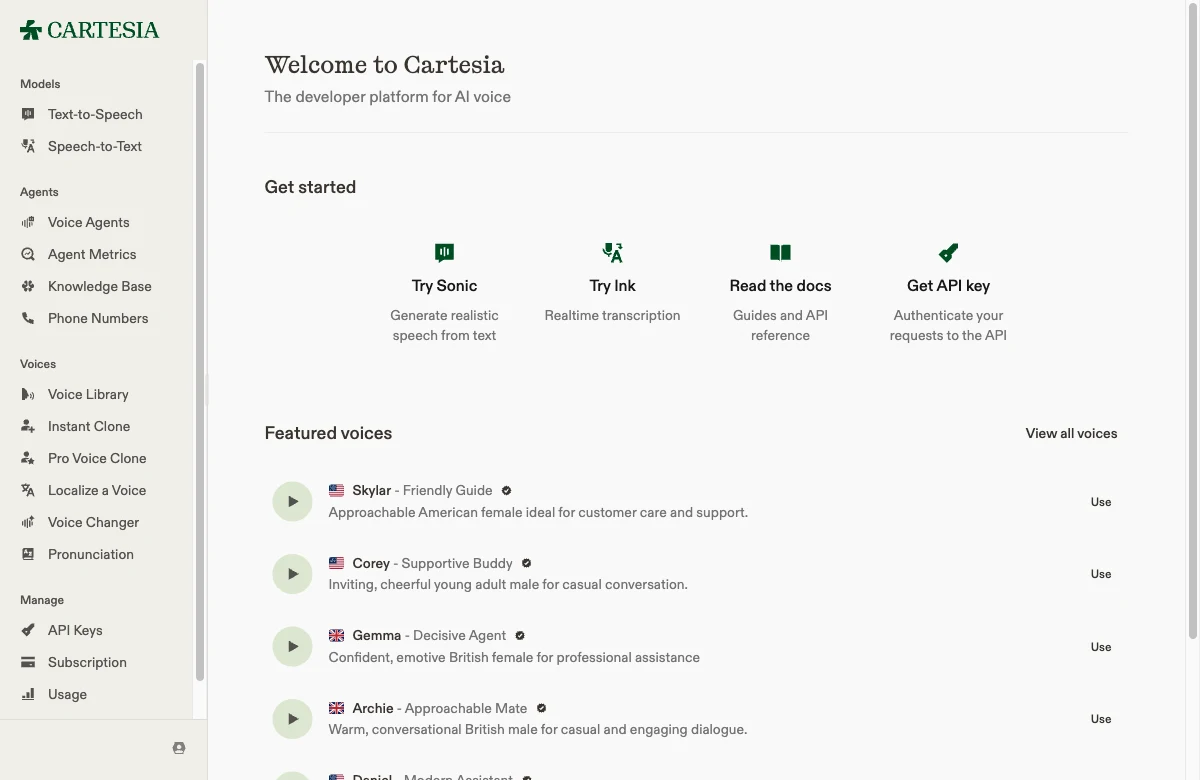
What you get is not a creator suite. It is a developer platform with three model lines: Sonic for text-to-speech, Ink for speech-to-text, and Line for assembling full voice agents. Around them sit phone numbers, a knowledge base, agent metrics, and a voice changer — the parts you need to ship a bot that answers the phone, not a tool for recording a YouTube intro.
Each model line earns its place. Ink handles the listening half of an agent, Line stitches transcription and speech into a deployable bot with its own logic and knowledge base, and the whole thing is engineered to run close to the metal. Sonic is built on state space models, the architecture that lets Cartesia pitch low-latency, on-device deployment instead of a round trip to a distant server. For a privacy-sensitive or latency-critical product, that on-device story is a real differentiator, not a slogan, and it is the kind of thing a general-purpose voice tool cannot promise.
The supporting tools fill out the agent toolkit rather than a creator’s. Localize a Voice adapts a voice into another accent or language, a Voice Changer recasts existing audio while keeping its timing, and a Pronunciation dictionary fixes how the model says product names and jargon — the unglamorous controls that decide whether a support bot mangles your company’s name on every call. None of it is aimed at narration; all of it is aimed at shipping a bot that sounds right in production.
The text-to-speech playground is where you feel the difference. You paste a line, pick a voice and a model, and hit generate, with a “Get API code” button one click away that hands you the exact POST /tts/bytes call. The whole interface assumes you are heading for the API, and the preset prompts — “Host a podcast,” “Schedule an appointment,” “Make a phone call” — tell you who Cartesia thinks you are.
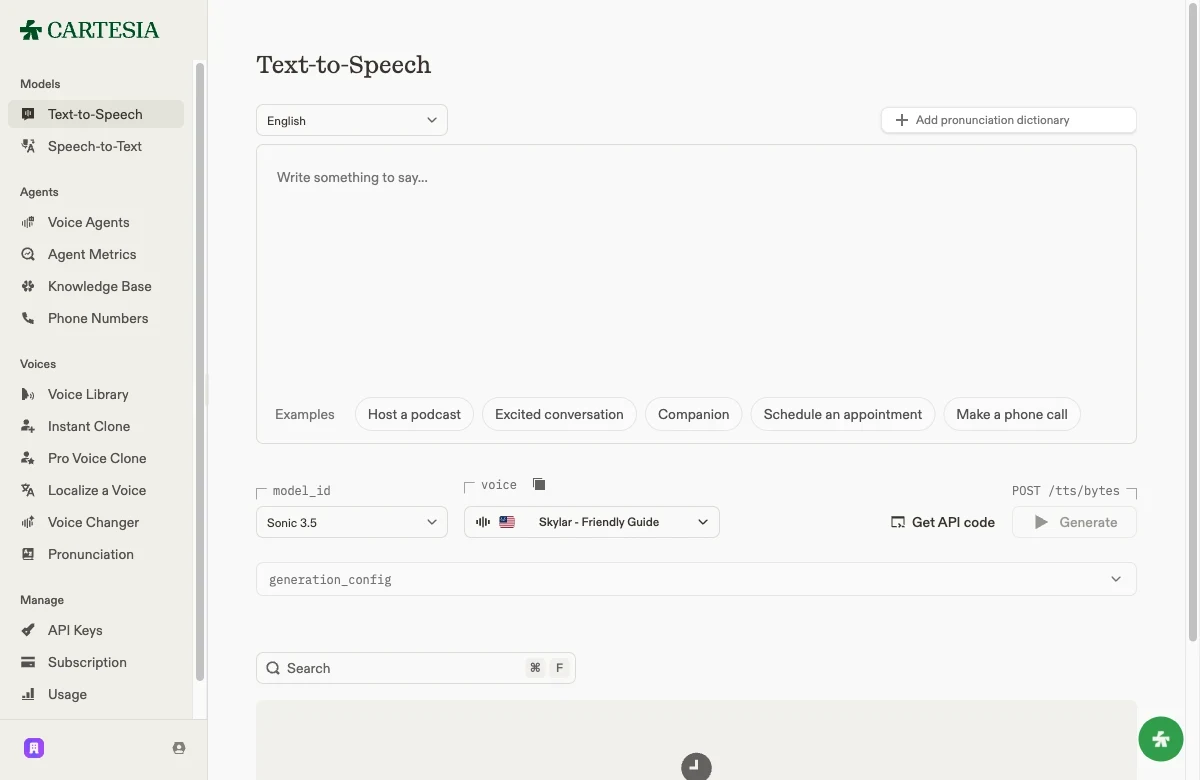
Speech is metered in credits, and the pricing is refreshingly literal: text-to-speech costs exactly 1 credit per character. Speech-to-text runs 3 credits per second, and the voice changer 15 credits per second. There is no fuzzy “1,000 credits is roughly a minute” translation to keep in your head. A character is a credit, full stop.
Here is the same neutral line in two Cartesia library voices, generated at default settings so you can hear the baseline quality rather than a cherry-picked demo:
The naturalness is well reviewed for English. A production team comparing providers on r/artificial said Cartesia’s “voice quality for English is good” and its streaming “genuinely fast.” But the platform never pretends the voice is the destination. It is the fast, scriptable layer underneath something you are building.
Cartesia pricing — read both pages before you pay
Cartesia has a free tier that is genuinely useful and a pricing structure that contradicts itself depending on which page you land on. Both facts matter.
On my own account the Subscription page shows the Free plan with 20,000 model credits remaining and $1.00 of voice-agent dollars. At 1 credit per character, that is roughly 20,000 characters, or about 27 minutes of speech a month — enough to prototype a voice and wire up the API, with instant cloning included. The one hard limit: no commercial license, so you cannot ship what you make on it.
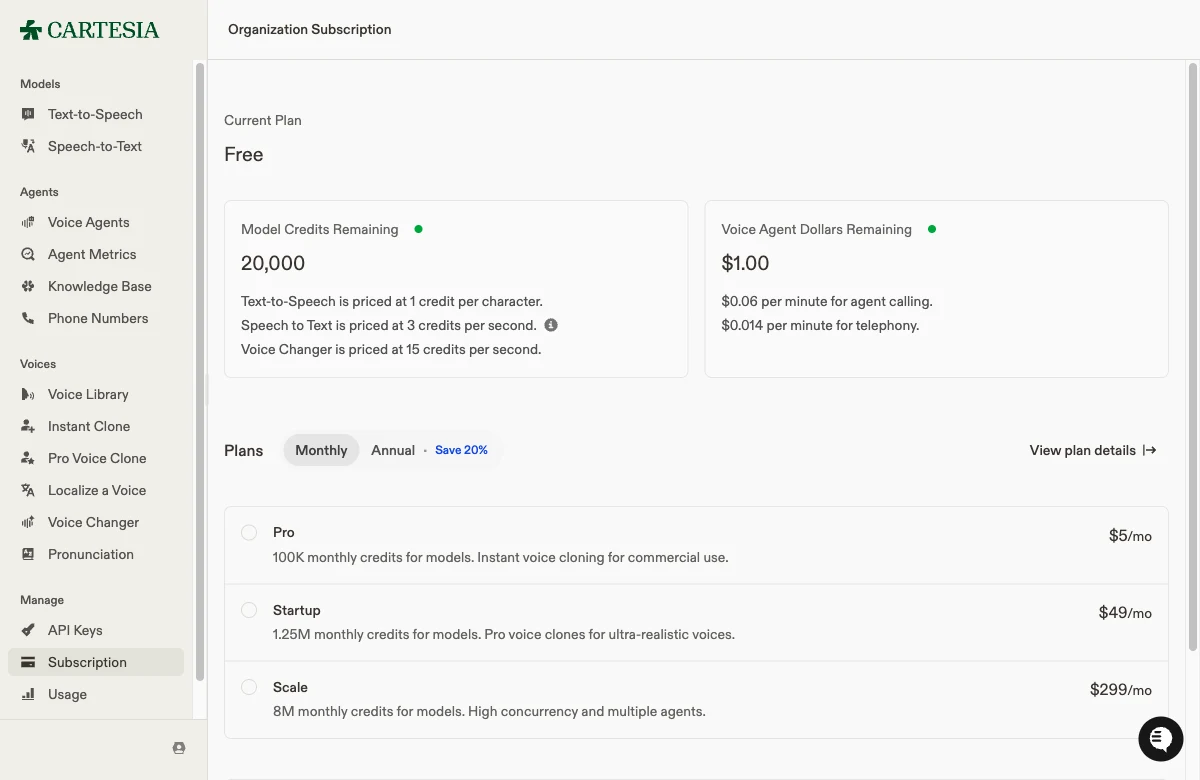
Here is where it gets confusing. The public pricing page headlines four paid tiers, and the in-app upgrade screen quotes the same plans at different numbers:
| Plan | Public page | In-app upgrade | Monthly credits | Voice cloning |
|---|---|---|---|---|
| Free | $0 | $0 | 20,000 | Instant only |
| Pro | $4/mo | $5/mo | 100,000 | Instant, commercial use |
| Startup | $39/mo | $49/mo | 1,250,000 | Instant + Pro |
| Scale | $239/mo | $299/mo | 8,000,000 | Instant + Pro |
The dollar gap is not a typo. The public cartesia.ai/pricing page lists Pro at $4, Startup at $39, and Scale at $239 for the models-only tier, while the in-app Subscription screen I clicked through quotes $5, $49, and $299 — because the in-app price bundles a prepaid voice-agent allowance the public page breaks into a separate column. Same plan names, two prices. Check both before you commit, because the page you read first is not the price you pay.
Beyond the plan credits, the usage-based costs are clear: voice-agent calling runs $0.06 per minute, telephony $0.014 per minute, and a one-time Professional Voice Cloning costs 225 credits. Annual billing knocks 20% off any tier. For a developer this is honest, legible pricing once you reconcile the two pages; for a creator used to “minutes per month,” the credit-and-agent-dollar split is one more sign this tool was not built for you.
It helps to run the math before you commit, because the part that scales is not the part the plan names emphasize. Say an agent handles 1,000 support calls a month at three minutes each. The speech itself is cheap: a 150-word answer is roughly 900 characters, so 900 credits, and even a chatty turn barely dents a tier’s allowance. The cost that compounds is the per-minute calling rate. Three thousand conversation minutes at $0.06 is $180 in agent calls on top of whatever plan you are on. For a real-time agent, price the conversation minutes first and the credits second, because the minutes are what grow with your traffic.
Who Cartesia is for
- Developers building real-time voice agents — the core audience, and the one the whole product serves. If you are wiring speech into a phone bot, a live assistant, or an app where a half-second of latency breaks the illusion, Cartesia’s sub-90ms Sonic is the reason to be here. Price your agent traffic against the per-minute calling rate, not just the plan credits.
- Teams that need speech-to-text and text-to-speech from one vendor — Sonic, Ink, and Line under one API key and one credit pool simplify the stack for conversational products.
- Anyone who wants instant voice cloning on a budget — cloning from about 10 seconds of audio is available even on the free tier, which is unusually generous for prototyping a branded agent voice.
- Startups optimizing for cost at scale — an independent latency benchmark posted on LinkedIn pegged Cartesia as “roughly 3-4x cheaper” than ElevenLabs at comparable speed, which is a real argument once an agent is handling volume.
- Not for creators doing narration, podcasts, or audiobooks — there is no long-form editor, no dubbing studio, and the voice library is built for support and assistant personas, not storytelling. For that work, the catalog and tooling in ElevenLabs or Murf will serve you far better.
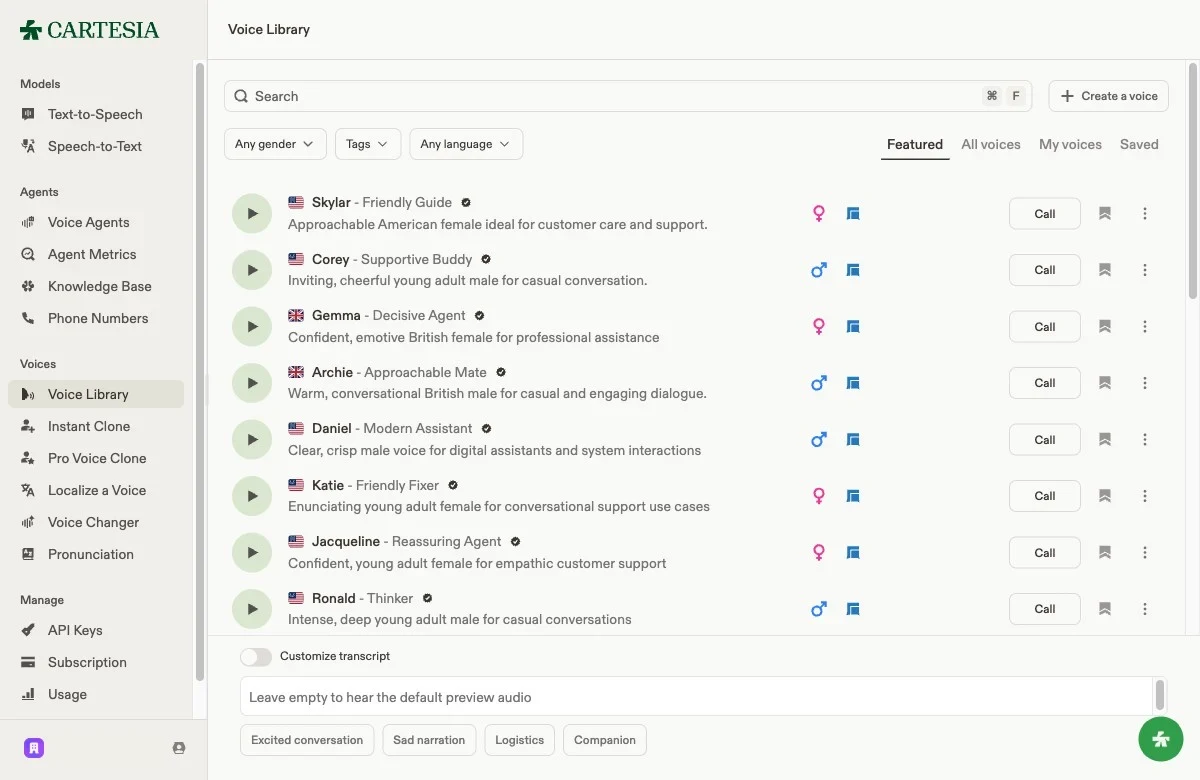
The voice library is the clearest tell of all. Scroll the featured voices and the descriptions repeat themselves: “ideal for customer care and support,” “professional assistance,” “empathic customer support,” “digital assistants and system interactions.” This is a roster for building agents, not for finding a narrator.
The good
Six reasons Cartesia earns the 4.0, in the order a developer should weigh them.
The lowest latency in the category
This is the whole point, and Cartesia delivers it. Sub-90ms time-to-first-audio is the advertised figure, and independent testing backs the order of magnitude: a production comparison on r/artificial called the streaming “genuinely fast,” and a public LinkedIn benchmark measured Sonic 3 at a 164ms average that stayed “under 300ms every single time.”
That 300ms ceiling matters more than it looks. It is roughly the point where a reply stops feeling instant and starts feeling like a pause, and most general-purpose voice models sail past it. For a live agent, staying under that line is the difference between a natural exchange and a stilted one, and no all-purpose voice tool I have used holds it as consistently.
Instant voice cloning, even on the free tier
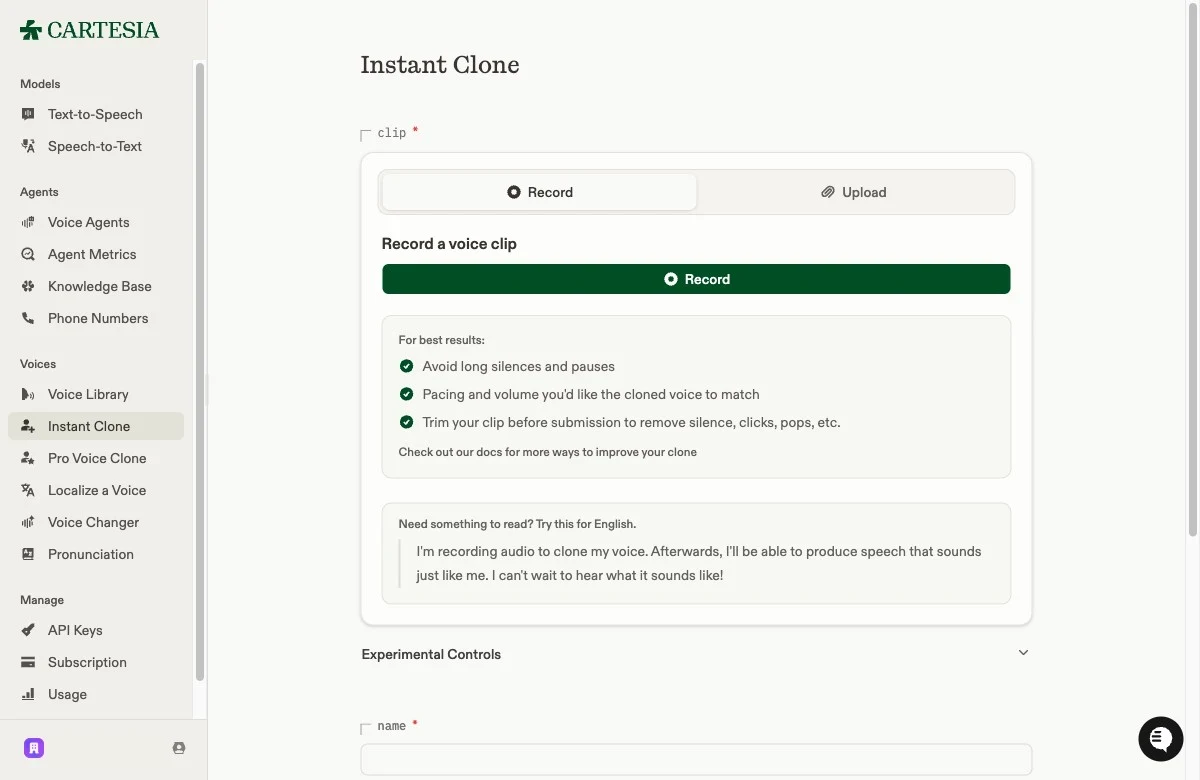
Cartesia clones a voice from roughly 10 seconds of audio, and it works on the free plan — most rivals gate cloning behind a paid tier. The clone screen is plain about getting a clean result: avoid long silences, match the pacing you want, trim the clip first. Reddit’s r/speechtech is blunt in its praise: “The cloning is very good, as well as the localization.” Here is the instant path on my own voice, reading a line I never recorded. To my ear it holds up: it sounds like me, not a rough approximation. Judge the similarity for yourself:
There are two cloning paths, and the split is sensible. Instant cloning is the fast, free-tier route that copies a voice in seconds, good enough for a consistent agent persona. Professional Voice Cloning becomes available on the Startup plan and trains a higher-fidelity model for 225 credits a clone, with the gain showing up on long-script stability and emotional range. For a single agent voice the instant path is usually all you need; the Pro tier is for when one cloned voice has to carry hours of varied dialogue.
A genuinely useful free tier
Twenty thousand credits a month is enough to build something real before you pay. You get instant cloning, the full playground, and API access without a card, which is the right way to evaluate a tool whose main claim, speed, you can only judge by running it. The only catch is the missing commercial license, so treat it as a build-and-test sandbox, not a shipping plan.
API-first ergonomics
Everything in the playground points at production. The “Get API code” button hands you the working request, the same account drives the SDKs, and streaming is the default rather than a bolt-on. The quickstart is about as short as an API gets: authenticate, name the model and voice, pass your text, and audio bytes come back.
import osfrom cartesia import Cartesia
client = Cartesia(api_key=os.environ.get("CARTESIA_API_KEY"))
data = client.tts.bytes(    model_id="sonic-2",    transcript="Hello from a real-time voice agent.",    voice_id="694f9389-aac1-45b6-b726-9d9369183238",    output_format={"container": "wav", "encoding": "pcm_f32le", "sample_rate": 44100},)
That is the same call the playground generates for you, so what you prototype in the browser is what you ship. For a team that builds in code, that continuity from click to production is the strongest non-latency reason to pick it.
Fine control over speed and emotion
The generation settings go past picking a voice. The playground exposes a generation_config panel, and Cartesia’s own comparison pages claim it is the only provider offering emotion and speed modulation — the controls that let one agent sound urgent on a delivery update and calm on a billing question without swapping voices. For a conversational product where tone carries meaning, that per-utterance control is more useful than a bigger catalog of fixed voices you cannot bend.
A full voice-agent stack, not just a TTS endpoint
Cartesia bundles the parts a conversational product actually needs: Ink for transcription, Line for agent logic, phone numbers, a knowledge base, and agent metrics, all under one vendor. ProductHunt reviewers — a 5.0 across 20 reviews — describe it in exactly those terms: “easy to integrate, notably low-latency, and well suited to real-time voice experiences.” Buying speech-to-text and text-to-speech from the same API removes a whole class of integration glue.
The bad
The trade-offs are real, and almost all of them trace back to the same root: this is an infrastructure tool wearing a playground, and it was never built for content creation.
English leads, other languages lag
Cartesia claims 40+ languages, but the quality is not even across them. The production team on r/artificial that praised the English quality added the caveat in the same breath: “Italian support was limited when we tested.” If your agent needs to sound native in something other than English, test that specific language hard before you build on it — the multilingual coverage is broader on paper than in practice.
Built for agents, not creators
There is no long-form workflow here. No script editor that splits a chapter into regenerable blocks, no dubbing studio, no sound-effects generator — the things a narrator or podcaster relies on simply are not part of the product. The voice library, with its wall of “customer care” and “professional assistance” personas, confirms the priority. For real-time agents that is the correct focus; for anyone making content, it is a wall you hit on day one.
| What a creator needs | What Cartesia ships |
|---|---|
| Long-form script editor | Not available |
| Dubbing / re-voicing studio | Not available |
| Sound-effects generation | Not available |
| Catalog for narration | Low hundreds, support-oriented |
| Real-time agent latency | Best in class |
The price depends on which page you read
The public pricing page advertises Pro at $4, Startup at $39, and Scale at $239; the in-app upgrade screen quotes the same plans at $5, $49, and $299. The difference is the bundled voice-agent allowance, but a prospective buyer comparing tools off the marketing page will quote a number that is wrong at checkout. Transparent pricing should not require reconciling two of a vendor’s own pages.
A smaller catalog and ecosystem than the leader
Cartesia’s library runs to the low hundreds of voices, against the thousands ElevenLabs offers, and the surrounding ecosystem — community voices, third-party integrations, tutorials — is younger and thinner. For an agent you only need one good voice, so this rarely bites the core use case, but if you ever want range or a specific character, the bench is shallow.
It shows up in the small stuff too. When you hit a problem, there are fewer Stack Overflow answers, fewer community tutorials, and a smaller pool of pre-built voices to start from than you get with the incumbent. That gap closes as the platform grows, but today it means more time in the official docs and less borrowing from other people’s solved problems.
The free tier cannot ship
Twenty thousand credits is generous for prototyping, but the missing commercial license means nothing you make on it can go into a product you sell. That is a reasonable gate, but it is worth being clear-eyed about: the free tier is an audition for the paid plans, and the cheapest plan that lets you ship commercially is Pro.
Alternatives worth considering
If you decided Cartesia is not the fit, here is where to look — not because these beat it on latency, but because each wins a case Cartesia does not chase.
- ElevenLabs — if the voice is the product. A catalog of thousands of voices, the best cloning most creators can buy, broader language coverage, and a real long-form workflow make it the default for narration, podcasts, and audiobooks. Its newer low-latency model also narrows Cartesia’s one clear advantage. See our ElevenLabs review.
- Murf — if you want a creator-friendly editor rather than an API. Murf is built around a timeline that syncs voiceover to slides and video, which fits explainer and corporate work far better than Cartesia’s developer-first flow. See our Murf review.
- Descript — if the voice is one part of a full edit. Descript’s voice tools live inside a complete audio-and-video editor, so you fix the voiceover and cut the video in one place. See our Descript review.
Final word
Cartesia earns its 4.0 by being the best in the world at one thing. If you are building a real-time voice agent and latency is the metric that decides whether the experience feels human, nothing I have tested answers faster, the instant cloning is strong, and the free tier lets you prove it before you pay. For that buyer, it is an easy recommendation.
For everyone else, the same focus that makes it excellent makes it the wrong tool. There is no catalog to browse, no long-form editor, and no creator workflow, because Cartesia never set out to build one. Know which side of that line you are on before you start, reconcile the two pricing pages, and if real-time speed is your problem, start on the free tier and listen to how little time passes before it answers.
Frequently asked questions
Is Cartesia free to use?
Yes. The free tier gives 20,000 model credits a month (about 27 minutes of text-to-speech at 1 credit per character) plus instant voice cloning. It has no commercial license, so it is for prototyping, not shipping.
How fast is Cartesia's Sonic model?
Cartesia advertises sub-90ms time-to-first-audio, and independent tests put it around 100 to 165ms in real conditions, among the fastest text-to-speech available. Speed is the whole reason to choose it.
Can Cartesia clone my voice?
Yes. Instant voice cloning works from about 10 seconds of audio and is available even on the free tier. Higher-fidelity Pro Voice Cloning unlocks on the Startup plan.
Is Cartesia better than ElevenLabs?
For real-time agent latency, Cartesia leads. For voice catalog size, language coverage, and creator workflows like narration and dubbing, ElevenLabs is broader. See our ElevenLabs review for the other side.
What does Cartesia cost?
The public pricing page headlines Free, Pro at $4/mo, Startup at $39/mo, and Scale at $239/mo. The in-app upgrade screen quotes the same plans higher, at $5, $49, and $299, because it bundles a prepaid voice-agent allowance, so check both before you pick.
Keep reading
ElevenLabs vs Cartesia: creator quality vs agent speed
ElevenLabs owns voice quality and catalog; Cartesia owns sub-100ms speed. I tested both, including cloning my own voice in each. Here's which AI voice wins.
Best AI voice cloning: which tool actually sounds like you?
ElevenLabs is the best AI voice cloning tool overall, but the right pick depends on whether you're cloning your own voice, building an app, or want it free.
Best ElevenLabs alternatives: which one replaces it?
The best ElevenLabs alternative depends on why you're leaving. I lined up Murf, Descript, Cartesia and 4 more against the one job each actually wins.