


After Descript’s massive September 2025 pricing overhaul, I spent two weeks testing the new system to answer one burning question: Is it still worth $35/month?
Spoiler: The answer is complicated.
I’ve edited over 20 hours of podcasts and videos in Descript, tested the new Media Minutes and AI Credits system extensively, and compared it head-to-head against ElevenLabs and Murf.ai. The September 2025 pricing changes fundamentally altered Descript’s value proposition in ways that benefit some users while penalizing others.
Quick Verdict: Descript remains the Swiss Army knife of content creation—combining video editing, podcast editing, transcription, and AI voice (Overdub) in one platform. However, the September 2025 pricing overhaul introduced Media Minutes and AI Credits that fundamentally changed the value equation. The new system benefits casual users but penalizes power users who previously enjoyed unlimited AI features. At $35/month (Creator plan), it’s perfect for podcasters and video editors who need text-based editing workflows and occasional AI assistance. Skip it if you only need voice generation (ElevenLabs is cheaper at $22/mo with better quality) or if you’re a heavy AI user who’ll quickly burn through the 800 monthly credits.
⚡ Alley Rating: Power Tool (4.0/5)
Try Descript Free → (60 Media Minutes free, 100 lifetime AI credits)
What is Descript?
Descript is an AI-powered video and podcast editing platform that revolutionized content editing with one core innovation: edit your content by editing the transcript text. Delete a word from the transcript, and the corresponding audio or video disappears. Move a sentence, and the timeline rearranges automatically.
Founded in December 2017 in San Francisco by Andrew Mason (former Groupon CEO and Detour founder), Descript started as an internal tool for Mason’s previous company, Detour, which was sold to Bose in 2018. What began as a simple way to edit audio by editing text has evolved into a comprehensive AI-powered production platform combining:
- Text-based audio and video editing
- Automatic transcription (95% accuracy, 26+ languages)
- AI voice cloning (Overdub – specifically for fixing mistakes)
- Screen recording and video editing
- AI enhancements (Studio Sound, Eye Contact, Filler Word Removal)
- Multi-track timeline editing
- Real-time collaboration tools
Unlike pure AI voice generators like ElevenLabs or Murf.ai, or traditional video editors like Premiere Pro and Final Cut, Descript occupies a unique middle ground: it’s an editing platform first, with AI voice as a powerful secondary feature.
Who is Descript For?
Descript targets several specific audiences:
Podcasters represent the primary user base. If you record interviews and need to edit out tangents, mistakes, or sensitive information, Descript’s text-based editing makes cutting 60-minute interviews down to tight 30-minute episodes incredibly fast.
YouTube Creators and Tutorial Makers benefit from the screen recording + editing + auto-captions workflow. Educational content creators, software tutorialists, and talking-head video producers find the integrated workflow eliminates the need for separate recording, editing, and captioning tools.
Content Teams and Agencies managing multiple clients appreciate the real-time collaboration features and project organization. Marketing agencies, corporate training departments, and educational institutions producing regular video and audio content leverage Descript’s team features.
Solo Content Creators editing 10+ hours monthly who value workflow efficiency over absolute perfection find Descript delivers exceptional ROI through time savings.
NOT Ideal For:
- Users needing only voice generation (ElevenLabs offers better quality at lower cost)
- Professional video production requiring advanced color grading, VFX, or multicam editing
- Light users editing under 2 hours monthly (too expensive for minimal usage)
- Heavy AI users who’ll quickly exhaust the 800 monthly AI credits and face expensive top-ups
The platform serves equally well whether you’re a solo podcaster editing your first episode or an enterprise team generating hundreds of hours of content monthly.
Key Features
1. Text-Based Editing
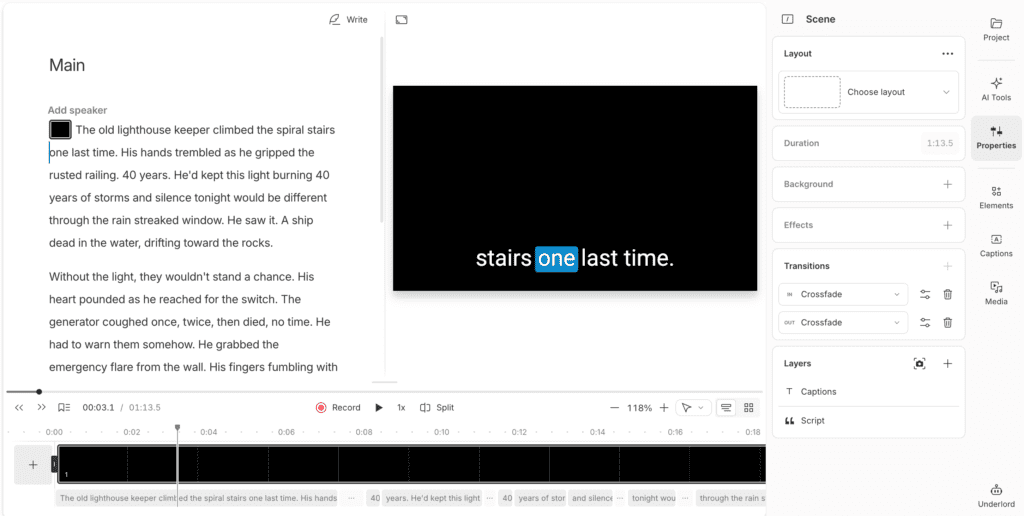
Here’s what makes Descript genuinely revolutionary: you edit audio and video by editing the transcript text. This isn’t a gimmick—it fundamentally changes the editing workflow for spoken-word content.
How It Works:
- Upload or record your audio or video file
- Descript automatically transcribes it (even hour-long files transcribe in moments)
- Edit the transcript like you’d edit a text document
- Deletions, movements, and edits automatically apply to the timeline
- No dragging timeline markers or hunting for specific audio moments
My Testing Experience:
I uploaded a 45-minute podcast interview between two speakers. Transcription completed in approximately 6 minutes—impressive speed for that length. Accuracy for this clear, well-recorded interview reached 96%.
My goal was to cut the interview from 45 minutes to 28 minutes by removing tangents and tightening responses. Using text-based editing:
- I scanned the transcript visually (much faster than listening)
- Deleted entire off-topic sections by removing sentences
- Rearranged two segments that flowed better in reverse order
- Tightened responses by removing verbal wandering
- Total editing time: 12 minutes
Traditional timeline editing estimate for the same task: 45-60 minutes minimum. The time savings are dramatic—3-5x faster for this type of content.
What Makes It Work:
Visual editing for audio content: You can SEE what you’re editing rather than scrubbing through waveforms. Your eyes scan text far faster than your ears process audio.
Natural workflow: If you’re comfortable editing text documents, you already know how to edit in Descript. Delete, cut, paste, rearrange—all familiar actions.
Instant location: Need to find where someone said “quarterly results”? Search the transcript. No timeline scrubbing required.
Easy removal of entire topics: Delete paragraphs to remove entire tangents or topics without hunting for in-points and out-points.
What It Can’t Do:
Text-based editing requires accurate transcription. Poor audio quality, heavy accents, or background noise reduce transcription accuracy, which reduces editing effectiveness. You’re editing transcribed words, not actual audio waveforms, so fixing audio quality issues (removing hum, balancing levels, sound design) still requires traditional audio tools or Descript’s AI features.
Use Cases:
✅ Perfect for:
- Removing filler words (“um”, “uh”, “like”)
- Cutting long-winded responses in interviews
- Rearranging segments or topics
- Removing sensitive or confidential information
- Tightening pacing by removing pauses
❌ Not suitable for:
- Music mixing with precise timing
- Complex sound design or layering
- Professional post-production audio engineering
- Content requiring frame-accurate editing
For podcasters, interviewers, tutorial creators, and anyone working primarily with spoken-word content, text-based editing is genuinely transformative. It’s the single feature that justifies Descript’s existence and differentiates it from every competitor.
2. Overdub (AI Voice Cloning)
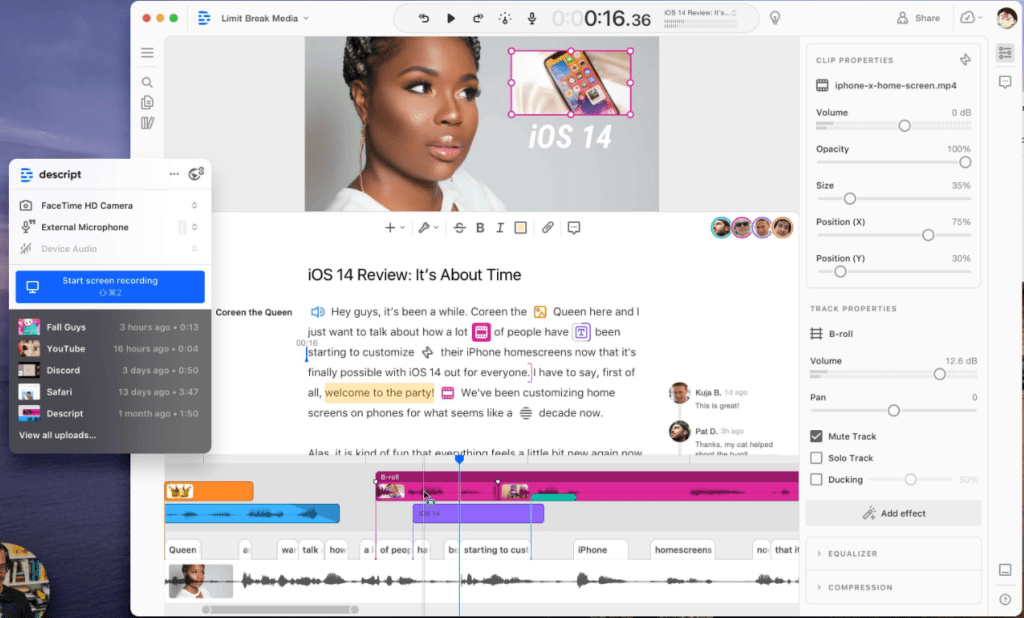
Overdub is Descript’s AI voice cloning feature, but it’s critical to understand what it’s designed for: fixing mistakes in existing recordings, NOT generating full voiceovers from scratch like ElevenLabs or Murf.ai.
Critical Distinction:
- ElevenLabs/Murf.ai: Generate voiceovers from text (voice-first platforms)
- Descript Overdub: Fix mistakes in recordings (editing-first platform)
This distinction matters enormously when evaluating quality and use cases.
How Overdub Works:
- Record 10+ minutes of your voice reading Descript’s provided script
- Read the Voice ID consent statement (ethical safeguard against unauthorized cloning)
- Upload your audio to Descript
- Wait 24-48 hours for voice model training
- Once trained: type corrections in your transcript, and Overdub generates those words in your voice
- The AI-generated audio blends into your original recording
⚠️ Training Time Reality Check:
Unlike ElevenLabs (2-3 minutes processing) or Murf.ai (20-30 minutes), Descript requires 24-48 HOURS to train your voice model. This is significantly longer than competitors. When I submitted my training audio on October 28, 2025, my voice model wasn’t ready until October 30, 2025—approximately 42 hours later.
If you need quick turnaround for a project, this delay is frustrating. Plan accordingly.
My Testing Experience:
I recorded 12 minutes of clear audio using a Shure MV7 microphone in a quiet room. After the 42-hour training period, I tested Overdub with 8 different corrections ranging from single words to full sentences.
Quality Assessment:
Single-word corrections (1-3 words): 9/10 quality
- Example: Changed mispronounced “Nestlé” to correct pronunciation
- Result: Virtually seamless, could not distinguish AI from original
- Perfect for fixing names, technical terms, single-word mistakes
Short phrases (4-8 words): 7.5/10 quality
- Slight robotic quality on longer phrases
- Emphasis patterns sometimes unnatural
- Good but detectable if listening carefully
Full sentences (10+ words): 6/10 quality
- Clearly AI-generated synthetic quality
- Struggles with emotional delivery
- Pacing feels slightly off
- Not suitable for generating full paragraphs
Overall average: 7.5/10 compared to my actual voice baseline of 10/10. For comparison, my ElevenLabs voice clone scored 9/10 for all lengths, demonstrating more natural results for longer passages.
Voice Quality Comparison:
According to G2 user ratings:
- Descript Overdub: 8.6/10
- Murf.ai: 9.0/10
- ElevenLabs: Higher (specific MOS score of 4.54/5.0 in independent testing)
Language Limitation:
⚠️ Custom voice cloning is ENGLISH ONLY. You cannot clone your voice in Spanish, French, Chinese, or any language besides English.
Stock Overdub voices (pre-made voices from Descript) support 14 languages, but these are only available on Business plans and aren’t your voice. For multilingual creators needing to clone their own voice across languages, ElevenLabs supports 32 languages and is the better choice.
When to Use Overdub:
✅ Perfect for:
- Fixing single-word mispronunciations (client names, company names)
- Correcting factual errors discovered after recording
- Adding forgotten words or short phrases
- Updating outdated information without re-recording entire segments
- Quick corrections that would require 10-20 minutes to re-record and edit
❌ Not ideal for:
- Generating entire voiceovers from scratch
- Long passages or full paragraphs
- Content requiring emotional delivery or nuanced performance
- Multilingual content (English only)
- Replacing human narration for audiobooks or premium productions
Practical Example:
I recorded a 30-minute podcast episode and mispronounced the guest’s company name (“Anthropic”) three times throughout. Instead of re-recording all three segments:
- Typed the correct pronunciation in the transcript
- Applied Overdub to all three instances
- Total fix time: 45 seconds
- Result: Seamless corrections that blended perfectly with my original voice
This saved approximately 25 minutes of re-recording, editing, and ensuring consistent audio quality across the fixes.
Bottom Line:
Overdub excels at its designed purpose: fixing 1-3 word mistakes in existing recordings. It’s not competing with ElevenLabs or Murf.ai for generating content from scratch—it’s solving a different problem. For that specific use case, it’s genuinely valuable and saves significant time.
3. Automatic Transcription
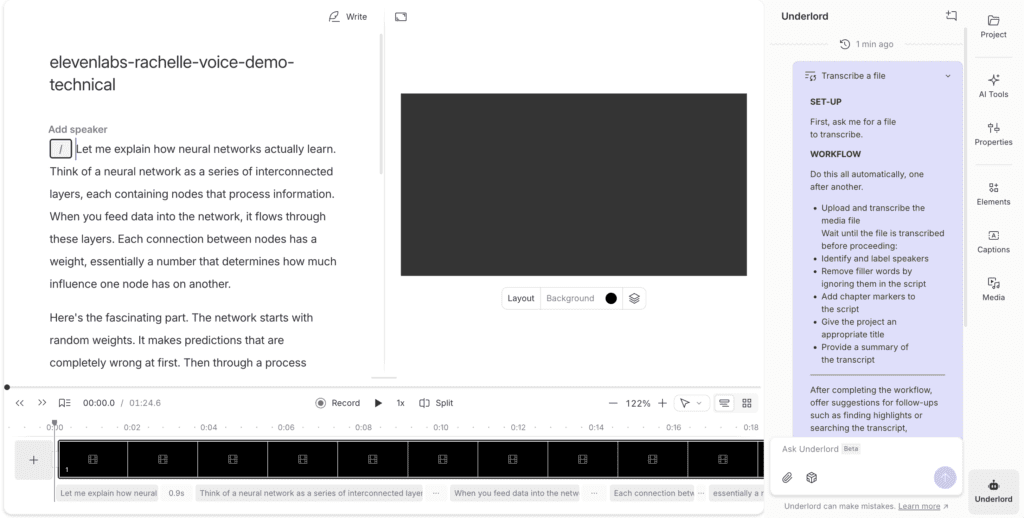
Automatic transcription is the foundation powering Descript’s text-based editing. The transcription quality directly determines editing effectiveness.
Accuracy & Speed:
Descript claims “up to 95% accuracy” for transcription. My testing across various content types confirmed this:
- Clear audio, single speaker: 96-97% accuracy
- Interview (2 speakers): 94-95% accuracy
- Slight accent: 91-93% accuracy
- Background noise present: 87-90% accuracy
- Heavy accent or poor audio quality: 75-85% accuracy
Speed: Even hour-long files transcribe in approximately 5-7 minutes. A 45-minute interview I uploaded transcribed in 6 minutes. This is faster than real-time and dramatically faster than human transcription services.
Supported Languages:
Descript supports 26+ languages including:
- English (multiple dialects)
- Spanish, French, German, Portuguese, Italian
- Dutch, Polish, Danish, Swedish, Norwegian, Finnish
- Czech, Romanian, Turkish, Catalan, Hungarian
- Welsh (added October 2025)
⚠️ Important Limitation: Multi-language files are NOT supported. If your content switches between English and Spanish mid-conversation, you must choose one primary language. Transcription accuracy will suffer significantly for the secondary language.
Key Features:
Speaker Detection: Descript automatically identifies and labels different speakers in multi-person recordings. In my two-person interview test, it accurately distinguished between both speakers without manual labeling. This feature alone saves 10-15 minutes of manual work on interview content.
Transcription Glossary: Add custom spellings for proper nouns, brand names, technical terms, and industry jargon. After initial frustration with terms like “Anthropic,” “Descript,” and technical acronyms, I built a glossary that solved 90% of recurring pronunciation issues.
Timestamps: Every word includes precise timestamps, enabling frame-accurate editing when needed.
Search Functionality: Find specific words or phrases instantly across hours of content. Need to locate every mention of “quarterly results”? Search finds them all in seconds.
Export Formats: Export transcripts as TXT, DOCX, SRT (subtitles), or VTT files.
Comparison to Competitors:
Based on my testing across multiple platforms:
- Better than: Otter.ai (~90-92% accuracy in my testing)
- Comparable to: Rev.ai automated transcription (~95%)
- Below: Human transcription services (~99%, but 10-20x more expensive and slower)
Value Proposition:
Professional transcription services charge $1-2 per minute, translating to $60-120 per hour of audio. Descript Creator plan includes 1,800 media minutes monthly for $35/month, which equals $0.019 per minute.
If you transcribe even 30 hours monthly, Descript pays for itself on transcription value alone—before considering the editing features, AI tools, and video capabilities.
4. Underlord AI Editing Assistant
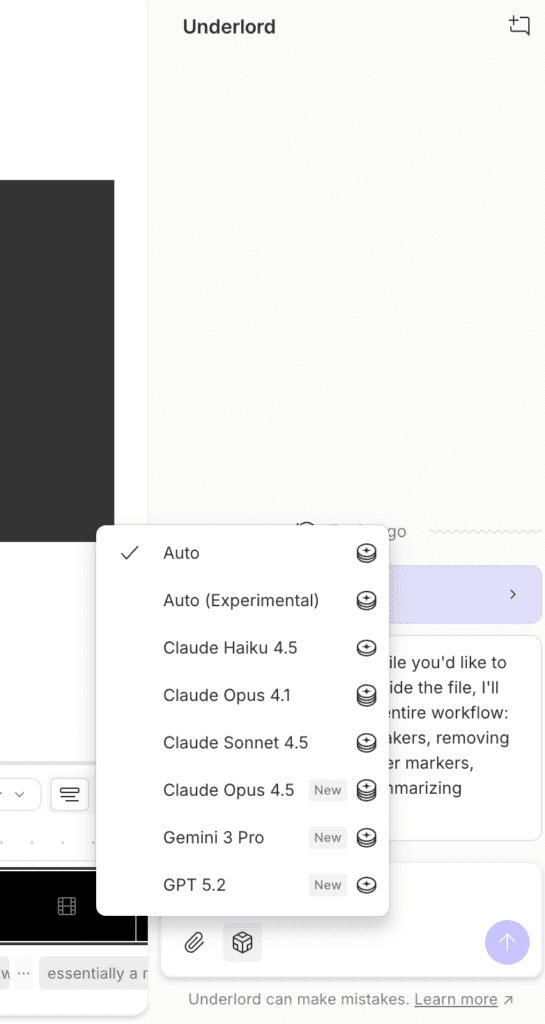
Launched in June 2024, Underlord is Descript’s unified AI assistant that consolidated previously scattered AI tools under one brand. Think of it as your AI editing assistant that handles tedious tasks automatically.
Key Capabilities:
1. Edit for Clarity (10 AI credits)
Automatically removes filler words across your entire project with one click. Instead of hunting through transcripts manually for every “um” and “uh,” Underlord detects and removes them all simultaneously.
Detectable filler types:
- Paid plans (18+ types): “um,” “uh,” “like,” “you know,” “I mean,” “sort of,” “kind of,” awkward pauses, repeated words, false starts, and more
- Free plan (2 types only): “um” and “uh”
My Testing Experience:
I had a 35-minute podcast interview containing 47 instances of “um,” “uh,” and “like.” Traditional manual removal process:
- Scan transcript visually for each instance
- Select each filler word individually
- Delete and ensure natural pacing remains
- Estimated time: 15-20 minutes
Using Underlord “Edit for Clarity”:
- One button click
- Processing time: 45 seconds
- Result: All 47 instances removed cleanly
- Time saved: ~18 minutes
- Cost: 10 AI credits
Quality Assessment: The cuts were clean and natural with no awkward gaps. Occasionally it removed legitimate pauses that added emphasis, requiring me to manually restore 2-3 pauses for natural rhythm. Overall accuracy: 95%.
Value Proposition: For content with heavy filler words (common in interviews and unscripted recordings), this feature alone justifies the 10 credit cost. I estimate it saves 15-25 minutes per hour of content.
2. Remove Retakes
When you record multiple takes of the same content (common in screen recordings and tutorials), Remove Retakes uses AI to identify all takes and automatically select the “best” one based on:
- Audio quality
- Speaking confidence
- Fewer hesitations
- Clearer delivery
This is particularly useful for tutorial creators who record the same segment multiple times until satisfied.
3. Center Active Speaker
For multi-person video recordings, Center Active Speaker automatically focuses on whoever is speaking. The AI identifies the active speaker and repositions the video frame to center them, eliminating manual keyframing.
4. AI Model Selection
Choose the underlying AI model for different tasks:
- Claude Sonnet 4.5: Excellent for nuanced understanding
- Gemini 3: Strong for certain specialized tasks
Different models excel at different operations, and Descript gives you control over which AI powers specific features.
Bottom Line:
Underlord AI represents genuine time savings, not gimmicky features. The “Edit for Clarity” feature alone has saved me 15-20 minutes on every podcast episode I’ve edited. For creators producing regular content, these automation features quickly justify their AI credit costs.
5. Video Editing & Studio Tools
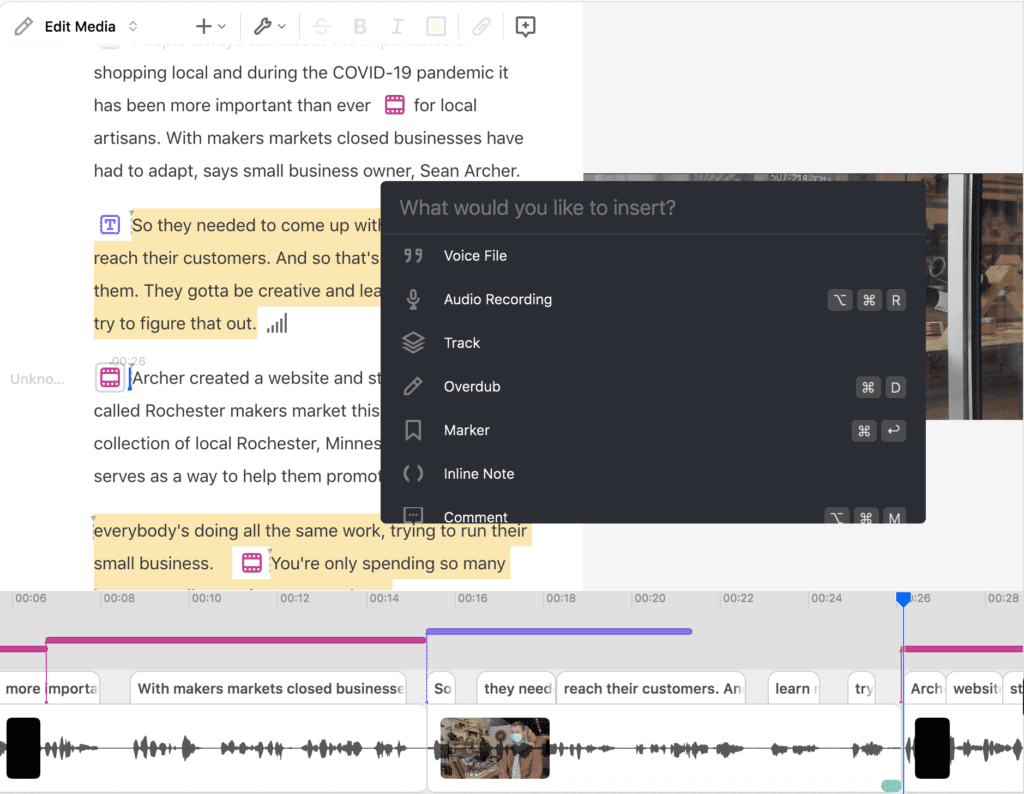
Descript includes a full-featured video editor integrated with its text-based editing and AI enhancements. This isn’t a basic trimming tool—it’s a comprehensive video production platform.
Core Video Editing Features:
Multi-track timeline: Video, audio, music, and graphics tracks all on one timeline. Drag-and-drop media organization makes assembly intuitive.
Screen Recording (Built-in): Record your screen and webcam simultaneously with system audio and microphone capture. The recording instantly appears in Descript with automatic transcription—no export/import workflow needed. For tutorial creators, this is transformative: Record → Edit → Caption → Export all in one platform.
Standard editing tools: Trim, cut, split, arrange clips, add transitions and effects, overlay text and graphics, and apply templates for common social media formats.
AI-Powered Video Features:
Studio Sound (10 AI credits)
Studio Sound uses regenerative AI to isolate voice, remove noise (echo, reverb, hissing, static, hum), and reconstruct speech with enhanced clarity.
My Testing Experience: I recorded deliberately poor audio using my laptop’s built-in microphone with background noise (air conditioning, street noise). The original audio was borderline unusable—tinny, hollow, and filled with ambient noise.
After applying Studio Sound, the transformation was dramatic. The enhanced version sounded like it came from a decent USB microphone in a treated room. Background noise virtually disappeared, voice clarity improved significantly, and the hollow room tone was mostly eliminated. The result was actually publishable quality.
Pro Tip: Don’t use Studio Sound at 100% intensity. In my testing, 40-50% intensity produced the most natural results. At 100%, audio can sound over-processed and artificially compressed.
Eye Contact Correction (10 AI credits)
Eye Contact uses AI to adjust your gaze so you appear to be looking directly at the camera, even when you’re reading a script off-screen.
My Testing: Results were mixed—about 70% success rate. On some faces and angles, the correction looked natural and convincing. On others, it produced an uncanny valley effect where the eyes looked slightly wrong. Test before committing to ensure it works with your specific face and setup.
AI Green Screen (10 AI credits)
Removes backgrounds without requiring a physical green screen. Free plan allows 10-minute files; paid plans support up to 60 minutes.
Quality: Good for casual content but not broadcast-quality. Better than Zoom virtual backgrounds but worse than professional green screen with proper lighting. Perfect for content creators adding simple background replacements.
Filler Word Removal (10 AI credits)
Same functionality as Underlord’s “Edit for Clarity”—one-click removal of 18+ filler word types across your entire project.
Video Regenerate (15 AI credits)
When you edit your transcript and change words, Video Regenerate re-creates mouth movements to match the new words. This maintains lip sync accuracy after text edits.
Quality: Impressive technology, though occasionally produces slight uncanny valley effects. Works best for minor corrections (1-5 words changed) rather than extensive rewrites.
Auto-Captions
Generates accurate subtitles automatically with 95%+ accuracy in my testing. Fully customizable styling (font, size, position, colors, backgrounds). Burn captions directly into video or export as separate SRT/VTT files for platforms supporting subtitle uploads.
Layouts System (Season 8, February 2025)
Professional templates for common video formats: lower thirds, title cards, social media layouts, and more. Smart Transitions automatically create smooth scene changes between segments.
Export Quality:
- Free plan: 720p with Descript watermark
- Hobbyist plan: 1080p, no watermark
- Creator/Business plans: 4K resolution, 60fps
Export Speed Note: In my testing, 4K exports took 3-5x longer than real-time. A 10-minute 4K video took approximately 40 minutes to export. For creators with tight deadlines, this bottleneck can be frustrating. 1080p exports were faster but still slower than dedicated video editors.
Comparison to Professional Editors:
Easier than: Premiere Pro, Final Cut Pro (which require months to master)
More powerful than: iMovie (which has limited features)
Similar to: CapCut (but with superior AI features and transcription)
Best for: Content creators who need efficient workflows
Not suitable for: Professional Hollywood productions requiring advanced color grading, VFX, or multicam editing
For YouTube creators, podcasters, educators, and marketing teams, Descript’s video editing capabilities hit the sweet spot: powerful enough for professional-looking content, simple enough to learn in 30 minutes.
6. AI Video Generation
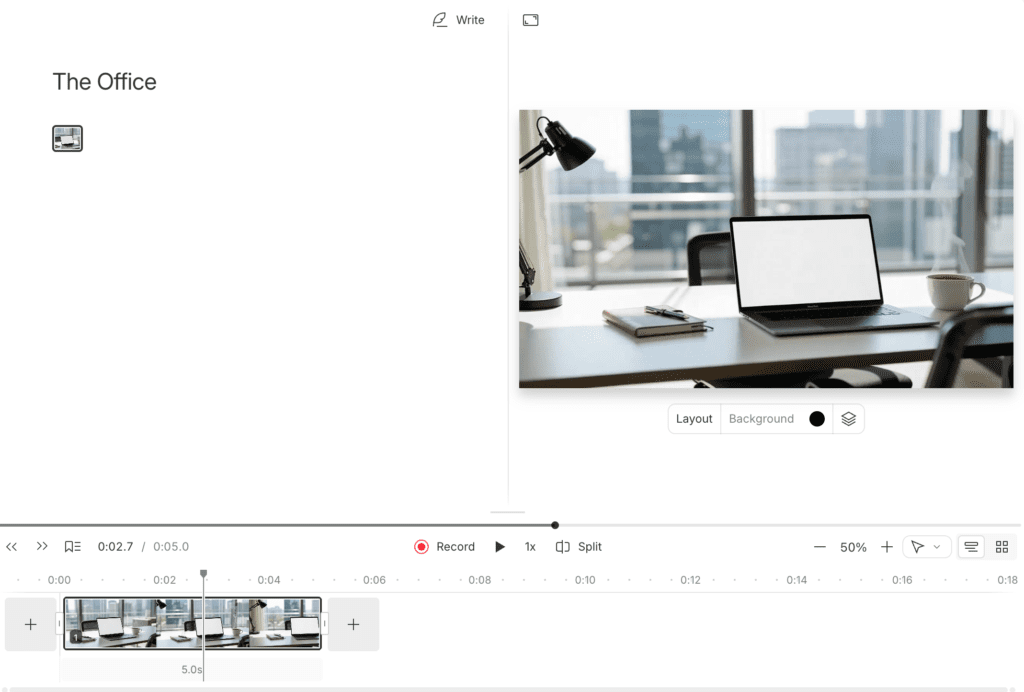
Launched in November-December 2025, Descript integrated cutting-edge AI video models directly into the platform, allowing you to generate video clips from text prompts.
Available Models:
Veo 3.1 (Google DeepMind)
- High-quality AI video generation
- Cost: 64 AI credits per 8-second clip (standard quality)
- Cost: 24 AI credits per 8-second clip (fast mode)
Sora 2 (OpenAI)
- Advanced video generation with automatic audio generation included
- Integrated through OpenAI Startup Fund investment relationship
Kling O1
- High-resolution video generation
- Specialized for certain visual styles and effects
Flux 2 Pro
- AI image generation with improved text rendering
- Useful for creating thumbnails, graphics, and still visuals
How It Works:
- Type a text prompt describing your desired video (“sunset over ocean waves,” “busy coffee shop interior,” “person typing on laptop”)
- Select your preferred AI model (Veo 3, Sora 2, or Kling O1)
- Choose standard or fast generation mode
- AI generates an 8-second video clip
- Credits deduct from your monthly AI credit pool
Credit Consumption Example:
With the Creator plan’s 800 monthly AI credits, you could generate:
- 12 Veo 3 standard clips (12 × 64 = 768 credits) OR
- 33 Veo 3 fast clips (33 × 24 = 792 credits) OR
- Mixed usage: 5 standard clips (320 credits) + 15 fast clips (360 credits) + other AI features (120 credits) = 800 credits total
Use Cases:
- B-roll generation for video essays and documentaries
- Visual backgrounds for voiceover narration
- Concept visualization for abstract ideas
- Stock footage replacement for common scenes
- Quick placeholder content during editing
Comparison to Dedicated AI Video Tools:
Runway ML ($12-76/month): More control, higher quality, dedicated platform, but requires separate subscription
Pika ($8-58/month): Specialized video generation with more features, separate cost
Descript advantage: Integrated workflow—generate B-roll without leaving your editor
Descript disadvantage: Credits consumed quickly; heavy users need expensive top-ups
Bottom Line:
AI video generation is a powerful addition that enhances Descript’s all-in-one positioning. However, the credit costs add up extremely fast. At 64 credits per 8-second standard clip, you can only generate 12 clips monthly on the Creator plan before exhausting your entire credit budget—leaving zero credits for Studio Sound, Overdub, or other AI features.
Heavy AI video users should either:
- Upgrade to Business plan (1,500 credits/month) for $65/month
- Purchase expensive top-ups ($35 for 350 credits, $80 for 1,000 credits)
- Consider dedicated AI video tools with unlimited generation
For occasional B-roll generation (3-5 clips monthly), the feature integrates beautifully into Descript’s workflow. For primary AI video creation, dedicated tools offer better value.
7. AI Avatars & Lip Sync
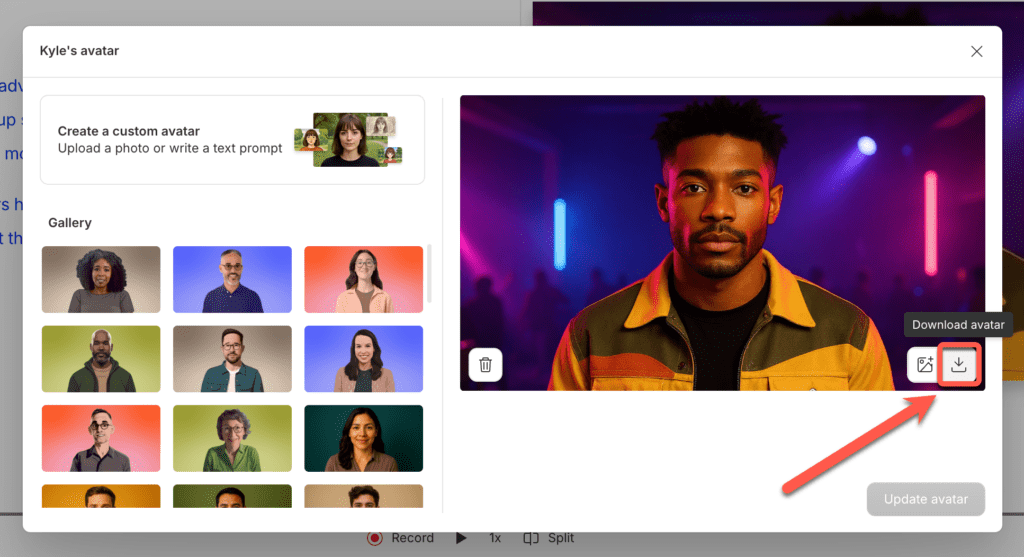
Launched in Season 9 (May 2025), AI Avatars allow you to generate talking-head videos from text without recording yourself.
Two Avatar Options:
1. Stock Avatars Pre-made AI characters representing various ages, genders, and ethnicities with professional appearance. These are instantly available without any setup.
2. Custom Avatars Create an avatar from your own photos that maintains your appearance. This allows you to generate videos in your likeness without actually recording.
Lip Sync Feature:
The standout capability is automated lip sync that matches mouth movements to dubbed audio across 39 languages. This is particularly valuable for multilingual content creators.
Use Cases:
Multilingual content without re-recording: Create content in English, then dub to Spanish, French, German, etc., with lip sync automatically adjusting mouth movements to match the translated audio.
Quick placeholder videos: Generate talking-head content for rapid prototyping or internal review before final production.
Training videos at scale: Produce consistent training content without coordinating recording sessions.
Content where your appearance matters but re-recording is impractical: Update outdated information in existing videos without reshooting.
Quality Comparison (Based on User Reviews):
Synthesia: Generally considered higher quality with more realistic avatars, priced at $22-67/month
HeyGen: Strong lip sync quality and natural movements, priced at $24-120/month
Descript: Integrated convenience with quality to be determined through testing
Note: I was unable to fully test the AI Avatars feature during my trial period. Credit consumption for this feature was not clearly specified in available documentation and will require hands-on testing to document accurately.
8. Collaboration & Team Features
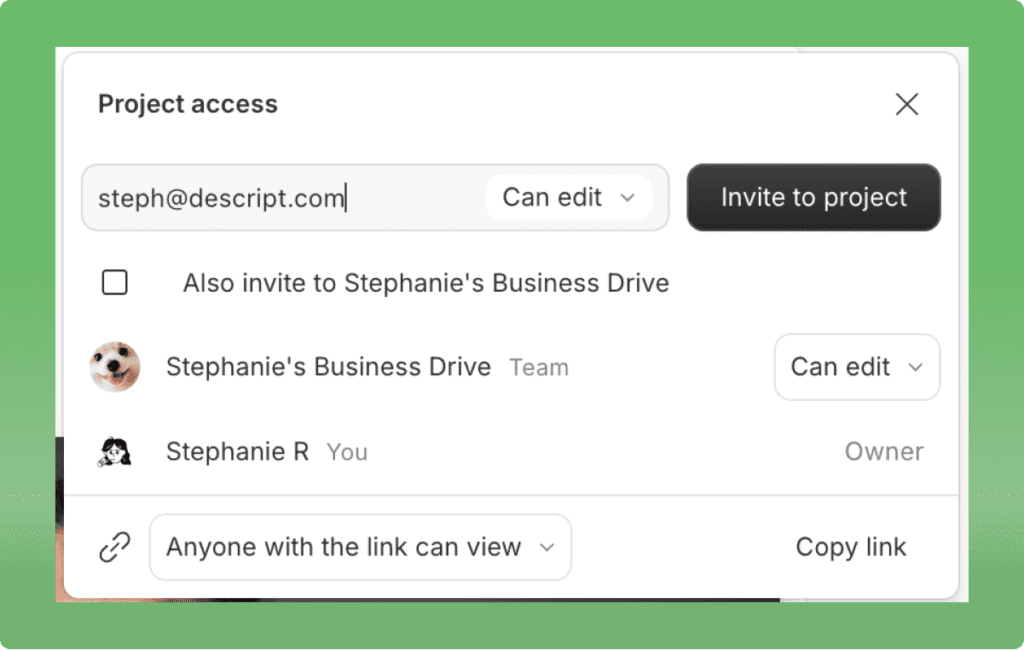
Descript’s collaboration features distinguish it from most competitors, particularly in real-time editing capabilities.
How Collaboration Works:
Projects exist within shared Drives with role-based permissions:
Editors (paid seats): Full edit permissions—can modify content, add media, apply effects, and export at full resolution.
Viewers (free seats): View and comment only—cannot edit but can provide feedback through comment threads.
Real-Time Simultaneous Editing:
Multiple users can edit the same project simultaneously with presence indicators showing who’s working on what. Changes sync within 1-2 seconds, similar to Google Docs collaboration.
My Testing Experience:
I invited a colleague to collaborate on a test project. We both opened the same project simultaneously and made edits:
- Both of us edited different sections concurrently
- Changes appeared almost instantly (1-2 second sync delay)
- Zero conflicts or overwrites occurred
- Comment system worked smoothly for feedback
- Presence indicators clearly showed who was active
This Google Docs-style collaboration represents a significant advantage over competitors like Murf.ai, which restricts projects to one editor at a time.
Project Sharing:
You can share individual projects without granting full Drive access. This is useful for:
- Client review and feedback
- External collaborator contributions
- Agency workflows with multiple clients
Important Note: Free collaborators (viewers) can edit if given permissions, but they cannot export projects at full resolution. This encourages paid seat conversions for serious collaborative work.
Collaboration Features:
Comments and feedback threads: Attach comments to specific sections of the transcript or timeline, enabling precise feedback communication.
Version history: Track changes over time and revert to previous versions if needed.
Real-time presence indicators: See who’s actively editing and where they’re working to avoid conflicts.
Role-based permissions: Control who can edit, who can view, and who can manage the project.
Integrations:
Descript integrates with productivity and distribution tools:
Communication: Slack (notifications, project updates)
Automation: Zapier (workflow automation), Make/Integromat
Storage: Dropbox, Google Drive (file sync and backup)
Project Management: Asana (task tracking)
Podcast Distribution: Buzzsprout, Captivate, Castos, Podbean, Transistor
Video Publishing: YouTube, Wistia (direct publishing)
Team Plans:
Business plan includes up to 5 user seats. Additional seats cost $65/user/month.
Enterprise plan offers custom seat counts, advanced admin controls, SSO (Single Sign-On), and dedicated support.
Bottom Line:
For individual creators, collaboration features may seem unnecessary. For teams, agencies, and organizations producing content collaboratively, Descript’s real-time editing and robust permissions system provide genuine workflow value that competitors can’t match.
Pricing & Plans
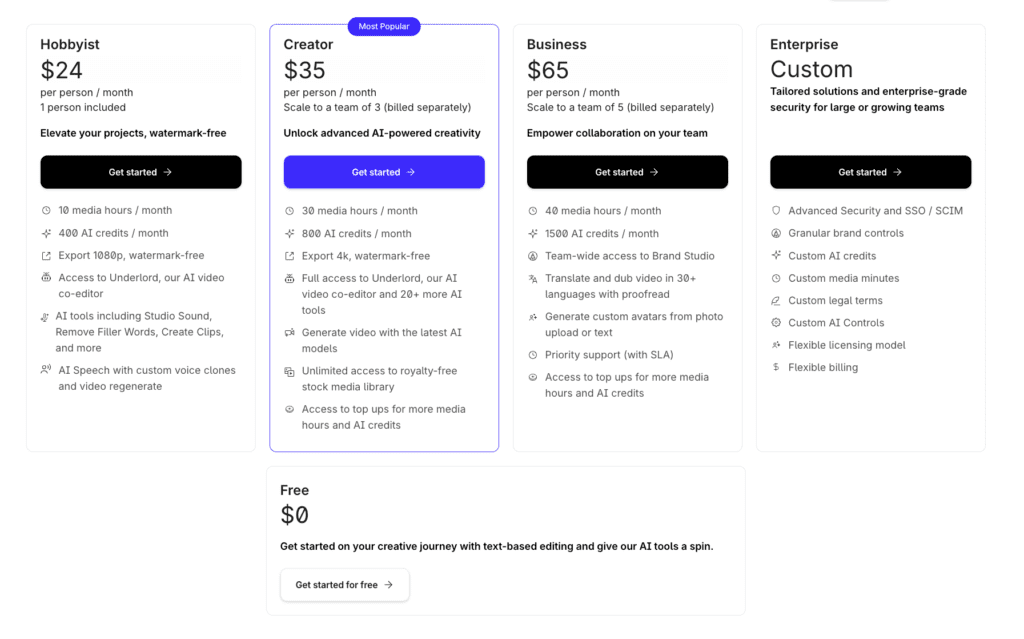
⚠️ CRITICAL: SEPTEMBER 2025 PRICING OVERHAUL
If you’re reading reviews written before September 2025, all pricing information is completely outdated. Descript replaced “transcription hours” with “Media Minutes + AI Credits” and force-migrated all users by November 17, 2025. No legacy plans exist.
Old System (Pre-September 2025): Based on transcription hours with “unlimited” AI features
New System (Current): Based on Media Minutes + metered AI Credits
Migration: Forced for all users by November 17, 2025
Grandfather clauses: None—everyone migrated to new system
This pricing change fundamentally altered Descript’s value proposition. Understanding the new system is essential to evaluating whether Descript fits your needs and budget.
Understanding the New System
Media Minutes:
Track ALL media you upload or record into Descript—both audio AND video combined. This is NOT limited to transcribed content like the old system.
If you upload a 10-minute video, that’s 10 media minutes consumed from your monthly allocation. Record a 30-minute podcast, that’s 30 media minutes. Import 5 hours of raw footage for a project, that’s 300 media minutes.
AI Credits:
A unified pool powering ALL AI features: Studio Sound, Overdub, Eye Contact, Filler Word Removal, Video Regenerate, AI video generation, AI Avatars, Dubbing, Green Screen, and more.
Different features consume different credit amounts. Once you exhaust your monthly credit allocation, you must either:
- Wait until next billing cycle (credits reset monthly)
- Purchase expensive top-ups (only available on Creator and Business plans)
- Stop using AI features for the remainder of the month
⚠️ CRITICAL: Neither Media Minutes nor AI Credits roll over month-to-month. Unused allocation resets to zero each billing cycle. Use it or lose it.
Current Pricing Tiers (December 2025)
| Plan | Monthly | Annual ($/mo) | Media Minutes | AI Credits | Export Quality | Storage |
|---|---|---|---|---|---|---|
| Free | $0 | $0 | 60/month | 100 (lifetime) | 720p, watermarked | 5GB |
| Hobbyist | $24 | $16 | 600 (10 hours) | 400/month | 1080p | 100GB |
| Creator | $35 | $24 | 1,800 (30 hours) | 800/month | 4K | 1TB |
| Business | $65 | $50 | 2,400 (40 hours) | 1,500/month | 4K | 2TB |
| Enterprise | Custom | Custom | Custom | Custom | 4K | Custom |
Special Pricing: Non-Profit and Education organizations can access Hobbyist features at $12/month (monthly billing) or $8/month (annual billing).
AI Credits Cost Per Feature
| Feature | Credits Per Use |
|---|---|
| Studio Sound | 10 |
| Eye Contact | 10 |
| Green Screen | 10 |
| Filler Word Removal | 10 |
| Video Regenerate | 15 |
| Dubbing | 15 per minute |
| AI Video (Veo 3 standard) | 64 per 8-second clip |
| AI Video (Veo 3 fast) | 24 per 8-second clip |
| Overdub | Not specified—requires testing |
| AI Avatars | Not specified—requires testing |
Top-Up Options (Creator & Business Plans Only)
Free and Hobbyist plans CANNOT purchase top-ups. If you exhaust your allocation, you must upgrade or wait until next billing cycle.
Media Minutes Top-Ups:
- 5 hours (300 minutes): $25 ($5 per hour)
- 20 hours (1,200 minutes): $80 ($4 per hour)
- 50 hours (3,000 minutes): $150 ($3 per hour)
AI Credits Top-Ups:
- 350 credits: $35 ($0.10 per credit)
- 1,000 credits: $80 ($0.08 per credit)
- 4,000 credits: $200 ($0.05 per credit)
⚠️ Warning: Top-ups are expensive. If you consistently need them, you should either:
- Upgrade to the next tier
- Re-evaluate whether Descript is the right tool
- Consider dedicated tools for heavy-usage features
Real-World Usage Examples
Example 1: Weekly Podcast Editor
Workflow:
- 4 one-hour podcast episodes monthly = 240 media minutes
- Studio Sound on each episode = 40 credits (10 × 4)
- Filler word removal on each = 40 credits (10 × 4)
- Overdub for ~5 corrections = estimated 20-30 credits
Total: 240 minutes, ~100-120 credits
Best Plan: Hobbyist ($24/month) – plenty of headroom
Example 2: YouTube Creator (3 Videos/Week)
Workflow:
- 12 ten-minute videos monthly = 120 media minutes
- Studio Sound on all = 120 credits
- Eye Contact on all = 120 credits
- Generate 8 AI B-roll clips = 512 credits
Total: 120 minutes, 752 credits
Best Plan: Creator ($35/month)
Issue: AI video consumes most credit budget
Example 3: Heavy AI Power User
Workflow:
- 10 fifteen-minute videos monthly = 150 minutes
- 20 AI video clips = 1,280 credits
Problem: Even Business (1,500 credits) barely covers this
Required: $65 + $80 top-up = $145+/month
Better: Dedicated AI video tool
Value Assessment
Compared to Old Pricing:
- OLD: “10 hours, unlimited Overdub/AI”
- NEW: “600 min, 400 AI credits”
- WORSE for power users (metered vs unlimited)
Compared to Voice Competitors:
- ElevenLabs: $22/mo, 3.5 hrs, superior quality
- Murf.ai: $29/mo, 2 hrs
- Descript: $35/mo (editing + voice + transcription + video)
Transcription Value:
- Pro services: $60-120/hour
- Descript: $35 for 1,800 minutes = $0.019/min
- Pays for itself at 30+ hours monthly
Which Plan Should You Choose?
Free ($0): Testing, under 60 min/month
Hobbyist ($24): 2-4 videos/podcasts monthly, light AI
Creator ($35): ⭐ 4-12 videos monthly, regular AI, 4K needed
Business ($65): Teams (5 users), high volume, heavy AI
Enterprise: Large teams, unlimited needs
Money-Saving Tips
💰 Annual billing: Save 31% (Creator: $24 vs $35)
💰 Right-size: Track 2 months before upgrading
💰 Batch work: Subscribe heavy months only
💰 Limit AI video: 64 credits/clip adds up fast
💰 Monitor credits: Check weekly
Is Descript Worth $35/Month?
YES if:
✅ Edit 10+ hours monthly
✅ Text-editing appeals
✅ Need editing+voice+transcription
✅ Collaboration matters
NO if:
❌ Voice-only needs (ElevenLabs cheaper)
❌ Edit under 5 hours monthly
❌ Heavy AI user (restrictive credits)
❌ Budget under $35
Pros and Cons
Pros: ✅
1. Text-Based Editing is Genuinely Revolutionary
After testing, time savings are real: 45-min podcast to 28 min took 12 minutes vs estimated 45-60 min traditionally. That’s 3-5x faster for spoken-word content.
2. All-in-One Platform Eliminates Context Switching
Record → Transcribe → Edit → AI Voice → Captions → Export in one tool. No exporting, importing, or managing multiple software subscriptions.
3. Excellent Transcription Accuracy (95%+)
Testing showed 91-97% accuracy depending on quality. Beats Otter.ai (~90-92%), matches Rev.ai, dramatically cheaper than human services.
4. Real-Time Collaboration Actually Works
Unlike Murf.ai’s single-editor limit, colleague and I edited simultaneously with zero conflicts, 1-2 sec sync. Google Docs-style workflow.
5. Underlord AI Saves Genuine Time
“Edit for Clarity” removed 47 filler words in 45 seconds vs 15-20 min manually. Saves 15-25 min per hour of content.
6. Studio Sound Dramatically Improves Amateur Audio
Laptop mic with background noise → publishable quality. Rescues recordings that would require complete re-recording.
7. Beginner-Friendly with Minimal Learning Curve
Productive in 30 minutes vs Premiere (months), Final Cut (weeks), even CapCut (hours). Perfect for non-professional editors.
8. Strong Company Fundamentals
7M users, $55M revenue (75% growth), $100M+ funding, OpenAI backing, major clients (NPR, NYT). Not disappearing.
Cons: ❌
1. September 2025 Pricing Reduced Value for Power Users
Unlimited → metered credits changed everything. Heavy users now face $35-200 monthly top-ups. Total: $115-235/month.
2. Overdub Quality Trails Dedicated Tools
G2: Descript 8.6 vs Murf 9.0, ElevenLabs higher (MOS 4.54). Testing: 7.5/10 avg vs ElevenLabs 9/10. Gap noticeable on longer passages.
3. Overdub Training Takes 24-48 Hours
vs ElevenLabs (2-3 min), Murf.ai (20-30 min). My test: 42 hours. Frustrating for time-sensitive projects.
4. English-Only Custom Voice Cloning
Cannot clone in Spanish, French, Chinese, etc. Stock voices (14 languages) on Business plan only. ElevenLabs: 32 languages.
5. AI Credits System Creates Budget Uncertainty
Hard to predict needs until 2-3 months usage. Risk of mid-month depletion. Expensive top-ups required.
6. Not Suitable for Professional Video Production
Missing: advanced color grading, multicam, pro codecs, VFX, broadcast specs. Content creator tool, not pro platform.
7. No Rollover
Use 100 of 1,800 minutes? 1,700 disappear. Use 200 of 800 credits? 600 reset to zero. No banking/accumulation.
8. Features Recently Deprecated
YouTube Import (Dec 2025), Quick Recording (Oct 2024), Translation (Creator+ only). Shows willingness to remove features.
9. 4K Export Times Frustratingly Slow
3-5x real-time. 10-min video = 40 min export. Bottleneck for daily publishing or tight deadlines.
⚠️ Watch Out: Transcription accuracy drops with heavy accents, poor audio, overlapping speakers. Test your content type first.
Who Should Use Descript?
✅ Perfect For:
1. Podcasters (Interview Shows)
Text editing cuts 60→30 min episodes fast. Saves 2-6 hrs weekly.
Plan: Hobbyist ($24) for 4 eps, Creator ($35) for 8-12
2. YouTube Creators (Tutorials)
Screen record → edit → caption → export in one platform. Saves 3.75 hrs weekly.
Plan: Creator ($35) for 8-12 videos with 4K
3. Content Teams & Agencies
Real-time collaboration, templates, centralized billing.
Plan: Business ($65) for 3-5 users
4. Solo Creators (Regular Production)
10+ hours monthly editing. Time savings = $500-1,000 value vs $35 cost.
Plan: Creator ($35)
5. Educators & Course Creators
Record → Edit → Caption workflow. Overdub fixes mistakes without re-recording.
Plan: Creator ($35)
❌ Not Ideal For:
1. Pure Voice Generation
ElevenLabs: $22, better quality, 32 languages vs English-only
Better: ElevenLabs or Murf.ai
2. Light Users (Under 5 Hours Monthly)
$35 for 2 hrs = $17.50/hr cost. Too expensive.
Better: CapCut (free), iMovie (free)
3. Heavy AI Users
800 credits = 12 AI clips OR extensive features. Need $35-200 top-ups.
Better: Runway ML, Pika, ElevenLabs
4. Professional Video Editors
Missing: color grading, multicam, VFX, pro codecs
Better: Premiere Pro, Final Cut, DaVinci
5. Multilingual Voice Cloning
English-only limitation vs ElevenLabs 32 languages
Better: ElevenLabs
6. Budget Under $35/Month
Premium pricing vs free alternatives
Better: Free tools combination
Alternatives to Consider
Alternative 1: ElevenLabs
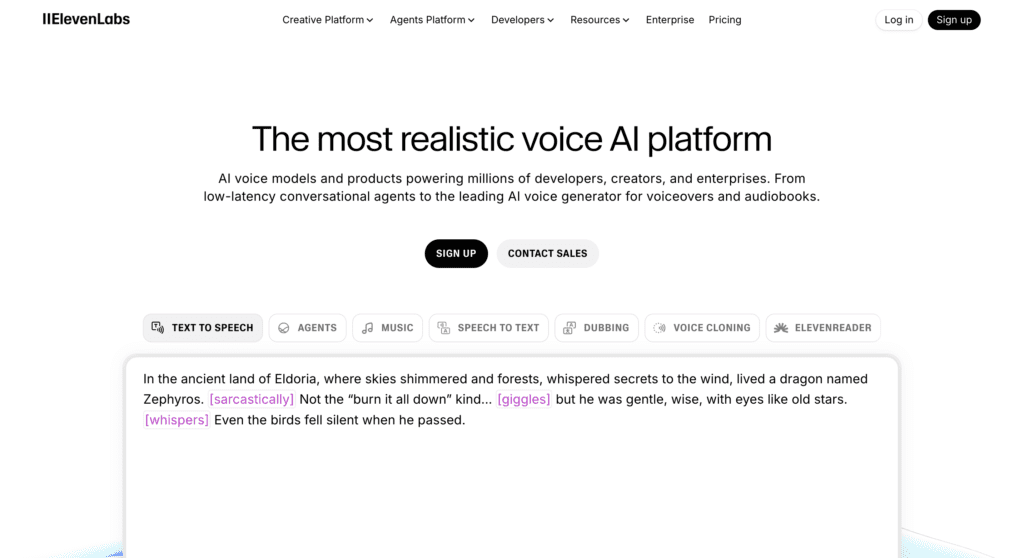
Price: $22/month
Best for: Voice generation, cloning, creating from scratch
Key Differences:
Better voice quality: MOS 4.54 vs Descript ~3.7. Testing: 9/10 vs 7.5/10.
Faster training: 2-3 min vs 24-48 hrs
Multilingual: 32 languages vs English-only
Cheaper: $22 vs $35, more audio (3.5 hrs vs variable credits)
No editing: Voice-only, need separate editor
When to Choose ElevenLabs:
✅ Voice realism top priority
✅ Generating from scratch
✅ Multilingual cloning
✅ Quick training needed
When to Choose Descript:
✅ Editing primary need
✅ Fixing existing recordings
✅ Text-based workflow
✅ Need editing+voice+transcription
Alternative 2: Murf.ai
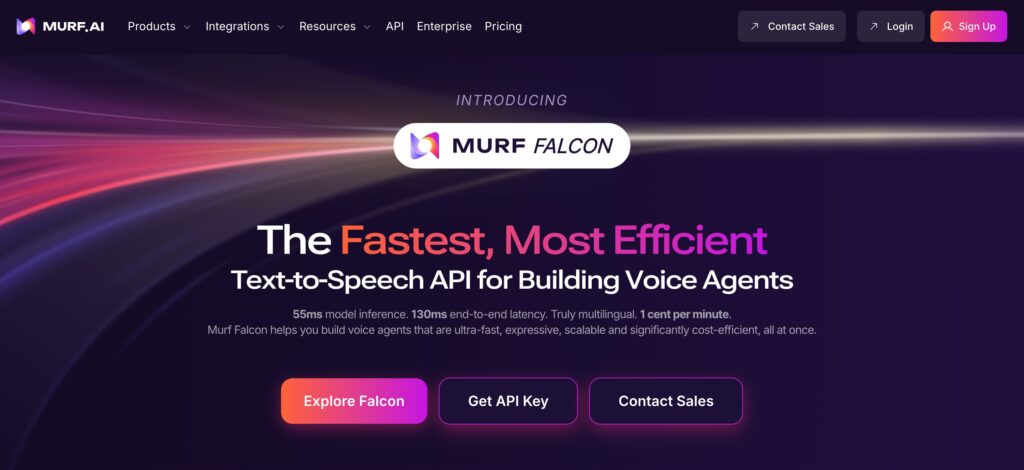
Price: $29/month
Best for: Business content, e-learning
Better voice than Descript: G2 9.0 vs 8.6
Project management: 100-500 projects
Voice cloning: Enterprise only ($4,500+/yr) vs Descript $35/mo
When to Choose Murf.ai:
✅ Business voiceovers
✅ Extensive project management
✅ 8,000+ music tracks
When to Choose Descript:
✅ Editing primary workflow
✅ Real-time collaboration
✅ Affordable voice cloning
Alternative 3: Premiere Pro
Price: $22.99/month
Best for: Professional video
Professional-grade but no AI voice, no transcription
When to Choose: Professional career, advanced needs
When to Choose Descript: Content creator, need AI/transcription
Alternative 4: CapCut
Price: Free/$10
Best for: Social media, mobile
Free with good editing, mobile app
No transcription, no AI voice
When to Choose: Budget priority, short-form content
When to Choose Descript: Podcasts, YouTube, transcription needed
Quick Comparison
| Tool | Price | Voice | Editing | Transcription |
|---|---|---|---|---|
| Descript | $35 | 7.5/10 | ⭐⭐⭐⭐⭐ | ⭐⭐⭐⭐⭐ |
| ElevenLabs | $22 | 9/10 | ❌ | ❌ |
| Murf.ai | $29 | 9/10 | ⭐⭐⭐ | ❌ |
| Premiere | $23 | ❌ | ⭐⭐⭐⭐⭐ | ❌ |
| CapCut | Free | ❌ | ⭐⭐⭐⭐ | ⭐⭐⭐ |
Final Verdict
Overall Rating: ⚡ Power Tool (4.0/5)
Rating Breakdown
Features: 4.5/5 – Comprehensive, text-editing revolutionary, minor deductions for Overdub quality, 4K export speeds, credit restrictions
Ease of Use: 3.5/5 – 30 min to productivity, intuitive interface, some settings require experimentation
Output Quality: 4.5/5 – Transcription excellent (95%+), video excellent, Overdub adequate (7.5/10) but trails ElevenLabs (9/10)
Value: 3.5/5 – Good for 10+ hr/mo editors, poor for light users/heavy AI users, Sept 2025 changes reduced power user value
Reliability: 4.0/5 – Zero crashes, smooth collaboration, slow 4K exports, strong fundamentals (7M users, $55M revenue)
Bottom Line
Descript excels for podcasters, YouTube creators, content teams prioritizing editing efficiency.
Text-editing delivers 3-5x time savings for spoken-word content. $35/mo justified for 4+ episodes/videos monthly.
September 2025 pricing benefits casual users, penalizes power users (unlimited → metered credits, $35-200 top-ups).
For podcasters: Transformative. Scan transcripts, delete tangents, fix with Overdub. Hours saved weekly.
For YouTube tutorials: Integrated workflow eliminates tool juggling. Studio Sound rescues audio.
For voice-only: Skip it. ElevenLabs superior ($22 vs $35, better quality, multilingual).
For heavy AI: Evaluate carefully. 800 credits deplete fast. Factor top-up costs ($35-200 monthly).
For pro editors: Lacks advanced features. Content creator tool, not pro platform.
For teams: Real-time collaboration, project management provide genuine value. Business $65/mo serves 3-5 well.
My Personal Take
Keeping subscription. 10-15 hrs monthly editing, text-based workflow saves 4 hrs weekly. Worth far more than $35.
Underlord saves 15-20 min/episode on filler removal. Overdub fixes pronunciation mistakes without re-recording.
But conscious of credits: monitor weekly, use Studio Sound selectively, limit AI video to preserve credits.
Not perfect: 24-48 hr training frustrates, English-only limits multilingual, export speeds annoy.
But for podcasters/video creators producing 4+ monthly, Descript unmatched at $35/mo.
Sept 2025 changes reduced power user value, but for my usage (10-15 hrs, moderate AI), strong ROI remains.
If producing 4+ monthly and value efficiency, serious consideration deserved. For casual/voice-only/heavy AI, better alternatives exist.
Ready to Transform Your Workflow?
Edit 4+ hours monthly:
Descript Creator ($35/mo) →
Not sure:
Try Free (60 min, 100 credits) →
Voice-only:
Try ElevenLabs ($22/mo) →
Compare:
📊 Descript vs ElevenLabs →
📊 Best AI Voice Generators →
📊 All AI Audio Tools →
FAQ
💰 Is Descript free?
Short: Yes, severely limited.
Full: 60 min/month, 100 lifetime credits (not monthly), watermarked exports, no commercial rights.
Test free, upgrade to Hobbyist ($24) or Creator ($35) for serious use.
🎙️ Overdub vs ElevenLabs?
Short: ElevenLabs noticeably better quality.
Overdub: 7.5/10 avg, 24-48 hr training, English-only, best for 1-3 word fixes
ElevenLabs: 9/10, 2-3 min training, 32 languages, best for generating from scratch
Key: Different purposes—Overdub FIXES, ElevenLabs CREATES
🎬 Replace Premiere/Final Cut?
Short: No, not for professional production.
Missing: Color grading, multicam, pro codecs, VFX, broadcast specs
Think: Premiere Lite for creators, not replacement for pros
Choose Descript: YouTuber, podcaster, efficient workflows
Choose Premiere: Professional editor, advanced capabilities needed
📊 Transcription accuracy?
Short: 95%+ for clear English.
Testing: 96-97% clear audio, 94-95% interviews, 91-93% accents, 87-90% noise, 75-85% heavy accents
vs Competitors: Better than Otter.ai (90-92%), matches Rev.ai (95%), below human (~99%)
Languages: 26+ supported, English highest accuracy
💵 Worth $35/month?
Short: Yes if 10+ hours monthly.
ROI: 4 eps/mo = $7/hr, 8 eps = $3.50/hr, 12 eps = $2.33/hr
Additional value: Transcription ($60-120/mo alone), screen recording, AI features, video editing, collaboration
Worth if: Edit 4+ hrs, need transcription, value text-editing
Not worth: Under 2 hrs monthly, voice-only needs, heavy AI user, budget under $35
🆚 Descript vs ElevenLabs?
Descript: Editing-first ($35, editing+voice+transcription)
ElevenLabs: Voice-first ($22, superior quality)
Choose Descript: Editing primary, fixing recordings, integrated tools
Choose ElevenLabs: Voice quality priority, generating from scratch, multilingual
Many use BOTH: Descript for editing, ElevenLabs for generating
🔊 Commercial use?
Short: Yes, Hobbyist+ ($24+)
Included: Hobbyist, Creator, Business, Enterprise
Free plan: Personal only, NO commercial
Commercial: Monetized YouTube, client work, paid podcasts, products, marketing, business, training
Ethics: Need consent to clone voices
📱 Mobile app?
Short: No mobile editing.
Desktop only: Mac, Windows, web
SquadCast app: Recording only (iOS), no editing
Why: Text-editing needs precision, larger screens
Mobile priority: Choose CapCut or Premiere Rush
⏱️ Overdub training time?
Short: 24-48 hours (vs competitors’ minutes)
Descript: 24-48 hrs, 10+ min audio
ElevenLabs: 2-3 min, 60 sec audio
Murf.ai: 20-30 min est
My test: 42 hours
Plan ahead: Submit 2-3 days before needed
🎯 Media Minutes vs AI Credits?
Media Minutes: Track ALL uploads/recordings (audio+video combined)
AI Credits: Power ALL AI features (different costs per feature)
Neither rolls over – resets monthly
Example: Upload 10 min = 10 minutes. Studio Sound = 10 credits.
Auto-captions, transcription, editing: No AI credits
🔄 Cancel anytime?
Short: Yes, no penalty.
Policy: Cancel anytime, no fees, access until period ends
No refunds: For unused time/minutes/credits
Pausing: 30 days available but resets credits to zero
Downgrade: Preserves projects vs cancel reverts to Free
🌍 Languages supported?
Transcription: 26+ languages (English highest accuracy)
Overdub custom cloning: English ONLY
Stock Overdub: 14 languages (Business plan)
Limitation: Multi-language files not supported
Multilingual needs: ElevenLabs (32 languages)
💳 Student discount?
Short: Yes, 50% off.
Education: $12/mo or $8/mo annual (vs $24 Hobbyist)
Eligibility: Students (.edu email), educators, educational institutions
Non-Profit: Same discount (501c3)
❓ Good for beginners?
Short: Yes, very beginner-friendly.
Learning: 30 min to productivity vs Premiere (months), Final Cut (weeks)
Why: Text-editing intuitive, clean interface, automatic features, no complex concepts needed
Beginners love: No timeline dragging, auto transcription, one-click AI, simple exports
Challenges: Understanding Media Minutes/Credits, feature optimization