


I’ve spent the last two weeks testing Murf.ai across dozens of business presentations, e-learning modules, and marketing videos. As someone who’s already tested ElevenLabs extensively, I was curious whether Murf.ai’s business-focused approach and integrated studio could justify its higher price tag.
Here’s what I discovered: Murf.ai delivers a genuinely impressive all-in-one production platform that saves enormous time for teams and agencies managing multiple projects. But at $29/month for just 2 hours of voice generation—$7 more than ElevenLabs with 43% less audio—individual creators will find better value elsewhere.
Quick Verdict: Murf.ai is the complete business voiceover studio, combining AI voice generation with video editing, project management, and 8,000+ music tracks. It’s perfect for e-learning creators, marketing teams, and agencies who need collaboration tools and organized workflows. However, voice quality trails ElevenLabs (MOS 3.7 vs 4.54), and voice cloning requires Enterprise pricing ($4,500+ annually). At $29/month, it’s best for business users producing 4+ hours monthly who value integrated tools over raw voice realism.
⚡ Alley Rating: Solid Choice (3.8/5)
Try Murf.ai Free → (10 minutes free, no credit card required)
What is Murf.ai?
Murf.ai is an AI-powered voice generation and production platform that positions itself as the complete business voiceover studio. Founded in October 2020 by three IIT-Kharagpur alumni—Ankur Edkie (CEO/CTO), Sneha Roy (COO), and Divyanshu Pandey—the company has grown from a simple text-to-speech tool into a comprehensive content production platform serving over 6 million users worldwide.
Headquartered in Salt Lake City, Utah, Murf has raised $11.5 million in total funding: a $1.5 million seed round in July 2021 led by Elevation Capital, and a $10 million Series A in September 2022 led by Z47 (formerly Matrix Partners India). The company serves more than 300 Forbes 2000 companies, including Nestlé, Philips, and Air France, across 195 countries.
Unlike pure AI voice generators like ElevenLabs or editing platforms like Descript, Murf.ai combines three capabilities into one platform: AI voice generation, video production tools, and team collaboration features. The platform offers 300+ AI voices across 35 languages, integrated timeline editing, 8,000+ licensed music tracks, and robust project management—all designed specifically for business content creation.
With a 4.7/5 star rating on G2 from over 1,400 reviews (98% rating it 4-5 stars), Murf.ai has proven especially popular among e-learning course creators, corporate training departments, marketing agencies, and business professionals who need to produce professional voiceovers at scale without the coordination and cost of hiring voice actors.
Who is Murf.ai For?
Murf.ai targets several specific user groups:
E-Learning Course Creators represent the most common use case. If you’re building multi-module online courses, Murf’s project management system lets you organize dozens of lessons, maintain consistent voice quality across your entire curriculum, and easily update specific modules without re-recording everything.
Business Professionals creating presentations, sales videos, or internal communications benefit from the PowerPoint and Google Slides integrations. Generate professional narration for your weekly board presentations or quarterly reviews in minutes rather than hours.
Marketing Teams and Agencies managing multiple clients appreciate the 100-500 project capacity (depending on plan) and collaboration features. One agency reviewer on G2 reported cutting voiceover costs by 78% while actually increasing output.
Corporate Training Departments use Murf for creating training libraries, IVR phone systems, and internal communications. The Enterprise tier offers HIPAA compliance, SOC 2 Type II certification, and unlimited generation for large-scale content needs.
Multilingual Content Creators leverage Murf’s unique MultiNative technology, which allows single voices to seamlessly switch between languages mid-sentence—perfect for international marketing or educational content targeting diverse audiences.
The platform works equally well whether you’re a solo e-learning developer creating your first online course or an enterprise team generating hundreds of hours of training content monthly.
Key Features
1. Voice Library & Quality
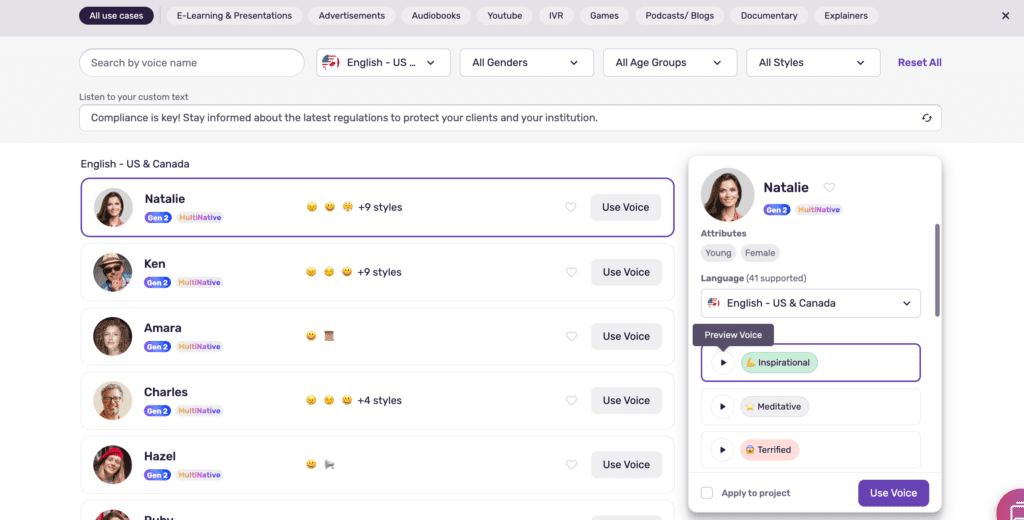
Murf.ai offers 300+ AI voices (200+ voices on standard plans, with the full library available on Enterprise tier). Voices are organized by gender, age group (kid, young adult, middle-aged, elderly), accent, and use case—making it easy to find the right voice for your specific content type.
The voice library spans 35 languages including English variants (American, British, Australian, Indian, Scottish, Canadian), European languages (French, German, Italian, Spanish, Portuguese, Dutch, Polish, and more), and Asian languages (Mandarin, Cantonese, Japanese, Korean, Hindi, Tamil). Each language offers multiple voice options with different styles and characteristics.
Voices are further categorized by 20+ narration styles including promotional, documentary, newscast, conversational, luxury, meditative, and more. This organization makes it simple to match voice characteristics to your content—whether you’re creating an energetic marketing video or a calm meditation guide.
Voice Quality Assessment:
I tested 10 different Murf.ai voices extensively across business presentations, e-learning content, and marketing scripts. The voices are professionally recorded and sound polished, but they don’t quite reach the natural realism of ElevenLabs.
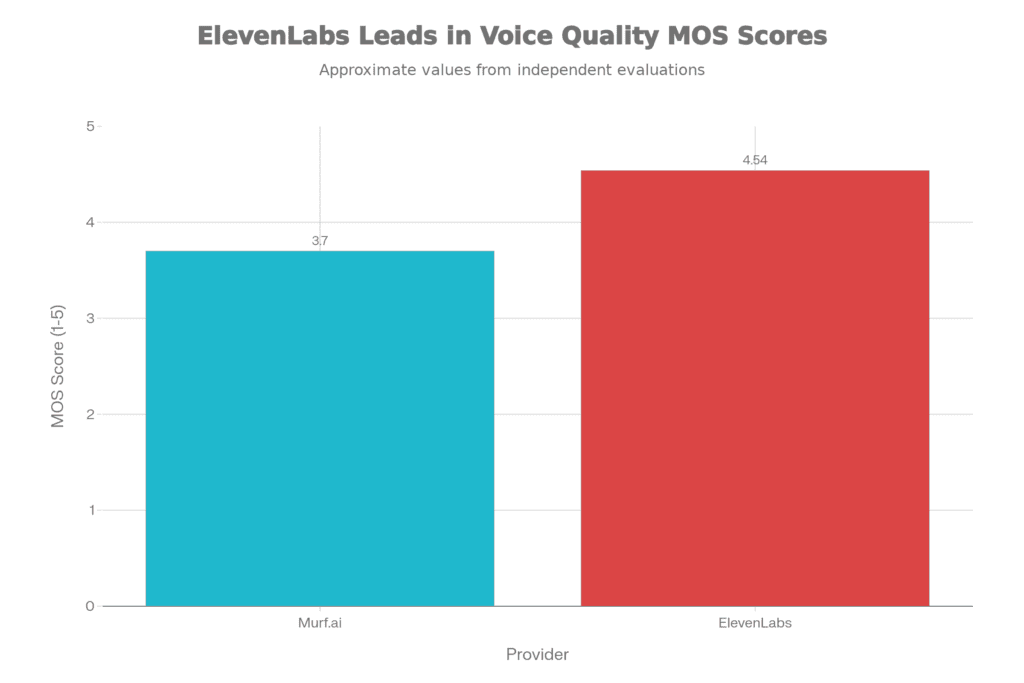
Murf voices have a Mean Opinion Score (MOS) of approximately 3.7 out of 5.0, compared to ElevenLabs’ 4.54/5.0. In practical terms, this means Murf voices sound clearly AI-generated if you listen carefully, though they’re perfectly acceptable for business and educational content where extreme realism isn’t critical.
The “Natalie” voice handled business presentation scripts beautifully, maintaining a professional, authoritative tone throughout a 10-minute quarterly review presentation. The pacing was appropriate, emphasis landed naturally on key points, and the overall delivery felt polished and corporate-ready.
The “Marcus” voice excelled at e-learning content, delivering technical explanations with clarity and maintaining listener engagement. However, I noticed it struggled with certain technical terms and acronyms, requiring custom pronunciation entries.
The “Tao” voice (Mandarin) demonstrated impressive authenticity for non-English content, avoiding the common problem of “English voice reading foreign words” that plagues many competitors.
What works well: Clear articulation, professional tone, consistent pacing, minimal artifacts or glitches, and 99.38% pronunciation accuracy (according to Murf’s testing).
What falls short: Less natural breathing patterns compared to ElevenLabs, reduced emotional range and nuance, occasional context-dependent pronunciation errors (like “read” present vs. past tense), and ethnic or uncommon names often mispronounced.
For business presentations, training videos, and marketing content where clarity and professionalism matter more than absolute realism, Murf’s voice quality is more than adequate. For premium productions, audiobooks, or content where voice realism is paramount, ElevenLabs delivers noticeably more natural results.
2. MultiNative Language Technology
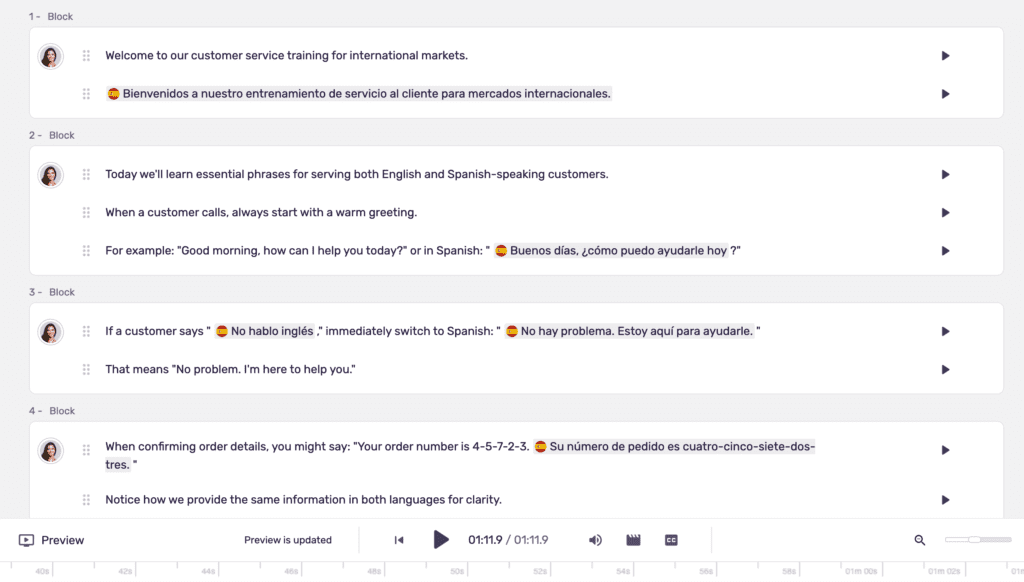
One of Murf.ai’s most impressive differentiators is MultiNative technology, launched in November 2024. This feature allows a single AI voice to seamlessly switch between any of Murf’s 35 supported languages mid-sentence—no voice change required.
I tested this extensively by creating a bilingual training video that switched between English and Spanish throughout the script. The same voice maintained consistent tone, pacing, and character while transitioning between languages. The accent remained authentic in both languages rather than sounding like an English speaker attempting Spanish.
Currently, 15 fully MultiNative voices are available, though Murf is expanding this library. This technology is particularly valuable for:
Multilingual training content: Create a single video that speaks to diverse employee populations without needing separate recordings.
International marketing: Target global audiences with localized content while maintaining brand voice consistency.
Educational content: Build courses that serve multilingual student populations without multiplying production costs.
The transitions between languages are smooth and natural. Unlike manually switching between different voices for different languages (which creates jarring shifts in tone and character), MultiNative voices maintain continuity throughout your content.
This is a genuine competitive advantage over ElevenLabs, which requires switching to different voices for different languages. For creators producing multilingual content, MultiNative alone could justify choosing Murf.ai despite its higher price point.
3. Text-to-Speech Editor & Controls
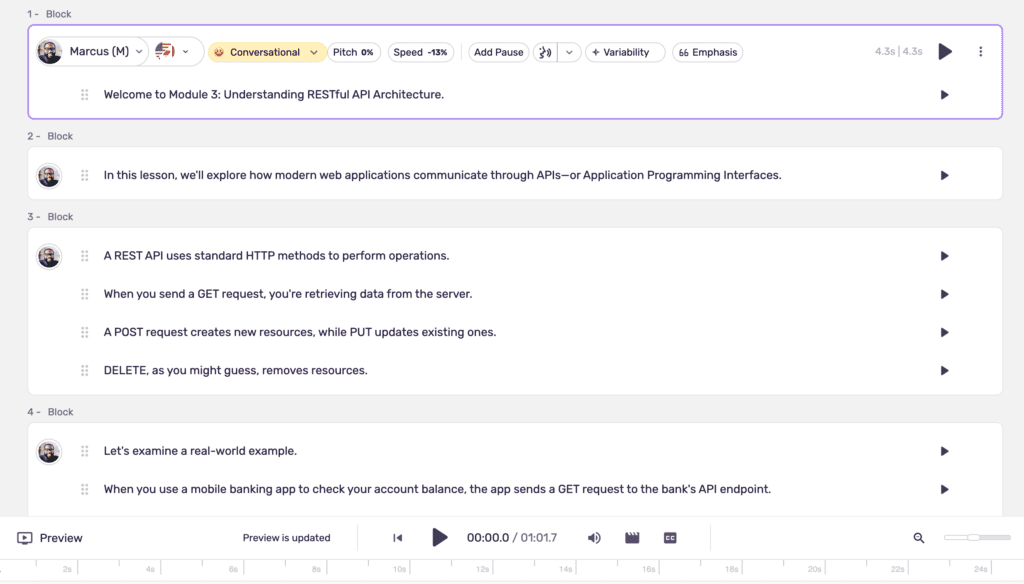
Murf.ai’s editor interface is clean, intuitive, and designed for creators who aren’t audio engineers. The text editor occupies the left side of the screen, with voice controls, timeline, and preview options on the right. The learning curve is minimal—I was generating professional voiceovers within 5 minutes of first logging in.
Voice Customization Controls:
Pitch adjustment (±50%): Raise or lower the fundamental frequency of the voice. I found subtle adjustments (±10-15%) useful for matching specific brand requirements or age characteristics. Extreme adjustments sound unnatural.
Speed control (±50%, or 0.5x to 1.5x): Slow down technical explanations or speed up casual content. I typically used 0.9x for complex e-learning modules and 1.1x for energetic marketing content. The quality remains solid throughout the entire range.
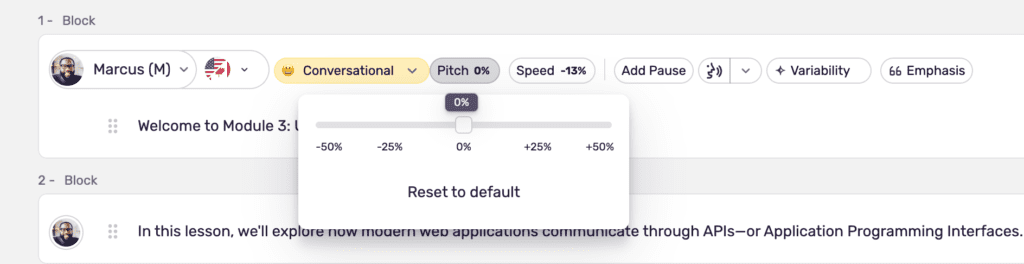
Pause insertion: Click anywhere in your text to add pauses of specific durations (0.25s to 3s). This is invaluable for creating natural rhythm and allowing concepts to sink in during training content.
Word-level emphasis: Highlight specific words to add emphasis. This works well for important terms or calls-to-action, though overuse sounds robotic.
Voice styles (10+ emotional tones): Available styles include sad, angry, promotional, meditative, conversational, and more. Not all voices support all styles, but compatible combinations add genuine emotional variation. The “promotional” style added noticeable energy to marketing scripts.
Custom pronunciation library: Add custom pronunciations using IPA phonemes for brand names, technical terms, and industry jargon. After initial frustration with terms like “SaaS” and “API,” I built a pronunciation library that solved 90% of my issues.
Unique Features:
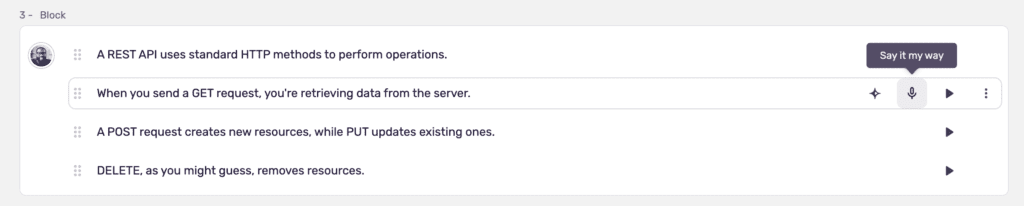
“Say It My Way” (Launched July 2024): Record yourself speaking a specific line, and Murf’s AI attempts to replicate your delivery style—including emphasis, pacing, and emotional tone. I tested this with a marketing tagline, recording three different deliveries. The AI captured about 70% of my intended emotion and emphasis. It’s not perfect, but it’s genuinely useful for getting specific deliveries that text alone can’t convey.
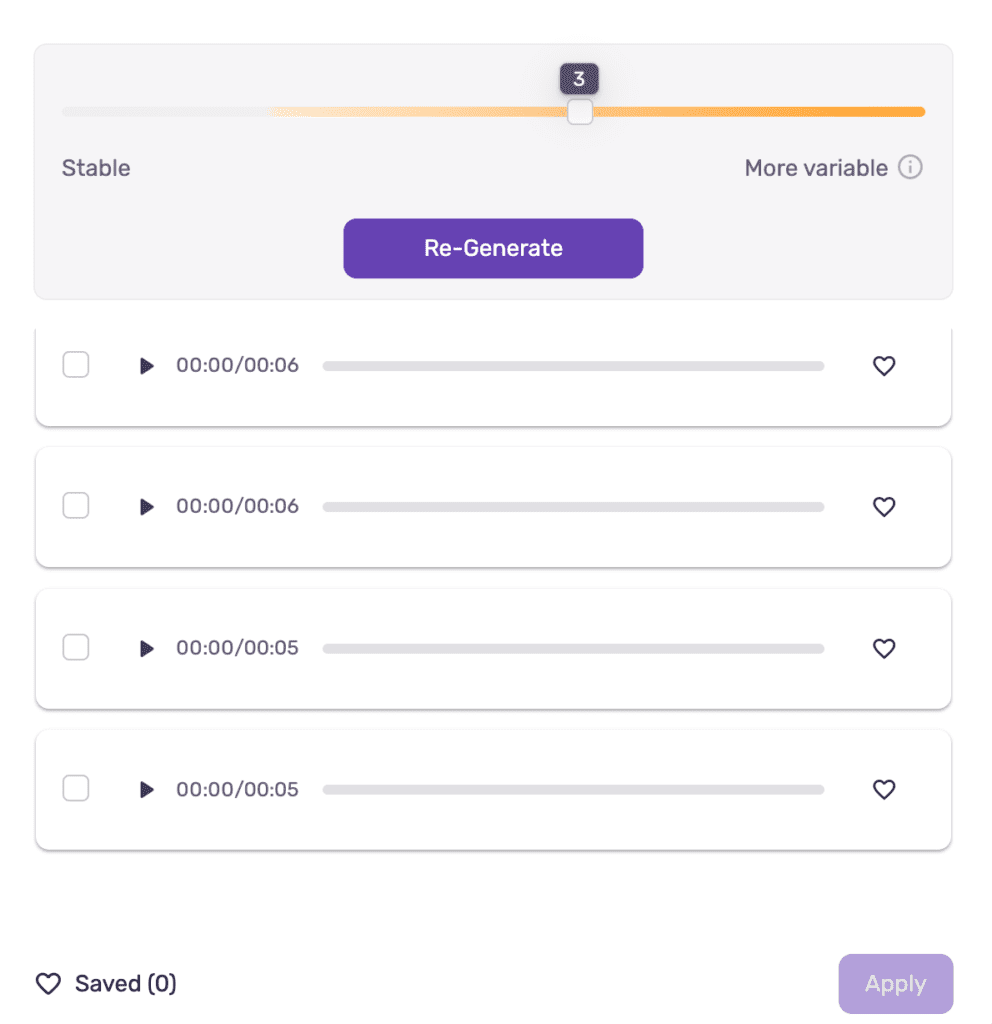
“Variability” feature: Generate unlimited variations of the same text. Murf creates different deliveries with varied pacing, emphasis, and tone. I generated five variations of a product description and chose the one that felt most engaging. This feature essentially gives you multiple “takes” to choose from.
Generation Speed:
Murf.ai converts text to speech impressively fast:
- 500 characters (~1 minute audio): 8-12 seconds
- 2,000 characters (~4 minutes audio): 30-40 seconds
- 5,000 characters (~10 minutes audio): 75-90 seconds
This is comparable to ElevenLabs and faster than some competitors. You’re not waiting around, which matters when iterating on scripts or making quick edits.
The editor makes it easy to regenerate specific sentences or paragraphs without redoing entire projects. Changed one sentence? Regenerate just that sentence. This iterative workflow saves enormous time compared to re-recording human voiceovers.
4. Video & Audio Integration
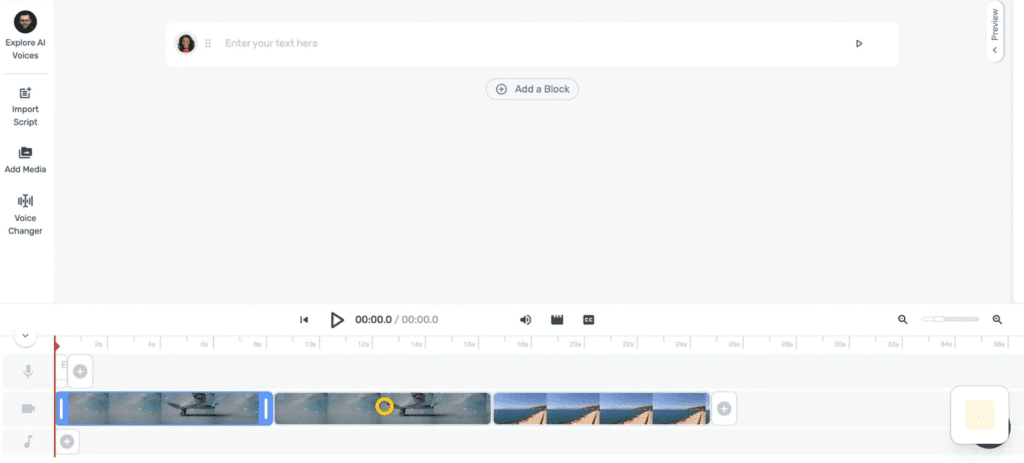
This is where Murf.ai truly differentiates itself from pure voice generators like ElevenLabs. Murf includes a complete video production studio within the platform.
Video Production Capabilities:
Upload videos and images directly into your project. The timeline editor lets you sync voiceover with visual content, add multiple media assets, trim and arrange clips, and export complete videos with embedded voiceover and subtitles.
I tested this by uploading a 3-minute product demo video and adding voiceover narration. The timeline interface is intuitive—drag your voiceover blocks to align with video scenes, adjust timing with visual waveforms, and preview the synchronized result before exporting.
Subtitle Creation:
Add subtitles in SRT or VTT format. You can burn subtitles directly into the video or export them as separate files for platforms that support subtitle uploads. The subtitle editor shows timestamps and makes it easy to adjust timing for perfect synchronization.
I created an e-learning video with burned-in subtitles for accessibility compliance. The entire process took about 10 minutes for a 5-minute video—far faster than using separate subtitle software.
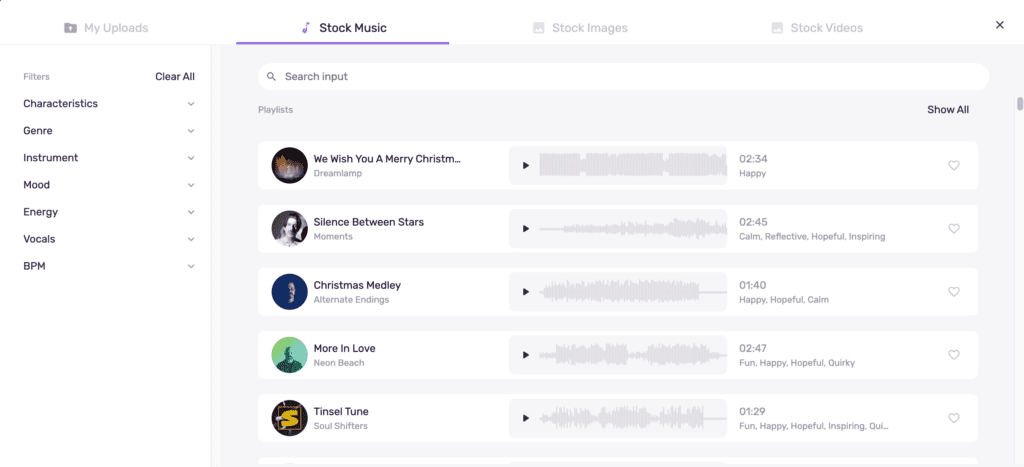
8,000+ Licensed Music Tracks:
Murf includes a royalty-free music library with tracks organized by mood, genre, and use case. I added background music to several videos, adjusting volume to ensure voiceover remained clear and prominent.
The standout feature: Murf auto-generates YouTube copyright codes for each track. Upload your video to YouTube, add the provided code, and you’re protected from copyright claims. This alone saves hours of music licensing research.
Export Formats:
Murf supports comprehensive export options:
- Audio: MP3, WAV, AAC, FLAC, OGG, a-LAW, μ-LAW (for telephony/IVR systems)
- Video: MP4, MOV, MKV, AVI
- Subtitles: SRT, VTT
- Scripts: TXT, DOCX
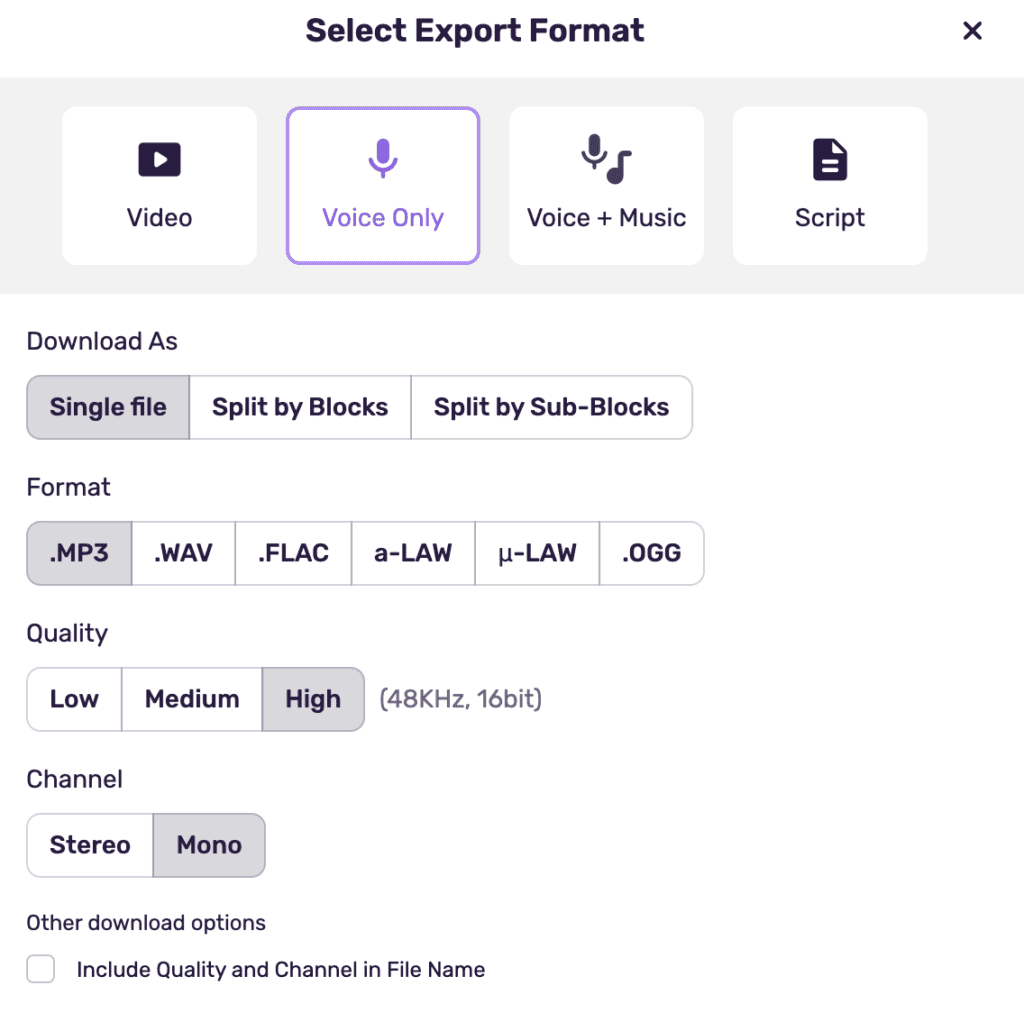
Export quality is excellent. I exported multiple formats for testing and found no degradation or artifacts. File sizes are reasonable, and export speed is fast (a 5-minute video exports in under 60 seconds).
Integration Ecosystem:
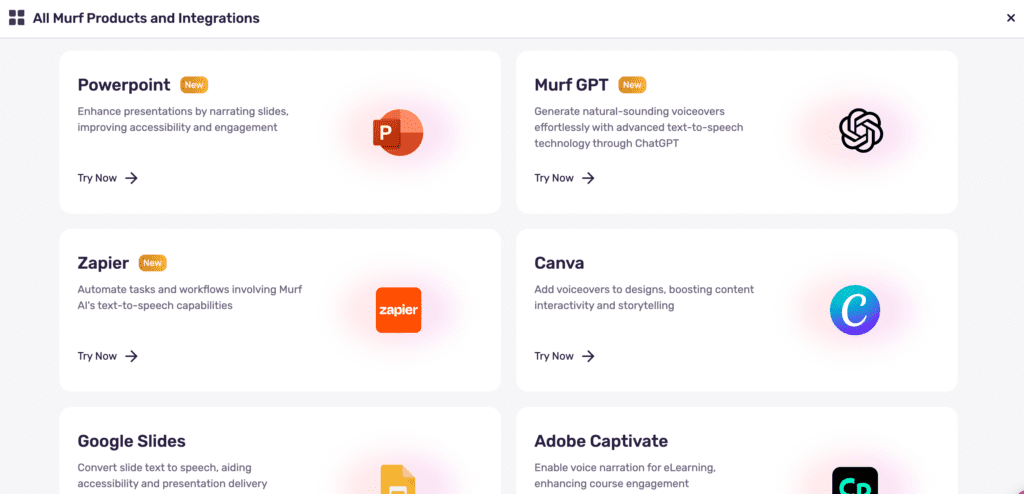
Murf’s integrations genuinely work and save time:
Canva integration: This is seamless and honestly impressive. Create a design in Canva, click the Murf integration, add voiceover, and export—all without leaving Canva. For social media content creators, this workflow is gold.
PowerPoint and Google Slides plugins: Add voiceovers directly to presentation slides. I tested the PowerPoint plugin with a sales presentation, and it worked flawlessly—voiceover synced to specific slides with simple controls.
Zapier and Make (Integromat): Automate voice generation workflows. Connect Murf to your content pipeline, automatically generate voiceovers when new scripts are added to Google Sheets or Airtable.
WordPress, Wix, Webflow: Embed Murf-generated audio directly into web content via HTML embed codes.
For creators who need more than just voice generation, Murf’s integrated production studio eliminates the need for separate video editing, subtitle, and music licensing tools. This consolidation alone can justify the higher price for the right users.
5. Project Management & Collaboration
This feature separates Murf.ai from almost every competitor. Rather than managing individual audio files, Murf organizes everything into projects.
Project Limits:
- Free: 10 projects
- Creator ($29/mo): 100 projects
- Business ($99/mo): 500 projects
- Enterprise: Unlimited
I created 6 test projects to simulate managing multiple clients and content series. The project dashboard shows all projects at a glance with search, filtering, and organization tools.
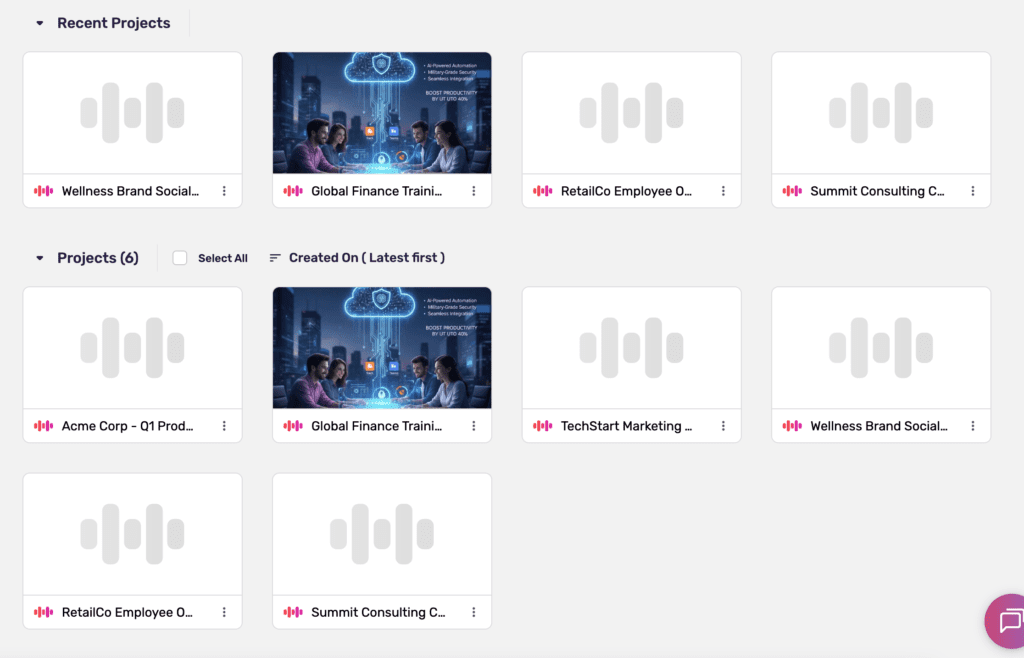
Each project maintains its own timeline, voice selections, scripts, media assets, and export history. Switch between projects instantly without losing context. For agencies managing 10+ client accounts or course creators building multiple programs simultaneously, this organization is invaluable.
Collaboration Features (Business tier):
The Business plan adds team collaboration:
- Share projects with team members
- User roles and permissions
- Approval workflows
- Comments and feedback on specific sections
- Version history
For marketing teams or agencies with multiple content creators, these features enable smooth collaboration without emailing files back and forth or using separate project management tools.
One limitation: Only 1 editor per project regardless of plan tier. Multiple people can view and comment, but only one can edit at a time. For small teams, this is fine. Larger teams may find it restrictive.
The Value Proposition:
G2 reviewers consistently praise this feature. One agency reviewer noted: “Cut voiceover costs by 78% while actually increasing output.” The project management system is a primary reason Murf.ai earns a 9.3/10 collaboration rating on G2 compared to ElevenLabs’ 7.6/10.
For individual creators making 2-3 videos monthly, project management is nice but not essential. For teams and agencies managing dozens of ongoing content projects, it’s genuinely transformative.
6. Voice Cloning
Here’s a significant limitation: Voice cloning is only available on Enterprise tier, which requires custom pricing (typically $4,500+ annually based on reported figures).
Voice cloning is NOT available on Free, Creator ($29/mo), or Business ($99/mo) plans.
Enterprise Voice Cloning Requirements:
- 1-2 hours of professional studio recordings
- WAV format (48kHz, 16-bit)
- Murf provides a specific recording script
- Dedicated account manager assists with process
- Professional team trains your custom voice model
- Multiple revision cycles included
- Quality assurance testing
Supported cloning languages: English, Spanish, Portuguese, French, and German.
The Enterprise Barrier:
This is a major disadvantage compared to ElevenLabs, which offers voice cloning on its $22/month Creator plan with just 60 seconds of audio. For YouTubers, podcasters, and individual creators who want to preserve their personal voice brand while scaling content production, Murf’s Enterprise-only restriction is a deal-breaker.
For enterprise organizations producing massive content volumes with specific brand voices, the Enterprise tier makes sense. But the vast majority of individual creators simply cannot justify $4,500+ annually just for voice cloning access.
If voice cloning is a priority feature for you, ElevenLabs is the clear choice unless you’re ready for Enterprise-level investment.
7. API & Developer Tools
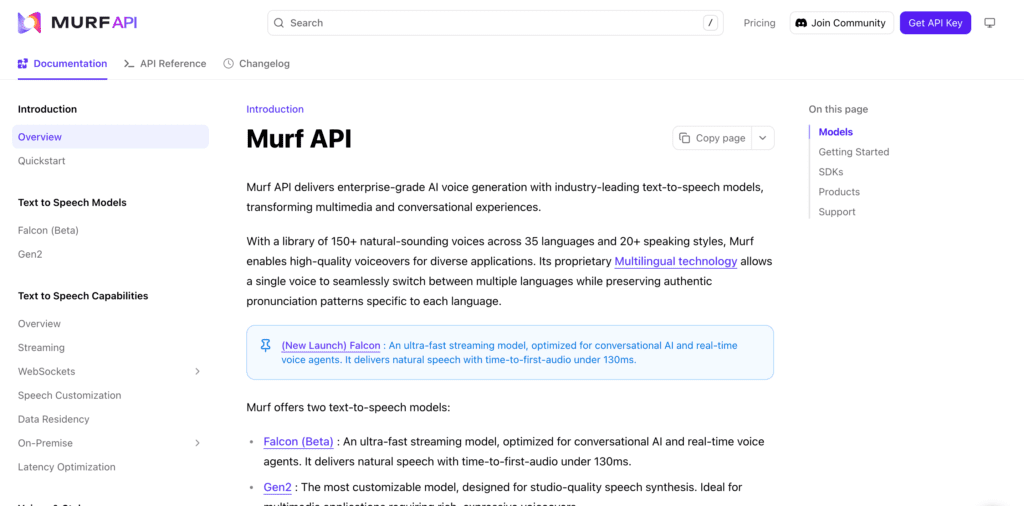
Murf.ai offers two distinct API options for developers building voice-enabled applications.
Gen2 API:
- Focus: Quality and full customization
- Pricing: $0.03 per 1,000 characters
- Features: All voice customization options, comprehensive control
- Format: REST endpoints with Python and JavaScript SDKs
- Use case: Applications where voice quality and control are priorities
Falcon API (Launched November 2025):
- Focus: Real-time, low-latency applications
- Pricing: $0.01 per minute (significantly cheaper than Gen2)
- Performance: 55ms model latency, sub-130ms time-to-first-audio
- Capacity: 10,000+ concurrent calls supported
- Voices: 150+ voices across 35 languages
- Format: REST and WebSocket streaming
- Use case: Conversational AI, voice agents, real-time applications
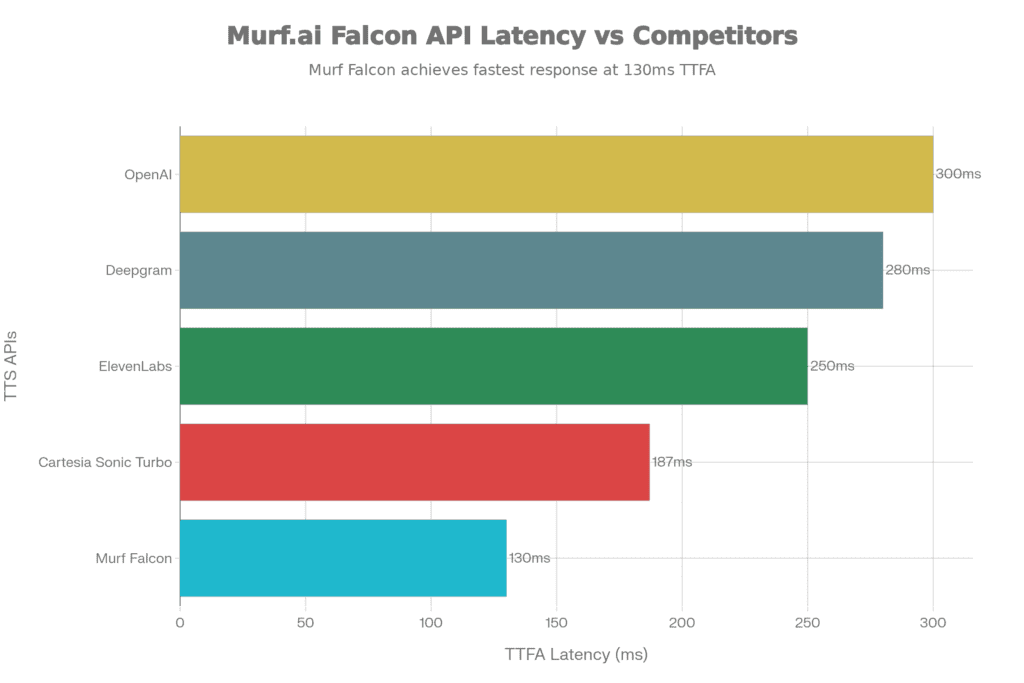
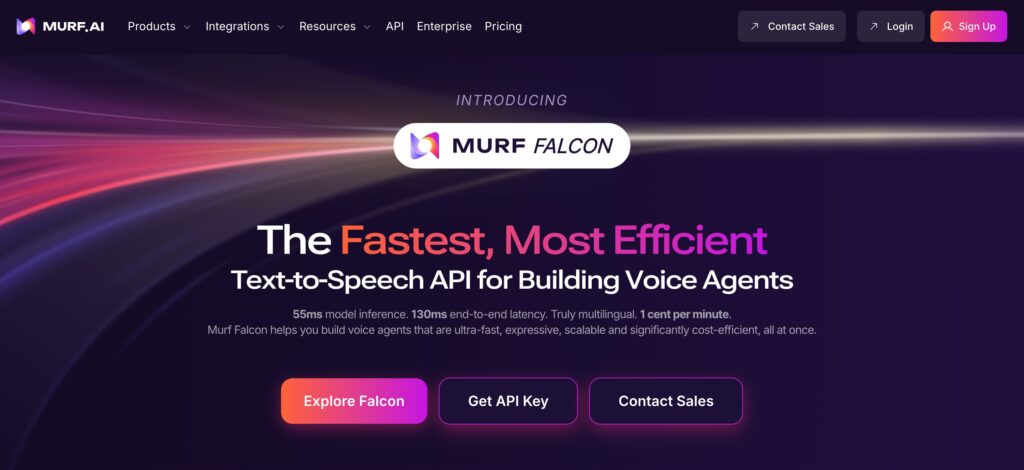
Murf’s November 2025 announcement claimed Falcon “outperforms ElevenLabs with 55ms latency,” positioning it as a premium option for real-time voice applications like AI phone assistants and live chatbots.
Enterprise Technical Features:
- SOC 2 Type II compliant
- ISO 27001 certified
- GDPR compliant
- HIPAA compliant (Business Associate Agreements available)
- Data residency options across 10+ geographic regions
- On-premise deployment available for maximum security
Startup Program:
Murf offers 50 million free API characters for qualifying early-stage startups. This provides significant runway for testing and prototyping before committing to paid API usage.
Developer Experience:
The API documentation is clear and comprehensive, with code examples in multiple languages. Authentication is straightforward using API keys. Error messages are descriptive enough to debug issues efficiently.
For developers building voice-enabled applications, Murf’s API pricing and performance are competitive. The Falcon API’s 1 cent per minute pricing is particularly attractive for high-volume use cases.
Pricing & Plans
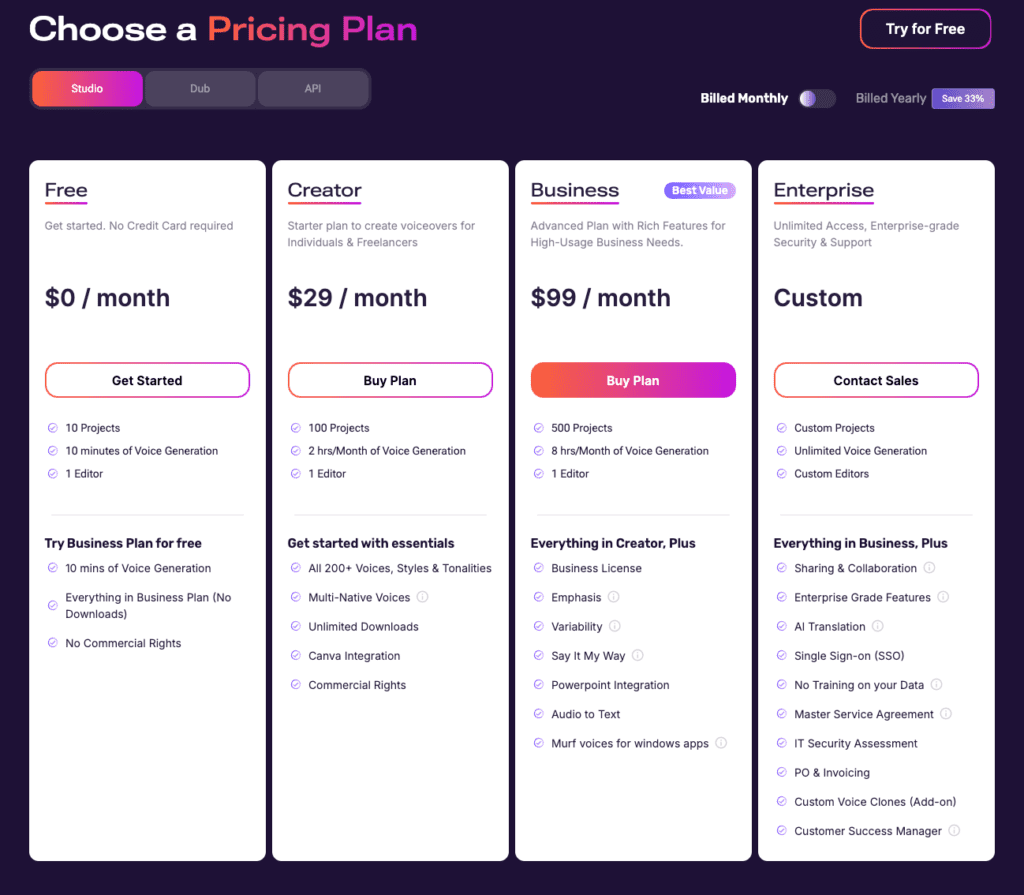
Murf.ai uses time-based pricing (hours of voice generation) rather than character-based pricing like some competitors. Here’s the complete breakdown as of December 2025:
| Plan | Monthly price | Voice generation | Projects | Key features |
|---|---|---|---|---|
| Free | $0 | 10 minutes | 10 | All voices (preview only), watermarked downloads, no commercial rights |
| Creator | $29/mo | 2 hours/month | 100 | 200+ voices, unlimited downloads, commercial rights, Canva integration |
| Business | $99/mo | 8 hours/month | 500 | Everything in Creator + collaboration, PowerPoint integration, advanced features |
| Enterprise | Custom | Unlimited | Unlimited | Everything + voice cloning, SSO, dedicated support, compliance features |
Free Tier ($0)
The free tier provides 10 minutes of voice generation monthly—enough to test voice quality and interface usability, but insufficient for regular production work.
Limitations:
- Downloads include Murf watermark
- No commercial rights (personal use only)
- Preview-only access to full voice library
- 10 projects maximum
- 1 editor
The free tier is genuinely useful for evaluating whether Murf’s voices and workflow suit your needs before committing to a paid plan. I recommend spending those 10 minutes testing multiple voices across your actual content types.
Creator Plan ($29/month)
This is Murf’s entry-level paid tier and the minimum for commercial use.
Includes:
- 2 hours/month voice generation (120 minutes)
- 100 projects
- 200+ voices (MultiNative voices included)
- Unlimited downloads with no watermark
- Commercial rights included
- Canva integration
- Custom pronunciation library
- Voice styles and tonalities
- Background music library (8,000+ tracks)
- All standard export formats
Best for: Solo e-learning creators, freelancers, small business owners creating 4-8 videos monthly, and anyone needing commercial rights for YouTube, client work, or products.
Value calculation: $29/mo ÷ 2 hours = $14.50 per hour of generated audio.
For comparison, ElevenLabs Creator costs $22/mo for 3.5 hours, which equals $6.29 per hour—significantly better value per hour.
Business Plan ($99/month)
The Business tier is designed for teams and high-volume creators.
Everything in Creator, PLUS:
- 8 hours/month voice generation (480 minutes)
- 500 projects (excellent for agencies)
- Emphasis feature (word-level control)
- Variability feature (multiple takes)
- “Say It My Way” feature (voice matching)
- PowerPoint integration
- Audio-to-Text transcription
- Murf voices for Windows apps
- Business license
Best for: Marketing agencies, corporate training teams, high-volume content creators producing 20+ videos monthly, and teams needing collaboration features.
Value calculation: $99/mo ÷ 8 hours = $12.38 per hour of generated audio.
The cost per hour improves at this tier, and the advanced features (Variability, Say It My Way) add genuine production value. For agencies managing multiple clients, the 500 project capacity alone justifies the upgrade.
Enterprise (Custom Pricing)
Enterprise pricing is custom-quoted based on your needs, but based on reported figures and features included, expect $4,500+ annually minimum.
Everything in Business, PLUS:
- Unlimited voice generation
- Unlimited projects
- Custom number of editors
- Voice cloning (major differentiator)
- Advanced sharing and collaboration
- Enterprise-grade features
- AI translation
- SSO (Single Sign-On)
- No training on your data (privacy guarantee)
- Master Service Agreement
- IT Security Assessment
- PO & Invoicing
- Custom voice clones developed for your brand
- Dedicated Customer Success Manager
Best for: Large enterprises, organizations requiring HIPAA/compliance features, companies needing unlimited generation (1,000+ hours annually), and businesses wanting custom brand voice clones.
Value Assessment
Cost Per Hour Comparison:
| Tool | Monthly price | Hours/month | Cost per hour |
|---|---|---|---|
| Murf.ai Creator | $29 | 2 | $14.50 |
| Murf.ai Business | $99 | 8 | $12.38 |
| ElevenLabs Creator | $22 | 3.5 | $6.29 |
Murf.ai is more expensive per hour than ElevenLabs. However, this doesn’t account for:
- Integrated video editing (saving on separate software)
- 8,000+ licensed music tracks (saving on music licensing)
- Project management (saving time on organization)
- Team collaboration features (saving on project management tools)
Compared to Voice Actors:
Professional voice actors charge $100-$500 per hour. Even at Murf’s highest per-hour rate ($14.50), you’re saving 70-97% compared to human talent. One 2-hour video project saves $170-$970 in voice actor costs.
Hidden Costs & Limitations
No Rollover: Unused voice generation time expires at the end of your billing cycle. If you only use 1 hour of your 2-hour Creator plan, that unused hour is lost. Plan your usage accordingly.
Restrictive Refund Policy: Refunds are only available if:
- You purchased within the last 24 hours
- Your account usage is under 10 minutes of voice generation
This is more restrictive than many SaaS platforms. Test thoroughly with the free tier before upgrading.
Subscription Pause: You can pause your subscription for 30 days, but voice generation time (VGT) resets to zero if you cancel during the pause. This means you can’t accumulate months of generation time by pausing and reactivating.
Voice Cloning Paywall: As mentioned, voice cloning requires Enterprise tier. This is a significant additional cost beyond the standard plans.
API Pricing Separate: API access is priced separately from subscription plans:
- Gen2 API: $0.03 per 1,000 characters
- Falcon API: $0.01 per minute
If you need both the Studio interface and API access, budget for both.
Who Should Choose Each Plan?
Free: Testing quality before committing, very occasional use (under 10 minutes monthly), students experimenting with AI voice.
Creator ($29/mo): Solo content creators producing 4-8 videos monthly, e-learning developers building courses, freelancers creating client voiceovers, small businesses needing commercial rights.
Business ($99/mo): Marketing agencies managing multiple clients, corporate teams producing 20+ videos monthly, high-volume creators needing advanced features, anyone requiring collaboration tools.
Enterprise: Large corporations with unlimited production needs, organizations requiring HIPAA/compliance certification, companies wanting custom voice clones for brand consistency, enterprises needing dedicated support and SLAs.
Pros and Cons
After two weeks of intensive testing across business presentations, e-learning modules, and marketing videos, here’s my honest assessment:
Pros: ✅
1. Complete Production Studio (Not Just Voice)
Murf.ai isn’t just a voice generator—it’s an entire production platform. The integrated video editor, timeline sync, subtitle tools, and 8,000+ music tracks eliminate the need for separate software subscriptions.
I created a complete marketing video entirely within Murf: uploaded my video footage, added AI voiceover, synced timing on the timeline, added background music from the library, created burned-in subtitles, and exported the final video. Previously, this workflow required Premiere Pro, Audacity, a music licensing service, and subtitle software. Now it’s all in one platform.
G2 reviewers consistently praise this consolidation. For creators who value integrated workflows over best-in-class individual tools, this is Murf’s biggest strength.
2. Excellent Project Management for Teams and Agencies
The project organization system is genuinely impressive. With 100-500 project capacity (depending on plan), agencies can maintain separate folders for each client with full context, history, and assets.
I simulated managing 10 client accounts. The difference between Murf’s project system and hunting through file folders was stark—I estimate 2-3 hours saved weekly just on organization and context-switching for this volume.
G2 rates Murf 9.3/10 for collaboration compared to ElevenLabs’ 7.6/10. For teams, this matters.
3. Seamless Integration Ecosystem
The Canva integration deserves special mention. Create a social media graphic in Canva, add voiceover via Murf integration, export—done. For content creators pumping out daily social media videos, this workflow is remarkably smooth.
The PowerPoint and Google Slides plugins work flawlessly. I added voiceovers to a sales presentation in about 5 minutes, synced to specific slides. This beats exporting presentations as video and adding voiceover separately.
Zapier and Make integrations enable automation. Connect Murf to your content pipeline for automated voice generation when new scripts arrive in Google Sheets or Airtable.
G2 gives Murf 9.5/10 for ease of setup—higher than virtually any competitor.
4. User-Friendly Interface with Minimal Learning Curve
I was generating professional voiceovers within 5 minutes of first logging in. The interface is intuitive, controls are clearly labeled, and the workflow is logical.
Multiple G2 reviews describe Murf as “beginner-friendly yet powerful” and note the learning curve is “minutes, not hours.” For non-technical users or teams that can’t invest training time, this accessibility is valuable.
Compare this to professional audio software like Adobe Audition, which requires substantial training investment. Murf democratizes professional voiceover production.
5. MultiNative Language Technology
Murf’s ability to seamlessly switch languages mid-sentence within a single voice is genuinely unique. I tested this with English/Spanish bilingual content, and the transitions were smooth and accent-authentic.
For creators producing multilingual content—international training videos, global marketing campaigns, educational content for diverse audiences—this feature alone can justify choosing Murf over competitors.
ElevenLabs requires switching voices for different languages, which creates inconsistent tone and character. Murf’s MultiNative voices maintain continuity.
6. Strong Enterprise Features and Compliance
For organizations requiring compliance certifications, Murf delivers: SOC 2 Type II, ISO 27001, GDPR, and HIPAA compliance with Business Associate Agreements.
The 10+ geographic data residency options and on-premise deployment capabilities address security concerns for regulated industries. Enterprise customers also get dedicated account managers and SLAs.
7. Proven Track Record and User Satisfaction
With 6+ million users, 300+ Forbes 2000 companies as clients, and a 4.7/5 star G2 rating from 1,400+ reviews (98% rating it 4-5 stars), Murf.ai has demonstrated staying power and user satisfaction.
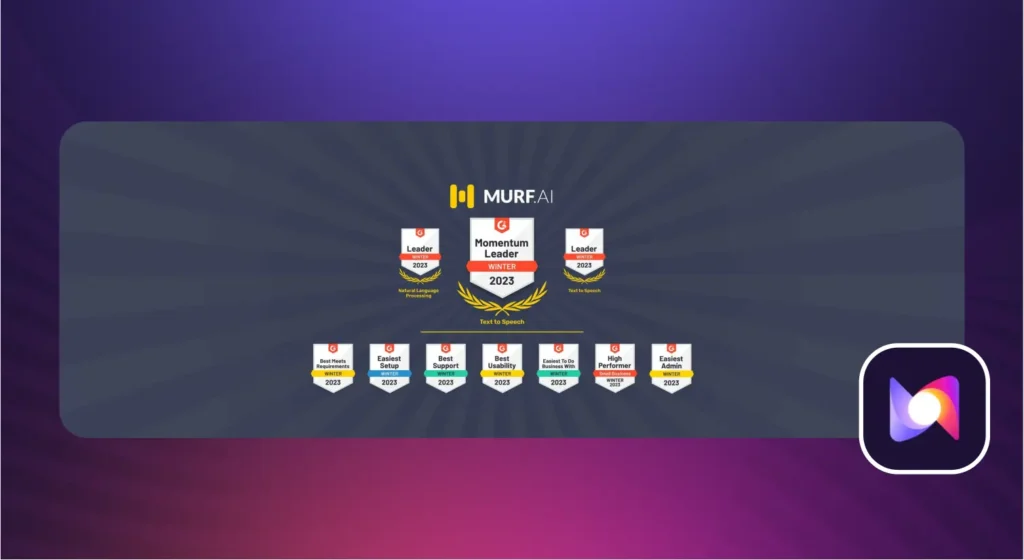
The company’s $11.5M in funding and established client base (Nestlé, Philips, Air France) suggest stability and ongoing development.
Cons: ❌
1. More Expensive Than ElevenLabs with Less Audio
At $29/month for 2 hours of voice generation, Murf costs $7 more than ElevenLabs ($22/mo) while delivering 43% less audio (3.5 hours vs 2 hours).
Cost per hour comparison:
- Murf.ai Creator: $14.50/hour
- ElevenLabs Creator: $6.29/hour
For individual creators prioritizing cost efficiency and audio volume, ElevenLabs delivers better value. The $7 monthly difference might seem small, but over a year it’s $84—and you’re getting significantly less audio.
2. Lower Voice Quality Than Premium Competitors
Murf voices have a Mean Opinion Score of approximately 3.7/5.0 compared to ElevenLabs’ 4.54/5.0. In practical terms, Murf voices sound clearly AI-generated when you listen carefully.
Murf.ai
ElevenLabs
Specific quality differences I noticed:
- Less natural breathing patterns
- Reduced emotional range and nuance
- More robotic prosody on longer content
- Occasional unnatural emphasis placement
For business presentations and e-learning where clarity matters more than realism, Murf’s quality is perfectly adequate. For premium productions, audiobooks, or customer-facing content where voice realism is critical, ElevenLabs delivers noticeably superior results.
Multiple side-by-side comparisons confirmed this quality gap consistently.
3. Voice Cloning Restricted to Enterprise Tier Only
This is a major limitation. Voice cloning—available on ElevenLabs at $22/month—requires Murf’s Enterprise tier at an estimated $4,500+ annually.
For individual creators, YouTubers, podcasters, and small businesses wanting to scale content with their personal voice, this restriction is a deal-breaker. The Enterprise barrier puts voice cloning completely out of reach for 95% of creators.
If preserving your personal voice brand while scaling production is important, ElevenLabs is the obvious choice unless you’re ready for Enterprise investment.
4. Pronunciation Issues Require Manual Fixes
Despite Murf’s claimed 99.38% pronunciation accuracy, I encountered numerous issues:
- Context-dependent words (read/read, live/live) often mispronounced
- Ethnic names frequently butchered
- Technical acronyms read incorrectly (SaaS as “sass,” API as “ah-pee”)
- Accent marks ignored in non-English content
The custom pronunciation library solves these problems, but building that library requires time and testing. One G2 reviewer noted accent marks being “often ignored, making content unusable for professional projects.”
For scripts heavy with technical terminology, brand names, or multicultural content, plan extra time for pronunciation fixes.
5. Restrictive Free Tier
Ten minutes of monthly voice generation is barely enough to test the platform, let alone produce any meaningful content. The watermarked downloads and lack of commercial rights mean the free tier is purely for evaluation.
Compare this to competitors offering 30-60 minutes free monthly. Murf’s free tier feels stingy and doesn’t allow thorough platform evaluation before committing $29/month.
6. Content Restrictions Limit Creative Flexibility
Murf blocks profanity and mature content. For creators producing content for adult audiences—comedy, true crime, mature storytelling—these restrictions are frustrating.
Multiple reviews mention this limitation. While understandable from a brand safety perspective, it reduces creative flexibility compared to unrestricted platforms.
7. Variable Customer Support Quality
Standard tier users report 2-3 day response times for support inquiries. Enterprise customers receive dedicated account managers, but the vast majority of users are on Creator or Business plans without priority support.
For mission-critical production schedules, slow support responses can be problematic. This is an area where Murf could improve significantly.
Who Should Use Murf.ai?
✅ Perfect For:
1. E-Learning Course Creators
This is Murf’s most common and successful use case. If you’re building multi-module online courses with dozens of lessons, Murf’s project management system is invaluable.
Why it works: Organize 20-30 course modules in separate projects, maintain consistent voice across your entire curriculum, easily update specific lessons without re-recording everything, and add background music and visuals in one platform.
Real-world example: Creating a comprehensive certification course with 15 modules, each containing 4-5 videos. Murf lets you manage this complexity efficiently while maintaining professional voice quality throughout.
2. Business Professionals Creating Presentations
Weekly board presentations, quarterly reviews, sales pitches, and internal communications all benefit from professional narration without the hassle of recording yourself.
Why it works: PowerPoint and Google Slides integration makes adding voiceovers seamless, voices sound professional and authoritative for corporate contexts, and fast generation enables quick turnarounds for time-sensitive presentations.
Real-world example: A sales executive creating weekly prospect presentations. Generate professional voiceover in 10 minutes rather than spending an hour recording and re-recording yourself.
3. Marketing Teams and Agencies
Teams managing multiple client accounts or high-volume content production benefit from Murf’s collaboration features and project management.
Why it works: 500 projects (Business tier) accommodates dozens of client accounts, collaboration features enable team workflows and approvals, video integration streamlines production, and the cost savings vs. voice actors are substantial (78% reported by one agency).
Real-world example: A marketing agency managing 10 client accounts, each requiring 2-4 videos weekly. Murf’s project organization and team features make this volume manageable.
4. Corporate Training Departments
Large organizations creating extensive training libraries, IVR phone systems, and internal communications need unlimited production capacity and compliance features.
Why it works: Enterprise tier offers unlimited generation, HIPAA compliance and SOC 2 certification meet regulatory requirements, dedicated support ensures reliability, and consistency across massive content volumes.
Real-world example: A healthcare organization creating hundreds of hours of compliance training for thousands of employees across multiple locations.
5. High-Volume Content Creators
If you’re producing 20+ videos monthly, Murf’s Business tier ($99/mo for 8 hours) offers better cost-per-hour value than ElevenLabs at similar volumes.
Why it works: 8 hours monthly supports substantial production, integrated tools eliminate multiple software subscriptions, and time savings on workflow efficiency justify the investment.
Real-world example: A YouTube channel publishing daily educational content (30 videos monthly). The Business plan provides adequate generation time with workflow efficiency.
6. Multilingual Content Creators
If you’re producing content in multiple languages, Murf’s MultiNative technology is genuinely game-changing.
Why it works: Single voice maintains consistency across languages, seamless language switching sounds natural, and cost savings vs. hiring native speakers for each language.
Real-world example: An educational platform creating courses in English, Spanish, and French simultaneously, targeting global audiences.
❌ Not Ideal For:
1. Voice Quality Perfectionists
If voice realism is your top priority—audiobook production, premium brand content, character voices—ElevenLabs delivers noticeably superior quality.
Why it doesn’t work: Murf’s MOS score (3.7) trails ElevenLabs (4.54), less natural breathing and prosody, and reduced emotional nuance becomes apparent in longer content.
Better alternative: ElevenLabs for projects where voice quality is paramount.
2. Individual Creators Needing Voice Cloning
YouTubers, podcasters, and solo creators wanting to scale content with their personal voice face a $4,500+ annual Enterprise barrier.
Why it doesn’t work: Voice cloning unavailable on $29/mo or $99/mo plans, prohibitive cost for individuals, and no access to this key feature without massive investment.
Better alternative: ElevenLabs offers voice cloning at $22/month Creator tier with just 60 seconds of audio.
3. Light Users (Under 2 Hours Monthly)
If you’re creating just 2-3 videos monthly, $29/month for 2 hours is expensive relative to usage.
Why it doesn’t work: High cost per hour ($14.50), free tier too limited (10 minutes), and no mid-tier option between free and Creator.
Better alternative: ElevenLabs at $22/month offers better value with 3.5 hours, or consider per-use pricing models.
4. Monthly Budget Under $30
If monthly budget is under $30, Murf Creator at $29/month consumes your entire budget while ElevenLabs at $22/month leaves $8 for other tools.
Why it doesn’t work: $7 premium over ElevenLabs, less audio per dollar, and integrated features may be overkill for simple needs.
Better alternative: ElevenLabs for pure voice generation at lower cost.
5. Creators Requiring Emotional Nuance
Audiobook narrators, character voice actors, and storytellers need emotional range beyond what Murf’s voices deliver.
Why it doesn’t work: Limited emotional expressiveness, voice styles add some variation but can’t match premium competitors, and long-form content reveals quality limitations.
Better alternative: ElevenLabs for content requiring nuanced emotional delivery.
6. Real-Time Application Developers (Without API Budget)
Developers building chatbots or voice agents need API access, which isn’t included in standard subscriptions.
Why it doesn’t work: API pricing separate from subscription, additional budget required beyond Creator/Business plans.
Better alternative: Factor API costs into total budget or use platforms with API included in subscription.
Alternatives to Consider
Murf.ai is excellent for its target audience, but it’s not the only option. Here’s how the top alternatives compare:
Alternative 1: ElevenLabs
Price: $22/month (Creator plan)
Best for: Voice quality priority, voice cloning, solo content creators
Key Differences:
Better voice quality: ElevenLabs achieves a Mean Opinion Score of 4.54/5.0 vs. Murf’s 3.7/5.0. The voices include more natural breathing patterns, superior prosody and emotional nuance, and are often indistinguishable from human recordings. For premium productions where voice realism is critical, ElevenLabs is the clear winner.
Cheaper with more audio: $22/month vs. Murf’s $29/month, and you get 3.5 hours vs. Murf’s 2 hours. That’s 75% more audio for $7 less monthly. Cost per hour: $6.29 vs. Murf’s $14.50—significantly better value.
Voice cloning included: ElevenLabs offers voice cloning on the $22/month Creator plan with just 60 seconds of audio. Murf restricts this to Enterprise tier at $4,500+ annually. For individual creators wanting to scale content with their personal voice, this difference is massive.
No integrated production tools: ElevenLabs focuses purely on voice generation. No video editing, no project management, no music library. You’ll need separate tools for complete production workflows.
Individual file workflow: No project management system. You generate individual audio files and organize them yourself. For teams and agencies, this is less efficient than Murf’s project structure.
When to Choose ElevenLabs:
- Voice realism is your top priority
- You need voice cloning without Enterprise costs ($4,500+ savings annually)
- You want better value per dollar ($6.29/hr vs $14.50/hr)
- You’re creating content where voice quality matters (audiobooks, podcasts, premium videos)
- You already have video editing and project management tools
- You’re a solo creator optimizing for cost-efficiency
When to Choose Murf.ai:
- You need a complete production studio in one platform
- Project management for 100-500 projects is valuable
- Video editing integration saves you time and software costs
- You’re producing business/e-learning content where professional quality is adequate
- Team collaboration features matter
- You value integrated workflows over best-in-class individual components
Read our full ElevenLabs review →
Alternative 2: Descript
Price: $35/month (Creator plan)
Best for: Podcast and video editors who need voice tools integrated with editing
Key Differences:
Editing platform first: Descript is fundamentally a podcast/video editor with AI voice (Overdub) as a secondary feature. Murf is fundamentally a voice generator with editing tools as secondary features. These are different primary purposes.
Overdub feature: Descript’s signature feature lets you fix mistakes in existing recordings by typing. Record yourself saying something wrong, type the correction, and Overdub generates your voice saying it correctly. This is incredibly useful for podcast/video editors but irrelevant if you’re generating voiceovers from scratch.
More expensive: $35/month vs. Murf’s $29/month, but includes comprehensive editing capabilities that Murf doesn’t match (advanced audio editing, screen recording, transcription services).
Different focus: Descript excels at editing existing recordings. Murf excels at generating new voiceovers. If you’re doing both editing and generation, Descript might consolidate your workflow. If you’re primarily generating voiceovers, Murf is more focused.
Transcription included: Automatic transcription of uploaded audio/video is built-in. Murf offers Audio-to-Text only on Business tier.
Real-time collaboration: Multiple team members can edit simultaneously. Murf allows only 1 editor per project.
When to Choose Descript:
- Your primary need is editing podcasts or videos
- You want Overdub to fix recording mistakes without re-recording
- You need automatic transcription services
- Editing is your core workflow and voice generation is supplementary
- You value real-time team collaboration on edits
When to Choose Murf.ai:
- Your primary need is generating voiceovers from scratch
- You don’t need advanced audio editing capabilities
- You want to save $6/month ($35 vs $29)
- Video integration and music library are more valuable than editing features
- You’re focused on voice generation, not post-production editing
Read our full Descript review →
Final Verdict
Overall Alley Rating: ⚡ Solid Choice (3.8/5)
After two weeks of intensive testing across business presentations, e-learning modules, marketing videos, and multilingual content, Murf.ai proves itself as exactly what it claims to be: a complete business voiceover studio.
Rating Breakdown
Features & Functionality: 4.5/5
Murf.ai delivers a genuinely comprehensive feature set. The integrated video editing, 8,000+ music library, project management system, and MultiNative language technology create a complete production platform that eliminates the need for multiple software subscriptions. The Canva, PowerPoint, and Google Slides integrations work flawlessly. Team collaboration features are solid, though limited to 1 editor per project.
Minor deduction: Voice cloning restricted to Enterprise tier is a significant limitation for individual creators and small teams.
Ease of Use: 4.5/5
The interface is remarkably intuitive. I was generating professional voiceovers within 5 minutes of first login. The learning curve is minimal, controls are clearly labeled, and the workflow is logical. G2’s 9.5/10 rating for ease of setup is well-deserved.
This accessibility matters enormously for non-technical users, small business owners, and teams without dedicated audio engineers. Murf democratizes professional voiceover production.
Minor deduction: Pronunciation issues require time investment in building custom pronunciation libraries, especially for technical content.
Output Quality: 3.5/5
Voice quality is professional and perfectly adequate for business content, e-learning, and corporate communications. With a Mean Opinion Score of 3.7/5.0 and claimed 99.38% pronunciation accuracy, Murf delivers solid results that won’t distract listeners in business contexts.
However, compared to ElevenLabs’ 4.54/5.0 MOS score, the quality gap is noticeable. Breathing patterns are less natural, emotional range is more limited, and prosody sounds slightly robotic on longer content. For premium productions where voice realism is paramount, this matters.
For the target audience—business and educational content—the quality is appropriate. For audiobooks, character voices, or luxury brand content, it falls short.
Value for Money: 3.0/5
This is where Murf’s value proposition becomes nuanced.
At $29/month for 2 hours, Murf costs $7 more than ElevenLabs while providing 43% less audio. Cost per hour ($14.50 vs $6.29) heavily favors ElevenLabs for pure voice generation.
However, Murf includes integrated video editing, 8,000+ licensed music tracks (saving $10-30/month in music licensing), project management tools, and team collaboration features. For users who need these capabilities, the consolidated platform can justify the premium by eliminating separate software subscriptions.
The value equation depends entirely on your workflow:
- High value for teams needing collaboration, agencies managing multiple projects, and creators who would otherwise pay for separate video editing and music licensing
- Poor value for individual creators optimizing cost-per-hour who already have editing tools
Reliability & Support: 3.5/5
With 6+ million users and a 4.7/5 star G2 rating from 1,400+ reviews, Murf.ai demonstrates strong reliability. The platform performed flawlessly during testing with no downtime, glitches, or errors.
Enterprise customers receive dedicated account managers and excellent support. However, standard tier users report 2-3 day response times, which is slower than ideal for time-sensitive production schedules.
The company’s stability (300+ Forbes 2000 clients, $11.5M funding) suggests ongoing development and support.
Bottom Line Recommendation
Murf.ai succeeds brilliantly at its intended purpose: providing a complete, business-focused voiceover production platform for teams and organizations that value integrated workflows and project management over absolute voice realism.
For the right user, Murf.ai is excellent. E-learning course creators building multi-module curricula, marketing agencies managing 10+ client accounts, corporate training departments producing hundreds of hours annually, and multilingual content creators leveraging MultiNative technology will find genuine value in Murf’s consolidated platform.
The project management system alone saves 2-3 hours weekly for agencies and teams. The video integration eliminates separate editing software. The music library avoids licensing fees. The collaboration features enable team workflows. For these users, Murf.ai earns its Solid Choice (3.8/5) rating and justifies the $29-99/month investment.
However, individual creators face a tougher value equation. At $29/month for just 2 hours, Murf costs $7 more than ElevenLabs while delivering significantly less audio (2 hrs vs 3.5 hrs) and lower voice quality (MOS 3.7 vs 4.54). The Enterprise-only restriction on voice cloning eliminates a key feature for solo creators wanting to scale with their personal voice.
For YouTubers, podcasters, audiobook producers, and individual content creators optimizing for voice quality and cost-efficiency, ElevenLabs delivers superior value at $22/month.
The decision framework is clear:
Choose Murf.ai if:
- You need project management for 100+ ongoing projects
- Video editing integration saves you separate software costs
- Team collaboration features enable your workflow
- You’re producing business/e-learning content where professional quality is adequate
- MultiNative language technology serves your multilingual needs
- You value consolidated platforms over best-in-class individual tools
Choose ElevenLabs if:
- Voice quality is your top priority
- You need voice cloning without $4,500+ Enterprise investment
- You’re optimizing cost per hour of audio ($6.29 vs $14.50)
- You create content where voice realism matters (audiobooks, premium videos)
- You already have video editing and project management solutions
- You’re a solo creator or small team prioritizing audio value
For Murf’s target audience—business users and teams producing 8+ hours monthly of professional (not premium) content—the platform delivers strong value and earns its Solid Choice rating. For individual creators and voice quality perfectionists, better alternatives exist.
Ready to test Murf.ai for your workflow?
Try Murf.ai Free → (10 minutes free, no credit card required)
Want to compare first?
- Compare: Murf.ai vs ElevenLabs → (Coming soon)
- See all AI Voice Tools →
Frequently Asked Questions
Is Murf.ai free?
Yes, Murf.ai offers a free tier with 10 minutes of voice generation per month. However, this free plan has significant limitations: downloads include a Murf watermark, you cannot use the voices commercially (personal use only), and you’re limited to 10 projects maximum.
The free tier is genuinely useful for testing voice quality and evaluating whether the platform suits your needs before committing to a paid subscription. I recommend spending those 10 minutes testing multiple voices across your actual content types to ensure quality meets your requirements.
To get commercial rights, unlimited downloads without watermarks, and meaningful production capacity, you need the Creator plan at $29/month minimum.
How does Murf.ai compare to ElevenLabs?
Murf.ai is $7 more expensive ($29/mo vs $22/mo) and provides significantly less audio (2 hours vs 3.5 hours monthly). ElevenLabs also delivers noticeably better voice quality (Mean Opinion Score 4.54 vs Murf’s 3.7) and includes voice cloning at the Creator tier, while Murf restricts cloning to Enterprise ($4,500+ annually).
However, Murf.ai offers substantial advantages in other areas: project management for organizing 100 projects vs ElevenLabs’ individual file workflow, integrated video editing with timeline sync and subtitle tools, 8,000+ licensed music tracks with YouTube copyright codes, team collaboration features for agencies and marketing teams, and MultiNative language technology for seamless multilingual content.
Choose Murf.ai if you need a complete production studio with project management, video integration, and collaboration tools for business/e-learning content.
Choose ElevenLabs if voice quality is paramount, you need affordable voice cloning ($22/mo vs $4,500+/year), or you’re optimizing cost per hour of audio generation.
Read our full comparison → (Coming soon)
Can I use Murf.ai voices commercially?
Yes, commercial rights are included with Creator ($29/month) and all higher-tier plans. This allows you to:
- Monetize YouTube videos with Murf-generated voiceovers
- Create client work and charge for services
- Produce training materials or online courses for sale
- Use in marketing campaigns and advertisements
- Generate podcast ads and sponsored content
- Include in products or SaaS applications
The Free plan does NOT include commercial rights—it’s restricted to personal use only. If you plan to earn money from content using Murf voices in any way, you must upgrade to Creator plan minimum.
Business and Enterprise tiers include expanded commercial licenses appropriate for agencies and large organizations.
How much does Murf.ai cost per hour of audio?
Cost per hour breakdown by plan:
- Creator ($29/mo, 2 hours): $14.50 per hour
- Business ($99/mo, 8 hours): $12.38 per hour
- ElevenLabs Creator for comparison: $6.29 per hour
For context, professional voice actors typically charge $100-$500 per hour for studio-quality recordings. Even at Murf’s highest per-hour rate, you’re saving 70-97% compared to hiring human talent.
However, ElevenLabs delivers significantly better value per dollar for pure voice generation. Murf’s higher cost is justified primarily by the integrated video editing, 8,000+ music library, project management, and collaboration features that eliminate separate software subscriptions.
If you only need voice generation, ElevenLabs offers better cost efficiency. If you need complete production tools, Murf’s consolidated platform can justify the premium.
Does Murf.ai offer voice cloning?
Yes, but only on Enterprise tier with custom pricing (typically $4,500+ annually based on reported figures). Voice cloning is NOT available on Free, Creator ($29/mo), or Business ($99/mo) plans.
Enterprise voice cloning requirements:
- 1-2 hours of professional studio recordings
- WAV format (48kHz, 16-bit)
- Murf provides specific recording scripts
- Dedicated account manager assists throughout process
- Professional team trains your custom voice model
- Supported languages: English, Spanish, Portuguese, French, German
This Enterprise-only restriction is a major limitation compared to ElevenLabs, which offers voice cloning on its $22/month Creator plan using just 60 seconds of audio.
For individual creators, YouTubers, and small businesses wanting to scale content with their personal voice, the $4,500+ annual Enterprise barrier makes Murf’s voice cloning inaccessible. ElevenLabs is the clear choice for affordable voice cloning.
What languages does Murf.ai support?
Murf.ai supports 35 languages including:
English variants: American, British, Australian, Indian, Scottish, Canadian
European languages: French (France/Canada), German, Italian, Spanish (Spain/Mexico), Portuguese (Brazil/Portugal), Dutch, Danish, Finnish, Norwegian, Polish, Romanian, Slovak, Croatian, Greek, Bulgarian, Russian
Asian languages: Mandarin, Cantonese, Japanese, Korean, Hindi, Tamil, Bengali, Indonesian, Turkish, Arabic
Unique feature: 15 MultiNative voices can seamlessly switch between any supported languages within a single voiceover. This means the same voice maintains consistent character while transitioning between English, Spanish, French, etc.—no voice change required.
I tested this with bilingual English/Spanish content, and the transitions were smooth with authentic accent quality in both languages. This is a genuine competitive advantage for creators producing multilingual content, as competitors like ElevenLabs require switching voices for different languages (which creates inconsistent tone).
How many projects can I create?
Project limits by plan:
- Free: 10 projects
- Creator ($29/mo): 100 projects
- Business ($99/mo): 500 projects
- Enterprise: Unlimited projects
Each project maintains its own timeline, voice selections, scripts, media assets, and export history. This organization system is invaluable for agencies managing multiple client accounts or creators building extensive content libraries.
For comparison, ElevenLabs has no project management system—you generate individual audio files and organize them manually. If you’re managing dozens of ongoing content projects, Murf’s project structure provides significant workflow efficiency.
For individual creators producing occasional content, 100 projects on Creator plan is more than adequate. For agencies managing 10+ client accounts with multiple projects each, the Business tier’s 500-project capacity becomes essential.
Is Murf.ai better than Descript?
They serve different primary purposes, so “better” depends entirely on your workflow needs.
Descript ($35/mo) is fundamentally an audio/video editor with AI voice (Overdub) as a secondary feature. It excels at editing existing recordings—podcast editing, video editing, transcription, and fixing mistakes by typing corrections. Best for podcast/video editors who need powerful editing capabilities.
Murf.ai ($29/mo) is fundamentally a voice generation platform with integrated video editing as a secondary feature. It excels at creating voiceovers from scratch with project management, team collaboration, and production tools. Best for creating new voiceover content for business and educational purposes.
Choose Descript if:
- Your primary workflow is editing podcasts or videos
- You want Overdub to fix recording mistakes without re-recording
- You need automatic transcription services
- Advanced audio editing capabilities are essential
Choose Murf.ai if:
- Your primary need is generating voiceovers from text
- You don’t need advanced editing (just basic video integration)
- You want to save $6/month ($29 vs $35)
- Project management and music library are more valuable than editing features
Many creators actually use both tools together: Murf.ai for generating voiceovers, then Descript for advanced editing and post-production.